Firewalls
Y.Vaishnavi
14311A1202
IT ‘A’
Contents
• Introduction
• History
• Why firewall security
• Types of firewalls
• Working
• Need for firewalls
• Next generation firewall
• Advantages and disadvantages
• Conclusion
Introduction
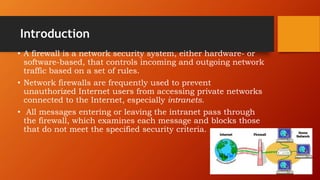
• A firewall is a network security system, either hardware- or
software-based, that controls incoming and outgoing network
traffic based on a set of rules.
• Network firewalls are frequently used to prevent
unauthorized Internet users from accessing private networks
connected to the Internet, especially intranets.
• All messages entering or leaving the intranet pass through
the firewall, which examines each message and blocks those
that do not meet the specified security criteria.
Continued…
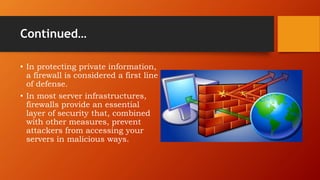
• In protecting private information,
a firewall is considered a first line
of defense.
• In most server infrastructures,
firewalls provide an essential
layer of security that, combined
with other measures, prevent
attackers from accessing your
servers in malicious ways.
History
• Computer security borrowed the term firewall from
firefighting and fire prevention, where a firewall is a barrier
established to prevent the spread of fire.
• Before firewalls emerged in the late 1980s, the only real form
of network security was performed by access control lists
(ACLs) residing on routers.
• Firewall technology emerged in the late 1980s when the
Internet was a fairly new technology in terms of its global use
and connectivity.
Why firewall security..?
• Remote login
• Application backdoors
• SMTP session hijacking
• Operating system bugs
• Denial of service
• Viruses
Types of firewalls
•Hardware firewalls
•Software firewalls
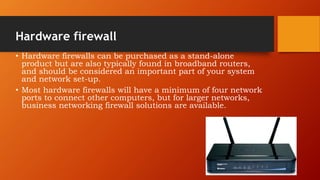
Hardware firewall
• Hardware firewalls can be purchased as a stand-alone
product but are also typically found in broadband routers,
and should be considered an important part of your system
and network set-up.
• Most hardware firewalls will have a minimum of four network
ports to connect other computers, but for larger networks,
business networking firewall solutions are available.
Software firewall
• Software firewalls are installed on your computer (like any
software) and you can customize it; allowing you some
control over its function and protection features. A software
firewall will protect your computer from outside attempts to
control or gain access your computer.
• New generation Operating systems come with built in
firewalls or you can buy a firewall software for the computer
that accesses the internet or acts as the gateway to your
home network.
Firewall logic
• Firewalls use 3 types of filtering mechanisms:
1. Packet filtering
2. Proxy service
3. Stateful inspection
Packet filtering
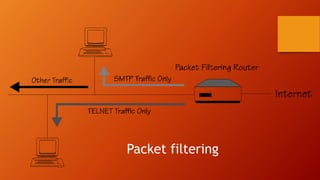
Data flow consists of packets of information and
firewalls analyze these packets to sniff out offensive or
unwanted packets depending on what you have defined
as unwanted packets.
 Looks at each packet entering or leaving the network
and accepts or rejects it based on user-defined rules.
Packet filtering is fairly effective and transparent to
users, but it is difficult to configure.
Packet filtering
Proxy service
A proxy server is a type of gateway that hides the true
network address of the computer(s) connecting through it.
 A proxy server connects to the Internet, makes the requests
for pages, connections to servers, etc., and receives the data
on behalf of the computer(s) behind it.
The firewall capabilities lie in the fact that a proxy can be
configured to allow only certain types of traffic to pass
(e.g.,HTTP files, or web pages).
Proxy firewalls are considered to be the most secure type of
firewall because they prevent direct network contact with
other systems.
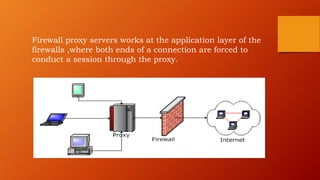
Firewall proxy servers works at the application layer of the
firewalls ,where both ends of a connection are forced to
conduct a session through the proxy.
Stateful inspection
A newer method that doesn't examine the contents of each
packet but instead compares certain key parts of the packet
to a database of trusted information.
Information traveling from inside the firewall to the outside is
monitored for specific defining characteristics, then incoming
information is compared to these characteristics.
 If the comparison yields a reasonable match, the information
is allowed through. Otherwise it is discarded.
How do Firewalls protect Businesses
• Large corporations often have very complex
firewalls in place to protect their extensive
networks.
• On the outbound side, firewalls can be configured
to prevent employees from sending certain types of
emails or transmitting sensitive data outside of the
network.
• On the inbound side, firewalls can be programmed
to prevent access to certain websites (like social
networking sites).
• A company might choose to designate a single
computer on the network for file sharing and all
other computers could be restricted.
The need of Firewalls for Personal Use
• For home use, firewalls work much more simply.
• The main goal of a personal firewall is to protect your
personal computer and private network from malicious
mischief.
• Viruses are often the first type of malware that can be
transmitted to your computer through email or over the
Internet and can quickly cause a lot of damage to your
files. There are two ways a Firewall can prevent this
from happening.
• It can allow all traffic to pass through except data that
meets a predetermined set of criteria, or it can prohibit
all traffic unless it meets a predetermined set of criteria.
Next generation firewalls
• Today, a new generation of users, applications, and
security threats are posing risk to the enterprise
wireless network.
• Traditional firewalls are not strong enough to
provide complete application visibility and control.
• Next Generation Firewalls allow organizations to
achieve network transparency, reduce
vulnerabilities, and conserve network performance.
Next generation firewalls
• A newer class of firewalls, next generation firewall -
NGFW, filters network and Internet traffic based
upon the applications or traffic types using specific
ports.
• Next Generation Firewalls (NGFWs) blend the
features of a standard firewall with quality of service
(QoS) functionalities in order to provide smarter and
deeper inspection.
Benefits of NGFW
• The 3 great benefits offered by next
generation firewall for your enterprise
wireless network are
1. Application Identification
2. Application Control
3. Threat Prevention
Advantages
• Low cost.
• Packet filters make use of current network routers.
• Makes Security Transparent to End-Users.
• Easy to install. High speed
• Packet filters make use of current network routers. Therefore
implementing a packet filter security system is typically less
complicated than other network security solutions.
• Packet filters are generally faster than other firewall
technologies because they perform fewer evaluations.
Disadvantages
• Packet filtering by a software firewall can degrade your system's
performance, because it's a demanding task to examine every
packet of data.
• Whichever option you choose, configuring and maintaining the
firewall can be a difficult
• A network firewall also can lend users a false sense of security,
encouraging them not to maintain security at the machine level. If
the network firewall fails or is not configured properly, this could
prove disastrous.
• Sometimes difficult to remove or un-install a firewall completely.
Conclusion
• Firewalls are a must have for any kind of computer usage
that go online. They protect you from all kinds of abuse &
unauthorised access like trojans that allow taking control of
your computers by remote logins or backdoors, virus or use
your resources to launch DOS attacks.
• Firewalls are worth installing. Be it a basic standalone
system, a home network or a office network, all face varying
levels of risks & Firewalls do a good job in mitigating these
risks. Tune the firewall for your requirements & security
levels and you have one reason less to worry.
Firewalls

Firewalls

  • 1.
  • 2.
    Contents • Introduction • History •Why firewall security • Types of firewalls • Working • Need for firewalls • Next generation firewall • Advantages and disadvantages • Conclusion
  • 3.
    Introduction • A firewallis a network security system, either hardware- or software-based, that controls incoming and outgoing network traffic based on a set of rules. • Network firewalls are frequently used to prevent unauthorized Internet users from accessing private networks connected to the Internet, especially intranets. • All messages entering or leaving the intranet pass through the firewall, which examines each message and blocks those that do not meet the specified security criteria.
  • 4.
    Continued… • In protectingprivate information, a firewall is considered a first line of defense. • In most server infrastructures, firewalls provide an essential layer of security that, combined with other measures, prevent attackers from accessing your servers in malicious ways.
  • 5.
    History • Computer securityborrowed the term firewall from firefighting and fire prevention, where a firewall is a barrier established to prevent the spread of fire. • Before firewalls emerged in the late 1980s, the only real form of network security was performed by access control lists (ACLs) residing on routers. • Firewall technology emerged in the late 1980s when the Internet was a fairly new technology in terms of its global use and connectivity.
  • 6.
    Why firewall security..? •Remote login • Application backdoors • SMTP session hijacking • Operating system bugs • Denial of service • Viruses
  • 7.
    Types of firewalls •Hardwarefirewalls •Software firewalls
  • 8.
    Hardware firewall • Hardwarefirewalls can be purchased as a stand-alone product but are also typically found in broadband routers, and should be considered an important part of your system and network set-up. • Most hardware firewalls will have a minimum of four network ports to connect other computers, but for larger networks, business networking firewall solutions are available.
  • 9.
    Software firewall • Softwarefirewalls are installed on your computer (like any software) and you can customize it; allowing you some control over its function and protection features. A software firewall will protect your computer from outside attempts to control or gain access your computer. • New generation Operating systems come with built in firewalls or you can buy a firewall software for the computer that accesses the internet or acts as the gateway to your home network.
  • 11.
    Firewall logic • Firewallsuse 3 types of filtering mechanisms: 1. Packet filtering 2. Proxy service 3. Stateful inspection
  • 12.
    Packet filtering Data flowconsists of packets of information and firewalls analyze these packets to sniff out offensive or unwanted packets depending on what you have defined as unwanted packets.  Looks at each packet entering or leaving the network and accepts or rejects it based on user-defined rules. Packet filtering is fairly effective and transparent to users, but it is difficult to configure.
  • 13.
  • 14.
    Proxy service A proxyserver is a type of gateway that hides the true network address of the computer(s) connecting through it.  A proxy server connects to the Internet, makes the requests for pages, connections to servers, etc., and receives the data on behalf of the computer(s) behind it. The firewall capabilities lie in the fact that a proxy can be configured to allow only certain types of traffic to pass (e.g.,HTTP files, or web pages). Proxy firewalls are considered to be the most secure type of firewall because they prevent direct network contact with other systems.
  • 15.
    Firewall proxy serversworks at the application layer of the firewalls ,where both ends of a connection are forced to conduct a session through the proxy.
  • 16.
    Stateful inspection A newermethod that doesn't examine the contents of each packet but instead compares certain key parts of the packet to a database of trusted information. Information traveling from inside the firewall to the outside is monitored for specific defining characteristics, then incoming information is compared to these characteristics.  If the comparison yields a reasonable match, the information is allowed through. Otherwise it is discarded.
  • 17.
    How do Firewallsprotect Businesses • Large corporations often have very complex firewalls in place to protect their extensive networks. • On the outbound side, firewalls can be configured to prevent employees from sending certain types of emails or transmitting sensitive data outside of the network. • On the inbound side, firewalls can be programmed to prevent access to certain websites (like social networking sites). • A company might choose to designate a single computer on the network for file sharing and all other computers could be restricted.
  • 18.
    The need ofFirewalls for Personal Use • For home use, firewalls work much more simply. • The main goal of a personal firewall is to protect your personal computer and private network from malicious mischief. • Viruses are often the first type of malware that can be transmitted to your computer through email or over the Internet and can quickly cause a lot of damage to your files. There are two ways a Firewall can prevent this from happening. • It can allow all traffic to pass through except data that meets a predetermined set of criteria, or it can prohibit all traffic unless it meets a predetermined set of criteria.
  • 20.
    Next generation firewalls •Today, a new generation of users, applications, and security threats are posing risk to the enterprise wireless network. • Traditional firewalls are not strong enough to provide complete application visibility and control. • Next Generation Firewalls allow organizations to achieve network transparency, reduce vulnerabilities, and conserve network performance.
  • 21.
    Next generation firewalls •A newer class of firewalls, next generation firewall - NGFW, filters network and Internet traffic based upon the applications or traffic types using specific ports. • Next Generation Firewalls (NGFWs) blend the features of a standard firewall with quality of service (QoS) functionalities in order to provide smarter and deeper inspection.
  • 22.
    Benefits of NGFW •The 3 great benefits offered by next generation firewall for your enterprise wireless network are 1. Application Identification 2. Application Control 3. Threat Prevention
  • 23.
    Advantages • Low cost. •Packet filters make use of current network routers. • Makes Security Transparent to End-Users. • Easy to install. High speed • Packet filters make use of current network routers. Therefore implementing a packet filter security system is typically less complicated than other network security solutions. • Packet filters are generally faster than other firewall technologies because they perform fewer evaluations.
  • 24.
    Disadvantages • Packet filteringby a software firewall can degrade your system's performance, because it's a demanding task to examine every packet of data. • Whichever option you choose, configuring and maintaining the firewall can be a difficult • A network firewall also can lend users a false sense of security, encouraging them not to maintain security at the machine level. If the network firewall fails or is not configured properly, this could prove disastrous. • Sometimes difficult to remove or un-install a firewall completely.
  • 26.
    Conclusion • Firewalls area must have for any kind of computer usage that go online. They protect you from all kinds of abuse & unauthorised access like trojans that allow taking control of your computers by remote logins or backdoors, virus or use your resources to launch DOS attacks. • Firewalls are worth installing. Be it a basic standalone system, a home network or a office network, all face varying levels of risks & Firewalls do a good job in mitigating these risks. Tune the firewall for your requirements & security levels and you have one reason less to worry.