CNIT 125:
Information Security
Professional
(CISSP
Preparation)
Ch 5. Communication and
Network Security (Part 1)
Network Architecture and Design
Fundamental Network Concepts
• Simplex
• One-way communication, like an FM
radio
• Half Duplex
• Sends or receives, but not both at
once, like a walkie-talkie
• Full Duplex
• Sends & receives simultaneously, like a
telephone
Fundamental Network Concepts
• Baseband
• Whole frequency range dedicated to
one signal, like Ethernet
• Broadband
• Multiple channels, each gets only a
portion of the bandwidth
• Like broadcast FM radio
Fundamental Network Concepts
• Analog
• Continuous variations of signal
• Signal degrades over distance and when
repeated
• Like a vinyl record
• Digital
• Signal is a series of zeroes and ones
• Can be transmitted and repeated with no
loss of accuracy
• Like a CD
Fundamental Network Concepts
• LAN (Local Area Network)
• Within a building
• MAN (Metropolitan Area Network)
• Within a city
• WAN (Wide Area Network)
• Covering cities, states, or countries
• GAN (Global Area Network)
• A global collection of WANs
• PAN (Personal Area Network)
• Devices you carry, often using Bluetooth
Fundamental Network Concepts
• Internet
• Global collection of networks running
TCP/IP
• Intranet
• Privately owned network using TCP/IP
• Extranet
• Connects private Intranets
• Such as connections to business
partners
Fundamental Network Concepts
• Circuit-Switched Network
• Dedicated circuit or channel for one
connection
• Ex: a T1 line between businesses
• Packet-Switched Network
• Multiple signals share the same lines
• Data is broken into packets
• Less wasteful and therefore cheaper
than circuit switching
Fundamental Network Concepts
• Quality of Service
• Can give specific traffic precedence
over other traffic
• On a packet-switched network
• Ex: VoIP packets get precedence over
email packets
Fundamental Network Concepts
• Layered Design
• OSI and TCP/IP models use layers
• Each layer performs a specific function
• Changes in one layer do not directly
affect another layer
Fundamental Network Concepts
• Network Model
• A description of how a network
protocol suite operates
• Ex: OSI model, TCP/IP model
• Network Stack
• A network protocol suite programmed
in software or hardware
• Ex: TCP/IP
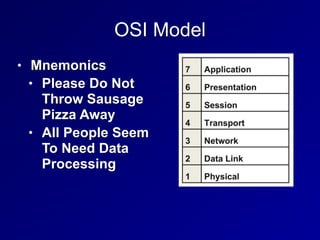
OSI Model
• Mnemonics
• Please Do Not
Throw Sausage
Pizza Away
• All People Seem
To Need Data
Processing
Layer 1: Physical
• Protocol Data Unit: bit
• Physical media that carry signals
• Ethernet cables
• Radio waves
• Fiber optic cables
• Devices
• Hubs
• Repeaters
• Cables
Layer 2: Data Link
• Protocol Data Unit: frame
• Uses MAC addresses (for Ethernet)
• Devices
• Ethernet card
• Switch
• Bridge
Layer 2: Data Link
• Two sub-layers
• Media Access Control
• Connects to layer 1
• Logical Link Control
• Connects to layer 3
Layer 3: Network
• Protocol Data Unit: packet
• Performs routing, using IP addresses
• Uses IPv4 and/or IPv6
• Device: Router
Layer 4: Transport
• Protocol Data Unit: Segment
• Protocols include UDP and TCP
• Uses Port Numbers
• TCP is reliable, orders segments, and re-
sends undelivered segments
Layer 5: Session
• Network file shares are mounted at the
session layer
• For example, you must log in first
• Connections between applications
Layer 6: Presentation
• Presents data to the application layer in a
comprehensible way
• Data conversion
• Character encoding such as ASCII
• Image formats like GIF and JPEG
• Encryption
• Compression
Layer 7: Application
• Numen-Readable data
• Web browser, word processor, IM client
• Protocols:
• Telnet
• FTP
• HTTP
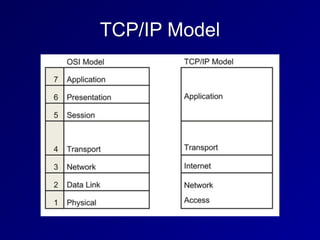
TCP/IP Model
Network Access Layer
• Combines OSI layers 1 and 2
• Includes cable and NIC
• Uses MAC addresses
Internet Layer
• OSI Layer 3
• IP addresses and routing
• Uses IPv4 or IPv6
Transport Layer
• Matches OSI layer 4
• Contains TCP and UDP
Application Layer
• Combines OSI layers 5-7
• Presents network data to the human user
• Like a Web browser
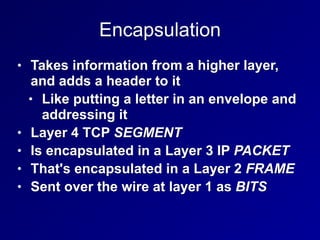
Encapsulation
• Takes information from a higher layer,
and adds a header to it
• Like putting a letter in an envelope and
addressing it
• Layer 4 TCP SEGMENT
• Is encapsulated in a Layer 3 IP PACKET
• That's encapsulated in a Layer 2 FRAME
• Sent over the wire at layer 1 as BITS
SPF10
• Segment
• Packet
• Frame
• One and Zero (Bits)
Decapsulation
• Also called de-multiplexing
• Happens at receiving end
• The addresses are stripped off the data
packets, and the data is delivered to higher
levels
• BITS are converted to FRAMES
• FRAMES are converted to PACKETS
• PACKETS are converted to SEGMENTS
• SEGMENTS are converted to application data
Network Access, Internet and Transport
Layer Protocols and Concepts
MAC Addresses
• Media Access Control address
• Unique hardware address of an Ethernet
NIC
• Burned in at the factory
• 48 bits long
• First 24 bits form Organizationally
Unique Identifier
• EUI-64 addresses are 64 bits long
• Used in IPv6
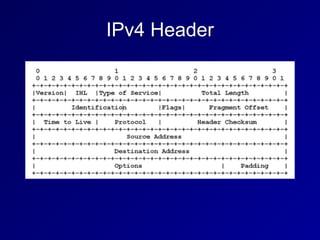
IPv4
• Internet Protocol version 4
• 32-bit addresses
• Written as four bytes in decimal
• 192.168.0.1
IPv4 Header
IPv4 Fragmentation
• An intermediate router can fragment a
packet into smaller packets
• To move it onto a network with a
smaller maximum transmission unit
• "Path MTU Discovery"
• Send a large packet with the DF (Don't
Fragment) bit set
• If it's dropped, try a lower packet size
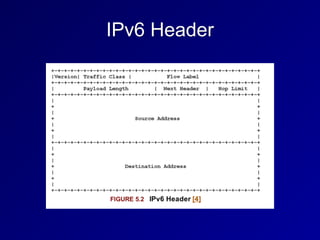
IPv6 Header
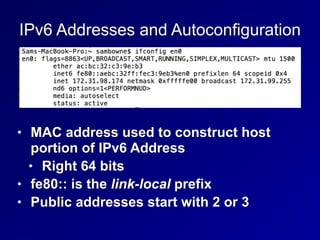
IPv6 Addresses and Autoconfiguration
• MAC address used to construct host
portion of IPv6 Address
• Right 64 bits
• fe80:: is the link-local prefix
• Public addresses start with 2 or 3
IPv6 Security Challenges
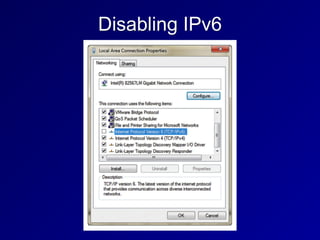
• Many networks have IPv6 enabled, but
the administrators don't understand how
to manage it
• It can be used for forbidden activity, such
as BitTorrent over IPv6
Disabling IPv6
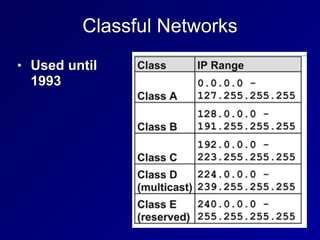
Classful Networks
• Used until
1993
Classless Inter-Domain Routing (CIDR)
• Allows network sizes between the
classes
• Class A is /8 16 million hosts
• Class B is /16 65,536 - 2 hosts
• Class C is /24 256 - 2 hosts
• 147.144.96.0/20
• 16 class Cs 2048 - 2 hosts
Private IPv4 Addresses
• Defined in RFC 1918
• 10.0.0.0 - 10.255.255.255 (10.0.0.0/8)
• 172.16.0.0 - 172.31.255.255 (172.16.0.0/12)
• 192.168.0.0 - 192.168.255.255
(192.168.0.0/16)
Network Address Translation (NAT)
• Usually used with Port Address Translation (PAT)
• So many clients can share a single public
address
• Other techniques (rarely used)
• Static NAT
• One private address to one public address
• Pool NAT
• A group of public addresses translated one-
by-one to the same number of local
addresses
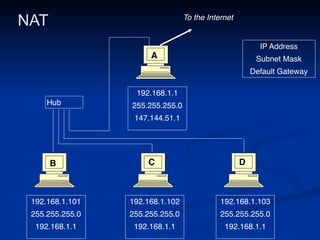
NAT
192.168.1.101
255.255.255.0
192.168.1.1
192.168.1.102
255.255.255.0
192.168.1.1
192.168.1.103
255.255.255.0
192.168.1.1
192.168.1.1
255.255.255.0
147.144.51.1
IP Address
Subnet Mask
Default Gateway
Hub
To the Internet
A
B C D
ARP (Address Resolution Protocol)
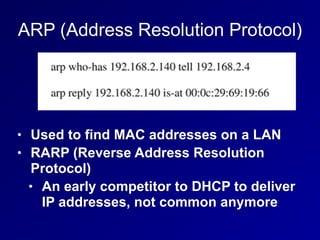
• Used to find MAC addresses on a LAN
• RARP (Reverse Address Resolution
Protocol)
• An early competitor to DHCP to deliver
IP addresses, not common anymore
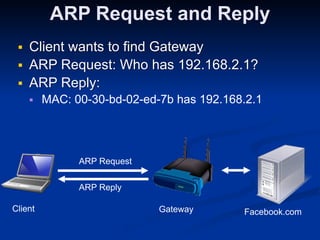
ARP Request and Reply
■ Client wants to find Gateway
■ ARP Request: Who has 192.168.2.1?
■ ARP Reply:
■ MAC: 00-30-bd-02-ed-7b has 192.168.2.1
Client
 Gateway
 Facebook.com
ARP Request
ARP Reply
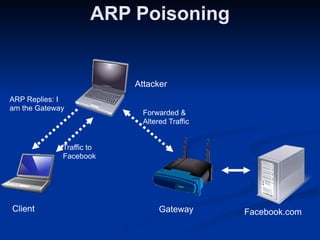
ARP Poisoning
Client
 Gateway
 Facebook.com
Attacker

ARP Replies: I
am the Gateway
Traffic to
Facebook
Forwarded &
Altered Traffic
Unicast and Multicast Traffic
• Unicast: One sender to one receiver
• Most common
• Multicast: One sender to several
receivers
• Rare, used by routing protocols
Broadcast Traffic
• One sender to every device on the LAN
• Limited broadcast: 255.255.255.255
• Actually sends layer 2 broadcast, to
MAC address FF:FF:FF:FF:FF:FF
• Directed broadcast: 147.144.255.255
• Was once sent over the Internet
• Blocked now to stop smurf attacks
Promiscuous Network Access
• A NIC in promiscuous mode passes all
frames upward for use
• Even if they are for a different MAC
• Required for Network Intrusion Detection
Systems (NIDS)
• Entering promiscuous mode requires root
privileges
• Switches isolate traffic segments
• So traffic won't be sent to the wrong MAC
address
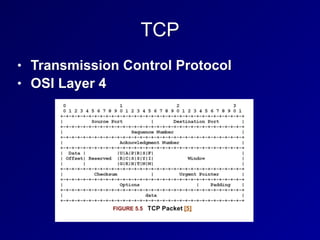
TCP
• Transmission Control Protocol
• OSI Layer 4
TCP Ports
• 0-1023: Well-known ports
• Require root privileges to listen on
• Also called "reserved ports"
• 1024 - 65535
• Ephemeral ports
• Any user can listen on them
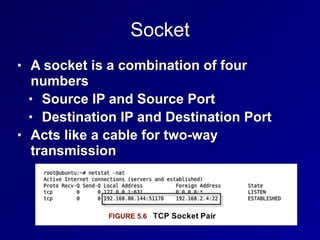
Socket
• A socket is a combination of four
numbers
• Source IP and Source Port
• Destination IP and Destination Port
• Acts like a cable for two-way
transmission
State
• LISTEN
• Waiting for a SYN
• ESTABLISHED
• Handshake complete
TCP Flags
• URG: Urgent
• ACK: Acknowledge
• PSH: Push
• RST: Reset &
• SYN: Synchronize
• FIN: Finish
• Three new flags added in 2001 & 2003
• CWR: Congestion Window Reduced
• ECE: Explicit Congestion Notification Echo
• NS: Nonce Sum
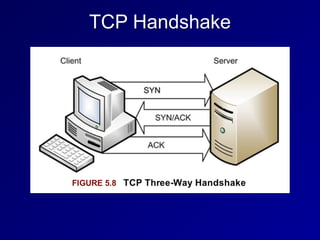
TCP Handshake
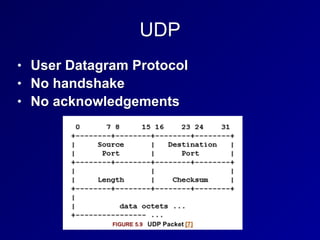
UDP
• User Datagram Protocol
• No handshake
• No acknowledgements
ICMP
• Internet Control Message Protocol
• Used to troubleshoot and report error
conditions
• PING
• Sends an ICMP Echo Request
• Gets an ICMP Echo Reply
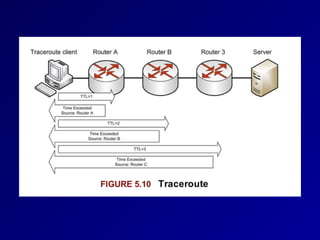
• Traceroute
• Sends packets with low TTL
• Tracks ICMP Time Exceeded replies
Traceroute
• Unix and Cisco send UDP packets
• Microsoft sends ICMP packets
Application Layer TCP/IP Protocols and
Concepts
• Telnet
• Terminal emulation
• Sends command-lines
• No encryption
• SSH (Secure Shell)
• Encrypted replacement for Telnet
Application Layer TCP/IP Protocols and
Concepts
• FTP (File Transfer Protocol)
• Sends passwords unencrypted
• Uses ports 20 and 21 on the server
• Problems for firewalls (link Ch 5b)
• Active FTP initiates the port 20
connection from the server, not the
client
• Passive FTP uses an arbitrary
ephemeral port on the server
Application Layer TCP/IP Protocols and
Concepts
• TFTP (Trivial File Transfer Protocol)
• Uses UDP port 69
• No authentication at all
• No encryption
• Used to update firmware in routers and
IP phones
Application Layer TCP/IP Protocols and
Concepts
• SSH (Secure Shell)
• Secure replacement for Telnet
• And FTP and the unix "r" commands
• rlogin, rshell, etc.
• Includes SFTP and SCP
• Can be used as a secure tunnel for other
protocols, such as HTTP
• Uses TCP port 22
• SSHv1 is old and vulnerable, SSHv2 is the
current standard
Application Layer TCP/IP Protocols and
Concepts
• SMTP (Simple Mail Transfer Protocol)
• Uses TCP port 25
• Used to send email between servers
• POP (Post Office Protocol)
• TCP port 110
• Used to download email to a local client like
Eudora or Outlook
• IMAP (Internet Message Access Protocol)
• TCP port 132
• Used to download email to a local client like
Eudora or Outlook
Application Layer TCP/IP Protocols and
Concepts
• DNS (Domain Name System)
• Uses UDP and TCP 53
• Large responses require TCP 53
• Zone transfers
• DNSSEC-signed records
• Resolves domain names like ccsf.edu
to IP addresses
Application Layer TCP/IP Protocols and
Concepts
• DNS Server Types
• SOA (Start of Authority)
• Contains the master record for a zone
• Recursive server
• If it doesn't have the requested data,
it will ask other servers
• Caching server
• Stores recently resolved names
Application Layer TCP/IP Protocols and
Concepts
• DNS Weaknesses
• Uses UDP
• No authentication
• Security relies on a 16-bit source port
and a 16-bit DNS query ID
• If attackers can guess both numbers,
they can poison a DNS sever cache
Application Layer TCP/IP Protocols and
Concepts
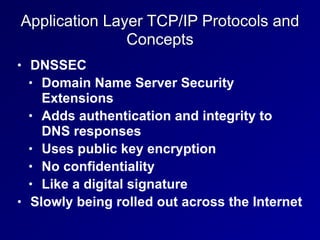
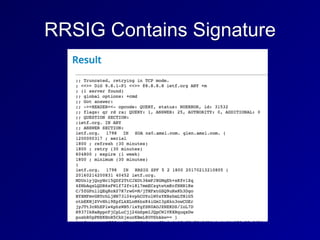
• DNSSEC
• Domain Name Server Security
Extensions
• Adds authentication and integrity to
DNS responses
• Uses public key encryption
• No confidentiality
• Like a digital signature
• Slowly being rolled out across the Internet
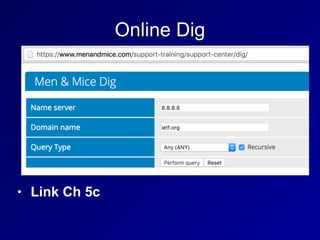
Online Dig
• Link Ch 5c
RRSIG Contains Signature
Application Layer TCP/IP Protocols and
Concepts
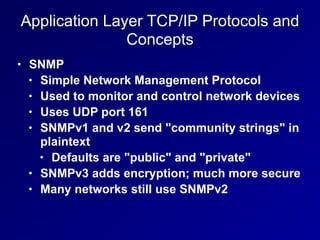
• SNMP
• Simple Network Management Protocol
• Used to monitor and control network devices
• Uses UDP port 161
• SNMPv1 and v2 send "community strings" in
plaintext
• Defaults are "public" and "private"
• SNMPv3 adds encryption; much more secure
• Many networks still use SNMPv2
Application Layer TCP/IP Protocols and
Concepts
• HTTP
• Hypertext Transfer Protocol
• TCP port 80
• No encryption
• HTTPS
• Hypertext Transfer Protocol Secure
• TCP port 443
• Encrypted with SSL/TLS
Application Layer TCP/IP Protocols and
Concepts
• BOOTP
• Bootstrap protocol
• Enables a BIOS to boot from the
network
• BIOS gets an IP address from BOOTP
• Then uses TFTP to load the OS
• Uses ports UDP 67 for servers and UDP
68 for clients
Application Layer TCP/IP Protocols and
Concepts
• DHCP
• Intended to replace BOOTP
• Can deliver IP address, DNS server,
default gateway, and more
• Uses ports UDP 67 for servers and UDP
68 for clients

CISSP Prep: Ch 5. Communication and Network Security (Part 1)

  • 1.
    CNIT 125: Information Security Professional (CISSP Preparation) Ch5. Communication and Network Security (Part 1)
  • 2.
  • 3.
    Fundamental Network Concepts •Simplex • One-way communication, like an FM radio • Half Duplex • Sends or receives, but not both at once, like a walkie-talkie • Full Duplex • Sends & receives simultaneously, like a telephone
  • 4.
    Fundamental Network Concepts •Baseband • Whole frequency range dedicated to one signal, like Ethernet • Broadband • Multiple channels, each gets only a portion of the bandwidth • Like broadcast FM radio
  • 5.
    Fundamental Network Concepts •Analog • Continuous variations of signal • Signal degrades over distance and when repeated • Like a vinyl record • Digital • Signal is a series of zeroes and ones • Can be transmitted and repeated with no loss of accuracy • Like a CD
  • 6.
    Fundamental Network Concepts •LAN (Local Area Network) • Within a building • MAN (Metropolitan Area Network) • Within a city • WAN (Wide Area Network) • Covering cities, states, or countries • GAN (Global Area Network) • A global collection of WANs • PAN (Personal Area Network) • Devices you carry, often using Bluetooth
  • 7.
    Fundamental Network Concepts •Internet • Global collection of networks running TCP/IP • Intranet • Privately owned network using TCP/IP • Extranet • Connects private Intranets • Such as connections to business partners
  • 8.
    Fundamental Network Concepts •Circuit-Switched Network • Dedicated circuit or channel for one connection • Ex: a T1 line between businesses • Packet-Switched Network • Multiple signals share the same lines • Data is broken into packets • Less wasteful and therefore cheaper than circuit switching
  • 9.
    Fundamental Network Concepts •Quality of Service • Can give specific traffic precedence over other traffic • On a packet-switched network • Ex: VoIP packets get precedence over email packets
  • 10.
    Fundamental Network Concepts •Layered Design • OSI and TCP/IP models use layers • Each layer performs a specific function • Changes in one layer do not directly affect another layer
  • 11.
    Fundamental Network Concepts •Network Model • A description of how a network protocol suite operates • Ex: OSI model, TCP/IP model • Network Stack • A network protocol suite programmed in software or hardware • Ex: TCP/IP
  • 12.
    OSI Model • Mnemonics •Please Do Not Throw Sausage Pizza Away • All People Seem To Need Data Processing
  • 13.
    Layer 1: Physical •Protocol Data Unit: bit • Physical media that carry signals • Ethernet cables • Radio waves • Fiber optic cables • Devices • Hubs • Repeaters • Cables
  • 14.
    Layer 2: DataLink • Protocol Data Unit: frame • Uses MAC addresses (for Ethernet) • Devices • Ethernet card • Switch • Bridge
  • 15.
    Layer 2: DataLink • Two sub-layers • Media Access Control • Connects to layer 1 • Logical Link Control • Connects to layer 3
  • 16.
    Layer 3: Network •Protocol Data Unit: packet • Performs routing, using IP addresses • Uses IPv4 and/or IPv6 • Device: Router
  • 17.
    Layer 4: Transport •Protocol Data Unit: Segment • Protocols include UDP and TCP • Uses Port Numbers • TCP is reliable, orders segments, and re- sends undelivered segments
  • 18.
    Layer 5: Session •Network file shares are mounted at the session layer • For example, you must log in first • Connections between applications
  • 19.
    Layer 6: Presentation •Presents data to the application layer in a comprehensible way • Data conversion • Character encoding such as ASCII • Image formats like GIF and JPEG • Encryption • Compression
  • 20.
    Layer 7: Application •Numen-Readable data • Web browser, word processor, IM client • Protocols: • Telnet • FTP • HTTP
  • 21.
  • 22.
    Network Access Layer •Combines OSI layers 1 and 2 • Includes cable and NIC • Uses MAC addresses
  • 23.
    Internet Layer • OSILayer 3 • IP addresses and routing • Uses IPv4 or IPv6
  • 24.
    Transport Layer • MatchesOSI layer 4 • Contains TCP and UDP
  • 25.
    Application Layer • CombinesOSI layers 5-7 • Presents network data to the human user • Like a Web browser
  • 26.
    Encapsulation • Takes informationfrom a higher layer, and adds a header to it • Like putting a letter in an envelope and addressing it • Layer 4 TCP SEGMENT • Is encapsulated in a Layer 3 IP PACKET • That's encapsulated in a Layer 2 FRAME • Sent over the wire at layer 1 as BITS
  • 27.
    SPF10 • Segment • Packet •Frame • One and Zero (Bits)
  • 28.
    Decapsulation • Also calledde-multiplexing • Happens at receiving end • The addresses are stripped off the data packets, and the data is delivered to higher levels • BITS are converted to FRAMES • FRAMES are converted to PACKETS • PACKETS are converted to SEGMENTS • SEGMENTS are converted to application data
  • 29.
    Network Access, Internetand Transport Layer Protocols and Concepts
  • 30.
    MAC Addresses • MediaAccess Control address • Unique hardware address of an Ethernet NIC • Burned in at the factory • 48 bits long • First 24 bits form Organizationally Unique Identifier • EUI-64 addresses are 64 bits long • Used in IPv6
  • 31.
    IPv4 • Internet Protocolversion 4 • 32-bit addresses • Written as four bytes in decimal • 192.168.0.1
  • 32.
  • 33.
    IPv4 Fragmentation • Anintermediate router can fragment a packet into smaller packets • To move it onto a network with a smaller maximum transmission unit • "Path MTU Discovery" • Send a large packet with the DF (Don't Fragment) bit set • If it's dropped, try a lower packet size
  • 34.
  • 35.
    IPv6 Addresses andAutoconfiguration • MAC address used to construct host portion of IPv6 Address • Right 64 bits • fe80:: is the link-local prefix • Public addresses start with 2 or 3
  • 36.
    IPv6 Security Challenges •Many networks have IPv6 enabled, but the administrators don't understand how to manage it • It can be used for forbidden activity, such as BitTorrent over IPv6
  • 37.
  • 38.
  • 39.
    Classless Inter-Domain Routing(CIDR) • Allows network sizes between the classes • Class A is /8 16 million hosts • Class B is /16 65,536 - 2 hosts • Class C is /24 256 - 2 hosts • 147.144.96.0/20 • 16 class Cs 2048 - 2 hosts
  • 40.
    Private IPv4 Addresses •Defined in RFC 1918 • 10.0.0.0 - 10.255.255.255 (10.0.0.0/8) • 172.16.0.0 - 172.31.255.255 (172.16.0.0/12) • 192.168.0.0 - 192.168.255.255 (192.168.0.0/16)
  • 41.
    Network Address Translation(NAT) • Usually used with Port Address Translation (PAT) • So many clients can share a single public address • Other techniques (rarely used) • Static NAT • One private address to one public address • Pool NAT • A group of public addresses translated one- by-one to the same number of local addresses
  • 42.
  • 43.
    ARP (Address ResolutionProtocol) • Used to find MAC addresses on a LAN • RARP (Reverse Address Resolution Protocol) • An early competitor to DHCP to deliver IP addresses, not common anymore
  • 44.
    ARP Request andReply ■ Client wants to find Gateway ■ ARP Request: Who has 192.168.2.1? ■ ARP Reply: ■ MAC: 00-30-bd-02-ed-7b has 192.168.2.1 Client
 Gateway
 Facebook.com ARP Request ARP Reply
  • 45.
    ARP Poisoning Client
 Gateway
Facebook.com Attacker
 ARP Replies: I am the Gateway Traffic to Facebook Forwarded & Altered Traffic
  • 46.
    Unicast and MulticastTraffic • Unicast: One sender to one receiver • Most common • Multicast: One sender to several receivers • Rare, used by routing protocols
  • 47.
    Broadcast Traffic • Onesender to every device on the LAN • Limited broadcast: 255.255.255.255 • Actually sends layer 2 broadcast, to MAC address FF:FF:FF:FF:FF:FF • Directed broadcast: 147.144.255.255 • Was once sent over the Internet • Blocked now to stop smurf attacks
  • 48.
    Promiscuous Network Access •A NIC in promiscuous mode passes all frames upward for use • Even if they are for a different MAC • Required for Network Intrusion Detection Systems (NIDS) • Entering promiscuous mode requires root privileges • Switches isolate traffic segments • So traffic won't be sent to the wrong MAC address
  • 49.
    TCP • Transmission ControlProtocol • OSI Layer 4
  • 50.
    TCP Ports • 0-1023:Well-known ports • Require root privileges to listen on • Also called "reserved ports" • 1024 - 65535 • Ephemeral ports • Any user can listen on them
  • 51.
    Socket • A socketis a combination of four numbers • Source IP and Source Port • Destination IP and Destination Port • Acts like a cable for two-way transmission
  • 52.
    State • LISTEN • Waitingfor a SYN • ESTABLISHED • Handshake complete
  • 53.
    TCP Flags • URG:Urgent • ACK: Acknowledge • PSH: Push • RST: Reset & • SYN: Synchronize • FIN: Finish • Three new flags added in 2001 & 2003 • CWR: Congestion Window Reduced • ECE: Explicit Congestion Notification Echo • NS: Nonce Sum
  • 54.
  • 55.
    UDP • User DatagramProtocol • No handshake • No acknowledgements
  • 56.
    ICMP • Internet ControlMessage Protocol • Used to troubleshoot and report error conditions • PING • Sends an ICMP Echo Request • Gets an ICMP Echo Reply • Traceroute • Sends packets with low TTL • Tracks ICMP Time Exceeded replies
  • 58.
    Traceroute • Unix andCisco send UDP packets • Microsoft sends ICMP packets
  • 59.
    Application Layer TCP/IPProtocols and Concepts • Telnet • Terminal emulation • Sends command-lines • No encryption • SSH (Secure Shell) • Encrypted replacement for Telnet
  • 60.
    Application Layer TCP/IPProtocols and Concepts • FTP (File Transfer Protocol) • Sends passwords unencrypted • Uses ports 20 and 21 on the server • Problems for firewalls (link Ch 5b) • Active FTP initiates the port 20 connection from the server, not the client • Passive FTP uses an arbitrary ephemeral port on the server
  • 61.
    Application Layer TCP/IPProtocols and Concepts • TFTP (Trivial File Transfer Protocol) • Uses UDP port 69 • No authentication at all • No encryption • Used to update firmware in routers and IP phones
  • 62.
    Application Layer TCP/IPProtocols and Concepts • SSH (Secure Shell) • Secure replacement for Telnet • And FTP and the unix "r" commands • rlogin, rshell, etc. • Includes SFTP and SCP • Can be used as a secure tunnel for other protocols, such as HTTP • Uses TCP port 22 • SSHv1 is old and vulnerable, SSHv2 is the current standard
  • 63.
    Application Layer TCP/IPProtocols and Concepts • SMTP (Simple Mail Transfer Protocol) • Uses TCP port 25 • Used to send email between servers • POP (Post Office Protocol) • TCP port 110 • Used to download email to a local client like Eudora or Outlook • IMAP (Internet Message Access Protocol) • TCP port 132 • Used to download email to a local client like Eudora or Outlook
  • 64.
    Application Layer TCP/IPProtocols and Concepts • DNS (Domain Name System) • Uses UDP and TCP 53 • Large responses require TCP 53 • Zone transfers • DNSSEC-signed records • Resolves domain names like ccsf.edu to IP addresses
  • 65.
    Application Layer TCP/IPProtocols and Concepts • DNS Server Types • SOA (Start of Authority) • Contains the master record for a zone • Recursive server • If it doesn't have the requested data, it will ask other servers • Caching server • Stores recently resolved names
  • 66.
    Application Layer TCP/IPProtocols and Concepts • DNS Weaknesses • Uses UDP • No authentication • Security relies on a 16-bit source port and a 16-bit DNS query ID • If attackers can guess both numbers, they can poison a DNS sever cache
  • 67.
    Application Layer TCP/IPProtocols and Concepts • DNSSEC • Domain Name Server Security Extensions • Adds authentication and integrity to DNS responses • Uses public key encryption • No confidentiality • Like a digital signature • Slowly being rolled out across the Internet
  • 68.
  • 69.
  • 70.
    Application Layer TCP/IPProtocols and Concepts • SNMP • Simple Network Management Protocol • Used to monitor and control network devices • Uses UDP port 161 • SNMPv1 and v2 send "community strings" in plaintext • Defaults are "public" and "private" • SNMPv3 adds encryption; much more secure • Many networks still use SNMPv2
  • 71.
    Application Layer TCP/IPProtocols and Concepts • HTTP • Hypertext Transfer Protocol • TCP port 80 • No encryption • HTTPS • Hypertext Transfer Protocol Secure • TCP port 443 • Encrypted with SSL/TLS
  • 72.
    Application Layer TCP/IPProtocols and Concepts • BOOTP • Bootstrap protocol • Enables a BIOS to boot from the network • BIOS gets an IP address from BOOTP • Then uses TFTP to load the OS • Uses ports UDP 67 for servers and UDP 68 for clients
  • 73.
    Application Layer TCP/IPProtocols and Concepts • DHCP • Intended to replace BOOTP • Can deliver IP address, DNS server, default gateway, and more • Uses ports UDP 67 for servers and UDP 68 for clients