Networking Basics For  :  Level 1  –  Networks and Computer Science Diploma Deanship of Community Services and Continuous Education - Imam University Based on :  Cisco Networking Academy  –  Exploration 1 Instructor :  Mahmoud Rabie
Grading 15 for  Attendance and Participation 35 for the  Take-Home Open-Book Exam 50 for the  Final Exam
Topics Introduction to Networking Networking Fundamentals Networking Media Communicating over the Network Application Layer Functionality and Protocols Ethernet and Link Layer Addressing
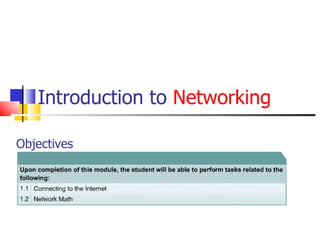
Introduction to  Networking Objectives
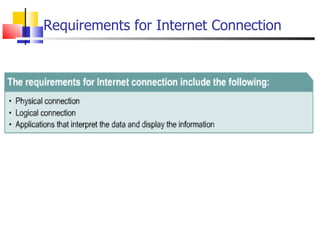
Requirements for Internet Connection
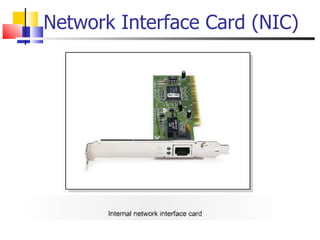
Network Interface Card (NIC)
TCP/IP Description and Configuration
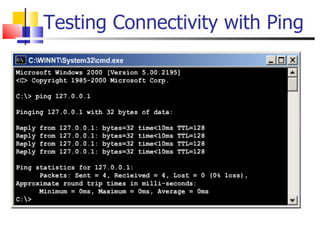
Testing Connectivity with Ping
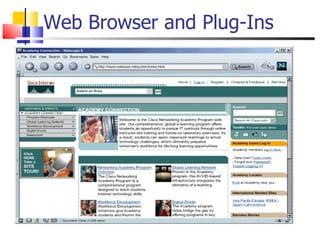
Web Browser and Plug-Ins
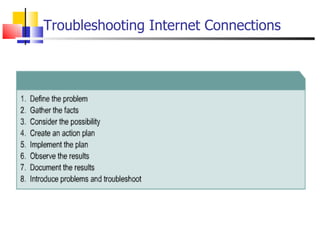
Troubleshooting Internet Connections
Network Math ISA will be covered well, by Dr. Baha
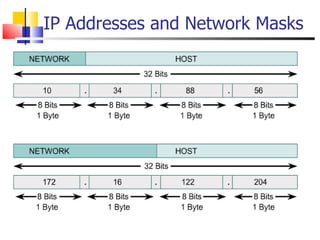
IP Addresses and Network Masks
Networking Fundamentals Objectives
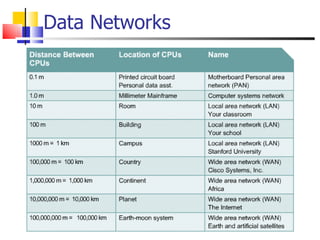
Data Networks
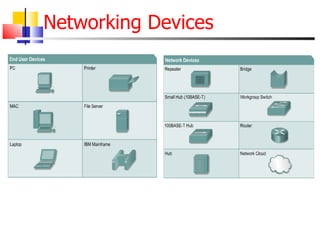
Networking Devices
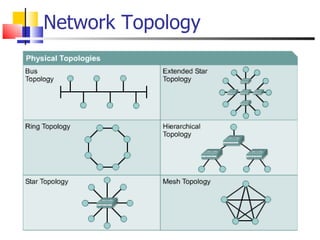
Network Topology
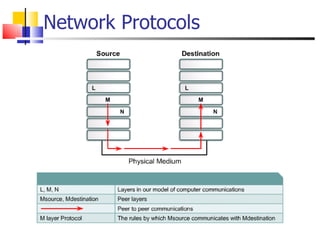
Network Protocols
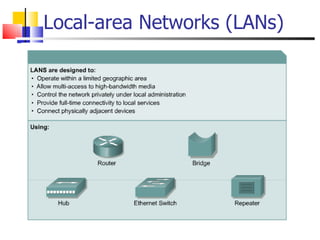
Local-area Networks (LANs)
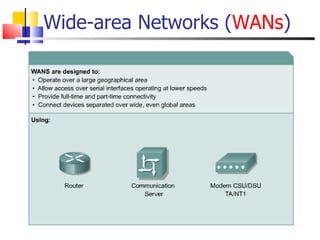
Wide-area Networks ( WANs )
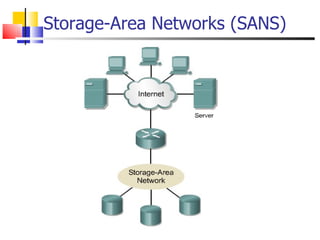
Storage - Area Networks (SANS)
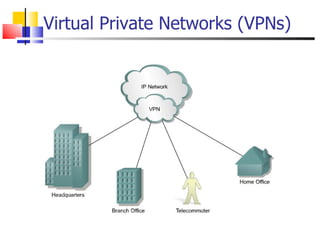
Virtual Private Networks (VPN s )
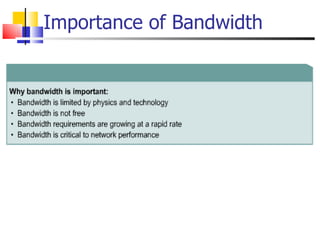
Importance of Bandwidth
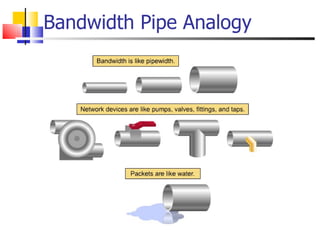
Bandwidth Pipe Analogy
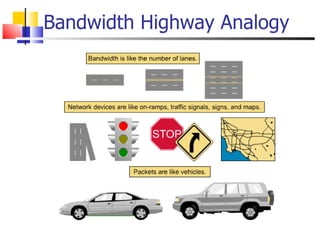
Bandwidth Highway Analogy
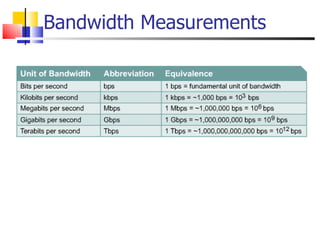
Bandwidth Measurements
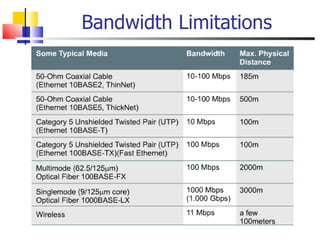
  Bandwidth Limitations
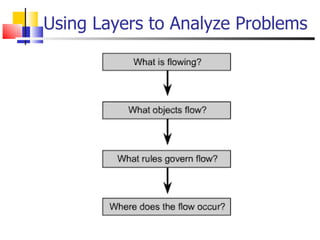
Using Layers to Analyze Problems
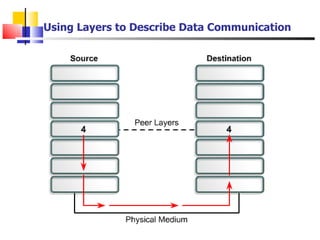
Using Layers to Describe Data Communication
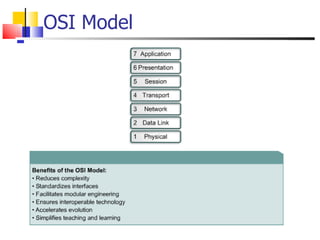
OSI Model
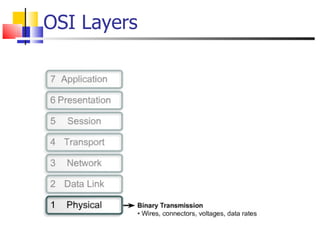
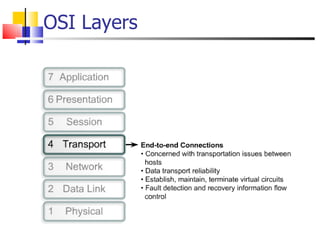
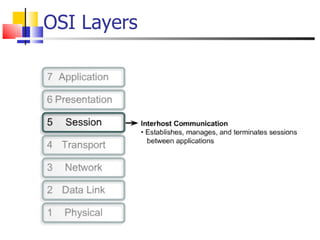
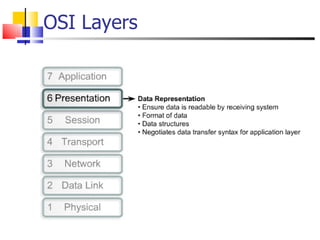
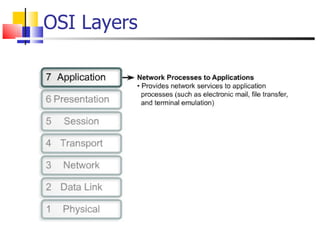
OSI Layers
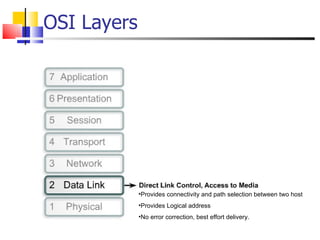
OSI Layers Provides connectivity and path selection between two host Provides Logical address No error correction, best effort delivery.
OSI Layers
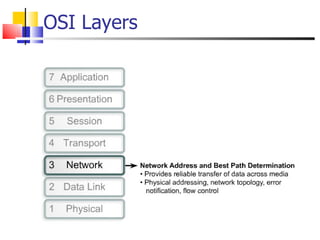
OSI Layers
OSI Layers
OSI Layers
OSI Layers
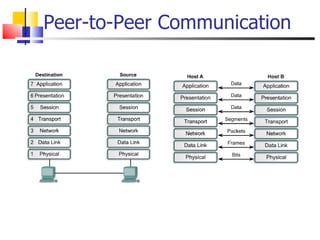
Peer-to-Peer Communication
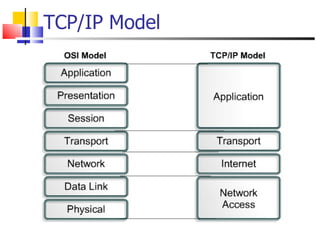
TCP/IP Model
Networking Media Objectives
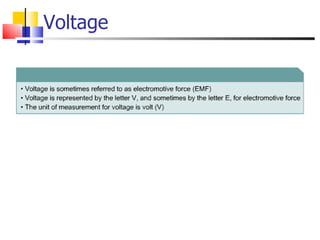
Voltage
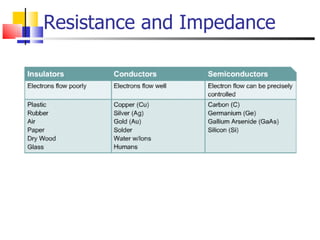
Resistance and Impedance
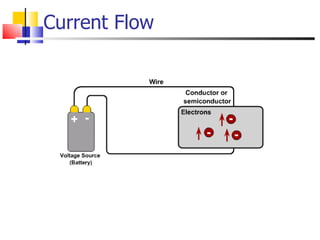
Current Flow
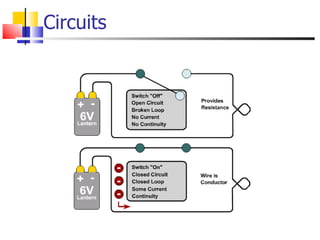
Circuits
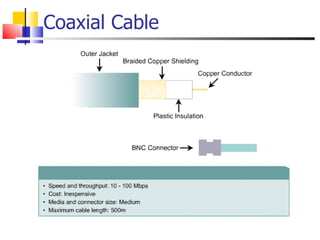
Coaxial Cable
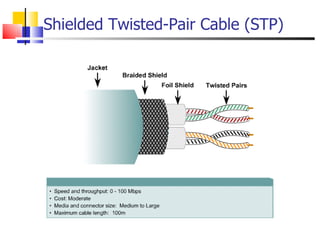
Shielded Twisted-Pair Cable (STP)
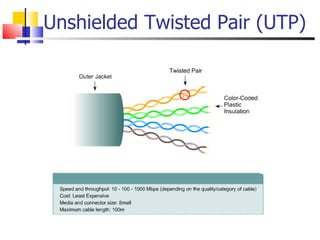
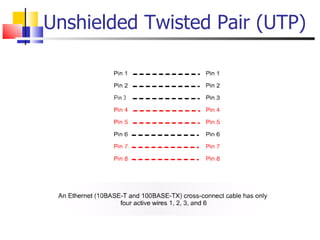
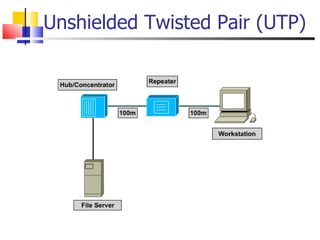
Unshielded Twisted Pair (UTP)
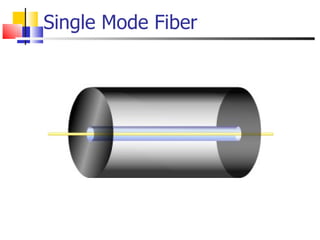
Single Mode Fiber
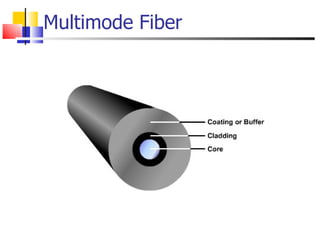
Multimode Fiber
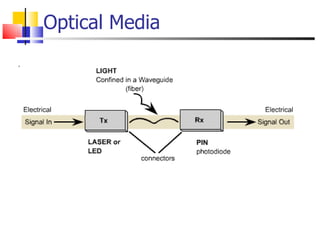
Optical Media
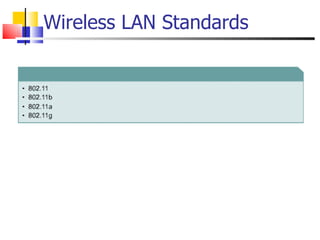
Wireless LAN Standards
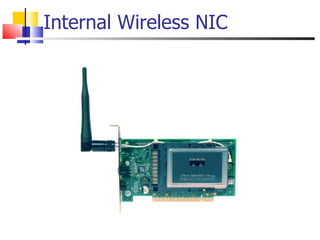
Internal Wireless NIC
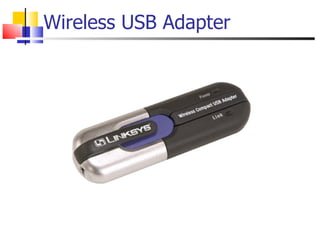
Wireless USB Adapter
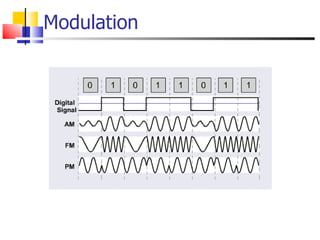
Modulation
Communicating over the Network
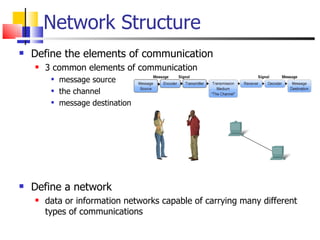
Network Structure Define the elements of communication 3 common elements of communication message source the channel message destination Define a network data or information networks capable of carrying many different types of communications
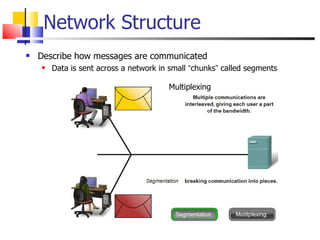
Network Structure Describe how messages are communicated Data is sent across a network in small  “ chunks ”  called segments Multiplexing
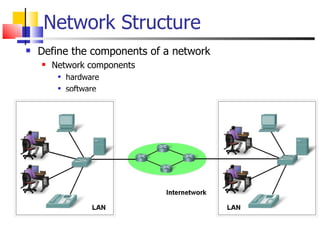
Network Structure Define the components of a network Network components hardware software
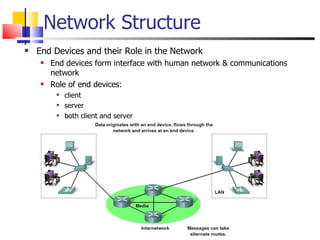
Network Structure End Devices and their Role in the Network End devices form interface with human network & communications network Role of end devices: client server both client and server
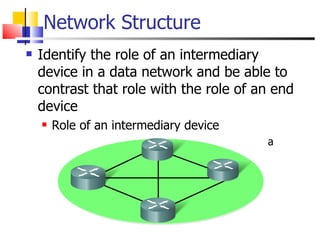
Network Structure Identify the role of an intermediary device in a data network and be able to contrast that role with the role of an end device Role of an intermediary device provides connectivity and ensures data flows  across network
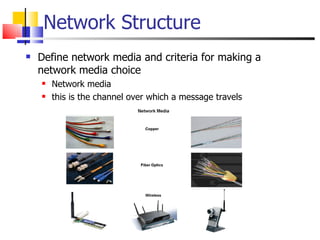
Network Structure Define network media and criteria for making a network media choice Network media this is the channel over which a message travels
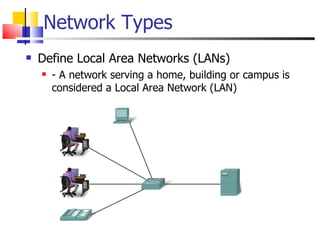
Network Types Define Local Area Networks (LANs) - A network serving a home, building or campus is considered a Local Area Network (LAN)
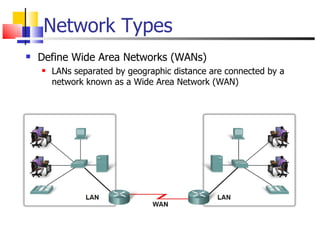
Network Types Define Wide Area Networks (WANs) LANs separated by geographic distance are connected by a network known as a Wide Area Network (WAN)
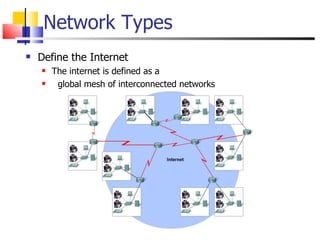
Network Types Define the Internet The internet is defined as a global mesh of interconnected networks
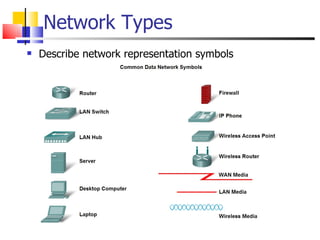
Network Types Describe network representation symbols
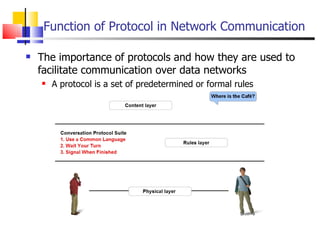
Function of Protocol in Network Communication The importance of protocols and how they are used to facilitate communication over data networks A protocol is a set of predetermined or formal rules
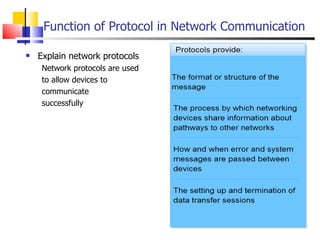
Function of Protocol in Network Communication Explain network protocols Network protocols are used to allow devices to  communicate  successfully
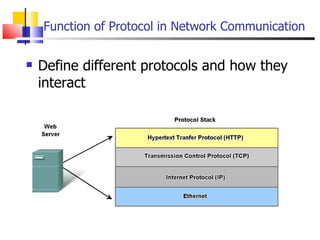
Function of Protocol in Network Communication Define different protocols and how they interact
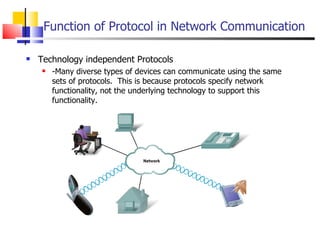
Function of Protocol in Network Communication Technology independent Protocols  -Many diverse types of devices can communicate using the same sets of protocols.  This is because protocols specify network functionality, not the underlying technology to support this functionality.
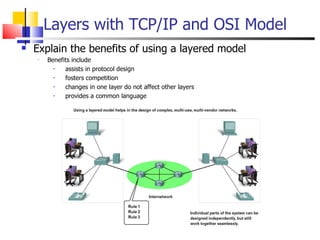
Layers with TCP/IP and OSI Model Explain the benefits of using a layered model Benefits include assists in protocol design fosters competition changes in one layer do not affect other layers provides a common language
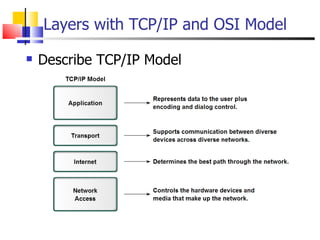
Layers with TCP/IP and OSI Model Describe TCP/IP Model
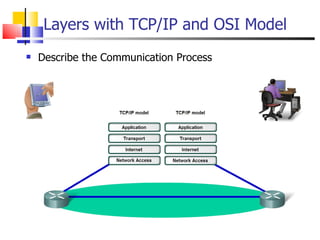
Layers with TCP/IP and OSI Model Describe the Communication Process
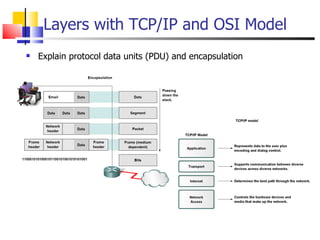
Layers with TCP/IP and OSI Model Explain protocol data units (PDU) and encapsulation
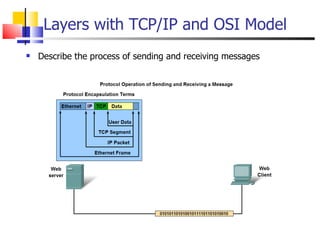
Layers with TCP/IP and OSI Model Describe the process of sending and receiving messages
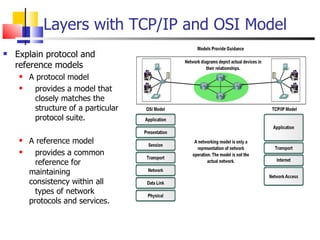
Layers with TCP/IP and OSI Model Explain protocol and reference models A protocol model  provides a model that  closely matches the  structure of a particular  protocol suite. A reference model  provides a common  reference for  maintaining  consistency within all  types of network  protocols and services.
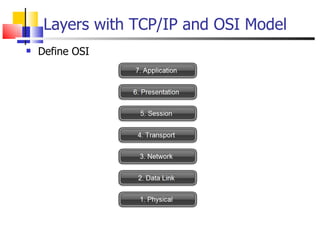
Layers with TCP/IP and OSI Model Define OSI
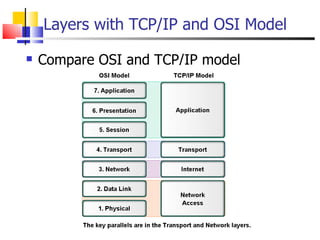
Layers with TCP/IP and OSI Model Compare OSI and TCP/IP model
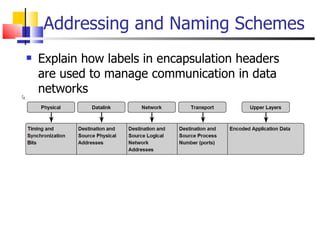
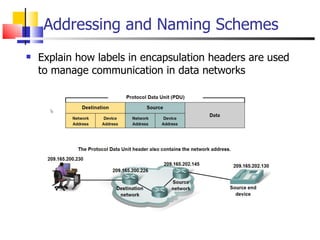
Addressing and Naming Schemes Explain how labels in encapsulation headers are used to manage communication in data networks
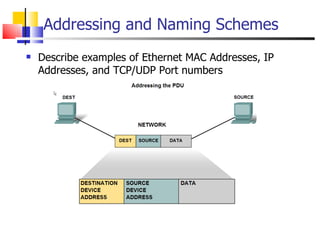
Addressing and Naming Schemes Describe examples of Ethernet MAC Addresses, IP Addresses, and TCP/UDP Port numbers
Addressing and Naming Schemes Explain how labels in encapsulation headers are used to manage communication in data networks
Application Layer Functionality and Protocols
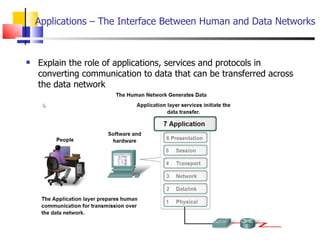
Applications – The Interface Between Human and Data Networks  Explain the role of applications, services and protocols in converting communication to data that can be transferred across the data network
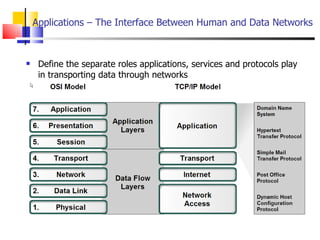
Applications – The Interface Between Human and Data Networks  Define the separate roles applications, services and protocols play in transporting data through networks
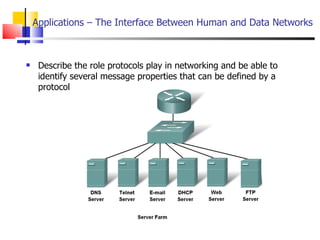
Describe the role protocols play in networking and be able to identify several message properties that can be defined by a protocol  Applications – The Interface Between Human and Data Networks
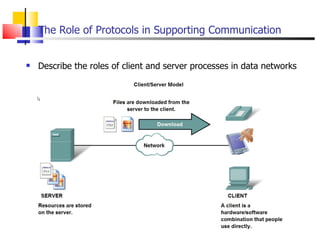
The Role of Protocols in Supporting Communication Describe the roles of client and server processes in data networks
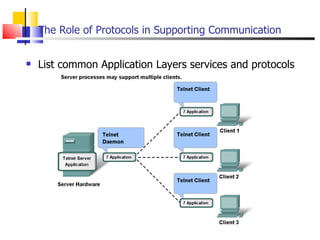
The Role of Protocols in Supporting Communication List common Application Layers services and protocols
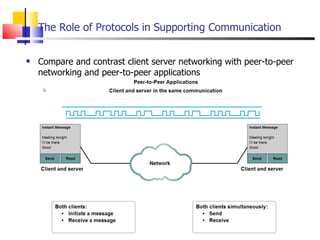
The Role of Protocols in Supporting Communication Compare and contrast client server networking with peer-to-peer networking and peer-to-peer applications
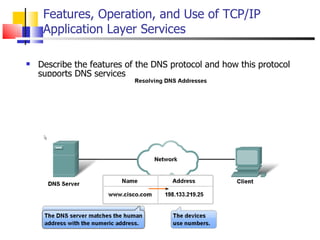
Features, Operation, and Use of TCP/IP Application Layer Services Describe the features of the DNS protocol and how this protocol supports DNS services
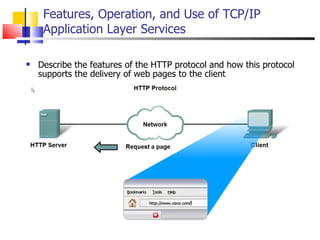
Describe the features of the HTTP protocol and how this protocol supports the delivery of web pages to the client  Features, Operation, and Use of TCP/IP Application Layer Services
Link Layer Addressing
MAC Addresses and ARP 32-bit IP address:  network-layer  address used to get datagram to destination IP subnet  MAC (or LAN or physical or Ethernet) address:  used to get datagram from one interface to another physically-connected interface (same network) 48 bit MAC address (for most LANs)  burned in the adapter
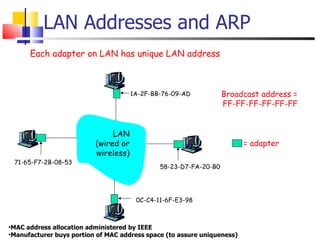
LAN Addresses and ARP Each adapter on LAN has unique LAN address Broadcast address = FF-FF-FF-FF-FF-FF = adapter MAC address allocation administered by IEEE Manufacturer buys portion of MAC address space (to assure uniqueness) 1A-2F-BB-76-09-AD 58-23-D7-FA-20-B0 0C-C4-11-6F-E3-98 71-65-F7-2B-08-53 LAN (wired or wireless)
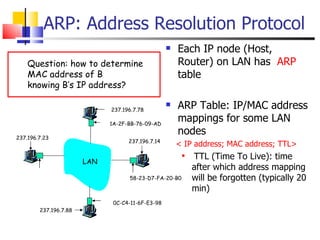
ARP: Address Resolution Protocol Each IP node (Host, Router) on LAN has  ARP  table ARP Table: IP/MAC address mappings for some LAN nodes < IP address; MAC address; TTL> TTL (Time To Live): time after which address mapping will be forgotten (typically 20 min) 1A-2F-BB-76-09-AD 58-23-D7-FA-20-B0 0C-C4-11-6F-E3-98 LAN 237.196.7.23 237.196.7.78 237.196.7.14 237.196.7.88 Question: how to determine MAC address of B knowing B’s IP address?
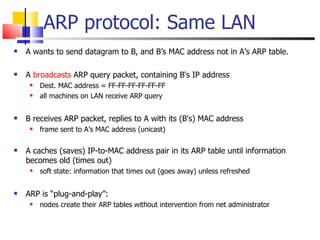
ARP protocol: Same LAN A wants to send datagram to B, and B’s MAC address not in A’s ARP table. A  broadcasts  ARP query packet, containing B's IP address  Dest. MAC address = FF-FF-FF-FF-FF-FF all machines on LAN receive ARP query  B receives ARP packet, replies to A with its (B's) MAC address frame sent to A’s MAC address (unicast) A caches (saves) IP-to-MAC address pair in its ARP table until information becomes old (times out)  soft state: information that times out (goes away) unless refreshed ARP is “plug-and-play”: nodes create their ARP tables without intervention from net administrator
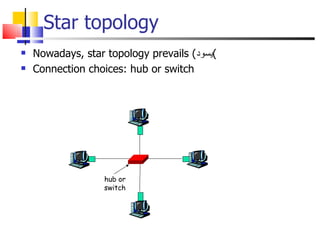
Star topology Nowadays, star topology prevails ( يسود ) Connection choices: hub or switch hub or switch
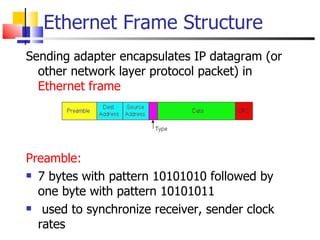
Ethernet Frame Structure Sending adapter encapsulates IP datagram (or other network layer protocol packet) in  Ethernet frame Preamble:   7 bytes with pattern 10101010 followed by one byte with pattern 10101011 used to synchronize receiver, sender clock rates
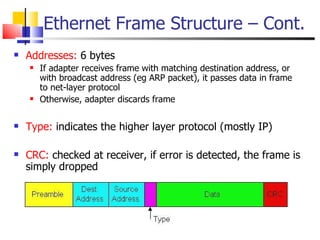
Ethernet Frame Structure – Cont. Addresses:  6 bytes If adapter receives frame with matching destination address, or with broadcast address (eg ARP packet), it passes data in frame to net-layer protocol Otherwise, adapter discards frame Type:  indicates the higher layer protocol (mostly IP) CRC:  checked at receiver, if error is detected, the frame is simply dropped
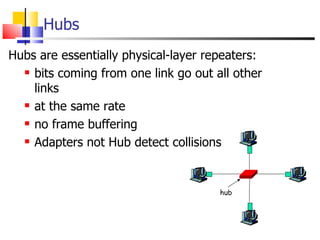
Hubs Hubs are essentially physical-layer repeaters: bits coming from one link go out all other links at the same rate no frame buffering Adapters not Hub detect collisions hub
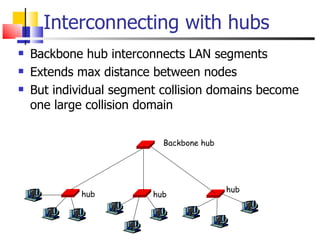
Interconnecting with hubs Backbone hub interconnects LAN segments Extends max distance between nodes But individual segment collision domains become one large collision domain hub hub hub Backbone hub
Switch Link layer device stores and forwards Ethernet frames examines frame header and  selectively  forwards  frame based on MAC destination address when frame is to be forwarded on segment, uses CSMA/CD to access segment Transparent hosts are unaware of presence of switches Plug-and-play, self-learning switches do not need to be configured
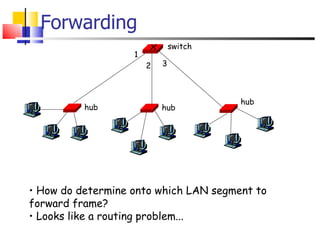
Forwarding How do determine onto which LAN segment to forward frame? Looks like a routing problem... 1 2 3 hub hub hub switch
Self Learning A switch has a  switch table Entry in switch table:  (MAC Address, Interface, Time Stamp) stale entries in table dropped (TTL can be 60 min)  Switch   learns  which hosts can be reached through which interfaces when frame received, switch “learns”  location of sender: incoming LAN segment records sender/location pair in switch table
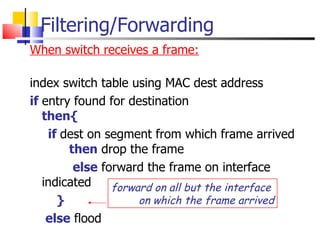
Filtering/Forwarding When switch receives a frame: index switch table using MAC dest address if   entry found for destination then{ if  dest on segment from which frame arrived   then   drop the frame else  forward the frame on interface indicated } else  flood forward on all but the interface  on which the frame arrived
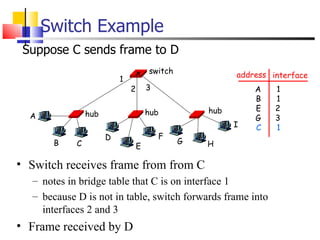
Switch Example Suppose C sends frame to D Switch receives frame from from C notes in bridge table that C is on interface 1 because D is not in table, switch forwards frame into interfaces 2 and 3 Frame received by D  address interface A B E G C 1 1 2 3 1 hub hub hub switch A B C D E F G H I 1 2 3
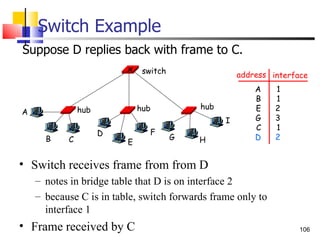
Switch Example Suppose D replies back with frame to C.  Switch receives frame from from D notes in bridge table that D is on interface 2 because C is in table, switch forwards frame only to interface 1 Frame received by C  address interface A B E G C D 1 1 2 3 1 2 hub hub hub switch A B C D E F G H I
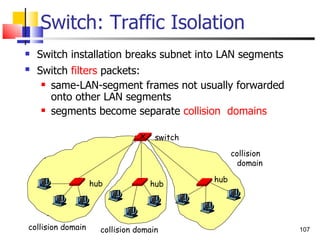
Switch: Traffic Isolation Switch installation breaks subnet into LAN segments Switch  filters  packets:   same-LAN-segment frames not usually forwarded onto other LAN segments segments become separate  collision  domains collision domain collision domain collision  domain hub hub hub switch
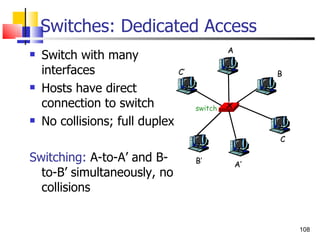
Switches: Dedicated Access Switch with many interfaces Hosts have direct connection to switch No collisions; full duplex Switching:  A-to-A’ and B-to-B’ simultaneously, no collisions switch A A’ B B’ C C’
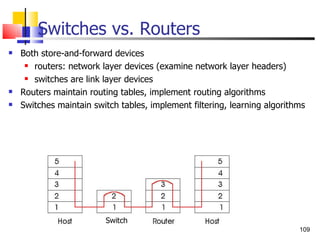
Switches vs. Routers Both store-and-forward devices routers: network layer devices (examine network layer headers) switches are link layer devices Routers maintain routing tables, implement routing algorithms Switches maintain switch tables, implement filtering, learning algorithms  Switch
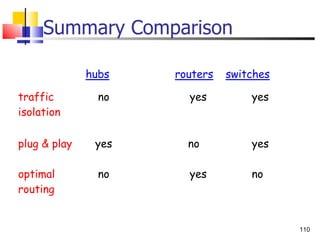
Summary Comparison

Tutorial&info,networks basics

  • 1.
    Networking Basics For : Level 1 – Networks and Computer Science Diploma Deanship of Community Services and Continuous Education - Imam University Based on : Cisco Networking Academy – Exploration 1 Instructor : Mahmoud Rabie
  • 2.
    Grading 15 for Attendance and Participation 35 for the Take-Home Open-Book Exam 50 for the Final Exam
  • 3.
    Topics Introduction toNetworking Networking Fundamentals Networking Media Communicating over the Network Application Layer Functionality and Protocols Ethernet and Link Layer Addressing
  • 4.
    Introduction to Networking Objectives
  • 5.
  • 6.
  • 7.
  • 8.
  • 9.
  • 10.
  • 11.
    Network Math ISAwill be covered well, by Dr. Baha
  • 12.
    IP Addresses andNetwork Masks
  • 13.
  • 14.
  • 15.
  • 16.
  • 17.
  • 18.
  • 19.
  • 20.
    Storage - AreaNetworks (SANS)
  • 21.
  • 22.
  • 23.
  • 24.
  • 25.
  • 26.
    BandwidthLimitations
  • 27.
    Using Layers toAnalyze Problems
  • 28.
    Using Layers toDescribe Data Communication
  • 29.
  • 30.
  • 31.
    OSI Layers Providesconnectivity and path selection between two host Provides Logical address No error correction, best effort delivery.
  • 32.
  • 33.
  • 34.
  • 35.
  • 36.
  • 37.
  • 38.
  • 39.
  • 40.
  • 41.
  • 42.
  • 43.
  • 44.
  • 45.
  • 46.
  • 47.
  • 48.
  • 49.
  • 50.
  • 51.
  • 52.
  • 53.
  • 54.
  • 55.
  • 56.
  • 57.
    Network Structure Definethe elements of communication 3 common elements of communication message source the channel message destination Define a network data or information networks capable of carrying many different types of communications
  • 58.
    Network Structure Describehow messages are communicated Data is sent across a network in small “ chunks ” called segments Multiplexing
  • 59.
    Network Structure Definethe components of a network Network components hardware software
  • 60.
    Network Structure EndDevices and their Role in the Network End devices form interface with human network & communications network Role of end devices: client server both client and server
  • 61.
    Network Structure Identifythe role of an intermediary device in a data network and be able to contrast that role with the role of an end device Role of an intermediary device provides connectivity and ensures data flows across network
  • 62.
    Network Structure Definenetwork media and criteria for making a network media choice Network media this is the channel over which a message travels
  • 63.
    Network Types DefineLocal Area Networks (LANs) - A network serving a home, building or campus is considered a Local Area Network (LAN)
  • 64.
    Network Types DefineWide Area Networks (WANs) LANs separated by geographic distance are connected by a network known as a Wide Area Network (WAN)
  • 65.
    Network Types Definethe Internet The internet is defined as a global mesh of interconnected networks
  • 66.
    Network Types Describenetwork representation symbols
  • 67.
    Function of Protocolin Network Communication The importance of protocols and how they are used to facilitate communication over data networks A protocol is a set of predetermined or formal rules
  • 68.
    Function of Protocolin Network Communication Explain network protocols Network protocols are used to allow devices to communicate successfully
  • 69.
    Function of Protocolin Network Communication Define different protocols and how they interact
  • 70.
    Function of Protocolin Network Communication Technology independent Protocols -Many diverse types of devices can communicate using the same sets of protocols. This is because protocols specify network functionality, not the underlying technology to support this functionality.
  • 71.
    Layers with TCP/IPand OSI Model Explain the benefits of using a layered model Benefits include assists in protocol design fosters competition changes in one layer do not affect other layers provides a common language
  • 72.
    Layers with TCP/IPand OSI Model Describe TCP/IP Model
  • 73.
    Layers with TCP/IPand OSI Model Describe the Communication Process
  • 74.
    Layers with TCP/IPand OSI Model Explain protocol data units (PDU) and encapsulation
  • 75.
    Layers with TCP/IPand OSI Model Describe the process of sending and receiving messages
  • 76.
    Layers with TCP/IPand OSI Model Explain protocol and reference models A protocol model provides a model that closely matches the structure of a particular protocol suite. A reference model provides a common reference for maintaining consistency within all types of network protocols and services.
  • 77.
    Layers with TCP/IPand OSI Model Define OSI
  • 78.
    Layers with TCP/IPand OSI Model Compare OSI and TCP/IP model
  • 79.
    Addressing and NamingSchemes Explain how labels in encapsulation headers are used to manage communication in data networks
  • 80.
    Addressing and NamingSchemes Describe examples of Ethernet MAC Addresses, IP Addresses, and TCP/UDP Port numbers
  • 81.
    Addressing and NamingSchemes Explain how labels in encapsulation headers are used to manage communication in data networks
  • 82.
  • 83.
    Applications – TheInterface Between Human and Data Networks Explain the role of applications, services and protocols in converting communication to data that can be transferred across the data network
  • 84.
    Applications – TheInterface Between Human and Data Networks Define the separate roles applications, services and protocols play in transporting data through networks
  • 85.
    Describe the roleprotocols play in networking and be able to identify several message properties that can be defined by a protocol Applications – The Interface Between Human and Data Networks
  • 86.
    The Role ofProtocols in Supporting Communication Describe the roles of client and server processes in data networks
  • 87.
    The Role ofProtocols in Supporting Communication List common Application Layers services and protocols
  • 88.
    The Role ofProtocols in Supporting Communication Compare and contrast client server networking with peer-to-peer networking and peer-to-peer applications
  • 89.
    Features, Operation, andUse of TCP/IP Application Layer Services Describe the features of the DNS protocol and how this protocol supports DNS services
  • 90.
    Describe the featuresof the HTTP protocol and how this protocol supports the delivery of web pages to the client Features, Operation, and Use of TCP/IP Application Layer Services
  • 91.
  • 92.
    MAC Addresses andARP 32-bit IP address: network-layer address used to get datagram to destination IP subnet MAC (or LAN or physical or Ethernet) address: used to get datagram from one interface to another physically-connected interface (same network) 48 bit MAC address (for most LANs) burned in the adapter
  • 93.
    LAN Addresses andARP Each adapter on LAN has unique LAN address Broadcast address = FF-FF-FF-FF-FF-FF = adapter MAC address allocation administered by IEEE Manufacturer buys portion of MAC address space (to assure uniqueness) 1A-2F-BB-76-09-AD 58-23-D7-FA-20-B0 0C-C4-11-6F-E3-98 71-65-F7-2B-08-53 LAN (wired or wireless)
  • 94.
    ARP: Address ResolutionProtocol Each IP node (Host, Router) on LAN has ARP table ARP Table: IP/MAC address mappings for some LAN nodes < IP address; MAC address; TTL> TTL (Time To Live): time after which address mapping will be forgotten (typically 20 min) 1A-2F-BB-76-09-AD 58-23-D7-FA-20-B0 0C-C4-11-6F-E3-98 LAN 237.196.7.23 237.196.7.78 237.196.7.14 237.196.7.88 Question: how to determine MAC address of B knowing B’s IP address?
  • 95.
    ARP protocol: SameLAN A wants to send datagram to B, and B’s MAC address not in A’s ARP table. A broadcasts ARP query packet, containing B's IP address Dest. MAC address = FF-FF-FF-FF-FF-FF all machines on LAN receive ARP query B receives ARP packet, replies to A with its (B's) MAC address frame sent to A’s MAC address (unicast) A caches (saves) IP-to-MAC address pair in its ARP table until information becomes old (times out) soft state: information that times out (goes away) unless refreshed ARP is “plug-and-play”: nodes create their ARP tables without intervention from net administrator
  • 96.
    Star topology Nowadays,star topology prevails ( يسود ) Connection choices: hub or switch hub or switch
  • 97.
    Ethernet Frame StructureSending adapter encapsulates IP datagram (or other network layer protocol packet) in Ethernet frame Preamble: 7 bytes with pattern 10101010 followed by one byte with pattern 10101011 used to synchronize receiver, sender clock rates
  • 98.
    Ethernet Frame Structure– Cont. Addresses: 6 bytes If adapter receives frame with matching destination address, or with broadcast address (eg ARP packet), it passes data in frame to net-layer protocol Otherwise, adapter discards frame Type: indicates the higher layer protocol (mostly IP) CRC: checked at receiver, if error is detected, the frame is simply dropped
  • 99.
    Hubs Hubs areessentially physical-layer repeaters: bits coming from one link go out all other links at the same rate no frame buffering Adapters not Hub detect collisions hub
  • 100.
    Interconnecting with hubsBackbone hub interconnects LAN segments Extends max distance between nodes But individual segment collision domains become one large collision domain hub hub hub Backbone hub
  • 101.
    Switch Link layerdevice stores and forwards Ethernet frames examines frame header and selectively forwards frame based on MAC destination address when frame is to be forwarded on segment, uses CSMA/CD to access segment Transparent hosts are unaware of presence of switches Plug-and-play, self-learning switches do not need to be configured
  • 102.
    Forwarding How dodetermine onto which LAN segment to forward frame? Looks like a routing problem... 1 2 3 hub hub hub switch
  • 103.
    Self Learning Aswitch has a switch table Entry in switch table: (MAC Address, Interface, Time Stamp) stale entries in table dropped (TTL can be 60 min) Switch learns which hosts can be reached through which interfaces when frame received, switch “learns” location of sender: incoming LAN segment records sender/location pair in switch table
  • 104.
    Filtering/Forwarding When switchreceives a frame: index switch table using MAC dest address if entry found for destination then{ if dest on segment from which frame arrived then drop the frame else forward the frame on interface indicated } else flood forward on all but the interface on which the frame arrived
  • 105.
    Switch Example SupposeC sends frame to D Switch receives frame from from C notes in bridge table that C is on interface 1 because D is not in table, switch forwards frame into interfaces 2 and 3 Frame received by D address interface A B E G C 1 1 2 3 1 hub hub hub switch A B C D E F G H I 1 2 3
  • 106.
    Switch Example SupposeD replies back with frame to C. Switch receives frame from from D notes in bridge table that D is on interface 2 because C is in table, switch forwards frame only to interface 1 Frame received by C address interface A B E G C D 1 1 2 3 1 2 hub hub hub switch A B C D E F G H I
  • 107.
    Switch: Traffic IsolationSwitch installation breaks subnet into LAN segments Switch filters packets: same-LAN-segment frames not usually forwarded onto other LAN segments segments become separate collision domains collision domain collision domain collision domain hub hub hub switch
  • 108.
    Switches: Dedicated AccessSwitch with many interfaces Hosts have direct connection to switch No collisions; full duplex Switching: A-to-A’ and B-to-B’ simultaneously, no collisions switch A A’ B B’ C C’
  • 109.
    Switches vs. RoutersBoth store-and-forward devices routers: network layer devices (examine network layer headers) switches are link layer devices Routers maintain routing tables, implement routing algorithms Switches maintain switch tables, implement filtering, learning algorithms Switch
  • 110.

Editor's Notes

  • #7 1) Physical Connection
  • #8 2) Logical Connection (Protocols = representation of communication forms)
  • #9 Ping-Pong
  • #10 3) Application that interpret the data and display the information
  • #13 Network Address  Network Mask Host Address
  • #16 End User Devices Network Devices
  • #29 كل ادارة تخاطب ما يناظرها
  • #38 Physical  Bits Data Link  Frames Network  Packets Transport  Segments Session, Presentation, Application  Data  ( تلميحة على ضم ادارات مخرجاتها نفس المخرجات – TCP Model)
  • #42 Insulators Conductors Semi
  • #45 Cable Types : Coaxial Cable Shielded Twisted Pair (STP)
  • #52 TX = Sender , RX = Receiver
  • #55 External USB Wireless NIC
  • #98 ديباجة Preamble =