CNIT 125:
Information Security
Professional
(CISSP
Preparation)
Ch 4. Communication and
Network Security
Updated 3-21-22
Network Architecture and Design
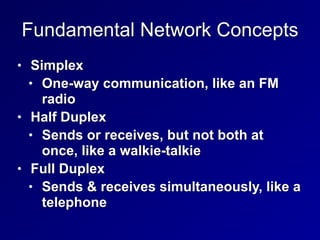
Fundamental Network Concepts
• Simplex


• One-way communication, like an FM
radio


• Half Duplex


• Sends or receives, but not both at
once, like a walkie-talkie


• Full Duplex


• Sends & receives simultaneously, like a
telephone
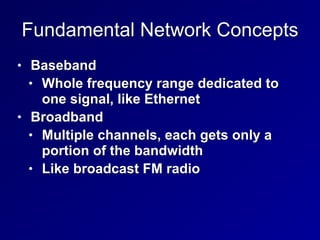
Fundamental Network Concepts
• Baseband


• Whole frequency range dedicated to
one signal, like Ethernet


• Broadband


• Multiple channels, each gets only a
portion of the bandwidth


• Like broadcast FM radio
Fundamental Network Concepts
• Analog


• Continuous variations of signal


• Signal degrades over distance and when
repeated


• Like a vinyl record


• Digital


• Signal is a series of zeroes and ones


• Can be transmitted and repeated with no
loss of accuracy


• Like a CD
Fundamental Network Concepts
• LAN (Local Area Network)


• Within a building


• MAN (Metropolitan Area Network)


• Within a city


• WAN (Wide Area Network)


• Covering cities, states, or countries


• GAN (Global Area Network)


• A global collection of WANs


• PAN (Personal Area Network)


• Devices you carry, often using Bluetooth
Fundamental Network Concepts
• Internet


• Global collection of networks running
TCP/IP


• Intranet


• Privately owned network using TCP/IP


• Extranet


• Connects private Intranets


• Such as connections to business
partners
Fundamental Network Concepts
• Circuit-Switched Network


• Dedicated circuit or channel for one
connection


• Ex: a T1 line between businesses


• Packet-Switched Network


• Multiple signals share the same lines


• Data is broken into packets


• Less wasteful and therefore cheaper
than circuit switching
Fundamental Network Concepts
• Quality of Service


• Can give specific traffic precedence
over other traffic


• On a packet-switched network


• Ex: VoIP packets get precedence over
email packets
Fundamental Network Concepts
• Layered Design


• OSI and TCP/IP models use layers


• Each layer performs a specific function


• Changes in one layer do not directly
affect another layer
Fundamental Network Concepts
• Network Model


• A description of how a network
protocol suite operates


• Ex: OSI model, TCP/IP model


• Network Stack


• A network protocol suite programmed
in software or hardware


• Ex: TCP/IP
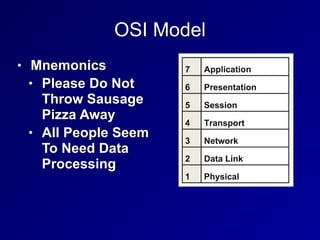
OSI Model
• Mnemonics


• Please Do Not
Throw Sausage
Pizza Away


• All People Seem
To Need Data
Processing
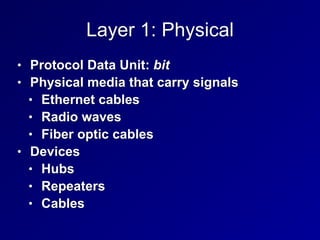
Layer 1: Physical
• Protocol Data Unit: bit


• Physical media that carry signals


• Ethernet cables


• Radio waves


• Fiber optic cables


• Devices


• Hubs


• Repeaters


• Cables
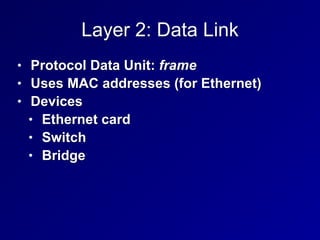
Layer 2: Data Link
• Protocol Data Unit: frame


• Uses MAC addresses (for Ethernet)


• Devices


• Ethernet card


• Switch


• Bridge
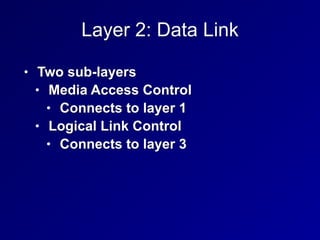
Layer 2: Data Link
• Two sub-layers


• Media Access Control


• Connects to layer 1


• Logical Link Control


• Connects to layer 3
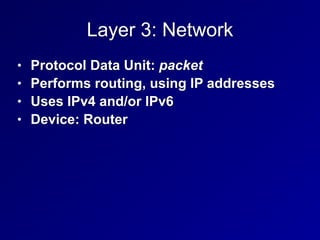
Layer 3: Network
• Protocol Data Unit: packet


• Performs routing, using IP addresses


• Uses IPv4 and/or IPv6


• Device: Router
Layer 4: Transport
• Protocol Data Unit: Segment


• Protocols include UDP and TCP


• Uses Port Numbers


• TCP is reliable, orders segments, and re-
sends undelivered segments
Layer 5: Session
• Network file shares are mounted at the
session layer


• For example, you must log in first


• Connections between applications
Layer 6: Presentation
• Presents data to the application layer in a
comprehensible way


• Data conversion


• Character encoding such as ASCII


• Image formats like GIF and JPEG


• Encryption


• Compression
Layer 7: Application
• Human-Readable data


• Web browser, word processor, IM client


• Protocols:


• Telnet


• FTP


• HTTP
21
4a
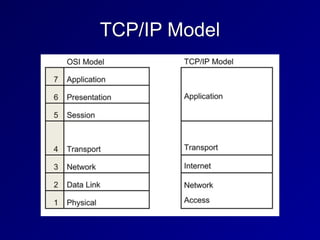
TCP/IP Model
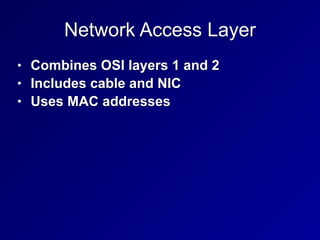
Network Access Layer
• Combines OSI layers 1 and 2


• Includes cable and NIC


• Uses MAC addresses
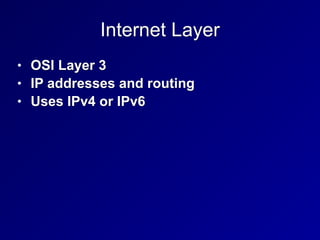
Internet Layer
• OSI Layer 3


• IP addresses and routing


• Uses IPv4 or IPv6
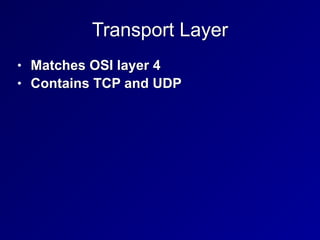
Transport Layer
• Matches OSI layer 4


• Contains TCP and UDP
Application Layer
• Combines OSI layers 5-7


• Presents network data to the human user


• Like a Web browser
Encapsulation
• Takes information from a higher layer,
and adds a header to it


• Like putting a letter in an envelope and
addressing it


• Layer 4 TCP SEGMENT


• Is encapsulated in a Layer 3 IP PACKET


• That's encapsulated in a Layer 2 FRAME


• Sent over the wire at layer 1 as BITS
Mnemonic: SPF10
• Segment


• Packet


• Frame


• One and Zero (Bits)
Decapsulation
• Also called de-multiplexing


• Happens at receiving end


• The addresses are stripped off the data
packets, and the data is delivered to higher
levels


• BITS are converted to FRAMES


• FRAMES are converted to PACKETS


• PACKETS are converted to SEGMENTS


• SEGMENTS are converted to application data
Network Access, Internet and Transport
Layer Protocols and Concepts
MAC Addresses
• Media Access Control address


• Unique hardware address of an Ethernet
NIC


• Burned in at the factory


• 48 bits long


• First 24 bits form Organizationally
Unique Identifier


• EUI-64 addresses are 64 bits long


• Used in IPv6
IPv4
• Internet Protocol version 4


• 32-bit addresses


• Written as four bytes in decimal


• 192.168.0.1
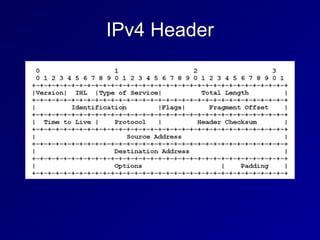
IPv4 Header
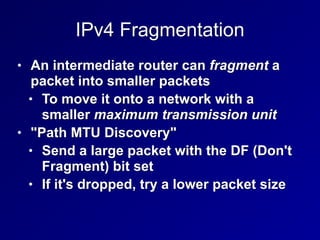
IPv4 Fragmentation
• An intermediate router can fragment a
packet into smaller packets


• To move it onto a network with a
smaller maximum transmission unit


• "Path MTU Discovery"


• Send a large packet with the DF (Don't
Fragment) bit set


• If it's dropped, try a lower packet size
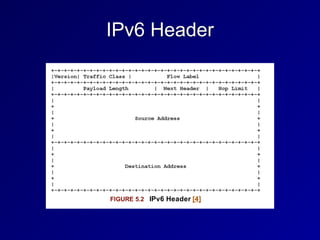
IPv6 Header
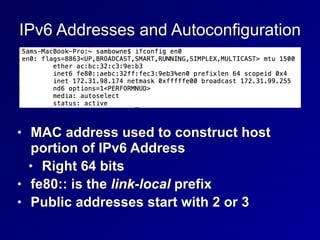
IPv6 Addresses and Autoconfiguration
• MAC address used to construct host
portion of IPv6 Address


• Right 64 bits


• fe80:: is the link-local prefix


• Public addresses start with 2 or 3
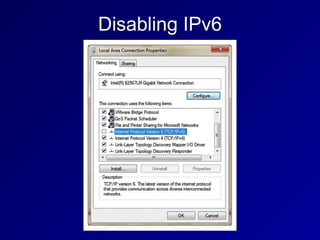
IPv6 Security Challenges
• Many networks have IPv6 enabled, but
the administrators don't understand how
to manage it


• It can be used for forbidden activity, such
as BitTorrent over IPv6
Disabling IPv6
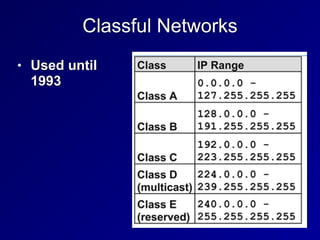
Classful Networks
• Used until
1993
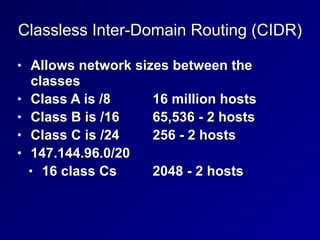
Classless Inter-Domain Routing (CIDR)
• Allows network sizes between the
classes


• Class A is /8
	
	
16 million hosts


• Class B is /16
	
	
65,536 - 2 hosts


• Class C is /24
	
	
256 - 2 hosts


• 147.144.96.0/20
	

• 16 class Cs
	
	
2048 - 2 hosts
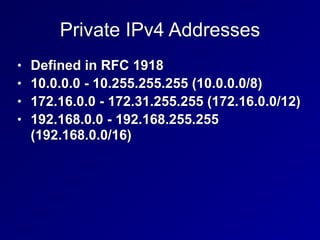
Private IPv4 Addresses
• Defined in RFC 1918


• 10.0.0.0 - 10.255.255.255 (10.0.0.0/8)


• 172.16.0.0 - 172.31.255.255 (172.16.0.0/12)


• 192.168.0.0 - 192.168.255.255
(192.168.0.0/16)
42
4b
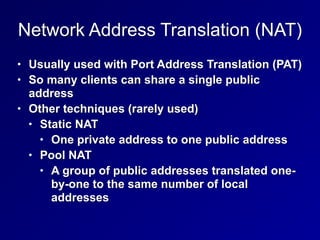
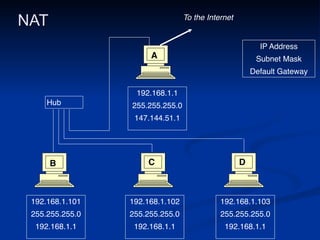
Network Address Translation (NAT)
• Usually used with Port Address Translation (PAT)


• So many clients can share a single public
address


• Other techniques (rarely used)


• Static NAT


• One private address to one public address


• Pool NAT


• A group of public addresses translated one-
by-one to the same number of local
addresses
NAT
192.168.1.10
1

255.255.255.
0

192.168.1.1
192.168.1.10
2

255.255.255.
0

192.168.1.1
192.168.1.10
3

255.255.255.
0

192.168.1.1
192.168.1.
1

255.255.255.
0

147.144.51.1
IP Addres
s

Subnet Mas
k

Default Gateway
Hub
To the Internet
A
B C D
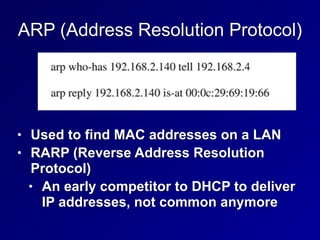
ARP (Address Resolution Protocol)
• Used to find MAC addresses on a LAN


• RARP (Reverse Address Resolution
Protocol)


• An early competitor to DHCP to deliver
IP addresses, not common anymore
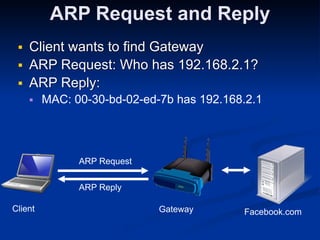
ARP Request and Reply
■ Client wants to find Gateway


■ ARP Request: Who has 192.168.2.1?


■ ARP Reply:


■ MAC: 00-30-bd-02-ed-7b has 192.168.2.1
Client


Gateway


Facebook.com
ARP Request
ARP Reply
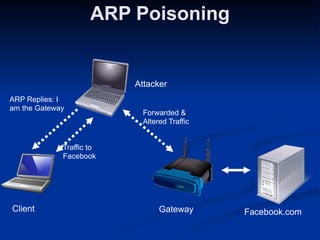
ARP Poisoning
Client


Gateway


Facebook.com
Attacker


ARP Replies: I
am the Gateway
Traffic to
Facebook
Forwarded &
Altered Traffic
Unicast and Multicast Traffic
• Unicast: One sender to one receiver


• Most common


• Multicast: One sender to several
receivers


• Rare, used by routing protocols
Broadcast Traffic
• One sender to every device on the LAN


• Limited broadcast: 255.255.255.255


• Actually sends layer 2 broadcast, to
MAC address FF:FF:FF:FF:FF:FF


• Directed broadcast: 147.144.255.255


• Was once sent over the Internet


• Blocked now to stop smurf attacks
Promiscuous Network Access
• A NIC in promiscuous mode passes all
frames upward for use


• Even if they are for a different MAC


• Required for Network Intrusion Detection
Systems (NIDS)


• Entering promiscuous mode requires root
privileges


• Switches isolate traffic segments


• So traffic won't be sent to the wrong MAC
address
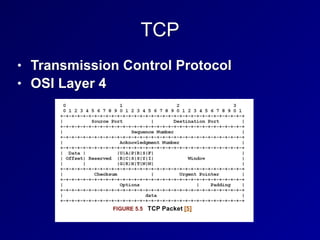
TCP
• Transmission Control Protocol


• OSI Layer 4
TCP Ports
• 0-1023: Well-known ports


• Require root privileges to listen on


• Also called "reserved ports"


• 1024 - 65535


• Ephemeral ports


• Any user can listen on them
Socket
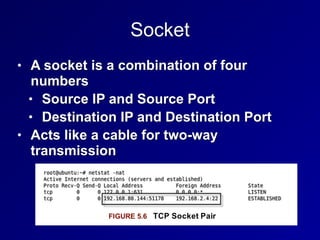
• A socket is a combination of four
numbers


• Source IP and Source Port


• Destination IP and Destination Port


• Acts like a cable for two-way
transmission
State
• LISTEN


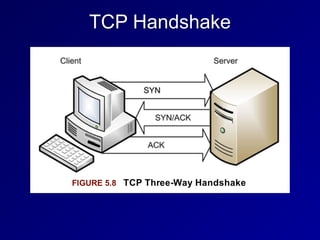
• Waiting for a SYN


• ESTABLISHED


• Handshake complete
TCP Flags
• URG: Urgent


• ACK: Acknowledge


• PSH: Push


• RST: Reset


• SYN: Synchronize


• FIN: Finish


• Three new flags added in 2001 & 2003


• CWR: Congestion Window Reduced


• ECE: Explicit Congestion Notification Echo


• NS: Nonce Sum
TCP Handshake
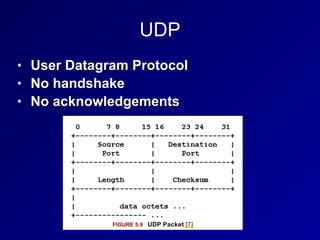
UDP
• User Datagram Protocol


• No handshake


• No acknowledgements
58
4c
ICMP
• Internet Control Message Protocol


• Used to troubleshoot and report error
conditions


• PING


• Sends an ICMP Echo Request


• Gets an ICMP Echo Reply


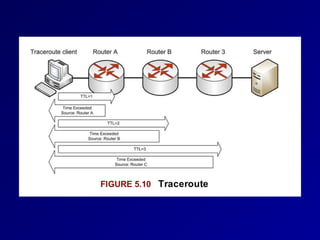
• Traceroute


• Sends packets with low TTL


• Tracks ICMP Time Exceeded replies
Traceroute
• Unix and Cisco send UDP packets


• Microsoft sends ICMP packets
Application Layer TCP/IP Protocols and
Concepts
• Telnet


• Terminal emulation


• Sends command-lines


• No encryption


• SSH (Secure Shell)


• Encrypted replacement for Telnet
Application Layer TCP/IP Protocols and
Concepts
• FTP (File Transfer Protocol)


• Sends passwords unencrypted


• Uses ports 20 and 21 on the server


• Problems for firewalls (link Ch 5b)


• Active FTP initiates the port 20
connection from the server, not the
client


• Passive FTP uses an arbitrary
ephemeral port on the server
Application Layer TCP/IP Protocols and
Concepts
• TFTP (Trivial File Transfer Protocol)


• Uses UDP port 69


• No authentication at all


• No encryption


• Used to update firmware in routers and
IP phones
Application Layer TCP/IP Protocols and
Concepts
• SSH (Secure Shell)


• Secure replacement for Telnet


• And FTP and the unix "r" commands


• rlogin, rshell, etc.


• Includes SFTP and SCP


• Can be used as a secure tunnel for other
protocols, such as HTTP


• Uses TCP port 22


• SSHv1 is old and vulnerable, SSHv2 is the
current standard
Application Layer TCP/IP Protocols and
Concepts
• SMTP (Simple Mail Transfer Protocol)


• Uses TCP port 25


• Used to send email between servers


• POP (Post Office Protocol)


• TCP port 110


• Used to download email to a local client like
Eudora or Outlook


• IMAP (Internet Message Access Protocol)


• TCP port 132


• Used to download email to a local client like
Eudora or Outlook
Application Layer TCP/IP Protocols and
Concepts
• DNS (Domain Name System)


• Uses UDP and TCP 53


• Large responses require TCP 53


• Zone transfers


• DNSSEC-signed records


• Resolves domain names like ccsf.edu
to IP addresses
Application Layer TCP/IP Protocols and
Concepts
• DNS Server Types


• SOA (Start of Authority)


• Contains the master record for a zone


• Recursive server


• If it doesn't have the requested data,
it will ask other servers


• Caching server


• Stores recently resolved names
Application Layer TCP/IP Protocols and
Concepts
• DNS Weaknesses


• Uses UDP


• No authentication


• Security relies on a 16-bit source port
and a 16-bit DNS query ID


• If attackers can guess both numbers,
they can poison a DNS sever cache
Application Layer TCP/IP Protocols and
Concepts
• DNSSEC


• Domain Name Server Security
Extensions


• Adds authentication and integrity to
DNS responses


• Uses public key encryption


• No confidentiality


• Like a digital signature


• Slowly being rolled out across the Internet
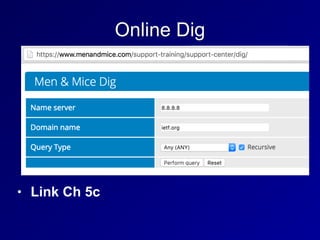
Online Dig
• Link Ch 5c
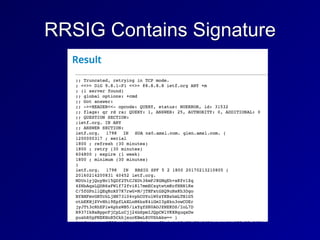
RRSIG Contains Signature
Application Layer TCP/IP Protocols and
Concepts
• SNMP


• Simple Network Management Protocol


• Used to monitor and control network devices


• Uses UDP port 161


• SNMPv1 and v2 send "community strings" in
plaintext


• Defaults are "public" and "private"


• SNMPv3 adds encryption; much more secure


• Many networks still use SNMPv2
Application Layer TCP/IP Protocols and
Concepts
• HTTP


• Hypertext Transfer Protocol


• TCP port 80


• No encryption


• HTTPS


• Hypertext Transfer Protocol Secure


• TCP port 443


• Encrypted with SSL/TLS
Application Layer TCP/IP Protocols and
Concepts
• BOOTP


• Bootstrap protocol


• Enables a BIOS to boot from the
network


• BIOS gets an IP address from BOOTP


• Then uses TFTP to load the OS


• Uses ports UDP 67 for servers and UDP
68 for clients
Application Layer TCP/IP Protocols and
Concepts
• DHCP


• Intended to replace BOOTP


• Can deliver IP address, DNS server,
default gateway, and more


• Uses ports UDP 67 for servers and UDP
68 for clients
77
4d
CNIT 125:
Information Security
Professional
(CISSP
Preparation)
Ch 4. Communication and
Network Security (Part 2)
Network Architecture and Design


(continued)
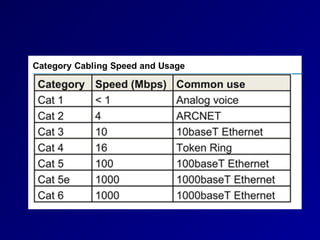
Layer 1 Network Cabling Terms
• EMI (Electromgnetic Interference)


• Caused by electricity


• Causes unwanted signals (noise)


• When a signal from one wire leaks into
another wire, that's Crosstalk


• Attenuation is the weakening of a signal
as it travels further from the source
Twisted Pair Cabling
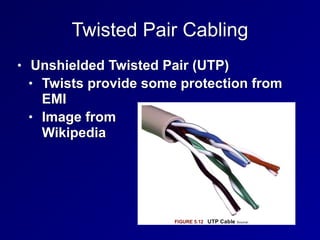
• Unshielded Twisted Pair (UTP)


• Twists provide some protection from
EMI


• Image from


Wikipedia
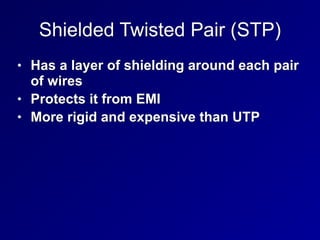
Shielded Twisted Pair (STP)
• Has a layer of shielding around each pair
of wires


• Protects it from EMI


• More rigid and expensive than UTP
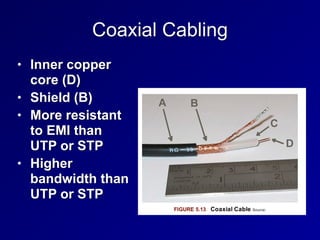
Coaxial Cabling
• Inner copper
core (D)


• Shield (B)


• More resistant
to EMI than
UTP or STP


• Higher
bandwidth than
UTP or STP
Fiber Optic Network Cable
• Uses light pulses


• Cable is made of glass


• Immune to EMI


• Much faster and lower attenuation than
coax


• Can send a signal 50 miles


• Disadvantages: cost and complexity
Types of Fiber
• Multimode fiber


• Many modes (paths) of light


• Shorter distance, lower bandwidth


• Singlemode fiber


• One mode (path)


• Long-haul, high-speed


• Wavelength Division Multiplexing


• Sends multiple signals over different colors
of light


• Can exceed 10 Gbps
LAN Technologies and Protocols
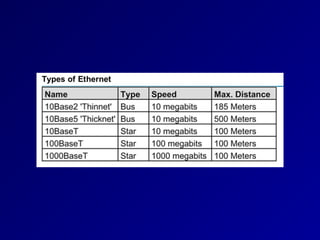
Ethernet
• Originally used a physical bus topology
with coaxial cables


• Now uses physical star topology with
twisted-pair cables


• Baseband (one channel)


• Frames can collide if two nodes
transmit simultaneously
CSMA/CD
• Carrier Sense Multiple Access/Collision
Detection


• Monitor network to see if it is idle


• If not idle, wait a random period of time


• If idle, transmit


• While transmitting, monitor the network


• If an unusual voltage level is detected,
another station must be sending: a
collision
Collision
• Send Jam signal to tell all nodes to stop
transmitting


• Wait a random amount of time before
retransmitting
CSMA/CA
• Carrier Sense Multiple Access/Collision
Avoidance


• Used in wireless networks


• Because collisions cannot be detected


• Uses acknowledgements for each
frame


• If no acknowledgement received, the
node will wait and retransmit


• Less efficient than CSMA/CD
ARCNET & Token Ring
• Attached Resource Computer Network


• Ran at 2.5 Mbps


• Token Ring


• Ran at 16 Mbps


• Two legacy LAN technologies


• Both use tokens


• Only node with the token can send or
receive data


• No collisions
FDDI
• Fiber Distributed Data Interface


• Another legacy LAN technology


• Used two fiber rings


• Secondary ring sent data in the
opposite direction


• Fault tolerant


• A single cut in the ring does not stop
service


• Runs at 100 Mbps
LAN Physical Network Topologies
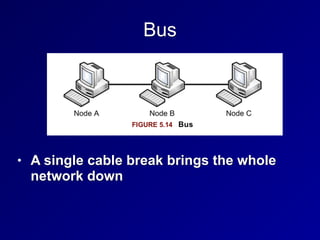
Bus
• A single cable break brings the whole
network down
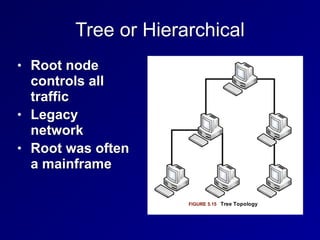
Tree or Hierarchical
• Root node
controls all
traffic


• Legacy
network


• Root was often
a mainframe
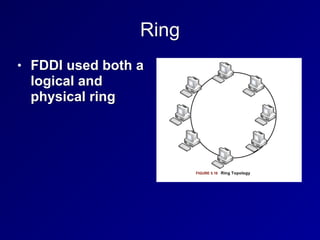
Ring
• FDDI used both a
logical and
physical ring
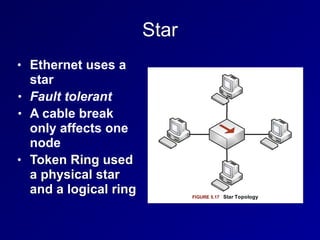
Star
• Ethernet uses a
star


• Fault tolerant


• A cable break
only affects one
node


• Token Ring used
a physical star
and a logical ring
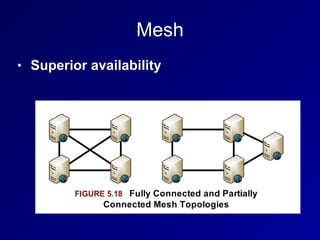
Mesh
• Superior availability
101
4e
WAN Technologies and Protocols
T1, T3, E1, E3
• T1 (DS1) provides 1.5 Mbps dedicated
circuit


• Contains 24 64 kbps lines (DS0)


• T3 (DS3) contains 28 T1s


• 45 Mbps


• E1 provides 2 Mbps in 30 channels


• E3 contains 16 E1s for 34 Mbps
SONET
• Synchronous Optical Networking


• Contains multiple T-carrier circuits


• Via fiber optic cabling


• Ring topology for redundancy
Frame Relay
• Packet-switched layer 2 protocol


• No error recovery


• Focuses on speed


• Multiplexes multiple logical connections
over a single physical connection


• To create Virtual Circuits


• An alternative to dedicated lines such as
T1s
Frame Relay
• PVC (Permanent Virtual Circuit)


• Always connected like a T1


• SVC (Switched Virtual Circuit)


• Sets up for a call, terminates after the
call


• Frame Relay addresses circuits with Data
Link Connection Identifiers (DLCI)
X.25
• Older packet-switched WAN protocol


• Cost-effective in 1970s through 1990s
ATM
• Asynchronous Transfer Mode


• WAN technology


• Fixed-size 53-byte cells


• 5 bytes of address, 48 bytes of data


• SDMS (Switched Multimegabit Data
Service)


• Older and similar to ATM


• Also used 53-byte cells
MPLS
• Multiprotocol Label Switching


• Forwards WAN data using labels


• Via a shared MPLS cloud network


• Can carry many types of traffic


• ATM, Frame Relay, IP, and more


• Traffic decisions are based on labels
SDLC and HDLC
• Synchronous Data Link Control


• Layer 2 WAN protocol


• Uses polling, similar to token passing


• Primary node polls secondary nodes to
request their data


• High-Level Data Link Control


• Successor to SDLC


• Adds error correction and flow control


• Three modes (next slide)
HDLC: Three Modes
• Normal Response Mode (NRM)


• Secondary nodes can transmit when given
permission by the primary


• Asynchronous Response Mode (ARM)


• Secondary nodes can initiate transmission
with the primary


• Asynchronous Balanced Mode (ABM)


• Compiled mode: nodes may act s either
primary or secondary, initiating
transmissions without receiving permission
Converged Protocols
• Multiple services over the same Ethernet
network


• Industrial controls, storage, voice, ...
DNP3
• Distributed Network Protocol 3


• Open standard


• Used primarily by energy sector


• For interoperability between various
vendors' SCADA and smart grid
applications


• "Smart Grid" technology brings utility
electricity delivery into the 21st century


• More energy-efficient
DNP3
• Multilayer protocol


• May be carried over TCP/IP


• Recent improvements allow "Secure
Authentication"


• Original specification was vulnerable to
spoofing and replay attacks, and pre-
shared keys only


• The current standard is IEEE 1815-2012


• Supports Public Key Infrastructure (PKI)
Storage Protocols
• Fibre Channel over Ethernet (FCoE)


• Internet Small Computer System
Interface (iSCSI)


• Used for SANs (Storage Area Networks)


• Allows block-level file access over a
network


• Just like a directly attached hard drive
Fibre Channel over Ethernet (FCoE)
• Fibre Channel uses special cable and
hardware


• Including Host Bus Adapters (HBAs)


• FCoE uses standard ethernet


• But not TCP/IP


• Fibre Channel over IP (FCIP)


• Encapsulates Fibre Channel frames via
TCP/IP
Internet Small Computer System
Interface (iSCSI)
• Uses higher layers of the TCP/IP suite for
communication


• Can be routed


• Allows access to storage over a WAN


• Uses Logical Unit Numbers (LUNs) to
address storage across the network
Virtual SAN
• Storage Area Networks (SANs)


• Historically used proprietary hardware
and software


• Virtual SAN is analogous to a VLAN
VoIP
• Voice over Internet Protocol


• Uses two protocols


• Real-time Transport Protocol (RTP)


• Carries audio and video


• Session Initiation Protocol (SIP)


• For signals like "phone ringing"


• Secure Real-time Transport Protocol (SRTP)


• Uses AES and SHA-1 to provide
confidentiality, integrity, and secure
authentication
VoIP
• Saves money


• No need for separate phone and IT
networks


• Exposes phone traffic to network attacks


• RTP provodes little or no security by
default


• Wireshark can eavesdrop on a call
Software-Defined Networks
• Separates a router's control plane from
the data (forwarding) plane


• Control plane makes routing decisions


• Data plane forwards packets through
the router


• With SDN routing decision are made
remotely


• Allows customization of networks
OpenFlow
• Most well-known SDN protocol


• Allows a central controller to control
switching rules


• Uses TCP and TLS encryption
123
4f
Wireless Local Area Networks
DoS & Availability
• An attacker in physical proximity to a
WLAN can launch DoS attacks


• Polluting the wireless spectrum with
noise


• Sending Deauth frames


• There is no defense
Unlicensed Bands
• Industrial, Scientific, and Medical (ISM)
bands


• No FCC license needed to use them


• Cordless phones, 802.11, and Bluetooth
all use ISM bands


• Two common bands used internationally


• 2.4 GHz


• 5 GHz
FHSS, DHSS, and OFDM
• Frequency Hopping Spread Spectrum
(FHSS) hops across many channels


• Direct Sequence Spread Spectrum (DSSS)
spreads the signal across a whole band


• Both maximize throughput and minimize
effects of interference


• Orthogonal Frequency Division Multiplexing
(OFDM) uses simultaneous transmissions
that do not interfere with each other
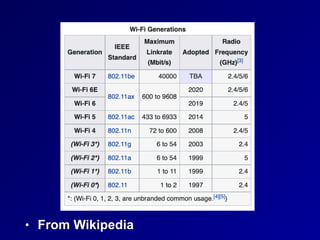
• From Wikipedia
Wireless NIC Modes
• Managed


• Master


• Ad-Hoc


• Monitor
Managed and Master Modes
• Managed mode


• Client mode, obeys commands from
the Master


• Master mode


• Access point


• Clients connect to it
Ad Hoc and Monitor Mode
• Ad Hoc


• Peer-to-peer network


• No central access point


• Monitor mode


• Used to sniff WLAN traffic


• Including traffic between other devices
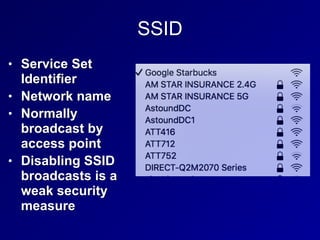
SSID
• Service Set
Identifier


• Network name


• Normally
broadcast by
access point


• Disabling SSID
broadcasts is a
weak security
measure
MAC Address Filtering
• A weak security measure


• MACs can be sniffed and spoofed
WEP
• Wired Equivalent Privacy


• Weak, unsafe encryption protocol


• Designed specifically to avoid export
munition laws


• Too weak to use
802.11i
• Defines a Robust Security Network (RSN)


• Also called WPA2 (Wi-Fi Protected
Access 2)


• Uses AES encryption for confidentiality


• Uses CCMP for integrity


• Counter Mode CBC MAC Protocol,
which makes a Message Integrity
Check (MIC)
WPA
• Designed for access points too weak to
implement 802.11i


• Uses RC4 encryption for confidentiality


• Uses TKIP for integrity


• Considered weaker than WPA2
Bluetooth
• IEEE 802.15


• Personal Area Network (PAN)


• Uses 2.4 GHz band


• v. 2.1 and earlier ran at 3 Mbps or less


• v3 is much faster


• Class 3: under 10 meters


• Class 2: 10 meters


• Class 1: 100 meters
Bluetooth
• Uses the 128-bit E0 symmetric stream
cipher


• Cryptanalysis has shown that E0 is
weak


• True strength is 38 bits or less


• Disable automatic discovery when not in
use


• But attacker can discover the device by
guessing its MAC address
RFID
• Radio Frequency Identification


• Tags for animals or objects


• Active, semi-passive, or passive


• Active RFID tag has a battery & broadcasts a
signal


• Semi-passive


• Has a battery & also relies on the reader for
power


• Passive


• Powered by reader, shorter range, cheaper
Faraday Cage
• Shields an object with wire mesh


• Blocks radio signals


• Can be made by wrapping aluminum foil
around an object
141
4g
Secure Network Devices and Protocols
Repeaters and Hubs
• OSI Layer 1


• Repeater has 2 ports


• Receives bits on one port


• Repeats them out the other port


• Hub


• Multiport repeater


• No traffic isolation


• No security, no confidentiality or integrity


• Half-duplex: cannot send and receive
simultaneously


• One collision domain
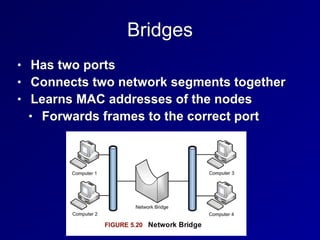
Bridges
• Has two ports


• Connects two network segments together


• Learns MAC addresses of the nodes


• Forwards frames to the correct port
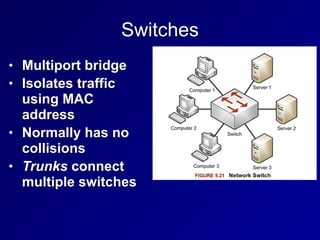
Switches
• Multiport bridge


• Isolates traffic
using MAC
address


• Normally has no
collisions


• Trunks connect
multiple switches
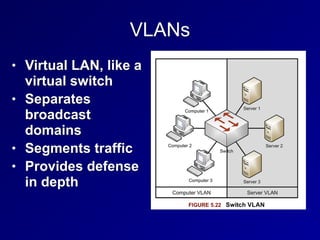
VLANs
• Virtual LAN, like a
virtual switch


• Separates
broadcast
domains


• Segments traffic


• Provides defense
in depth
Port Isolation
• Traditionally only one port on a managed
switch could communicate to the uplink


• Forms a Private VLAN (PVLAN)


• Makes lateral movement much more
difficult for an attacker
Port Isolation
• Very useful in modern multi-tenant
environments


• Isolates customers from one another


• Even when they are all serviced by the
same hypervisor
SPAN Ports
• Switched Port Analyzer Port


• Allows a NIDS (Network Intrusion
Detection System) to see all traffic
passing through the switch


• Also called a "mirror" port


• SPAN port may not have enough
bandwidth to deliver all the frames


• Some will be missed
Network Taps
• A device that can see all traffic on the
network


• Preferred way to connect a sniffer or
NIDS


• Can "fail open", so network traffic
passes if the tap fails


• Gives visibility to malformed frames


• Can have memory buffer to cache traffic
bursts
Routers
• OSI Layer 3


• Router traffic from one LAN to another


• Based on IP addresses


• Static Routes


• Typed in by network manager


• Don't change often


• Sufficient for small networks


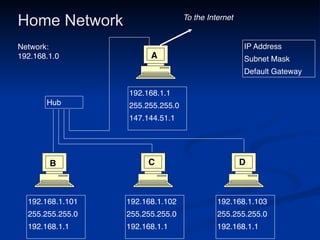
• Default route or Default Gateway


• Used if no other route is defined for that IP
Home Network
192.168.1.10
1

255.255.255.
0

192.168.1.1
192.168.1.10
2

255.255.255.
0

192.168.1.1
192.168.1.10
3

255.255.255.
0

192.168.1.1
192.168.1.
1

255.255.255.
0

147.144.51.1
IP Addres
s

Subnet Mas
k

Default Gateway
Hub
To the Internet
A
B C D
Network
:

192.168.1.0
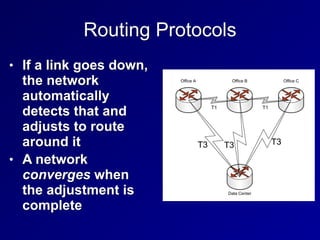
Routing Protocols
• If a link goes down,
the network
automatically
detects that and
adjusts to route
around it


• A network
converges when
the adjustment is
complete
Routing Protocols
• Interior Gateway Protocols (IGPs)


• Used by private networks like Intranets


• Ex: RIP, OSPF


• Exterior Gateway Protocols (EGPs)


• Used on the Internet


• Ex: BGP
Distance-Vector Routing Protocols
• Routers don't know the whole network
map


• Just a distance metric and direction


• Example


• AT&T is 2 hops out port 1


• CCSF is 3 hops out port 2


• Prone to inefficient decisions


• Like using a slower link with fewer hops


• And routing loops
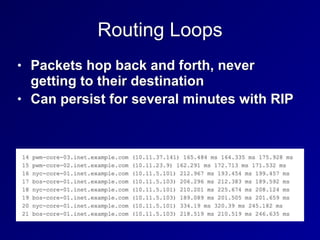
Routing Loops
• Packets hop back and forth, never
getting to their destination


• Can persist for several minutes with RIP
RIP (Routing Information Protocol)
• Old and inefficient, for weak routers


• Distance-Vector


• Uses hop count as metric


• Sends updates every 30 seconds


• Convergence is slow


• Max. hop count is 15; 16 is "infinity"


• RIPv1 uses classful networks only


• RIPv2 supports CIDR
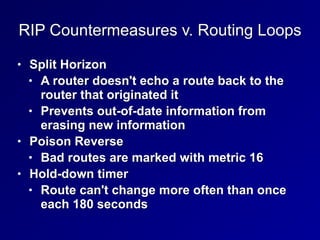
RIP Countermeasures v. Routing Loops
• Split Horizon


• A router doesn't echo a route back to the
router that originated it


• Prevents out-of-date information from
erasing new information


• Poison Reverse


• Bad routes are marked with metric 16


• Hold-down timer


• Route can't change more often than once
each 180 seconds
Link State Routing Protocols
• Each router knows the whole network
diagram


• Can use additional metrics to determine
best route


• Including bandwidth


• Much better than RIP, but requires more
processing power from the routers
OSPF
• Open Shortest Path First


• An open link-state routing protocol


• Routers send updates when events
occur


• Converges much faster than RIP
BGP
• Border Gateway Protocol


• Used on the Internet


• Routes between Autonomous Systems


• Networks with multiple Internet
connections


• A path-vector protocol
162
4h
Firewalls
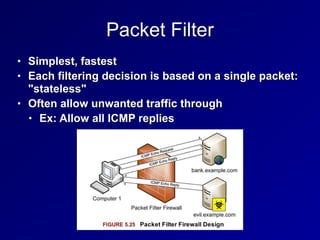
Packet Filter
• Simplest, fastest


• Each filtering decision is based on a single packet:
"stateless"


• Often allow unwanted traffic through


• Ex: Allow all ICMP replies
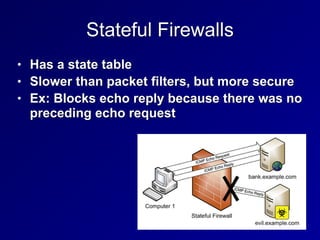
Stateful Firewalls
• Has a state table


• Slower than packet filters, but more secure


• Ex: Blocks echo reply because there was no
preceding echo request
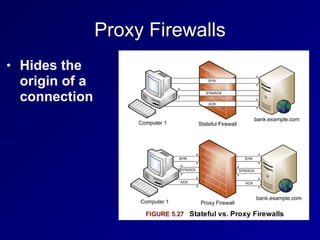
Proxy Firewalls
• Hides the
origin of a
connection
Application-Layer Proxy Firewalls
• Can use application-layer data to filter
traffic


• Such as URLs


• Often specialized to a certain protocol


• FTP proxy


• HTTP proxy
Circuit-Level Proxies Including SOCKS
• Operate at OSI layer 5 (Session)


• Below application-layer proxies


• Application-layer data is just passed
along


• Can forward many protocols


• SOCKS uses port TCP 1080


• Tor uses SOCKS
Bastion Host
• A host placed on the Internet but not
protected by another device, such as a
firewall


• Must protect itself


• Must be hardened


• Usually provide a specific service, all
others are disabled
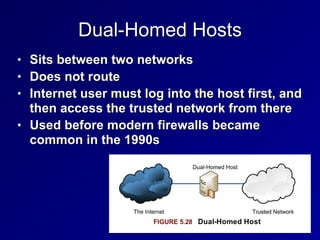
Dual-Homed Hosts
• Sits between two networks


• Does not route


• Internet user must log into the host first, and
then access the trusted network from there


• Used before modern firewalls became
common in the 1990s
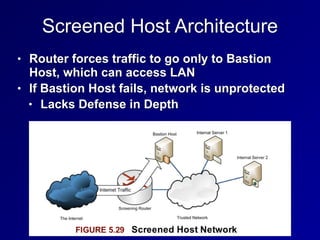
Screened Host Architecture
• Router forces traffic to go only to Bastion
Host, which can access LAN


• If Bastion Host fails, network is unprotected


• Lacks Defense in Depth
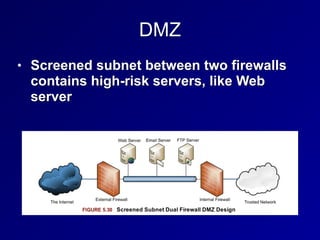
DMZ
• Screened subnet between two firewalls
contains high-risk servers, like Web
server
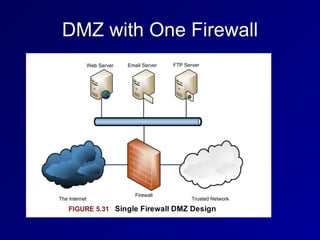
DMZ with One Firewall
Modem
• Modulator/Demodulator


• Translates binary data into analog
signals that can be carried on phone
networks


• Asynchronous devices


• No clock signal
DTE/DCE
• Data Terminal Equipment (DTE)


• A user machine, like a laptop or phone


• Data Circuit-Terminating Equipment (DCE)


• The end of an ISP's network, such as a
router


• Demarc


• The point where the DCE meets the DTE,
where the ISP's responsibility ends
CSU/DSU
• Circuit carried by DCE/DTE is
synchronous


• Uses a clock signal provided by the
DCE


• DCE device is a modem or a CSU/DSU
(Channel Service Unit/Data Service Unit)
177
Secure Communications Types
• Topics


• Authentication Protocols and Frameworks


• VPN (Virtual Private Network)


• Remote Access
Authentication Protocols and
Frameworks
PAP (Password Authentication Protocol)
• Sends passwords in cleartext


• Subject to sniffing and replay


• Insecure, should not be used
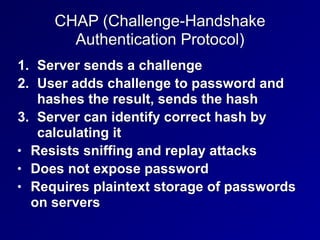
CHAP (Challenge-Handshake
Authentication Protocol)
1. Server sends a challenge


2. User adds challenge to password and
hashes the result, sends the hash


3. Server can identify correct hash by
calculating it


• Resists sniffing and replay attacks


• Does not expose password


• Requires plaintext storage of passwords
on servers
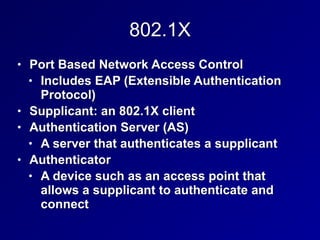
802.1X
• Port Based Network Access Control


• Includes EAP (Extensible Authentication
Protocol)


• Supplicant: an 802.1X client

• Authentication Server (AS)


• A server that authenticates a supplicant


• Authenticator


• A device such as an access point that
allows a supplicant to authenticate and
connect
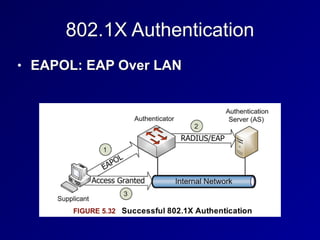
802.1X Authentication
• EAPOL: EAP Over LAN
Types of EAP
• EAP-MD5


• Weak, vulnerable to MITM attacks and
password-cracking


• Only allows client-to-server authentication;
all other methods listed below allow mutual
authentication


• LEAP (Lightweight Extensible Authentication
Protocol)


• Cisco-proprietary; unsafe, should not be
used
Types of EAP
• EAP-FAST


• EAP-Flexible Authentication via Secure
Tunneling


• Designed by Cisco to replace LEAP


• Uses a Protected Access Credential
(PAC) as a pre-shared key
Types of EAP
• EAP-TLS


• EAP-Transport Layer Security


• Uses PKI


• Requires both client-side and server-side
certificates


• Very secure, but complex and costly
Types of EAP
• EAP-TTLS


• EAP-Tunnelled Transport Layer
Security


• Allows a client to use a password
instead of a certificate


• Easier to deploy than EAP-TLS, but
less secure
Types of EAP
• PEAP


• Protected EAP


• Similar to EAP-TTLS
188
4i
VPN (Virtual Private Network)
VPN Goal
• Create a secure link over the Internet


• As secure as a dedicated leased line like
a T1


• Uses secure authentication, hashes, and
ciphers
SLIP and PPP
• Serial Line Internet Protocol (SLIP)


• Layer 2 protocol from 1988


• No confidentiality, integrity or
authentication


• Point-to-Point Protocol (PPP)


• Replaced SLIP


• Uses HDLC


• Adds confidentiality, integrity and
authentication
PPTP
• Point-to-Point Tunneling Protocol


• Uses GRE (General Routing
Encapsulation)


• To pass PPP via IP


• Uses TCP port 1723 for a control
channel


• Old and unsafe
L2TP
• Layer 2 Tunneling Protocol


• Provides authentication but not
confidentiality


• Used with IPsec, provides confidentiality


• Can be used on non-IP networks, such as
ATM
IPsec
• Two main protocols


• Encapsulating Security Payload (ESP)


• Layer 4 protocol 50


• Authentication Header (AH)


• Layer 4 protocol 51
IPsec Architectures
• Host-to-gateway


• Client mode


• Gateway-to-gateway


• Point-to-point


• Host-to-host
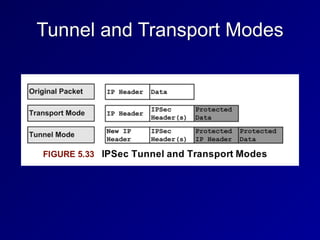
Tunnel and Transport Modes
SSL and TLS
• Secure Sockets Layer (SSL)


• Now deprecated, replaced by TLS


• Transport Layer Security (TLS)


• Port TCP 443


• TLS VPNs are simpler to use than IPsec
Remote Access
ISDN
• Integrated Services Digital Network


• Provides digital service over copper-wire
phone lines


• Basic Rate Interface (BRI)


• Provides two 64 Kbps channels and
one 16 Kbps signaling channel


• Primary Rate Interface (PRI)


• Provides 23 64 Kbps channels and one
16 Kbps signaling channel
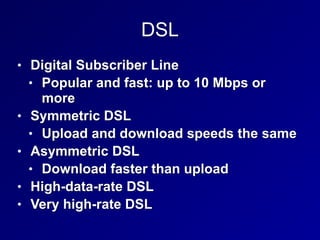
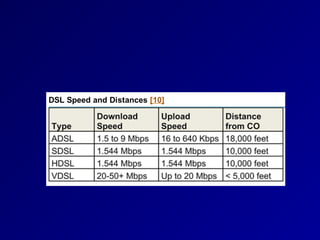
DSL
• Digital Subscriber Line


• Popular and fast: up to 10 Mbps or
more


• Symmetric DSL


• Upload and download speeds the same


• Asymmetric DSL


• Download faster than upload


• High-data-rate DSL


• Very high-rate DSL
Cable Modems
• Internet access via broadband cable TV


• Bandwidth shared with neighbors


• Only available in cities, where the cables
are
Callback & Caller ID
• Callback


• A modem-based authentication system


• User calls to initiate a connection


• System hangs up and calls back at a
preconfigured number


• Caller ID


• Verifies that the user is calling from the
correct phone number


• BUT caller ID can be easily forged
Remote Desktop Console Access
• rlogin & rsh are old Unix remote access
systems


• Cleartext and poorly authenticated


• Used TCP 513 and 514, respectively


• Two modern remote access protocols


• Virtual Network Computing (VNC)


• TCP port 5900


• Remote Desktop Protocol (RDP)


• TCP port 3389
GoToMyPC and LogMeIn
• Use reverse tunnel over HTTPS


• Agent installed on computer connects to
a central server


• User authenticates to that server
Desktop and Application Vitualization
• Virtual Desktop Infrastructure (VDI)


• A centralized infrastructure hosts a
desktop image


• Remotely deployed to workforce


• Application virtualization


• Users access the application on the
central server


• Allows strict access control and patch
management
Screen Scraping
• Packetizes and transmits information
needed to draw the screen


• Used by VNC but not by RDP
Instant Messaging
• Real-time chat


• Often with audio an video conferencing


• IRC (Internet Relay Chat)


• From 1988 and still popular


• Uses TCP port 6667 by default


• Many IRC servers use nonstandard
ports


• Used by malware to phone home
Other Chat Protocols
• AOL Instant Messenger (AIM)


• ICQ


• Extensible Messaging and Presence
Protocol (XMPP)


• Formerly called Jabber


• Security risks


• Unpatched old chat clients


• File sharing can be used to leak
confidential documents
Remote Meeting Technology
• GoToMeeting by Citrix


• Microsoft Office Live Meeting


• Allow sharing Powerpoint slides and
documents


• Sometimes also audio or video


• Sometimes allow users to remotely control a
PC


• Tunnel through outbound TLS traffic


• May bypass existing controls and violate
policy
PDAs
• Personal Digital Assistants


• Apple Newton and Palm Pilot


• "Mobile device" is a more modern term
than PDA


• Most have converged with smartphones


• iPhone, Blackberry, Android
PDA Security Issues
• Loss of data due to theft of device


• Sensitive data on a PDA should be
encrypted


• PIN code should be used to lock it


• Remote Wipe capability helps to control
data loss


• Wireless security


• Should use secure wireless connections
and consider risks of Bluetooth
Wireless Application Protocol


(WAP)
• Designed to provide secure Web
services to handheld devices such as
smartphones


• Based on HTML


• Includes HDML (Handheld Device Markup
Language)


• Authentication uses WTLS (Wireless
Transport Layer Security)


• Based on TLS
WAP
• WAP browser is a microbrowser


• Simpler than a full Web browser


• Connects to a WAP gateway


• A proxy server designed to translate Web
pages


• Accesses sites written in, or converted to
WML (Wireless Markup Language)


• Based on XML


• WAP has disappeared since 2013, according
to Wikipedia
Content Delivery Networks


(CDN)
• A series of caching servers


• Improve performance and lower latency of
downloaded online content


• Automatically use servers closest to end
users


• Examples


• Akamai, Amazon CloudFront, CloudFlare,
Microsoft Azure


• Can increase availability and resist DoS
attacks
216
4j

4. Communication and Network Security

  • 1.
    CNIT 125: Information Security Professional (CISSP Preparation) Ch4. Communication and Network Security Updated 3-21-22
  • 2.
  • 3.
    Fundamental Network Concepts •Simplex • One-way communication, like an FM radio • Half Duplex • Sends or receives, but not both at once, like a walkie-talkie • Full Duplex • Sends & receives simultaneously, like a telephone
  • 4.
    Fundamental Network Concepts •Baseband • Whole frequency range dedicated to one signal, like Ethernet • Broadband • Multiple channels, each gets only a portion of the bandwidth • Like broadcast FM radio
  • 5.
    Fundamental Network Concepts •Analog • Continuous variations of signal • Signal degrades over distance and when repeated • Like a vinyl record • Digital • Signal is a series of zeroes and ones • Can be transmitted and repeated with no loss of accuracy • Like a CD
  • 6.
    Fundamental Network Concepts •LAN (Local Area Network) • Within a building • MAN (Metropolitan Area Network) • Within a city • WAN (Wide Area Network) • Covering cities, states, or countries • GAN (Global Area Network) • A global collection of WANs • PAN (Personal Area Network) • Devices you carry, often using Bluetooth
  • 7.
    Fundamental Network Concepts •Internet • Global collection of networks running TCP/IP • Intranet • Privately owned network using TCP/IP • Extranet • Connects private Intranets • Such as connections to business partners
  • 8.
    Fundamental Network Concepts •Circuit-Switched Network • Dedicated circuit or channel for one connection • Ex: a T1 line between businesses • Packet-Switched Network • Multiple signals share the same lines • Data is broken into packets • Less wasteful and therefore cheaper than circuit switching
  • 9.
    Fundamental Network Concepts •Quality of Service • Can give specific traffic precedence over other traffic • On a packet-switched network • Ex: VoIP packets get precedence over email packets
  • 10.
    Fundamental Network Concepts •Layered Design • OSI and TCP/IP models use layers • Each layer performs a specific function • Changes in one layer do not directly affect another layer
  • 11.
    Fundamental Network Concepts •Network Model • A description of how a network protocol suite operates • Ex: OSI model, TCP/IP model • Network Stack • A network protocol suite programmed in software or hardware • Ex: TCP/IP
  • 12.
    OSI Model • Mnemonics •Please Do Not Throw Sausage Pizza Away • All People Seem To Need Data Processing
  • 13.
    Layer 1: Physical •Protocol Data Unit: bit • Physical media that carry signals • Ethernet cables • Radio waves • Fiber optic cables • Devices • Hubs • Repeaters • Cables
  • 14.
    Layer 2: DataLink • Protocol Data Unit: frame • Uses MAC addresses (for Ethernet) • Devices • Ethernet card • Switch • Bridge
  • 15.
    Layer 2: DataLink • Two sub-layers • Media Access Control • Connects to layer 1 • Logical Link Control • Connects to layer 3
  • 16.
    Layer 3: Network •Protocol Data Unit: packet • Performs routing, using IP addresses • Uses IPv4 and/or IPv6 • Device: Router
  • 17.
    Layer 4: Transport •Protocol Data Unit: Segment • Protocols include UDP and TCP • Uses Port Numbers • TCP is reliable, orders segments, and re- sends undelivered segments
  • 18.
    Layer 5: Session •Network file shares are mounted at the session layer • For example, you must log in first • Connections between applications
  • 19.
    Layer 6: Presentation •Presents data to the application layer in a comprehensible way • Data conversion • Character encoding such as ASCII • Image formats like GIF and JPEG • Encryption • Compression
  • 20.
    Layer 7: Application •Human-Readable data • Web browser, word processor, IM client • Protocols: • Telnet • FTP • HTTP
  • 21.
  • 22.
  • 23.
    Network Access Layer •Combines OSI layers 1 and 2 • Includes cable and NIC • Uses MAC addresses
  • 24.
    Internet Layer • OSILayer 3 • IP addresses and routing • Uses IPv4 or IPv6
  • 25.
    Transport Layer • MatchesOSI layer 4 • Contains TCP and UDP
  • 26.
    Application Layer • CombinesOSI layers 5-7 • Presents network data to the human user • Like a Web browser
  • 27.
    Encapsulation • Takes informationfrom a higher layer, and adds a header to it • Like putting a letter in an envelope and addressing it • Layer 4 TCP SEGMENT • Is encapsulated in a Layer 3 IP PACKET • That's encapsulated in a Layer 2 FRAME • Sent over the wire at layer 1 as BITS
  • 28.
    Mnemonic: SPF10 • Segment •Packet • Frame • One and Zero (Bits)
  • 29.
    Decapsulation • Also calledde-multiplexing • Happens at receiving end • The addresses are stripped off the data packets, and the data is delivered to higher levels • BITS are converted to FRAMES • FRAMES are converted to PACKETS • PACKETS are converted to SEGMENTS • SEGMENTS are converted to application data
  • 30.
    Network Access, Internetand Transport Layer Protocols and Concepts
  • 31.
    MAC Addresses • MediaAccess Control address • Unique hardware address of an Ethernet NIC • Burned in at the factory • 48 bits long • First 24 bits form Organizationally Unique Identifier • EUI-64 addresses are 64 bits long • Used in IPv6
  • 32.
    IPv4 • Internet Protocolversion 4 • 32-bit addresses • Written as four bytes in decimal • 192.168.0.1
  • 33.
  • 34.
    IPv4 Fragmentation • Anintermediate router can fragment a packet into smaller packets • To move it onto a network with a smaller maximum transmission unit • "Path MTU Discovery" • Send a large packet with the DF (Don't Fragment) bit set • If it's dropped, try a lower packet size
  • 35.
  • 36.
    IPv6 Addresses andAutoconfiguration • MAC address used to construct host portion of IPv6 Address • Right 64 bits • fe80:: is the link-local prefix • Public addresses start with 2 or 3
  • 37.
    IPv6 Security Challenges •Many networks have IPv6 enabled, but the administrators don't understand how to manage it • It can be used for forbidden activity, such as BitTorrent over IPv6
  • 38.
  • 39.
  • 40.
    Classless Inter-Domain Routing(CIDR) • Allows network sizes between the classes • Class A is /8 16 million hosts • Class B is /16 65,536 - 2 hosts • Class C is /24 256 - 2 hosts • 147.144.96.0/20 • 16 class Cs 2048 - 2 hosts
  • 41.
    Private IPv4 Addresses •Defined in RFC 1918 • 10.0.0.0 - 10.255.255.255 (10.0.0.0/8) • 172.16.0.0 - 172.31.255.255 (172.16.0.0/12) • 192.168.0.0 - 192.168.255.255 (192.168.0.0/16)
  • 42.
  • 43.
    Network Address Translation(NAT) • Usually used with Port Address Translation (PAT) • So many clients can share a single public address • Other techniques (rarely used) • Static NAT • One private address to one public address • Pool NAT • A group of public addresses translated one- by-one to the same number of local addresses
  • 44.
  • 45.
    ARP (Address ResolutionProtocol) • Used to find MAC addresses on a LAN • RARP (Reverse Address Resolution Protocol) • An early competitor to DHCP to deliver IP addresses, not common anymore
  • 46.
    ARP Request andReply ■ Client wants to find Gateway ■ ARP Request: Who has 192.168.2.1? ■ ARP Reply: ■ MAC: 00-30-bd-02-ed-7b has 192.168.2.1 Client 
 Gateway 
 Facebook.com ARP Request ARP Reply
  • 47.
    ARP Poisoning Client 
 Gateway 
 Facebook.com Attacker 
 ARP Replies:I am the Gateway Traffic to Facebook Forwarded & Altered Traffic
  • 48.
    Unicast and MulticastTraffic • Unicast: One sender to one receiver • Most common • Multicast: One sender to several receivers • Rare, used by routing protocols
  • 49.
    Broadcast Traffic • Onesender to every device on the LAN • Limited broadcast: 255.255.255.255 • Actually sends layer 2 broadcast, to MAC address FF:FF:FF:FF:FF:FF • Directed broadcast: 147.144.255.255 • Was once sent over the Internet • Blocked now to stop smurf attacks
  • 50.
    Promiscuous Network Access •A NIC in promiscuous mode passes all frames upward for use • Even if they are for a different MAC • Required for Network Intrusion Detection Systems (NIDS) • Entering promiscuous mode requires root privileges • Switches isolate traffic segments • So traffic won't be sent to the wrong MAC address
  • 51.
    TCP • Transmission ControlProtocol • OSI Layer 4
  • 52.
    TCP Ports • 0-1023:Well-known ports • Require root privileges to listen on • Also called "reserved ports" • 1024 - 65535 • Ephemeral ports • Any user can listen on them
  • 53.
    Socket • A socketis a combination of four numbers • Source IP and Source Port • Destination IP and Destination Port • Acts like a cable for two-way transmission
  • 54.
    State • LISTEN • Waitingfor a SYN • ESTABLISHED • Handshake complete
  • 55.
    TCP Flags • URG:Urgent • ACK: Acknowledge • PSH: Push • RST: Reset • SYN: Synchronize • FIN: Finish • Three new flags added in 2001 & 2003 • CWR: Congestion Window Reduced • ECE: Explicit Congestion Notification Echo • NS: Nonce Sum
  • 56.
  • 57.
    UDP • User DatagramProtocol • No handshake • No acknowledgements
  • 58.
  • 59.
    ICMP • Internet ControlMessage Protocol • Used to troubleshoot and report error conditions • PING • Sends an ICMP Echo Request • Gets an ICMP Echo Reply • Traceroute • Sends packets with low TTL • Tracks ICMP Time Exceeded replies
  • 61.
    Traceroute • Unix andCisco send UDP packets • Microsoft sends ICMP packets
  • 62.
    Application Layer TCP/IPProtocols and Concepts • Telnet • Terminal emulation • Sends command-lines • No encryption • SSH (Secure Shell) • Encrypted replacement for Telnet
  • 63.
    Application Layer TCP/IPProtocols and Concepts • FTP (File Transfer Protocol) • Sends passwords unencrypted • Uses ports 20 and 21 on the server • Problems for firewalls (link Ch 5b) • Active FTP initiates the port 20 connection from the server, not the client • Passive FTP uses an arbitrary ephemeral port on the server
  • 64.
    Application Layer TCP/IPProtocols and Concepts • TFTP (Trivial File Transfer Protocol) • Uses UDP port 69 • No authentication at all • No encryption • Used to update firmware in routers and IP phones
  • 65.
    Application Layer TCP/IPProtocols and Concepts • SSH (Secure Shell) • Secure replacement for Telnet • And FTP and the unix "r" commands • rlogin, rshell, etc. • Includes SFTP and SCP • Can be used as a secure tunnel for other protocols, such as HTTP • Uses TCP port 22 • SSHv1 is old and vulnerable, SSHv2 is the current standard
  • 66.
    Application Layer TCP/IPProtocols and Concepts • SMTP (Simple Mail Transfer Protocol) • Uses TCP port 25 • Used to send email between servers • POP (Post Office Protocol) • TCP port 110 • Used to download email to a local client like Eudora or Outlook • IMAP (Internet Message Access Protocol) • TCP port 132 • Used to download email to a local client like Eudora or Outlook
  • 67.
    Application Layer TCP/IPProtocols and Concepts • DNS (Domain Name System) • Uses UDP and TCP 53 • Large responses require TCP 53 • Zone transfers • DNSSEC-signed records • Resolves domain names like ccsf.edu to IP addresses
  • 68.
    Application Layer TCP/IPProtocols and Concepts • DNS Server Types • SOA (Start of Authority) • Contains the master record for a zone • Recursive server • If it doesn't have the requested data, it will ask other servers • Caching server • Stores recently resolved names
  • 69.
    Application Layer TCP/IPProtocols and Concepts • DNS Weaknesses • Uses UDP • No authentication • Security relies on a 16-bit source port and a 16-bit DNS query ID • If attackers can guess both numbers, they can poison a DNS sever cache
  • 70.
    Application Layer TCP/IPProtocols and Concepts • DNSSEC • Domain Name Server Security Extensions • Adds authentication and integrity to DNS responses • Uses public key encryption • No confidentiality • Like a digital signature • Slowly being rolled out across the Internet
  • 71.
  • 72.
  • 73.
    Application Layer TCP/IPProtocols and Concepts • SNMP • Simple Network Management Protocol • Used to monitor and control network devices • Uses UDP port 161 • SNMPv1 and v2 send "community strings" in plaintext • Defaults are "public" and "private" • SNMPv3 adds encryption; much more secure • Many networks still use SNMPv2
  • 74.
    Application Layer TCP/IPProtocols and Concepts • HTTP • Hypertext Transfer Protocol • TCP port 80 • No encryption • HTTPS • Hypertext Transfer Protocol Secure • TCP port 443 • Encrypted with SSL/TLS
  • 75.
    Application Layer TCP/IPProtocols and Concepts • BOOTP • Bootstrap protocol • Enables a BIOS to boot from the network • BIOS gets an IP address from BOOTP • Then uses TFTP to load the OS • Uses ports UDP 67 for servers and UDP 68 for clients
  • 76.
    Application Layer TCP/IPProtocols and Concepts • DHCP • Intended to replace BOOTP • Can deliver IP address, DNS server, default gateway, and more • Uses ports UDP 67 for servers and UDP 68 for clients
  • 77.
  • 78.
    CNIT 125: Information Security Professional (CISSP Preparation) Ch4. Communication and Network Security (Part 2)
  • 79.
    Network Architecture andDesign (continued)
  • 80.
    Layer 1 NetworkCabling Terms • EMI (Electromgnetic Interference) • Caused by electricity • Causes unwanted signals (noise) • When a signal from one wire leaks into another wire, that's Crosstalk • Attenuation is the weakening of a signal as it travels further from the source
  • 81.
    Twisted Pair Cabling •Unshielded Twisted Pair (UTP) • Twists provide some protection from EMI • Image from 
 Wikipedia
  • 83.
    Shielded Twisted Pair(STP) • Has a layer of shielding around each pair of wires • Protects it from EMI • More rigid and expensive than UTP
  • 84.
    Coaxial Cabling • Innercopper core (D) • Shield (B) • More resistant to EMI than UTP or STP • Higher bandwidth than UTP or STP
  • 85.
    Fiber Optic NetworkCable • Uses light pulses • Cable is made of glass • Immune to EMI • Much faster and lower attenuation than coax • Can send a signal 50 miles • Disadvantages: cost and complexity
  • 86.
    Types of Fiber •Multimode fiber • Many modes (paths) of light • Shorter distance, lower bandwidth • Singlemode fiber • One mode (path) • Long-haul, high-speed • Wavelength Division Multiplexing • Sends multiple signals over different colors of light • Can exceed 10 Gbps
  • 87.
  • 88.
    Ethernet • Originally useda physical bus topology with coaxial cables • Now uses physical star topology with twisted-pair cables • Baseband (one channel) • Frames can collide if two nodes transmit simultaneously
  • 90.
    CSMA/CD • Carrier SenseMultiple Access/Collision Detection • Monitor network to see if it is idle • If not idle, wait a random period of time • If idle, transmit • While transmitting, monitor the network • If an unusual voltage level is detected, another station must be sending: a collision
  • 91.
    Collision • Send Jamsignal to tell all nodes to stop transmitting • Wait a random amount of time before retransmitting
  • 92.
    CSMA/CA • Carrier SenseMultiple Access/Collision Avoidance • Used in wireless networks • Because collisions cannot be detected • Uses acknowledgements for each frame • If no acknowledgement received, the node will wait and retransmit • Less efficient than CSMA/CD
  • 93.
    ARCNET & TokenRing • Attached Resource Computer Network • Ran at 2.5 Mbps • Token Ring • Ran at 16 Mbps • Two legacy LAN technologies • Both use tokens • Only node with the token can send or receive data • No collisions
  • 94.
    FDDI • Fiber DistributedData Interface • Another legacy LAN technology • Used two fiber rings • Secondary ring sent data in the opposite direction • Fault tolerant • A single cut in the ring does not stop service • Runs at 100 Mbps
  • 95.
  • 96.
    Bus • A singlecable break brings the whole network down
  • 97.
    Tree or Hierarchical •Root node controls all traffic • Legacy network • Root was often a mainframe
  • 98.
    Ring • FDDI usedboth a logical and physical ring
  • 99.
    Star • Ethernet usesa star • Fault tolerant • A cable break only affects one node • Token Ring used a physical star and a logical ring
  • 100.
  • 101.
  • 102.
  • 103.
    T1, T3, E1,E3 • T1 (DS1) provides 1.5 Mbps dedicated circuit • Contains 24 64 kbps lines (DS0) • T3 (DS3) contains 28 T1s • 45 Mbps • E1 provides 2 Mbps in 30 channels • E3 contains 16 E1s for 34 Mbps
  • 104.
    SONET • Synchronous OpticalNetworking • Contains multiple T-carrier circuits • Via fiber optic cabling • Ring topology for redundancy
  • 105.
    Frame Relay • Packet-switchedlayer 2 protocol • No error recovery • Focuses on speed • Multiplexes multiple logical connections over a single physical connection • To create Virtual Circuits • An alternative to dedicated lines such as T1s
  • 106.
    Frame Relay • PVC(Permanent Virtual Circuit) • Always connected like a T1 • SVC (Switched Virtual Circuit) • Sets up for a call, terminates after the call • Frame Relay addresses circuits with Data Link Connection Identifiers (DLCI)
  • 107.
    X.25 • Older packet-switchedWAN protocol • Cost-effective in 1970s through 1990s
  • 108.
    ATM • Asynchronous TransferMode • WAN technology • Fixed-size 53-byte cells • 5 bytes of address, 48 bytes of data • SDMS (Switched Multimegabit Data Service) • Older and similar to ATM • Also used 53-byte cells
  • 109.
    MPLS • Multiprotocol LabelSwitching • Forwards WAN data using labels • Via a shared MPLS cloud network • Can carry many types of traffic • ATM, Frame Relay, IP, and more • Traffic decisions are based on labels
  • 110.
    SDLC and HDLC •Synchronous Data Link Control • Layer 2 WAN protocol • Uses polling, similar to token passing • Primary node polls secondary nodes to request their data • High-Level Data Link Control • Successor to SDLC • Adds error correction and flow control • Three modes (next slide)
  • 111.
    HDLC: Three Modes •Normal Response Mode (NRM) • Secondary nodes can transmit when given permission by the primary • Asynchronous Response Mode (ARM) • Secondary nodes can initiate transmission with the primary • Asynchronous Balanced Mode (ABM) • Compiled mode: nodes may act s either primary or secondary, initiating transmissions without receiving permission
  • 112.
    Converged Protocols • Multipleservices over the same Ethernet network • Industrial controls, storage, voice, ...
  • 113.
    DNP3 • Distributed NetworkProtocol 3 • Open standard • Used primarily by energy sector • For interoperability between various vendors' SCADA and smart grid applications • "Smart Grid" technology brings utility electricity delivery into the 21st century • More energy-efficient
  • 114.
    DNP3 • Multilayer protocol •May be carried over TCP/IP • Recent improvements allow "Secure Authentication" • Original specification was vulnerable to spoofing and replay attacks, and pre- shared keys only • The current standard is IEEE 1815-2012 • Supports Public Key Infrastructure (PKI)
  • 115.
    Storage Protocols • FibreChannel over Ethernet (FCoE) • Internet Small Computer System Interface (iSCSI) • Used for SANs (Storage Area Networks) • Allows block-level file access over a network • Just like a directly attached hard drive
  • 116.
    Fibre Channel overEthernet (FCoE) • Fibre Channel uses special cable and hardware • Including Host Bus Adapters (HBAs) • FCoE uses standard ethernet • But not TCP/IP • Fibre Channel over IP (FCIP) • Encapsulates Fibre Channel frames via TCP/IP
  • 117.
    Internet Small ComputerSystem Interface (iSCSI) • Uses higher layers of the TCP/IP suite for communication • Can be routed • Allows access to storage over a WAN • Uses Logical Unit Numbers (LUNs) to address storage across the network
  • 118.
    Virtual SAN • StorageArea Networks (SANs) • Historically used proprietary hardware and software • Virtual SAN is analogous to a VLAN
  • 119.
    VoIP • Voice overInternet Protocol • Uses two protocols • Real-time Transport Protocol (RTP) • Carries audio and video • Session Initiation Protocol (SIP) • For signals like "phone ringing" • Secure Real-time Transport Protocol (SRTP) • Uses AES and SHA-1 to provide confidentiality, integrity, and secure authentication
  • 120.
    VoIP • Saves money •No need for separate phone and IT networks • Exposes phone traffic to network attacks • RTP provodes little or no security by default • Wireshark can eavesdrop on a call
  • 121.
    Software-Defined Networks • Separatesa router's control plane from the data (forwarding) plane • Control plane makes routing decisions • Data plane forwards packets through the router • With SDN routing decision are made remotely • Allows customization of networks
  • 122.
    OpenFlow • Most well-knownSDN protocol • Allows a central controller to control switching rules • Uses TCP and TLS encryption
  • 123.
  • 124.
  • 125.
    DoS & Availability •An attacker in physical proximity to a WLAN can launch DoS attacks • Polluting the wireless spectrum with noise • Sending Deauth frames • There is no defense
  • 126.
    Unlicensed Bands • Industrial,Scientific, and Medical (ISM) bands • No FCC license needed to use them • Cordless phones, 802.11, and Bluetooth all use ISM bands • Two common bands used internationally • 2.4 GHz • 5 GHz
  • 127.
    FHSS, DHSS, andOFDM • Frequency Hopping Spread Spectrum (FHSS) hops across many channels • Direct Sequence Spread Spectrum (DSSS) spreads the signal across a whole band • Both maximize throughput and minimize effects of interference • Orthogonal Frequency Division Multiplexing (OFDM) uses simultaneous transmissions that do not interfere with each other
  • 128.
  • 129.
    Wireless NIC Modes •Managed • Master • Ad-Hoc • Monitor
  • 130.
    Managed and MasterModes • Managed mode • Client mode, obeys commands from the Master • Master mode • Access point • Clients connect to it
  • 131.
    Ad Hoc andMonitor Mode • Ad Hoc • Peer-to-peer network • No central access point • Monitor mode • Used to sniff WLAN traffic • Including traffic between other devices
  • 132.
    SSID • Service Set Identifier •Network name • Normally broadcast by access point • Disabling SSID broadcasts is a weak security measure
  • 133.
    MAC Address Filtering •A weak security measure • MACs can be sniffed and spoofed
  • 134.
    WEP • Wired EquivalentPrivacy • Weak, unsafe encryption protocol • Designed specifically to avoid export munition laws • Too weak to use
  • 135.
    802.11i • Defines aRobust Security Network (RSN) • Also called WPA2 (Wi-Fi Protected Access 2) • Uses AES encryption for confidentiality • Uses CCMP for integrity • Counter Mode CBC MAC Protocol, which makes a Message Integrity Check (MIC)
  • 136.
    WPA • Designed foraccess points too weak to implement 802.11i • Uses RC4 encryption for confidentiality • Uses TKIP for integrity • Considered weaker than WPA2
  • 137.
    Bluetooth • IEEE 802.15 •Personal Area Network (PAN) • Uses 2.4 GHz band • v. 2.1 and earlier ran at 3 Mbps or less • v3 is much faster • Class 3: under 10 meters • Class 2: 10 meters • Class 1: 100 meters
  • 138.
    Bluetooth • Uses the128-bit E0 symmetric stream cipher • Cryptanalysis has shown that E0 is weak • True strength is 38 bits or less • Disable automatic discovery when not in use • But attacker can discover the device by guessing its MAC address
  • 139.
    RFID • Radio FrequencyIdentification • Tags for animals or objects • Active, semi-passive, or passive • Active RFID tag has a battery & broadcasts a signal • Semi-passive • Has a battery & also relies on the reader for power • Passive • Powered by reader, shorter range, cheaper
  • 140.
    Faraday Cage • Shieldsan object with wire mesh • Blocks radio signals • Can be made by wrapping aluminum foil around an object
  • 141.
  • 142.
  • 143.
    Repeaters and Hubs •OSI Layer 1 • Repeater has 2 ports • Receives bits on one port • Repeats them out the other port • Hub • Multiport repeater • No traffic isolation • No security, no confidentiality or integrity • Half-duplex: cannot send and receive simultaneously • One collision domain
  • 144.
    Bridges • Has twoports • Connects two network segments together • Learns MAC addresses of the nodes • Forwards frames to the correct port
  • 145.
    Switches • Multiport bridge •Isolates traffic using MAC address • Normally has no collisions • Trunks connect multiple switches
  • 146.
    VLANs • Virtual LAN,like a virtual switch • Separates broadcast domains • Segments traffic • Provides defense in depth
  • 147.
    Port Isolation • Traditionallyonly one port on a managed switch could communicate to the uplink • Forms a Private VLAN (PVLAN) • Makes lateral movement much more difficult for an attacker
  • 148.
    Port Isolation • Veryuseful in modern multi-tenant environments • Isolates customers from one another • Even when they are all serviced by the same hypervisor
  • 149.
    SPAN Ports • SwitchedPort Analyzer Port • Allows a NIDS (Network Intrusion Detection System) to see all traffic passing through the switch • Also called a "mirror" port • SPAN port may not have enough bandwidth to deliver all the frames • Some will be missed
  • 150.
    Network Taps • Adevice that can see all traffic on the network • Preferred way to connect a sniffer or NIDS • Can "fail open", so network traffic passes if the tap fails • Gives visibility to malformed frames • Can have memory buffer to cache traffic bursts
  • 151.
    Routers • OSI Layer3 • Router traffic from one LAN to another • Based on IP addresses • Static Routes • Typed in by network manager • Don't change often • Sufficient for small networks • Default route or Default Gateway • Used if no other route is defined for that IP
  • 152.
  • 153.
    Routing Protocols • Ifa link goes down, the network automatically detects that and adjusts to route around it • A network converges when the adjustment is complete
  • 154.
    Routing Protocols • InteriorGateway Protocols (IGPs) • Used by private networks like Intranets • Ex: RIP, OSPF • Exterior Gateway Protocols (EGPs) • Used on the Internet • Ex: BGP
  • 155.
    Distance-Vector Routing Protocols •Routers don't know the whole network map • Just a distance metric and direction • Example • AT&T is 2 hops out port 1 • CCSF is 3 hops out port 2 • Prone to inefficient decisions • Like using a slower link with fewer hops • And routing loops
  • 156.
    Routing Loops • Packetshop back and forth, never getting to their destination • Can persist for several minutes with RIP
  • 157.
    RIP (Routing InformationProtocol) • Old and inefficient, for weak routers • Distance-Vector • Uses hop count as metric • Sends updates every 30 seconds • Convergence is slow • Max. hop count is 15; 16 is "infinity" • RIPv1 uses classful networks only • RIPv2 supports CIDR
  • 158.
    RIP Countermeasures v.Routing Loops • Split Horizon • A router doesn't echo a route back to the router that originated it • Prevents out-of-date information from erasing new information • Poison Reverse • Bad routes are marked with metric 16 • Hold-down timer • Route can't change more often than once each 180 seconds
  • 159.
    Link State RoutingProtocols • Each router knows the whole network diagram • Can use additional metrics to determine best route • Including bandwidth • Much better than RIP, but requires more processing power from the routers
  • 160.
    OSPF • Open ShortestPath First • An open link-state routing protocol • Routers send updates when events occur • Converges much faster than RIP
  • 161.
    BGP • Border GatewayProtocol • Used on the Internet • Routes between Autonomous Systems • Networks with multiple Internet connections • A path-vector protocol
  • 162.
  • 163.
  • 164.
    Packet Filter • Simplest,fastest • Each filtering decision is based on a single packet: "stateless" • Often allow unwanted traffic through • Ex: Allow all ICMP replies
  • 165.
    Stateful Firewalls • Hasa state table • Slower than packet filters, but more secure • Ex: Blocks echo reply because there was no preceding echo request
  • 166.
    Proxy Firewalls • Hidesthe origin of a connection
  • 167.
    Application-Layer Proxy Firewalls •Can use application-layer data to filter traffic • Such as URLs • Often specialized to a certain protocol • FTP proxy • HTTP proxy
  • 168.
    Circuit-Level Proxies IncludingSOCKS • Operate at OSI layer 5 (Session) • Below application-layer proxies • Application-layer data is just passed along • Can forward many protocols • SOCKS uses port TCP 1080 • Tor uses SOCKS
  • 169.
    Bastion Host • Ahost placed on the Internet but not protected by another device, such as a firewall • Must protect itself • Must be hardened • Usually provide a specific service, all others are disabled
  • 170.
    Dual-Homed Hosts • Sitsbetween two networks • Does not route • Internet user must log into the host first, and then access the trusted network from there • Used before modern firewalls became common in the 1990s
  • 171.
    Screened Host Architecture •Router forces traffic to go only to Bastion Host, which can access LAN • If Bastion Host fails, network is unprotected • Lacks Defense in Depth
  • 172.
    DMZ • Screened subnetbetween two firewalls contains high-risk servers, like Web server
  • 173.
    DMZ with OneFirewall
  • 174.
    Modem • Modulator/Demodulator • Translatesbinary data into analog signals that can be carried on phone networks • Asynchronous devices • No clock signal
  • 175.
    DTE/DCE • Data TerminalEquipment (DTE) • A user machine, like a laptop or phone • Data Circuit-Terminating Equipment (DCE) • The end of an ISP's network, such as a router • Demarc • The point where the DCE meets the DTE, where the ISP's responsibility ends
  • 176.
    CSU/DSU • Circuit carriedby DCE/DTE is synchronous • Uses a clock signal provided by the DCE • DCE device is a modem or a CSU/DSU (Channel Service Unit/Data Service Unit)
  • 177.
    177 Secure Communications Types •Topics • Authentication Protocols and Frameworks • VPN (Virtual Private Network) • Remote Access
  • 178.
  • 179.
    PAP (Password AuthenticationProtocol) • Sends passwords in cleartext • Subject to sniffing and replay • Insecure, should not be used
  • 180.
    CHAP (Challenge-Handshake Authentication Protocol) 1.Server sends a challenge 2. User adds challenge to password and hashes the result, sends the hash 3. Server can identify correct hash by calculating it • Resists sniffing and replay attacks • Does not expose password • Requires plaintext storage of passwords on servers
  • 181.
    802.1X • Port BasedNetwork Access Control • Includes EAP (Extensible Authentication Protocol) • Supplicant: an 802.1X client • Authentication Server (AS) • A server that authenticates a supplicant • Authenticator • A device such as an access point that allows a supplicant to authenticate and connect
  • 182.
  • 183.
    Types of EAP •EAP-MD5 • Weak, vulnerable to MITM attacks and password-cracking • Only allows client-to-server authentication; all other methods listed below allow mutual authentication • LEAP (Lightweight Extensible Authentication Protocol) • Cisco-proprietary; unsafe, should not be used
  • 184.
    Types of EAP •EAP-FAST • EAP-Flexible Authentication via Secure Tunneling • Designed by Cisco to replace LEAP • Uses a Protected Access Credential (PAC) as a pre-shared key
  • 185.
    Types of EAP •EAP-TLS • EAP-Transport Layer Security • Uses PKI • Requires both client-side and server-side certificates • Very secure, but complex and costly
  • 186.
    Types of EAP •EAP-TTLS • EAP-Tunnelled Transport Layer Security • Allows a client to use a password instead of a certificate • Easier to deploy than EAP-TLS, but less secure
  • 187.
    Types of EAP •PEAP • Protected EAP • Similar to EAP-TTLS
  • 188.
  • 189.
  • 190.
    VPN Goal • Createa secure link over the Internet • As secure as a dedicated leased line like a T1 • Uses secure authentication, hashes, and ciphers
  • 191.
    SLIP and PPP •Serial Line Internet Protocol (SLIP) • Layer 2 protocol from 1988 • No confidentiality, integrity or authentication • Point-to-Point Protocol (PPP) • Replaced SLIP • Uses HDLC • Adds confidentiality, integrity and authentication
  • 192.
    PPTP • Point-to-Point TunnelingProtocol • Uses GRE (General Routing Encapsulation) • To pass PPP via IP • Uses TCP port 1723 for a control channel • Old and unsafe
  • 193.
    L2TP • Layer 2Tunneling Protocol • Provides authentication but not confidentiality • Used with IPsec, provides confidentiality • Can be used on non-IP networks, such as ATM
  • 194.
    IPsec • Two mainprotocols • Encapsulating Security Payload (ESP) • Layer 4 protocol 50 • Authentication Header (AH) • Layer 4 protocol 51
  • 195.
    IPsec Architectures • Host-to-gateway •Client mode • Gateway-to-gateway • Point-to-point • Host-to-host
  • 196.
  • 197.
    SSL and TLS •Secure Sockets Layer (SSL) • Now deprecated, replaced by TLS • Transport Layer Security (TLS) • Port TCP 443 • TLS VPNs are simpler to use than IPsec
  • 198.
  • 199.
    ISDN • Integrated ServicesDigital Network • Provides digital service over copper-wire phone lines • Basic Rate Interface (BRI) • Provides two 64 Kbps channels and one 16 Kbps signaling channel • Primary Rate Interface (PRI) • Provides 23 64 Kbps channels and one 16 Kbps signaling channel
  • 200.
    DSL • Digital SubscriberLine • Popular and fast: up to 10 Mbps or more • Symmetric DSL • Upload and download speeds the same • Asymmetric DSL • Download faster than upload • High-data-rate DSL • Very high-rate DSL
  • 202.
    Cable Modems • Internetaccess via broadband cable TV • Bandwidth shared with neighbors • Only available in cities, where the cables are
  • 203.
    Callback & CallerID • Callback • A modem-based authentication system • User calls to initiate a connection • System hangs up and calls back at a preconfigured number • Caller ID • Verifies that the user is calling from the correct phone number • BUT caller ID can be easily forged
  • 204.
    Remote Desktop ConsoleAccess • rlogin & rsh are old Unix remote access systems • Cleartext and poorly authenticated • Used TCP 513 and 514, respectively • Two modern remote access protocols • Virtual Network Computing (VNC) • TCP port 5900 • Remote Desktop Protocol (RDP) • TCP port 3389
  • 205.
    GoToMyPC and LogMeIn •Use reverse tunnel over HTTPS • Agent installed on computer connects to a central server • User authenticates to that server
  • 206.
    Desktop and ApplicationVitualization • Virtual Desktop Infrastructure (VDI) • A centralized infrastructure hosts a desktop image • Remotely deployed to workforce • Application virtualization • Users access the application on the central server • Allows strict access control and patch management
  • 207.
    Screen Scraping • Packetizesand transmits information needed to draw the screen • Used by VNC but not by RDP
  • 208.
    Instant Messaging • Real-timechat • Often with audio an video conferencing • IRC (Internet Relay Chat) • From 1988 and still popular • Uses TCP port 6667 by default • Many IRC servers use nonstandard ports • Used by malware to phone home
  • 209.
    Other Chat Protocols •AOL Instant Messenger (AIM) • ICQ • Extensible Messaging and Presence Protocol (XMPP) • Formerly called Jabber • Security risks • Unpatched old chat clients • File sharing can be used to leak confidential documents
  • 210.
    Remote Meeting Technology •GoToMeeting by Citrix • Microsoft Office Live Meeting • Allow sharing Powerpoint slides and documents • Sometimes also audio or video • Sometimes allow users to remotely control a PC • Tunnel through outbound TLS traffic • May bypass existing controls and violate policy
  • 211.
    PDAs • Personal DigitalAssistants • Apple Newton and Palm Pilot • "Mobile device" is a more modern term than PDA • Most have converged with smartphones • iPhone, Blackberry, Android
  • 212.
    PDA Security Issues •Loss of data due to theft of device • Sensitive data on a PDA should be encrypted • PIN code should be used to lock it • Remote Wipe capability helps to control data loss • Wireless security • Should use secure wireless connections and consider risks of Bluetooth
  • 213.
    Wireless Application Protocol (WAP) •Designed to provide secure Web services to handheld devices such as smartphones • Based on HTML • Includes HDML (Handheld Device Markup Language) • Authentication uses WTLS (Wireless Transport Layer Security) • Based on TLS
  • 214.
    WAP • WAP browseris a microbrowser • Simpler than a full Web browser • Connects to a WAP gateway • A proxy server designed to translate Web pages • Accesses sites written in, or converted to WML (Wireless Markup Language) • Based on XML • WAP has disappeared since 2013, according to Wikipedia
  • 215.
    Content Delivery Networks (CDN) •A series of caching servers • Improve performance and lower latency of downloaded online content • Automatically use servers closest to end users • Examples • Akamai, Amazon CloudFront, CloudFlare, Microsoft Azure • Can increase availability and resist DoS attacks
  • 216.