Hyper Text Transfer Protocol (HTTP) Objective: Understand HTTP (the protocol that makes the Internet possible)
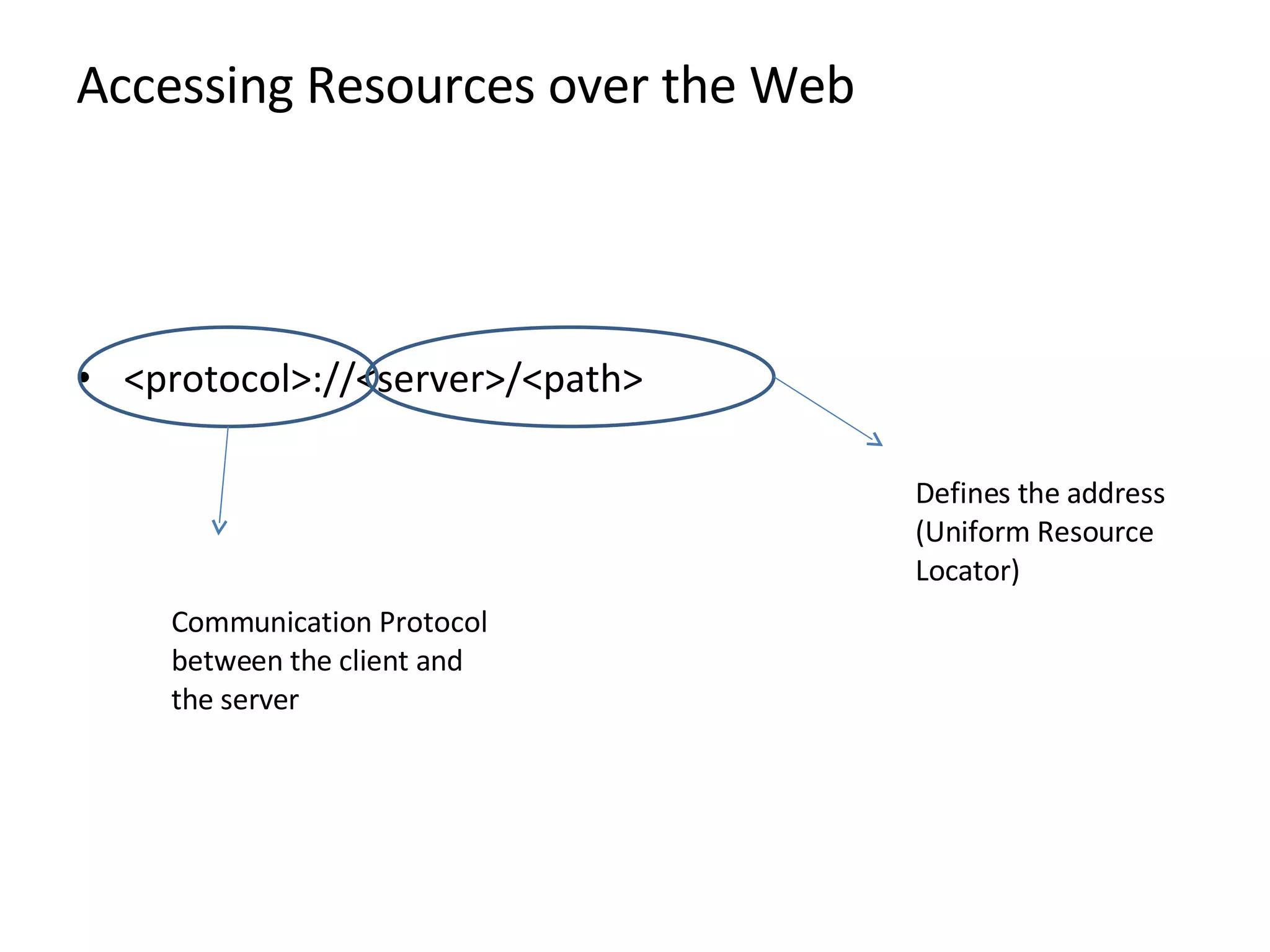
Accessing Resources over the Web <protocol>://<server>/<path> Defines the address (Uniform Resource Locator) Communication Protocol between the client and the server
Hypertext Transport Protocol (HTTP) characteristics Request-response mechanism: Transaction is initiated by a client sending a  request  to server  Server generates a  response   Resource Identification Each HTTP request includes a URI (Uniform Resource Identifier) Statelessness The server does not maintain any information about the transaction  Meta data support  Metadata about information can be exchanged in the messages
HTTP Request Format GET /index.html HTTP/1.0 Request Line Host:  www.content-networking.com Date: BBBBBBBBBBBB User-Agent: Mozilla/5.0 (en) (WINNT; U) Accept-Language: en-us  Header Lines  Carriage Return/Line Feed Specifies request method Specifies resource via URI  & meta data Message Body Content-length:  (Message Payload)
Request Methods GET  whatever information is  identified by the Reuest-URI Can Get static content  and  data produced by a program POST Submit information to Web Server Eg: posting to blog, submission of user form… Information is included in message body  The actual function depends on request URI  Example POST/phonebook.cgi.HTTP/1.0 Date: User-Agent: Accept Language: en-us Content Length: 14 98490 55266  Looks up phone book for the number  Could have been also achieved by Get  But in that case number would have been in the Resource URL  Which would have been stored in the log
Request Methods…contd (ii) HEAD Servers response does not include message body  Useful for getting resource metadata without transferring the resource  Also useful for debugging , checking for validity, accessibility and modification PUT Requests a server store the enclosed data under the supplied Request URL. Creates the resource if it does not create  Not useful for web publishing (FTP is preferred for security purposes) DELETE Removes the Web object  Needs to be carefully used for security reasons
Request Methods…contd (iii) TRACE method Invokes a remote appliction layer feedback of the request message Useful for testing what is being received at the server  Also possible to forward to intermediaries for debugging purposes OPTIONS Requests information about communication options available to server
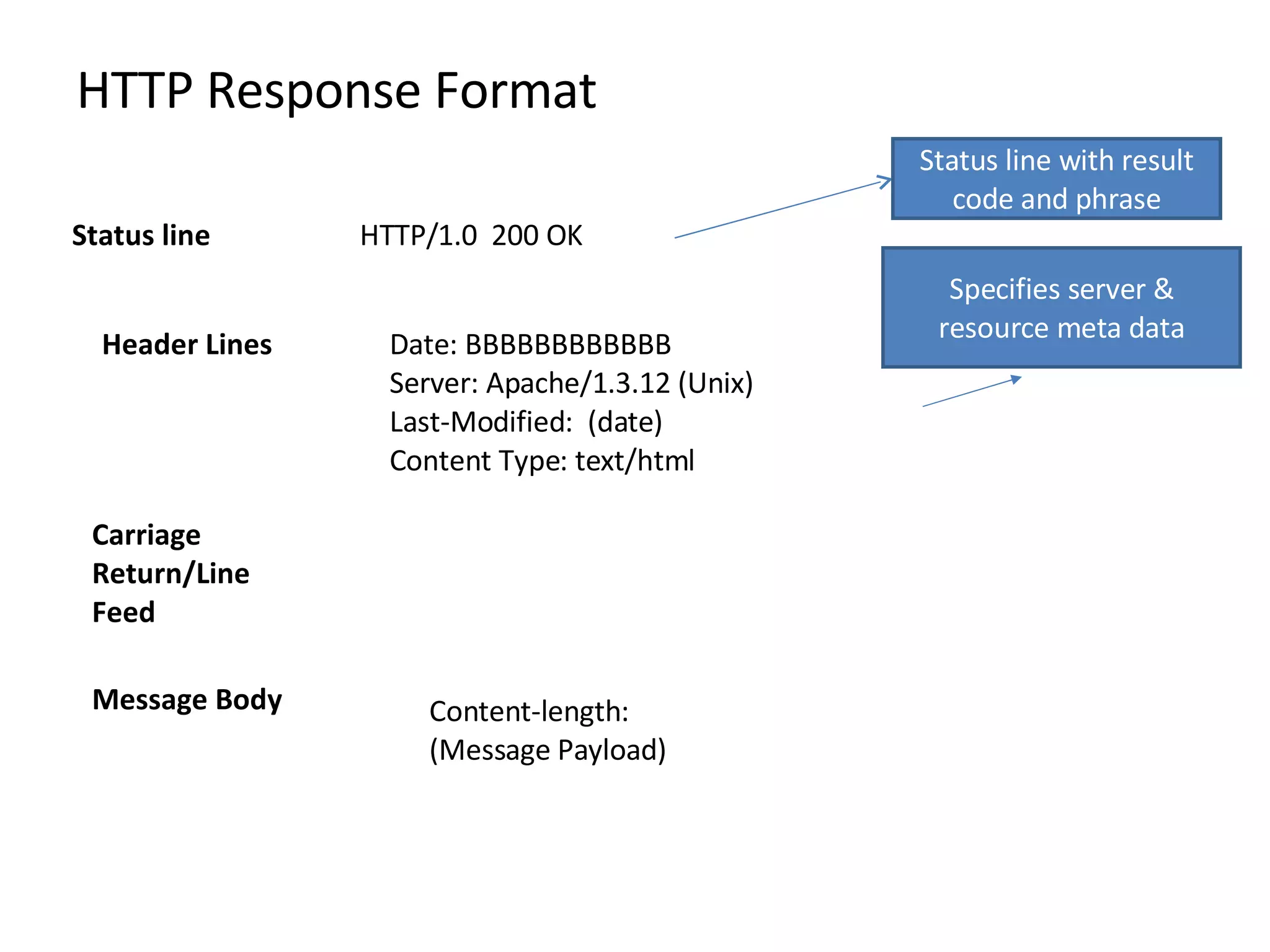
HTTP Response Format HTTP/1.0  200 OK  Status line Date: BBBBBBBBBBBB Server: Apache/1.3.12 (Unix) Last-Modified:  (date) Content Type: text/html Header Lines  Carriage Return/Line Feed Status line with result code and phrase Specifies server & resource meta data Message Body Content-length:  (Message Payload)
Result Code and Phrase 1xx: Informational – Not Done Yet 2xx: Success – You win 3xx:Redirection-You lose but try again 4xx:Client Error – You lose, your fault 5xx:Server Error – You lose, my bad  200 OK  204 No Content 300 Mutiple Choices 301 Moved Permanently  302 Moved Temporarily 304 Not Modified  400 Bad Request  401 Unauthorized 404 Not Found 500 Internal Server Error
Improvements in HTTP/1.1 Persistent connections Keeps the connection open after the server response  Connection can be closed by either client or server  Request Pipelining  Allows a client to send several requests without waiting for a response Server responds in the same order  Chunked Encoding  Allows sender to break a message into arbitrary  sized chunks  Useful for dynamically created response messages
Cookies HTTP is stateless protocol  Cookies manage state maintenance by shifting the burden to client Cookies are transmitted in clear text (security issue) Client Server Usual HTTP Request Usual HTTP Response, including header line Set-cookie: <cookie> 1 st  client request Usual HTTP Request, including header line Set-cookie: <cookie> Usual HTTP Response 2nd client request Client does not interpret the cookie string  Server is presented with the previously returned state information
User Authentication Users browser information remembers credentials and includes them in headers for subsequent requests Browser typically deletes stored authentication credentials once browser is closed HTTP allows various authentication mechanis ms  Client Server Usual HTTP Request HTTP Response with code 401, including header line www-authenticate: <string1> Same HTTP Request, including header line Authorization: <string2> Usual HTTP Response 1 st  client request User inputs credentials  Usual HTTP Request, including header line Authorization: <string2> Usual HTTP Response 2ndclient request
SSL: Secure Web Communications SSL protocol is application independent  Operates between application layer and transport layer Application protocols such as HTTP sit on top of it and TCP/IP beneath it SSL provides:
How SSL Works The Public Key is a random number generated in pair (the other part of the pair is the private key known only to the server)  Data encrypted by the public key can be decrypted only by using the private key  Client Server HTTPS Request SSL Certificate with the Public Key of the Server Sends Session Key encrypted with the Server Public Key Response/Request encrypted with session key Generates a random number or session key which can be encrypted using the server public key Decrypted using the Server Private Key
Ensuring SSL version compatibility There are different versions of SSL depending on the encryption algorithm used.  The browser sends the versions it supports The server sends the certificate. The certificate includes:  The identity of the organization to which the web server belongs  The certificate’s expiration date  The public key  The identity of the organization that issued the certificate, known as a certification authority (CA)  Browsers store and recognize certificates issued by a number of well-known CAs.
What it does and what it does not What It Does What it Does Not Data encryption  Server authentication  Message integrity  Optional client authentication  SSL does not protect the data stored on the disk.  Information getting stolen through pages cached on the browser Stealing confidential information from the browser memory. Since in SSL data is encrypted only during transmission on the network, it is in clear text in the browser memory

HTTP Basics

  • 1.
    Hyper Text TransferProtocol (HTTP) Objective: Understand HTTP (the protocol that makes the Internet possible)
  • 2.
    Accessing Resources overthe Web <protocol>://<server>/<path> Defines the address (Uniform Resource Locator) Communication Protocol between the client and the server
  • 3.
    Hypertext Transport Protocol(HTTP) characteristics Request-response mechanism: Transaction is initiated by a client sending a request to server Server generates a response Resource Identification Each HTTP request includes a URI (Uniform Resource Identifier) Statelessness The server does not maintain any information about the transaction Meta data support Metadata about information can be exchanged in the messages
  • 4.
    HTTP Request FormatGET /index.html HTTP/1.0 Request Line Host: www.content-networking.com Date: BBBBBBBBBBBB User-Agent: Mozilla/5.0 (en) (WINNT; U) Accept-Language: en-us Header Lines Carriage Return/Line Feed Specifies request method Specifies resource via URI & meta data Message Body Content-length: (Message Payload)
  • 5.
    Request Methods GET whatever information is identified by the Reuest-URI Can Get static content and data produced by a program POST Submit information to Web Server Eg: posting to blog, submission of user form… Information is included in message body The actual function depends on request URI Example POST/phonebook.cgi.HTTP/1.0 Date: User-Agent: Accept Language: en-us Content Length: 14 98490 55266 Looks up phone book for the number Could have been also achieved by Get But in that case number would have been in the Resource URL Which would have been stored in the log
  • 6.
    Request Methods…contd (ii)HEAD Servers response does not include message body Useful for getting resource metadata without transferring the resource Also useful for debugging , checking for validity, accessibility and modification PUT Requests a server store the enclosed data under the supplied Request URL. Creates the resource if it does not create Not useful for web publishing (FTP is preferred for security purposes) DELETE Removes the Web object Needs to be carefully used for security reasons
  • 7.
    Request Methods…contd (iii)TRACE method Invokes a remote appliction layer feedback of the request message Useful for testing what is being received at the server Also possible to forward to intermediaries for debugging purposes OPTIONS Requests information about communication options available to server
  • 8.
    HTTP Response FormatHTTP/1.0 200 OK Status line Date: BBBBBBBBBBBB Server: Apache/1.3.12 (Unix) Last-Modified: (date) Content Type: text/html Header Lines Carriage Return/Line Feed Status line with result code and phrase Specifies server & resource meta data Message Body Content-length: (Message Payload)
  • 9.
    Result Code andPhrase 1xx: Informational – Not Done Yet 2xx: Success – You win 3xx:Redirection-You lose but try again 4xx:Client Error – You lose, your fault 5xx:Server Error – You lose, my bad 200 OK 204 No Content 300 Mutiple Choices 301 Moved Permanently 302 Moved Temporarily 304 Not Modified 400 Bad Request 401 Unauthorized 404 Not Found 500 Internal Server Error
  • 10.
    Improvements in HTTP/1.1Persistent connections Keeps the connection open after the server response Connection can be closed by either client or server Request Pipelining Allows a client to send several requests without waiting for a response Server responds in the same order Chunked Encoding Allows sender to break a message into arbitrary sized chunks Useful for dynamically created response messages
  • 11.
    Cookies HTTP isstateless protocol Cookies manage state maintenance by shifting the burden to client Cookies are transmitted in clear text (security issue) Client Server Usual HTTP Request Usual HTTP Response, including header line Set-cookie: <cookie> 1 st client request Usual HTTP Request, including header line Set-cookie: <cookie> Usual HTTP Response 2nd client request Client does not interpret the cookie string Server is presented with the previously returned state information
  • 12.
    User Authentication Usersbrowser information remembers credentials and includes them in headers for subsequent requests Browser typically deletes stored authentication credentials once browser is closed HTTP allows various authentication mechanis ms Client Server Usual HTTP Request HTTP Response with code 401, including header line www-authenticate: <string1> Same HTTP Request, including header line Authorization: <string2> Usual HTTP Response 1 st client request User inputs credentials Usual HTTP Request, including header line Authorization: <string2> Usual HTTP Response 2ndclient request
  • 13.
    SSL: Secure WebCommunications SSL protocol is application independent Operates between application layer and transport layer Application protocols such as HTTP sit on top of it and TCP/IP beneath it SSL provides:
  • 14.
    How SSL WorksThe Public Key is a random number generated in pair (the other part of the pair is the private key known only to the server) Data encrypted by the public key can be decrypted only by using the private key Client Server HTTPS Request SSL Certificate with the Public Key of the Server Sends Session Key encrypted with the Server Public Key Response/Request encrypted with session key Generates a random number or session key which can be encrypted using the server public key Decrypted using the Server Private Key
  • 15.
    Ensuring SSL versioncompatibility There are different versions of SSL depending on the encryption algorithm used. The browser sends the versions it supports The server sends the certificate. The certificate includes: The identity of the organization to which the web server belongs The certificate’s expiration date The public key The identity of the organization that issued the certificate, known as a certification authority (CA) Browsers store and recognize certificates issued by a number of well-known CAs.
  • 16.
    What it doesand what it does not What It Does What it Does Not Data encryption Server authentication Message integrity Optional client authentication SSL does not protect the data stored on the disk. Information getting stolen through pages cached on the browser Stealing confidential information from the browser memory. Since in SSL data is encrypted only during transmission on the network, it is in clear text in the browser memory