CNIT 125:
Information Security
Professional
(CISSP
Preparation)
Ch 5. Communication and
Network Security (Part 2)
Network Architecture and Design
(continued)
Layer 1 Network Cabling Terms
• EMI (Electromgnetic Interference)
• Caused by electricity
• Causes unwanted signals (noise)
• When a signal from one wire leaks into
another wire, that's Crosstalk
• Attenuation is the weakening of a signal
as it travels further from the source
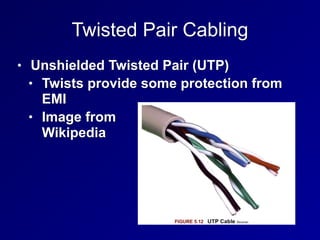
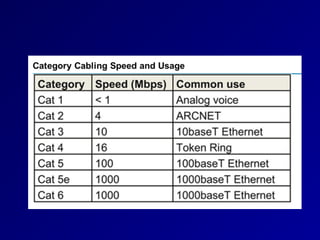
Twisted Pair Cabling
• Unshielded Twisted Pair (UTP)
• Twists provide some protection from
EMI
• Image from

Wikipedia
Shielded Twisted Pair (STP)
• Has a layer of shielding around each pair
of wires
• Protects it from EMI
• More rigid and expensive than UTP
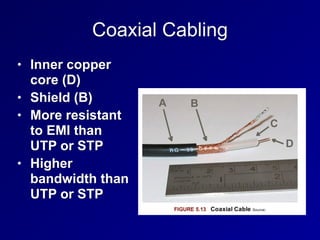
Coaxial Cabling
• Inner copper
core (D)
• Shield (B)
• More resistant
to EMI than
UTP or STP
• Higher
bandwidth than
UTP or STP
Fiber Optic Network Cable
• Uses light pulses
• Cable is made of glass
• Immune to EMI
• Much faster and lower attenuation than
coax
• Can send a signal 50 miles
• Disadvantages: cost and complexity
Types of Fiber
• Multimode fiber
• Many modes (paths) of light
• Shorter distance, lower bandwidth
• Singlemode fiber
• One mode (path)
• Long-haul, high-speed
• Wavelength Division Multiplexing
• Sends multiple signals over different colors
of light
• Can exceed 10 Gbps
LAN Technologies and Protocols
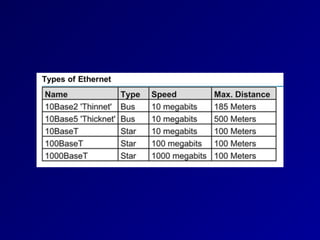
Ethernet
• Originally used a physical bus topology
with coaxial cables
• Now uses physical star topology with
twisted-pair cables
• Baseband (one channel)
• Frames can collide if two nodes
transmit simultaneously
CSMA/CD
• Carrier Sense Multiple Access/Collision
Detection
• Monitor network to see if it is idle
• If not idle, wait a random period of time
• If idle, transmit
• While transmitting, monitor the network
• If an unusual voltage level is detected,
another station must be sending: a
collision
Collision
• Send Jam signal to tell all nodes to stop
transmitting
• Wait a random amount of time before
retransmitting
CSMA/CA
• Carrier Sense Multiple Access/Collision
Avoidance
• Used in wireless networks
• Because collisions cannot be detected
• Uses acknowledgements for each
frame
• If no acknowledgement received, the
node will wait and retransmit
• Less efficient than CSMA/CD
ARCNET & Token Ring
• Attached Resource Computer Network
• Ran at 2.5 Mbps
• Token Ring
• Ran at 16 Mbps
• Two legacy LAN technologies
• Both use tokens
• Only node with the token can send or
receive data
• No collisions
FDDI
• Fiber Distributed Data Interface
• Another legacy LAN technology
• Used two fiber rings
• Secondary ring sent data in the
opposite direction
• Fault tolerant
• A single cut in the ring does not stop
service
• Runs at 100 Mbps
LAN Physical Network Topologies
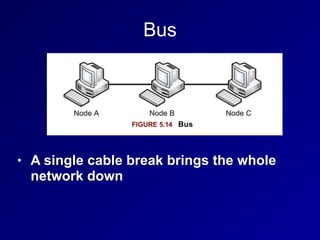
Bus
• A single cable break brings the whole
network down
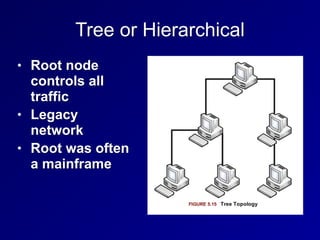
Tree or Hierarchical
• Root node
controls all
traffic
• Legacy
network
• Root was often
a mainframe
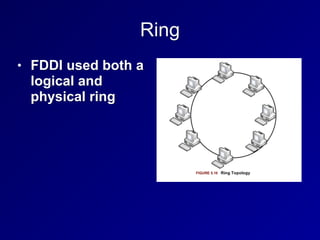
Ring
• FDDI used both a
logical and
physical ring
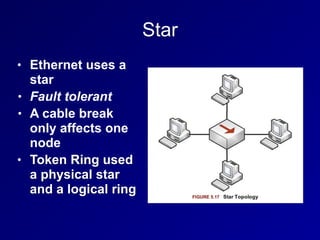
Star
• Ethernet uses a
star
• Fault tolerant
• A cable break
only affects one
node
• Token Ring used
a physical star
and a logical ring
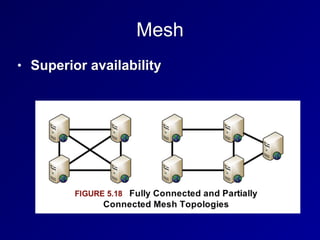
Mesh
• Superior availability
WAN Technologies and Protocols
T1, T3, E1, E3
• T1 (DS1) provides 1.5 Mbps dedicated
circuit
• Contains 24 64 kbps lines (DS0)
• T3 (DS3) contains 28 T1s
• 45 Mbps
• E1 provides 2 Mbps in 30 channels
• E3 contains 16 E1s for 34 Mbps
SONET
• Synchronous Optical Networking
• Contains multiple T-carrier circuits
• Via fiber optic cabling
• Ring topology for redundancy
Frame Relay
• Packet-switched layer 2 protocol
• No error recovery
• Focuses on speed
• Multiplexes multiple logical connections
over a single physical connection
• To create Virtual Circuits
• An alternative to dedicated lines such as
T1s
Frame Relay
• PVC (Permanent Virtual Circuit)
• Always connected like a T1
• SVC (Switched Virtual Circuit)
• Sets up for a call, terminates after the
call
• Frame Relay addresses circuits with Data
Link Connection Identifiers (DLCI)
X.25
• Older packet-switched WAN protocol
• Cost-effective in 1970s through 1990s
ATM
• Asynchronous Transfer Mode
• WAN technology
• Fixed-size 53-byte cells
• 5 bytes of address, 48 bytes of data
• SDMS (Switched Multimegabit Data
Service)
• Older and similar to ATM
• Also used 53-byte cells
MPLS
• Multiprotocol Label Switching
• Forwards WAN data using labels
• Via a shared MPLS cloud network
• Can carry many types of traffic
• ATM, Frame Relay, IP, and more
• Traffic decisions are based on labels
SDLC and HDLC
• Synchronous Data Link Control
• Layer 2 WAN protocol
• Uses polling, similar to token passing
• Primary node polls secondary nodes to
request their data
• High-Level Data Link Control
• Successor to SDLC
• Adds error correction and flow control
• Three modes (next slide)
HDLC: Three Modes
• Normal Response Mode (NRM)
• Secondary nodes can transmit when given
permission by the primary
• Asynchronous Response Mode (ARM)
• Secondary nodes can initiate transmission
with the primary
• Asynchronous Balanced Mode (ABM)
• Compiled mode: nodes may act s either
primary or secondary, initiating
transmissions without receiving permission
Converged Protocols
• Multiple services over the same Ethernet
network
• Industrial controls, storage, voice, ...
DNP3
• Distributed Network Protocol 3
• Open standard
• Used primarily by energy sector
• For interoperability between various
vendors' SCADA and smart grid
applications
• "Smart Grid" technology brings utility
electricity delivery into the 21st century
• More energy-efficient
DNP3
• Multilayer protocol
• May be carried over TCP/IP
• Recent improvements allow "Secure
Authentication"
• Original specification was vulnerable to
spoofing and replay attacks, and pre-
shared keys only
• The current standard is IEEE 1815-2012
• Supports Public Key Infrastructure (PKI)
Storage Protocols
• Fibre Channel over Ethernet (FCoE)
• Internet Small Computer System
Interface (iSCSI)
• Used for SANs (Storage Area Networks)
• Allows block-level file access over a
network
• Just like a directly attached hard drive
Fibre Channel over Ethernet (FCoE)
• Fibre Channel uses special cable and
hardware
• Including Host Bus Adapters (HBAs)
• FCoE uses standard ethernet
• But not TCP/IP
• Fibre Channel over IP (FCIP)
• Encapsulates Fibre Channel frames via
TCP/IP
Internet Small Computer System
Interface (iSCSI)
• Uses higher layers of the TCP/IP suite for
communication
• Can be routed
• Allows access to storage over a WAN
• Uses Logical Unit Numbers (LUNs) to
address storage across the network
Virtual SAN
• Storage Area Networks (SANs)
• Historically used proprietary hardware
and software
• Virtual SAN is analogous to a VLAN
VoIP
• Voice over Internet Protocol
• Uses two protocols
• Real-time Transport Protocol (RTP)
• Carries audio and video
• Session Initiation Protocol (SIP)
• For signals like "phone ringing"
• Secure Real-time Transport Protocol (SRTP)
• Uses AES and SHA-1 to provide
confidentiality, integrity, and secure
authentication
VoIP
• Saves money
• No need for separate phone and IT
networks
• Exposes phone traffic to network attacks
• RTP provodes little or no security by
default
• Wireshark can eavesdrop on a call
Software-Defined Networks
• Separates a router's control plane from
the data (forwarding) plane
• Control plane makes routing decisions
• Data plane forwards packets through
the router
• With SDN routing decision are made
remotely
• Allows customization of networks
OpenFlow
• Most well-known SDN protocol
• Allows a central controller to control
switching rules
• Uses TCP and TLS encryption
Wireless Local Area Networks
DoS & Availability
• An attacker in physical proximity to a
WLAN can launch D0S attacks
• Polluting the wireless spectrum with
noise
• Sending Deauth frames
• There is no defense
Unlicensed Bands
• Industrial, Scientific, and Medical (ISM)
bands
• No FCC license needed to use them
• Cordless phones, 802.11, and Bluetooth
all use ISM bands
• Two common bands used internationally
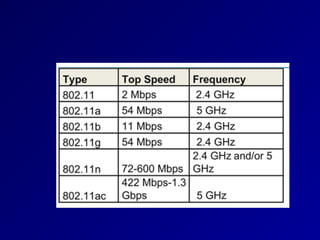
• 2.4 GHz
• 5 GHz
FHSS, DHSS, and OFDM
• Frequency Hopping Spread Spectrum
(FHSS) hops across many channels
• Direct Sequence Spread Spectrum (DSSS)
spreads the signal across a whole band
• Both maximize throughput and minimize
effects of interference
• Orthogonal Frequency Division Multiplexing
(OFDM) uses simultaneous transmissions
that do not interfere with each other
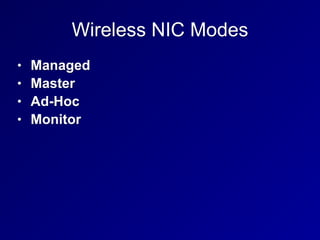
Wireless NIC Modes
• Managed
• Master
• Ad-Hoc
• Monitor
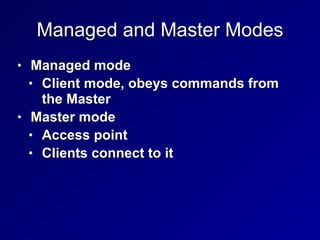
Managed and Master Modes
• Managed mode
• Client mode, obeys commands from
the Master
• Master mode
• Access point
• Clients connect to it
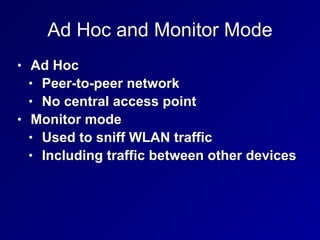
Ad Hoc and Monitor Mode
• Ad Hoc
• Peer-to-peer network
• No central access point
• Monitor mode
• Used to sniff WLAN traffic
• Including traffic between other devices
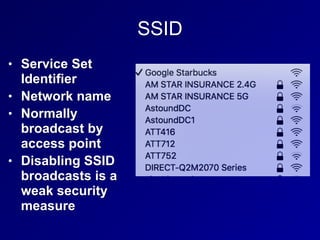
SSID
• Service Set
Identifier
• Network name
• Normally
broadcast by
access point
• Disabling SSID
broadcasts is a
weak security
measure
MAC Address Filtering
• A weak security measure
• MACs can be sniffed and spoofed
WEP
• Wired Equivalent Privacy
• Weak, unsafe encryption protocol
• Designed specifically to avoid export
munition laws
• Too weak to use
802.11i
• Defines a Robust Security Network (RSN)
• Also called WPA2 (Wi-Fi Protected
Access 2)
• Uses AES encryption for confidentiality
• Uses CCMP for integrity
• Counter Mode CBC MAC Protocol,
which makes a Message Integrity
Check (MIC)
WPA
• Designed for access points too weak to
implement 802.11i
• Uses RC4 encryption for confidentiality
• Uses TKIP for integrity
• Considered weaker than WPA2
Bluetooth
• IEEE 802.15
• Personal Area Network (PAN)
• Uses 2.4 GHz band
• v. 2.1 and earlier ran at 3 Mbps or less
• v3 is much faster
• Class 3: under 10 meters
• Class 2: 10 meters
• Class 1: 100 meters
Bluetooth
• Uses the 128-bit E0 symmetric stream
cipher
• Cryptanalysis has shown that E0 is
weak
• True strength is 38 bits or less
• Disable automatic discovery when not in
use
• But attacker can discover the device by
guessing its MAC address
RFID
• Radio Frequency Identification
• Tags for animals or objects
• Active, semi-passive, or passive
• Active RFID tag has a battery & broadcasts a
signal
• Semi-passive
• Has a battery & also relies on the reader for
power
• Passive
• Powered by reader, shorter range, cheaper
Faraday Cage
• Shields an object with wire mesh
• Blocks radio signals
• Can be made by wrapping aluminum foil
around an object
Secure Network Devices and Protocols
Repeaters and Hubs
• OSI Layer 1
• Repeater has 2 ports
• Receives bits on one port
• Repeats them out the other port
• Hub
• Multiport repeater
• No traffic isolation
• No security, no confidentiality or integrity
• Half-duplex: cannot send and receive
simultaneously
• One collision domain
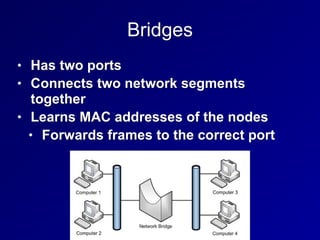
Bridges
• Has two ports
• Connects two network segments
together
• Learns MAC addresses of the nodes
• Forwards frames to the correct port
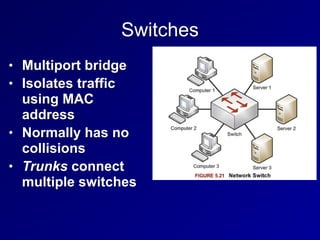
Switches
• Multiport bridge
• Isolates traffic
using MAC
address
• Normally has no
collisions
• Trunks connect
multiple switches
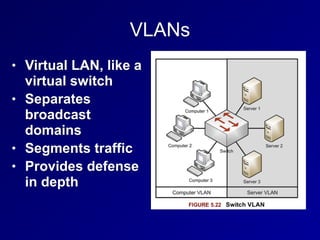
VLANs
• Virtual LAN, like a
virtual switch
• Separates
broadcast
domains
• Segments traffic
• Provides defense
in depth
Port Isolation
• Traditionally only one port on a managed
switch could communicate to the uplink
• Forms a Private VLAN (PVLAN)
• Makes lateral movement much more
difficult for an attacker
Port Isolation
• Very useful in modern multi-tenant
environments
• Isolates customers from one another
• Even when they are all serviced by the
same hypervisor
SPAN Ports
• Switched Port Analyzer Port
• Allows a NDS to see all traffic passing
through the switch
• Also called a "mirror" port
• SPAN port may not have enough
bandwidth to deliver all the frames
• Some will be missed
Network Taps
• A device that can see all traffic on the
network
• Preferred way to connect a sniffer or
NIDS
• Can "fail open", so network traffic
passes if the tap fails
• Gives visibility to malformed frames
• Can have memory buffer to cache traffic
bursts
Routers
• OSI Layer 3
• Router traffic from one LAN to another
• Based on IP addresses
• Static Routes
• Typed in by network manager
• Don't change often
• Sufficient for small networks
• Default route or Default Gateway
• Used if no other route is defined for that IP
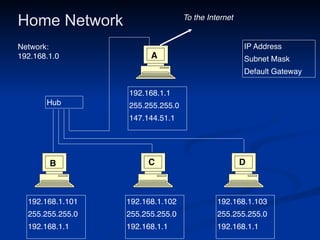
Home Network
192.168.1.101
255.255.255.0
192.168.1.1
192.168.1.102
255.255.255.0
192.168.1.1
192.168.1.103
255.255.255.0
192.168.1.1
192.168.1.1
255.255.255.0
147.144.51.1
IP Address
Subnet Mask
Default Gateway
Hub
To the Internet
A
B C D
Network:
192.168.1.0
Routing Protocols
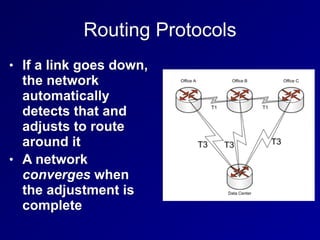
• If a link goes down,
the network
automatically
detects that and
adjusts to route
around it
• A network
converges when
the adjustment is
complete
Routing Protocols
• Interior Gateway Protocols (IGPs)
• Used by private networks like Intranets
• Ex: RIP, OSPF
• Exterior Gateway Protocols (EGPs)
• Used on the Internet
• Ex: BGP
Distant-Vector Routing Protocols
• Routers don't know the whole network
map
• Just a distance metric and direction
• Example
• AT&T is 2 hops out port 1
• CCSF is 3 hops out port 2
• Prone to inefficient decisions
• Like using a slower link with fewer hops
• And routing loops
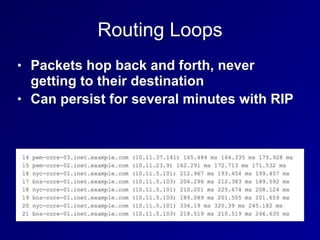
Routing Loops
• Packets hop back and forth, never
getting to their destination
• Can persist for several minutes with RIP
RIP (Routing Information Protocol)
• Old and inefficient, for weak routers
• Distance-Vector
• Uses hop count as metric
• Sends updates every 30 seconds
• Convergence is slow
• Max. hop count is 15; 16 is "infinity"
• RIPv1 uses classful networks only
• RIPv2 supports CIDR
RIP Countermeasures v. Routing Loops
• Split Horizon
• A router doesn't echo a route back to the
router that originated it
• Prevents out-of-date information from
erasing new information
• Poison Reverse
• Bad routes are marked with metric 16
• Hold-down timer
• Route can't change more often than once
each 180 seconds
Link State Routing Protocols
• Each router knows the whole network
diagram
• Can use additional metrics to determine
best route
• Including bandwidth
• Much better than RIP, but requires more
processing power from the routers
OSPF
• Open Shortest Path First
• An open link-state routing protocol
• Routers send updates when events
occur
• Converges much faster than RIP
BGP
• Border Gateway Protocol
• Used on the Internet
• Routes between Autonomous Systems
• Networks with multiple Internet
connections
• A path-vector protocol
Firewalls
Packet Filter
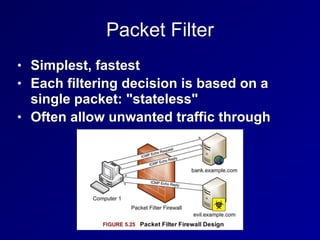
• Simplest, fastest
• Each filtering decision is based on a
single packet: "stateless"
• Often allow unwanted traffic through
Stateful Firewalls
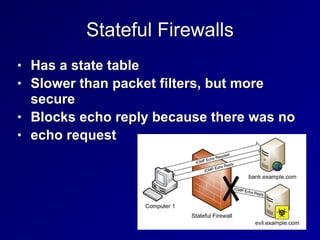
• Has a state table
• Slower than packet filters, but more
secure
• Blocks echo reply because there was no
• echo request
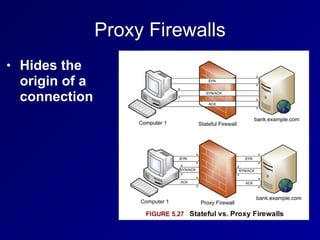
Proxy Firewalls
• Hides the
origin of a
connection
Application-Layer Proxy Firewalls
• Can use application-layer data to filter
traffic
• Such as URLs
• Often specialized to a certain protocol
• FTP proxy
• HTTP proxy
Circuit-Level Proxies Including SOCKS
• Operate at OSI layer 5 (Session)
• Below application-layer proxies
• Application-layer data is just passed
along
• Can forward many protocols
• SOCKS uses port TCP 1080
• Tor uses SOCKS
Bastion Host
• A host placed on the Internet but not
protected by another device, such as a
firewall
• Must protect itself
• Must be hardened
• Usually provide a specific service, all
others are disabled
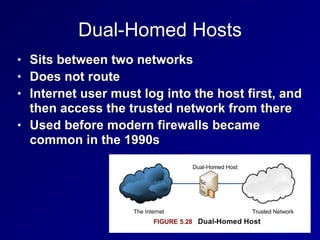
Dual-Homed Hosts
• Sits between two networks
• Does not route
• Internet user must log into the host first, and
then access the trusted network from there
• Used before modern firewalls became
common in the 1990s
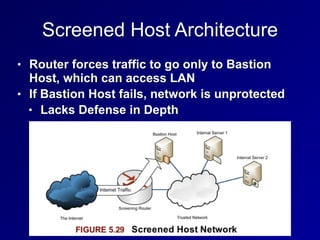
Screened Host Architecture
• Router forces traffic to go only to Bastion
Host, which can access LAN
• If Bastion Host fails, network is unprotected
• Lacks Defense in Depth
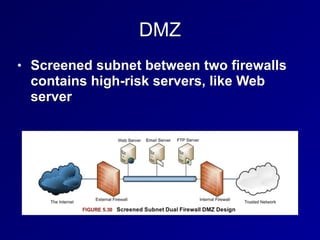
DMZ
• Screened subnet between two firewalls
contains high-risk servers, like Web
server
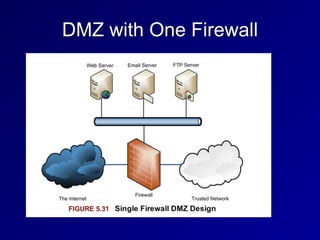
DMZ with One Firewall
Modem
• Modulator/Demodulator
• Translates binary data into analog sound
that can be carried on phone networks
• Asynchronous devices
• No clock signal
DTE/DCE
• Data Terminal Equipment (DTE)
• A user machine, like a laptop or phone
• Data Circuit-Terminating Equipment (DCE)
• The end of an ISP's network, such as a
router
• Demarc
• The point where the DCE meets the DTE,
where the ISP's responsibility ends
CSU/DSU
• Circuit carried by DCE/DTE is
synchronous
• Uses a clock signal provided by the
DCE
• DCE device is a modem or a CSU/DSU
(Channel Service Unit/Data Service Unit)
Secure Communications
Authentication Protocols and
Frameworks
PAP (Password Authentication Protocol)
• Sends passwords in cleartext
• Subject to sniffing and replay
• Insecure, should not be used
CHAP (Challenge-Handshake
Authentication Protocol)
1. Server sends a challenge
2. User adds challenge to password and
hashes the result, sends the hash
3. Server can identify correct hash by
calculating it
• Resists sniffing and replay attacks
• Does not expose password
• Requires plaintext storage of passwords
on servers
802.1X
• Port Based Network Access Control
• Includes EAP (Extensible Authentication
Protocol)
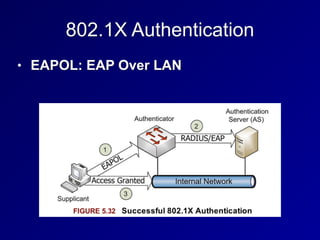
• Supplicant: an 802.1X client
• Authentication Server (AS)
• A server that authenticates a supplicant
• Authenticator
• A device such as an access point that
allows a supplicant to authenticate and
connect
802.1X Authentication
• EAPOL: EAP Over LAN
Types of EAP
• EAP-MD5
• Weak, vulnerable to MITM attacks and
password-cracking
• Only allows client-to-server authentication;
all other methods listed below allow mutual
authentication
• LEAP (Lightweight Extensible Authentication
Protocol)
• Cisco-proprietary; unsafe, should not be
used
Types of EAP
• EAP-FAST
• EAP-Flexible Authentication via Secure
Tunneling
• Designed by Cisco to replace LEAP
• Uses a Protected Access Credential
(PAC) as a pre-shared key
Types of EAP
• EAP-TLS
• EAP-Transport Layer Security
• Uses PKI
• Requires both client-side and server-side
certificates
• Very secure, but complex and costly
Types of EAP
• EAP-TTLS
• EAP-Tunnelled Transport Layer
Security
• Allows a client to use a password
instead of a certificate
• Easier to deploy than EAP-TLS, but
less secure
Types of EAP
• PEAP
• Protected EAP
• Similar to EAP-TTLS
VPN (Virtual Private Network)
VPN Goal
• Create a secure link over the Internet
• As secure as a dedicated leased line like
a T1
• Uses secure authentication, hashes, and
ciphers
SLIP and PPP
• Serial Line Internet Protocol (SLIP)
• Layer 2 protocol from 1988
• No confidentiality, integrity or
authentication
• Point-to-Point Protocol (PPP)
• Replaced SLIP
• Uses HDLC
• Adds confidentiality, integrity and
authentication
PPTP
• Point-to-Point Tunneling Protocol
• Uses GRE (General Routing
Encapsulation)
• To pass PPP via IP
• Uses TCP port 1723 for a control
channel
• Old and unsafe
L2TP
• Layer 2 Tunneling Protocol
• Provides authentication but not
confidentiality
• Used with IPsec, provides confidentiality
• Can be used on non-IP networks, such as
ATM
IPsec
• Two main protocols
• Encapsulating Security Payload (ESP)
• Layer 4 protocol 50
• Authentication Header (AH)
• Layer 4 protocol 51
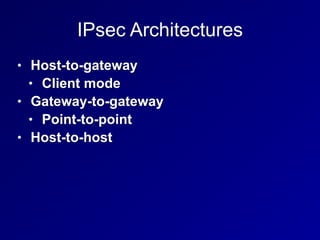
IPsec Architectures
• Host-to-gateway
• Client mode
• Gateway-to-gateway
• Point-to-point
• Host-to-host
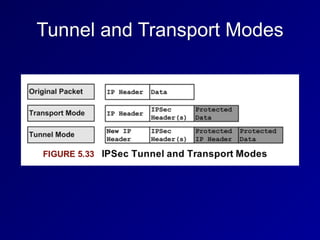
Tunnel and Transport Modes
SSL and TLS
• Secure Sockets Layer (SSL)
• Now deprecated, replaced by TLS
• Transport Layer Security (TLS)
• Port TCP 443
• TLS VPNs are simpler to use than IPsec
Remote Access
ISDN
• Integrated Services Digital Network
• Provides digital service over copper-wire
phone lines
• Basic Rate Interface (BRI)
• Provides two 64 Kbps channels and
one 16 Kbps signaling channel
• Primary Rate Interface (PRI)
• Provides 23 64 Kbps channels and one
16 Kbps signaling channel
DSL
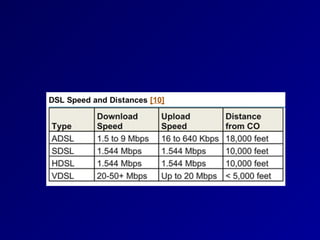
• Digital Subscriber Line
• Popular and fast: up to 10 Mbps or
more
• Symmetric DSL
• Upload and download speeds the same
• Asymmetric DSL
• Download faster than upload
• High-data-rate DSL
• Very high-rate DSL
Cable Modems
• Internet access via broadband cable TV
• Bandwidth shared with neighbors
• Only available in cities, where the cables
are
Callback & Caller ID
• Callback
• A modem-based authentication system
• User calls to initiate a connection
• System hangs up and calls back at a
preconfigured number
• Caller ID
• Verifies that the user is calling from the
correct phone number
• BUT caller ID can be easily forged
Remote Desktop Console Access
• rlogin & rsh are old Unix remote access
systems
• Cleartext and poorly authenticated
• Used TCP 513 and 514, respectively
• Two modern remote access protocols
• Virtual Network Computing (VNC)
• TCP port 5900
• Remote Desktop Protocol (RDP)
• TCP port 3389
GoToMyPC and LogMeIn
• Use reverse tunnel over HTTPS
• Agent installed on computer connects to
a central server
• User authenticates to that server
Desktop and Application Vitualization
• Virtual Desktop Infrastructure (VDI)
• A centralized infrastructure hosts a
desktop image
• Remotely deployed to workforce
• Application virtualization
• Users access the application on the
central server
• Allows strict access control and patch
management
Screen Scraping
• Packetizes and transmits information
needed to draw the screen
• Used by VNC but not bybRDP
Instant Messaging
• Real-time chat
• Often with audio an video conferencing
• IRC (Internet Relay Chat)
• From 1988 and still popular
• Uses TCP port 6667 by default
• Many IRC servers use nonstandard
ports
• Used by malware to phone home
Other Chat Protocols
• AOL Instant Messenger (AIM)
• ICQ
• Extensible Messaging and Presence
Protocol (XMPP)
• Formerly called Jabber
• Security risks
• Unpatched old chat clients
• File sharing can be used to leak
confidential documents
Remote Meeting Technology
• GoToMeeting by Citrix
• Microsoft Office Live Meeting
• Allow sharing Powerpoint slides and
documents
• Sometimes also audio or video
• Sometimes allow users to remotely control a
PC
• Tunnel through outbound TLS traffic
• May bypass existing controls and violate
policy
PDAs
• Personal Digital Assistants
• Apple Newton and Palm Pilot
• "Mobile device" is a more modern term
than PDA
• Most have converged with smartphones
• iPhone, Blackberry, Android
PDA Security Issues
• Loss of data due to theft of device
• Sensitive data on a PDA should be
encrypted
• PIN code should be used to lock it
• Remote Wipe capability helps to control
data loss
• Wireless security
• Should use secure wireless connections
and consider risks of Bluetooth
Wireless Application Protocol
(WAP)
• Designed to provide secure Web
services to handheld devices such as
smartphones
• Based on HTML
• Includes HDML (Handheld Device Markup
Language)
• Authentication uses WTLS (Wireless
Transport Layer Security)
• Based on TLS
WAP
• WAP browser is a microbrowser
• Simpler than a full Web browser
• Connects to a WAP gateway
• A proxy server designed to translate
Web pages
• Accesses sites written in, or converted to
WML (Wireless Markup Language)
• Based on XML
Content Delivery Networks
(CDN)
• A series of caching servers
• Improve performance and lower latency of
downloaded online content
• Automatically use servers closest to end
users
• Examples
• Akamai, Amazon CloudFront, CloudFlare,
Microsoft Azure
• Can increase availability and resist DoS
attacks

CISSP Prep: Ch 5. Communication and Network Security (Part 2)

  • 1.
    CNIT 125: Information Security Professional (CISSP Preparation) Ch5. Communication and Network Security (Part 2)
  • 2.
    Network Architecture andDesign (continued)
  • 3.
    Layer 1 NetworkCabling Terms • EMI (Electromgnetic Interference) • Caused by electricity • Causes unwanted signals (noise) • When a signal from one wire leaks into another wire, that's Crosstalk • Attenuation is the weakening of a signal as it travels further from the source
  • 4.
    Twisted Pair Cabling •Unshielded Twisted Pair (UTP) • Twists provide some protection from EMI • Image from
 Wikipedia
  • 6.
    Shielded Twisted Pair(STP) • Has a layer of shielding around each pair of wires • Protects it from EMI • More rigid and expensive than UTP
  • 7.
    Coaxial Cabling • Innercopper core (D) • Shield (B) • More resistant to EMI than UTP or STP • Higher bandwidth than UTP or STP
  • 8.
    Fiber Optic NetworkCable • Uses light pulses • Cable is made of glass • Immune to EMI • Much faster and lower attenuation than coax • Can send a signal 50 miles • Disadvantages: cost and complexity
  • 9.
    Types of Fiber •Multimode fiber • Many modes (paths) of light • Shorter distance, lower bandwidth • Singlemode fiber • One mode (path) • Long-haul, high-speed • Wavelength Division Multiplexing • Sends multiple signals over different colors of light • Can exceed 10 Gbps
  • 10.
  • 11.
    Ethernet • Originally useda physical bus topology with coaxial cables • Now uses physical star topology with twisted-pair cables • Baseband (one channel) • Frames can collide if two nodes transmit simultaneously
  • 13.
    CSMA/CD • Carrier SenseMultiple Access/Collision Detection • Monitor network to see if it is idle • If not idle, wait a random period of time • If idle, transmit • While transmitting, monitor the network • If an unusual voltage level is detected, another station must be sending: a collision
  • 14.
    Collision • Send Jamsignal to tell all nodes to stop transmitting • Wait a random amount of time before retransmitting
  • 15.
    CSMA/CA • Carrier SenseMultiple Access/Collision Avoidance • Used in wireless networks • Because collisions cannot be detected • Uses acknowledgements for each frame • If no acknowledgement received, the node will wait and retransmit • Less efficient than CSMA/CD
  • 16.
    ARCNET & TokenRing • Attached Resource Computer Network • Ran at 2.5 Mbps • Token Ring • Ran at 16 Mbps • Two legacy LAN technologies • Both use tokens • Only node with the token can send or receive data • No collisions
  • 17.
    FDDI • Fiber DistributedData Interface • Another legacy LAN technology • Used two fiber rings • Secondary ring sent data in the opposite direction • Fault tolerant • A single cut in the ring does not stop service • Runs at 100 Mbps
  • 18.
  • 19.
    Bus • A singlecable break brings the whole network down
  • 20.
    Tree or Hierarchical •Root node controls all traffic • Legacy network • Root was often a mainframe
  • 21.
    Ring • FDDI usedboth a logical and physical ring
  • 22.
    Star • Ethernet usesa star • Fault tolerant • A cable break only affects one node • Token Ring used a physical star and a logical ring
  • 23.
  • 24.
  • 25.
    T1, T3, E1,E3 • T1 (DS1) provides 1.5 Mbps dedicated circuit • Contains 24 64 kbps lines (DS0) • T3 (DS3) contains 28 T1s • 45 Mbps • E1 provides 2 Mbps in 30 channels • E3 contains 16 E1s for 34 Mbps
  • 26.
    SONET • Synchronous OpticalNetworking • Contains multiple T-carrier circuits • Via fiber optic cabling • Ring topology for redundancy
  • 27.
    Frame Relay • Packet-switchedlayer 2 protocol • No error recovery • Focuses on speed • Multiplexes multiple logical connections over a single physical connection • To create Virtual Circuits • An alternative to dedicated lines such as T1s
  • 28.
    Frame Relay • PVC(Permanent Virtual Circuit) • Always connected like a T1 • SVC (Switched Virtual Circuit) • Sets up for a call, terminates after the call • Frame Relay addresses circuits with Data Link Connection Identifiers (DLCI)
  • 29.
    X.25 • Older packet-switchedWAN protocol • Cost-effective in 1970s through 1990s
  • 30.
    ATM • Asynchronous TransferMode • WAN technology • Fixed-size 53-byte cells • 5 bytes of address, 48 bytes of data • SDMS (Switched Multimegabit Data Service) • Older and similar to ATM • Also used 53-byte cells
  • 31.
    MPLS • Multiprotocol LabelSwitching • Forwards WAN data using labels • Via a shared MPLS cloud network • Can carry many types of traffic • ATM, Frame Relay, IP, and more • Traffic decisions are based on labels
  • 32.
    SDLC and HDLC •Synchronous Data Link Control • Layer 2 WAN protocol • Uses polling, similar to token passing • Primary node polls secondary nodes to request their data • High-Level Data Link Control • Successor to SDLC • Adds error correction and flow control • Three modes (next slide)
  • 33.
    HDLC: Three Modes •Normal Response Mode (NRM) • Secondary nodes can transmit when given permission by the primary • Asynchronous Response Mode (ARM) • Secondary nodes can initiate transmission with the primary • Asynchronous Balanced Mode (ABM) • Compiled mode: nodes may act s either primary or secondary, initiating transmissions without receiving permission
  • 34.
    Converged Protocols • Multipleservices over the same Ethernet network • Industrial controls, storage, voice, ...
  • 35.
    DNP3 • Distributed NetworkProtocol 3 • Open standard • Used primarily by energy sector • For interoperability between various vendors' SCADA and smart grid applications • "Smart Grid" technology brings utility electricity delivery into the 21st century • More energy-efficient
  • 36.
    DNP3 • Multilayer protocol •May be carried over TCP/IP • Recent improvements allow "Secure Authentication" • Original specification was vulnerable to spoofing and replay attacks, and pre- shared keys only • The current standard is IEEE 1815-2012 • Supports Public Key Infrastructure (PKI)
  • 37.
    Storage Protocols • FibreChannel over Ethernet (FCoE) • Internet Small Computer System Interface (iSCSI) • Used for SANs (Storage Area Networks) • Allows block-level file access over a network • Just like a directly attached hard drive
  • 38.
    Fibre Channel overEthernet (FCoE) • Fibre Channel uses special cable and hardware • Including Host Bus Adapters (HBAs) • FCoE uses standard ethernet • But not TCP/IP • Fibre Channel over IP (FCIP) • Encapsulates Fibre Channel frames via TCP/IP
  • 39.
    Internet Small ComputerSystem Interface (iSCSI) • Uses higher layers of the TCP/IP suite for communication • Can be routed • Allows access to storage over a WAN • Uses Logical Unit Numbers (LUNs) to address storage across the network
  • 40.
    Virtual SAN • StorageArea Networks (SANs) • Historically used proprietary hardware and software • Virtual SAN is analogous to a VLAN
  • 41.
    VoIP • Voice overInternet Protocol • Uses two protocols • Real-time Transport Protocol (RTP) • Carries audio and video • Session Initiation Protocol (SIP) • For signals like "phone ringing" • Secure Real-time Transport Protocol (SRTP) • Uses AES and SHA-1 to provide confidentiality, integrity, and secure authentication
  • 42.
    VoIP • Saves money •No need for separate phone and IT networks • Exposes phone traffic to network attacks • RTP provodes little or no security by default • Wireshark can eavesdrop on a call
  • 43.
    Software-Defined Networks • Separatesa router's control plane from the data (forwarding) plane • Control plane makes routing decisions • Data plane forwards packets through the router • With SDN routing decision are made remotely • Allows customization of networks
  • 44.
    OpenFlow • Most well-knownSDN protocol • Allows a central controller to control switching rules • Uses TCP and TLS encryption
  • 45.
  • 46.
    DoS & Availability •An attacker in physical proximity to a WLAN can launch D0S attacks • Polluting the wireless spectrum with noise • Sending Deauth frames • There is no defense
  • 47.
    Unlicensed Bands • Industrial,Scientific, and Medical (ISM) bands • No FCC license needed to use them • Cordless phones, 802.11, and Bluetooth all use ISM bands • Two common bands used internationally • 2.4 GHz • 5 GHz
  • 48.
    FHSS, DHSS, andOFDM • Frequency Hopping Spread Spectrum (FHSS) hops across many channels • Direct Sequence Spread Spectrum (DSSS) spreads the signal across a whole band • Both maximize throughput and minimize effects of interference • Orthogonal Frequency Division Multiplexing (OFDM) uses simultaneous transmissions that do not interfere with each other
  • 50.
    Wireless NIC Modes •Managed • Master • Ad-Hoc • Monitor
  • 51.
    Managed and MasterModes • Managed mode • Client mode, obeys commands from the Master • Master mode • Access point • Clients connect to it
  • 52.
    Ad Hoc andMonitor Mode • Ad Hoc • Peer-to-peer network • No central access point • Monitor mode • Used to sniff WLAN traffic • Including traffic between other devices
  • 53.
    SSID • Service Set Identifier •Network name • Normally broadcast by access point • Disabling SSID broadcasts is a weak security measure
  • 54.
    MAC Address Filtering •A weak security measure • MACs can be sniffed and spoofed
  • 55.
    WEP • Wired EquivalentPrivacy • Weak, unsafe encryption protocol • Designed specifically to avoid export munition laws • Too weak to use
  • 56.
    802.11i • Defines aRobust Security Network (RSN) • Also called WPA2 (Wi-Fi Protected Access 2) • Uses AES encryption for confidentiality • Uses CCMP for integrity • Counter Mode CBC MAC Protocol, which makes a Message Integrity Check (MIC)
  • 57.
    WPA • Designed foraccess points too weak to implement 802.11i • Uses RC4 encryption for confidentiality • Uses TKIP for integrity • Considered weaker than WPA2
  • 58.
    Bluetooth • IEEE 802.15 •Personal Area Network (PAN) • Uses 2.4 GHz band • v. 2.1 and earlier ran at 3 Mbps or less • v3 is much faster • Class 3: under 10 meters • Class 2: 10 meters • Class 1: 100 meters
  • 59.
    Bluetooth • Uses the128-bit E0 symmetric stream cipher • Cryptanalysis has shown that E0 is weak • True strength is 38 bits or less • Disable automatic discovery when not in use • But attacker can discover the device by guessing its MAC address
  • 60.
    RFID • Radio FrequencyIdentification • Tags for animals or objects • Active, semi-passive, or passive • Active RFID tag has a battery & broadcasts a signal • Semi-passive • Has a battery & also relies on the reader for power • Passive • Powered by reader, shorter range, cheaper
  • 61.
    Faraday Cage • Shieldsan object with wire mesh • Blocks radio signals • Can be made by wrapping aluminum foil around an object
  • 62.
  • 63.
    Repeaters and Hubs •OSI Layer 1 • Repeater has 2 ports • Receives bits on one port • Repeats them out the other port • Hub • Multiport repeater • No traffic isolation • No security, no confidentiality or integrity • Half-duplex: cannot send and receive simultaneously • One collision domain
  • 64.
    Bridges • Has twoports • Connects two network segments together • Learns MAC addresses of the nodes • Forwards frames to the correct port
  • 65.
    Switches • Multiport bridge •Isolates traffic using MAC address • Normally has no collisions • Trunks connect multiple switches
  • 66.
    VLANs • Virtual LAN,like a virtual switch • Separates broadcast domains • Segments traffic • Provides defense in depth
  • 67.
    Port Isolation • Traditionallyonly one port on a managed switch could communicate to the uplink • Forms a Private VLAN (PVLAN) • Makes lateral movement much more difficult for an attacker
  • 68.
    Port Isolation • Veryuseful in modern multi-tenant environments • Isolates customers from one another • Even when they are all serviced by the same hypervisor
  • 69.
    SPAN Ports • SwitchedPort Analyzer Port • Allows a NDS to see all traffic passing through the switch • Also called a "mirror" port • SPAN port may not have enough bandwidth to deliver all the frames • Some will be missed
  • 70.
    Network Taps • Adevice that can see all traffic on the network • Preferred way to connect a sniffer or NIDS • Can "fail open", so network traffic passes if the tap fails • Gives visibility to malformed frames • Can have memory buffer to cache traffic bursts
  • 71.
    Routers • OSI Layer3 • Router traffic from one LAN to another • Based on IP addresses • Static Routes • Typed in by network manager • Don't change often • Sufficient for small networks • Default route or Default Gateway • Used if no other route is defined for that IP
  • 72.
  • 73.
    Routing Protocols • Ifa link goes down, the network automatically detects that and adjusts to route around it • A network converges when the adjustment is complete
  • 74.
    Routing Protocols • InteriorGateway Protocols (IGPs) • Used by private networks like Intranets • Ex: RIP, OSPF • Exterior Gateway Protocols (EGPs) • Used on the Internet • Ex: BGP
  • 75.
    Distant-Vector Routing Protocols •Routers don't know the whole network map • Just a distance metric and direction • Example • AT&T is 2 hops out port 1 • CCSF is 3 hops out port 2 • Prone to inefficient decisions • Like using a slower link with fewer hops • And routing loops
  • 76.
    Routing Loops • Packetshop back and forth, never getting to their destination • Can persist for several minutes with RIP
  • 77.
    RIP (Routing InformationProtocol) • Old and inefficient, for weak routers • Distance-Vector • Uses hop count as metric • Sends updates every 30 seconds • Convergence is slow • Max. hop count is 15; 16 is "infinity" • RIPv1 uses classful networks only • RIPv2 supports CIDR
  • 78.
    RIP Countermeasures v.Routing Loops • Split Horizon • A router doesn't echo a route back to the router that originated it • Prevents out-of-date information from erasing new information • Poison Reverse • Bad routes are marked with metric 16 • Hold-down timer • Route can't change more often than once each 180 seconds
  • 79.
    Link State RoutingProtocols • Each router knows the whole network diagram • Can use additional metrics to determine best route • Including bandwidth • Much better than RIP, but requires more processing power from the routers
  • 80.
    OSPF • Open ShortestPath First • An open link-state routing protocol • Routers send updates when events occur • Converges much faster than RIP
  • 81.
    BGP • Border GatewayProtocol • Used on the Internet • Routes between Autonomous Systems • Networks with multiple Internet connections • A path-vector protocol
  • 82.
  • 83.
    Packet Filter • Simplest,fastest • Each filtering decision is based on a single packet: "stateless" • Often allow unwanted traffic through
  • 84.
    Stateful Firewalls • Hasa state table • Slower than packet filters, but more secure • Blocks echo reply because there was no • echo request
  • 85.
    Proxy Firewalls • Hidesthe origin of a connection
  • 86.
    Application-Layer Proxy Firewalls •Can use application-layer data to filter traffic • Such as URLs • Often specialized to a certain protocol • FTP proxy • HTTP proxy
  • 87.
    Circuit-Level Proxies IncludingSOCKS • Operate at OSI layer 5 (Session) • Below application-layer proxies • Application-layer data is just passed along • Can forward many protocols • SOCKS uses port TCP 1080 • Tor uses SOCKS
  • 88.
    Bastion Host • Ahost placed on the Internet but not protected by another device, such as a firewall • Must protect itself • Must be hardened • Usually provide a specific service, all others are disabled
  • 89.
    Dual-Homed Hosts • Sitsbetween two networks • Does not route • Internet user must log into the host first, and then access the trusted network from there • Used before modern firewalls became common in the 1990s
  • 90.
    Screened Host Architecture •Router forces traffic to go only to Bastion Host, which can access LAN • If Bastion Host fails, network is unprotected • Lacks Defense in Depth
  • 91.
    DMZ • Screened subnetbetween two firewalls contains high-risk servers, like Web server
  • 92.
    DMZ with OneFirewall
  • 93.
    Modem • Modulator/Demodulator • Translatesbinary data into analog sound that can be carried on phone networks • Asynchronous devices • No clock signal
  • 94.
    DTE/DCE • Data TerminalEquipment (DTE) • A user machine, like a laptop or phone • Data Circuit-Terminating Equipment (DCE) • The end of an ISP's network, such as a router • Demarc • The point where the DCE meets the DTE, where the ISP's responsibility ends
  • 95.
    CSU/DSU • Circuit carriedby DCE/DTE is synchronous • Uses a clock signal provided by the DCE • DCE device is a modem or a CSU/DSU (Channel Service Unit/Data Service Unit)
  • 96.
  • 97.
  • 98.
    PAP (Password AuthenticationProtocol) • Sends passwords in cleartext • Subject to sniffing and replay • Insecure, should not be used
  • 99.
    CHAP (Challenge-Handshake Authentication Protocol) 1.Server sends a challenge 2. User adds challenge to password and hashes the result, sends the hash 3. Server can identify correct hash by calculating it • Resists sniffing and replay attacks • Does not expose password • Requires plaintext storage of passwords on servers
  • 100.
    802.1X • Port BasedNetwork Access Control • Includes EAP (Extensible Authentication Protocol) • Supplicant: an 802.1X client • Authentication Server (AS) • A server that authenticates a supplicant • Authenticator • A device such as an access point that allows a supplicant to authenticate and connect
  • 101.
  • 102.
    Types of EAP •EAP-MD5 • Weak, vulnerable to MITM attacks and password-cracking • Only allows client-to-server authentication; all other methods listed below allow mutual authentication • LEAP (Lightweight Extensible Authentication Protocol) • Cisco-proprietary; unsafe, should not be used
  • 103.
    Types of EAP •EAP-FAST • EAP-Flexible Authentication via Secure Tunneling • Designed by Cisco to replace LEAP • Uses a Protected Access Credential (PAC) as a pre-shared key
  • 104.
    Types of EAP •EAP-TLS • EAP-Transport Layer Security • Uses PKI • Requires both client-side and server-side certificates • Very secure, but complex and costly
  • 105.
    Types of EAP •EAP-TTLS • EAP-Tunnelled Transport Layer Security • Allows a client to use a password instead of a certificate • Easier to deploy than EAP-TLS, but less secure
  • 106.
    Types of EAP •PEAP • Protected EAP • Similar to EAP-TTLS
  • 107.
  • 108.
    VPN Goal • Createa secure link over the Internet • As secure as a dedicated leased line like a T1 • Uses secure authentication, hashes, and ciphers
  • 109.
    SLIP and PPP •Serial Line Internet Protocol (SLIP) • Layer 2 protocol from 1988 • No confidentiality, integrity or authentication • Point-to-Point Protocol (PPP) • Replaced SLIP • Uses HDLC • Adds confidentiality, integrity and authentication
  • 110.
    PPTP • Point-to-Point TunnelingProtocol • Uses GRE (General Routing Encapsulation) • To pass PPP via IP • Uses TCP port 1723 for a control channel • Old and unsafe
  • 111.
    L2TP • Layer 2Tunneling Protocol • Provides authentication but not confidentiality • Used with IPsec, provides confidentiality • Can be used on non-IP networks, such as ATM
  • 112.
    IPsec • Two mainprotocols • Encapsulating Security Payload (ESP) • Layer 4 protocol 50 • Authentication Header (AH) • Layer 4 protocol 51
  • 113.
    IPsec Architectures • Host-to-gateway •Client mode • Gateway-to-gateway • Point-to-point • Host-to-host
  • 114.
  • 115.
    SSL and TLS •Secure Sockets Layer (SSL) • Now deprecated, replaced by TLS • Transport Layer Security (TLS) • Port TCP 443 • TLS VPNs are simpler to use than IPsec
  • 116.
  • 117.
    ISDN • Integrated ServicesDigital Network • Provides digital service over copper-wire phone lines • Basic Rate Interface (BRI) • Provides two 64 Kbps channels and one 16 Kbps signaling channel • Primary Rate Interface (PRI) • Provides 23 64 Kbps channels and one 16 Kbps signaling channel
  • 118.
    DSL • Digital SubscriberLine • Popular and fast: up to 10 Mbps or more • Symmetric DSL • Upload and download speeds the same • Asymmetric DSL • Download faster than upload • High-data-rate DSL • Very high-rate DSL
  • 120.
    Cable Modems • Internetaccess via broadband cable TV • Bandwidth shared with neighbors • Only available in cities, where the cables are
  • 121.
    Callback & CallerID • Callback • A modem-based authentication system • User calls to initiate a connection • System hangs up and calls back at a preconfigured number • Caller ID • Verifies that the user is calling from the correct phone number • BUT caller ID can be easily forged
  • 122.
    Remote Desktop ConsoleAccess • rlogin & rsh are old Unix remote access systems • Cleartext and poorly authenticated • Used TCP 513 and 514, respectively • Two modern remote access protocols • Virtual Network Computing (VNC) • TCP port 5900 • Remote Desktop Protocol (RDP) • TCP port 3389
  • 123.
    GoToMyPC and LogMeIn •Use reverse tunnel over HTTPS • Agent installed on computer connects to a central server • User authenticates to that server
  • 124.
    Desktop and ApplicationVitualization • Virtual Desktop Infrastructure (VDI) • A centralized infrastructure hosts a desktop image • Remotely deployed to workforce • Application virtualization • Users access the application on the central server • Allows strict access control and patch management
  • 125.
    Screen Scraping • Packetizesand transmits information needed to draw the screen • Used by VNC but not bybRDP
  • 126.
    Instant Messaging • Real-timechat • Often with audio an video conferencing • IRC (Internet Relay Chat) • From 1988 and still popular • Uses TCP port 6667 by default • Many IRC servers use nonstandard ports • Used by malware to phone home
  • 127.
    Other Chat Protocols •AOL Instant Messenger (AIM) • ICQ • Extensible Messaging and Presence Protocol (XMPP) • Formerly called Jabber • Security risks • Unpatched old chat clients • File sharing can be used to leak confidential documents
  • 128.
    Remote Meeting Technology •GoToMeeting by Citrix • Microsoft Office Live Meeting • Allow sharing Powerpoint slides and documents • Sometimes also audio or video • Sometimes allow users to remotely control a PC • Tunnel through outbound TLS traffic • May bypass existing controls and violate policy
  • 129.
    PDAs • Personal DigitalAssistants • Apple Newton and Palm Pilot • "Mobile device" is a more modern term than PDA • Most have converged with smartphones • iPhone, Blackberry, Android
  • 130.
    PDA Security Issues •Loss of data due to theft of device • Sensitive data on a PDA should be encrypted • PIN code should be used to lock it • Remote Wipe capability helps to control data loss • Wireless security • Should use secure wireless connections and consider risks of Bluetooth
  • 131.
    Wireless Application Protocol (WAP) •Designed to provide secure Web services to handheld devices such as smartphones • Based on HTML • Includes HDML (Handheld Device Markup Language) • Authentication uses WTLS (Wireless Transport Layer Security) • Based on TLS
  • 132.
    WAP • WAP browseris a microbrowser • Simpler than a full Web browser • Connects to a WAP gateway • A proxy server designed to translate Web pages • Accesses sites written in, or converted to WML (Wireless Markup Language) • Based on XML
  • 133.
    Content Delivery Networks (CDN) •A series of caching servers • Improve performance and lower latency of downloaded online content • Automatically use servers closest to end users • Examples • Akamai, Amazon CloudFront, CloudFlare, Microsoft Azure • Can increase availability and resist DoS attacks