CHARMED Upgrading UT Pickle Separations  to  DeltaV v11 with integrated CHARMS  Dr. Frank Seibert – University of Texas Mark Nixon – Emerson Research Manager
Presenters Frank Seibert, University of Texas at Austin Mark Nixon Research Manager Austin, Texas
Abstract This presentation follows the modernization of the UT Pickle Research Center in Austin, TX.  The project includes an upgrade to CHARMS IO (electronic IO) and S-Series controllers, installation of new junction boxes, upgrade of graphics, conversion to rack mounted PCs and Servers, and modernization of the control room.  The presentation follows the planning and execution of the project from initial planning, through execution, to commissioning, to taking the project on-line.
Separations Research Program, University of Texas at Austin The Separations Research Program was established at the J.J. Pickle Research Campus in 1984 This cooperative industry/university program performs fundamental research of interest to chemical, biotechnological, petroleum refining, gas processing, pharmaceutical, and food companies. CO2 removal from stack gas is a current focus project
Undergraduate Students
Research Areas Distillation CO2 Absorption/Stripping Liquid-Liquid Extraction Oil Extraction from Algae Verification of Separation Processes Scale-up/Trouble-Shooting
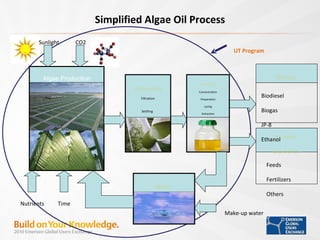
Harvesting Filtration Settling   Water  Biofuels Processing Concentration Preparation Lysing Extraction Biomass  Coproducts Algae Production Biodiesel Biogas JP-8 Ethanol Feeds Fertilizers Others Sunlight Time Make-up water UT Program Simplified Algae Oil Process Nutrients CO2
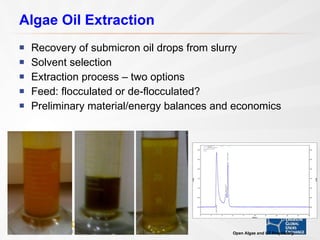
Algae Oil Extraction Recovery of submicron oil drops from slurry  Solvent selection Extraction process – two options Feed: flocculated or de-flocculated? Preliminary material/energy balances and economics Open Algae and UT Proprietary
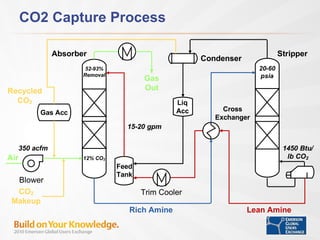
CO2 Capture Process
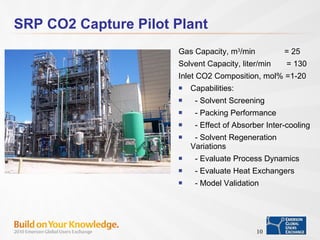
SRP CO2 Capture Pilot Plant Gas Capacity, m 3 /min  = 25  Solvent Capacity, liter/min  = 130  Inlet CO2 Composition, mol% =1-20 Capabilities: - Solvent Screening - Packing Performance - Effect of Absorber Inter-cooling - Solvent Regeneration Variations - Evaluate Process Dynamics - Evaluate Heat Exchangers - Model Validation
Absorption Column Column Diameter, cm = 42.8  Packed Height, cm  = 600  Pressure, bar  = 1 Windows for Observation Inter-cooling Capability Extensive Temperature Measurements
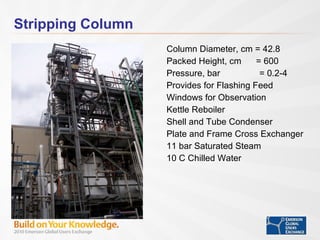
Stripping Column Column Diameter, cm = 42.8  Packed Height, cm  = 600  Pressure, bar  = 0.2-4 Provides for Flashing Feed Windows for Observation Kettle Reboiler Shell and Tube Condenser Plate and Frame Cross Exchanger 11 bar Saturated Steam 10 C Chilled Water
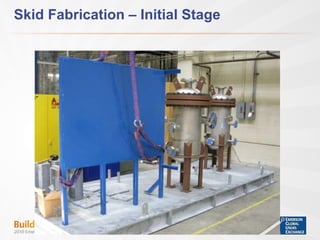
Skid Fabrication – Initial Stage
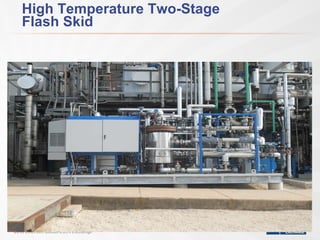
High Temperature Two-Stage  Flash Skid
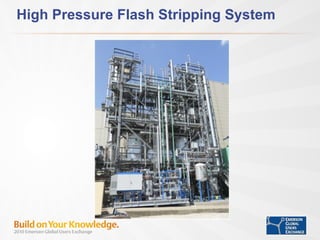
High Pressure Flash Stripping System
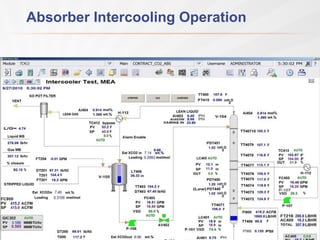
Absorber Intercooling Operation
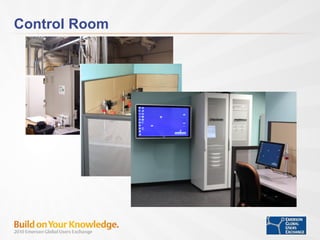
Scope of the upgrade Project Upgrade to DeltaV v11 and AMS Replace M series with S series controllers & IO Two standard DeltaV JB’s w/ RCIOC’s & CHARMS Retrofit one of existing JB’s with RCIOC’s & CHARMS Upgraded Fieldbus Added WIOC  Upgrade PROplus, Application Station & Workstations to Windows 7 Update Displays  Added new Switches Upgrade Control Room Remove existing overhead utility piping and abandoned conduit Add new wall to separate operators from equipment room Move analyzers to single cabinet and relocate Upgrade lighting and install suspended ceiling in Operator room Add new Operator room furniture
Upgrade continued… Workstations and Servers – Rack Mount Four DELL Workstations (Operator Stations) One DELL Server (Application Station) Three Redundant CIOCs 181 CHARMS AI, AO, DI, DO, RTD, Thermocouple Two sets of Redundant S-Series Controllers 41 S-Series Cards AI, AO, DI, DO, Serial, FF
CO2 Skid Five Rosemount 3095 Flowmeters Two Rosemount 3051 Level Transmitters One Micromotion Coriolis Flowmeter  Two Micromotion Viscometer Six Fisher DVC Valves One Rugged PC configured as a ProPlus (for local interface & commissioning).
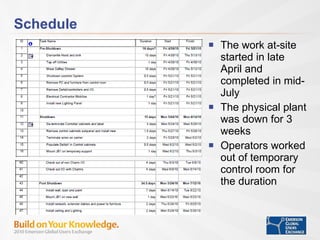
Schedule The work at-site started in late April and completed in mid-July The physical plant was down for 3 weeks Operators worked out of temporary control room for the duration
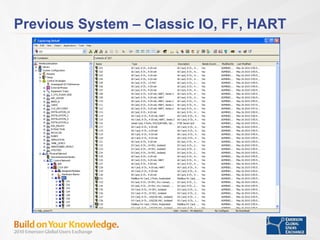
Previous System – Classic IO, FF, HART
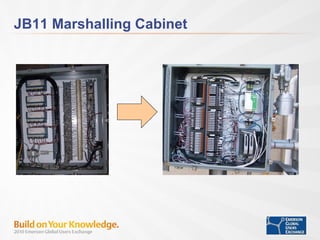
JB11 Marshalling Cabinet
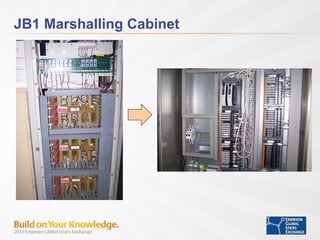
JB1 Marshalling Cabinet
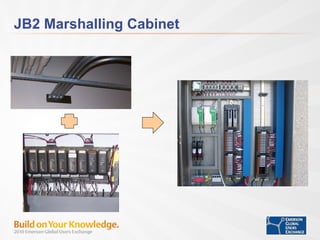
JB2 Marshalling Cabinet
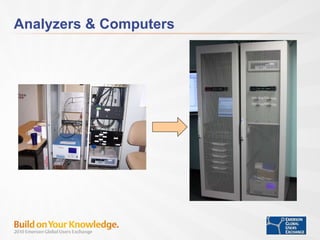
Analyzers & Computers
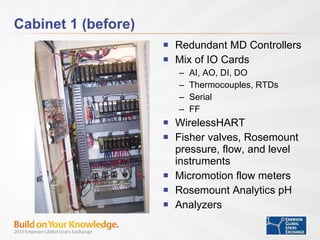
Cabinet 1 (before) Redundant MD Controllers Mix of IO Cards AI, AO, DI, DO Thermocouples, RTDs Serial FF WirelessHART Fisher valves, Rosemount pressure, flow, and level instruments Micromotion flow meters Rosemount Analytics pH Analyzers
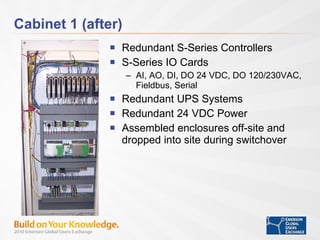
Cabinet 1 (after) Redundant S-Series Controllers S-Series IO Cards AI, AO, DI, DO 24 VDC, DO 120/230VAC, Fieldbus, Serial Redundant UPS Systems Redundant 24 VDC Power Assembled enclosures off-site and dropped into site during switchover
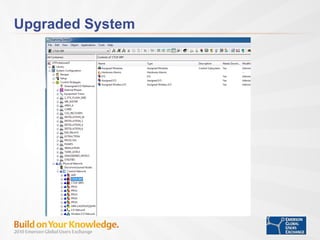
Upgraded System
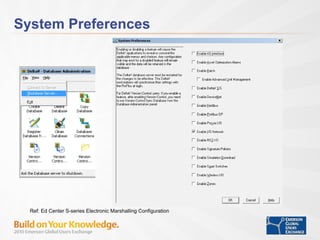
System Preferences Ref: Ed Center S-series Electronic Marshalling Configuration
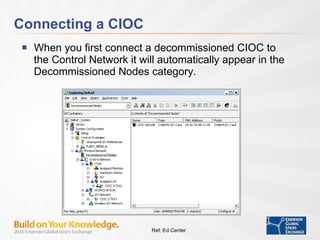
Connecting a CIOC When you first connect a decommissioned CIOC to the Control Network it will automatically appear in the Decommissioned Nodes category. Ref: Ed Center
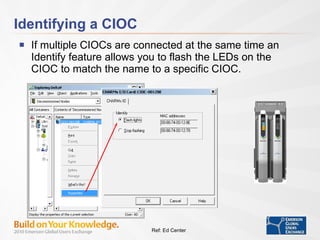
Identifying a CIOC If multiple CIOCs are connected at the same time an Identify feature allows you to flash the LEDs on the CIOC to match the name to a specific CIOC. Ref: Ed Center
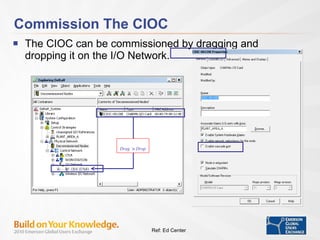
Commission The CIOC The CIOC can be commissioned by dragging and dropping it on the I/O Network. Drag ‘n Drop Ref: Ed Center
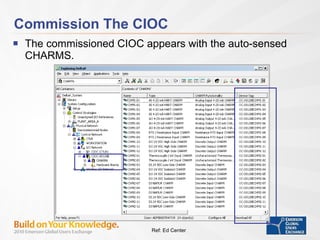
Commission The CIOC The commissioned CIOC appears with the auto-sensed CHARMS. Ref: Ed Center
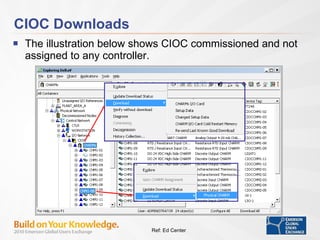
CIOC Downloads The illustration below shows CIOC commissioned and not assigned to any controller. Ref: Ed Center
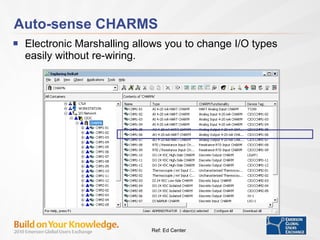
Auto-sense CHARMS Electronic Marshalling allows you to change I/O types easily without re-wiring. Ref: Ed Center
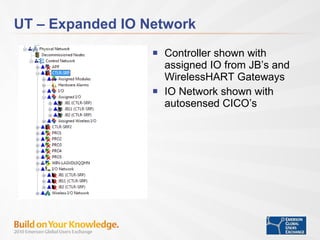
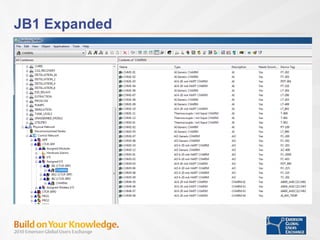
UT – Expanded IO Network Controller shown with assigned IO from JB’s and WirelessHART Gateways IO Network shown with autosensed CICO’s
JB1 Expanded
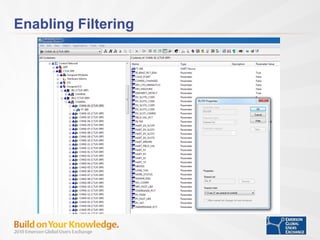
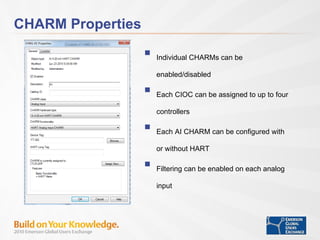
CHARM Properties Individual CHARMs can be enabled/disabled Each CIOC can be assigned to up to four controllers Each AI CHARM can be configured with or without HART Filtering can be enabled on each analog input
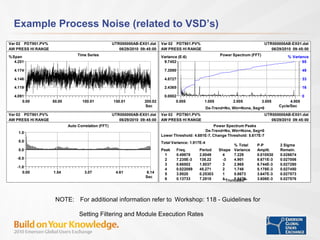
Example Process Noise (related to VSD’s) NOTE:   For additional information refer to   Workshop: 118 - Guidelines for  Setting Filtering and Module Execution Rates
Enabling Filtering
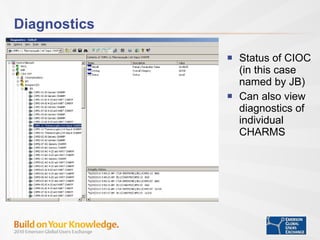
Diagnostics Status of CIOC (in this case named by JB) Can also view diagnostics of individual CHARMS
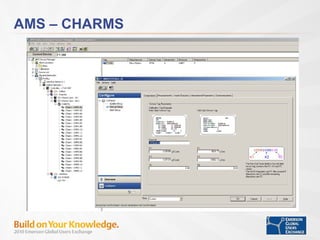
AMS – CHARMS
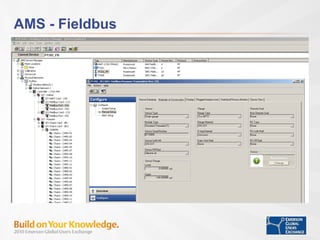
AMS - Fieldbus
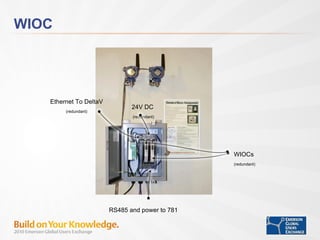
WIOC Ethernet To DeltaV (redundant) WIOCs (redundant) 24V DC  (redundant) RS485 and power to 781
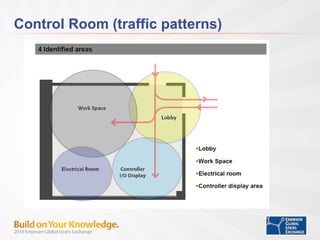
Control Room (traffic patterns)
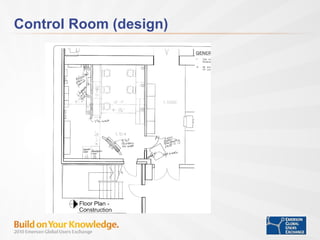
Control Room (design)
Control (artist drawing)
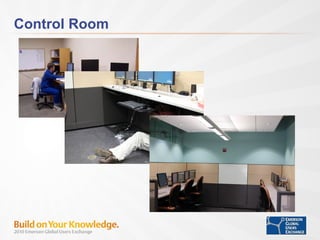
Control Room
Control Room
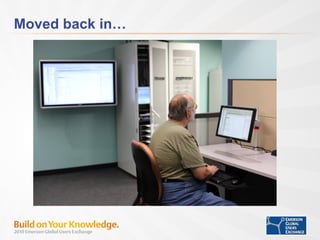
Moved back in…
Things learned along the way Have knowledgeable person on-site at all times Tags must be carefully tracked Keep a virtual machine handy with previous system configuration on it It is very easy to move DST assignments between controllers – utilize the split window view on Explorer and drag/drop DSTs between destinations Use controller upgrade utility to double check version information Use autosense to double check CHARM types Use diagnostics to look for wiring & calibration issues Use AMS to quickly check FF and HART devices
Business Results Achieved Flexibility.  With CHARMS IO UT can easily add and remove devices in the field and move configuration between controllers without being limited by where wires are terminated.  Supporting multiple projects.  It will be much easier to run parallel tests.  The improved control room layout makes it much easier for operators to run their portion of the tests.  More data.  Upgraded servers makes it easier to hold on to more data.
Summary CHARMS IO provides UT with considerable project flexibility.  The new control room layout and upgraded servers provides UT with much a better environment to run concurrent projects, collect data, and provide reports for their customers. We appreciate you taking the time to attend our session.  We would like feedback on the presentation or your own experiences. Questions?
Where To Get More Information Emerson Exchange 2010 Workshop: 168 - DeltaV Development Systems in a Virtualized Environment Exhibit: Virtual CHARMS IO Simulation Demonstration - Advanced Control Booth Workshop: 118 - Guidelines for Setting Filtering and Module Execution Rate  Ed Svrcs: 13-555 - DeltaV S-series Electronic Marshalling DeltaV Literature Product Data Sheet: DeltaV Virtual CHARMS IO Simulation Books On Line v11 Visit  www.emersonprocess.com/smartwireless

CHARMED Upgrading the UT Pickle Separations to DeltaV v11

  • 1.
    CHARMED Upgrading UTPickle Separations to DeltaV v11 with integrated CHARMS Dr. Frank Seibert – University of Texas Mark Nixon – Emerson Research Manager
  • 2.
    Presenters Frank Seibert,University of Texas at Austin Mark Nixon Research Manager Austin, Texas
  • 3.
    Abstract This presentationfollows the modernization of the UT Pickle Research Center in Austin, TX. The project includes an upgrade to CHARMS IO (electronic IO) and S-Series controllers, installation of new junction boxes, upgrade of graphics, conversion to rack mounted PCs and Servers, and modernization of the control room. The presentation follows the planning and execution of the project from initial planning, through execution, to commissioning, to taking the project on-line.
  • 4.
    Separations Research Program,University of Texas at Austin The Separations Research Program was established at the J.J. Pickle Research Campus in 1984 This cooperative industry/university program performs fundamental research of interest to chemical, biotechnological, petroleum refining, gas processing, pharmaceutical, and food companies. CO2 removal from stack gas is a current focus project
  • 5.
  • 6.
    Research Areas DistillationCO2 Absorption/Stripping Liquid-Liquid Extraction Oil Extraction from Algae Verification of Separation Processes Scale-up/Trouble-Shooting
  • 7.
    Harvesting Filtration Settling Water Biofuels Processing Concentration Preparation Lysing Extraction Biomass Coproducts Algae Production Biodiesel Biogas JP-8 Ethanol Feeds Fertilizers Others Sunlight Time Make-up water UT Program Simplified Algae Oil Process Nutrients CO2
  • 8.
    Algae Oil ExtractionRecovery of submicron oil drops from slurry Solvent selection Extraction process – two options Feed: flocculated or de-flocculated? Preliminary material/energy balances and economics Open Algae and UT Proprietary
  • 9.
  • 10.
    SRP CO2 CapturePilot Plant Gas Capacity, m 3 /min = 25 Solvent Capacity, liter/min = 130 Inlet CO2 Composition, mol% =1-20 Capabilities: - Solvent Screening - Packing Performance - Effect of Absorber Inter-cooling - Solvent Regeneration Variations - Evaluate Process Dynamics - Evaluate Heat Exchangers - Model Validation
  • 11.
    Absorption Column ColumnDiameter, cm = 42.8 Packed Height, cm = 600 Pressure, bar = 1 Windows for Observation Inter-cooling Capability Extensive Temperature Measurements
  • 12.
    Stripping Column ColumnDiameter, cm = 42.8 Packed Height, cm = 600 Pressure, bar = 0.2-4 Provides for Flashing Feed Windows for Observation Kettle Reboiler Shell and Tube Condenser Plate and Frame Cross Exchanger 11 bar Saturated Steam 10 C Chilled Water
  • 13.
    Skid Fabrication –Initial Stage
  • 14.
  • 15.
    High Pressure FlashStripping System
  • 16.
  • 17.
    Scope of theupgrade Project Upgrade to DeltaV v11 and AMS Replace M series with S series controllers & IO Two standard DeltaV JB’s w/ RCIOC’s & CHARMS Retrofit one of existing JB’s with RCIOC’s & CHARMS Upgraded Fieldbus Added WIOC Upgrade PROplus, Application Station & Workstations to Windows 7 Update Displays Added new Switches Upgrade Control Room Remove existing overhead utility piping and abandoned conduit Add new wall to separate operators from equipment room Move analyzers to single cabinet and relocate Upgrade lighting and install suspended ceiling in Operator room Add new Operator room furniture
  • 18.
    Upgrade continued… Workstationsand Servers – Rack Mount Four DELL Workstations (Operator Stations) One DELL Server (Application Station) Three Redundant CIOCs 181 CHARMS AI, AO, DI, DO, RTD, Thermocouple Two sets of Redundant S-Series Controllers 41 S-Series Cards AI, AO, DI, DO, Serial, FF
  • 19.
    CO2 Skid FiveRosemount 3095 Flowmeters Two Rosemount 3051 Level Transmitters One Micromotion Coriolis Flowmeter Two Micromotion Viscometer Six Fisher DVC Valves One Rugged PC configured as a ProPlus (for local interface & commissioning).
  • 20.
    Schedule The workat-site started in late April and completed in mid-July The physical plant was down for 3 weeks Operators worked out of temporary control room for the duration
  • 21.
    Previous System –Classic IO, FF, HART
  • 22.
  • 23.
  • 24.
  • 25.
  • 26.
    Cabinet 1 (before)Redundant MD Controllers Mix of IO Cards AI, AO, DI, DO Thermocouples, RTDs Serial FF WirelessHART Fisher valves, Rosemount pressure, flow, and level instruments Micromotion flow meters Rosemount Analytics pH Analyzers
  • 27.
    Cabinet 1 (after)Redundant S-Series Controllers S-Series IO Cards AI, AO, DI, DO 24 VDC, DO 120/230VAC, Fieldbus, Serial Redundant UPS Systems Redundant 24 VDC Power Assembled enclosures off-site and dropped into site during switchover
  • 28.
  • 29.
    System Preferences Ref:Ed Center S-series Electronic Marshalling Configuration
  • 30.
    Connecting a CIOCWhen you first connect a decommissioned CIOC to the Control Network it will automatically appear in the Decommissioned Nodes category. Ref: Ed Center
  • 31.
    Identifying a CIOCIf multiple CIOCs are connected at the same time an Identify feature allows you to flash the LEDs on the CIOC to match the name to a specific CIOC. Ref: Ed Center
  • 32.
    Commission The CIOCThe CIOC can be commissioned by dragging and dropping it on the I/O Network. Drag ‘n Drop Ref: Ed Center
  • 33.
    Commission The CIOCThe commissioned CIOC appears with the auto-sensed CHARMS. Ref: Ed Center
  • 34.
    CIOC Downloads Theillustration below shows CIOC commissioned and not assigned to any controller. Ref: Ed Center
  • 35.
    Auto-sense CHARMS ElectronicMarshalling allows you to change I/O types easily without re-wiring. Ref: Ed Center
  • 36.
    UT – ExpandedIO Network Controller shown with assigned IO from JB’s and WirelessHART Gateways IO Network shown with autosensed CICO’s
  • 37.
  • 38.
    CHARM Properties IndividualCHARMs can be enabled/disabled Each CIOC can be assigned to up to four controllers Each AI CHARM can be configured with or without HART Filtering can be enabled on each analog input
  • 39.
    Example Process Noise(related to VSD’s) NOTE: For additional information refer to Workshop: 118 - Guidelines for Setting Filtering and Module Execution Rates
  • 40.
  • 41.
    Diagnostics Status ofCIOC (in this case named by JB) Can also view diagnostics of individual CHARMS
  • 42.
  • 43.
  • 44.
    WIOC Ethernet ToDeltaV (redundant) WIOCs (redundant) 24V DC (redundant) RS485 and power to 781
  • 45.
  • 46.
  • 47.
  • 48.
  • 49.
  • 50.
  • 51.
    Things learned alongthe way Have knowledgeable person on-site at all times Tags must be carefully tracked Keep a virtual machine handy with previous system configuration on it It is very easy to move DST assignments between controllers – utilize the split window view on Explorer and drag/drop DSTs between destinations Use controller upgrade utility to double check version information Use autosense to double check CHARM types Use diagnostics to look for wiring & calibration issues Use AMS to quickly check FF and HART devices
  • 52.
    Business Results AchievedFlexibility. With CHARMS IO UT can easily add and remove devices in the field and move configuration between controllers without being limited by where wires are terminated. Supporting multiple projects. It will be much easier to run parallel tests. The improved control room layout makes it much easier for operators to run their portion of the tests. More data. Upgraded servers makes it easier to hold on to more data.
  • 53.
    Summary CHARMS IOprovides UT with considerable project flexibility. The new control room layout and upgraded servers provides UT with much a better environment to run concurrent projects, collect data, and provide reports for their customers. We appreciate you taking the time to attend our session. We would like feedback on the presentation or your own experiences. Questions?
  • 54.
    Where To GetMore Information Emerson Exchange 2010 Workshop: 168 - DeltaV Development Systems in a Virtualized Environment Exhibit: Virtual CHARMS IO Simulation Demonstration - Advanced Control Booth Workshop: 118 - Guidelines for Setting Filtering and Module Execution Rate Ed Svrcs: 13-555 - DeltaV S-series Electronic Marshalling DeltaV Literature Product Data Sheet: DeltaV Virtual CHARMS IO Simulation Books On Line v11 Visit www.emersonprocess.com/smartwireless

Editor's Notes

  • #30 The first step to configuring CHARM I/O is to Enable the I/O Network on the system preferences. This will you to configure the I/O Network on the DeltaV Explorer. This is accomplished as indicated in step 1. by selecting System Preferences under the DeltaV Engineering category of programs and checking the Enable I/O Network. As noted in the dialog you must restart the DeltaV database server for this added preference to be recognized. Restarting the DeltaV database server can be accomplished by first shutting it down as indicated in step 2. by using the Database administration tool and selecting Shutdown Server from the File menu. Once the Server is shutdown. Launch the DeltaV Explorer and it will automatically restart the database server. At this point you will be able to configure CHARM I/O from the DeltaV Explorer.
  • #31 Upon connecting a decommissioned CIOC to the Control Network it will announce itself and show up in the Decommissioned Nodes category as shown in this screen capture. Here a CIOC shows up with the default name CIOC-00128E. The default name is prefixed CIOC and to make it a unique name and allow for multiple decommissioned CIOCs a numerical suffix is applied which comes from it’s MAC address.
  • #32 If multiple CIOCs are connected at the same time an Identify feature allows you to flash the LEDs on the CIOC to match the name to the physical CIOC. All LEDs will flash alternately on the two CIOCs during the identify state. This is the same as you have done with DeltaV controllers from day 1 with DeltaV.
  • #33 The CIOC can be commissioned by dragging and dropping it on the IO Network. This will create a new CIOC as opposed to dropping it on the placeholder named CIOC which is already configured and assigned to the controller named CTLR. The placeholder allows you to configure a CIOC without having the physical hardware available and then when the hardware arrives the decommissioned CIOC would be assigned to the placeholder. In this example we are creating a new CIOC, the properties box dialog appears immediately after dropping the CIOC on the IO Network allowing you to define the new CIOCs name. Several other properties are defined here as well, including whether you want hardware alarms generated for this CIOC, Network redundancy etc.. Again similar to a controller. Unique to the CIOC is the Enable Cascade Port. This option must be checked to turn on the bottom cascade port for daisy chaining one CIOC to another. Upon completing this dialog click OK and the act of commissioning will assign a valid DeltaV Network address to the CIOC as well autosense the CHARM types attached.
  • #34 Here you see the newly commissioned CIOC with the autosensed CHARM types in the right hand window. A couple points of interest for this CIOC. First, CHARMS are assigned with default DSTs, the default naming convention includes the CIOC Name followed by CHM for charm, and the carrier – charm number. So the first default DST is 1-01 for carrier 1 CHARM 1 through 2-12 for carrier 2 charm 12. When configuring each CHARM you will assign the appropriate device tag or DST. Also notice the new CIOC, named CIOC – double zero one twenty-eight E is not assigned to any controller yet, as the placeholder above it has the CHARMS assigned to the controller named CTLR as denoted by the parenthesis. Additionally, the yellow triangle indicates this node has no configuration and requires a download.
  • #35 This illustration shows the CIOC commissioned and not assigned to any controller, if it were assigned following, the CIOC name in parenthesis it would have the assigned controller name. The point here is that the CIOC and it’s CHARMS can be commissioned, auto sensed and configured independent of controllers. Additionally, the CIOC and CHARMS can be downloaded independent of the controller to allow a baseline check of the configuration and wiring, in which a green LED will illuminate on the individual CHARMS for a good indication of the CHARM and it’s associated wiring to the field device.
  • #36 One of the key features of Electronic Marshalling is the ability to change CHARM types easily. Consider this example CHM1-2 is an Analog Input while CHM1-6 is an Analog Output. We have just been informed that the CHARMS need to be reversed to match the field instruments. No re-wiring is required we just need to swap the physical CHARMS between positions 2 and 6, then Auto-sense the CHARMS in their new location. The next slides take you through the steps of swapping locations.