Process Education on Demand targeted, customizable training
Featuring "New" eLearning: Control Loop
Foundations
Photography & Video Recording Policy

Photography and audio/video recording is not permitted in any sessions or in the
exhibition areas without press credentials or written permission from the Emerson
Exchange Board of Directors. Inquiries should be directed to:
EmersonExchange@Emerson.com
Thank you.
Presenters



Mike Brouse, Mgr. Global
Learning Solutions
(Educational Services)



Terry Blevins
Introduction
This workshop describes online educational services that provide easy 24 /7
access to the training and knowledge resources you need. We will review:


Educational Services Strategy



Blended Learning (online and live classes)



Coming soon - e9025 – Control Loop Foundations
–

Intended Audience

–

Course Outline

–

Example – a “typical” lesson

–

Supporting materials – book, website



New learning management system (LMS)



Summary & questions



Where To Get More Information
Remove the Barriers to Learning


Reduce the complexity in learning about products, applications
technologies and industry solutions
– Fast pace of new products & technologies
– New features and capabilities



Be more proactive and consultative with our customers regarding
their training & education requirements



Provide customized “blended learning solutions” that address
major shifts in learning needs:
 Changing demographics
 Just-in-time training
 Globalization
Customer Feedback About Learning


Content & solutions should include:
– High quality online content (live & on-demand)
– High quality classroom training (hands-on)

– Ability to personalize learning for a specific audience
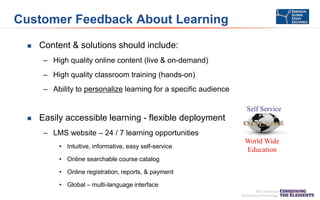
Self Service


Easily accessible learning - flexible deployment
– LMS website – 24 / 7 learning opportunities
• Intuitive, informative, easy self-service
• Online searchable course catalog

• Online registration, reports, & payment
• Global – multi-language interface

World Wide
Education
Blended Learning Path – I&E Technician








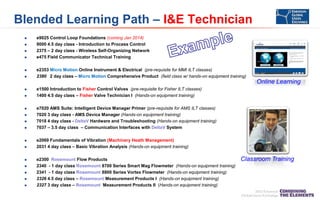
e9025 Control Loop Foundations (coming Jan 2014)
9000 4.5 day class - Introduction to Process Control
2375 – 2 day class - Wireless Self-Organizing Network
e475 Field Communicator Technical Training
e2353 Micro Motion Online Instrument & Electrical (pre-requisite for MMI ILT classes)
2380 2 day class – Micro Motion Comprehensive Product (field class w/ hands-on equipment training)

Online Learning

















e1500 Introduction to Fisher Control Valves (pre-requisite for Fisher ILT classes)
1400 4.5 day class – Fisher Valve Technician I (Hands-on equipment training)
e7020 AMS Suite: Intelligent Device Manager Primer (pre-requisite for AMS ILT classes)
7020 3 day class - AMS Device Manager (Hands-on equipment training)
7018 4 day class - DeltaV Hardware and Troubleshooting (Hands-on equipment training)
7037 – 3.5 day class – Communication Interfaces with DeltaV System
e2069 Fundamentals of Vibration (Machinery Heath Management)
2031 4 day class – Basic Vibration Analysis (Hands-on equipment training)
e2300 Rosemount Flow Products
2340 - 1 day class Rosemount 8700 Series Smart Mag Flowmeter (Hands-on equipment training)
2341 - 1 day class Rosemount 8800 Series Vortex Flowmeter (Hands-on equipment training)
2326 4.5 day class – Rosemount Measurement Products I (Hands-on equipment training)
2327 3 day class – Rosemount Measurement Products II (Hands-on equipment training)

Classroom Training
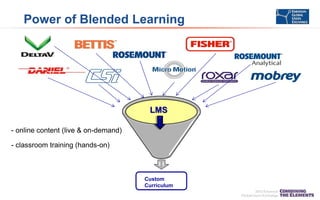
Power of Blended Learning

LMS
- online content (live & on-demand)
- classroom training (hands-on)

Custom
Curriculum
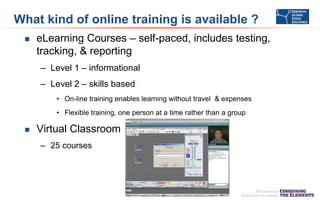
What kind of online training is available ?


eLearning Courses – self-paced, includes testing,
tracking, & reporting
– Level 1 – informational
– Level 2 – skills based
• On-line training enables learning without travel & expenses
• Flexible training, one person at a time rather than a group



Virtual Classroom
– 25 courses
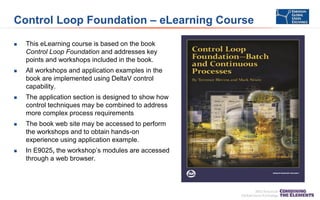
Control Loop Foundation – eLearning Course


This eLearning course is based on the book
Control Loop Foundation and addresses key
points and workshops included in the book.



All workshops and application examples in the
book are implemented using DeltaV control
capability.



The application section is designed to show how
control techniques may be combined to address
more complex process requirements



The book web site may be accessed to perform
the workshops and to obtain hands-on
experience using application example.



In E9025, the workshop’s modules are accessed
through a web browser.
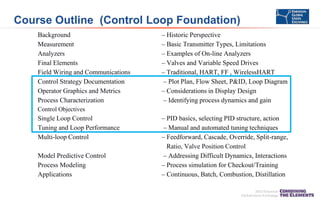
Course Outline (Control Loop Foundation)
Background
Measurement
Analyzers
Final Elements
Field Wiring and Communications
Control Strategy Documentation
Operator Graphics and Metrics
Process Characterization

– Historic Perspective
– Basic Transmitter Types, Limitations
– Examples of On-line Analyzers
– Valves and Variable Speed Drives
– Traditional, HART, FF , WirelessHART
– Plot Plan, Flow Sheet, P&ID, Loop Diagram
– Considerations in Display Design
– Identifying process dynamics and gain

Control Objectives

Single Loop Control
Tuning and Loop Performance
Multi-loop Control
Model Predictive Control
Process Modeling
Applications

– PID basics, selecting PID structure, action
– Manual and automated tuning techniques
– Feedforward, Cascade, Override, Split-range,
Ratio, Valve Position Control
– Addressing Difficult Dynamics, Interactions
– Process simulation for Checkout/Training
– Continuous, Batch, Combustion, Distillation
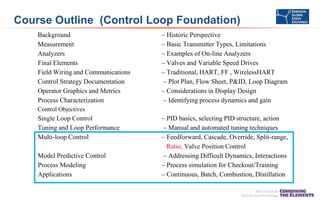
Course Outline (Control Loop Foundation)
Background
Measurement
Analyzers
Final Elements
Field Wiring and Communications
Control Strategy Documentation
Operator Graphics and Metrics
Process Characterization

– Historic Perspective
– Basic Transmitter Types, Limitations
– Examples of On-line Analyzers
– Valves and Variable Speed Drives
– Traditional, HART, FF , WirelessHART
– Plot Plan, Flow Sheet, P&ID, Loop Diagram
– Considerations in Display Design
– Identifying process dynamics and gain

Control Objectives

Single Loop Control
Tuning and Loop Performance
Multi-loop Control
Model Predictive Control
Process Modeling
Applications

– PID basics, selecting PID structure, action
– Manual and automated tuning techniques
– Feedforward, Cascade, Override, Split-range,
Ratio, Valve Position Control
– Addressing Difficult Dynamics, Interactions
– Process simulation for Checkout/Training
– Continuous, Batch, Combustion, Distillation
Course Outline (Control Loop Foundation)
Background
Measurement
Analyzers
Final Elements
Field Wiring and Communications
Control Strategy Documentation
Operator Graphics and Metrics
Process Characterization

– Historic Perspective
– Basic Transmitter Types, Limitations
– Examples of On-line Analyzers
– Valves and Variable Speed Drives
– Traditional, HART, FF , WirelessHART
– Plot Plan, Flow Sheet, P&ID, Loop Diagram
– Considerations in Display Design
– Identifying process dynamics and gain

Control Objectives

Single Loop Control
Tuning and Loop Performance
Multi-loop Control
Model Predictive Control
Process Modeling
Applications

– PID basics, selecting PID structure, action
– Manual and automated tuning techniques
– Feedforward, Cascade, Override, Split-range,
Ratio, Valve Position Control
– Addressing Difficult Dynamics, Interactions
– Process simulation for Checkout/Training
– Continuous, Batch, Combustion, Distillation
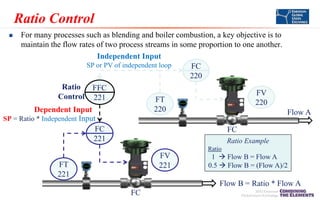
Ratio Control
For many processes such as blending and boiler combustion, a key objective is to
maintain the flow rates of two process streams in some proportion to one another.
Independent Input
SP or PV of independent loop
FC
220
Ratio FFC
FV
Control 221
FT
220
220
Dependent Input
Flow A
SP = Ratio * Independent Input
FC
FC
221
Ratio Example


Ratio

FV
221

FT
221

1  Flow B = Flow A
0.5  Flow B = (Flow A)/2

Flow B = Ratio * Flow A
FC
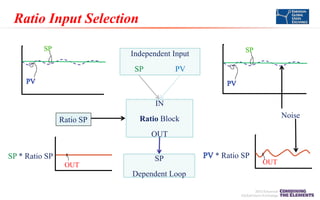
Ratio Input Selection
Independent Input
SP

PV

IN

Ratio SP

Noise

Ratio Block
OUT

SP * Ratio SP
OUT

SP
Dependent Loop

* Ratio SP

OUT
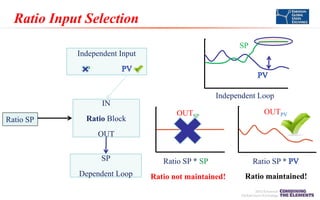
Ratio Input Selection
SP
Independent Input
SP
Independent Loop
IN
Ratio SP

Ratio Block

OUTSP

OUTPV

OUT
SP
Dependent Loop

Ratio SP * SP
Ratio not maintained!

Ratio SP *
Ratio maintained!
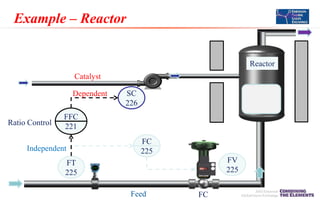
Example – Reactor

Outlet

Reactor
Catalyst
Dependent

Ratio Control

SC
226

FFC
221

Independent

FC
225
FV
225

FT
225
Feed

FC
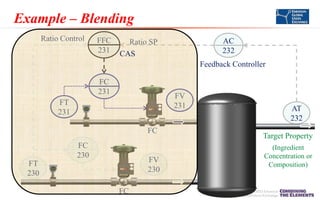
Example – Blending
Ratio Control

FFC
231

AC
232

Ratio SP
CAS

Feedback Controller
FC
231

FV
231

FT
231
FC
FC
230

FV
230

FT
230
FC

AT
232
Target Property
(Ingredient
Concentration or
Composition)
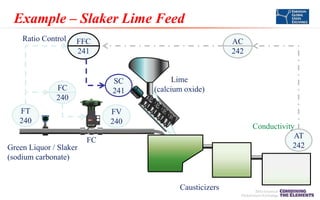
Example – Slaker Lime Feed
Ratio Control

FFC
241

AC
242

SC
241

FC
240
FT
240

Lime
(calcium oxide)

FV
240

Conductivity
AT
242

FC
Green Liquor / Slaker
(sodium carbonate)

Causticizers
Ratio Control Implementation




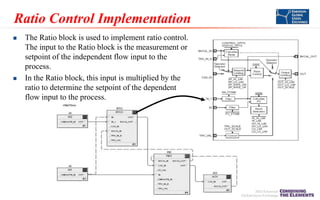
The Ratio block is used to implement ratio control.
The input to the Ratio block is the measurement or
setpoint of the independent flow input to the
process.
In the Ratio block, this input is multiplied by the
ratio to determine the setpoint of the dependent
flow input to the process.
Workshop – Ratio Control






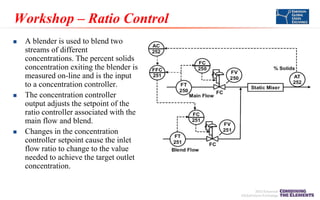
A blender is used to blend two
streams of different
concentrations. The percent solids
concentration exiting the blender is
measured on-line and is the input
to a concentration controller.
The concentration controller
output adjusts the setpoint of the
ratio controller associated with the
main flow and blend.
Changes in the concentration
controller setpoint cause the inlet
flow ratio to change to the value
needed to achieve the target outlet
concentration.
Workshop – Ratio Control







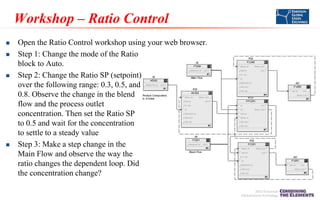
Open the Ratio Control workshop using your web browser.
Step 1: Change the mode of the Ratio
block to Auto.
Step 2: Change the Ratio SP (setpoint)
over the following range: 0.3, 0.5, and
0.8. Observe the change in the blend
flow and the process outlet
concentration. Then set the Ratio SP
to 0.5 and wait for the concentration
to settle to a steady value
Step 3: Make a step change in the
Main Flow and observe the way the
ratio changes the dependent loop. Did
the concentration change?
Workshop – Ratio Control




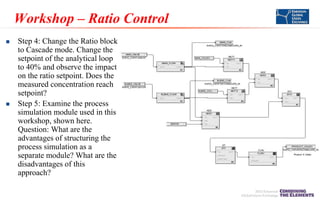
Step 4: Change the Ratio block
to Cascade mode. Change the
setpoint of the analytical loop
to 40% and observe the impact
on the ratio setpoint. Does the
measured concentration reach
setpoint?
Step 5: Examine the process
simulation module used in this
workshop, shown here.
Question: What are the
advantages of structuring the
process simulation as a
separate module? What are the
disadvantages of this
approach?
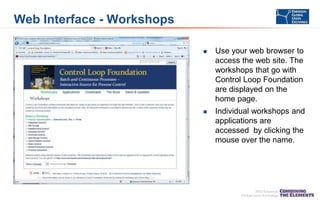
Web Interface - Workshops


Use your web browser to
access the web site. The
workshops that go with
Control Loop Foundation
are displayed on the
home page.



Individual workshops and
applications are
accessed by clicking the
mouse over the name.
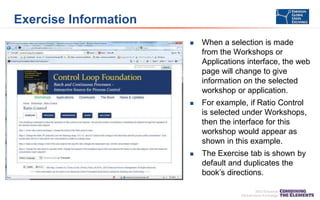
Exercise Information


When a selection is made
from the Workshops or
Applications interface, the web
page will change to give
information on the selected
workshop or application.



For example, if Ratio Control
is selected under Workshops,
then the interface for this
workshop would appear as
shown in this example.



The Exercise tab is shown by
default and duplicates the
book’s directions.
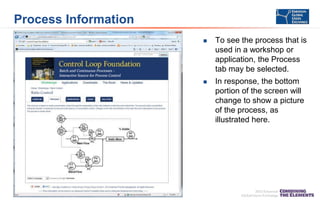
Process Information


To see the process that is
used in a workshop or
application, the Process
tab may be selected.



In response, the bottom
portion of the screen will
change to show a picture
of the process, as
illustrated here.
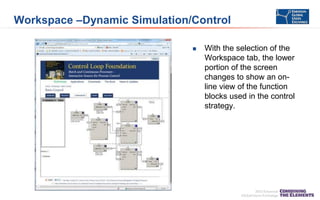
Workspace –Dynamic Simulation/Control


With the selection of the
Workspace tab, the lower
portion of the screen
changes to show an online view of the function
blocks used in the control
strategy.
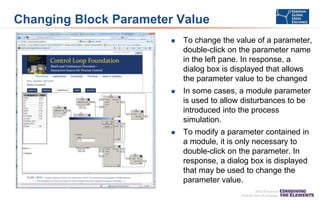
Changing Block Parameter Value


To change the value of a parameter,
double-click on the parameter name
in the left pane. In response, a
dialog box is displayed that allows
the parameter value to be changed



In some cases, a module parameter
is used to allow disturbances to be
introduced into the process
simulation.



To modify a parameter contained in
a module, it is only necessary to
double-click on the parameter. In
response, a dialog box is displayed
that may be used to change the
parameter value.
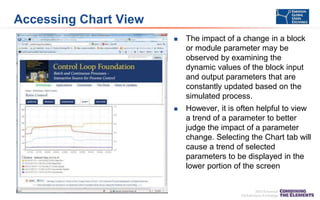
Accessing Chart View


The impact of a change in a block
or module parameter may be
observed by examining the
dynamic values of the block input
and output parameters that are
constantly updated based on the
simulated process.



However, it is often helpful to view
a trend of a parameter to better
judge the impact of a parameter
change. Selecting the Chart tab will
cause a trend of selected
parameters to be displayed in the
lower portion of the screen
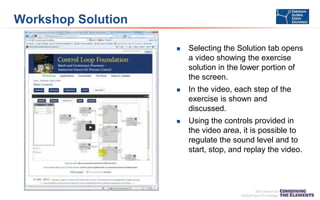
Workshop Solution


Selecting the Solution tab opens
a video showing the exercise
solution in the lower portion of
the screen.



In the video, each step of the
exercise is shown and
discussed.



Using the controls provided in
the video area, it is possible to
regulate the sound level and to
start, stop, and replay the video.
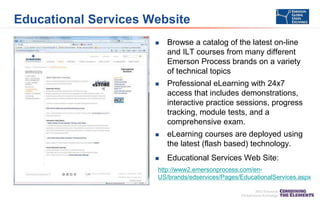
Educational Services Website


Browse a catalog of the latest on-line
and ILT courses from many different
Emerson Process brands on a variety
of technical topics



Professional eLearning with 24x7
access that includes demonstrations,
interactive practice sessions, progress
tracking, module tests, and a
comprehensive exam.



eLearning courses are deployed using
the latest (flash based) technology.



Educational Services Web Site:

http://www2.emersonprocess.com/enUS/brands/edservices/Pages/EducationalServices.aspx
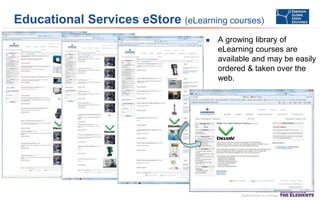
Educational Services eStore (eLearning courses)


A growing library of
eLearning courses are
available and may be easily
ordered & taken over the
web.
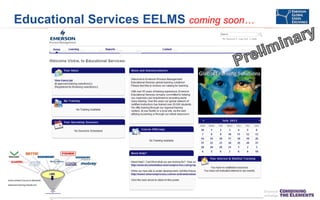
Educational Services EELMS coming soon…
Conclusion


Blended learning is a cost effective solution to help train and
prepare your personnel.
– eLearning courses
– Virtual Classroom – Live Instructor
– Classroom courses



The E9025 eLearning course is based on the book “Control Loop
Foundation”
– Many workshops and application examples are provided
– All workshop modules are accessed through a web browser
– ETA Jan 30 - $850 / 16-20 hours of online content
Where To Get More Information




Stop by the Educational Services booth
Educational Services website:
–



email me:
–



Mike.Brouse@emerson.com

Contact Educational Services:
–
–



http://www2.emersonprocess.com/enus/brands/edservices/Pages/EducationalServices.aspx

641-754-3771 or 800-338-8158
email: education@emersonprocess.com

Control Loop Foundation
–

–

Purchase Book or eBook :
http://www.isa.org/Template.cfm?Section=Find_Books1&template=/Ecommerce/Produ
ctDisplay.cfm&ProductID=11267
Web site: http://controlloopfoundation.com/
Thank You for Attending!
Enjoy the rest of the conference.
eLearning Demos
e7012 DeltaV Operator v11 http://emersonprocess.adobeconnect.com/p58z91ss9h7/
e7014 DeltaV Operator w batch http://emersonprocess.adobeconnect.com/p3n76drppo9/

e7046 Batch Analytics http://emersonprocess.adobeconnect.com/p75r110i5a0/
e1500 – Intro to Fisher Control Valves http://emersonprocess.adobeconnect.com/p7n4aa3okmy/
e2353 - Micro Motion Online Technician Training http://emersonprocess.adobeconnect.com/p18cul59djz/
e7020 AMS Device Manager http://emersonprocess.adobeconnect.com/p9p7aatxn7f/

Process Education on Demand

  • 1.
    Process Education onDemand targeted, customizable training Featuring "New" eLearning: Control Loop Foundations
  • 2.
    Photography & VideoRecording Policy Photography and audio/video recording is not permitted in any sessions or in the exhibition areas without press credentials or written permission from the Emerson Exchange Board of Directors. Inquiries should be directed to: EmersonExchange@Emerson.com Thank you.
  • 3.
    Presenters  Mike Brouse, Mgr.Global Learning Solutions (Educational Services)  Terry Blevins
  • 4.
    Introduction This workshop describesonline educational services that provide easy 24 /7 access to the training and knowledge resources you need. We will review:  Educational Services Strategy  Blended Learning (online and live classes)  Coming soon - e9025 – Control Loop Foundations – Intended Audience – Course Outline – Example – a “typical” lesson – Supporting materials – book, website  New learning management system (LMS)  Summary & questions  Where To Get More Information
  • 5.
    Remove the Barriersto Learning  Reduce the complexity in learning about products, applications technologies and industry solutions – Fast pace of new products & technologies – New features and capabilities  Be more proactive and consultative with our customers regarding their training & education requirements  Provide customized “blended learning solutions” that address major shifts in learning needs:  Changing demographics  Just-in-time training  Globalization
  • 6.
    Customer Feedback AboutLearning  Content & solutions should include: – High quality online content (live & on-demand) – High quality classroom training (hands-on) – Ability to personalize learning for a specific audience Self Service  Easily accessible learning - flexible deployment – LMS website – 24 / 7 learning opportunities • Intuitive, informative, easy self-service • Online searchable course catalog • Online registration, reports, & payment • Global – multi-language interface World Wide Education
  • 7.
    Blended Learning Path– I&E Technician       e9025 Control Loop Foundations (coming Jan 2014) 9000 4.5 day class - Introduction to Process Control 2375 – 2 day class - Wireless Self-Organizing Network e475 Field Communicator Technical Training e2353 Micro Motion Online Instrument & Electrical (pre-requisite for MMI ILT classes) 2380 2 day class – Micro Motion Comprehensive Product (field class w/ hands-on equipment training) Online Learning              e1500 Introduction to Fisher Control Valves (pre-requisite for Fisher ILT classes) 1400 4.5 day class – Fisher Valve Technician I (Hands-on equipment training) e7020 AMS Suite: Intelligent Device Manager Primer (pre-requisite for AMS ILT classes) 7020 3 day class - AMS Device Manager (Hands-on equipment training) 7018 4 day class - DeltaV Hardware and Troubleshooting (Hands-on equipment training) 7037 – 3.5 day class – Communication Interfaces with DeltaV System e2069 Fundamentals of Vibration (Machinery Heath Management) 2031 4 day class – Basic Vibration Analysis (Hands-on equipment training) e2300 Rosemount Flow Products 2340 - 1 day class Rosemount 8700 Series Smart Mag Flowmeter (Hands-on equipment training) 2341 - 1 day class Rosemount 8800 Series Vortex Flowmeter (Hands-on equipment training) 2326 4.5 day class – Rosemount Measurement Products I (Hands-on equipment training) 2327 3 day class – Rosemount Measurement Products II (Hands-on equipment training) Classroom Training
  • 8.
    Power of BlendedLearning LMS - online content (live & on-demand) - classroom training (hands-on) Custom Curriculum
  • 9.
    What kind ofonline training is available ?  eLearning Courses – self-paced, includes testing, tracking, & reporting – Level 1 – informational – Level 2 – skills based • On-line training enables learning without travel & expenses • Flexible training, one person at a time rather than a group  Virtual Classroom – 25 courses
  • 10.
    Control Loop Foundation– eLearning Course  This eLearning course is based on the book Control Loop Foundation and addresses key points and workshops included in the book.  All workshops and application examples in the book are implemented using DeltaV control capability.  The application section is designed to show how control techniques may be combined to address more complex process requirements  The book web site may be accessed to perform the workshops and to obtain hands-on experience using application example.  In E9025, the workshop’s modules are accessed through a web browser.
  • 11.
    Course Outline (ControlLoop Foundation) Background Measurement Analyzers Final Elements Field Wiring and Communications Control Strategy Documentation Operator Graphics and Metrics Process Characterization – Historic Perspective – Basic Transmitter Types, Limitations – Examples of On-line Analyzers – Valves and Variable Speed Drives – Traditional, HART, FF , WirelessHART – Plot Plan, Flow Sheet, P&ID, Loop Diagram – Considerations in Display Design – Identifying process dynamics and gain Control Objectives Single Loop Control Tuning and Loop Performance Multi-loop Control Model Predictive Control Process Modeling Applications – PID basics, selecting PID structure, action – Manual and automated tuning techniques – Feedforward, Cascade, Override, Split-range, Ratio, Valve Position Control – Addressing Difficult Dynamics, Interactions – Process simulation for Checkout/Training – Continuous, Batch, Combustion, Distillation
  • 12.
    Course Outline (ControlLoop Foundation) Background Measurement Analyzers Final Elements Field Wiring and Communications Control Strategy Documentation Operator Graphics and Metrics Process Characterization – Historic Perspective – Basic Transmitter Types, Limitations – Examples of On-line Analyzers – Valves and Variable Speed Drives – Traditional, HART, FF , WirelessHART – Plot Plan, Flow Sheet, P&ID, Loop Diagram – Considerations in Display Design – Identifying process dynamics and gain Control Objectives Single Loop Control Tuning and Loop Performance Multi-loop Control Model Predictive Control Process Modeling Applications – PID basics, selecting PID structure, action – Manual and automated tuning techniques – Feedforward, Cascade, Override, Split-range, Ratio, Valve Position Control – Addressing Difficult Dynamics, Interactions – Process simulation for Checkout/Training – Continuous, Batch, Combustion, Distillation
  • 13.
    Course Outline (ControlLoop Foundation) Background Measurement Analyzers Final Elements Field Wiring and Communications Control Strategy Documentation Operator Graphics and Metrics Process Characterization – Historic Perspective – Basic Transmitter Types, Limitations – Examples of On-line Analyzers – Valves and Variable Speed Drives – Traditional, HART, FF , WirelessHART – Plot Plan, Flow Sheet, P&ID, Loop Diagram – Considerations in Display Design – Identifying process dynamics and gain Control Objectives Single Loop Control Tuning and Loop Performance Multi-loop Control Model Predictive Control Process Modeling Applications – PID basics, selecting PID structure, action – Manual and automated tuning techniques – Feedforward, Cascade, Override, Split-range, Ratio, Valve Position Control – Addressing Difficult Dynamics, Interactions – Process simulation for Checkout/Training – Continuous, Batch, Combustion, Distillation
  • 14.
    Ratio Control For manyprocesses such as blending and boiler combustion, a key objective is to maintain the flow rates of two process streams in some proportion to one another. Independent Input SP or PV of independent loop FC 220 Ratio FFC FV Control 221 FT 220 220 Dependent Input Flow A SP = Ratio * Independent Input FC FC 221 Ratio Example  Ratio FV 221 FT 221 1  Flow B = Flow A 0.5  Flow B = (Flow A)/2 Flow B = Ratio * Flow A FC
  • 15.
    Ratio Input Selection IndependentInput SP PV IN Ratio SP Noise Ratio Block OUT SP * Ratio SP OUT SP Dependent Loop * Ratio SP OUT
  • 16.
    Ratio Input Selection SP IndependentInput SP Independent Loop IN Ratio SP Ratio Block OUTSP OUTPV OUT SP Dependent Loop Ratio SP * SP Ratio not maintained! Ratio SP * Ratio maintained!
  • 17.
    Example – Reactor Outlet Reactor Catalyst Dependent RatioControl SC 226 FFC 221 Independent FC 225 FV 225 FT 225 Feed FC
  • 18.
    Example – Blending RatioControl FFC 231 AC 232 Ratio SP CAS Feedback Controller FC 231 FV 231 FT 231 FC FC 230 FV 230 FT 230 FC AT 232 Target Property (Ingredient Concentration or Composition)
  • 19.
    Example – SlakerLime Feed Ratio Control FFC 241 AC 242 SC 241 FC 240 FT 240 Lime (calcium oxide) FV 240 Conductivity AT 242 FC Green Liquor / Slaker (sodium carbonate) Causticizers
  • 20.
    Ratio Control Implementation   TheRatio block is used to implement ratio control. The input to the Ratio block is the measurement or setpoint of the independent flow input to the process. In the Ratio block, this input is multiplied by the ratio to determine the setpoint of the dependent flow input to the process.
  • 21.
    Workshop – RatioControl    A blender is used to blend two streams of different concentrations. The percent solids concentration exiting the blender is measured on-line and is the input to a concentration controller. The concentration controller output adjusts the setpoint of the ratio controller associated with the main flow and blend. Changes in the concentration controller setpoint cause the inlet flow ratio to change to the value needed to achieve the target outlet concentration.
  • 22.
    Workshop – RatioControl     Open the Ratio Control workshop using your web browser. Step 1: Change the mode of the Ratio block to Auto. Step 2: Change the Ratio SP (setpoint) over the following range: 0.3, 0.5, and 0.8. Observe the change in the blend flow and the process outlet concentration. Then set the Ratio SP to 0.5 and wait for the concentration to settle to a steady value Step 3: Make a step change in the Main Flow and observe the way the ratio changes the dependent loop. Did the concentration change?
  • 23.
    Workshop – RatioControl   Step 4: Change the Ratio block to Cascade mode. Change the setpoint of the analytical loop to 40% and observe the impact on the ratio setpoint. Does the measured concentration reach setpoint? Step 5: Examine the process simulation module used in this workshop, shown here. Question: What are the advantages of structuring the process simulation as a separate module? What are the disadvantages of this approach?
  • 24.
    Web Interface -Workshops  Use your web browser to access the web site. The workshops that go with Control Loop Foundation are displayed on the home page.  Individual workshops and applications are accessed by clicking the mouse over the name.
  • 25.
    Exercise Information  When aselection is made from the Workshops or Applications interface, the web page will change to give information on the selected workshop or application.  For example, if Ratio Control is selected under Workshops, then the interface for this workshop would appear as shown in this example.  The Exercise tab is shown by default and duplicates the book’s directions.
  • 26.
    Process Information  To seethe process that is used in a workshop or application, the Process tab may be selected.  In response, the bottom portion of the screen will change to show a picture of the process, as illustrated here.
  • 27.
    Workspace –Dynamic Simulation/Control  Withthe selection of the Workspace tab, the lower portion of the screen changes to show an online view of the function blocks used in the control strategy.
  • 28.
    Changing Block ParameterValue  To change the value of a parameter, double-click on the parameter name in the left pane. In response, a dialog box is displayed that allows the parameter value to be changed  In some cases, a module parameter is used to allow disturbances to be introduced into the process simulation.  To modify a parameter contained in a module, it is only necessary to double-click on the parameter. In response, a dialog box is displayed that may be used to change the parameter value.
  • 29.
    Accessing Chart View  Theimpact of a change in a block or module parameter may be observed by examining the dynamic values of the block input and output parameters that are constantly updated based on the simulated process.  However, it is often helpful to view a trend of a parameter to better judge the impact of a parameter change. Selecting the Chart tab will cause a trend of selected parameters to be displayed in the lower portion of the screen
  • 30.
    Workshop Solution  Selecting theSolution tab opens a video showing the exercise solution in the lower portion of the screen.  In the video, each step of the exercise is shown and discussed.  Using the controls provided in the video area, it is possible to regulate the sound level and to start, stop, and replay the video.
  • 31.
    Educational Services Website  Browsea catalog of the latest on-line and ILT courses from many different Emerson Process brands on a variety of technical topics  Professional eLearning with 24x7 access that includes demonstrations, interactive practice sessions, progress tracking, module tests, and a comprehensive exam.  eLearning courses are deployed using the latest (flash based) technology.  Educational Services Web Site: http://www2.emersonprocess.com/enUS/brands/edservices/Pages/EducationalServices.aspx
  • 32.
    Educational Services eStore(eLearning courses)  A growing library of eLearning courses are available and may be easily ordered & taken over the web.
  • 33.
  • 34.
    Conclusion  Blended learning isa cost effective solution to help train and prepare your personnel. – eLearning courses – Virtual Classroom – Live Instructor – Classroom courses  The E9025 eLearning course is based on the book “Control Loop Foundation” – Many workshops and application examples are provided – All workshop modules are accessed through a web browser – ETA Jan 30 - $850 / 16-20 hours of online content
  • 35.
    Where To GetMore Information   Stop by the Educational Services booth Educational Services website: –  email me: –  Mike.Brouse@emerson.com Contact Educational Services: – –  http://www2.emersonprocess.com/enus/brands/edservices/Pages/EducationalServices.aspx 641-754-3771 or 800-338-8158 email: education@emersonprocess.com Control Loop Foundation – – Purchase Book or eBook : http://www.isa.org/Template.cfm?Section=Find_Books1&template=/Ecommerce/Produ ctDisplay.cfm&ProductID=11267 Web site: http://controlloopfoundation.com/
  • 36.
    Thank You forAttending! Enjoy the rest of the conference.
  • 37.
    eLearning Demos e7012 DeltaVOperator v11 http://emersonprocess.adobeconnect.com/p58z91ss9h7/ e7014 DeltaV Operator w batch http://emersonprocess.adobeconnect.com/p3n76drppo9/ e7046 Batch Analytics http://emersonprocess.adobeconnect.com/p75r110i5a0/ e1500 – Intro to Fisher Control Valves http://emersonprocess.adobeconnect.com/p7n4aa3okmy/ e2353 - Micro Motion Online Technician Training http://emersonprocess.adobeconnect.com/p18cul59djz/ e7020 AMS Device Manager http://emersonprocess.adobeconnect.com/p9p7aatxn7f/