Top-Down Network
Design
Chapter Six
Designing Models for Addressing and Naming
Copyright 2010 Cisco Press & Priscilla Oppenheimer
Guidelines for Addressing and
Naming
 Use a structured model for addressing and naming
 Assign addresses and names hierarchically
 Decide in advance if you will use
 Central or distributed authority for addressing and naming
 Public or private addressing
 Static or dynamic addressing and naming
2
Advantages of Structured
Models for Addressing &
Naming It makes it easier to
 Read network maps
 Operate network management software
 Recognize devices in protocol analyzer traces
 Meet goals for usability
 Design filters on firewalls and routers
 Implement route summarization
3
Public IP Addresses
 Managed by the Internet Assigned Numbers Authority (IANA)
 Users are assigned IP addresses by Internet service providers
(ISPs).
 ISPs obtain allocations of IP addresses from their appropriate
Regional Internet Registry (RIR)
4
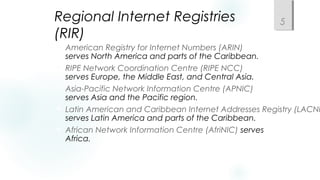
Regional Internet Registries
(RIR)
 American Registry for Internet Numbers (ARIN)
serves North America and parts of the Caribbean.
 RIPE Network Coordination Centre (RIPE NCC)
serves Europe, the Middle East, and Central Asia.
 Asia-Pacific Network Information Centre (APNIC)
serves Asia and the Pacific region.
 Latin American and Caribbean Internet Addresses Registry (LACNI
serves Latin America and parts of the Caribbean.
 African Network Information Centre (AfriNIC) serves
Africa.
5
Private Addressing
10.0.0.0 – 10.255.255.255
172.16.0.0 – 172.31.255.255
192.168.0.0 – 192.168.255.255
6
Criteria for Using Static Vs. Dynamic
Addressing
 The number of end systems
 The likelihood of needing to renumber
 The need for high availability
 Security requirements
 The importance of tracking addresses
 Whether end systems need additional information
 (DHCP can provide more than just an address)
7
The Two Parts of an IP Address
Prefix Host
32 Bits
Prefix Length
8
Prefix Length
 An IP address is accompanied by an indication of the prefix length
 Subnet mask
 /Length
 Examples
 192.168.10.1 255.255.255.0
 192.168.10.1/24
9
Subnet Mask
 32 bits long
 Specifies which part of an IP address is the
network/subnet field and which part is the host
field
 The network/subnet portion of the mask is all 1s in binary.
 The host portion of the mask is all 0s in binary.
 Convert the binary expression back to dotted-decimal
notation for entering into configurations.
 Alternative
 Use slash notation (for example /24)
 Specifies the number of 1s
10
Subnet Mask Example
 11111111 11111111 11111111 00000000
 What is this in slash notation?
 What is this in dotted-decimal notation?
11
Another Subnet Mask Example
 11111111 11111111 11110000 00000000
 What is this in slash notation?
 What is this in dotted-decimal notation?
12
One More Subnet Mask Example
 11111111 11111111 11111000 00000000
 What is this in slash notation?
 What is this in dotted-decimal notation?
13
Designing Networks with
Subnets
 Determining subnet size
 Computing subnet mask
 Computing IP addresses
14
Addresses to Avoid When
Subnetting
 A node address of all ones (broadcast)
 A node address of all zeros (network)
 A subnet address of all ones (all subnets)
 A subnet address of all zeros (confusing)
 Cisco IOS configuration permits a subnet address of all
zeros with the ip subnet-zero command
15
Practice
 Network is 172.16.0.0
 You want to divide the network into subnets.
 You will allow 600 nodes per subnet.
 What subnet mask should you use?
 What is the address of the first node on the first subnet?
 What address would this node use to send to all devices on its
subnet?
16
More Practice
 Network is 172.16.0.0
 You have eight LANs, each of which will be its own subnet.
 What subnet mask should you use?
 What is the address of the first node on the first subnet?
 What address would this node use to send to all devices
on its subnet?
17
One More
 Network is 192.168.55.0
 You want to divide the network into subnets.
 You will have approximately 25 nodes per subnet.
 What subnet mask should you use?
 What is the address of the last node on the last subnet?
 What address would this node use to send to all devices on its
subnet?
18
IP Address Classes
 Classes are now considered obsolete
 But you have to learn them because
 Everyone in the industry still talks about them!
 You may run into a device whose configuration is affected by the
classful system
19
Classful IP Addressing
Class First First Byte Prefix Intent
Few Bits Length
A 0 1-126* 8 Very large networks
B 10 128-191 16 Large networks
C 110 192-223 24 Small networks
D 1110 224-239 NA IP multicast
E 1111 240-255 NA Experimental
*Addresses starting with 127 are reserved for IP traffic local to a host.
20
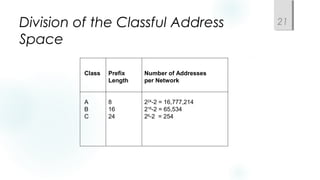
Class Prefix Number of Addresses
Length per Network
A 8 224
-2 = 16,777,214
B 16 216
-2 = 65,534
C 24 28
-2 = 254
Division of the Classful Address
Space
21
Classful IP is Wasteful
 Class A uses 50% of address space
 Class B uses 25% of address space
 Class C uses 12.5% of address space
 Class D and E use 12.5% of address space
22
Classless Addressing
 Prefix/host boundary can be anywhere
 Less wasteful
 Supports route summarization
 Also known as
 Aggregation
 Supernetting
 Classless routing
 Classless inter-domain routing (CIDR)
 Prefix routing
23
Supernetting
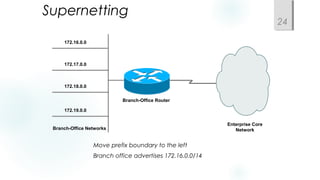
 Move prefix boundary to the left
 Branch office advertises 172.16.0.0/14
172.16.0.0
172.17.0.0
172.18.0.0
172.19.0.0
Branch-Office Networks
Enterprise Core
Network
Branch-Office Router
24
172.16.0.0/14 Summarization
Second Octet in Decimal Second Octet in Binary
16 00010000
17 00010001
18 00010010
19 00010011
25
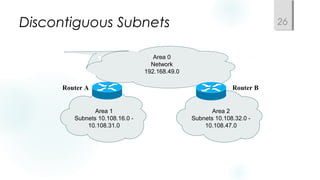
Discontiguous Subnets
Area 1
Subnets 10.108.16.0 -
10.108.31.0
Area 0
Network
192.168.49.0
Area 2
Subnets 10.108.32.0 -
10.108.47.0
Router A Router B
26
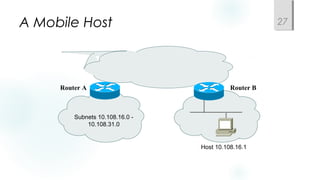
A Mobile Host
Subnets 10.108.16.0 -
10.108.31.0
Router A Router B
Host 10.108.16.1
27
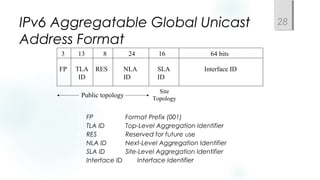
IPv6 Aggregatable Global Unicast
Address Format
 FP Format Prefix (001)
 TLA ID Top-Level Aggregation Identifier
 RES Reserved for future use
 NLA ID Next-Level Aggregation Identifier
 SLA ID Site-Level Aggregation Identifier
 Interface ID Interface Identifier
3 13 8 24 16 64 bits
FP TLA
ID
RES NLA
ID
SLA
ID
Interface ID
Public topology
Site
Topology
28
Upgrading to IPv6
 Dual stack
 Tunneling
 Translation
29
Guidelines for Assigning Names
 Names should be
 Short
 Meaningful
 Unambiguous
 Distinct
 Case insensitive
 Avoid names with unusual characters
 Hyphens, underscores, asterisks, and so on
30
Domain Name System
(DNS)
 Maps names to IP addresses
 Supports hierarchical naming
 example: frodo.rivendell.middle-earth.com
 A DNS server has a database of resource records (RRs) that
maps names to addresses in the server’s “zone of authority”
 Client queries server
 Uses UDP port 53 for name queries and replies
 Uses TCP port 53 for zone transfers
31
DNS Details
Client/server model
Client is configured with the IP
address of a DNS server
Manually or DHCP can provide the
address
DNS resolver software on the client
machine sends a query to the DNS
server. Client may ask for recursive
lookup.
32
DNS Recursion
 A DNS server may offer recursion, which allows
the server to ask other servers
 Each server is configured with the IP address of one
or more root DNS servers.
 When a DNS server receives a response from
another server, it replies to the resolver client
software. The server also caches the
information for future requests.
 The network administrator of the authoritative DNS
server for a name defines the length of time that a
non-authoritative server may cache information.
33
Summary
 Use a systematic, structured, top-down approach to
addressing and naming
 Assign addresses in a hierarchical fashion
 Distribute authority for addressing and naming where
appropriate
 IPv6 looms in our future
34
Review Questions
 Why is it important to use a structured model for addressing
and naming?
 When is it appropriate to use IP private addressing versus
public addressing?
 When is it appropriate to use static versus dynamic
addressing?
 What are some approaches to upgrading to IPv6?
35

Chapter06

  • 1.
    Top-Down Network Design Chapter Six DesigningModels for Addressing and Naming Copyright 2010 Cisco Press & Priscilla Oppenheimer
  • 2.
    Guidelines for Addressingand Naming  Use a structured model for addressing and naming  Assign addresses and names hierarchically  Decide in advance if you will use  Central or distributed authority for addressing and naming  Public or private addressing  Static or dynamic addressing and naming 2
  • 3.
    Advantages of Structured Modelsfor Addressing & Naming It makes it easier to  Read network maps  Operate network management software  Recognize devices in protocol analyzer traces  Meet goals for usability  Design filters on firewalls and routers  Implement route summarization 3
  • 4.
    Public IP Addresses Managed by the Internet Assigned Numbers Authority (IANA)  Users are assigned IP addresses by Internet service providers (ISPs).  ISPs obtain allocations of IP addresses from their appropriate Regional Internet Registry (RIR) 4
  • 5.
    Regional Internet Registries (RIR) American Registry for Internet Numbers (ARIN) serves North America and parts of the Caribbean.  RIPE Network Coordination Centre (RIPE NCC) serves Europe, the Middle East, and Central Asia.  Asia-Pacific Network Information Centre (APNIC) serves Asia and the Pacific region.  Latin American and Caribbean Internet Addresses Registry (LACNI serves Latin America and parts of the Caribbean.  African Network Information Centre (AfriNIC) serves Africa. 5
  • 6.
    Private Addressing 10.0.0.0 –10.255.255.255 172.16.0.0 – 172.31.255.255 192.168.0.0 – 192.168.255.255 6
  • 7.
    Criteria for UsingStatic Vs. Dynamic Addressing  The number of end systems  The likelihood of needing to renumber  The need for high availability  Security requirements  The importance of tracking addresses  Whether end systems need additional information  (DHCP can provide more than just an address) 7
  • 8.
    The Two Partsof an IP Address Prefix Host 32 Bits Prefix Length 8
  • 9.
    Prefix Length  AnIP address is accompanied by an indication of the prefix length  Subnet mask  /Length  Examples  192.168.10.1 255.255.255.0  192.168.10.1/24 9
  • 10.
    Subnet Mask  32bits long  Specifies which part of an IP address is the network/subnet field and which part is the host field  The network/subnet portion of the mask is all 1s in binary.  The host portion of the mask is all 0s in binary.  Convert the binary expression back to dotted-decimal notation for entering into configurations.  Alternative  Use slash notation (for example /24)  Specifies the number of 1s 10
  • 11.
    Subnet Mask Example 11111111 11111111 11111111 00000000  What is this in slash notation?  What is this in dotted-decimal notation? 11
  • 12.
    Another Subnet MaskExample  11111111 11111111 11110000 00000000  What is this in slash notation?  What is this in dotted-decimal notation? 12
  • 13.
    One More SubnetMask Example  11111111 11111111 11111000 00000000  What is this in slash notation?  What is this in dotted-decimal notation? 13
  • 14.
    Designing Networks with Subnets Determining subnet size  Computing subnet mask  Computing IP addresses 14
  • 15.
    Addresses to AvoidWhen Subnetting  A node address of all ones (broadcast)  A node address of all zeros (network)  A subnet address of all ones (all subnets)  A subnet address of all zeros (confusing)  Cisco IOS configuration permits a subnet address of all zeros with the ip subnet-zero command 15
  • 16.
    Practice  Network is172.16.0.0  You want to divide the network into subnets.  You will allow 600 nodes per subnet.  What subnet mask should you use?  What is the address of the first node on the first subnet?  What address would this node use to send to all devices on its subnet? 16
  • 17.
    More Practice  Networkis 172.16.0.0  You have eight LANs, each of which will be its own subnet.  What subnet mask should you use?  What is the address of the first node on the first subnet?  What address would this node use to send to all devices on its subnet? 17
  • 18.
    One More  Networkis 192.168.55.0  You want to divide the network into subnets.  You will have approximately 25 nodes per subnet.  What subnet mask should you use?  What is the address of the last node on the last subnet?  What address would this node use to send to all devices on its subnet? 18
  • 19.
    IP Address Classes Classes are now considered obsolete  But you have to learn them because  Everyone in the industry still talks about them!  You may run into a device whose configuration is affected by the classful system 19
  • 20.
    Classful IP Addressing ClassFirst First Byte Prefix Intent Few Bits Length A 0 1-126* 8 Very large networks B 10 128-191 16 Large networks C 110 192-223 24 Small networks D 1110 224-239 NA IP multicast E 1111 240-255 NA Experimental *Addresses starting with 127 are reserved for IP traffic local to a host. 20
  • 21.
    Class Prefix Numberof Addresses Length per Network A 8 224 -2 = 16,777,214 B 16 216 -2 = 65,534 C 24 28 -2 = 254 Division of the Classful Address Space 21
  • 22.
    Classful IP isWasteful  Class A uses 50% of address space  Class B uses 25% of address space  Class C uses 12.5% of address space  Class D and E use 12.5% of address space 22
  • 23.
    Classless Addressing  Prefix/hostboundary can be anywhere  Less wasteful  Supports route summarization  Also known as  Aggregation  Supernetting  Classless routing  Classless inter-domain routing (CIDR)  Prefix routing 23
  • 24.
    Supernetting  Move prefixboundary to the left  Branch office advertises 172.16.0.0/14 172.16.0.0 172.17.0.0 172.18.0.0 172.19.0.0 Branch-Office Networks Enterprise Core Network Branch-Office Router 24
  • 25.
    172.16.0.0/14 Summarization Second Octetin Decimal Second Octet in Binary 16 00010000 17 00010001 18 00010010 19 00010011 25
  • 26.
    Discontiguous Subnets Area 1 Subnets10.108.16.0 - 10.108.31.0 Area 0 Network 192.168.49.0 Area 2 Subnets 10.108.32.0 - 10.108.47.0 Router A Router B 26
  • 27.
    A Mobile Host Subnets10.108.16.0 - 10.108.31.0 Router A Router B Host 10.108.16.1 27
  • 28.
    IPv6 Aggregatable GlobalUnicast Address Format  FP Format Prefix (001)  TLA ID Top-Level Aggregation Identifier  RES Reserved for future use  NLA ID Next-Level Aggregation Identifier  SLA ID Site-Level Aggregation Identifier  Interface ID Interface Identifier 3 13 8 24 16 64 bits FP TLA ID RES NLA ID SLA ID Interface ID Public topology Site Topology 28
  • 29.
    Upgrading to IPv6 Dual stack  Tunneling  Translation 29
  • 30.
    Guidelines for AssigningNames  Names should be  Short  Meaningful  Unambiguous  Distinct  Case insensitive  Avoid names with unusual characters  Hyphens, underscores, asterisks, and so on 30
  • 31.
    Domain Name System (DNS) Maps names to IP addresses  Supports hierarchical naming  example: frodo.rivendell.middle-earth.com  A DNS server has a database of resource records (RRs) that maps names to addresses in the server’s “zone of authority”  Client queries server  Uses UDP port 53 for name queries and replies  Uses TCP port 53 for zone transfers 31
  • 32.
    DNS Details Client/server model Clientis configured with the IP address of a DNS server Manually or DHCP can provide the address DNS resolver software on the client machine sends a query to the DNS server. Client may ask for recursive lookup. 32
  • 33.
    DNS Recursion  ADNS server may offer recursion, which allows the server to ask other servers  Each server is configured with the IP address of one or more root DNS servers.  When a DNS server receives a response from another server, it replies to the resolver client software. The server also caches the information for future requests.  The network administrator of the authoritative DNS server for a name defines the length of time that a non-authoritative server may cache information. 33
  • 34.
    Summary  Use asystematic, structured, top-down approach to addressing and naming  Assign addresses in a hierarchical fashion  Distribute authority for addressing and naming where appropriate  IPv6 looms in our future 34
  • 35.
    Review Questions  Whyis it important to use a structured model for addressing and naming?  When is it appropriate to use IP private addressing versus public addressing?  When is it appropriate to use static versus dynamic addressing?  What are some approaches to upgrading to IPv6? 35

Editor's Notes

  • #30 Dual stack. Both IPv4 and IPv6 stacks run on the system. The system is able to communicate with both IPv6 and IPv4 devices. The choice of IP version is based on name lookup and application preference. This is the most appropriate for campus and access-layer networks during the transition period and is the preferred technique for transition to IPv6. Operating systems that support a dual stack include FreeBSD, Linux, Sun Solaris, and Windows 2000/XP. Tunneling. This method encapsulates IPv6 packets for traversal across an IPv4 network. By using tunnels, isolated IPv6 networks can communicate without requiring an upgrade to the IPv4 infrastructure. Both routers and hosts can use tunneling. Translation. This method translates one type of address to the other to facilitate communication between an IPv4 and an IPv6 network. Translation will mainly be used for legacy equipment that will not be upgraded to IPv6. An IPv6 node behind a translation device has full connectivity to other IPv6 nodes and has NAT functionality for communicating with IPv4 devices. Translation can be handled by Application Level Gateways (ALGs) or by an application programming interface (API) on every host. The two main translation solutions are NAT-Protocol Translation (NAT-PT) and Dual-Stack Transition Mechanism (DSTM).