1
IP Address
K. PALANIVEL
Systems Analyst, Computer Centre
Pondicherry University, Puducherry – 605014.
LECTURE 4
COMS 525: TCPIP
COURSE
TOPIC
TOPICS TO BE COVERED
• Structure of an IP address
• Classful IP addresses
• Limitations and problems with
Classful IP addresses
• Subnetting
• CIDR
• IP Version 6 addresses
What is an IP Address?
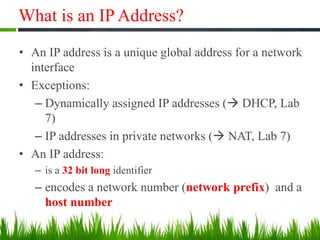
• An IP address is a unique global address for a network
interface
• Exceptions:
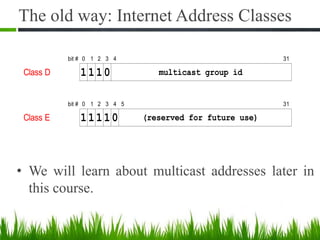
– Dynamically assigned IP addresses ( DHCP, Lab
7)
– IP addresses in private networks ( NAT, Lab 7)
• An IP address:
– is a 32 bit long identifier
– encodes a network number (network prefix) and a
host number
Network Prefix and Host Number
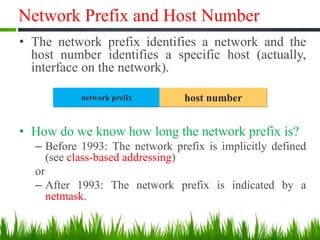
• The network prefix identifies a network and the
host number identifies a specific host (actually,
interface on the network).
• How do we know how long the network prefix is?
– Before 1993: The network prefix is implicitly defined
(see class-based addressing)
or
– After 1993: The network prefix is indicated by a
netmask.
network prefix host number
Dotted Decimal Notation
• IP addresses are written in a so-called dotted
decimal notation
• Each byte is identified by a decimal number in
the range [0..255]:
• Example:
1000111110000000 10001001 10010000
1st Byte
= 128
2nd Byte
= 143
3rd Byte
= 137
4th Byte
= 144
128.143.137.144
Example
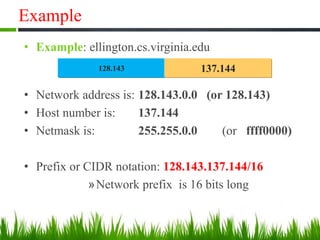
• Example: ellington.cs.virginia.edu
• Network address is: 128.143.0.0 (or 128.143)
• Host number is: 137.144
• Netmask is: 255.255.0.0 (or ffff0000)
• Prefix or CIDR notation: 128.143.137.144/16
»Network prefix is 16 bits long
128.143 137.144
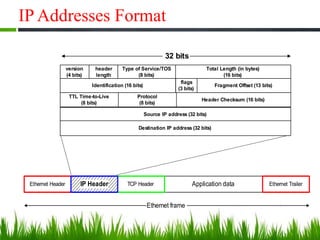
IP Addresses Format
Application dataTCP HeaderEthernet Header Ethernet Trailer
Ethernet frame
IP Header
version
(4 bits)
header
length
Type of Service/TOS
(8 bits)
Total Length (in bytes)
(16 bits)
Identification (16 bits)
flags
(3 bits)
Fragment Offset (13 bits)
Source IP address (32 bits)
Destination IP address (32 bits)
TTL Time-to-Live
(8 bits)
Protocol
(8 bits)
Header Checksum (16 bits)
32 bits
Special IP Addresses
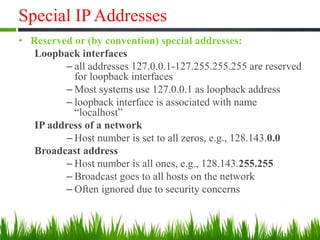
• Reserved or (by convention) special addresses:
Loopback interfaces
– all addresses 127.0.0.1-127.255.255.255 are reserved
for loopback interfaces
– Most systems use 127.0.0.1 as loopback address
– loopback interface is associated with name
“localhost”
IP address of a network
– Host number is set to all zeros, e.g., 128.143.0.0
Broadcast address
– Host number is all ones, e.g., 128.143.255.255
– Broadcast goes to all hosts on the network
– Often ignored due to security concerns
Special IP Addresses
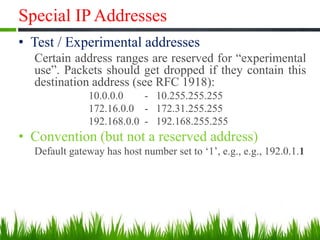
• Test / Experimental addresses
Certain address ranges are reserved for “experimental
use”. Packets should get dropped if they contain this
destination address (see RFC 1918):
10.0.0.0 - 10.255.255.255
172.16.0.0 - 172.31.255.255
192.168.0.0 - 192.168.255.255
• Convention (but not a reserved address)
Default gateway has host number set to ‘1’, e.g., e.g., 192.0.1.1
Subnetting
Subnetting
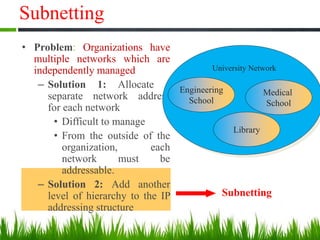
• Problem: Organizations have
multiple networks which are
independently managed
– Solution 1: Allocate a
separate network address
for each network
• Difficult to manage
• From the outside of the
organization, each
network must be
addressable.
– Solution 2: Add another
level of hierarchy to the IP
addressing structure
University Network
Medical
School
Library
Engineering
School
Address Assignment with Subnetting
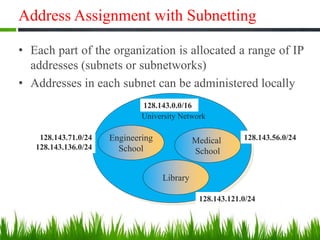
• Each part of the organization is allocated a range of IP
addresses (subnets or subnetworks)
• Addresses in each subnet can be administered locally
University Network
Medical
School
Library
Engineering
School
128.143.0.0/16
128.143.71.0/24
128.143.136.0/24
128.143.56.0/24
128.143.121.0/24
Basic Idea of Subnetting
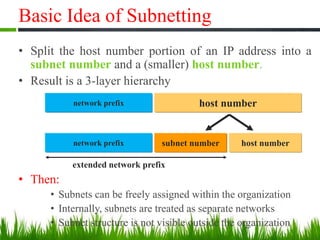
• Split the host number portion of an IP address into a
subnet number and a (smaller) host number.
• Result is a 3-layer hierarchy
• Then:
• Subnets can be freely assigned within the organization
• Internally, subnets are treated as separate networks
• Subnet structure is not visible outside the organization
network prefix host number
subnet numbernetwork prefix host number
extended network prefix
Subnetmask
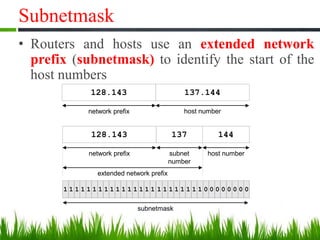
• Routers and hosts use an extended network
prefix (subnetmask) to identify the start of the
host numbers
128.143 137.144
network prefix host number
128.143 144
network prefix host numbersubnet
number
137
extended network prefix
1 1 1 1 1 1 1 1 1 1 1 1 1 1 1 1 1 1 1 1 1 1 1 1 0 0 0 0 0 0 0 0
subnetmask
Advantages of Subnetting
• With subnetting, IP addresses use a 3-layer hierarchy:
» Network
» Subnet
» Host
• Reduces router complexity. Since external routers do
not know about subnetting, the complexity of routing
tables at external routers is reduced.
• Note: Length of the subnet mask need not be identical
at all subnetworks.
Example: Subnetmask
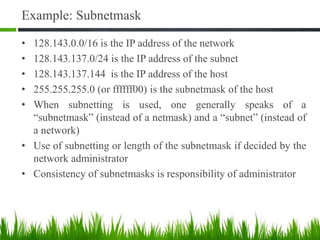
• 128.143.0.0/16 is the IP address of the network
• 128.143.137.0/24 is the IP address of the subnet
• 128.143.137.144 is the IP address of the host
• 255.255.255.0 (or ffffff00) is the subnetmask of the host
• When subnetting is used, one generally speaks of a
“subnetmask” (instead of a netmask) and a “subnet” (instead of
a network)
• Use of subnetting or length of the subnetmask if decided by the
network administrator
• Consistency of subnetmasks is responsibility of administrator
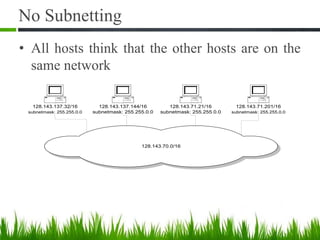
No Subnetting
• All hosts think that the other hosts are on the
same network
128.143.70.0/16
128.143.137.32/16
subnetmask: 255.255.0.0
128.143.71.21/16
subnetmask: 255.255.0.0
128.143.137.144/16
subnetmask: 255.255.0.0
128.143.71.201/16
subnetmask: 255.255.0.0
128.143.0.0/16
128.143.137.32/24
subnetmask: 255.255.255.0
128.143.71.21/24
subnetmask: 255.255.255.0
128.143.137.144/24
subnetmask: 255.255.255.0
128.143.71.201/24
subnetmask: 255.255.255.0
128.143.137.0/24
Subnet
128.143.71.0/24
Subnet
With Subnetting
• Hosts with same extended network prefix
belong to the same network
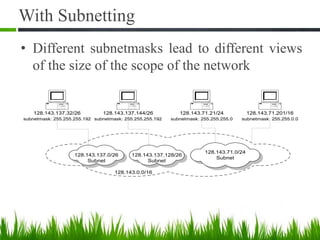
With Subnetting
• Different subnetmasks lead to different views
of the size of the scope of the network
128.143.0.0/16
128.143.137.32/26
subnetmask: 255.255.255.192
128.143.71.21/24
subnetmask: 255.255.255.0
128.143.137.144/26
subnetmask: 255.255.255.192
128.143.71.201/16
subnetmask: 255.255.0.0
128.143.71.0/24
Subnet
128.143.137.128/26
Subnet
128.143.137.0/26
Subnet
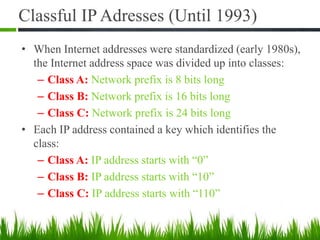
Classful IP Adresses (Until 1993)
• When Internet addresses were standardized (early 1980s),
the Internet address space was divided up into classes:
– Class A: Network prefix is 8 bits long
– Class B: Network prefix is 16 bits long
– Class C: Network prefix is 24 bits long
• Each IP address contained a key which identifies the
class:
– Class A: IP address starts with “0”
– Class B: IP address starts with “10”
– Class C: IP address starts with “110”
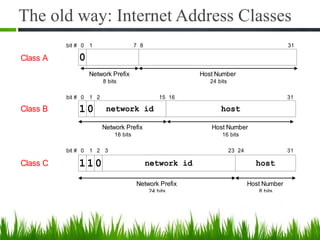
The old way: Internet Address Classes
Class C network id host11 0
Network Prefix
24 bits
Host Number
8 bits
bit # 0 1 23 242 313
Class B 1 network id host
bit # 0 1 15 162
Network Prefix
16 bits
Host Number
16 bits
0
31
Class A 0
Network Prefix
8 bits
bit # 0 1 7 8
Host Number
24 bits
31
Class D multicast group id11 1
bit # 0 1 2 313
0
4
Class E (reserved for future use)11 1
bit # 0 1 2 313
1
4
0
5
The old way: Internet Address Classes
• We will learn about multicast addresses later in
this course.
Problems with Classful IP Addresses
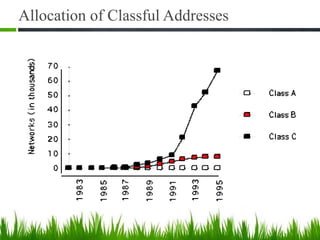
• By the early 1990s, the original classful address scheme had a
number of problems
– Flat address space. Routing tables on the backbone Internet
need to have an entry for each network address. When Class C
networks were widely used, this created a problem. By the
1993, the size of the routing tables started to outgrow the
capacity of routers.
Other problems:
– Too few network addresses for large networks
• Class A and Class B addresses were gone
– Limited flexibility for network addresses:
• Class A and B addresses are overkill (>64,000 addresses)
• Class C address is insufficient (requires 40 Class C
addresses)
Allocation of Classful Addresses
QUESTIONS ???

03 coms 525 tcpip - ip address

  • 1.
    1 IP Address K. PALANIVEL SystemsAnalyst, Computer Centre Pondicherry University, Puducherry – 605014. LECTURE 4 COMS 525: TCPIP COURSE TOPIC
  • 2.
    TOPICS TO BECOVERED • Structure of an IP address • Classful IP addresses • Limitations and problems with Classful IP addresses • Subnetting • CIDR • IP Version 6 addresses
  • 3.
    What is anIP Address? • An IP address is a unique global address for a network interface • Exceptions: – Dynamically assigned IP addresses ( DHCP, Lab 7) – IP addresses in private networks ( NAT, Lab 7) • An IP address: – is a 32 bit long identifier – encodes a network number (network prefix) and a host number
  • 4.
    Network Prefix andHost Number • The network prefix identifies a network and the host number identifies a specific host (actually, interface on the network). • How do we know how long the network prefix is? – Before 1993: The network prefix is implicitly defined (see class-based addressing) or – After 1993: The network prefix is indicated by a netmask. network prefix host number
  • 5.
    Dotted Decimal Notation •IP addresses are written in a so-called dotted decimal notation • Each byte is identified by a decimal number in the range [0..255]: • Example: 1000111110000000 10001001 10010000 1st Byte = 128 2nd Byte = 143 3rd Byte = 137 4th Byte = 144 128.143.137.144
  • 6.
    Example • Example: ellington.cs.virginia.edu •Network address is: 128.143.0.0 (or 128.143) • Host number is: 137.144 • Netmask is: 255.255.0.0 (or ffff0000) • Prefix or CIDR notation: 128.143.137.144/16 »Network prefix is 16 bits long 128.143 137.144
  • 7.
    IP Addresses Format ApplicationdataTCP HeaderEthernet Header Ethernet Trailer Ethernet frame IP Header version (4 bits) header length Type of Service/TOS (8 bits) Total Length (in bytes) (16 bits) Identification (16 bits) flags (3 bits) Fragment Offset (13 bits) Source IP address (32 bits) Destination IP address (32 bits) TTL Time-to-Live (8 bits) Protocol (8 bits) Header Checksum (16 bits) 32 bits
  • 8.
    Special IP Addresses •Reserved or (by convention) special addresses: Loopback interfaces – all addresses 127.0.0.1-127.255.255.255 are reserved for loopback interfaces – Most systems use 127.0.0.1 as loopback address – loopback interface is associated with name “localhost” IP address of a network – Host number is set to all zeros, e.g., 128.143.0.0 Broadcast address – Host number is all ones, e.g., 128.143.255.255 – Broadcast goes to all hosts on the network – Often ignored due to security concerns
  • 9.
    Special IP Addresses •Test / Experimental addresses Certain address ranges are reserved for “experimental use”. Packets should get dropped if they contain this destination address (see RFC 1918): 10.0.0.0 - 10.255.255.255 172.16.0.0 - 172.31.255.255 192.168.0.0 - 192.168.255.255 • Convention (but not a reserved address) Default gateway has host number set to ‘1’, e.g., e.g., 192.0.1.1
  • 10.
    Subnetting Subnetting • Problem: Organizationshave multiple networks which are independently managed – Solution 1: Allocate a separate network address for each network • Difficult to manage • From the outside of the organization, each network must be addressable. – Solution 2: Add another level of hierarchy to the IP addressing structure University Network Medical School Library Engineering School
  • 11.
    Address Assignment withSubnetting • Each part of the organization is allocated a range of IP addresses (subnets or subnetworks) • Addresses in each subnet can be administered locally University Network Medical School Library Engineering School 128.143.0.0/16 128.143.71.0/24 128.143.136.0/24 128.143.56.0/24 128.143.121.0/24
  • 12.
    Basic Idea ofSubnetting • Split the host number portion of an IP address into a subnet number and a (smaller) host number. • Result is a 3-layer hierarchy • Then: • Subnets can be freely assigned within the organization • Internally, subnets are treated as separate networks • Subnet structure is not visible outside the organization network prefix host number subnet numbernetwork prefix host number extended network prefix
  • 13.
    Subnetmask • Routers andhosts use an extended network prefix (subnetmask) to identify the start of the host numbers 128.143 137.144 network prefix host number 128.143 144 network prefix host numbersubnet number 137 extended network prefix 1 1 1 1 1 1 1 1 1 1 1 1 1 1 1 1 1 1 1 1 1 1 1 1 0 0 0 0 0 0 0 0 subnetmask
  • 14.
    Advantages of Subnetting •With subnetting, IP addresses use a 3-layer hierarchy: » Network » Subnet » Host • Reduces router complexity. Since external routers do not know about subnetting, the complexity of routing tables at external routers is reduced. • Note: Length of the subnet mask need not be identical at all subnetworks.
  • 15.
    Example: Subnetmask • 128.143.0.0/16is the IP address of the network • 128.143.137.0/24 is the IP address of the subnet • 128.143.137.144 is the IP address of the host • 255.255.255.0 (or ffffff00) is the subnetmask of the host • When subnetting is used, one generally speaks of a “subnetmask” (instead of a netmask) and a “subnet” (instead of a network) • Use of subnetting or length of the subnetmask if decided by the network administrator • Consistency of subnetmasks is responsibility of administrator
  • 16.
    No Subnetting • Allhosts think that the other hosts are on the same network 128.143.70.0/16 128.143.137.32/16 subnetmask: 255.255.0.0 128.143.71.21/16 subnetmask: 255.255.0.0 128.143.137.144/16 subnetmask: 255.255.0.0 128.143.71.201/16 subnetmask: 255.255.0.0
  • 17.
    128.143.0.0/16 128.143.137.32/24 subnetmask: 255.255.255.0 128.143.71.21/24 subnetmask: 255.255.255.0 128.143.137.144/24 subnetmask:255.255.255.0 128.143.71.201/24 subnetmask: 255.255.255.0 128.143.137.0/24 Subnet 128.143.71.0/24 Subnet With Subnetting • Hosts with same extended network prefix belong to the same network
  • 18.
    With Subnetting • Differentsubnetmasks lead to different views of the size of the scope of the network 128.143.0.0/16 128.143.137.32/26 subnetmask: 255.255.255.192 128.143.71.21/24 subnetmask: 255.255.255.0 128.143.137.144/26 subnetmask: 255.255.255.192 128.143.71.201/16 subnetmask: 255.255.0.0 128.143.71.0/24 Subnet 128.143.137.128/26 Subnet 128.143.137.0/26 Subnet
  • 19.
    Classful IP Adresses(Until 1993) • When Internet addresses were standardized (early 1980s), the Internet address space was divided up into classes: – Class A: Network prefix is 8 bits long – Class B: Network prefix is 16 bits long – Class C: Network prefix is 24 bits long • Each IP address contained a key which identifies the class: – Class A: IP address starts with “0” – Class B: IP address starts with “10” – Class C: IP address starts with “110”
  • 20.
    The old way:Internet Address Classes Class C network id host11 0 Network Prefix 24 bits Host Number 8 bits bit # 0 1 23 242 313 Class B 1 network id host bit # 0 1 15 162 Network Prefix 16 bits Host Number 16 bits 0 31 Class A 0 Network Prefix 8 bits bit # 0 1 7 8 Host Number 24 bits 31
  • 21.
    Class D multicastgroup id11 1 bit # 0 1 2 313 0 4 Class E (reserved for future use)11 1 bit # 0 1 2 313 1 4 0 5 The old way: Internet Address Classes • We will learn about multicast addresses later in this course.
  • 22.
    Problems with ClassfulIP Addresses • By the early 1990s, the original classful address scheme had a number of problems – Flat address space. Routing tables on the backbone Internet need to have an entry for each network address. When Class C networks were widely used, this created a problem. By the 1993, the size of the routing tables started to outgrow the capacity of routers. Other problems: – Too few network addresses for large networks • Class A and Class B addresses were gone – Limited flexibility for network addresses: • Class A and B addresses are overkill (>64,000 addresses) • Class C address is insufficient (requires 40 Class C addresses)
  • 23.
  • 24.