IT Infrastructure Architecture
Compute – Part 1
(chapter 10)
Infrastructure Building Blocks
and Concepts
Introduction
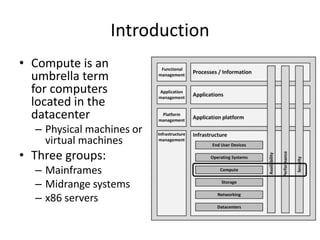
• Compute is an
umbrella term
for computers
located in the
datacenter
– Physical machines or
virtual machines
• Three groups:
– Mainframes
– Midrange systems
– x86 servers
Introduction
• Physical computers contain:
– Power supplies
– Central Processing Units
– A Basic Input/Output System
– Memory
– Expansion ports
– Network connectivity
– A keyboard, mouse, and monitor
History
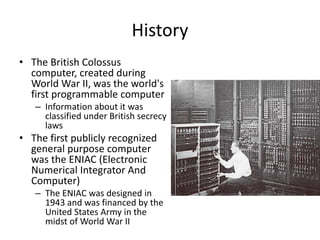
• The British Colossus
computer, created during
World War II, was the world's
first programmable computer
– Information about it was
classified under British secrecy
laws
• The first publicly recognized
general purpose computer
was the ENIAC (Electronic
Numerical Integrator And
Computer)
– The ENIAC was designed in
1943 and was financed by the
United States Army in the
midst of World War II
History
• The ENIAC:
– Could perform 5,000 operations per second
– Used more than 17,000 vacuum tubes
– Got its input using an IBM punched card reader
– Punched cards were used for output
• In the 1960s computers started to be built using
transistors instead of vacuum tubes
– Smaller
– Faster
– Cheaper to produce
– Required less power
– Much more reliable
History
• The transistor based computers were followed in the
1970s by computers based on integrated circuit (IC)
technology
– ICs are small chips that contain a set of transistors
providing standardized building blocks like AND gates, OR
gates, counters, adders, and flip-flops
– By combining building blocks, CPUs and memory circuits
could be created
• Microprocessors decreased size and cost of computers
even further
– Increased their speed and reliability
– In the 1980s microprocessors were cheap enough to be
used in personal computers
Compute building blocks
Computer housing
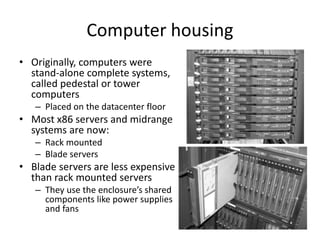
• Originally, computers were
stand-alone complete systems,
called pedestal or tower
computers
– Placed on the datacenter floor
• Most x86 servers and midrange
systems are now:
– Rack mounted
– Blade servers
• Blade servers are less expensive
than rack mounted servers
– They use the enclosure’s shared
components like power supplies
and fans
Computer housing
• A blade enclosure typically hosts from 8 to 16 blade
servers
• Blade enclosure provides:
– Shared redundant power supplies for all blades
– Shared backplane to connect all blades
– Redundant network switches to connect the blades’
Ethernet interfaces providing redundant Ethernet
connections to other systems
– Redundant SAN switches to connect the HBA interfaces on
the blade servers providing dual redundant Fibre Channel
connections to other systems
– A management module to manage the enclosure and the
blades in it
Computer housing
• The amount of wiring in a blade server setup
is substantially reduced when compared to
traditional server racks
– Less possible points of failure
– Lower initial deployment costs
• Enclosures are often not only used for blade
servers, but also for storage components like
disks, controllers, and SAN switches
Processors
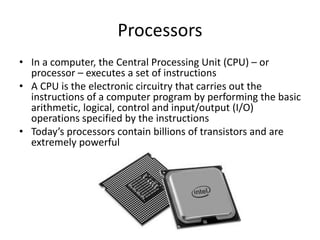
• In a computer, the Central Processing Unit (CPU) – or
processor – executes a set of instructions
• A CPU is the electronic circuitry that carries out the
instructions of a computer program by performing the basic
arithmetic, logical, control and input/output (I/O)
operations specified by the instructions
• Today’s processors contain billions of transistors and are
extremely powerful
Processor instructions
• CPU can perform a fixed number of instructions such as
ADD, SHIFT BITS, MOVE DATA, and JUMP TO CODE
LOCATION, called the instruction set
• A program created using CPU instructions is referred to
as machine code
• Each instruction is associated with an English like
mnemonic
– Easier for people to remember
– Set of mnemonics is called the assembly language
• For example:
– Binary code for the ADD WITH CARRY
– Machine code instruction: 10011101
– Mnemonic : ADC
Processors - programming
• The assembler programming language is the
lowest level programming language for computers
• Higher level programming languages are much
more human friendly
– C#
– Java
– Python
• Programs written in these languages are
translated to assembly code before they can run
on a specific CPU
• This compiling is done by a high-level language
compiler
Processors - speed
• A CPU needs a high frequency clock to operate,
generating so-called clock ticks or clock cycles
– Each machine code instruction takes one or more clock
ticks to execute
– An ADD instruction typically costs 1 tick to compute
• The speed at which the CPU operates is defined in
GHz (billions of clock ticks per second)
– A single core of a 2.4 GHz CPU can perform 2.4 billion
additions in 1 second
Processors – word size
• Each CPU is designed to handle data in chunks, called
words, with a specific size
– The first CPUs had a word size of 4 bits
– Today, most CPUs have a word size of 64 bits
• The word size is reflected in many aspects of a CPU's
structure and operation:
– The majority of the internal memory registers are the size
of one word
– The largest piece of data that can be transferred to and
from the working memory in a single operation is a word
– A 64-bit CPU can address 17,179,869,184 TB of memory
(64-bit word)
Intel x86 processors
• Intel CPUs became the de-facto standard for many
computer architectures
– The original PC used a 4.77 MHz 16-bit 8088 CPU
– A few years later, Intel produced the 32-bit 80386 and
the 80486 processors
• Since these names all ended with the number 86,
the generic architecture was referred to as x86
• In 2017, the latest Intel x86 model is the 22-core
E5-2699A Xeon Processor, running on 2.4 GHz
AMD x86 processors
• Advanced Micro Devices, Inc. (AMD) is the
second-largest global supplier of microprocessors
based on the x86 architecture
– In 1982, AMD signed a contract with Intel, becoming a
licensed second-source manufacturer of 8086 and
8088 processors for IBM
– Intel cancelled the licensing contract in 1986
– AMD still produces x86 compatible CPUs, forcing Intel
to keep innovating and to keep CPU prices relatively
low
• In 2017, the latest model is the 16-core AMD
Opteron 6386 SE CPU, running on 2.8 GHz
Itanium and x86-64 processors
• The Itanium processor line was a family of 64-bit high-
end CPUs meant for high-end servers and workstations
– Not based on the x86 architecture
– HP was the only company to actively produce Itanium
based systems, running HP-UX and OpenVMS
• In 2005, AMD released the K8 core processor
architecture as an answer to Intel’s Itanium architecture
– The K8 included a 64-bit extension to the x86 instruction
set
– Later, Intel adopted AMS’s processor’s instruction set as an
extension to its x86 processor line, called x86-64
• Today, the x86-64 architecture is used in all Intel and
AMD processors
ARM processors
• The ARM (Advanced RISC Machine) is the most used
CPU in the world
• In 2013, 10 billion ARM processors were shipped,
running on:
– 95% of smartphones
– 90% of hard disk drives
– 40% of digital televisions and set-top boxes
– 15% of microcontrollers
– 20% of mobile computers
• The CPU is produced by a large number of
manufacturers under license of ARM
• Since 2016, ARM is owned by Japanese
telecommunications company SoftBank Group
Oracle SPARC processors
• In 1986, Sun Microsystems started to produce the
SPARC processor series for their Solaris UNIX based
systems
• The SPARC architecture is fully open and non-
proprietary
– A true open source hardware design
– Any manufacturer can get a license to produce a SPARC
CPU
• Oracle bought Sun Microsystems in 2010
• SPARC processors are still used by Oracle in their
Exadata and Exalogic products
• In 2017, the latest model is the 32-core SPARC M7 CPU,
running on 4.1 GHz
IBM POWER processors
• POWER (also known as PowerPC) is a series of
CPUs
– Created by IBM
– Introduced in 1990
• IBM uses POWER CPUs in many of their high-end
server products
– Watson, the supercomputer that won Jeopardy in
2011, was equipped with 3,000 POWER7 CPU cores
• In 2017, the latest model is the 24-core POWER9
CPU, running on 4 GHz
Memory – early systems
• The first computers used vacuum tubes to store data
– Extremely expensive, uses much power, fragile, generates
much heat
• An alternative to vacuum tubes were relays
– Mechanical parts that use magnetism to move a physical
switch
– Two relays can be combined to create a single bit of
memory storage
– Slow, uses much power, noisy, heavy, and expensive
• Based on cathode ray tubes, the Williams tube was the
first random access memory, capable of storing several
thousands of bits, but only for some seconds
Memory – early systems
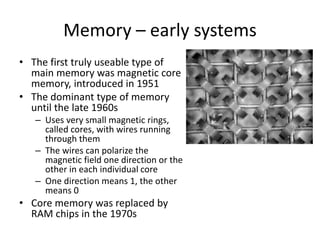
• The first truly useable type of
main memory was magnetic core
memory, introduced in 1951
• The dominant type of memory
until the late 1960s
– Uses very small magnetic rings,
called cores, with wires running
through them
– The wires can polarize the
magnetic field one direction or the
other in each individual core
– One direction means 1, the other
means 0
• Core memory was replaced by
RAM chips in the 1970s
RAM memory
• RAM: Random Access Memory
– Any piece of data stored in RAM can be read in the
same amount of time, regardless of its physical
location
• Based on transistor technology, typically
implemented in large amounts in Integrated
Circuits (ICs)
• Data is volatile – it remains available as long as
the RAM is powered
RAM memory
• Static RAM (SRAM)
– Uses flip-flop circuitry to store bits
– Six transistors per bit
• Dynamic RAM (DRAM)
– Uses a charge in a capacitor
– One transistor per bit
– DRAM loses its data after a short time due to the
leakage of the capacitors
– To keep data available in DRAM it must be
refreshed regularly (typically 16 times per second)
BIOS
• The Basic Input/Output System (BIOS) is a set of
instructions stored on a memory chip located on
the computer’s motherboard
• The BIOS controls a computer from the moment it
is powered on, to the point where the operating
system is started
• Mostly implemented in a Flash memory chip
• It is good practice to update the BIOS software
regularly
– Upgrading computers to the latest version of the BIOS
is called BIOS flashing
Interfaces
• Connecting computers to external peripherals is
done using interfaces
• External interfaces use connectors located at the
outside of the computer case
– One of the first standardized external interfaces was
the serial bus based on RS-232
– RS-232 is still used today in some systems to connect:
• Older type of peripherals
• Industrial equipment
• Console ports
• Special purpose equipment
USB
• The Universal Serial Bus (USB) was introduced in 1996 as
a replacement for most of the external interfaces on
servers and PCs
• Can provide operating power to attached devices
• Up to seven devices can be daisy-chained
– Hubs can be used to connect multiple devices to one USB
computer port
• In 2013, USB 3.1 was introduced
– Provides a throughput of 10 Gbit/s
• In 2014, USB Type-C was introduced
– Smaller connector
– Ability to provide more power to connected devices
Thunderbolt
• Thunderbolt, also known as Light Peak, was
introduced in 2011
• Thunderbolt 3 was released in 2015
– Can provide a maximum throughput of 40 Gbit/s
– Provide 100 W power to devices
– Uses the USB Type-C connector
– Backward compatible with USB 3.1
PCI
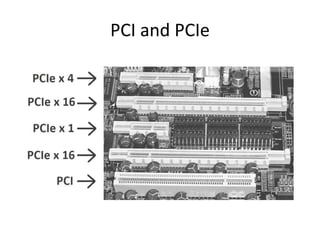
• Internal interfaces, typically some form of PCI,
are located on the system board of the
computer, inside the case, and connect
expansion boards like network adapters and
disk controllers
• Uses a shared parallel bus architecture
– Only one shared communication path between
two PCI devices can be active at any given time
PCIe
• PCI Express (PCIe) uses a topology based on point-to-
point serial links, rather than a shared parallel bus
architecture
– A connection between any two PCIe devices is known as a
link
– A collection of 1 or more links is called a lane
• Routed by a hub on the system board acting as a
crossbar switch
– The hub allows multiple pairs of devices to communicate
with each other at the same time
• Despite the availability of the much faster PCIe,
conventional PCI remains a very common interface in
computers
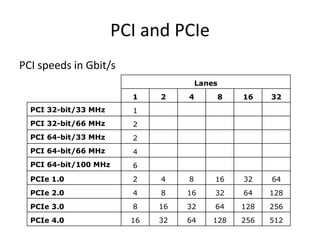
PCI and PCIe
PCI and PCIe
Lanes
1 2 4 8 16 32
PCI 32-bit/33 MHz 1
PCI 32-bit/66 MHz 2
PCI 64-bit/33 MHz 2
PCI 64-bit/66 MHz 4
PCI 64-bit/100 MHz 6
PCIe 1.0 2 4 8 16 32 64
PCIe 2.0 4 8 16 32 64 128
PCIe 3.0 8 16 32 64 128 256
PCIe 4.0 16 32 64 128 256 512
PCI speeds in Gbit/s
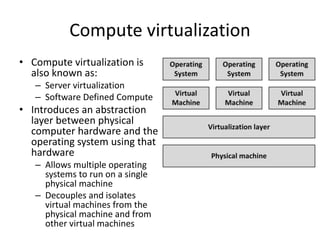
Compute virtualization
• Compute virtualization is
also known as:
– Server virtualization
– Software Defined Compute
• Introduces an abstraction
layer between physical
computer hardware and the
operating system using that
hardware
– Allows multiple operating
systems to run on a single
physical machine
– Decouples and isolates
virtual machines from the
physical machine and from
other virtual machines
Compute virtualization
• A virtual machine is a logical representation of a physical
computer in software
• New virtual machines can be provisioned without the
need for a hardware purchase
– With a few mouse clicks or using an API
– New virtual machines can be installed in minutes
• Costs can be saved on hardware, power, and cooling by
consolidating many physical computers as virtual
machines on fewer (bigger) physical machines
• Because fewer physical machines are needed, the cost
of maintenance contracts can be reduced and the risk of
hardware failure is reduced
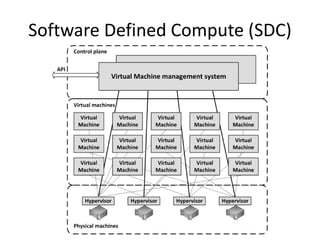
Software Defined Compute (SDC)
• Virtual machines are typically managed using one
redundant centralized virtual machine
management system
– Enables systems managers to manage more machines
with the same number of staff
– Allows managing the virtual machines using APIs
– Server virtualization can therefore be seen as Software
Defined Compute
• In SDC, all physical machines are running a
hypervisor and all hypervisors are managed as one
layer using management software
Software Defined Compute (SDC)
• Some virtualization platforms allow running virtual
machines to be moved automatically between physical
machines
• Benefits:
– When a physical machine fails, all virtual machines that ran
on the failed physical machine can be restarted
automatically on other physical machines
– Virtual machines can automatically be moved to the least
busy physical machines
– Some physical machines can get fully loaded while other
physical machines can be automatically switched off, saving
power and cooling cost
– Enables hardware maintenance without downtime
Disadvantages of computer
virtualization
• Because creating a new virtual machine is so
easy, virtual machines tend to get created for
all kinds of reasons
– This effect is known as "virtual machine sprawl“
– All VMs:
• Must be managed
• Use resources of the physical machine
• Use power and cooling
• Must be back-upped
• Must be kept up to date by installing patches
Disadvantages of computer
virtualization
• Introduction of an extra layer in the infrastructure
– License fees
– Systems managers training
– Installation and maintenance of additional tools
• Virtualization cannot be used on all servers
– Some servers require additional specialized hardware, like
modem cards, USB tokens or some form of high speed I/O
like in real-time SCADA systems
• Virtualization is not supported by all application vendors
– When the application experiences some problem, systems
managers must reinstall the application on a physical
machine before they get support
Virtualization technologies
• Emulation
– Can run programs on a computer, other than the
one they were originally intended for
– Run a mainframe operating system on a x86 server
• Logical Partitions (LPARs)
– Hardware based
– Used on mainframe and midrange systems
Virtualization technologies
• Hypervisors
– Control the physical computer's hardware and provide
virtual machines with all the services of a physical
system
• Virtual CPUs
• BIOS
• Virtual devices
• Virtualized memory management
– Three types:
• Binary translation
• Paravirtualization
• Hardware assisted virtualization (most used on x86 servers)
Container technology
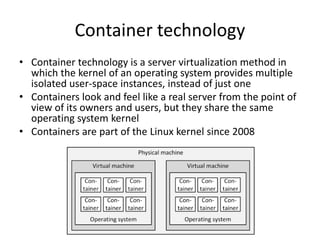
• Container technology is a server virtualization method in
which the kernel of an operating system provides multiple
isolated user-space instances, instead of just one
• Containers look and feel like a real server from the point of
view of its owners and users, but they share the same
operating system kernel
• Containers are part of the Linux kernel since 2008
Container technology
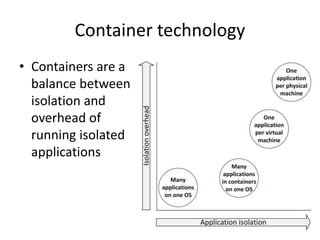
• Containers are a
balance between
isolation and
overhead of
running isolated
applications
Container technology
• Containers have a number of benefits:
– Isolation
• Applications or application components can be encapsulated
in containers, each operating independently and isolated
from each other
– Portability
• Since containers typically contain all components the
application needs to function, including libraries and
patches, containers can be run on any infrastructure that is
capable of running containers using the same kernel version
– Easy deployment
• Containers allow developers to quickly deploy new software
versions, as their containers can be moved from the
development environment to the production environment
unaltered
Container implementation
• Containers are based on 3 technologies that are
all part of the Linux kernel:
– Chroot (also known as a jail)
• Changes the root directory for the current running process
• Ensures processes cannot access files outside the designated
directory tree
– Namespaces
• Allows complete isolation of an applications' view of the
operating environment
• Process trees, networking, user IDs and mounted file
systems
Container implementation
– Cgroups
• Limits and isolates the resource usage of a collection of
processes
• PU, memory, disk I/O, network
• Linux Containers (LXC), introduced in 2008, is
a combination of these
• Docker is a popular implementation of a
container ecosystem
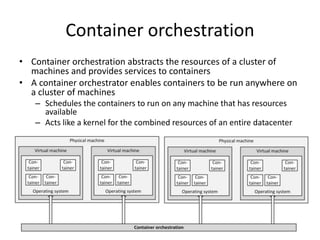
Container orchestration
• Container orchestration abstracts the resources of a cluster of
machines and provides services to containers
• A container orchestrator enables containers to be run anywhere on
a cluster of machines
– Schedules the containers to run on any machine that has resources
available
– Acts like a kernel for the combined resources of an entire datacenter
Mainframes
• A mainframe is a high-performance computer made for
high-volume, I/O-intensive computing
– Expensive
– Mostly used for administrative processes
– Optimized for handling high volumes of data
• IBM is the largest vendor – it has 90% market share
• The end of the mainframe is predicted for decades
now, but mainframes are still widely used
• Today’s mainframes are still large (the size of a few 19"
racks), but they don’t fill-up a room anymore
Mainframes
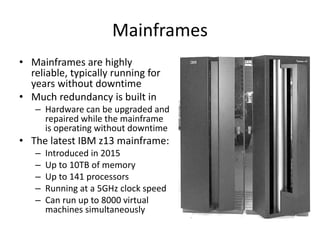
• Mainframes are highly
reliable, typically running for
years without downtime
• Much redundancy is built in
– Hardware can be upgraded and
repaired while the mainframe
is operating without downtime
• The latest IBM z13 mainframe:
– Introduced in 2015
– Up to 10TB of memory
– Up to 141 processors
– Running at a 5GHz clock speed
– Can run up to 8000 virtual
machines simultaneously
Mainframe architecture
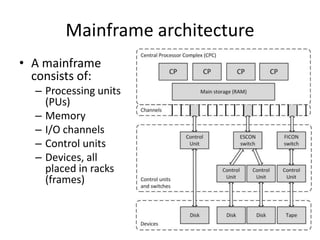
• A mainframe
consists of:
– Processing units
(PUs)
– Memory
– I/O channels
– Control units
– Devices, all
placed in racks
(frames)
Mainframe architecture – PU,
memory, and disks
• In the mainframe world, the term PU (Processing Unit) is
used instead of CPU
– A mainframe has multiple PUs, so there is no central processing
unit
– The total of all PUs in a mainframe is called a Central Processor
Complex (CPC)
• Each book package in the CPC cage contains from four to
eight memory cards
– For example, a fully loaded z9 mainframe has four book
packages that can provide up to a total of 512 GB of memory
• Disks in mainframes are called DASD (Direct Attached
Storage Device)
– Comparable to a SAN in a midrange or x86 environment
Mainframe architecture – Channels
and control units
• A channel provides a data and control path
between I/O devices and memory
• Today’s largest mainframes have 1024
channels
• A control unit is similar to an expansion card
in an x86 or midrange system
– Contains logic to work with a particular type of I/O
device, like a printer or a tape drive
Mainframe architecture – Channels
and control units
• Channel types:
– OSA
• Connectivity to various industry standard networking
technologies, including Ethernet
– FICON
• The most flexible channel technology, based on fiber-optic
technology
• With FICON, input/output devices can be located many
kilometers from the mainframe to which they are attached
– ESCON
• An earlier type of fiber-optic technology
• Almost as fast as FICON channels, but at a shorter distance
Mainframe virtualization
• Mainframes were designed for virtualization from the
start
• Logical partitions (LPARs) are the default virtualization
solution
• LPARs are equivalent to separate mainframes
• A common number of LPARs in use on a mainframe is
less than ten
• The mainframe operating system running on each LPAR
is designed to concurrently run a large number of
applications and services, and can be connected to
thousands of users at the same time
• Often one LPAR runs all production tasks while another
runs the consolidated test environment

10. compute-part-1

  • 1.
    IT Infrastructure Architecture Compute– Part 1 (chapter 10) Infrastructure Building Blocks and Concepts
  • 2.
    Introduction • Compute isan umbrella term for computers located in the datacenter – Physical machines or virtual machines • Three groups: – Mainframes – Midrange systems – x86 servers
  • 3.
    Introduction • Physical computerscontain: – Power supplies – Central Processing Units – A Basic Input/Output System – Memory – Expansion ports – Network connectivity – A keyboard, mouse, and monitor
  • 4.
    History • The BritishColossus computer, created during World War II, was the world's first programmable computer – Information about it was classified under British secrecy laws • The first publicly recognized general purpose computer was the ENIAC (Electronic Numerical Integrator And Computer) – The ENIAC was designed in 1943 and was financed by the United States Army in the midst of World War II
  • 5.
    History • The ENIAC: –Could perform 5,000 operations per second – Used more than 17,000 vacuum tubes – Got its input using an IBM punched card reader – Punched cards were used for output • In the 1960s computers started to be built using transistors instead of vacuum tubes – Smaller – Faster – Cheaper to produce – Required less power – Much more reliable
  • 6.
    History • The transistorbased computers were followed in the 1970s by computers based on integrated circuit (IC) technology – ICs are small chips that contain a set of transistors providing standardized building blocks like AND gates, OR gates, counters, adders, and flip-flops – By combining building blocks, CPUs and memory circuits could be created • Microprocessors decreased size and cost of computers even further – Increased their speed and reliability – In the 1980s microprocessors were cheap enough to be used in personal computers
  • 7.
  • 8.
    Computer housing • Originally,computers were stand-alone complete systems, called pedestal or tower computers – Placed on the datacenter floor • Most x86 servers and midrange systems are now: – Rack mounted – Blade servers • Blade servers are less expensive than rack mounted servers – They use the enclosure’s shared components like power supplies and fans
  • 9.
    Computer housing • Ablade enclosure typically hosts from 8 to 16 blade servers • Blade enclosure provides: – Shared redundant power supplies for all blades – Shared backplane to connect all blades – Redundant network switches to connect the blades’ Ethernet interfaces providing redundant Ethernet connections to other systems – Redundant SAN switches to connect the HBA interfaces on the blade servers providing dual redundant Fibre Channel connections to other systems – A management module to manage the enclosure and the blades in it
  • 10.
    Computer housing • Theamount of wiring in a blade server setup is substantially reduced when compared to traditional server racks – Less possible points of failure – Lower initial deployment costs • Enclosures are often not only used for blade servers, but also for storage components like disks, controllers, and SAN switches
  • 11.
    Processors • In acomputer, the Central Processing Unit (CPU) – or processor – executes a set of instructions • A CPU is the electronic circuitry that carries out the instructions of a computer program by performing the basic arithmetic, logical, control and input/output (I/O) operations specified by the instructions • Today’s processors contain billions of transistors and are extremely powerful
  • 12.
    Processor instructions • CPUcan perform a fixed number of instructions such as ADD, SHIFT BITS, MOVE DATA, and JUMP TO CODE LOCATION, called the instruction set • A program created using CPU instructions is referred to as machine code • Each instruction is associated with an English like mnemonic – Easier for people to remember – Set of mnemonics is called the assembly language • For example: – Binary code for the ADD WITH CARRY – Machine code instruction: 10011101 – Mnemonic : ADC
  • 13.
    Processors - programming •The assembler programming language is the lowest level programming language for computers • Higher level programming languages are much more human friendly – C# – Java – Python • Programs written in these languages are translated to assembly code before they can run on a specific CPU • This compiling is done by a high-level language compiler
  • 14.
    Processors - speed •A CPU needs a high frequency clock to operate, generating so-called clock ticks or clock cycles – Each machine code instruction takes one or more clock ticks to execute – An ADD instruction typically costs 1 tick to compute • The speed at which the CPU operates is defined in GHz (billions of clock ticks per second) – A single core of a 2.4 GHz CPU can perform 2.4 billion additions in 1 second
  • 15.
    Processors – wordsize • Each CPU is designed to handle data in chunks, called words, with a specific size – The first CPUs had a word size of 4 bits – Today, most CPUs have a word size of 64 bits • The word size is reflected in many aspects of a CPU's structure and operation: – The majority of the internal memory registers are the size of one word – The largest piece of data that can be transferred to and from the working memory in a single operation is a word – A 64-bit CPU can address 17,179,869,184 TB of memory (64-bit word)
  • 16.
    Intel x86 processors •Intel CPUs became the de-facto standard for many computer architectures – The original PC used a 4.77 MHz 16-bit 8088 CPU – A few years later, Intel produced the 32-bit 80386 and the 80486 processors • Since these names all ended with the number 86, the generic architecture was referred to as x86 • In 2017, the latest Intel x86 model is the 22-core E5-2699A Xeon Processor, running on 2.4 GHz
  • 17.
    AMD x86 processors •Advanced Micro Devices, Inc. (AMD) is the second-largest global supplier of microprocessors based on the x86 architecture – In 1982, AMD signed a contract with Intel, becoming a licensed second-source manufacturer of 8086 and 8088 processors for IBM – Intel cancelled the licensing contract in 1986 – AMD still produces x86 compatible CPUs, forcing Intel to keep innovating and to keep CPU prices relatively low • In 2017, the latest model is the 16-core AMD Opteron 6386 SE CPU, running on 2.8 GHz
  • 18.
    Itanium and x86-64processors • The Itanium processor line was a family of 64-bit high- end CPUs meant for high-end servers and workstations – Not based on the x86 architecture – HP was the only company to actively produce Itanium based systems, running HP-UX and OpenVMS • In 2005, AMD released the K8 core processor architecture as an answer to Intel’s Itanium architecture – The K8 included a 64-bit extension to the x86 instruction set – Later, Intel adopted AMS’s processor’s instruction set as an extension to its x86 processor line, called x86-64 • Today, the x86-64 architecture is used in all Intel and AMD processors
  • 19.
    ARM processors • TheARM (Advanced RISC Machine) is the most used CPU in the world • In 2013, 10 billion ARM processors were shipped, running on: – 95% of smartphones – 90% of hard disk drives – 40% of digital televisions and set-top boxes – 15% of microcontrollers – 20% of mobile computers • The CPU is produced by a large number of manufacturers under license of ARM • Since 2016, ARM is owned by Japanese telecommunications company SoftBank Group
  • 20.
    Oracle SPARC processors •In 1986, Sun Microsystems started to produce the SPARC processor series for their Solaris UNIX based systems • The SPARC architecture is fully open and non- proprietary – A true open source hardware design – Any manufacturer can get a license to produce a SPARC CPU • Oracle bought Sun Microsystems in 2010 • SPARC processors are still used by Oracle in their Exadata and Exalogic products • In 2017, the latest model is the 32-core SPARC M7 CPU, running on 4.1 GHz
  • 21.
    IBM POWER processors •POWER (also known as PowerPC) is a series of CPUs – Created by IBM – Introduced in 1990 • IBM uses POWER CPUs in many of their high-end server products – Watson, the supercomputer that won Jeopardy in 2011, was equipped with 3,000 POWER7 CPU cores • In 2017, the latest model is the 24-core POWER9 CPU, running on 4 GHz
  • 22.
    Memory – earlysystems • The first computers used vacuum tubes to store data – Extremely expensive, uses much power, fragile, generates much heat • An alternative to vacuum tubes were relays – Mechanical parts that use magnetism to move a physical switch – Two relays can be combined to create a single bit of memory storage – Slow, uses much power, noisy, heavy, and expensive • Based on cathode ray tubes, the Williams tube was the first random access memory, capable of storing several thousands of bits, but only for some seconds
  • 23.
    Memory – earlysystems • The first truly useable type of main memory was magnetic core memory, introduced in 1951 • The dominant type of memory until the late 1960s – Uses very small magnetic rings, called cores, with wires running through them – The wires can polarize the magnetic field one direction or the other in each individual core – One direction means 1, the other means 0 • Core memory was replaced by RAM chips in the 1970s
  • 24.
    RAM memory • RAM:Random Access Memory – Any piece of data stored in RAM can be read in the same amount of time, regardless of its physical location • Based on transistor technology, typically implemented in large amounts in Integrated Circuits (ICs) • Data is volatile – it remains available as long as the RAM is powered
  • 25.
    RAM memory • StaticRAM (SRAM) – Uses flip-flop circuitry to store bits – Six transistors per bit • Dynamic RAM (DRAM) – Uses a charge in a capacitor – One transistor per bit – DRAM loses its data after a short time due to the leakage of the capacitors – To keep data available in DRAM it must be refreshed regularly (typically 16 times per second)
  • 26.
    BIOS • The BasicInput/Output System (BIOS) is a set of instructions stored on a memory chip located on the computer’s motherboard • The BIOS controls a computer from the moment it is powered on, to the point where the operating system is started • Mostly implemented in a Flash memory chip • It is good practice to update the BIOS software regularly – Upgrading computers to the latest version of the BIOS is called BIOS flashing
  • 27.
    Interfaces • Connecting computersto external peripherals is done using interfaces • External interfaces use connectors located at the outside of the computer case – One of the first standardized external interfaces was the serial bus based on RS-232 – RS-232 is still used today in some systems to connect: • Older type of peripherals • Industrial equipment • Console ports • Special purpose equipment
  • 28.
    USB • The UniversalSerial Bus (USB) was introduced in 1996 as a replacement for most of the external interfaces on servers and PCs • Can provide operating power to attached devices • Up to seven devices can be daisy-chained – Hubs can be used to connect multiple devices to one USB computer port • In 2013, USB 3.1 was introduced – Provides a throughput of 10 Gbit/s • In 2014, USB Type-C was introduced – Smaller connector – Ability to provide more power to connected devices
  • 29.
    Thunderbolt • Thunderbolt, alsoknown as Light Peak, was introduced in 2011 • Thunderbolt 3 was released in 2015 – Can provide a maximum throughput of 40 Gbit/s – Provide 100 W power to devices – Uses the USB Type-C connector – Backward compatible with USB 3.1
  • 30.
    PCI • Internal interfaces,typically some form of PCI, are located on the system board of the computer, inside the case, and connect expansion boards like network adapters and disk controllers • Uses a shared parallel bus architecture – Only one shared communication path between two PCI devices can be active at any given time
  • 31.
    PCIe • PCI Express(PCIe) uses a topology based on point-to- point serial links, rather than a shared parallel bus architecture – A connection between any two PCIe devices is known as a link – A collection of 1 or more links is called a lane • Routed by a hub on the system board acting as a crossbar switch – The hub allows multiple pairs of devices to communicate with each other at the same time • Despite the availability of the much faster PCIe, conventional PCI remains a very common interface in computers
  • 32.
  • 33.
    PCI and PCIe Lanes 12 4 8 16 32 PCI 32-bit/33 MHz 1 PCI 32-bit/66 MHz 2 PCI 64-bit/33 MHz 2 PCI 64-bit/66 MHz 4 PCI 64-bit/100 MHz 6 PCIe 1.0 2 4 8 16 32 64 PCIe 2.0 4 8 16 32 64 128 PCIe 3.0 8 16 32 64 128 256 PCIe 4.0 16 32 64 128 256 512 PCI speeds in Gbit/s
  • 34.
    Compute virtualization • Computevirtualization is also known as: – Server virtualization – Software Defined Compute • Introduces an abstraction layer between physical computer hardware and the operating system using that hardware – Allows multiple operating systems to run on a single physical machine – Decouples and isolates virtual machines from the physical machine and from other virtual machines
  • 35.
    Compute virtualization • Avirtual machine is a logical representation of a physical computer in software • New virtual machines can be provisioned without the need for a hardware purchase – With a few mouse clicks or using an API – New virtual machines can be installed in minutes • Costs can be saved on hardware, power, and cooling by consolidating many physical computers as virtual machines on fewer (bigger) physical machines • Because fewer physical machines are needed, the cost of maintenance contracts can be reduced and the risk of hardware failure is reduced
  • 36.
    Software Defined Compute(SDC) • Virtual machines are typically managed using one redundant centralized virtual machine management system – Enables systems managers to manage more machines with the same number of staff – Allows managing the virtual machines using APIs – Server virtualization can therefore be seen as Software Defined Compute • In SDC, all physical machines are running a hypervisor and all hypervisors are managed as one layer using management software
  • 37.
  • 38.
    Software Defined Compute(SDC) • Some virtualization platforms allow running virtual machines to be moved automatically between physical machines • Benefits: – When a physical machine fails, all virtual machines that ran on the failed physical machine can be restarted automatically on other physical machines – Virtual machines can automatically be moved to the least busy physical machines – Some physical machines can get fully loaded while other physical machines can be automatically switched off, saving power and cooling cost – Enables hardware maintenance without downtime
  • 39.
    Disadvantages of computer virtualization •Because creating a new virtual machine is so easy, virtual machines tend to get created for all kinds of reasons – This effect is known as "virtual machine sprawl“ – All VMs: • Must be managed • Use resources of the physical machine • Use power and cooling • Must be back-upped • Must be kept up to date by installing patches
  • 40.
    Disadvantages of computer virtualization •Introduction of an extra layer in the infrastructure – License fees – Systems managers training – Installation and maintenance of additional tools • Virtualization cannot be used on all servers – Some servers require additional specialized hardware, like modem cards, USB tokens or some form of high speed I/O like in real-time SCADA systems • Virtualization is not supported by all application vendors – When the application experiences some problem, systems managers must reinstall the application on a physical machine before they get support
  • 41.
    Virtualization technologies • Emulation –Can run programs on a computer, other than the one they were originally intended for – Run a mainframe operating system on a x86 server • Logical Partitions (LPARs) – Hardware based – Used on mainframe and midrange systems
  • 42.
    Virtualization technologies • Hypervisors –Control the physical computer's hardware and provide virtual machines with all the services of a physical system • Virtual CPUs • BIOS • Virtual devices • Virtualized memory management – Three types: • Binary translation • Paravirtualization • Hardware assisted virtualization (most used on x86 servers)
  • 43.
    Container technology • Containertechnology is a server virtualization method in which the kernel of an operating system provides multiple isolated user-space instances, instead of just one • Containers look and feel like a real server from the point of view of its owners and users, but they share the same operating system kernel • Containers are part of the Linux kernel since 2008
  • 44.
    Container technology • Containersare a balance between isolation and overhead of running isolated applications
  • 45.
    Container technology • Containershave a number of benefits: – Isolation • Applications or application components can be encapsulated in containers, each operating independently and isolated from each other – Portability • Since containers typically contain all components the application needs to function, including libraries and patches, containers can be run on any infrastructure that is capable of running containers using the same kernel version – Easy deployment • Containers allow developers to quickly deploy new software versions, as their containers can be moved from the development environment to the production environment unaltered
  • 46.
    Container implementation • Containersare based on 3 technologies that are all part of the Linux kernel: – Chroot (also known as a jail) • Changes the root directory for the current running process • Ensures processes cannot access files outside the designated directory tree – Namespaces • Allows complete isolation of an applications' view of the operating environment • Process trees, networking, user IDs and mounted file systems
  • 47.
    Container implementation – Cgroups •Limits and isolates the resource usage of a collection of processes • PU, memory, disk I/O, network • Linux Containers (LXC), introduced in 2008, is a combination of these • Docker is a popular implementation of a container ecosystem
  • 48.
    Container orchestration • Containerorchestration abstracts the resources of a cluster of machines and provides services to containers • A container orchestrator enables containers to be run anywhere on a cluster of machines – Schedules the containers to run on any machine that has resources available – Acts like a kernel for the combined resources of an entire datacenter
  • 49.
    Mainframes • A mainframeis a high-performance computer made for high-volume, I/O-intensive computing – Expensive – Mostly used for administrative processes – Optimized for handling high volumes of data • IBM is the largest vendor – it has 90% market share • The end of the mainframe is predicted for decades now, but mainframes are still widely used • Today’s mainframes are still large (the size of a few 19" racks), but they don’t fill-up a room anymore
  • 50.
    Mainframes • Mainframes arehighly reliable, typically running for years without downtime • Much redundancy is built in – Hardware can be upgraded and repaired while the mainframe is operating without downtime • The latest IBM z13 mainframe: – Introduced in 2015 – Up to 10TB of memory – Up to 141 processors – Running at a 5GHz clock speed – Can run up to 8000 virtual machines simultaneously
  • 51.
    Mainframe architecture • Amainframe consists of: – Processing units (PUs) – Memory – I/O channels – Control units – Devices, all placed in racks (frames)
  • 52.
    Mainframe architecture –PU, memory, and disks • In the mainframe world, the term PU (Processing Unit) is used instead of CPU – A mainframe has multiple PUs, so there is no central processing unit – The total of all PUs in a mainframe is called a Central Processor Complex (CPC) • Each book package in the CPC cage contains from four to eight memory cards – For example, a fully loaded z9 mainframe has four book packages that can provide up to a total of 512 GB of memory • Disks in mainframes are called DASD (Direct Attached Storage Device) – Comparable to a SAN in a midrange or x86 environment
  • 53.
    Mainframe architecture –Channels and control units • A channel provides a data and control path between I/O devices and memory • Today’s largest mainframes have 1024 channels • A control unit is similar to an expansion card in an x86 or midrange system – Contains logic to work with a particular type of I/O device, like a printer or a tape drive
  • 54.
    Mainframe architecture –Channels and control units • Channel types: – OSA • Connectivity to various industry standard networking technologies, including Ethernet – FICON • The most flexible channel technology, based on fiber-optic technology • With FICON, input/output devices can be located many kilometers from the mainframe to which they are attached – ESCON • An earlier type of fiber-optic technology • Almost as fast as FICON channels, but at a shorter distance
  • 55.
    Mainframe virtualization • Mainframeswere designed for virtualization from the start • Logical partitions (LPARs) are the default virtualization solution • LPARs are equivalent to separate mainframes • A common number of LPARs in use on a mainframe is less than ten • The mainframe operating system running on each LPAR is designed to concurrently run a large number of applications and services, and can be connected to thousands of users at the same time • Often one LPAR runs all production tasks while another runs the consolidated test environment