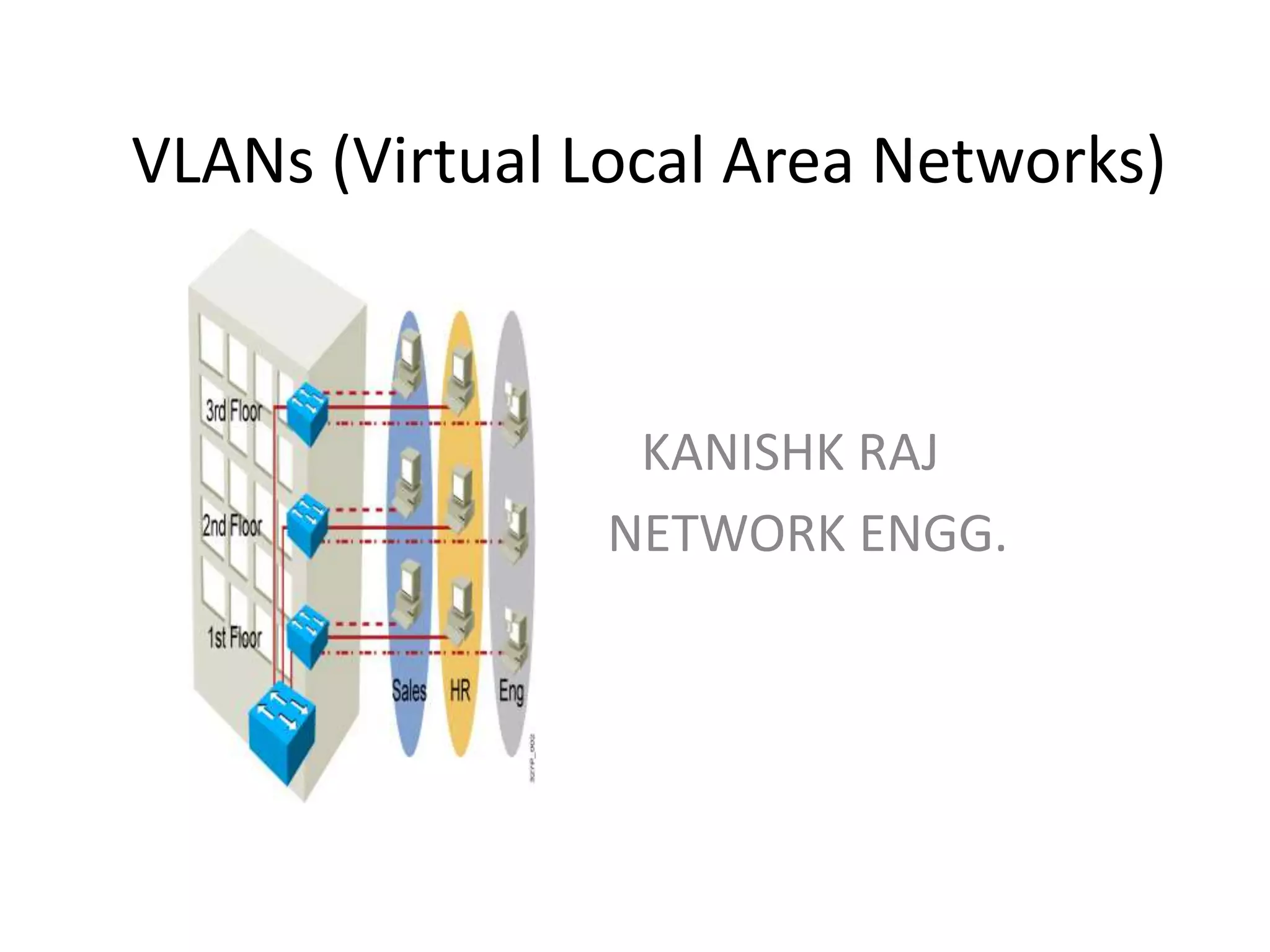
VLANs (Virtual Local Area Networks)
K KANISHK RAJ
NETWORK ENGG.
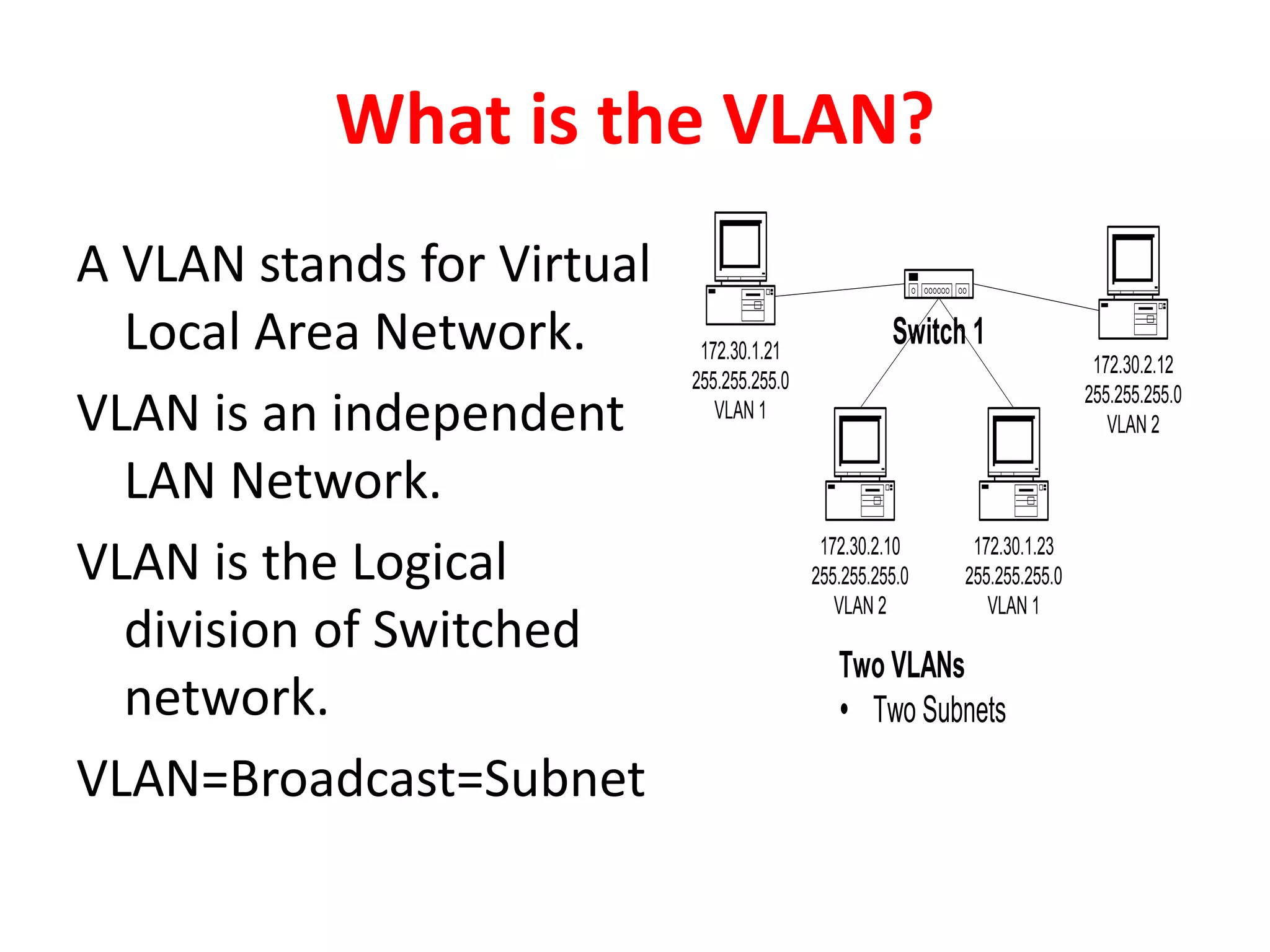
What is the VLAN?
A VLAN stands for Virtual
Local Area Network.
VLAN is an independent
LAN Network.
VLAN is the Logical
division of Switched
network.
VLAN=Broadcast=Subnet
Two VLANs
Ÿ Two Subnets
Switch 1172.30.1.21
255.255.255.0
VLAN 1
172.30.2.10
255.255.255.0
VLAN 2
172.30.1.23
255.255.255.0
VLAN 1
172.30.2.12
255.255.255.0
VLAN 2
Why VLAN is effective?
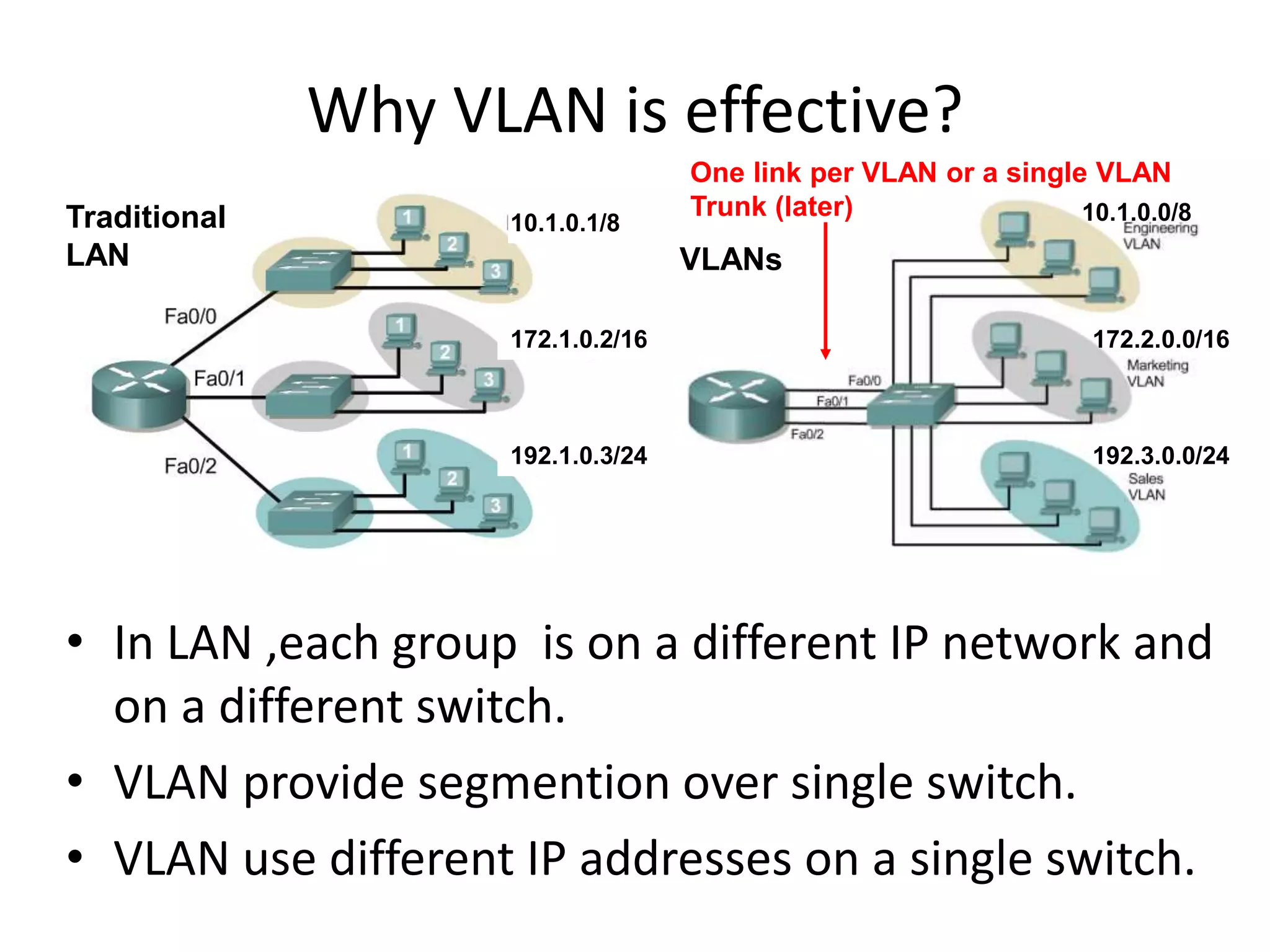
• In LAN ,each group is on a different IP network and
on a different switch.
• VLAN provide segmention over single switch.
• VLAN use different IP addresses on a single switch.
Traditional
LAN
192.1.0.3/24
172.1.0.2/16
10.1.0.1/8
One link per VLAN or a single VLAN
Trunk (later)
VLANs
10.1.0.0/8
172.2.0.0/16
192.3.0.0/24
Benefits of VLANs
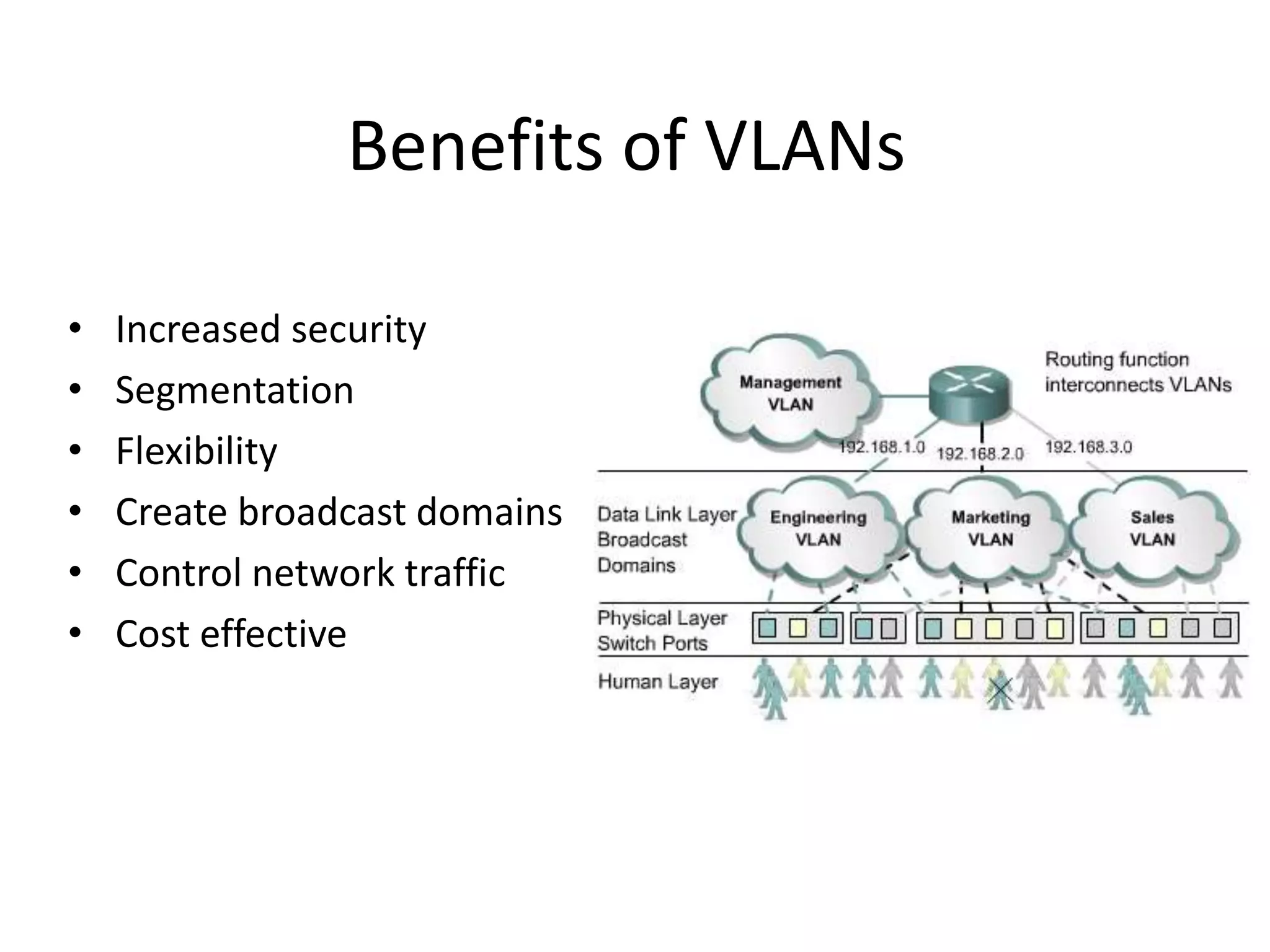
• Increased security
• Segmentation
• Flexibility
• Create broadcast domains
• Control network traffic
• Cost effective
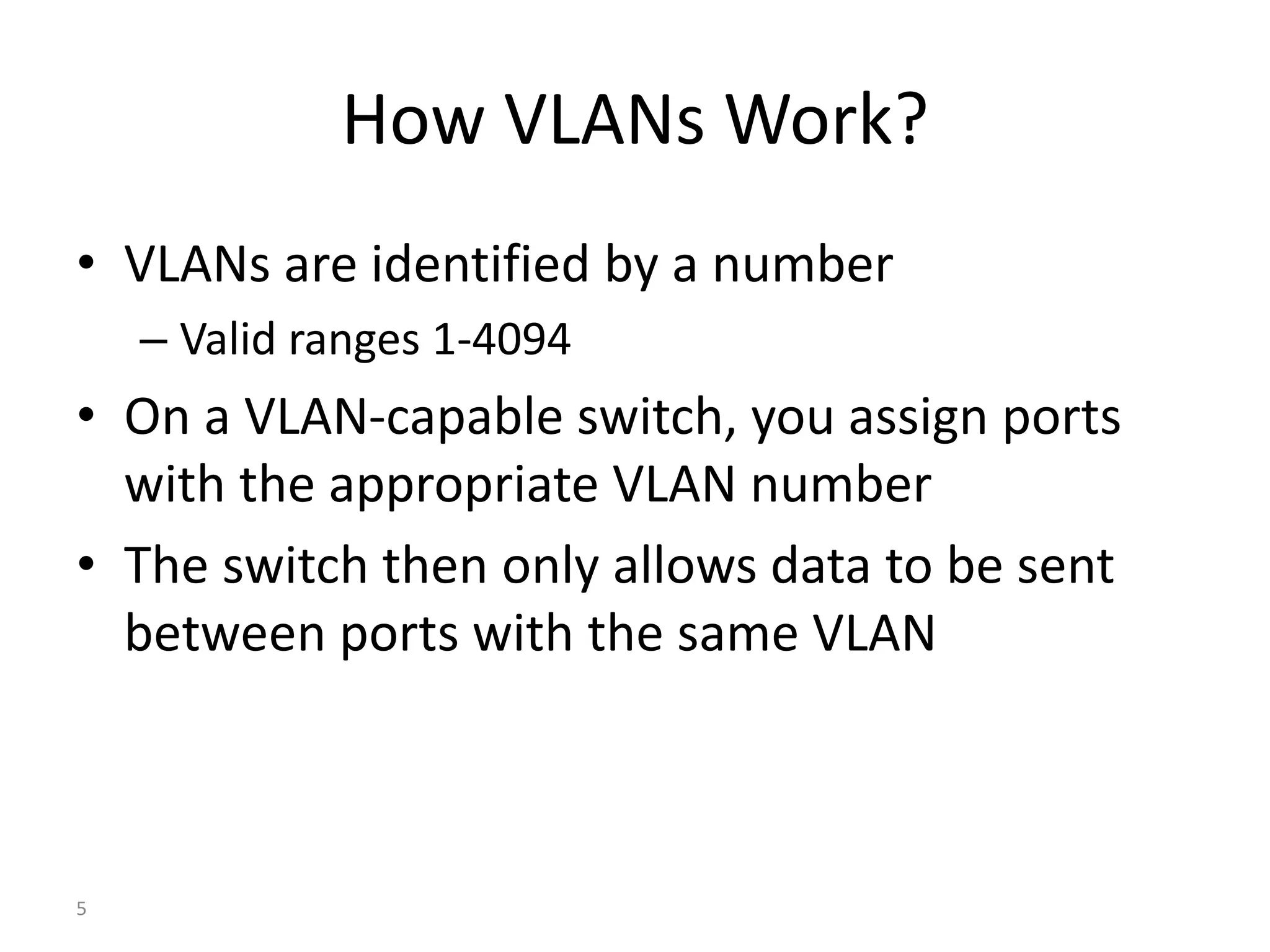
How VLANs Work?
• VLANs are identified by a number
– Valid ranges 1-4094
• On a VLAN-capable switch, you assign ports
with the appropriate VLAN number
• The switch then only allows data to be sent
between ports with the same VLAN
5
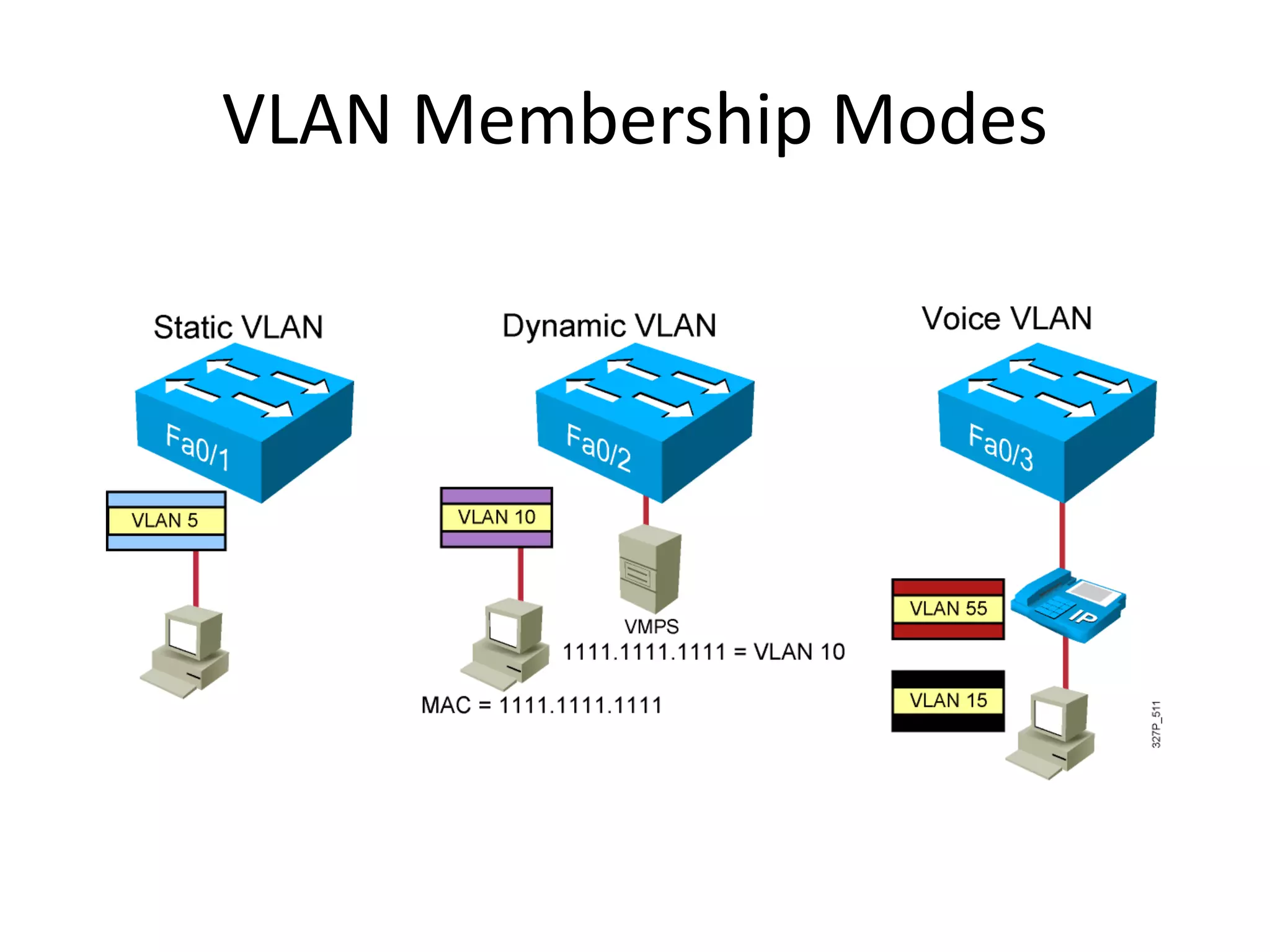
VLAN Membership Modes
Courtesy of Rick Graziani
graziani@cabrillo.edu
7
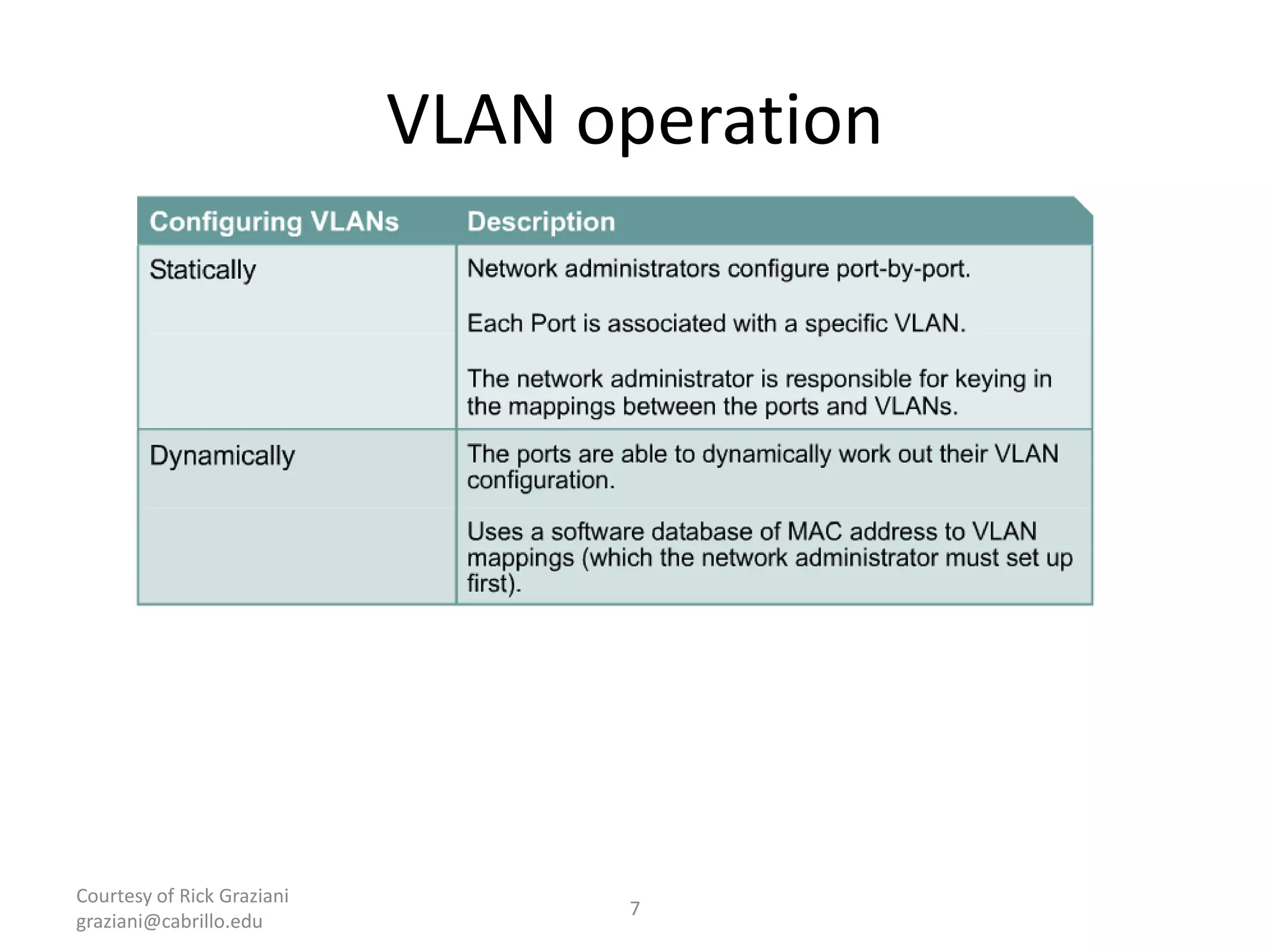
VLAN operation
Courtesy of Rick Graziani
graziani@cabrillo.edu
8
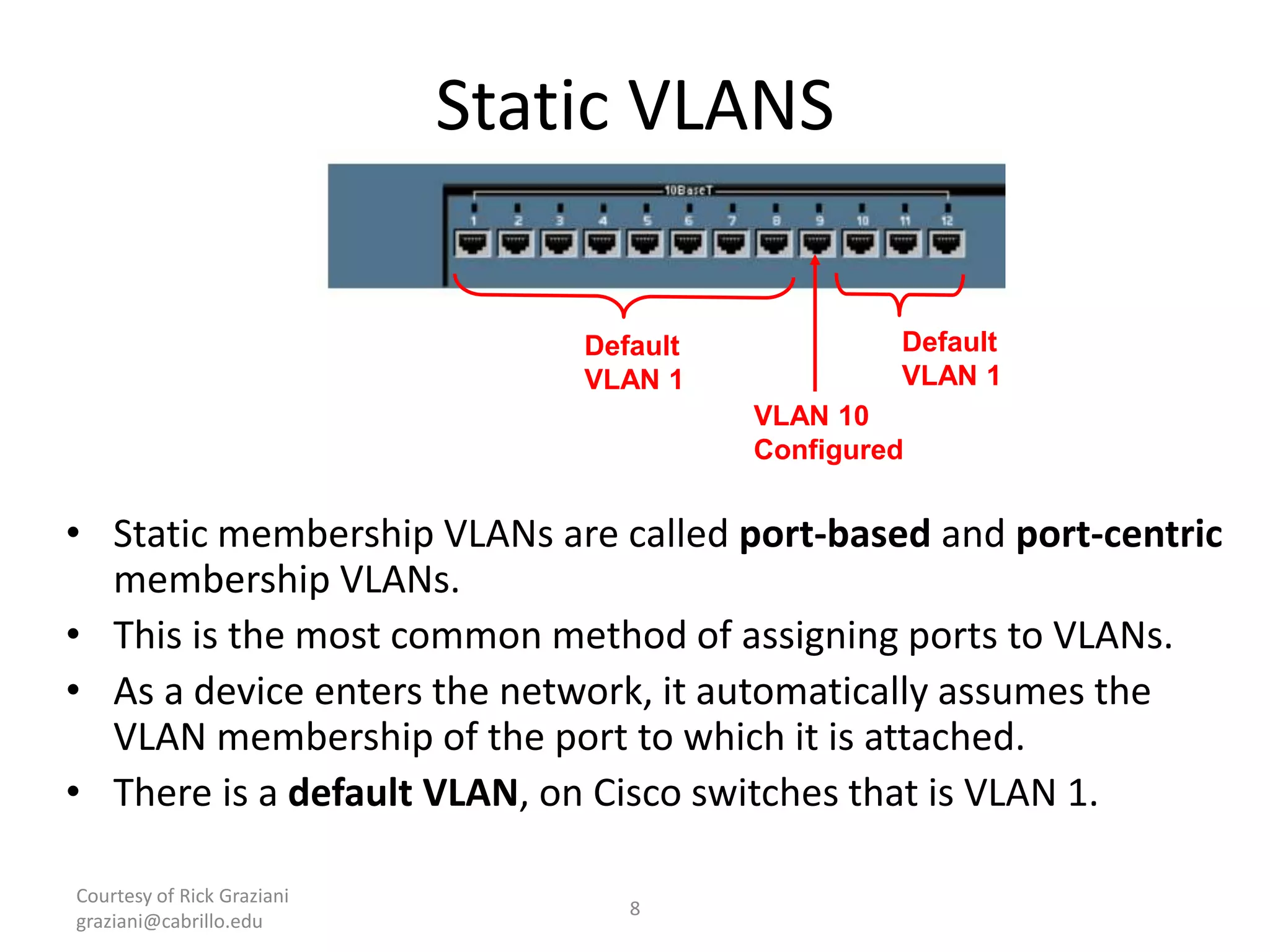
Static VLANS
• Static membership VLANs are called port-based and port-centric
membership VLANs.
• This is the most common method of assigning ports to VLANs.
• As a device enters the network, it automatically assumes the
VLAN membership of the port to which it is attached.
• There is a default VLAN, on Cisco switches that is VLAN 1.
VLAN 10
Configured
Default
VLAN 1
Default
VLAN 1
Courtesy of Rick Graziani
graziani@cabrillo.edu
9
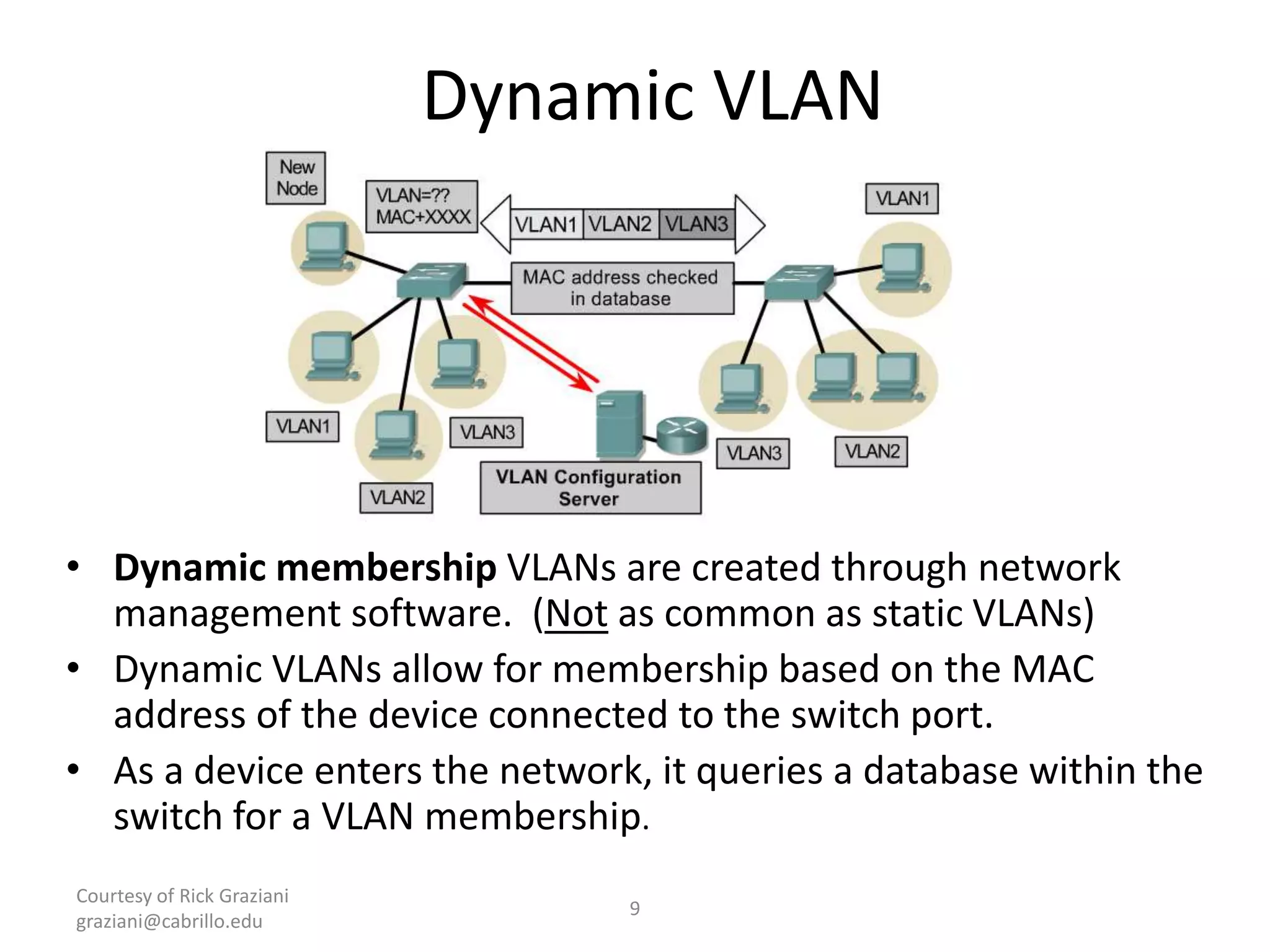
Dynamic VLAN
• Dynamic membership VLANs are created through network
management software. (Not as common as static VLANs)
• Dynamic VLANs allow for membership based on the MAC
address of the device connected to the switch port.
• As a device enters the network, it queries a database within the
switch for a VLAN membership.
Courtesy of Rick Graziani
graziani@cabrillo.edu
10
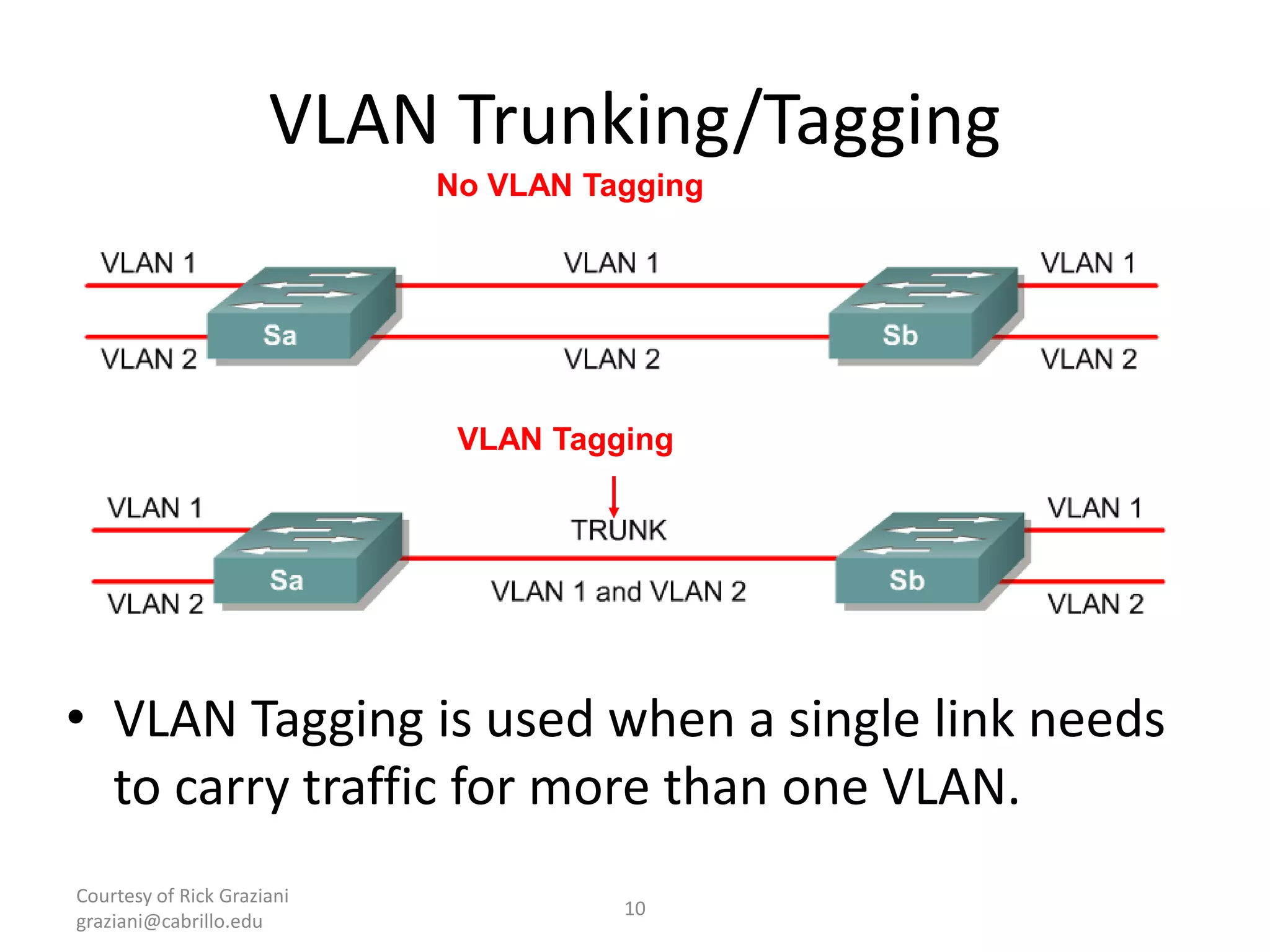
VLAN Trunking/Tagging
• VLAN Tagging is used when a single link needs
to carry traffic for more than one VLAN.
No VLAN Tagging
VLAN Tagging
VLAN Creation Guidelines
– The maximum number of VLANs is switch-
dependent.
– Most Cisco Catalyst desktop switches support 128
separate spanning-tree instances, one per VLAN.
– VLAN 1 is the factory default Ethernet VLAN.
– First open the switch interface command mode.
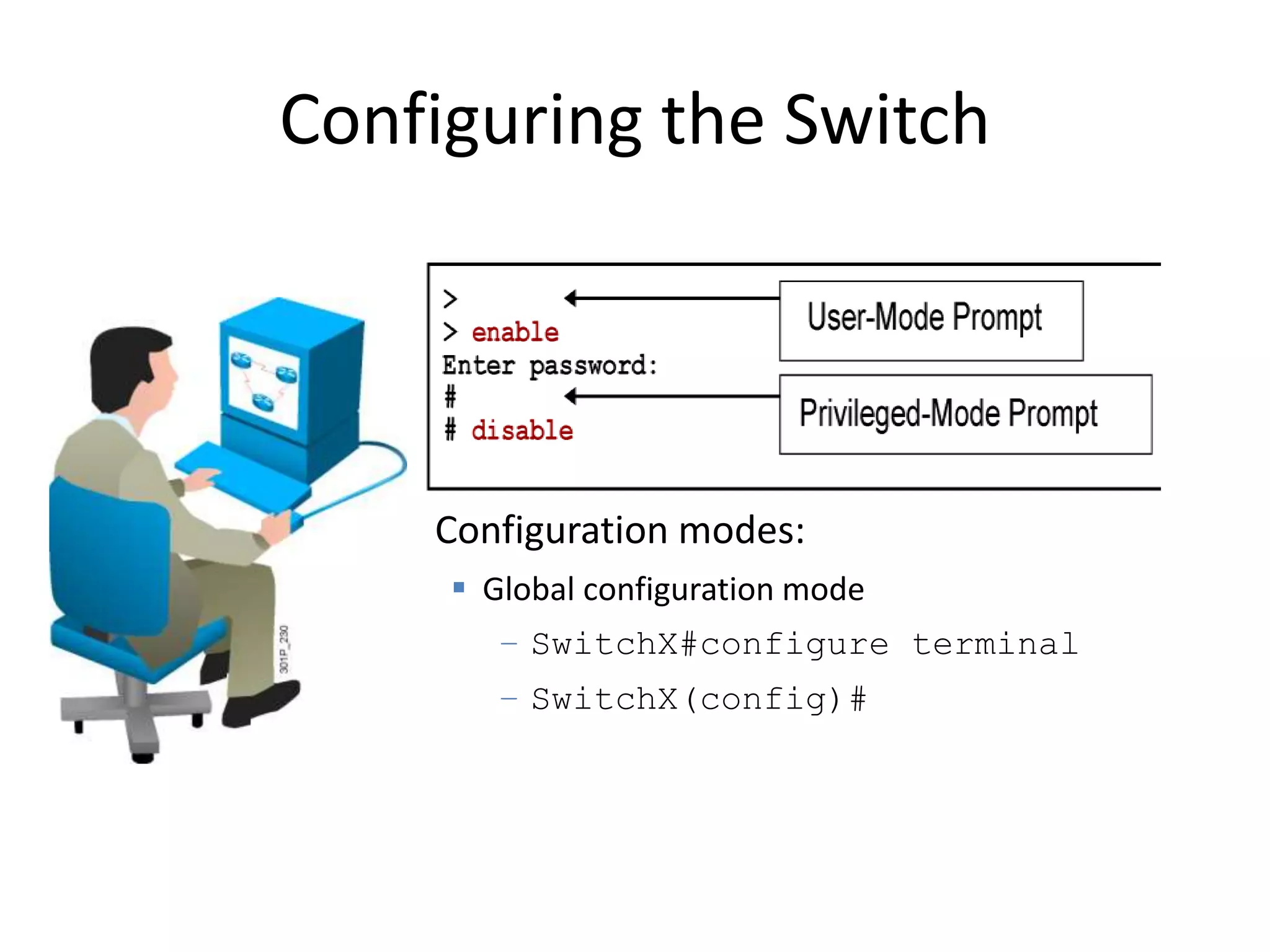
Configuration modes:
 Global configuration mode
– SwitchX#configure terminal
– SwitchX(config)#
Configuring the Switch
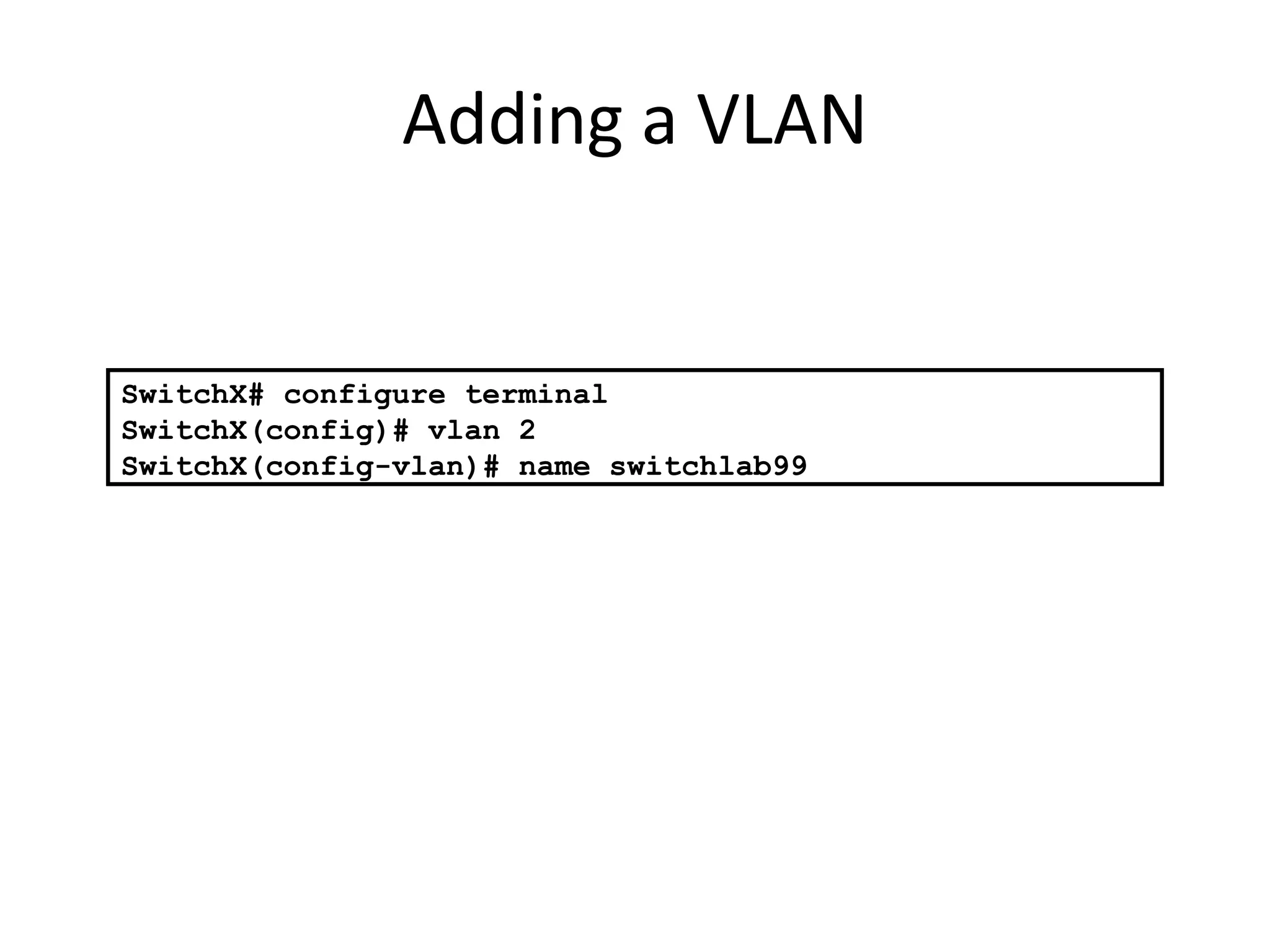
Adding a VLAN
SwitchX# configure terminal
SwitchX(config)# vlan 2
SwitchX(config-vlan)# name switchlab99
Courtesy of Rick Graziani
graziani@cabrillo.edu
14
Accessing/Managing the Switch
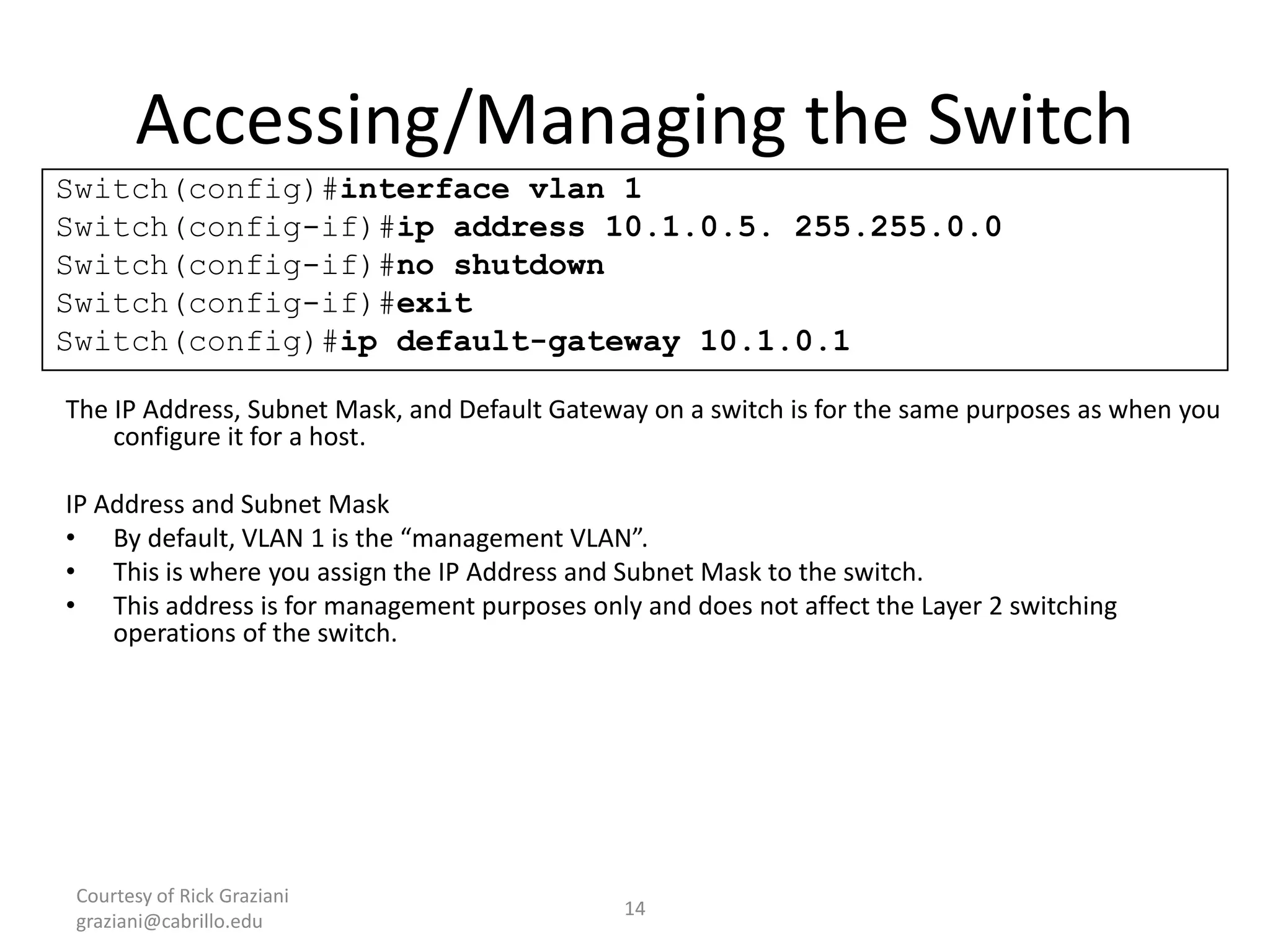
The IP Address, Subnet Mask, and Default Gateway on a switch is for the same purposes as when you
configure it for a host.
IP Address and Subnet Mask
• By default, VLAN 1 is the “management VLAN”.
• This is where you assign the IP Address and Subnet Mask to the switch.
• This address is for management purposes only and does not affect the Layer 2 switching
operations of the switch.
Switch(config)#interface vlan 1
Switch(config-if)#ip address 10.1.0.5. 255.255.0.0
Switch(config-if)#no shutdown
Switch(config-if)#exit
Switch(config)#ip default-gateway 10.1.0.1
Courtesy of Rick Graziani
graziani@cabrillo.edu
15
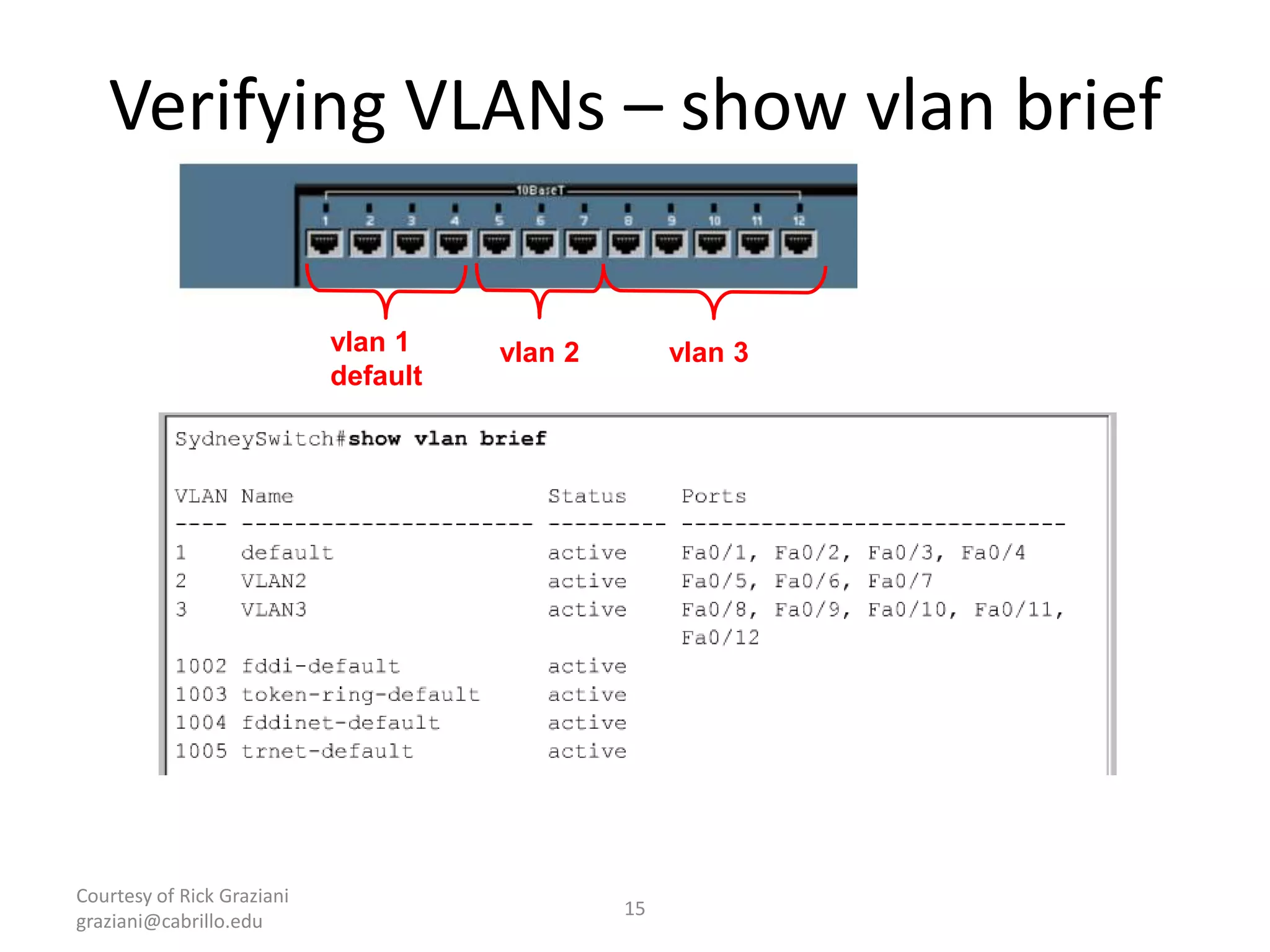
Verifying VLANs – show vlan brief
vlan 3vlan 2vlan 1
default
THANK YOU
I hope ,It is useful for Students

Vlans (virtual local area networks)

  • 1.
    VLANs (Virtual LocalArea Networks) K KANISHK RAJ NETWORK ENGG.
  • 2.
    What is theVLAN? A VLAN stands for Virtual Local Area Network. VLAN is an independent LAN Network. VLAN is the Logical division of Switched network. VLAN=Broadcast=Subnet Two VLANs Ÿ Two Subnets Switch 1172.30.1.21 255.255.255.0 VLAN 1 172.30.2.10 255.255.255.0 VLAN 2 172.30.1.23 255.255.255.0 VLAN 1 172.30.2.12 255.255.255.0 VLAN 2
  • 3.
    Why VLAN iseffective? • In LAN ,each group is on a different IP network and on a different switch. • VLAN provide segmention over single switch. • VLAN use different IP addresses on a single switch. Traditional LAN 192.1.0.3/24 172.1.0.2/16 10.1.0.1/8 One link per VLAN or a single VLAN Trunk (later) VLANs 10.1.0.0/8 172.2.0.0/16 192.3.0.0/24
  • 4.
    Benefits of VLANs •Increased security • Segmentation • Flexibility • Create broadcast domains • Control network traffic • Cost effective
  • 5.
    How VLANs Work? •VLANs are identified by a number – Valid ranges 1-4094 • On a VLAN-capable switch, you assign ports with the appropriate VLAN number • The switch then only allows data to be sent between ports with the same VLAN 5
  • 6.
  • 7.
    Courtesy of RickGraziani graziani@cabrillo.edu 7 VLAN operation
  • 8.
    Courtesy of RickGraziani graziani@cabrillo.edu 8 Static VLANS • Static membership VLANs are called port-based and port-centric membership VLANs. • This is the most common method of assigning ports to VLANs. • As a device enters the network, it automatically assumes the VLAN membership of the port to which it is attached. • There is a default VLAN, on Cisco switches that is VLAN 1. VLAN 10 Configured Default VLAN 1 Default VLAN 1
  • 9.
    Courtesy of RickGraziani graziani@cabrillo.edu 9 Dynamic VLAN • Dynamic membership VLANs are created through network management software. (Not as common as static VLANs) • Dynamic VLANs allow for membership based on the MAC address of the device connected to the switch port. • As a device enters the network, it queries a database within the switch for a VLAN membership.
  • 10.
    Courtesy of RickGraziani graziani@cabrillo.edu 10 VLAN Trunking/Tagging • VLAN Tagging is used when a single link needs to carry traffic for more than one VLAN. No VLAN Tagging VLAN Tagging
  • 11.
    VLAN Creation Guidelines –The maximum number of VLANs is switch- dependent. – Most Cisco Catalyst desktop switches support 128 separate spanning-tree instances, one per VLAN. – VLAN 1 is the factory default Ethernet VLAN. – First open the switch interface command mode.
  • 12.
    Configuration modes:  Globalconfiguration mode – SwitchX#configure terminal – SwitchX(config)# Configuring the Switch
  • 13.
    Adding a VLAN SwitchX#configure terminal SwitchX(config)# vlan 2 SwitchX(config-vlan)# name switchlab99
  • 14.
    Courtesy of RickGraziani graziani@cabrillo.edu 14 Accessing/Managing the Switch The IP Address, Subnet Mask, and Default Gateway on a switch is for the same purposes as when you configure it for a host. IP Address and Subnet Mask • By default, VLAN 1 is the “management VLAN”. • This is where you assign the IP Address and Subnet Mask to the switch. • This address is for management purposes only and does not affect the Layer 2 switching operations of the switch. Switch(config)#interface vlan 1 Switch(config-if)#ip address 10.1.0.5. 255.255.0.0 Switch(config-if)#no shutdown Switch(config-if)#exit Switch(config)#ip default-gateway 10.1.0.1
  • 15.
    Courtesy of RickGraziani graziani@cabrillo.edu 15 Verifying VLANs – show vlan brief vlan 3vlan 2vlan 1 default
  • 16.
    THANK YOU I hope,It is useful for Students