IT Infrastructure Architecture
Introduction to IT Infrastructure
(chapter 1 and 2)
Infrastructure Building Blocks
and Concepts
Introduction
• IT infrastructures become more complicated
– New types of applications:
• Big data
• The Internet of Thing
• Mobility
• Cloud computing
• Most current infrastructure landscapes are
complex
– The result of a history of application implementation
projects
– Specialized hardware and infrastructure components
Introduction
• Agile adaptations require infrastructure:
– Solid
– Scalable
– Modular
• Architecture is crucial to control the
infrastructure when it is designed, in use, and
when it is changed.
The definition of IT infrastructure
• In literature, many definitions of IT infrastructure are described
• Examples:
– IT infrastructure consists of the equipment, systems, software, and
services used in common across an organization, regardless of
mission/program/project. IT Infrastructure also serves as the
foundation upon which mission/program/project-specific systems and
capabilities are built
– All of the hardware, software, networks, facilities, etc., that are
required to develop, test, deliver, monitor, control, or support IT
services. The term IT Infrastructure includes all of the Information
Technology but not the associated people, Processes and
documentation
– Infrastructure is the shared and reliable services that provide the
foundation for the enterprise IT portfolio. The implementation of an
architecture includes the processors, software, databases, electronic
links, and datacenters as well as the standards that ensure the
components work together, the skills for managing the operation, etc.
The definition of IT infrastructure
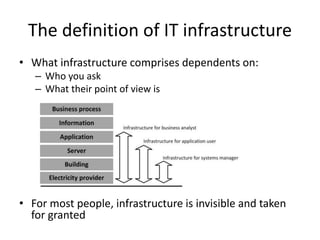
• What infrastructure comprises dependents on:
– Who you ask
– What their point of view is
• For most people, infrastructure is invisible and taken
for granted
IT building blocks
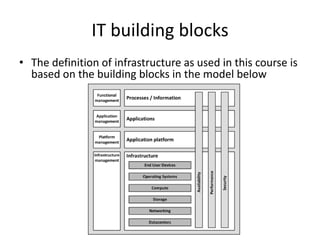
• The definition of infrastructure as used in this course is
based on the building blocks in the model below
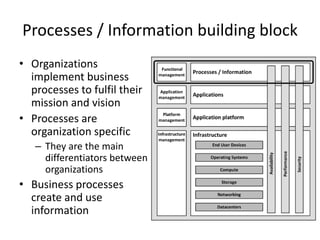
Processes / Information building block
• Organizations
implement business
processes to fulfil their
mission and vision
• Processes are
organization specific
– They are the main
differentiators between
organizations
• Business processes
create and use
information
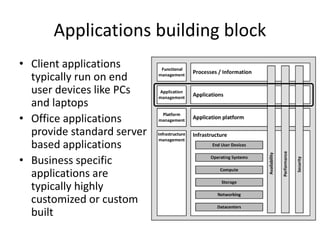
Applications building block
• Client applications
typically run on end
user devices like PCs
and laptops
• Office applications
provide standard server
based applications
• Business specific
applications are
typically highly
customized or custom
built
Application Platform building block
• Comprises:
– Front-end servers
– Application servers
– Connectivity
– Databases
Application Platform building block
• Front-end servers provide end users with
interactions to applications:
– Presenting application screens in web browsers
• Application servers act as containers running
the actual application
• Connectivity entails FTP servers, ETL servers,
and ESBs
• Databases provide a way to store and retrieve
structured data
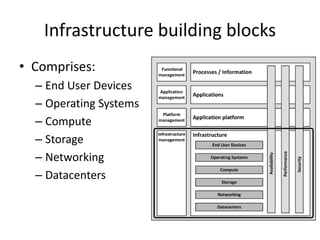
Infrastructure building blocks
• Comprises:
– End User Devices
– Operating Systems
– Compute
– Storage
– Networking
– Datacenters
Infrastructure building blocks
• End User Devices are the devices used by end users to
work with applications
– PCs
– Laptops
– Thin clients
– Mobile devices
– Printers
• Operating Systems are collections of programs that
manage a computer’s internal workings:
– Memory
– Processors
– Devices
– File system
Infrastructure building blocks
• Compute are the physical and virtual
computers in the datacenter
– Also known as servers
• Storage are systems that store data
– Hard disks
– Tapes
– Direct Attached Storage (DAS)
– Network Attached Storage (NAS)
– Storage Area Networks (SANs)
Infrastructure building blocks
• Networking connects all components
– Routers
– Switches
– Firewalls
– WAN
– LAN
– Internet access
– VPNs
• Includes infrastructure services
– DNS
– DHCP
– Time services
Infrastructure building blocks
• Datacenters are locations that host most IT infrastructure
hardware
– Uninterruptible power supplies (UPSs)
– Heating, Ventilation, and Air Conditioning (HVAC)
– Computer racks
– Physical security measures
• Infrastructure management are processes
– ITIL
– COBIT
– DevOps
• Tools are used for:
– Monitoring
– Backup
– Logging
Infrastructure building blocks
• Infrastructure building blocks are not per
definition hierarchically related!
– For instance, servers need both networking and
storage
– Both are equally important
Introduction to Non-functional
attributes
Non-Functional attributes
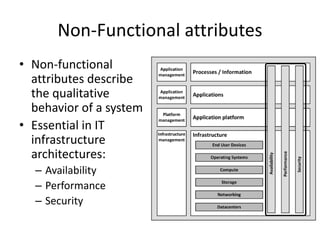
• Non-functional
attributes describe
the qualitative
behavior of a system
• Essential in IT
infrastructure
architectures:
– Availability
– Performance
– Security
NFRs
• The name “Non-functional attributes”
suggests they have no function
• They are very important for the successful
implementation and use of an IT
infrastructure
• The term non-functional requirements or
NFRs is frequently used and widely known
• The acceptance of a system is largely
dependent on the implemented non-
functional requirements
Conflicting NFRs
• Many of the non-functional attributes are
delivered by the infrastructure
• Non-functional requirements are often
conflicting:
– Security versus user friendliness
– Performance versus cost
• The infrastructure architect should present
stakeholders with these conflicting
requirements and their consequences

01. 03.-introduction-to-infrastructure

  • 1.
    IT Infrastructure Architecture Introductionto IT Infrastructure (chapter 1 and 2) Infrastructure Building Blocks and Concepts
  • 2.
    Introduction • IT infrastructuresbecome more complicated – New types of applications: • Big data • The Internet of Thing • Mobility • Cloud computing • Most current infrastructure landscapes are complex – The result of a history of application implementation projects – Specialized hardware and infrastructure components
  • 3.
    Introduction • Agile adaptationsrequire infrastructure: – Solid – Scalable – Modular • Architecture is crucial to control the infrastructure when it is designed, in use, and when it is changed.
  • 4.
    The definition ofIT infrastructure • In literature, many definitions of IT infrastructure are described • Examples: – IT infrastructure consists of the equipment, systems, software, and services used in common across an organization, regardless of mission/program/project. IT Infrastructure also serves as the foundation upon which mission/program/project-specific systems and capabilities are built – All of the hardware, software, networks, facilities, etc., that are required to develop, test, deliver, monitor, control, or support IT services. The term IT Infrastructure includes all of the Information Technology but not the associated people, Processes and documentation – Infrastructure is the shared and reliable services that provide the foundation for the enterprise IT portfolio. The implementation of an architecture includes the processors, software, databases, electronic links, and datacenters as well as the standards that ensure the components work together, the skills for managing the operation, etc.
  • 5.
    The definition ofIT infrastructure • What infrastructure comprises dependents on: – Who you ask – What their point of view is • For most people, infrastructure is invisible and taken for granted
  • 6.
    IT building blocks •The definition of infrastructure as used in this course is based on the building blocks in the model below
  • 7.
    Processes / Informationbuilding block • Organizations implement business processes to fulfil their mission and vision • Processes are organization specific – They are the main differentiators between organizations • Business processes create and use information
  • 8.
    Applications building block •Client applications typically run on end user devices like PCs and laptops • Office applications provide standard server based applications • Business specific applications are typically highly customized or custom built
  • 9.
    Application Platform buildingblock • Comprises: – Front-end servers – Application servers – Connectivity – Databases
  • 10.
    Application Platform buildingblock • Front-end servers provide end users with interactions to applications: – Presenting application screens in web browsers • Application servers act as containers running the actual application • Connectivity entails FTP servers, ETL servers, and ESBs • Databases provide a way to store and retrieve structured data
  • 11.
    Infrastructure building blocks •Comprises: – End User Devices – Operating Systems – Compute – Storage – Networking – Datacenters
  • 12.
    Infrastructure building blocks •End User Devices are the devices used by end users to work with applications – PCs – Laptops – Thin clients – Mobile devices – Printers • Operating Systems are collections of programs that manage a computer’s internal workings: – Memory – Processors – Devices – File system
  • 13.
    Infrastructure building blocks •Compute are the physical and virtual computers in the datacenter – Also known as servers • Storage are systems that store data – Hard disks – Tapes – Direct Attached Storage (DAS) – Network Attached Storage (NAS) – Storage Area Networks (SANs)
  • 14.
    Infrastructure building blocks •Networking connects all components – Routers – Switches – Firewalls – WAN – LAN – Internet access – VPNs • Includes infrastructure services – DNS – DHCP – Time services
  • 15.
    Infrastructure building blocks •Datacenters are locations that host most IT infrastructure hardware – Uninterruptible power supplies (UPSs) – Heating, Ventilation, and Air Conditioning (HVAC) – Computer racks – Physical security measures • Infrastructure management are processes – ITIL – COBIT – DevOps • Tools are used for: – Monitoring – Backup – Logging
  • 16.
    Infrastructure building blocks •Infrastructure building blocks are not per definition hierarchically related! – For instance, servers need both networking and storage – Both are equally important
  • 17.
  • 18.
    Non-Functional attributes • Non-functional attributesdescribe the qualitative behavior of a system • Essential in IT infrastructure architectures: – Availability – Performance – Security
  • 19.
    NFRs • The name“Non-functional attributes” suggests they have no function • They are very important for the successful implementation and use of an IT infrastructure • The term non-functional requirements or NFRs is frequently used and widely known • The acceptance of a system is largely dependent on the implemented non- functional requirements
  • 20.
    Conflicting NFRs • Manyof the non-functional attributes are delivered by the infrastructure • Non-functional requirements are often conflicting: – Security versus user friendliness – Performance versus cost • The infrastructure architect should present stakeholders with these conflicting requirements and their consequences