Top-Down Network Design
Chapter Thirteen
Optimizing Your Network Design
Copyright 2010 Cisco Press & Priscilla Oppenheimer
Reasons to Optimize
• Meet key business and technical goals
• Use bandwidth efficiently
• Control delay and jitter
• Reduce serialization delay
• Support preferential service for essential
applications
• Meet Quality of Service (QoS) requirements
IP Multicast Helps Optimize
Bandwidth Usage
• With IP multicast, you can send a high-
volume multimedia stream just once instead
of once for each user
• Requires support for
– Multicast addressing
– Multicast registration (IGMP)
– Multicast routing protocols
IP Multicast Addressing
• Uses Class D multicast destination address
– 224.0.0.0 to 239.255.255.255
• Converted to a MAC-layer multicast
destination address
– The low-order 23 bits of the Class D address
become the low-order 23 bits of the MAC-layer
address
– The top 9 bits of the Class D address are not
used
– The top 25 bits of the MAC-layer address are
0x01:00:5E followed by a binary 0
Internet Group Management
Protocol (IGMP)
• Allows a host to join a multicast group
• Host transmits a membership-report
message to inform routers on the segment
that traffic for a group should be multicast
to the host’s segment
• IGMPv2 has support for a router more
quickly learning that the last host on a
segment has left a group
Multicast Routing Protocols
• Becoming obsolete
– Multicast OSPF (MOSPF)
– Distance Vector Multicast Routing Protocol
(DVMRP)
• Still used
– Protocol Independent Multicast (PIM)
• Dense-Mode PIM
• Sparse-Mode PIM
Reducing Serialization Delay
• Link-layer fragmentation and interleaving
– Breaks up and reassembles frames
– Multilink PPP
– Frame Relay FRF.12
• Compressed Real Time Protocol
– RTP is used for voice and video
– Compressed RTP compresses the RTP, UDP,
and IP header from 40 bytes to 2 to 4 bytes
A Few Technologies for Meeting
QoS Requirements
• IETF controlled load service
• IETF guaranteed service
• IP precedence
• IP differentiated services
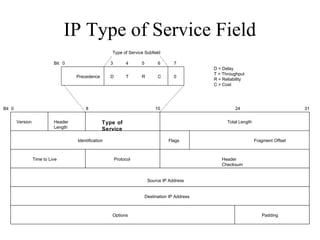
IP Type of Service Field
• The type of service field in the IP header is
divided into two subfields
– The 3-bit precedence subfield supports eight
levels of priority
– The 4-bit type of service subfield supports four
types of service
• Although IP precedence is still used, the
type of service subfield was hardly ever
used
IP Type of Service Field
Version Header
Length
Type of
Service
Total Length
Identification Flags Fragment Offset
Time to Live Protocol Header
Checksum
Source IP Address
Destination IP Address
Options Padding
0Bit 8 15 24 31
Precedence D T R C 0
Bit 0 3 4 5 6 7
Type of Service Subfield
D = Delay
T = Throughput
R = Reliability
C = Cost
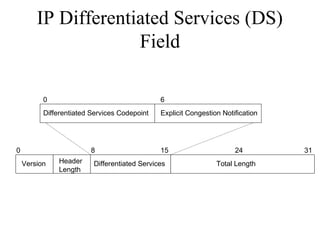
IP Differentiated Services (DS)
Field
• RFC 2474 redefines the type of service field
as the Differentiated Services (DS) field
– Bits 0 through 5 are the Differentiated Services
Codepoint (DSCP) subfield
• Has essentially the same goal as the precedence
subfield
• Influences queuing and packet dropping decisions for
IP packets at a router output interface
– Bits 6 and 7 are the Explicit Congestion
Notification (ECN) subfield
IP Differentiated Services (DS)
Field
Version Header
Length
Differentiated Services Total Length
0 8 15 24 31
Differentiated Services Codepoint
0 6
Explicit Congestion Notification
Classifying LAN Traffic
• IEEE 802.1p
• Classifies traffic at the data-link layer
• Supports eight classes of service
• A switch can have a separate queue for each
class and service the highest-priority queues
first
Cisco Switching Techniques
• Process switching
• Fast switching
• NetFlow switching
• Cisco Express Forwarding (CEF)
Cisco Queuing Services
• First in, first out (FIFO) queuing
• Priority queuing
• Custom queuing
• Weighted fair queuing (WFQ)
• Class-based WFQ (CBWFQ)
• Low latency queuing (LLQ)
Priority Queuing
Packet in high
queue?
NO
Dispatch Packet Continue
YES
Packet in medium
queue?
NO
YES
Packet in normal
queue?
NO
YES
Packet in low
queue?
NO
YES
START
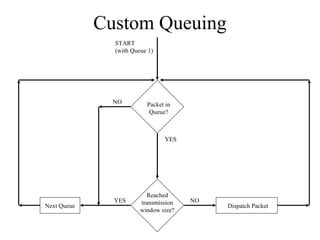
Custom Queuing
Reached
transmission
window size?
NO
Dispatch PacketNext Queue
YES
START
(with Queue 1)
Packet in
Queue?
NO
YES
Low-Latency Queuing
• One queue always gets the green light
– Use this for voice
• Combine this with class-based
weighted fair queuing
– Define traffic classes based on protocols,
access control lists, and input interfaces
– Assign characteristics to classes such as
bandwidth required and the maximum
number of packets that can be queued for
the class
Random Early Detection (RED)
• Congestion avoidance rather than
congestion management
• Monitors traffic loads and randomly
discards packets if congestion increases
• Source nodes detect dropped packets and
slow down
– Works best with TCP
• Weighted Random Early Detection
• Cisco’s implementation uses IP precedence or the
DS field instead of just randomly dropping packets
Traffic Shaping
• Manage and control network traffic to avoid
bottlenecks
• Avoid overwhelming a downstream router
or link
• Reduce outbound traffic for a flow to a
configured bit rate
– Queue bursts of traffic for that flow
Committed Access Rate (CAR)
• Cisco feature for classifying and policing
traffic on an incoming interface
• Supports policies regarding how traffic that
exceeds a certain bandwidth allocation
should be handled
• Can drop a packet or change the IP
precedence or DSCP bits
Summary
• Optimization provides the high bandwidth, low
delay, and controlled jitter required by many
critical business applications
• To minimize bandwidth utilization by
multimedia applications, use IP multicast
• To reduce serialization delay, use link
fragmentation and compressed RTP
• To support QoS and optimize performance, use
IP precedence, DSCP, 802.1p. advanced
switching and queuing methods, RED, CAR,
etc.
Review Questions
• Why is it important to optimize your
network?
• What has become of the IP type of service
field?
• What are some methods for marking
packets to identify the need for priority
handling?
• Compare and contrast Cisco queuing
services.

Chapter13

  • 1.
    Top-Down Network Design ChapterThirteen Optimizing Your Network Design Copyright 2010 Cisco Press & Priscilla Oppenheimer
  • 2.
    Reasons to Optimize •Meet key business and technical goals • Use bandwidth efficiently • Control delay and jitter • Reduce serialization delay • Support preferential service for essential applications • Meet Quality of Service (QoS) requirements
  • 3.
    IP Multicast HelpsOptimize Bandwidth Usage • With IP multicast, you can send a high- volume multimedia stream just once instead of once for each user • Requires support for – Multicast addressing – Multicast registration (IGMP) – Multicast routing protocols
  • 4.
    IP Multicast Addressing •Uses Class D multicast destination address – 224.0.0.0 to 239.255.255.255 • Converted to a MAC-layer multicast destination address – The low-order 23 bits of the Class D address become the low-order 23 bits of the MAC-layer address – The top 9 bits of the Class D address are not used – The top 25 bits of the MAC-layer address are 0x01:00:5E followed by a binary 0
  • 5.
    Internet Group Management Protocol(IGMP) • Allows a host to join a multicast group • Host transmits a membership-report message to inform routers on the segment that traffic for a group should be multicast to the host’s segment • IGMPv2 has support for a router more quickly learning that the last host on a segment has left a group
  • 6.
    Multicast Routing Protocols •Becoming obsolete – Multicast OSPF (MOSPF) – Distance Vector Multicast Routing Protocol (DVMRP) • Still used – Protocol Independent Multicast (PIM) • Dense-Mode PIM • Sparse-Mode PIM
  • 7.
    Reducing Serialization Delay •Link-layer fragmentation and interleaving – Breaks up and reassembles frames – Multilink PPP – Frame Relay FRF.12 • Compressed Real Time Protocol – RTP is used for voice and video – Compressed RTP compresses the RTP, UDP, and IP header from 40 bytes to 2 to 4 bytes
  • 8.
    A Few Technologiesfor Meeting QoS Requirements • IETF controlled load service • IETF guaranteed service • IP precedence • IP differentiated services
  • 9.
    IP Type ofService Field • The type of service field in the IP header is divided into two subfields – The 3-bit precedence subfield supports eight levels of priority – The 4-bit type of service subfield supports four types of service • Although IP precedence is still used, the type of service subfield was hardly ever used
  • 10.
    IP Type ofService Field Version Header Length Type of Service Total Length Identification Flags Fragment Offset Time to Live Protocol Header Checksum Source IP Address Destination IP Address Options Padding 0Bit 8 15 24 31 Precedence D T R C 0 Bit 0 3 4 5 6 7 Type of Service Subfield D = Delay T = Throughput R = Reliability C = Cost
  • 11.
    IP Differentiated Services(DS) Field • RFC 2474 redefines the type of service field as the Differentiated Services (DS) field – Bits 0 through 5 are the Differentiated Services Codepoint (DSCP) subfield • Has essentially the same goal as the precedence subfield • Influences queuing and packet dropping decisions for IP packets at a router output interface – Bits 6 and 7 are the Explicit Congestion Notification (ECN) subfield
  • 12.
    IP Differentiated Services(DS) Field Version Header Length Differentiated Services Total Length 0 8 15 24 31 Differentiated Services Codepoint 0 6 Explicit Congestion Notification
  • 13.
    Classifying LAN Traffic •IEEE 802.1p • Classifies traffic at the data-link layer • Supports eight classes of service • A switch can have a separate queue for each class and service the highest-priority queues first
  • 14.
    Cisco Switching Techniques •Process switching • Fast switching • NetFlow switching • Cisco Express Forwarding (CEF)
  • 15.
    Cisco Queuing Services •First in, first out (FIFO) queuing • Priority queuing • Custom queuing • Weighted fair queuing (WFQ) • Class-based WFQ (CBWFQ) • Low latency queuing (LLQ)
  • 16.
    Priority Queuing Packet inhigh queue? NO Dispatch Packet Continue YES Packet in medium queue? NO YES Packet in normal queue? NO YES Packet in low queue? NO YES START
  • 17.
    Custom Queuing Reached transmission window size? NO DispatchPacketNext Queue YES START (with Queue 1) Packet in Queue? NO YES
  • 18.
    Low-Latency Queuing • Onequeue always gets the green light – Use this for voice • Combine this with class-based weighted fair queuing – Define traffic classes based on protocols, access control lists, and input interfaces – Assign characteristics to classes such as bandwidth required and the maximum number of packets that can be queued for the class
  • 19.
    Random Early Detection(RED) • Congestion avoidance rather than congestion management • Monitors traffic loads and randomly discards packets if congestion increases • Source nodes detect dropped packets and slow down – Works best with TCP • Weighted Random Early Detection • Cisco’s implementation uses IP precedence or the DS field instead of just randomly dropping packets
  • 20.
    Traffic Shaping • Manageand control network traffic to avoid bottlenecks • Avoid overwhelming a downstream router or link • Reduce outbound traffic for a flow to a configured bit rate – Queue bursts of traffic for that flow
  • 21.
    Committed Access Rate(CAR) • Cisco feature for classifying and policing traffic on an incoming interface • Supports policies regarding how traffic that exceeds a certain bandwidth allocation should be handled • Can drop a packet or change the IP precedence or DSCP bits
  • 22.
    Summary • Optimization providesthe high bandwidth, low delay, and controlled jitter required by many critical business applications • To minimize bandwidth utilization by multimedia applications, use IP multicast • To reduce serialization delay, use link fragmentation and compressed RTP • To support QoS and optimize performance, use IP precedence, DSCP, 802.1p. advanced switching and queuing methods, RED, CAR, etc.
  • 23.
    Review Questions • Whyis it important to optimize your network? • What has become of the IP type of service field? • What are some methods for marking packets to identify the need for priority handling? • Compare and contrast Cisco queuing services.

Editor's Notes

  • #15 These are technologies for “switching” (forwarding) packets through a router.