Top-Down Network Design
Chapter Ten
Selecting Technologies and Devices for Campus Networks
Copyright 2010 Cisco Press & Priscilla Oppenheimer
Selecting Technologies and
Devices
• We now know what the network will look like.
• We also know what capabilities the network
will need.
• We are now ready to start picking out
technologies and devices.
• Chapter 10 has guidelines for campus
networks.
Campus Network Design Steps
• Develop a cabling plant
design
• Select the types of cabling
• Select the data-link-layer
technologies
• Select internetworking
devices
– Meet with vendors
Cabling Plant Design
Considerations
• Campus and building cabling topologies
• The types and lengths of cables between buildings
• Within buildings
– The location of telecommunications closets and cross-
connect rooms
– The types and lengths of cables for vertical cabling
between floors
– The types and lengths of cables for horizontal cabling
within floors
– The types and lengths of cables for work-area cabling
going from telecommunications closets to workstations
Centralized Versus Distributed
Cabling Topologies
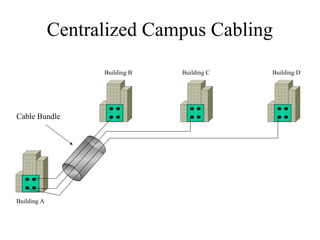
• A centralized cabling scheme terminates
most or all of the cable runs in one area of
the design environment. A star topology is
an example of a centralized system.
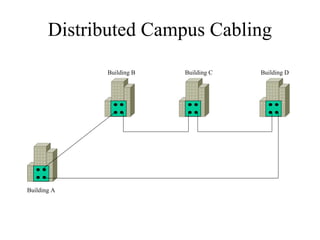
• A distributed cabling scheme terminates
cable runs throughout the design
environment. Ring, bus, and tree topologies
are examples of distributed systems.
Centralized Campus Cabling
Cable Bundle
Building A
Building B Building C Building D
Distributed Campus Cabling
Building A
Building B Building C Building D
Types of Media Used in Campus
Networks
• Copper media
• Optical media
• Wireless media
Copper Media Advantages
• Conducts electric current well
• Does not rust
• Can be drawn into thin wires
• Easy to shape
• Hard to break
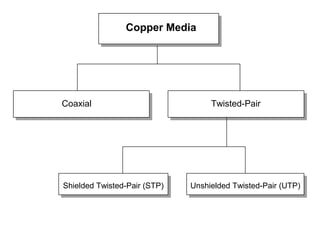
Copper Media
Coaxial Twisted-Pair
Shielded Twisted-Pair (STP) Unshielded Twisted-Pair (UTP)
Coaxial Cable
• Solid copper conductor, surrounded by:
– Flexible plastic insulation
– Braided copper shielding
– Outer jacket
• Can be run without as many boosts from
repeaters, for longer distances between
network nodes, than either STP or UTP
cable
– Nonetheless, it’s no longer widely used
Twisted-Pair Cabling
• A “twisted pair” consists of two copper
conductors twisted together
• Each conductor has plastic insulation
• Shielded Twisted Pair (STP)
– Has metal foil or braided-mesh covering that
encases each pair
• Unshielded Twisted Pair (UTP)
– No metal foil or braided-mesh covering around
pairs, so it’s less expensive
UTP Categories
• Category 1. Used for voice communication
• Category 2. Used for voice and data, up to 4 Mbps
• Category 3. Used for data, up to 10 Mbps
– Required to have at least 3 twists per foot
– Standard cable for most telephone systems
– Also used in 10-Mbps Ethernet (10Base-T Ethernet)
• Category 4. Used for data, up to 16 Mbps
– Must also have at least 3 twists per foot as well as other features
• Category 5. Used for data, up to 100 Mbps
– Must have 3 twists per inch!
• Category 5e. Used in Gigabit Ethernet
• Category 6. Used in Gigabit Ethernet and future technologies
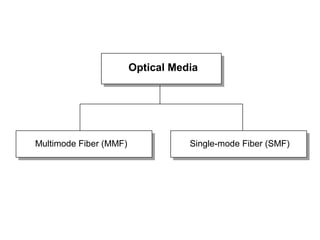
Optical Media
Multimode Fiber (MMF) Single-mode Fiber (SMF)
Copper Vs Fiber-Optic Cabling
• Twisted-pair and coax cable transmit network
signals in the form of current
• Fiber-optic cable transmits network signals in the
form of light
• Fiber-optic cable is made of glass
– Not susceptible to electromagnetic or radio frequency
interference
– Not as susceptible to attenuation, which means longer
cables are possible
– Supports very high bandwidth (10 Gbps or greater)
– For long distances, fiber costs less than copper
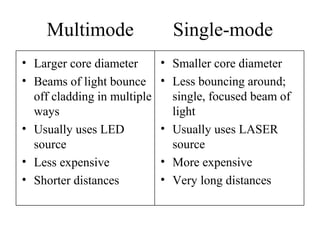
Multimode Single-mode
• Larger core diameter
• Beams of light bounce
off cladding in multiple
ways
• Usually uses LED
source
• Less expensive
• Shorter distances
• Smaller core diameter
• Less bouncing around;
single, focused beam of
light
• Usually uses LASER
source
• More expensive
• Very long distances
Wireless Media
• IEEE 802.11a, b, g, n
• Laser
• Microwave
• Cellular
• Satellite
Cabling Guidelines
• At the access layer use
– Copper UTP rated for Category 5 or 5e, unless
there is a good reason not to
– To future proof the network
• Use 5e instead of 5
• Install UTP Category 6 rated cable and terminate the
cable with Cat 5 or 5e connectors
• Then only the connectors need to be changed to
move up in speed
– In special cases
• Use MMF for bandwidth intensive applications
• Or install fiber along with the copper
Cabling Guidelines
• At the distribution layer use
– MMF if distance allows
– SMF otherwise
– Unless unusual circumstances occur and cable
cannot be run, then use a wireless method
– To future proof the network
• Run both MMF and SMF
LAN Technologies
• Half-duplex Ethernet (becoming obsolete)
• Full-duplex Ethernet
• 10-Mbps Ethernet (becoming obsolete)
• 100-Mbps Ethernet
• 1000-Mbps (1-Gbps or Gigabit) Ethernet
• 10-Gbps Ethernet
• Metro Ethernet
• Long Range Ethernet (LRE)
• Cisco’s EtherChannel
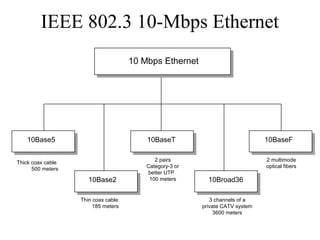
10 Mbps Ethernet
10Base5
10Base2
10BaseF
Thick coax cable
500 meters
Thin coax cable
185 meters
10BaseT
2 pairs
Category-3 or
better UTP
100 meters
IEEE 802.3 10-Mbps Ethernet
2 multimode
optical fibers
10Broad36
3 channels of a
private CATV system
3600 meters
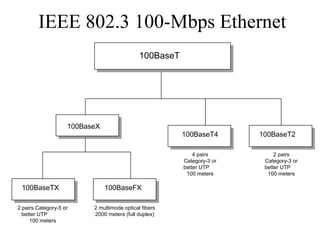
100BaseT
100BaseTX 100BaseFX
100BaseT2
2 pairs Category-5 or
better UTP
100 meters
2 multimode optical fibers
2000 meters (full duplex)
100BaseT4
4 pairs
Category-3 or
better UTP
100 meters
IEEE 802.3 100-Mbps Ethernet
2 pairs
Category-3 or
better UTP
100 meters
100BaseX
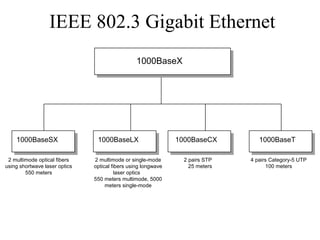
1000BaseX
1000BaseSX 1000BaseLX 1000BaseT
2 multimode optical fibers
using shortwave laser optics
550 meters
2 multimode or single-mode
optical fibers using longwave
laser optics
550 meters multimode, 5000
meters single-mode
4 pairs Category-5 UTP
100 meters
1000BaseCX
2 pairs STP
25 meters
IEEE 802.3 Gigabit Ethernet
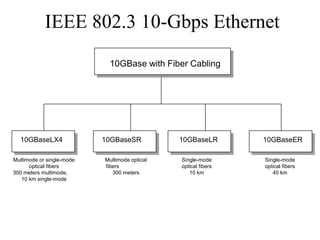
10GBase with Fiber Cabling
10GBaseLX4 10GBaseSR 10GBaseER
Multimode or single-mode
optical fibers
300 meters multimode,
10 km single-mode
Multimode optical
fibers
300 meters
Single-mode
optical fibers
40 km
10GBaseLR
Single-mode
optical fibers
10 km
IEEE 802.3 10-Gbps Ethernet
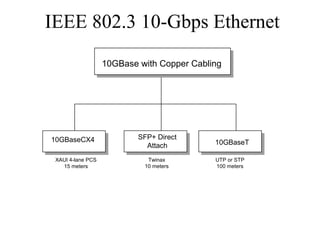
10GBase with Copper Cabling
10GBaseCX4 SFP+ Direct
Attach
XAUI 4-lane PCS
15 meters
Twinax
10 meters
10GBaseT
IEEE 802.3 10-Gbps Ethernet
UTP or STP
100 meters
Metro Ethernet
• Service offered by providers and carriers
that traditionally had only classic WAN
offerings
• The customer can use a standard Ethernet
interface to reach a MAN or WAN
• The customer can add bandwidth as needed
with a simple configuration change
Long-Reach Ethernet
• Enables the use of Ethernet over existing,
unconditioned, voice-grade copper twisted-
pair cabling
• Used to connect buildings and rooms within
buildings
– Rural areas
– Old cities where upgrading cabling is
impractical
– Multi-unit structures such as hotels, apartment
complexes, business complexes, and
government agencies
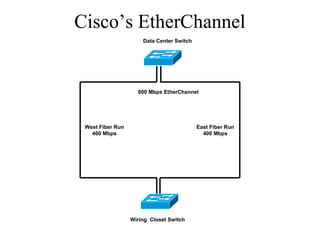
Cisco’s EtherChannel
Data Center Switch
Wiring Closet Switch
East Fiber Run
400 Mbps
West Fiber Run
400 Mbps
800 Mbps EtherChannel
Internetworking Devices for
Campus Networks
• Switches
• Routers
• Wireless access points
• Wireless bridges
Selection Criteria for
Internetworking Devices
• The number of ports
• Processing speed
• The amount of memory
• Latency when device relays data
• Throughput when device relays data
• LAN and WAN technologies supported
• Media supported
More Selection Criteria for
Internetworking Devices
• Cost
• Ease of configuration and management
• MTBF and MTTR
• Support for hot-swappable components
• Support for redundant power supplies
• Quality of technical support,
documentation, and training
• Etc.
Summary
• Once the logical design is completed, the
physical design can start
• A major task during physical design is
selecting technologies and devices for campus
networks
– Media
– Data-link layer technology
– Internetworking devices
• Also, at this point, the logical topology design
can be developed further by specifying
cabling topologies
Review Questions
• What are three fundamental media types used
in campus networks?
• What selection criteria can you use to select
an Ethernet variety for your design customer?
• What selection criteria can you use when
purchasing internetworking devices for your
design customer?
• Some people think Metro Ethernet will
replace traditional WANs. Do you agree or
disagree and why?

Chapter10

  • 1.
    Top-Down Network Design ChapterTen Selecting Technologies and Devices for Campus Networks Copyright 2010 Cisco Press & Priscilla Oppenheimer
  • 2.
    Selecting Technologies and Devices •We now know what the network will look like. • We also know what capabilities the network will need. • We are now ready to start picking out technologies and devices. • Chapter 10 has guidelines for campus networks.
  • 3.
    Campus Network DesignSteps • Develop a cabling plant design • Select the types of cabling • Select the data-link-layer technologies • Select internetworking devices – Meet with vendors
  • 4.
    Cabling Plant Design Considerations •Campus and building cabling topologies • The types and lengths of cables between buildings • Within buildings – The location of telecommunications closets and cross- connect rooms – The types and lengths of cables for vertical cabling between floors – The types and lengths of cables for horizontal cabling within floors – The types and lengths of cables for work-area cabling going from telecommunications closets to workstations
  • 5.
    Centralized Versus Distributed CablingTopologies • A centralized cabling scheme terminates most or all of the cable runs in one area of the design environment. A star topology is an example of a centralized system. • A distributed cabling scheme terminates cable runs throughout the design environment. Ring, bus, and tree topologies are examples of distributed systems.
  • 6.
    Centralized Campus Cabling CableBundle Building A Building B Building C Building D
  • 7.
    Distributed Campus Cabling BuildingA Building B Building C Building D
  • 8.
    Types of MediaUsed in Campus Networks • Copper media • Optical media • Wireless media
  • 9.
    Copper Media Advantages •Conducts electric current well • Does not rust • Can be drawn into thin wires • Easy to shape • Hard to break
  • 10.
    Copper Media Coaxial Twisted-Pair ShieldedTwisted-Pair (STP) Unshielded Twisted-Pair (UTP)
  • 11.
    Coaxial Cable • Solidcopper conductor, surrounded by: – Flexible plastic insulation – Braided copper shielding – Outer jacket • Can be run without as many boosts from repeaters, for longer distances between network nodes, than either STP or UTP cable – Nonetheless, it’s no longer widely used
  • 12.
    Twisted-Pair Cabling • A“twisted pair” consists of two copper conductors twisted together • Each conductor has plastic insulation • Shielded Twisted Pair (STP) – Has metal foil or braided-mesh covering that encases each pair • Unshielded Twisted Pair (UTP) – No metal foil or braided-mesh covering around pairs, so it’s less expensive
  • 13.
    UTP Categories • Category1. Used for voice communication • Category 2. Used for voice and data, up to 4 Mbps • Category 3. Used for data, up to 10 Mbps – Required to have at least 3 twists per foot – Standard cable for most telephone systems – Also used in 10-Mbps Ethernet (10Base-T Ethernet) • Category 4. Used for data, up to 16 Mbps – Must also have at least 3 twists per foot as well as other features • Category 5. Used for data, up to 100 Mbps – Must have 3 twists per inch! • Category 5e. Used in Gigabit Ethernet • Category 6. Used in Gigabit Ethernet and future technologies
  • 14.
    Optical Media Multimode Fiber(MMF) Single-mode Fiber (SMF)
  • 15.
    Copper Vs Fiber-OpticCabling • Twisted-pair and coax cable transmit network signals in the form of current • Fiber-optic cable transmits network signals in the form of light • Fiber-optic cable is made of glass – Not susceptible to electromagnetic or radio frequency interference – Not as susceptible to attenuation, which means longer cables are possible – Supports very high bandwidth (10 Gbps or greater) – For long distances, fiber costs less than copper
  • 16.
    Multimode Single-mode • Largercore diameter • Beams of light bounce off cladding in multiple ways • Usually uses LED source • Less expensive • Shorter distances • Smaller core diameter • Less bouncing around; single, focused beam of light • Usually uses LASER source • More expensive • Very long distances
  • 17.
    Wireless Media • IEEE802.11a, b, g, n • Laser • Microwave • Cellular • Satellite
  • 18.
    Cabling Guidelines • Atthe access layer use – Copper UTP rated for Category 5 or 5e, unless there is a good reason not to – To future proof the network • Use 5e instead of 5 • Install UTP Category 6 rated cable and terminate the cable with Cat 5 or 5e connectors • Then only the connectors need to be changed to move up in speed – In special cases • Use MMF for bandwidth intensive applications • Or install fiber along with the copper
  • 19.
    Cabling Guidelines • Atthe distribution layer use – MMF if distance allows – SMF otherwise – Unless unusual circumstances occur and cable cannot be run, then use a wireless method – To future proof the network • Run both MMF and SMF
  • 20.
    LAN Technologies • Half-duplexEthernet (becoming obsolete) • Full-duplex Ethernet • 10-Mbps Ethernet (becoming obsolete) • 100-Mbps Ethernet • 1000-Mbps (1-Gbps or Gigabit) Ethernet • 10-Gbps Ethernet • Metro Ethernet • Long Range Ethernet (LRE) • Cisco’s EtherChannel
  • 21.
    10 Mbps Ethernet 10Base5 10Base2 10BaseF Thickcoax cable 500 meters Thin coax cable 185 meters 10BaseT 2 pairs Category-3 or better UTP 100 meters IEEE 802.3 10-Mbps Ethernet 2 multimode optical fibers 10Broad36 3 channels of a private CATV system 3600 meters
  • 22.
    100BaseT 100BaseTX 100BaseFX 100BaseT2 2 pairsCategory-5 or better UTP 100 meters 2 multimode optical fibers 2000 meters (full duplex) 100BaseT4 4 pairs Category-3 or better UTP 100 meters IEEE 802.3 100-Mbps Ethernet 2 pairs Category-3 or better UTP 100 meters 100BaseX
  • 23.
    1000BaseX 1000BaseSX 1000BaseLX 1000BaseT 2multimode optical fibers using shortwave laser optics 550 meters 2 multimode or single-mode optical fibers using longwave laser optics 550 meters multimode, 5000 meters single-mode 4 pairs Category-5 UTP 100 meters 1000BaseCX 2 pairs STP 25 meters IEEE 802.3 Gigabit Ethernet
  • 24.
    10GBase with FiberCabling 10GBaseLX4 10GBaseSR 10GBaseER Multimode or single-mode optical fibers 300 meters multimode, 10 km single-mode Multimode optical fibers 300 meters Single-mode optical fibers 40 km 10GBaseLR Single-mode optical fibers 10 km IEEE 802.3 10-Gbps Ethernet
  • 25.
    10GBase with CopperCabling 10GBaseCX4 SFP+ Direct Attach XAUI 4-lane PCS 15 meters Twinax 10 meters 10GBaseT IEEE 802.3 10-Gbps Ethernet UTP or STP 100 meters
  • 26.
    Metro Ethernet • Serviceoffered by providers and carriers that traditionally had only classic WAN offerings • The customer can use a standard Ethernet interface to reach a MAN or WAN • The customer can add bandwidth as needed with a simple configuration change
  • 27.
    Long-Reach Ethernet • Enablesthe use of Ethernet over existing, unconditioned, voice-grade copper twisted- pair cabling • Used to connect buildings and rooms within buildings – Rural areas – Old cities where upgrading cabling is impractical – Multi-unit structures such as hotels, apartment complexes, business complexes, and government agencies
  • 28.
    Cisco’s EtherChannel Data CenterSwitch Wiring Closet Switch East Fiber Run 400 Mbps West Fiber Run 400 Mbps 800 Mbps EtherChannel
  • 29.
    Internetworking Devices for CampusNetworks • Switches • Routers • Wireless access points • Wireless bridges
  • 30.
    Selection Criteria for InternetworkingDevices • The number of ports • Processing speed • The amount of memory • Latency when device relays data • Throughput when device relays data • LAN and WAN technologies supported • Media supported
  • 31.
    More Selection Criteriafor Internetworking Devices • Cost • Ease of configuration and management • MTBF and MTTR • Support for hot-swappable components • Support for redundant power supplies • Quality of technical support, documentation, and training • Etc.
  • 32.
    Summary • Once thelogical design is completed, the physical design can start • A major task during physical design is selecting technologies and devices for campus networks – Media – Data-link layer technology – Internetworking devices • Also, at this point, the logical topology design can be developed further by specifying cabling topologies
  • 33.
    Review Questions • Whatare three fundamental media types used in campus networks? • What selection criteria can you use to select an Ethernet variety for your design customer? • What selection criteria can you use when purchasing internetworking devices for your design customer? • Some people think Metro Ethernet will replace traditional WANs. Do you agree or disagree and why?

Editor's Notes

  • #21 These days, use at least 100-Mbps Ethernet to the desktop and 100-Mbps, Gigabit, or 10-Gbps Ethernet in backbones. Also, use full-duplex Ethernet whenever possible.