Your Interactive Guide
to the Digital World
Discovering
Computers 2012
Objectives Overview
Discuss the purpose of the
components required for
successful communications
and identify various sending
and receiving devices
Describe the uses of
computer communications
List advantages of using a
network, and differentiate
among LANs, MANs, and
WANs
Differentiate between
client/server and peer-to-
peer networks, and
describe how a P2P
network works
Differentiate among a star
network, bus network, and
ring network
Describe the various
network communications
standards
Discovering Computers 2012: Chapter 9 2See Page 459
for Detailed Objectives
Objectives Overview
Explain the purpose of
communications
software
Describe various types
of lines for
communications over
the telephone network
Describe commonly
used communications
devices
Discuss different ways
to set up a home
network
Describe various
physical and wireless
transmission media
Discovering Computers 2012: Chapter 9 3See Page 459
for Detailed Objectives
Communications
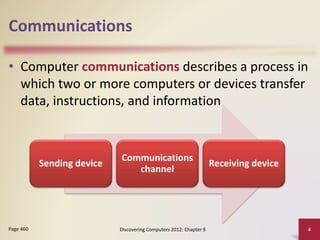
• Computer communications describes a process in
which two or more computers or devices transfer
data, instructions, and information
Discovering Computers 2012: Chapter 9 4Page 460
Sending device
Communications
channel
Receiving device
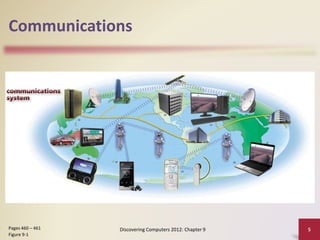
Communications
Discovering Computers 2012: Chapter 9 5Pages 460 – 461
Figure 9-1
Uses of Computer Communications
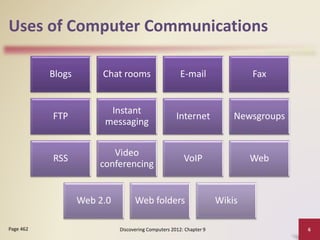
Blogs Chat rooms E-mail Fax
FTP
Instant
messaging
Internet Newsgroups
RSS
Video
conferencing
VoIP Web
Web 2.0 Web folders Wikis
Discovering Computers 2012: Chapter 9 6Page 462
Uses of Computer Communications
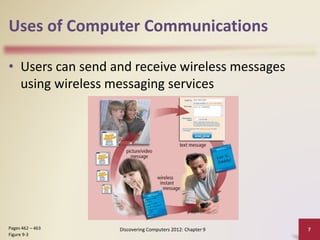
• Users can send and receive wireless messages
using wireless messaging services
Discovering Computers 2012: Chapter 9 7Pages 462 – 463
Figure 9-3
Uses of Computer Communications
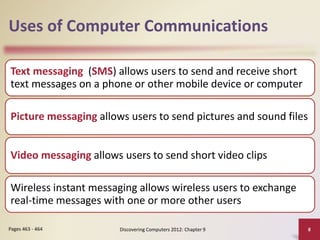
Text messaging (SMS) allows users to send and receive short
text messages on a phone or other mobile device or computer
Picture messaging allows users to send pictures and sound files
Video messaging allows users to send short video clips
Wireless instant messaging allows wireless users to exchange
real-time messages with one or more other users
Discovering Computers 2012: Chapter 9 8Pages 463 - 464
Uses of Computer Communications
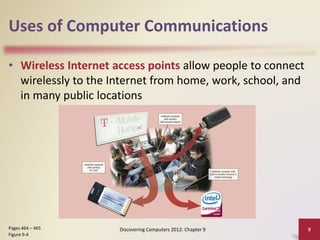
• Wireless Internet access points allow people to connect
wirelessly to the Internet from home, work, school, and
in many public locations
Discovering Computers 2012: Chapter 9 9Pages 464 – 465
Figure 9-4
Uses of Computer Communications
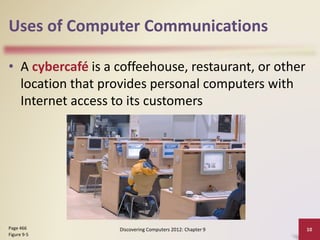
• A cybercafé is a coffeehouse, restaurant, or other
location that provides personal computers with
Internet access to its customers
Discovering Computers 2012: Chapter 9 10Page 466
Figure 9-5
Uses of Computer Communications
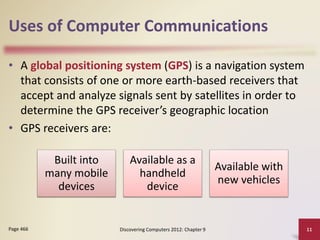
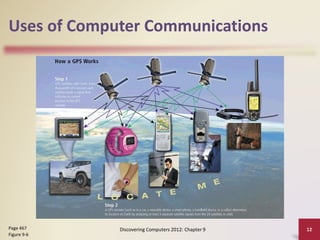
• A global positioning system (GPS) is a navigation system
that consists of one or more earth-based receivers that
accept and analyze signals sent by satellites in order to
determine the GPS receiver’s geographic location
• GPS receivers are:
Discovering Computers 2012: Chapter 9 11Page 466
Built into
many mobile
devices
Available as a
handheld
device
Available with
new vehicles
Uses of Computer Communications
Discovering Computers 2012: Chapter 9 12Page 467
Figure 9-6
Uses of Computer Communications
Groupware
• Helps groups of people work
together on projects and
share information over a
network
• Component of workgroup
computing
• Major feature is group
scheduling
Voice mail
• Allows someone to leave a
voice message for one or
more people
• Computer in voice mail
system converts an analog
voice message into digital
form
• A voice mailbox is a storage
location on a hard disk in the
voice mail system
Discovering Computers 2012: Chapter 9 13Page 467
Uses of Computer Communications
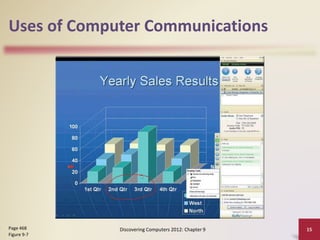
• Many programs provide a means to collaborate, or work
online, with other users connected to a server
• Collaboration software includes tools that enable users to
share documents via online meetings and communicate
with other connected users
Discovering Computers 2012: Chapter 9 14Page 468
Online
meetings
Web
conferences
Document
management
systems
Uses of Computer Communications
Discovering Computers 2012: Chapter 9 15Page 468
Figure 9-7
Uses of Computer Communications
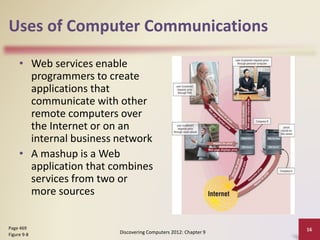
• Web services enable
programmers to create
applications that
communicate with other
remote computers over
the Internet or on an
internal business network
• A mashup is a Web
application that combines
services from two or
more sources
Discovering Computers 2012: Chapter 9
16Page 469
Figure 9-8
Networks
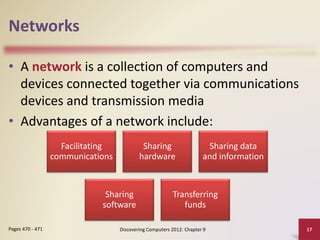
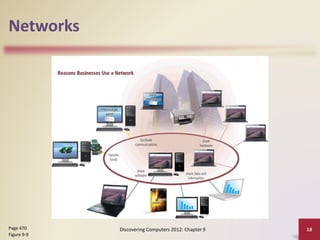
• A network is a collection of computers and
devices connected together via communications
devices and transmission media
• Advantages of a network include:
Discovering Computers 2012: Chapter 9 17Pages 470 - 471
Facilitating
communications
Sharing
hardware
Sharing data
and information
Sharing
software
Transferring
funds
Networks
Discovering Computers 2012: Chapter 9 18Page 470
Figure 9-9
Networks
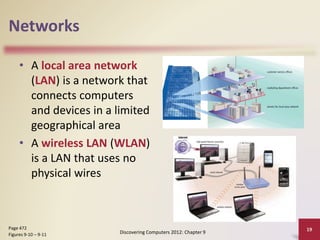
• A local area network
(LAN) is a network that
connects computers
and devices in a limited
geographical area
• A wireless LAN (WLAN)
is a LAN that uses no
physical wires
Discovering Computers 2012: Chapter 9
19Page 472
Figures 9-10 – 9-11
Networks
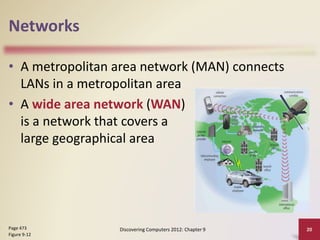
• A metropolitan area network (MAN) connects
LANs in a metropolitan area
• A wide area network (WAN)
is a network that covers a
large geographical area
Discovering Computers 2012: Chapter 9 20Page 473
Figure 9-12
Networks
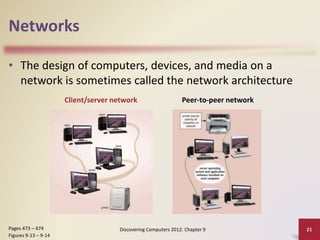
• The design of computers, devices, and media on a
network is sometimes called the network architecture
Discovering Computers 2012: Chapter 9 21Pages 473 – 474
Figures 9-13 – 9-14
Client/server network Peer-to-peer network
Networks
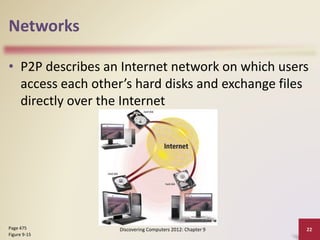
• P2P describes an Internet network on which users
access each other’s hard disks and exchange files
directly over the Internet
Discovering Computers 2012: Chapter 9 22Page 475
Figure 9-15
Networks
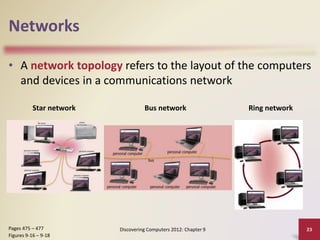
• A network topology refers to the layout of the computers
and devices in a communications network
Discovering Computers 2012: Chapter 9 23Pages 475 – 477
Figures 9-16 – 9-18
Star network Bus network Ring network
Networks
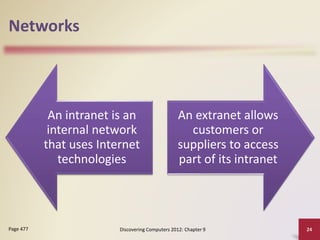
An intranet is an
internal network
that uses Internet
technologies
An extranet allows
customers or
suppliers to access
part of its intranet
Discovering Computers 2012: Chapter 9 24Page 477
Network Communications Standards
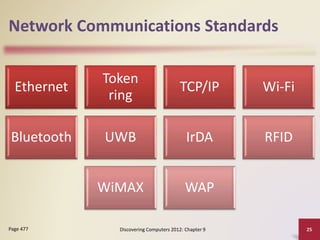
Ethernet
Token
ring
TCP/IP Wi-Fi
Bluetooth UWB IrDA RFID
WiMAX WAP
Discovering Computers 2012: Chapter 9 25Page 477
Network Communications Standards
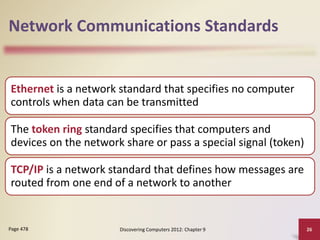
Ethernet is a network standard that specifies no computer
controls when data can be transmitted
The token ring standard specifies that computers and
devices on the network share or pass a special signal (token)
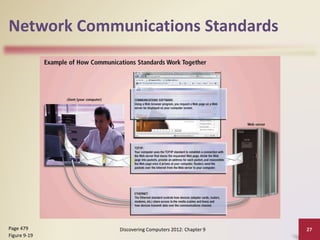
TCP/IP is a network standard that defines how messages are
routed from one end of a network to another
Discovering Computers 2012: Chapter 9 26Page 478
Network Communications Standards
Discovering Computers 2012: Chapter 9 27Page 479
Figure 9-19
Network Communications Standards
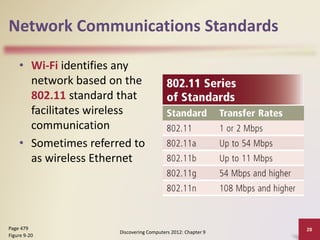
• Wi-Fi identifies any
network based on the
802.11 standard that
facilitates wireless
communication
• Sometimes referred to
as wireless Ethernet
Discovering Computers 2012: Chapter 9
28Page 479
Figure 9-20
Network Communications Standards
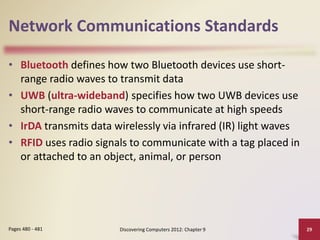
• Bluetooth defines how two Bluetooth devices use short-
range radio waves to transmit data
• UWB (ultra-wideband) specifies how two UWB devices use
short-range radio waves to communicate at high speeds
• IrDA transmits data wirelessly via infrared (IR) light waves
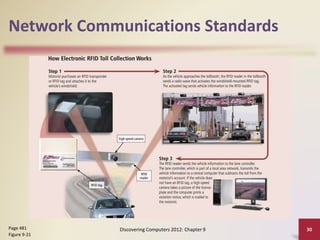
• RFID uses radio signals to communicate with a tag placed in
or attached to an object, animal, or person
Discovering Computers 2012: Chapter 9 29Pages 480 - 481
Network Communications Standards
Discovering Computers 2012: Chapter 9 30Page 481
Figure 9-21
Network Communications Standards
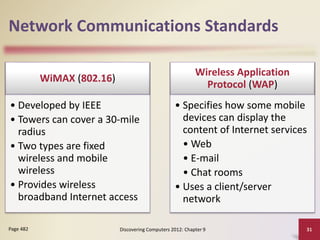
WiMAX (802.16)
• Developed by IEEE
• Towers can cover a 30-mile
radius
• Two types are fixed
wireless and mobile
wireless
• Provides wireless
broadband Internet access
Wireless Application
Protocol (WAP)
• Specifies how some mobile
devices can display the
content of Internet services
• Web
• E-mail
• Chat rooms
• Uses a client/server
network
Discovering Computers 2012: Chapter 9 31Page 482
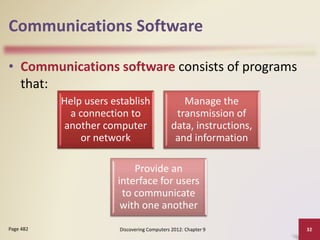
Communications Software
• Communications software consists of programs
that:
Discovering Computers 2012: Chapter 9 32Page 482
Help users establish
a connection to
another computer
or network
Manage the
transmission of
data, instructions,
and information
Provide an
interface for users
to communicate
with one another
Communications Over
the Telephone Network
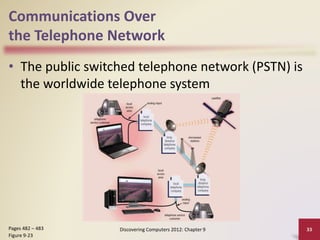
• The public switched telephone network (PSTN) is
the worldwide telephone system
Discovering Computers 2012: Chapter 9 33Pages 482 – 483
Figure 9-23
Communications Over
the Telephone Network
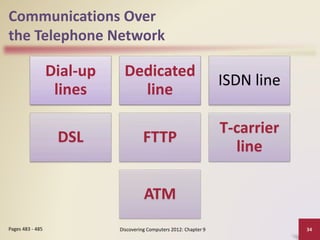
Dial-up
lines
Dedicated
line
ISDN line
DSL FTTP
T-carrier
line
ATM
Discovering Computers 2012: Chapter 9 34Pages 483 - 485
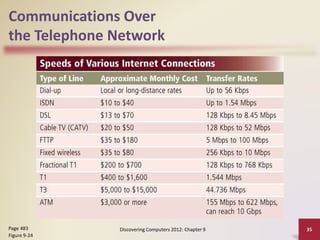
Communications Over
the Telephone Network
Discovering Computers 2012: Chapter 9 35Page 483
Figure 9-24
Communications Over
the Telephone Network
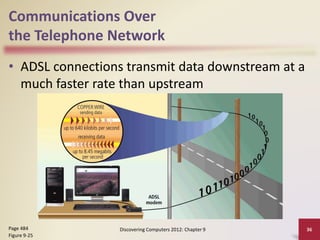
• ADSL connections transmit data downstream at a
much faster rate than upstream
Discovering Computers 2012: Chapter 9 36Page 484
Figure 9-25
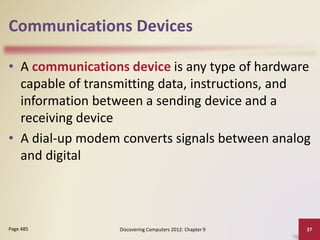
Communications Devices
• A communications device is any type of hardware
capable of transmitting data, instructions, and
information between a sending device and a
receiving device
• A dial-up modem converts signals between analog
and digital
Discovering Computers 2012: Chapter 9 37Page 485
Communications Devices
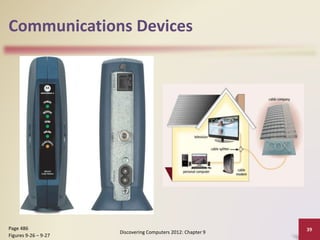
• A digital modem sends and receives data and
information to and from a digital line
Discovering Computers 2012: Chapter 9 38Page 486
DSL
modem
Cable
modem
Communications Devices
Discovering Computers 2012: Chapter 9
39Page 486
Figures 9-26 – 9-27
Communications Devices
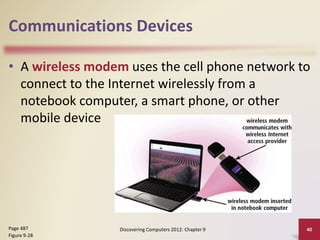
• A wireless modem uses the cell phone network to
connect to the Internet wirelessly from a
notebook computer, a smart phone, or other
mobile device
Discovering Computers 2012: Chapter 9 40Page 487
Figure 9-28
Communications Devices
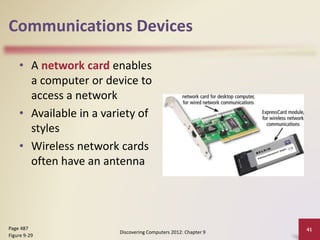
• A network card enables
a computer or device to
access a network
• Available in a variety of
styles
• Wireless network cards
often have an antenna
Discovering Computers 2012: Chapter 9
41Page 487
Figure 9-29
Communications Devices
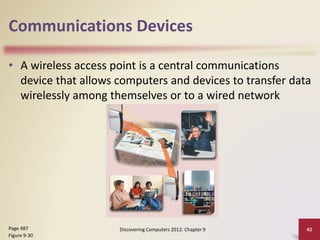
• A wireless access point is a central communications
device that allows computers and devices to transfer data
wirelessly among themselves or to a wired network
Discovering Computers 2012: Chapter 9 42Page 487
Figure 9-30
Communications Devices
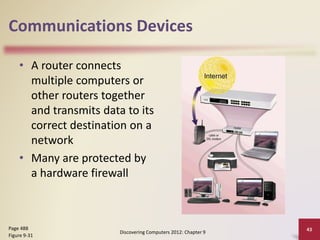
• A router connects
multiple computers or
other routers together
and transmits data to its
correct destination on a
network
• Many are protected by
a hardware firewall
Discovering Computers 2012: Chapter 9
43Page 488
Figure 9-31
Communications Devices
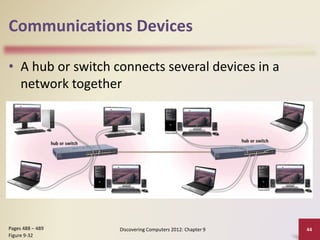
• A hub or switch connects several devices in a
network together
Discovering Computers 2012: Chapter 9 44Pages 488 – 489
Figure 9-32
Home Networks
Discovering Computers 2012: Chapter 9 45Page 489
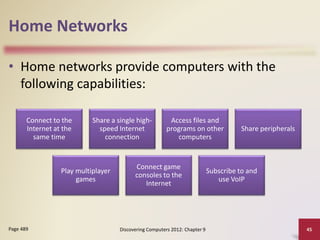
• Home networks provide computers with the
following capabilities:
Connect to the
Internet at the
same time
Share a single high-
speed Internet
connection
Access files and
programs on other
computers
Share peripherals
Play multiplayer
games
Connect game
consoles to the
Internet
Subscribe to and
use VoIP
Home Networks
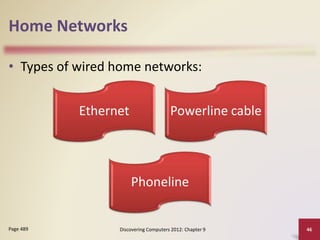
• Types of wired home networks:
Discovering Computers 2012: Chapter 9 46Page 489
Ethernet Powerline cable
Phoneline
Home Networks
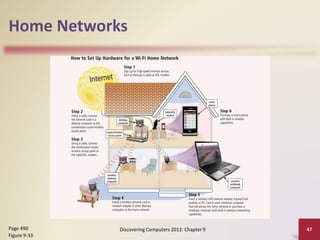
Discovering Computers 2012: Chapter 9 47Page 490
Figure 9-33
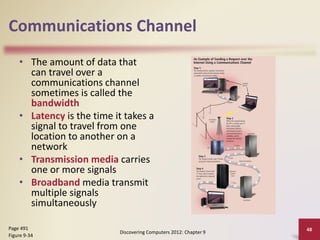
Communications Channel
• The amount of data that
can travel over a
communications channel
sometimes is called the
bandwidth
• Latency is the time it takes a
signal to travel from one
location to another on a
network
• Transmission media carries
one or more signals
• Broadband media transmit
multiple signals
simultaneously
Discovering Computers 2012: Chapter 9
48Page 491
Figure 9-34
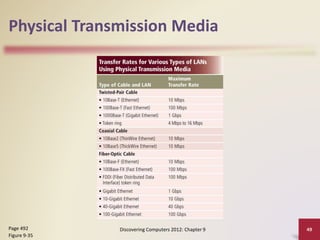
Physical Transmission Media
Discovering Computers 2012: Chapter 9 49Page 492
Figure 9-35
Physical Transmission Media
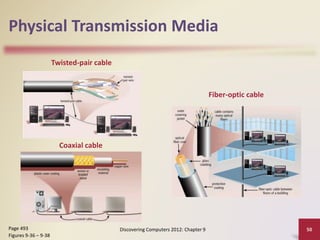
Discovering Computers 2012: Chapter 9 50Page 493
Figures 9-36 – 9-38
Twisted-pair cable
Coaxial cable
Fiber-optic cable
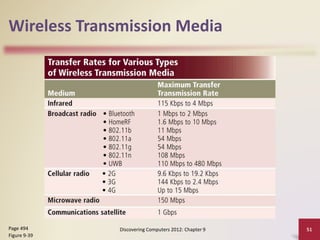
Wireless Transmission Media
Discovering Computers 2012: Chapter 9 51Page 494
Figure 9-39
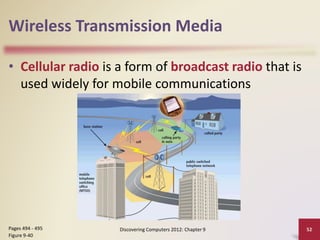
Wireless Transmission Media
• Cellular radio is a form of broadcast radio that is
used widely for mobile communications
Discovering Computers 2012: Chapter 9 52Pages 494 - 495
Figure 9-40
Wireless Transmission Media
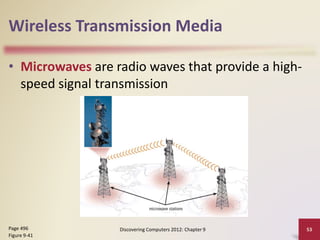
• Microwaves are radio waves that provide a high-
speed signal transmission
Discovering Computers 2012: Chapter 9 53Page 496
Figure 9-41
Wireless Transmission Media
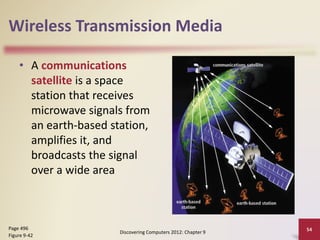
• A communications
satellite is a space
station that receives
microwave signals from
an earth-based station,
amplifies it, and
broadcasts the signal
over a wide area
Discovering Computers 2012: Chapter 9
54Page 496
Figure 9-42
Summary
Overview of
communications
terminology and
applications
How to join
computers into a
network
Various
communications
devices, media,
and procedures
Discovering Computers 2012: Chapter 9 55Page 497
Your Interactive Guide
to the Digital World
Discovering
Computers 2012
Chapter 9 Complete

Chapter 9 communications and networks

  • 1.
    Your Interactive Guide tothe Digital World Discovering Computers 2012
  • 2.
    Objectives Overview Discuss thepurpose of the components required for successful communications and identify various sending and receiving devices Describe the uses of computer communications List advantages of using a network, and differentiate among LANs, MANs, and WANs Differentiate between client/server and peer-to- peer networks, and describe how a P2P network works Differentiate among a star network, bus network, and ring network Describe the various network communications standards Discovering Computers 2012: Chapter 9 2See Page 459 for Detailed Objectives
  • 3.
    Objectives Overview Explain thepurpose of communications software Describe various types of lines for communications over the telephone network Describe commonly used communications devices Discuss different ways to set up a home network Describe various physical and wireless transmission media Discovering Computers 2012: Chapter 9 3See Page 459 for Detailed Objectives
  • 4.
    Communications • Computer communicationsdescribes a process in which two or more computers or devices transfer data, instructions, and information Discovering Computers 2012: Chapter 9 4Page 460 Sending device Communications channel Receiving device
  • 5.
    Communications Discovering Computers 2012:Chapter 9 5Pages 460 – 461 Figure 9-1
  • 6.
    Uses of ComputerCommunications Blogs Chat rooms E-mail Fax FTP Instant messaging Internet Newsgroups RSS Video conferencing VoIP Web Web 2.0 Web folders Wikis Discovering Computers 2012: Chapter 9 6Page 462
  • 7.
    Uses of ComputerCommunications • Users can send and receive wireless messages using wireless messaging services Discovering Computers 2012: Chapter 9 7Pages 462 – 463 Figure 9-3
  • 8.
    Uses of ComputerCommunications Text messaging (SMS) allows users to send and receive short text messages on a phone or other mobile device or computer Picture messaging allows users to send pictures and sound files Video messaging allows users to send short video clips Wireless instant messaging allows wireless users to exchange real-time messages with one or more other users Discovering Computers 2012: Chapter 9 8Pages 463 - 464
  • 9.
    Uses of ComputerCommunications • Wireless Internet access points allow people to connect wirelessly to the Internet from home, work, school, and in many public locations Discovering Computers 2012: Chapter 9 9Pages 464 – 465 Figure 9-4
  • 10.
    Uses of ComputerCommunications • A cybercafé is a coffeehouse, restaurant, or other location that provides personal computers with Internet access to its customers Discovering Computers 2012: Chapter 9 10Page 466 Figure 9-5
  • 11.
    Uses of ComputerCommunications • A global positioning system (GPS) is a navigation system that consists of one or more earth-based receivers that accept and analyze signals sent by satellites in order to determine the GPS receiver’s geographic location • GPS receivers are: Discovering Computers 2012: Chapter 9 11Page 466 Built into many mobile devices Available as a handheld device Available with new vehicles
  • 12.
    Uses of ComputerCommunications Discovering Computers 2012: Chapter 9 12Page 467 Figure 9-6
  • 13.
    Uses of ComputerCommunications Groupware • Helps groups of people work together on projects and share information over a network • Component of workgroup computing • Major feature is group scheduling Voice mail • Allows someone to leave a voice message for one or more people • Computer in voice mail system converts an analog voice message into digital form • A voice mailbox is a storage location on a hard disk in the voice mail system Discovering Computers 2012: Chapter 9 13Page 467
  • 14.
    Uses of ComputerCommunications • Many programs provide a means to collaborate, or work online, with other users connected to a server • Collaboration software includes tools that enable users to share documents via online meetings and communicate with other connected users Discovering Computers 2012: Chapter 9 14Page 468 Online meetings Web conferences Document management systems
  • 15.
    Uses of ComputerCommunications Discovering Computers 2012: Chapter 9 15Page 468 Figure 9-7
  • 16.
    Uses of ComputerCommunications • Web services enable programmers to create applications that communicate with other remote computers over the Internet or on an internal business network • A mashup is a Web application that combines services from two or more sources Discovering Computers 2012: Chapter 9 16Page 469 Figure 9-8
  • 17.
    Networks • A networkis a collection of computers and devices connected together via communications devices and transmission media • Advantages of a network include: Discovering Computers 2012: Chapter 9 17Pages 470 - 471 Facilitating communications Sharing hardware Sharing data and information Sharing software Transferring funds
  • 18.
    Networks Discovering Computers 2012:Chapter 9 18Page 470 Figure 9-9
  • 19.
    Networks • A localarea network (LAN) is a network that connects computers and devices in a limited geographical area • A wireless LAN (WLAN) is a LAN that uses no physical wires Discovering Computers 2012: Chapter 9 19Page 472 Figures 9-10 – 9-11
  • 20.
    Networks • A metropolitanarea network (MAN) connects LANs in a metropolitan area • A wide area network (WAN) is a network that covers a large geographical area Discovering Computers 2012: Chapter 9 20Page 473 Figure 9-12
  • 21.
    Networks • The designof computers, devices, and media on a network is sometimes called the network architecture Discovering Computers 2012: Chapter 9 21Pages 473 – 474 Figures 9-13 – 9-14 Client/server network Peer-to-peer network
  • 22.
    Networks • P2P describesan Internet network on which users access each other’s hard disks and exchange files directly over the Internet Discovering Computers 2012: Chapter 9 22Page 475 Figure 9-15
  • 23.
    Networks • A networktopology refers to the layout of the computers and devices in a communications network Discovering Computers 2012: Chapter 9 23Pages 475 – 477 Figures 9-16 – 9-18 Star network Bus network Ring network
  • 24.
    Networks An intranet isan internal network that uses Internet technologies An extranet allows customers or suppliers to access part of its intranet Discovering Computers 2012: Chapter 9 24Page 477
  • 25.
    Network Communications Standards Ethernet Token ring TCP/IPWi-Fi Bluetooth UWB IrDA RFID WiMAX WAP Discovering Computers 2012: Chapter 9 25Page 477
  • 26.
    Network Communications Standards Ethernetis a network standard that specifies no computer controls when data can be transmitted The token ring standard specifies that computers and devices on the network share or pass a special signal (token) TCP/IP is a network standard that defines how messages are routed from one end of a network to another Discovering Computers 2012: Chapter 9 26Page 478
  • 27.
    Network Communications Standards DiscoveringComputers 2012: Chapter 9 27Page 479 Figure 9-19
  • 28.
    Network Communications Standards •Wi-Fi identifies any network based on the 802.11 standard that facilitates wireless communication • Sometimes referred to as wireless Ethernet Discovering Computers 2012: Chapter 9 28Page 479 Figure 9-20
  • 29.
    Network Communications Standards •Bluetooth defines how two Bluetooth devices use short- range radio waves to transmit data • UWB (ultra-wideband) specifies how two UWB devices use short-range radio waves to communicate at high speeds • IrDA transmits data wirelessly via infrared (IR) light waves • RFID uses radio signals to communicate with a tag placed in or attached to an object, animal, or person Discovering Computers 2012: Chapter 9 29Pages 480 - 481
  • 30.
    Network Communications Standards DiscoveringComputers 2012: Chapter 9 30Page 481 Figure 9-21
  • 31.
    Network Communications Standards WiMAX(802.16) • Developed by IEEE • Towers can cover a 30-mile radius • Two types are fixed wireless and mobile wireless • Provides wireless broadband Internet access Wireless Application Protocol (WAP) • Specifies how some mobile devices can display the content of Internet services • Web • E-mail • Chat rooms • Uses a client/server network Discovering Computers 2012: Chapter 9 31Page 482
  • 32.
    Communications Software • Communicationssoftware consists of programs that: Discovering Computers 2012: Chapter 9 32Page 482 Help users establish a connection to another computer or network Manage the transmission of data, instructions, and information Provide an interface for users to communicate with one another
  • 33.
    Communications Over the TelephoneNetwork • The public switched telephone network (PSTN) is the worldwide telephone system Discovering Computers 2012: Chapter 9 33Pages 482 – 483 Figure 9-23
  • 34.
    Communications Over the TelephoneNetwork Dial-up lines Dedicated line ISDN line DSL FTTP T-carrier line ATM Discovering Computers 2012: Chapter 9 34Pages 483 - 485
  • 35.
    Communications Over the TelephoneNetwork Discovering Computers 2012: Chapter 9 35Page 483 Figure 9-24
  • 36.
    Communications Over the TelephoneNetwork • ADSL connections transmit data downstream at a much faster rate than upstream Discovering Computers 2012: Chapter 9 36Page 484 Figure 9-25
  • 37.
    Communications Devices • Acommunications device is any type of hardware capable of transmitting data, instructions, and information between a sending device and a receiving device • A dial-up modem converts signals between analog and digital Discovering Computers 2012: Chapter 9 37Page 485
  • 38.
    Communications Devices • Adigital modem sends and receives data and information to and from a digital line Discovering Computers 2012: Chapter 9 38Page 486 DSL modem Cable modem
  • 39.
    Communications Devices Discovering Computers2012: Chapter 9 39Page 486 Figures 9-26 – 9-27
  • 40.
    Communications Devices • Awireless modem uses the cell phone network to connect to the Internet wirelessly from a notebook computer, a smart phone, or other mobile device Discovering Computers 2012: Chapter 9 40Page 487 Figure 9-28
  • 41.
    Communications Devices • Anetwork card enables a computer or device to access a network • Available in a variety of styles • Wireless network cards often have an antenna Discovering Computers 2012: Chapter 9 41Page 487 Figure 9-29
  • 42.
    Communications Devices • Awireless access point is a central communications device that allows computers and devices to transfer data wirelessly among themselves or to a wired network Discovering Computers 2012: Chapter 9 42Page 487 Figure 9-30
  • 43.
    Communications Devices • Arouter connects multiple computers or other routers together and transmits data to its correct destination on a network • Many are protected by a hardware firewall Discovering Computers 2012: Chapter 9 43Page 488 Figure 9-31
  • 44.
    Communications Devices • Ahub or switch connects several devices in a network together Discovering Computers 2012: Chapter 9 44Pages 488 – 489 Figure 9-32
  • 45.
    Home Networks Discovering Computers2012: Chapter 9 45Page 489 • Home networks provide computers with the following capabilities: Connect to the Internet at the same time Share a single high- speed Internet connection Access files and programs on other computers Share peripherals Play multiplayer games Connect game consoles to the Internet Subscribe to and use VoIP
  • 46.
    Home Networks • Typesof wired home networks: Discovering Computers 2012: Chapter 9 46Page 489 Ethernet Powerline cable Phoneline
  • 47.
    Home Networks Discovering Computers2012: Chapter 9 47Page 490 Figure 9-33
  • 48.
    Communications Channel • Theamount of data that can travel over a communications channel sometimes is called the bandwidth • Latency is the time it takes a signal to travel from one location to another on a network • Transmission media carries one or more signals • Broadband media transmit multiple signals simultaneously Discovering Computers 2012: Chapter 9 48Page 491 Figure 9-34
  • 49.
    Physical Transmission Media DiscoveringComputers 2012: Chapter 9 49Page 492 Figure 9-35
  • 50.
    Physical Transmission Media DiscoveringComputers 2012: Chapter 9 50Page 493 Figures 9-36 – 9-38 Twisted-pair cable Coaxial cable Fiber-optic cable
  • 51.
    Wireless Transmission Media DiscoveringComputers 2012: Chapter 9 51Page 494 Figure 9-39
  • 52.
    Wireless Transmission Media •Cellular radio is a form of broadcast radio that is used widely for mobile communications Discovering Computers 2012: Chapter 9 52Pages 494 - 495 Figure 9-40
  • 53.
    Wireless Transmission Media •Microwaves are radio waves that provide a high- speed signal transmission Discovering Computers 2012: Chapter 9 53Page 496 Figure 9-41
  • 54.
    Wireless Transmission Media •A communications satellite is a space station that receives microwave signals from an earth-based station, amplifies it, and broadcasts the signal over a wide area Discovering Computers 2012: Chapter 9 54Page 496 Figure 9-42
  • 55.
    Summary Overview of communications terminology and applications Howto join computers into a network Various communications devices, media, and procedures Discovering Computers 2012: Chapter 9 55Page 497
  • 56.
    Your Interactive Guide tothe Digital World Discovering Computers 2012 Chapter 9 Complete