Discovering Computers 2008
Chapter 9
Communicatio
ns and
Networks
Chapter 9 Objectives
Discuss the components required for
successful communications
Discuss the components required for
successful communications
Identify various sending
and receiving devices
Identify various sending
and receiving devices
Describe uses of computer communicationsDescribe uses of computer communications
List advantages of using a networkList advantages of using a network
Differentiate among client/server,
peer-to-peer, and P2P networks
Differentiate among client/server,
peer-to-peer, and P2P networks
Describe the various network
communications standards
Describe the various network
communications standards
Explain the purpose of
communications software
Explain the purpose of
communications software
Describe various types of lines for
communications over the telephone network
Describe various types of lines for
communications over the telephone network
Describe commonly used
communications devices
Describe commonly used
communications devices
Discuss different ways to set up
a home network
Discuss different ways to set up
a home network
Identify various physical and wireless
transmission media
Identify various physical and wireless
transmission media
Next
Communications
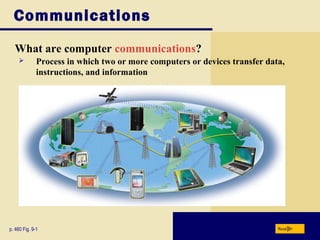
What are computer communications?
Nextp. 460 Fig. 9-1
 Process in which two or more computers or devices transfer data,
instructions, and information
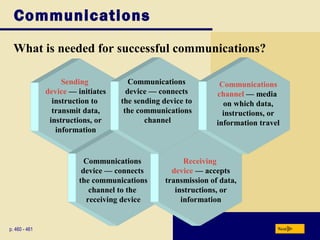
Sending
device — initiates
instruction to
transmit data,
instructions, or
information
What is needed for successful communications?
Communications
Nextp. 460 - 461
Communications
device — connects
the communications
channel to the
receiving device
Receiving
device — accepts
transmission of data,
instructions, or
information
Communications
device — connects
the sending device to
the communications
channel
Communications
channel — media
on which data,
instructions, or
information travel
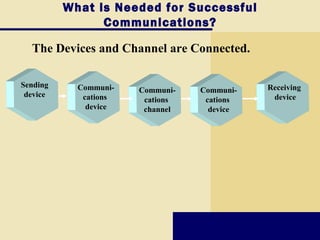
What is Needed for Successful
Communications?
The Devices and Channel are Connected.
Communi-
cations
device
Sending
device
Receiving
device
Communi-
cations
device
Communi-
cations
channel
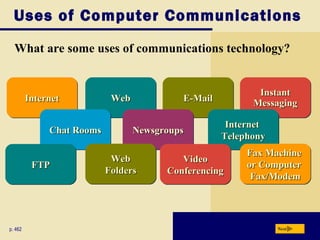
Uses of Computer Communications
What are some uses of communications technology?
Nextp. 462
WebWebWebWebInternetInternetInternetInternet E-MailE-MailE-MailE-Mail
InstantInstant
MessagingMessaging
InstantInstant
MessagingMessaging
InternetInternet
TelephonyTelephony
InternetInternet
TelephonyTelephony
NewsgroupsNewsgroupsNewsgroupsNewsgroupsChat RoomsChat RoomsChat RoomsChat Rooms
WebWeb
FoldersFolders
WebWeb
FoldersFolders
Fax MachineFax Machine
or Computeror Computer
Fax/ModemFax/Modem
Fax MachineFax Machine
or Computeror Computer
Fax/ModemFax/Modem
VideoVideo
ConferencingConferencing
VideoVideo
ConferencingConferencing
FTPFTPFTPFTP
Uses of Computer Communications
Video: A First Look at Yahoo Messenger 8 with Voice
Next
CLICK TO START
Uses of Computer Communications
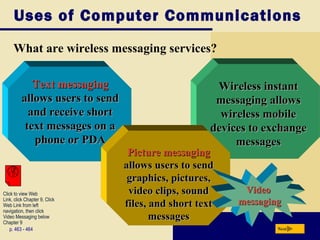
What are wireless messaging services?
p. 463 - 464 Next
Wireless instantWireless instant
messagingmessaging allowsallows
wireless mobilewireless mobile
devices to exchangedevices to exchange
messagesmessages
Text messagingText messaging
allows users to sendallows users to send
and receive shortand receive short
text messages on atext messages on a
phone or PDAphone or PDA
Picture messagingPicture messaging
allows users to sendallows users to send
graphics, pictures,graphics, pictures,
video clips, soundvideo clips, sound
files, and short textfiles, and short text
messagesmessages
VideoVideo
messagingmessaging
Click to view Web
Link, click Chapter 9, Click
Web Link from left
navigation, then click
Video Messaging below
Chapter 9
Uses of Computer Communications
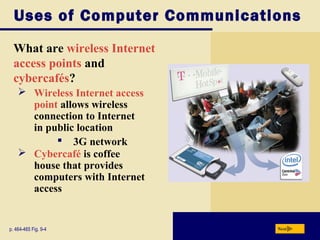
What are wireless Internet
access points and
cybercafés?
Nextp. 464-465 Fig. 9-4
 Wireless Internet access
point allows wireless
connection to Internet
in public location
 3G network
 Cybercafé is coffee
house that provides
computers with Internet
access
Uses of Computer Communications
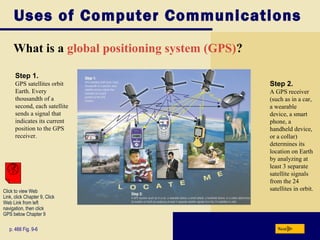
What is a global positioning system (GPS)?
Nextp. 466 Fig. 9-6
Step 1.
GPS satellites orbit
Earth. Every
thousandth of a
second, each satellite
sends a signal that
indicates its current
position to the GPS
receiver.
Step 2.
A GPS receiver
(such as in a car,
a wearable
device, a smart
phone, a
handheld device,
or a collar)
determines its
location on Earth
by analyzing at
least 3 separate
satellite signals
from the 24
satellites in orbit.Click to view Web
Link, click Chapter 9, Click
Web Link from left
navigation, then click
GPS below Chapter 9
Uses of Computer Communications
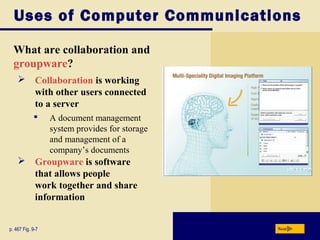
What are collaboration and
groupware?
Nextp. 467 Fig. 9-7
 A document management
system provides for storage
and management of a
company’s documents
 Groupware is software
that allows people
work together and share
information
 Collaboration is working
with other users connected
to a server
Uses of Computer Communications
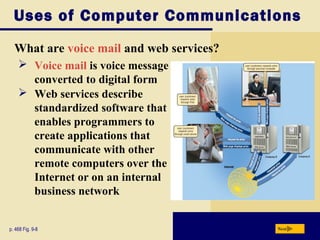
What are voice mail and web services?
Nextp. 468 Fig. 9-8
 Voice mail is voice message
converted to digital form
 Web services describe
standardized software that
enables programmers to
create applications that
communicate with other
remote computers over the
Internet or on an internal
business network
Networks
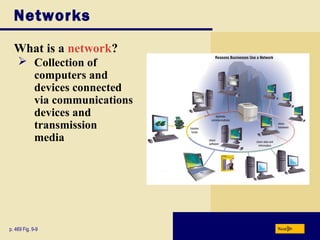
What is a network?
Nextp. 469 Fig. 9-9
 Collection of
computers and
devices connected
via communications
devices and
transmission
media
Networks
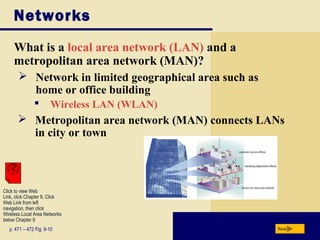
What is a local area network (LAN) and a
metropolitan area network (MAN)?
Nextp. 471 – 472 Fig. 9-10
 Network in limited geographical area such as
home or office building
 Wireless LAN (WLAN)
 Metropolitan area network (MAN) connects LANs
in city or town
Click to view Web
Link, click Chapter 9, Click
Web Link from left
navigation, then click
Wireless Local Area Networks
below Chapter 9
Networks
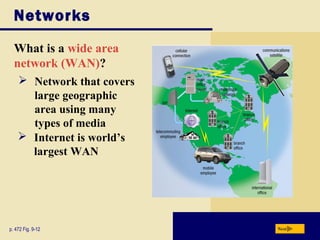
What is a wide area
network (WAN)?
Nextp. 472 Fig. 9-12
 Network that covers
large geographic
area using many
types of media
 Internet is world’s
largest WAN
Networks
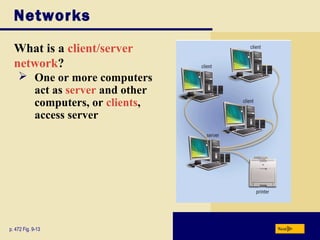
What is a client/server
network?
Nextp. 472 Fig. 9-13
 One or more computers
act as server and other
computers, or clients,
access server
Networks
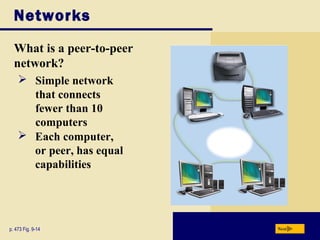
What is a peer-to-peer
network?
Nextp. 473 Fig. 9-14
 Simple network
that connects
fewer than 10
computers
 Each computer,
or peer, has equal
capabilities
Networks
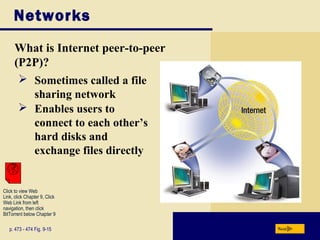
What is Internet peer-to-peer
(P2P)?
Nextp. 473 - 474 Fig. 9-15
 Sometimes called a file
sharing network
 Enables users to
connect to each other’s
hard disks and
exchange files directly
Click to view Web
Link, click Chapter 9, Click
Web Link from left
navigation, then click
BitTorrent below Chapter 9
Networks
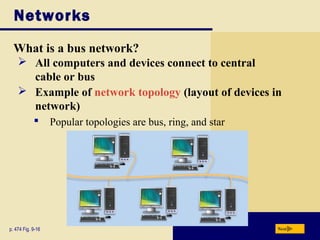
What is a bus network?
Nextp. 474 Fig. 9-16
 All computers and devices connect to central
cable or bus
 Example of network topology (layout of devices in
network)
 Popular topologies are bus, ring, and star
Networks
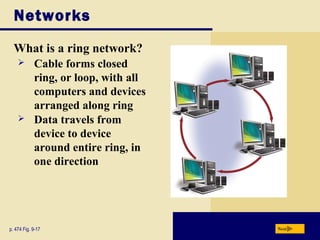
What is a ring network?
Nextp. 474 Fig. 9-17
 Cable forms closed
ring, or loop, with all
computers and devices
arranged along ring
 Data travels from
device to device
around entire ring, in
one direction
Networks
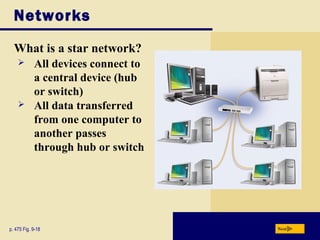
What is a star network?
Nextp. 475 Fig. 9-18
 All devices connect to
a central device (hub
or switch)
 All data transferred
from one computer to
another passes
through hub or switch
Networks
What is an intranet?
Nextp. 475
Extranet allows customers or suppliers to access
part of company’s intranet
Typically includes connection to Internet
Makes information accessible to employees
Internal network that uses Internet technologies
Network Communications
Standards
What are Ethernet and token ring?
Nextp. 476
Ethernet technology allows computers to contend
for access to network
 If two computers send data at same time,
a collision occurs and computers must send again
Token ring technology controls access to network
by requiring devices to pass a special signal,
called tokenClick to view Web
Link, click Chapter 9, Click
Web Link from left
navigation, then click
Ethernet below Chapter 9
Network Communications
Standards
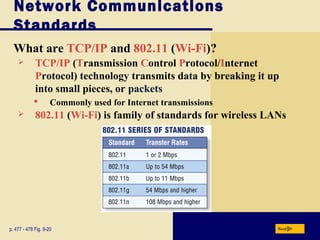
What are TCP/IP and 802.11 (Wi-Fi)?
Nextp. 477 - 478 Fig. 9-20
 TCP/IP (Transmission Control Protocol/Internet
Protocol) technology transmits data by breaking it up
into small pieces, or packets
 Commonly used for Internet transmissions
 802.11 (Wi-Fi) is family of standards for wireless LANs
Network Communications
Standards
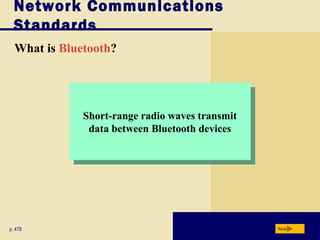
What is Bluetooth?
Nextp. 478
Short-range radio waves transmit
data between Bluetooth devices
Short-range radio waves transmit
data between Bluetooth devices
Network Communications
Standards
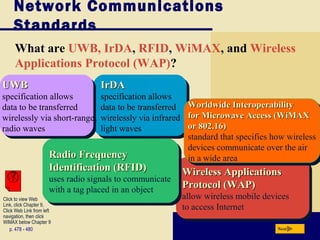
What are UWB, IrDA, RFID, WiMAX, and Wireless
Applications Protocol (WAP)?
Nextp. 478 - 480
Click to view Web
Link, click Chapter 9,
Click Web Link from left
navigation, then click
WiMAX below Chapter 9
IrDAIrDA
specification allows
data to be transferred
wirelessly via infrared
light waves
IrDAIrDA
specification allows
data to be transferred
wirelessly via infrared
light waves
Wireless ApplicationsWireless Applications
Protocol (WAP)Protocol (WAP)
allow wireless mobile devices
to access Internet
Wireless ApplicationsWireless Applications
Protocol (WAP)Protocol (WAP)
allow wireless mobile devices
to access Internet
Radio FrequencyRadio Frequency
Identification (RFID)Identification (RFID)
uses radio signals to communicate
with a tag placed in an object
Radio FrequencyRadio Frequency
Identification (RFID)Identification (RFID)
uses radio signals to communicate
with a tag placed in an object
Worldwide InteroperabilityWorldwide Interoperability
for Microwave Access (WiMAXfor Microwave Access (WiMAX
or 802.16)or 802.16)
standard that specifies how wireless
devices communicate over the air
in a wide area
Worldwide InteroperabilityWorldwide Interoperability
for Microwave Access (WiMAXfor Microwave Access (WiMAX
or 802.16)or 802.16)
standard that specifies how wireless
devices communicate over the air
in a wide area
UWBUWB
specification allows
data to be transferred
wirelessly via short-range
radio waves
UWBUWB
specification allows
data to be transferred
wirelessly via short-range
radio waves
Communications Software
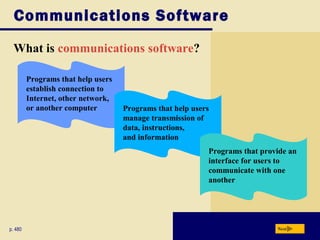
What is communications software?
Nextp. 480
Programs that help users
establish connection to
Internet, other network,
or another computer Programs that help users
manage transmission of
data, instructions,
and information
Programs that provide an
interface for users to
communicate with one
another
Communications Over the Telephone Network
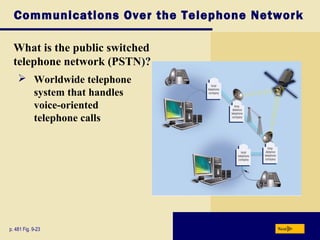
What is the public switched
telephone network (PSTN)?
Nextp. 481 Fig. 9-23
 Worldwide telephone
system that handles
voice-oriented
telephone calls
Communications Over the Telephone Network
What is a dial-up line?
Nextp. 481
 Temporary connection using telephone line for
communications
 Costs no more than making regular call
 Computers at any two locations can establish a
connection using modems and telephone network
Communications Over the Telephone Network
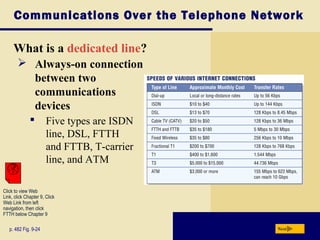
What is a dedicated line?
Nextp. 482 Fig. 9-24
 Five types are ISDN
line, DSL, FTTH
and FTTB, T-carrier
line, and ATM
 Always-on connection
between two
communications
devices
Click to view Web
Link, click Chapter 9, Click
Web Link from left
navigation, then click
FTTH below Chapter 9
Communications Devices
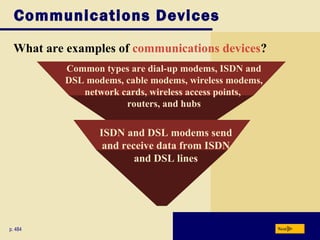
What are examples of communications devices?
Nextp. 484
Common types are dial-up modems, ISDN and
DSL modems, cable modems, wireless modems,
network cards, wireless access points,
routers, and hubs
ISDN and DSL modems send
and receive data from ISDN
and DSL lines
Communications Devices
What is a dial-up modem?
Nextp. 485
 A dial-up modem converts digital signals to analog signals
and vice versa
 Usually in the form of an adapter card
Communications Devices
What are ISDN and DSL modems?
Nextp. 485
Communications devices that send and
receive digital ISDN and DSL signals
Communications devices that send and
receive digital ISDN and DSL signals
Usually external devices in which one
end connects to a telephone line and the other
end connects to a port on the system unit
Usually external devices in which one
end connects to a telephone line and the other
end connects to a port on the system unit
Communications Devices
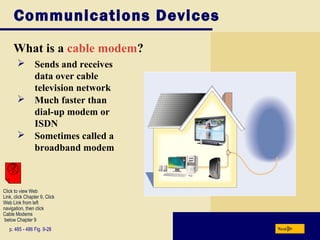
What is a cable modem?
Nextp. 485 - 486 Fig. 9-28
 Sends and receives
data over cable
television network
 Much faster than
dial-up modem or
ISDN
 Sometimes called a
broadband modem
Click to view Web
Link, click Chapter 9, Click
Web Link from left
navigation, then click
Cable Modems
below Chapter 9
Communications Devices
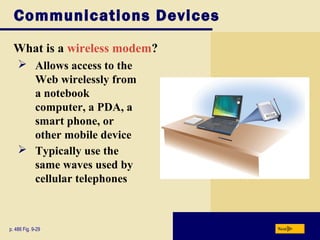
What is a wireless modem?
Nextp. 486 Fig. 9-29
 Allows access to the
Web wirelessly from
a notebook
computer, a PDA, a
smart phone, or
other mobile device
 Typically use the
same waves used by
cellular telephones
Communications Devices
What is a network card?
Nextp. 486 - 487 Fig. 9-30
 Adapter card, PC
Card, ExpressCard
module, USB
network adapter, or
flash card that
enables computer or
device to access
network
 Sometimes called
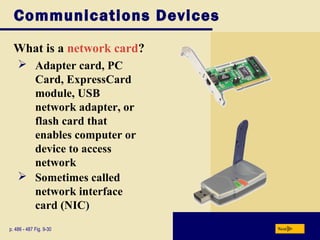
network interface
card (NIC)
Communications Devices
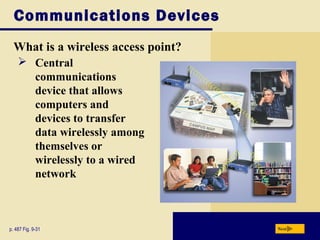
What is a wireless access point?
Nextp. 487 Fig. 9-31
 Central
communications
device that allows
computers and
devices to transfer
data wirelessly among
themselves or
wirelessly to a wired
network
Communications Devices
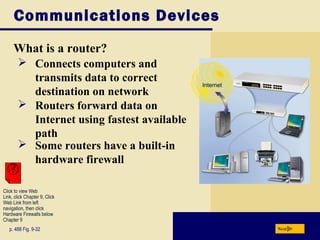
What is a router?
Nextp. 488 Fig. 9-32
 Connects computers and
transmits data to correct
destination on network
 Routers forward data on
Internet using fastest available
path
Click to view Web
Link, click Chapter 9, Click
Web Link from left
navigation, then click
Hardware Firewalls below
Chapter 9
 Some routers have a built-in
hardware firewall
Communications Devices
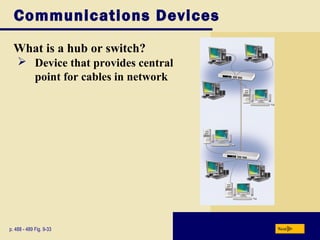
What is a hub or switch?
Nextp. 488 - 489 Fig. 9-33
 Device that provides central
point for cables in network
Home Networks
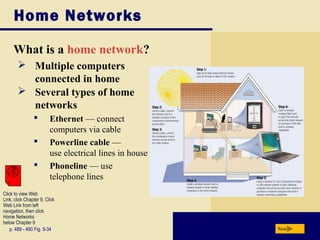
What is a home network?
Nextp. 489 - 490 Fig. 9-34
 Multiple computers
connected in home
 Several types of home
networks
 Ethernet — connect
computers via cable
 Powerline cable —
use electrical lines in house
 Phoneline — use
telephone lines
Click to view Web
Link, click Chapter 9, Click
Web Link from left
navigation, then click
Home Networks
below Chapter 9
Communications Channel
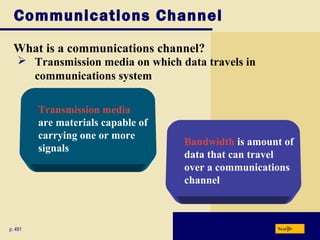
What is a communications channel?
Nextp. 491
 Transmission media on which data travels in
communications system
Bandwidth is amount of
data that can travel
over a communications
channel
Transmission media
are materials capable of
carrying one or more
signals
Communications Channel
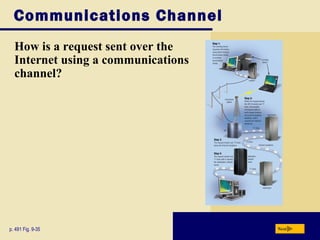
How is a request sent over the
Internet using a communications
channel?
Nextp. 491 Fig. 9-35
Physical Transmission Media
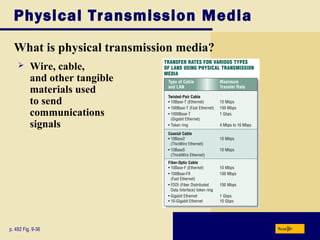
What is physical transmission media?
Nextp. 492 Fig. 9-36
 Wire, cable,
and other tangible
materials used
to send
communications
signals
Physical Transmission Media
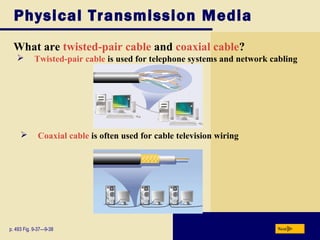
What are twisted-pair cable and coaxial cable?
Nextp. 493 Fig. 9-37—9-38
 Twisted-pair cable is used for telephone systems and network cabling
 Coaxial cable is often used for cable television wiring
Physical Transmission Media
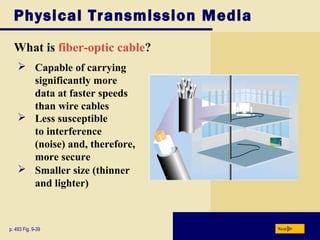
What is fiber-optic cable?
Nextp. 493 Fig. 9-39
 Capable of carrying
significantly more
data at faster speeds
than wire cables
 Less susceptible
to interference
(noise) and, therefore,
more secure
 Smaller size (thinner
and lighter)
Wireless Transmission Media
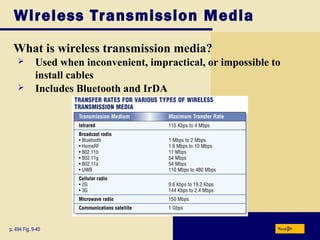
What is wireless transmission media?
Nextp. 494 Fig. 9-40
 Used when inconvenient, impractical, or impossible to
install cables
 Includes Bluetooth and IrDA
Wireless Transmission Media
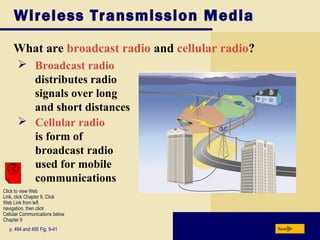
What are broadcast radio and cellular radio?
Nextp. 494 and 495 Fig. 9-41
 Broadcast radio
distributes radio
signals over long
and short distances
 Cellular radio
is form of
broadcast radio
used for mobile
communications
Click to view Web
Link, click Chapter 9, Click
Web Link from left
navigation, then click
Cellular Communications below
Chapter 9
Wireless Transmission Media
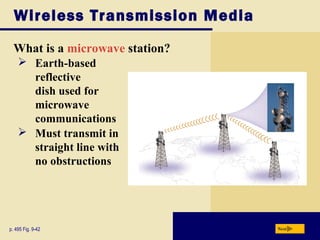
What is a microwave station?
Nextp. 495 Fig. 9-42
 Earth-based
reflective
dish used for
microwave
communications
 Must transmit in
straight line with
no obstructions
Wireless Transmission Media
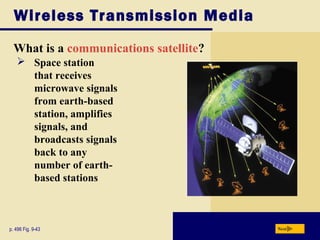
What is a communications satellite?
Nextp. 496 Fig. 9-43
 Space station
that receives
microwave signals
from earth-based
station, amplifies
signals, and
broadcasts signals
back to any
number of earth-
based stations
Summary of Communications and Networks
Chapter 9 Complete
Communications terminology
and applications
Communications terminology
and applications
How to join computers into a networkHow to join computers into a network
Various communications
devices, media, and procedures
Various communications
devices, media, and procedures

Chapter09

  • 1.
    Discovering Computers 2008 Chapter9 Communicatio ns and Networks
  • 2.
    Chapter 9 Objectives Discussthe components required for successful communications Discuss the components required for successful communications Identify various sending and receiving devices Identify various sending and receiving devices Describe uses of computer communicationsDescribe uses of computer communications List advantages of using a networkList advantages of using a network Differentiate among client/server, peer-to-peer, and P2P networks Differentiate among client/server, peer-to-peer, and P2P networks Describe the various network communications standards Describe the various network communications standards Explain the purpose of communications software Explain the purpose of communications software Describe various types of lines for communications over the telephone network Describe various types of lines for communications over the telephone network Describe commonly used communications devices Describe commonly used communications devices Discuss different ways to set up a home network Discuss different ways to set up a home network Identify various physical and wireless transmission media Identify various physical and wireless transmission media Next
  • 3.
    Communications What are computercommunications? Nextp. 460 Fig. 9-1  Process in which two or more computers or devices transfer data, instructions, and information
  • 4.
    Sending device — initiates instructionto transmit data, instructions, or information What is needed for successful communications? Communications Nextp. 460 - 461 Communications device — connects the communications channel to the receiving device Receiving device — accepts transmission of data, instructions, or information Communications device — connects the sending device to the communications channel Communications channel — media on which data, instructions, or information travel
  • 5.
    What is Neededfor Successful Communications? The Devices and Channel are Connected. Communi- cations device Sending device Receiving device Communi- cations device Communi- cations channel
  • 6.
    Uses of ComputerCommunications What are some uses of communications technology? Nextp. 462 WebWebWebWebInternetInternetInternetInternet E-MailE-MailE-MailE-Mail InstantInstant MessagingMessaging InstantInstant MessagingMessaging InternetInternet TelephonyTelephony InternetInternet TelephonyTelephony NewsgroupsNewsgroupsNewsgroupsNewsgroupsChat RoomsChat RoomsChat RoomsChat Rooms WebWeb FoldersFolders WebWeb FoldersFolders Fax MachineFax Machine or Computeror Computer Fax/ModemFax/Modem Fax MachineFax Machine or Computeror Computer Fax/ModemFax/Modem VideoVideo ConferencingConferencing VideoVideo ConferencingConferencing FTPFTPFTPFTP
  • 7.
    Uses of ComputerCommunications Video: A First Look at Yahoo Messenger 8 with Voice Next CLICK TO START
  • 8.
    Uses of ComputerCommunications What are wireless messaging services? p. 463 - 464 Next Wireless instantWireless instant messagingmessaging allowsallows wireless mobilewireless mobile devices to exchangedevices to exchange messagesmessages Text messagingText messaging allows users to sendallows users to send and receive shortand receive short text messages on atext messages on a phone or PDAphone or PDA Picture messagingPicture messaging allows users to sendallows users to send graphics, pictures,graphics, pictures, video clips, soundvideo clips, sound files, and short textfiles, and short text messagesmessages VideoVideo messagingmessaging Click to view Web Link, click Chapter 9, Click Web Link from left navigation, then click Video Messaging below Chapter 9
  • 9.
    Uses of ComputerCommunications What are wireless Internet access points and cybercafés? Nextp. 464-465 Fig. 9-4  Wireless Internet access point allows wireless connection to Internet in public location  3G network  Cybercafé is coffee house that provides computers with Internet access
  • 10.
    Uses of ComputerCommunications What is a global positioning system (GPS)? Nextp. 466 Fig. 9-6 Step 1. GPS satellites orbit Earth. Every thousandth of a second, each satellite sends a signal that indicates its current position to the GPS receiver. Step 2. A GPS receiver (such as in a car, a wearable device, a smart phone, a handheld device, or a collar) determines its location on Earth by analyzing at least 3 separate satellite signals from the 24 satellites in orbit.Click to view Web Link, click Chapter 9, Click Web Link from left navigation, then click GPS below Chapter 9
  • 11.
    Uses of ComputerCommunications What are collaboration and groupware? Nextp. 467 Fig. 9-7  A document management system provides for storage and management of a company’s documents  Groupware is software that allows people work together and share information  Collaboration is working with other users connected to a server
  • 12.
    Uses of ComputerCommunications What are voice mail and web services? Nextp. 468 Fig. 9-8  Voice mail is voice message converted to digital form  Web services describe standardized software that enables programmers to create applications that communicate with other remote computers over the Internet or on an internal business network
  • 13.
    Networks What is anetwork? Nextp. 469 Fig. 9-9  Collection of computers and devices connected via communications devices and transmission media
  • 14.
    Networks What is alocal area network (LAN) and a metropolitan area network (MAN)? Nextp. 471 – 472 Fig. 9-10  Network in limited geographical area such as home or office building  Wireless LAN (WLAN)  Metropolitan area network (MAN) connects LANs in city or town Click to view Web Link, click Chapter 9, Click Web Link from left navigation, then click Wireless Local Area Networks below Chapter 9
  • 15.
    Networks What is awide area network (WAN)? Nextp. 472 Fig. 9-12  Network that covers large geographic area using many types of media  Internet is world’s largest WAN
  • 16.
    Networks What is aclient/server network? Nextp. 472 Fig. 9-13  One or more computers act as server and other computers, or clients, access server
  • 17.
    Networks What is apeer-to-peer network? Nextp. 473 Fig. 9-14  Simple network that connects fewer than 10 computers  Each computer, or peer, has equal capabilities
  • 18.
    Networks What is Internetpeer-to-peer (P2P)? Nextp. 473 - 474 Fig. 9-15  Sometimes called a file sharing network  Enables users to connect to each other’s hard disks and exchange files directly Click to view Web Link, click Chapter 9, Click Web Link from left navigation, then click BitTorrent below Chapter 9
  • 19.
    Networks What is abus network? Nextp. 474 Fig. 9-16  All computers and devices connect to central cable or bus  Example of network topology (layout of devices in network)  Popular topologies are bus, ring, and star
  • 20.
    Networks What is aring network? Nextp. 474 Fig. 9-17  Cable forms closed ring, or loop, with all computers and devices arranged along ring  Data travels from device to device around entire ring, in one direction
  • 21.
    Networks What is astar network? Nextp. 475 Fig. 9-18  All devices connect to a central device (hub or switch)  All data transferred from one computer to another passes through hub or switch
  • 22.
    Networks What is anintranet? Nextp. 475 Extranet allows customers or suppliers to access part of company’s intranet Typically includes connection to Internet Makes information accessible to employees Internal network that uses Internet technologies
  • 23.
    Network Communications Standards What areEthernet and token ring? Nextp. 476 Ethernet technology allows computers to contend for access to network  If two computers send data at same time, a collision occurs and computers must send again Token ring technology controls access to network by requiring devices to pass a special signal, called tokenClick to view Web Link, click Chapter 9, Click Web Link from left navigation, then click Ethernet below Chapter 9
  • 24.
    Network Communications Standards What areTCP/IP and 802.11 (Wi-Fi)? Nextp. 477 - 478 Fig. 9-20  TCP/IP (Transmission Control Protocol/Internet Protocol) technology transmits data by breaking it up into small pieces, or packets  Commonly used for Internet transmissions  802.11 (Wi-Fi) is family of standards for wireless LANs
  • 25.
    Network Communications Standards What isBluetooth? Nextp. 478 Short-range radio waves transmit data between Bluetooth devices Short-range radio waves transmit data between Bluetooth devices
  • 26.
    Network Communications Standards What areUWB, IrDA, RFID, WiMAX, and Wireless Applications Protocol (WAP)? Nextp. 478 - 480 Click to view Web Link, click Chapter 9, Click Web Link from left navigation, then click WiMAX below Chapter 9 IrDAIrDA specification allows data to be transferred wirelessly via infrared light waves IrDAIrDA specification allows data to be transferred wirelessly via infrared light waves Wireless ApplicationsWireless Applications Protocol (WAP)Protocol (WAP) allow wireless mobile devices to access Internet Wireless ApplicationsWireless Applications Protocol (WAP)Protocol (WAP) allow wireless mobile devices to access Internet Radio FrequencyRadio Frequency Identification (RFID)Identification (RFID) uses radio signals to communicate with a tag placed in an object Radio FrequencyRadio Frequency Identification (RFID)Identification (RFID) uses radio signals to communicate with a tag placed in an object Worldwide InteroperabilityWorldwide Interoperability for Microwave Access (WiMAXfor Microwave Access (WiMAX or 802.16)or 802.16) standard that specifies how wireless devices communicate over the air in a wide area Worldwide InteroperabilityWorldwide Interoperability for Microwave Access (WiMAXfor Microwave Access (WiMAX or 802.16)or 802.16) standard that specifies how wireless devices communicate over the air in a wide area UWBUWB specification allows data to be transferred wirelessly via short-range radio waves UWBUWB specification allows data to be transferred wirelessly via short-range radio waves
  • 27.
    Communications Software What iscommunications software? Nextp. 480 Programs that help users establish connection to Internet, other network, or another computer Programs that help users manage transmission of data, instructions, and information Programs that provide an interface for users to communicate with one another
  • 28.
    Communications Over theTelephone Network What is the public switched telephone network (PSTN)? Nextp. 481 Fig. 9-23  Worldwide telephone system that handles voice-oriented telephone calls
  • 29.
    Communications Over theTelephone Network What is a dial-up line? Nextp. 481  Temporary connection using telephone line for communications  Costs no more than making regular call  Computers at any two locations can establish a connection using modems and telephone network
  • 30.
    Communications Over theTelephone Network What is a dedicated line? Nextp. 482 Fig. 9-24  Five types are ISDN line, DSL, FTTH and FTTB, T-carrier line, and ATM  Always-on connection between two communications devices Click to view Web Link, click Chapter 9, Click Web Link from left navigation, then click FTTH below Chapter 9
  • 31.
    Communications Devices What areexamples of communications devices? Nextp. 484 Common types are dial-up modems, ISDN and DSL modems, cable modems, wireless modems, network cards, wireless access points, routers, and hubs ISDN and DSL modems send and receive data from ISDN and DSL lines
  • 32.
    Communications Devices What isa dial-up modem? Nextp. 485  A dial-up modem converts digital signals to analog signals and vice versa  Usually in the form of an adapter card
  • 33.
    Communications Devices What areISDN and DSL modems? Nextp. 485 Communications devices that send and receive digital ISDN and DSL signals Communications devices that send and receive digital ISDN and DSL signals Usually external devices in which one end connects to a telephone line and the other end connects to a port on the system unit Usually external devices in which one end connects to a telephone line and the other end connects to a port on the system unit
  • 34.
    Communications Devices What isa cable modem? Nextp. 485 - 486 Fig. 9-28  Sends and receives data over cable television network  Much faster than dial-up modem or ISDN  Sometimes called a broadband modem Click to view Web Link, click Chapter 9, Click Web Link from left navigation, then click Cable Modems below Chapter 9
  • 35.
    Communications Devices What isa wireless modem? Nextp. 486 Fig. 9-29  Allows access to the Web wirelessly from a notebook computer, a PDA, a smart phone, or other mobile device  Typically use the same waves used by cellular telephones
  • 36.
    Communications Devices What isa network card? Nextp. 486 - 487 Fig. 9-30  Adapter card, PC Card, ExpressCard module, USB network adapter, or flash card that enables computer or device to access network  Sometimes called network interface card (NIC)
  • 37.
    Communications Devices What isa wireless access point? Nextp. 487 Fig. 9-31  Central communications device that allows computers and devices to transfer data wirelessly among themselves or wirelessly to a wired network
  • 38.
    Communications Devices What isa router? Nextp. 488 Fig. 9-32  Connects computers and transmits data to correct destination on network  Routers forward data on Internet using fastest available path Click to view Web Link, click Chapter 9, Click Web Link from left navigation, then click Hardware Firewalls below Chapter 9  Some routers have a built-in hardware firewall
  • 39.
    Communications Devices What isa hub or switch? Nextp. 488 - 489 Fig. 9-33  Device that provides central point for cables in network
  • 40.
    Home Networks What isa home network? Nextp. 489 - 490 Fig. 9-34  Multiple computers connected in home  Several types of home networks  Ethernet — connect computers via cable  Powerline cable — use electrical lines in house  Phoneline — use telephone lines Click to view Web Link, click Chapter 9, Click Web Link from left navigation, then click Home Networks below Chapter 9
  • 41.
    Communications Channel What isa communications channel? Nextp. 491  Transmission media on which data travels in communications system Bandwidth is amount of data that can travel over a communications channel Transmission media are materials capable of carrying one or more signals
  • 42.
    Communications Channel How isa request sent over the Internet using a communications channel? Nextp. 491 Fig. 9-35
  • 43.
    Physical Transmission Media Whatis physical transmission media? Nextp. 492 Fig. 9-36  Wire, cable, and other tangible materials used to send communications signals
  • 44.
    Physical Transmission Media Whatare twisted-pair cable and coaxial cable? Nextp. 493 Fig. 9-37—9-38  Twisted-pair cable is used for telephone systems and network cabling  Coaxial cable is often used for cable television wiring
  • 45.
    Physical Transmission Media Whatis fiber-optic cable? Nextp. 493 Fig. 9-39  Capable of carrying significantly more data at faster speeds than wire cables  Less susceptible to interference (noise) and, therefore, more secure  Smaller size (thinner and lighter)
  • 46.
    Wireless Transmission Media Whatis wireless transmission media? Nextp. 494 Fig. 9-40  Used when inconvenient, impractical, or impossible to install cables  Includes Bluetooth and IrDA
  • 47.
    Wireless Transmission Media Whatare broadcast radio and cellular radio? Nextp. 494 and 495 Fig. 9-41  Broadcast radio distributes radio signals over long and short distances  Cellular radio is form of broadcast radio used for mobile communications Click to view Web Link, click Chapter 9, Click Web Link from left navigation, then click Cellular Communications below Chapter 9
  • 48.
    Wireless Transmission Media Whatis a microwave station? Nextp. 495 Fig. 9-42  Earth-based reflective dish used for microwave communications  Must transmit in straight line with no obstructions
  • 49.
    Wireless Transmission Media Whatis a communications satellite? Nextp. 496 Fig. 9-43  Space station that receives microwave signals from earth-based station, amplifies signals, and broadcasts signals back to any number of earth- based stations
  • 50.
    Summary of Communicationsand Networks Chapter 9 Complete Communications terminology and applications Communications terminology and applications How to join computers into a networkHow to join computers into a network Various communications devices, media, and procedures Various communications devices, media, and procedures