Network Hardware
What You’ll Learn in This Hour
 Bridges
 Hubs and switches
 Routers
 Network Address Translation
Connectivity Device
 Traffic control
 Connectivity
 Hierarchical addressing
 Signal regeneration
The primary uses of connectivity devices are as follow:
Bridges
 A bridge is a connectivity device that filters and forwards packets by
physical address. Bridges operate at the OSI Data Link layer
 In recent years, bridges have become much less common as networks
move to more versatile devices, such as switches.
 A bridge listens to each segment of the network it is connected to and
builds a table showing which physical address is on which segment.
 When data is transmitted on one of the network segments, the bridge
checks the destination address of the data and consults the MAC-
Address table.
Bridges (continue)
 If the destination address is on the segment from which the
data was received, the bridge ignores the data.
 If the destination address is on a different segment, the
bridge forwards the data to the appropriate segment.
 If the destination address isn't in the MAC-address table,
the bridge forwards the data to all segments except the
segment from which it received the transmission.
Bridges (continue)
Hub
 As you'll recall from Hour 3, the classic Ethernet concept calls for all
computers to share the transmission medium. Each transmission is heard by
all network adapters.
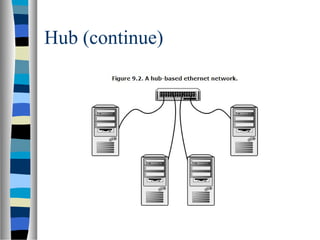
 An ethernet hub receives a transmission from one of its ports and echoes that
transmission to all of its other ports (refer to Figure 9.2).
 In other words, the network behaves as if all computers were connected using
a single continuous line.
 The hub does not filter or route any data. Instead, the hub just receives and
retransmits signals.
Hub (continue)
 One of the principal reasons for the rise of hub-based Ethernet is that
in most cases a hub simplifies the task of wiring the network.
 Each computer is connected to the hub through a single line.
 A computer can easily be detached and reconnected.
 In an office setting where computers are commonly grouped together
in a small area, a single hub can serve a close group of computers and
can be connected to other hubs in other parts of the network.
Hub (continue)
Switches
 A hub-based Ethernet network still faces the principal liability of Ethernet:
Performance degrades as traffic increases.
 No computer can transmit unless the line is free. Furthermore, each network
adapter must receive and process every frame placed on the Ethernet.
 A smarter version of a hub, called a switch, was developed to address these
problems with Ethernet.
 In its most fundamental form, a switch looks very similar to the hub shown in
Figure 9.2.
 Each computer is attached to the switch through a single line. However, the
switch is smarter about where it sends the data received through one of its
ports.
Switches (continue)
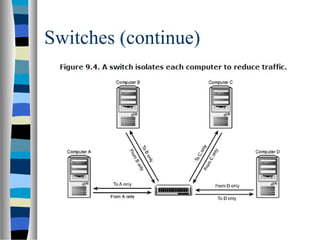
 Most switches associate each port with the physical address of the
adapter connected to that port (see Figure 9.3).
 When one of the computers attached to the port transmits a frame, the
switch checks the destination address of the frame and sends the frame
to the port associated with that destination address.
 In other words, the switch sends the frame only to the adapter that is
supposed to receive it.
 Every adapter does not have to examine every frame transmitted on
the network. The switch reduces superfluous transmissions and
therefore improves the performance of the network.
Switches (continue)
Switches (continue)
Switches Type
 Cut-through The switch starts forwarding the frame as
soon as it obtains the destination address.
 Store and forward The switch receives the entire frame
before retransmitting. This method slows down the
retransmission process, but it can sometimes improve
overall performance because the switch filters out
fragments and other invalid frames.
Routers
 A router is a device that filters traffic by logical address. Routers operate at the Internet
layer (OSI Network layer) using IP addressing information in the Internet layer header.
 Routers are an essential part of any large TCP/IP network. Without routers the Internet
could not function. In fact, the Internet never would have grown to what it is today
without the development of network routers and TCP/IP routing protocols.
 A large network such as the Internet contains many routers that provide redundant
pathways from the source to the destination nodes. The routers must work
independently, but the effect of the system must be that data is routed accurately and
efficiently through the internetwork.
 Routers are far more sophisticated than bridges. Routers replace Network Access layer
header information as they pass data from one network to the next, so a router can
connect dissimilar network types. Many routers also maintain detailed information
describing the best path based on considerations of distance, bandwidth, and time.
What is Router?
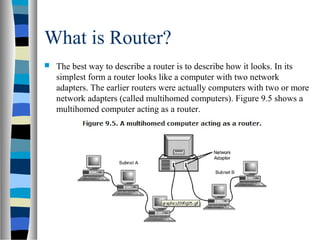
 The best way to describe a router is to describe how it looks. In its
simplest form a router looks like a computer with two network
adapters. The earlier routers were actually computers with two or more
network adapters (called multihomed computers). Figure 9.5 shows a
multihomed computer acting as a router.
Routers (in a real world)
 The router has more than two ports (adapters) and can therefore
interconnect more than two networks. The decision of where to
forward the data then becomes more complicated, and the possibility
for redundant paths increases.
 The networks that the router interconnects are each interconnected
with other networks. In other words, the router sees network addresses
for networks to which it is not directly connected. The router must
have a strategy for forwarding data addressed to networks to which it
is not directly attached.
 The network of routers provides redundant paths, and each router must
have a way of deciding which path to use.
Complex Network and Routing
Introduction to Routing
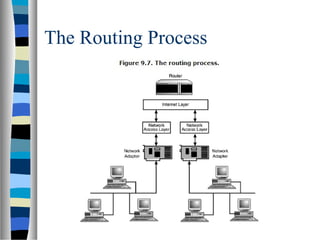
 The router receives data from one of its attached networks.
 The router passes the data up the protocol stack to the Internet layer.
In other words, the router discards the Network Access layer header
information and reassembles (if necessary) the IP datagram.
 The router checks the destination address in the IP header. If the
destination is on the network from whence the data came, the router
ignores the data. (The data presumably has already reached its
destination because it was transmitted on the network of the
destination computer.)
Introduction to Routing (cont)
 If the data is destined for a different network, the router consults a
routing table to determine where to forward the data.
 After the router determines which of its adapters will receive the data,
it passes the data down through the appropriate Network Access layer
software for transmission through the adapter.
The Routing Process
Primary Types of Routing
 Static routing Requires the network administrator
to enter route information manually.
 Dynamic routing Builds the routing table
dynamically based on routing information
obtained using routing protocols.
Routing Table Concept
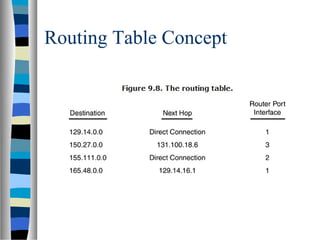
 A routing table essentially maps destination network IDs to the IP
address of the next hop—the next stop the datagram makes on its path
to the destination network.
 Note that the routing table makes a distinction between networks
directly connected to the router itself and networks connected
indirectly through other routers.
 The next hop can be either the destination network (if it is directly
connected) or the next downstream router on the way to the
destination network. The Router Port Interface in Figure 9.8 refers to
the router port through which the router forwards the data.
Routing Table Concept

network hardware

  • 1.
  • 2.
    What You’ll Learnin This Hour  Bridges  Hubs and switches  Routers  Network Address Translation
  • 3.
    Connectivity Device  Trafficcontrol  Connectivity  Hierarchical addressing  Signal regeneration The primary uses of connectivity devices are as follow:
  • 4.
    Bridges  A bridgeis a connectivity device that filters and forwards packets by physical address. Bridges operate at the OSI Data Link layer  In recent years, bridges have become much less common as networks move to more versatile devices, such as switches.  A bridge listens to each segment of the network it is connected to and builds a table showing which physical address is on which segment.  When data is transmitted on one of the network segments, the bridge checks the destination address of the data and consults the MAC- Address table.
  • 5.
    Bridges (continue)  Ifthe destination address is on the segment from which the data was received, the bridge ignores the data.  If the destination address is on a different segment, the bridge forwards the data to the appropriate segment.  If the destination address isn't in the MAC-address table, the bridge forwards the data to all segments except the segment from which it received the transmission.
  • 6.
  • 7.
    Hub  As you'llrecall from Hour 3, the classic Ethernet concept calls for all computers to share the transmission medium. Each transmission is heard by all network adapters.  An ethernet hub receives a transmission from one of its ports and echoes that transmission to all of its other ports (refer to Figure 9.2).  In other words, the network behaves as if all computers were connected using a single continuous line.  The hub does not filter or route any data. Instead, the hub just receives and retransmits signals.
  • 8.
    Hub (continue)  Oneof the principal reasons for the rise of hub-based Ethernet is that in most cases a hub simplifies the task of wiring the network.  Each computer is connected to the hub through a single line.  A computer can easily be detached and reconnected.  In an office setting where computers are commonly grouped together in a small area, a single hub can serve a close group of computers and can be connected to other hubs in other parts of the network.
  • 9.
  • 10.
    Switches  A hub-basedEthernet network still faces the principal liability of Ethernet: Performance degrades as traffic increases.  No computer can transmit unless the line is free. Furthermore, each network adapter must receive and process every frame placed on the Ethernet.  A smarter version of a hub, called a switch, was developed to address these problems with Ethernet.  In its most fundamental form, a switch looks very similar to the hub shown in Figure 9.2.  Each computer is attached to the switch through a single line. However, the switch is smarter about where it sends the data received through one of its ports.
  • 11.
    Switches (continue)  Mostswitches associate each port with the physical address of the adapter connected to that port (see Figure 9.3).  When one of the computers attached to the port transmits a frame, the switch checks the destination address of the frame and sends the frame to the port associated with that destination address.  In other words, the switch sends the frame only to the adapter that is supposed to receive it.  Every adapter does not have to examine every frame transmitted on the network. The switch reduces superfluous transmissions and therefore improves the performance of the network.
  • 12.
  • 13.
  • 14.
    Switches Type  Cut-throughThe switch starts forwarding the frame as soon as it obtains the destination address.  Store and forward The switch receives the entire frame before retransmitting. This method slows down the retransmission process, but it can sometimes improve overall performance because the switch filters out fragments and other invalid frames.
  • 15.
    Routers  A routeris a device that filters traffic by logical address. Routers operate at the Internet layer (OSI Network layer) using IP addressing information in the Internet layer header.  Routers are an essential part of any large TCP/IP network. Without routers the Internet could not function. In fact, the Internet never would have grown to what it is today without the development of network routers and TCP/IP routing protocols.  A large network such as the Internet contains many routers that provide redundant pathways from the source to the destination nodes. The routers must work independently, but the effect of the system must be that data is routed accurately and efficiently through the internetwork.  Routers are far more sophisticated than bridges. Routers replace Network Access layer header information as they pass data from one network to the next, so a router can connect dissimilar network types. Many routers also maintain detailed information describing the best path based on considerations of distance, bandwidth, and time.
  • 16.
    What is Router? The best way to describe a router is to describe how it looks. In its simplest form a router looks like a computer with two network adapters. The earlier routers were actually computers with two or more network adapters (called multihomed computers). Figure 9.5 shows a multihomed computer acting as a router.
  • 17.
    Routers (in areal world)  The router has more than two ports (adapters) and can therefore interconnect more than two networks. The decision of where to forward the data then becomes more complicated, and the possibility for redundant paths increases.  The networks that the router interconnects are each interconnected with other networks. In other words, the router sees network addresses for networks to which it is not directly connected. The router must have a strategy for forwarding data addressed to networks to which it is not directly attached.  The network of routers provides redundant paths, and each router must have a way of deciding which path to use.
  • 18.
  • 19.
    Introduction to Routing The router receives data from one of its attached networks.  The router passes the data up the protocol stack to the Internet layer. In other words, the router discards the Network Access layer header information and reassembles (if necessary) the IP datagram.  The router checks the destination address in the IP header. If the destination is on the network from whence the data came, the router ignores the data. (The data presumably has already reached its destination because it was transmitted on the network of the destination computer.)
  • 20.
    Introduction to Routing(cont)  If the data is destined for a different network, the router consults a routing table to determine where to forward the data.  After the router determines which of its adapters will receive the data, it passes the data down through the appropriate Network Access layer software for transmission through the adapter.
  • 21.
  • 22.
    Primary Types ofRouting  Static routing Requires the network administrator to enter route information manually.  Dynamic routing Builds the routing table dynamically based on routing information obtained using routing protocols.
  • 23.
    Routing Table Concept A routing table essentially maps destination network IDs to the IP address of the next hop—the next stop the datagram makes on its path to the destination network.  Note that the routing table makes a distinction between networks directly connected to the router itself and networks connected indirectly through other routers.  The next hop can be either the destination network (if it is directly connected) or the next downstream router on the way to the destination network. The Router Port Interface in Figure 9.8 refers to the router port through which the router forwards the data.
  • 24.