CHAPTER 3
MULTIMEDIA
DESIGN
DMM1033 // MULTIMEDIA TECHNOLOGY
contents
» Multimedia development phases
» Production team and responsibility
» Storyboard template
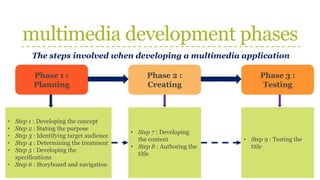
multimedia development phases
The steps involved when developing a multimedia application
Phase 1 :
Planning
Phase 2 :
Creating
Phase 3 :
Testing
• Step 1 : Developing the concept
• Step 2 : Stating the purpose
• Step 3 : Identifying target audience
• Step 4 : Determining the treatment
• Step 5 : Developing the
specifications
• Step 6 : Storyboard and navigation
• Step 7 : Developing
the content
• Step 8 : Authoring the
title
• Step 9 : Testing the
title
multimedia development phases
Step 1 : Developing the concept
» The general idea
» Ask questions like “What do we want to do?”
» Process of generating ideas can be structured by doing brainstorming
sessions
» Series of these questions are considerable :
» How can we improve the application? (faster, better usage, better graphics
quality, updated content)
» How to change the content to make it appeal to different markets? (consumer,
education, corporate)
» How can we take advantage of the new offered technologies? (virtual reality,
speech recognition, etc)
» How can we re-package our content? (books, movies, games, reference
materials, brochures, etc)
multimedia development phases
Step 2 : Stating the purpose
» What do you want to accomplish?
» Determine project goals and objectives
» Goals : broad statements of what the project will accomplish
» Objectives : more precise statements
» Both help to direct the development process and provide ways to evaluate the title
during and after its development
multimedia development phases
Step 3 : Identifying the target audience
» Stated the audience
» Who will be using your application
» Can be described in many ways. For example, demographics : location, age, sex,
marital status, education, income, etc
» Determine the information needed for the audience
» The larger the audience, the more diverse it need and more difficult to give what
they want
multimedia development phases
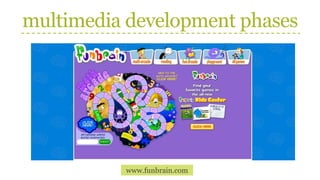
Step 4 : Determining the treatment
» The look and feel
» By taking together the concept, objectives and target audience – help to
determine the presentation of the application
» Example of look and feel : title’s tone (humorous, serious, formal), approach,
metaphor, emphasis
» Many multimedia titles intended for home (games) uses humorous tone, while
business uses more formal tone
» Approach : the direction provided for the user
» Children’s games and interactive books focus on exploration. Child is
presented with a scene, with little instructions
» Adult-education applications provides bigger deal of direction
multimedia development phases
www.funbrain.com
multimedia development phases
www.starbucks.com.my
multimedia development phases
www.lulamag.com
multimedia development phases
www.samsung.com.my
multimedia development phases
Step 4 : Determining the treatment
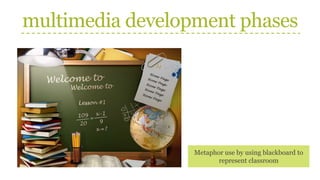
» Metaphor : use to provide interest or to aid in understanding the title
» Examples : file cabinet, books with chapters, television with channels, etc
Interactive resume Nandos
multimedia development phases
Metaphor use by using blackboard to
represent classroom
multimedia development phases
Step 4 : Determining the
treatment
» Emphasis : important to consider
the significance of each element
based on the concept, objectives,
and audience for the title
» What do you want to emphasize
on? How can you emphasize?
What is the emphasis of this web page?
multimedia development phases
What is the emphasis of this web page?
multimedia development phases
Step 5 : Developing the specifications
» How does it work?
» Specifications should be detailed
» List what will be included on each screen (links, content)
» Elements involve, including the placement and arrangement (buttons, text,
photos, size, colors)
» Functionality of each object (how program reacts to an action done by user)
» User interface (the appearance, interactivity, navigations)
multimedia development phases
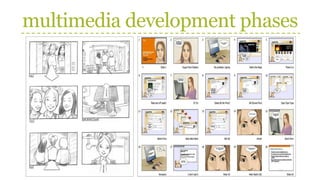
Step 6 : Storyboard and navigation
» The screen design and the connection
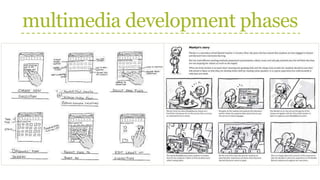
» Storyboard : representation (often in the form of hand-drawn sketches) of what
each screen will look like and how the screens are linked
» Serve multiple purposes
» To provide an overview of the project
» To provide a guide for the developer
» To illustrate the links among screens
» To illustrate the functionality of the object
multimedia development phases
Step 6 : Storyboard and navigation
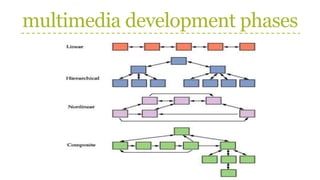
» Navigation : linking of screens through the use of buttons or hypertext that
allows user to jump from one screen to another
» Navigation structure :
» Linear : user navigate sequentially, from one frame to another
» Hierarchical : navigate along the branches of tree structure that is shaped
by the natural logic of content. Also called linear with branching.
» Non-linear : navigate freely through the content and unbound by pre-
determined routes
» Composite : combination of linear and non-linear
multimedia development phases
Step 7 : Developing the content
» Creating the pieces
» Indicate the content to be incorporated into multimedia application
» There are numerous content issues need to be addressed :
» The quality level of content : photorealistic graphics, stereo sound, etc
» Content generator : existing content, hire content experts, employ graphic
designer, etc
» Copyrights and licensing agreements : who will be responsible
» Archiving and documenting content
multimedia development phases
Step 8 : Authoring the title
» Bringing it all together
» Which authoring system to be use
» Developer might consider the following :
» Playback system : Macintosh or Windows platform
» Authoring and editing programs
» Programmer expertise
multimedia development phases
Step 9 : Testing the title
» Does it work the way as planned?
» Although it is listed as the final step, testing should be an ongoing process
» Testing can be done at the beginning of the stage and all the way through the end
» Throughout the creation phase of the title, it is important to test the design and
function
» Testing involves how the user interacts with the applications
» Does the user understand the navigation scheme, terminology, icons and
metaphors?
» Does the user gets confuse, stuck or lose interest?
» Usability testing is a formal process : users may be videotaped as they interact
with the applications and asked to provide feedback
multimedia development phases
Step 9 : Testing the title
» Two formal processes : alpha testing and beta testing
» Alpha testing
» Usually conduct within the company and is not restricted to the development
team
» Tester should explore everything and find every possible solutions to every
possible problems
» Beta testing
» Final functional test before release
» Involve selected potential users
» Outside of the company
» Often required to sign non-disclosure agreements to prevent them from
revealing any information before the official release
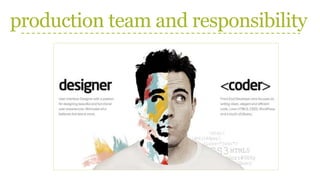
production team and responsibility
» Team of skilled individuals is required to create a great multimedia project
» Multimedia skills set : diverse range of skills required for a project
» Multimedia team consist of the following :
» Project manager
» Multimedia designer
» Interface designer
» Writer
» Video specialist
» Audio specialist
» Multimedia programmer
» Web producer
production team and responsibility
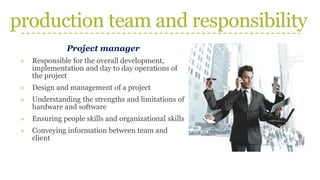
Project manager
» Responsible for the overall development,
implementation and day to day operations of
the project
» Design and management of a project
» Understanding the strengths and limitations of
hardware and software
» Ensuring people skills and organizational skills
» Conveying information between team and
client
production team and responsibility
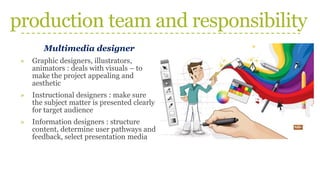
Multimedia designer
» Graphic designers, illustrators,
animators : deals with visuals – to
make the project appealing and
aesthetic
» Instructional designers : make sure
the subject matter is presented clearly
for target audience
» Information designers : structure
content, determine user pathways and
feedback, select presentation media
production team and responsibility
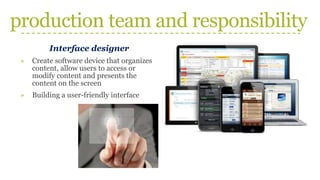
Interface designer
» Create software device that organizes
content, allow users to access or
modify content and presents the
content on the screen
» Building a user-friendly interface
production team and responsibility
Multimedia writer
» Creating characters, actions, point of
view and interactivity
» Writing proposals and test screens
» Scripting voice overs and actors
narrations
production team and responsibility
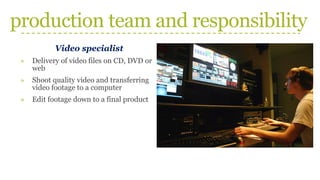
Video specialist
» Delivery of video files on CD, DVD or
web
» Shoot quality video and transferring
video footage to a computer
» Edit footage down to a final product
production team and responsibility
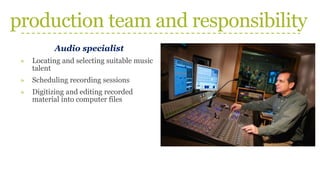
Audio specialist
» Locating and selecting suitable music
talent
» Scheduling recording sessions
» Digitizing and editing recorded
material into computer files
production team and responsibility
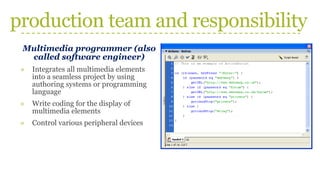
Multimedia programmer (also
called software engineer)
» Integrates all multimedia elements
into a seamless project by using
authoring systems or programming
language
» Write coding for the display of
multimedia elements
» Control various peripheral devices
production team and responsibility
Multimedia producer for the Web (Web producer)
» Put together a coordinated set of pages for the Web
» Also co-ordinate updates and changes
production team and responsibility
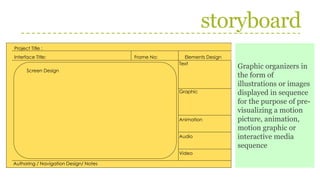
storyboard
Project Title :
Interface Title: Frame No: Elements Design
Screen Design
Authoring / Navigation Design/ Notes
Text
Graphic
Animation
Audio
Video
Graphic organizers in
the form of
illustrations or images
displayed in sequence
for the purpose of pre-
visualizing a motion
picture, animation,
motion graphic or
interactive media
sequence
class exercise
» You and your friends are thinking of creating a food blog website
» On a piece of paper, provide the explanation for each of the multimedia
development phases involve for your website
» For example : Step 1 – Developing the concept : To create a food blog that reviews
food and restaurant from all around the world

Chapter 3_Multimedia Design.pdf

  • 1.
  • 2.
    contents » Multimedia developmentphases » Production team and responsibility » Storyboard template
  • 3.
    multimedia development phases Thesteps involved when developing a multimedia application Phase 1 : Planning Phase 2 : Creating Phase 3 : Testing • Step 1 : Developing the concept • Step 2 : Stating the purpose • Step 3 : Identifying target audience • Step 4 : Determining the treatment • Step 5 : Developing the specifications • Step 6 : Storyboard and navigation • Step 7 : Developing the content • Step 8 : Authoring the title • Step 9 : Testing the title
  • 4.
    multimedia development phases Step1 : Developing the concept » The general idea » Ask questions like “What do we want to do?” » Process of generating ideas can be structured by doing brainstorming sessions » Series of these questions are considerable : » How can we improve the application? (faster, better usage, better graphics quality, updated content) » How to change the content to make it appeal to different markets? (consumer, education, corporate) » How can we take advantage of the new offered technologies? (virtual reality, speech recognition, etc) » How can we re-package our content? (books, movies, games, reference materials, brochures, etc)
  • 5.
    multimedia development phases Step2 : Stating the purpose » What do you want to accomplish? » Determine project goals and objectives » Goals : broad statements of what the project will accomplish » Objectives : more precise statements » Both help to direct the development process and provide ways to evaluate the title during and after its development
  • 6.
    multimedia development phases Step3 : Identifying the target audience » Stated the audience » Who will be using your application » Can be described in many ways. For example, demographics : location, age, sex, marital status, education, income, etc » Determine the information needed for the audience » The larger the audience, the more diverse it need and more difficult to give what they want
  • 7.
    multimedia development phases Step4 : Determining the treatment » The look and feel » By taking together the concept, objectives and target audience – help to determine the presentation of the application » Example of look and feel : title’s tone (humorous, serious, formal), approach, metaphor, emphasis » Many multimedia titles intended for home (games) uses humorous tone, while business uses more formal tone » Approach : the direction provided for the user » Children’s games and interactive books focus on exploration. Child is presented with a scene, with little instructions » Adult-education applications provides bigger deal of direction
  • 8.
  • 9.
  • 10.
  • 11.
  • 12.
    multimedia development phases Step4 : Determining the treatment » Metaphor : use to provide interest or to aid in understanding the title » Examples : file cabinet, books with chapters, television with channels, etc Interactive resume Nandos
  • 13.
    multimedia development phases Metaphoruse by using blackboard to represent classroom
  • 14.
    multimedia development phases Step4 : Determining the treatment » Emphasis : important to consider the significance of each element based on the concept, objectives, and audience for the title » What do you want to emphasize on? How can you emphasize? What is the emphasis of this web page?
  • 15.
    multimedia development phases Whatis the emphasis of this web page?
  • 16.
    multimedia development phases Step5 : Developing the specifications » How does it work? » Specifications should be detailed » List what will be included on each screen (links, content) » Elements involve, including the placement and arrangement (buttons, text, photos, size, colors) » Functionality of each object (how program reacts to an action done by user) » User interface (the appearance, interactivity, navigations)
  • 17.
    multimedia development phases Step6 : Storyboard and navigation » The screen design and the connection » Storyboard : representation (often in the form of hand-drawn sketches) of what each screen will look like and how the screens are linked » Serve multiple purposes » To provide an overview of the project » To provide a guide for the developer » To illustrate the links among screens » To illustrate the functionality of the object
  • 18.
  • 19.
  • 20.
    multimedia development phases Step6 : Storyboard and navigation » Navigation : linking of screens through the use of buttons or hypertext that allows user to jump from one screen to another » Navigation structure : » Linear : user navigate sequentially, from one frame to another » Hierarchical : navigate along the branches of tree structure that is shaped by the natural logic of content. Also called linear with branching. » Non-linear : navigate freely through the content and unbound by pre- determined routes » Composite : combination of linear and non-linear
  • 21.
  • 22.
    multimedia development phases Step7 : Developing the content » Creating the pieces » Indicate the content to be incorporated into multimedia application » There are numerous content issues need to be addressed : » The quality level of content : photorealistic graphics, stereo sound, etc » Content generator : existing content, hire content experts, employ graphic designer, etc » Copyrights and licensing agreements : who will be responsible » Archiving and documenting content
  • 23.
    multimedia development phases Step8 : Authoring the title » Bringing it all together » Which authoring system to be use » Developer might consider the following : » Playback system : Macintosh or Windows platform » Authoring and editing programs » Programmer expertise
  • 24.
    multimedia development phases Step9 : Testing the title » Does it work the way as planned? » Although it is listed as the final step, testing should be an ongoing process » Testing can be done at the beginning of the stage and all the way through the end » Throughout the creation phase of the title, it is important to test the design and function » Testing involves how the user interacts with the applications » Does the user understand the navigation scheme, terminology, icons and metaphors? » Does the user gets confuse, stuck or lose interest? » Usability testing is a formal process : users may be videotaped as they interact with the applications and asked to provide feedback
  • 25.
    multimedia development phases Step9 : Testing the title » Two formal processes : alpha testing and beta testing » Alpha testing » Usually conduct within the company and is not restricted to the development team » Tester should explore everything and find every possible solutions to every possible problems » Beta testing » Final functional test before release » Involve selected potential users » Outside of the company » Often required to sign non-disclosure agreements to prevent them from revealing any information before the official release
  • 26.
    production team andresponsibility » Team of skilled individuals is required to create a great multimedia project » Multimedia skills set : diverse range of skills required for a project » Multimedia team consist of the following : » Project manager » Multimedia designer » Interface designer » Writer » Video specialist » Audio specialist » Multimedia programmer » Web producer
  • 27.
    production team andresponsibility Project manager » Responsible for the overall development, implementation and day to day operations of the project » Design and management of a project » Understanding the strengths and limitations of hardware and software » Ensuring people skills and organizational skills » Conveying information between team and client
  • 28.
    production team andresponsibility Multimedia designer » Graphic designers, illustrators, animators : deals with visuals – to make the project appealing and aesthetic » Instructional designers : make sure the subject matter is presented clearly for target audience » Information designers : structure content, determine user pathways and feedback, select presentation media
  • 29.
    production team andresponsibility Interface designer » Create software device that organizes content, allow users to access or modify content and presents the content on the screen » Building a user-friendly interface
  • 30.
    production team andresponsibility Multimedia writer » Creating characters, actions, point of view and interactivity » Writing proposals and test screens » Scripting voice overs and actors narrations
  • 31.
    production team andresponsibility Video specialist » Delivery of video files on CD, DVD or web » Shoot quality video and transferring video footage to a computer » Edit footage down to a final product
  • 32.
    production team andresponsibility Audio specialist » Locating and selecting suitable music talent » Scheduling recording sessions » Digitizing and editing recorded material into computer files
  • 33.
    production team andresponsibility Multimedia programmer (also called software engineer) » Integrates all multimedia elements into a seamless project by using authoring systems or programming language » Write coding for the display of multimedia elements » Control various peripheral devices
  • 34.
    production team andresponsibility Multimedia producer for the Web (Web producer) » Put together a coordinated set of pages for the Web » Also co-ordinate updates and changes
  • 35.
    production team andresponsibility
  • 36.
    storyboard Project Title : InterfaceTitle: Frame No: Elements Design Screen Design Authoring / Navigation Design/ Notes Text Graphic Animation Audio Video Graphic organizers in the form of illustrations or images displayed in sequence for the purpose of pre- visualizing a motion picture, animation, motion graphic or interactive media sequence
  • 37.
    class exercise » Youand your friends are thinking of creating a food blog website » On a piece of paper, provide the explanation for each of the multimedia development phases involve for your website » For example : Step 1 – Developing the concept : To create a food blog that reviews food and restaurant from all around the world