Chapter Two
Multimedia Authoring and Tools
2.1 What is Multimedia Authoring
 Multimedia Authoring  the process of
creating multimedia application.
 During authoring, you might need to
organize or edit the elements of your
multimedia project, create user interface
and designing interactivity.
 This can be achieved through the use of
authoring programs / tools.
Introduction to Multimedia
Authoring Tools
 Multimedia authoring tools provide the framework for
organizing and editing the elements of a multimedia
project.
 Authoring software provides an integrated environment
for combining the content and functions of a project.
 It enables the developer to create, edit, and import
data.
Introduction to Multimedia
Authoring Tools
 Authoring system in multimedia.
 Features of authoring tools.
Authoring System in
Multimedia
 In multimedia authoring systems, multimedia elements and
events are often regarded as objects.
 Objects exist in a hierarchical order of parent and child
relationships.
 Each object is assigned properties and modifiers.
 On receiving messages, objects perform tasks depending on
the properties and modifiers.
Features of Authoring Tools
 Editing and organizing features.
 Programming features.
 Interactivity features.
 Performance tuning and playback features.
 Delivery, cross-platform, and Internet playability
features.
Editing and Organizing
Features
 Authoring systems include editing tools to create, edit,
and convert multimedia elements such as animation and
video clips.
 The organization, design, and production process for
multimedia involves storyboarding and flowcharting.
 Visual flowcharting or overview facility illustrates
project structure at a macro level.
Programming Features
 Visual programming with icons or objects is the simplest
and easiest authoring process.
 Visual authoring tools such as Authorware and
IconAuthor are suitable for slide shows and
presentations.
 Authoring tools offer ‘very high level language’ (VHLL)
or interpreted scripting environment.
Interactivity Features
 Interactivity gives the end user control over the content
and flow of information in a project.
 Simple branching is the ability to go to another section
of the multimedia production.
Interactivity Features
 Conditional branching is an activity based on the results
of IF-THEN decisions or events.
 Structured language supports complex programming
logic, subroutines, event tracking, and message passing
among objects and elements.
Performance Tuning and
Playback Features
 Achieving synchronization is difficult, considering that
performance of the different computers used for
multimedia development and delivery varies.
 Authoring system should facilitate precise timing of
events.
 It should enable developers to build a part of a project
and then test it immediately.
Delivery, Cross-Platform, and
Internet Playability Features
 Delivering the project may require building a run-time
version of the project, using the multimedia authoring
software.
 Run-time version or standalone allows a project to play
back without the complete authoring software and all
its tools and editors.
Delivery, Cross-Platform, and
Internet Playability Features
 It is important to use tools that facilitate easy transfer
across platforms.
 Authoring systems provide a means for converting their
output to be delivered within the context of HTML or
DHTML.
2.2 Some Useful Editing and
Authoring Tools
 Use to merge multimedia elements (text,
audio, graphic, animation, video) into a
project.
 Designed to manage individual multimedia
elements and provide user interaction (if
required).
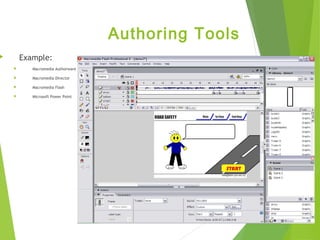
Authoring Tools
 Example:
 Macromedia Authorware
 Macromedia Director
 Macromedia Flash
 Microsoft Power Point
2.3 Authoring Paradigms
 Authoring metaphor == authoring paradigm 
for easier understanding of the methodology
employed to create multimedia applications.
a) Scripting-language metaphor
b) Slide show metaphor
c) Hierarchical metaphor
d) Iconic/Flow-control metaphor
e) Frames metaphor
f) Card/Scripting metaphor
g) Cast/Score metaphor
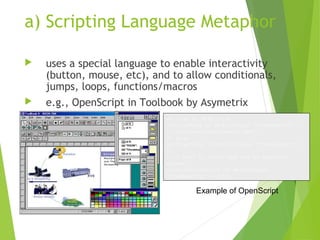
a) Scripting Language Metaphor
 uses a special language to enable interactivity
(button, mouse, etc), and to allow conditionals,
jumps, loops, functions/macros
 e.g., OpenScript in Toolbook by Asymetrix
-- load an MPEG file
extFileName of MediaPlayer “theMpegPath” =
“c:windowsmediamedia.mpg”;
-- play
extPlayCount of MediaPlayer “theMpegPath” =
1;
--if want to start and end at specific
frames
extSelectionStart of MediaPlayer
“theMpegPath” = 103;
Example of OpenScript
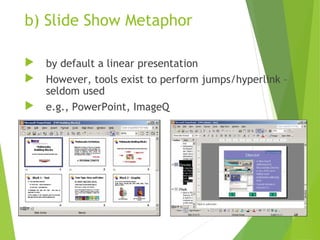
b) Slide Show Metaphor
 by default a linear presentation
 However, tools exist to perform jumps/hyperlink –
seldom used
 e.g., PowerPoint, ImageQ
c) Hierarchical Metaphor
 User-controllable elements are
organized into a tree structure.
 Often used in menu-driven applications
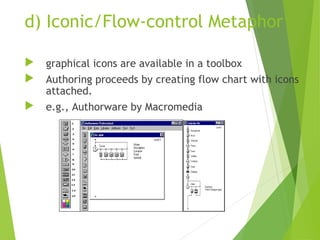
d) Iconic/Flow-control Metaphor
 graphical icons are available in a toolbox
 Authoring proceeds by creating flow chart with icons
attached.
 e.g., Authorware by Macromedia
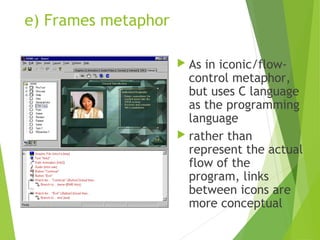
e) Frames metaphor
 As in iconic/flow-
control metaphor,
but uses C language
as the programming
language
 rather than
represent the actual
flow of the
program, links
between icons are
more conceptual
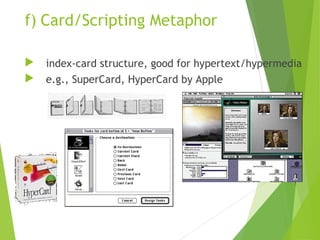
f) Card/Scripting Metaphor
 index-card structure, good for hypertext/hypermedia
 e.g., SuperCard, HyperCard by Apple
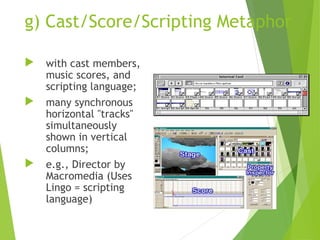
g) Cast/Score/Scripting Metaphor
 with cast members,
music scores, and
scripting language;
 many synchronous
horizontal "tracks"
simultaneously
shown in vertical
columns;
 e.g., Director by
Macromedia (Uses
Lingo = scripting
language)

Chapter 2 multimedia authoring and tools

  • 1.
  • 2.
    2.1 What isMultimedia Authoring  Multimedia Authoring  the process of creating multimedia application.  During authoring, you might need to organize or edit the elements of your multimedia project, create user interface and designing interactivity.  This can be achieved through the use of authoring programs / tools.
  • 3.
    Introduction to Multimedia AuthoringTools  Multimedia authoring tools provide the framework for organizing and editing the elements of a multimedia project.  Authoring software provides an integrated environment for combining the content and functions of a project.  It enables the developer to create, edit, and import data.
  • 4.
    Introduction to Multimedia AuthoringTools  Authoring system in multimedia.  Features of authoring tools.
  • 5.
    Authoring System in Multimedia In multimedia authoring systems, multimedia elements and events are often regarded as objects.  Objects exist in a hierarchical order of parent and child relationships.  Each object is assigned properties and modifiers.  On receiving messages, objects perform tasks depending on the properties and modifiers.
  • 6.
    Features of AuthoringTools  Editing and organizing features.  Programming features.  Interactivity features.  Performance tuning and playback features.  Delivery, cross-platform, and Internet playability features.
  • 7.
    Editing and Organizing Features Authoring systems include editing tools to create, edit, and convert multimedia elements such as animation and video clips.  The organization, design, and production process for multimedia involves storyboarding and flowcharting.  Visual flowcharting or overview facility illustrates project structure at a macro level.
  • 8.
    Programming Features  Visualprogramming with icons or objects is the simplest and easiest authoring process.  Visual authoring tools such as Authorware and IconAuthor are suitable for slide shows and presentations.  Authoring tools offer ‘very high level language’ (VHLL) or interpreted scripting environment.
  • 9.
    Interactivity Features  Interactivitygives the end user control over the content and flow of information in a project.  Simple branching is the ability to go to another section of the multimedia production.
  • 10.
    Interactivity Features  Conditionalbranching is an activity based on the results of IF-THEN decisions or events.  Structured language supports complex programming logic, subroutines, event tracking, and message passing among objects and elements.
  • 11.
    Performance Tuning and PlaybackFeatures  Achieving synchronization is difficult, considering that performance of the different computers used for multimedia development and delivery varies.  Authoring system should facilitate precise timing of events.  It should enable developers to build a part of a project and then test it immediately.
  • 12.
    Delivery, Cross-Platform, and InternetPlayability Features  Delivering the project may require building a run-time version of the project, using the multimedia authoring software.  Run-time version or standalone allows a project to play back without the complete authoring software and all its tools and editors.
  • 13.
    Delivery, Cross-Platform, and InternetPlayability Features  It is important to use tools that facilitate easy transfer across platforms.  Authoring systems provide a means for converting their output to be delivered within the context of HTML or DHTML.
  • 14.
    2.2 Some UsefulEditing and Authoring Tools  Use to merge multimedia elements (text, audio, graphic, animation, video) into a project.  Designed to manage individual multimedia elements and provide user interaction (if required).
  • 15.
    Authoring Tools  Example: Macromedia Authorware  Macromedia Director  Macromedia Flash  Microsoft Power Point
  • 16.
    2.3 Authoring Paradigms Authoring metaphor == authoring paradigm  for easier understanding of the methodology employed to create multimedia applications. a) Scripting-language metaphor b) Slide show metaphor c) Hierarchical metaphor d) Iconic/Flow-control metaphor e) Frames metaphor f) Card/Scripting metaphor g) Cast/Score metaphor
  • 17.
    a) Scripting LanguageMetaphor  uses a special language to enable interactivity (button, mouse, etc), and to allow conditionals, jumps, loops, functions/macros  e.g., OpenScript in Toolbook by Asymetrix -- load an MPEG file extFileName of MediaPlayer “theMpegPath” = “c:windowsmediamedia.mpg”; -- play extPlayCount of MediaPlayer “theMpegPath” = 1; --if want to start and end at specific frames extSelectionStart of MediaPlayer “theMpegPath” = 103; Example of OpenScript
  • 18.
    b) Slide ShowMetaphor  by default a linear presentation  However, tools exist to perform jumps/hyperlink – seldom used  e.g., PowerPoint, ImageQ
  • 19.
    c) Hierarchical Metaphor User-controllable elements are organized into a tree structure.  Often used in menu-driven applications
  • 20.
    d) Iconic/Flow-control Metaphor graphical icons are available in a toolbox  Authoring proceeds by creating flow chart with icons attached.  e.g., Authorware by Macromedia
  • 21.
    e) Frames metaphor As in iconic/flow- control metaphor, but uses C language as the programming language  rather than represent the actual flow of the program, links between icons are more conceptual
  • 22.
    f) Card/Scripting Metaphor index-card structure, good for hypertext/hypermedia  e.g., SuperCard, HyperCard by Apple
  • 23.
    g) Cast/Score/Scripting Metaphor with cast members, music scores, and scripting language;  many synchronous horizontal "tracks" simultaneously shown in vertical columns;  e.g., Director by Macromedia (Uses Lingo = scripting language)