Floating point arithmetic
Representation of floating point
arithmetic
Operations
Normalization
Pit-Falls of floating point arithmetic
 There are two types of arithmetic
operations :-
Integer Arithmetic
Real – floating point arithmetic
Integer Arithmetic :- deals with
integer operands.
i.e. - num without fractional parts
Real Arithmetic :- use number with
fractional parts as operands and is
use
Real no. = mantissa * 10^exponent
COMPUTER
REPRESENTATION OF
FLOATING POINT NUMBERS
In the CPU, a 32-bit floating
point number is represented
using IEEE standard format as
follows:
S | EXPONENT | MANTISSA
where S is one bit, the EXPONENT
is 8 bits, and the MANTISSA is
23 bits.
 The mantissa
 represents the leading
significant bits in the number.
 It is made less than 1 and
greater than or equal to 0.1
 The exponent
 is used to adjust the position
of the binary point (as opposed
to a "decimal" point)
 In power of 10 and multiplies
with mantissa
 Normalization :-
Mantissa and Exponent have
their own independent signs
While storing no. of the
leading digit in the mantissa,
mantissa is always made non-
zero by appropriately shifting
it and adjusting the value of
the exponent
 The shifting of mantissa to the left
till its most significant digit is non-
zero is called normalization.
Arithmetic operations with
normalized floating point
numbers
 Addition
 Subtraction
 Multiplication
 Division
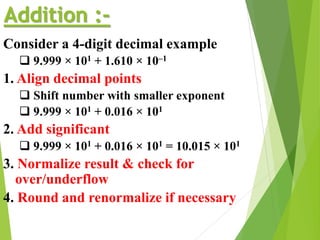
Addition :-
Consider a 4-digit decimal example
 9.999 × 101 + 1.610 × 10⁻¹
1. Align decimal points
 Shift number with smaller exponent
 9.999 × 101 + 0.016 × 101
2. Add significant
 9.999 × 101 + 0.016 × 101 = 10.015 × 101
3. Normalize result & check for
over/underflow
4. Round and renormalize if necessary
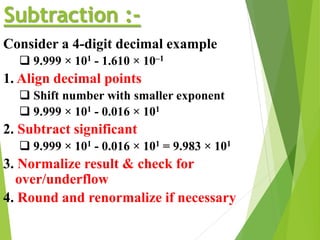
Subtraction :-
Consider a 4-digit decimal example
 9.999 × 101 - 1.610 × 10⁻¹
1. Align decimal points
 Shift number with smaller exponent
 9.999 × 101 - 0.016 × 101
2. Subtract significant
 9.999 × 101 - 0.016 × 101 = 9.983 × 101
3. Normalize result & check for
over/underflow
4. Round and renormalize if necessary
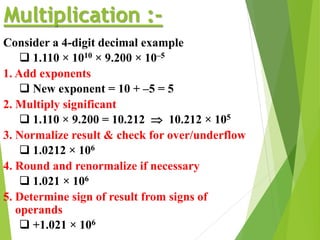
Multiplication :-
Consider a 4-digit decimal example
 1.110 × 1010 × 9.200 × 10–5
1. Add exponents
 New exponent = 10 + –5 = 5
2. Multiply significant
 1.110 × 9.200 = 10.212  10.212 × 10⁵
3. Normalize result & check for over/underflow
 1.0212 × 10⁶
4. Round and renormalize if necessary
 1.021 × 10⁶
5. Determine sign of result from signs of
operands
 +1.021 × 10⁶
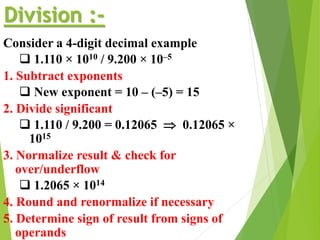
Division :-
Consider a 4-digit decimal example
 1.110 × 10¹⁰ / 9.200 × 10⁻⁵
1. Subtract exponents
 New exponent = 10 – (–5) = 15
2. Divide significant
 1.110 / 9.200 = 0.12065  0.12065 ×
1015
3. Normalize result & check for
over/underflow
 1.2065 × 10¹⁴
4. Round and renormalize if necessary
5. Determine sign of result from signs of
operands
CBNST PPT, Floating point arithmetic,Normalization

CBNST PPT, Floating point arithmetic,Normalization

  • 1.
    Floating point arithmetic Representationof floating point arithmetic Operations Normalization Pit-Falls of floating point arithmetic
  • 2.
     There aretwo types of arithmetic operations :- Integer Arithmetic Real – floating point arithmetic Integer Arithmetic :- deals with integer operands. i.e. - num without fractional parts Real Arithmetic :- use number with fractional parts as operands and is use Real no. = mantissa * 10^exponent
  • 3.
    COMPUTER REPRESENTATION OF FLOATING POINTNUMBERS In the CPU, a 32-bit floating point number is represented using IEEE standard format as follows: S | EXPONENT | MANTISSA where S is one bit, the EXPONENT is 8 bits, and the MANTISSA is 23 bits.
  • 4.
     The mantissa represents the leading significant bits in the number.  It is made less than 1 and greater than or equal to 0.1  The exponent  is used to adjust the position of the binary point (as opposed to a "decimal" point)  In power of 10 and multiplies with mantissa
  • 5.
     Normalization :- Mantissaand Exponent have their own independent signs While storing no. of the leading digit in the mantissa, mantissa is always made non- zero by appropriately shifting it and adjusting the value of the exponent  The shifting of mantissa to the left till its most significant digit is non- zero is called normalization.
  • 6.
    Arithmetic operations with normalizedfloating point numbers  Addition  Subtraction  Multiplication  Division
  • 7.
    Addition :- Consider a4-digit decimal example  9.999 × 101 + 1.610 × 10⁻¹ 1. Align decimal points  Shift number with smaller exponent  9.999 × 101 + 0.016 × 101 2. Add significant  9.999 × 101 + 0.016 × 101 = 10.015 × 101 3. Normalize result & check for over/underflow 4. Round and renormalize if necessary
  • 8.
    Subtraction :- Consider a4-digit decimal example  9.999 × 101 - 1.610 × 10⁻¹ 1. Align decimal points  Shift number with smaller exponent  9.999 × 101 - 0.016 × 101 2. Subtract significant  9.999 × 101 - 0.016 × 101 = 9.983 × 101 3. Normalize result & check for over/underflow 4. Round and renormalize if necessary
  • 9.
    Multiplication :- Consider a4-digit decimal example  1.110 × 1010 × 9.200 × 10–5 1. Add exponents  New exponent = 10 + –5 = 5 2. Multiply significant  1.110 × 9.200 = 10.212  10.212 × 10⁵ 3. Normalize result & check for over/underflow  1.0212 × 10⁶ 4. Round and renormalize if necessary  1.021 × 10⁶ 5. Determine sign of result from signs of operands  +1.021 × 10⁶
  • 10.
    Division :- Consider a4-digit decimal example  1.110 × 10¹⁰ / 9.200 × 10⁻⁵ 1. Subtract exponents  New exponent = 10 – (–5) = 15 2. Divide significant  1.110 / 9.200 = 0.12065  0.12065 × 10¹⁵ 3. Normalize result & check for over/underflow  1.2065 × 10¹⁴ 4. Round and renormalize if necessary 5. Determine sign of result from signs of operands