



AutoCAD Architecture
ADMEC Multimedia Institute
C-7/114, 2nd
Floor, Sector-7, Rohini, Delhi:110085
Mob.: +91-8377861642, 9999492155
Email ID: info@admecindia.co.in | website: www.admecindia.co.in
Created by: Mukesh GuptaPresented By: ADMEC Multimedia Institute
What is AutoCAD ?
● AutoCAD (Automatic computer aided design) is a mercantile
application for 2D plan and 3D modeling drawing available since
1982, as a desktop application and since 2010 available as a mobile
web and cloud based apps.
● AutoCAD Developed by Auto-desk, CAD was first released in since
December 1982, running on computers with internal graphics
Comptroller. Former to the introduction of AutoCAD, most instdurial
CAD programs ran on main computers or minicomputer, with each
CAD manipulator working at a isolated graphic terminals.
● AutoCAD is a computer-aided drawing application used for creating
blue-prints for buildings, Create a bridges and computer chips. CAD
is mainly used by draftsman, although engineer, surveyors and
architecture, may need to use the software application.
Types of Drafters?
Three types of drafters:
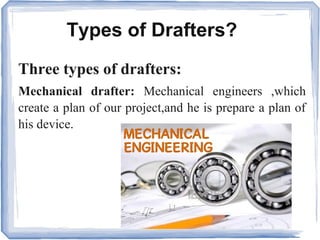
Mechanical drafter: Mechanical engineers ,which
create a plan of our project,and he is prepare a plan of
his device.
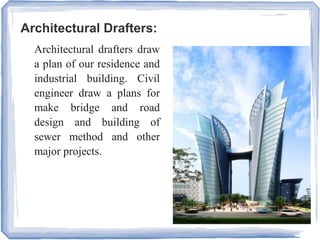
Architectural Drafters:
Architectural drafters draw
a plan of our residence and
industrial building. Civil
engineer draw a plans for
make bridge and road
design and building of
sewer method and other
major projects.
Electrical Drafters:
Electrical engineer work up electricity to
prepare drawing of wiring electrical device
demonstration.Electrical engineer also create
a wiring plan for making, installing and
repairing of electronic gadgets. Electrical
engineer deep study and application for
electricity.
Who is AutoCAD Designer?
CAD designer are professional who make a 2D
plan and 3D modeling. Another designers as
civil, machanical, architecture he make a building
design.Sourly, CAD designers work an engineer,
architect and interior designers to design a home
design, electric or room designs. Most important,
they help to create plans that can be used by an-
other architecture professional.
Where is AutoCAD Used?
Auto-CAD is used athwart a broad range of
industries, by as architectures, project managers,
civil engineers, graphic designers, and other
professionals and electrical engineer which make a
good plan for our projects.
● Auto-CAD is engineer prepare a good plan and
use it.
● Cad desingner prepare a building,bridge and
roadways , flyover and another things .
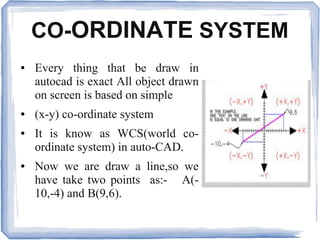
CO-ORDINATE SYSTEM
● Every thing that be draw in
autocad is exact All object drawn
on screen is based on simple
● (x-y) co-ordinate system
● It is know as WCS(world co-
ordinate system) in auto-CAD.
● Now we are draw a line,so we
have take two points as:- A(-
10,-4) and B(9,6).
Comparison between 2D and 3D?
2D is a single view.but 3D is a six view and four
isometric view. it is explain under of page. 2D is two
dimensions "level", use the horizontal and vertical (X
and Y) dimensions, but 3d is the three dimensions (X
and Y and Z),
● It is show in 3d six view .
Top view and Bottom view, Left view and Right view,
Front view and Back view
● And 4 Isometric view:-
South-East AND North-East AND North-West , South-
West
About Autocad Commands?
● Basics: Units.
● Viewing: Draw order, draw order annotation.
● Geometry: Circle,hatch,line,pline,rectangle.
● Precision: Distance,osnap.
● Layer: Layer.
● Properties: Match properties,line type.
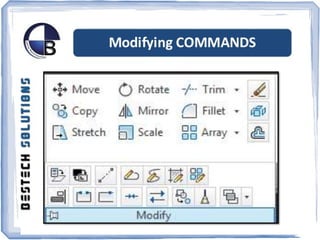
● Modifying: Trim, Stretch, Rotate, Pedit, Offset,
Move, Mirror, Fillet, Extend, Explode, Erase,
Copy, Align, Champher.
● Block: Insert, Block.
● Layouts: Mview.
● Notes and labels: Style, Mtext, Multileader Style,
Multileader.
● Dimensions:
Dimaligned, Dimangular, Dimcontinue,
Dimdiameter, Dimradius, Dimstyle.
Be a AutoCad Architecture
- Contact Us -
ADMEC MULTIMEDIA INSTITUTE
Leader in Animation & Digital Media Education
ISO 9001 : 2008 CERTIFIED
- Visit Our Websites -
www.admecindia.co.in
www.cadtraininginstitute.com
Phones: +91-9811-8181-22, +91-9911-7823-50
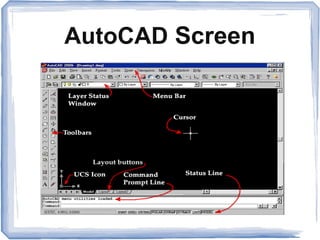
AutoCAD Screen
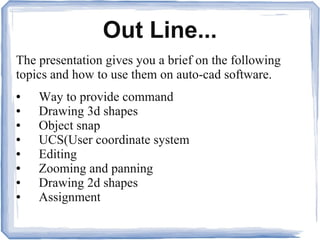
Out Line...
The presentation gives you a brief on the following
topics and how to use them on auto-cad software.
● Way to provide command
● Drawing 3d shapes
● Object snap
● UCS(User coordinate system
● Editing
● Zooming and panning
● Drawing 2d shapes
● Assignment
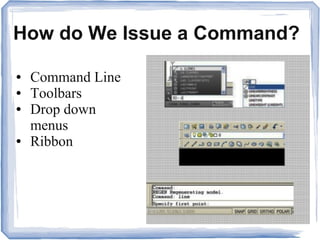
How do We Issue a Command?
● Command Line
● Toolbars
● Drop down
menus
● Ribbon
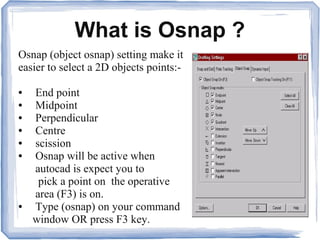
What is Osnap ?
Osnap (object osnap) setting make it
easier to select a 2D objects points:-
● End point
● Midpoint
● Perpendicular
● Centre
● scission
● Osnap will be active when
autocad is expect you to
pick a point on the operative
area (F3) is on.
● Type (osnap) on your command
window OR press F3 key.
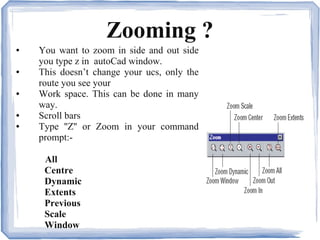
Zooming ?
● You want to zoom in side and out side
you type z in autoCad window.
● This doesn’t change your ucs, only the
route you see your
● Work space. This can be done in many
way.
● Scroll bars
● Type ''Z'' or Zoom in your command
prompt:-
All
Centre
Dynamic
Extents
Previous
Scale
Window
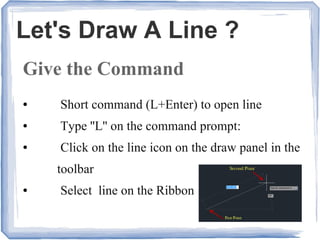
Let's Draw A Line ?
Give the Command
● Short command (L+Enter) to open line
● Type ''L'' on the command prompt:
● Click on the line icon on the draw panel in the
toolbar
● Select line on the Ribbon
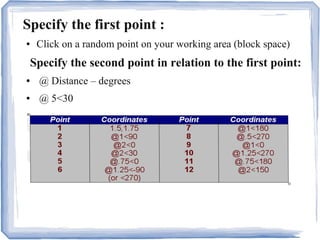
Specify the first point :
● Click on a random point on your working area (block space)
Specify the second point in relation to the first point:
● @ Distance – degrees
● @ 5<30
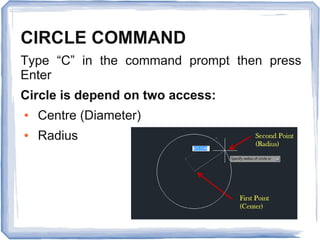
CIRCLE COMMAND
Type “C” in the command prompt then press
Enter
Circle is depend on two access:
● Centre (Diameter)
● Radius
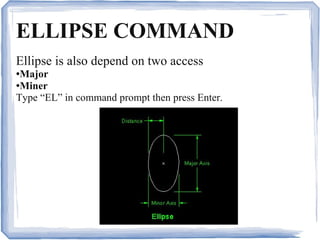
ELLIPSE COMMAND
Ellipse is also depend on two access
●Major
●Miner
Type “EL” in command prompt then press Enter.
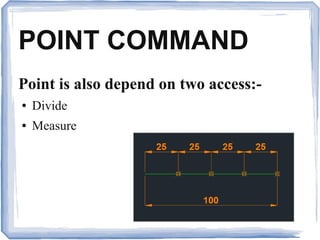
POINT COMMAND
Point is also depend on two access:-
● Divide
● Measure
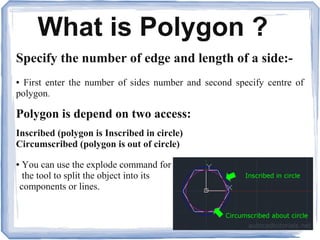
What is Polygon ?
Specify the number of edge and length of a side:-
● First enter the number of sides number and second specify centre of
polygon.
Polygon is depend on two access:
Inscribed (polygon is Inscribed in circle)
Circumscribed (polygon is out of circle)
● You can use the explode command for
the tool to split the object into its
components or lines.
What is Editing ?
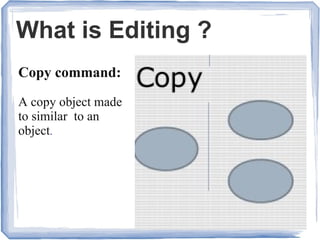
Copy command:
A copy object made
to similar to an
object.
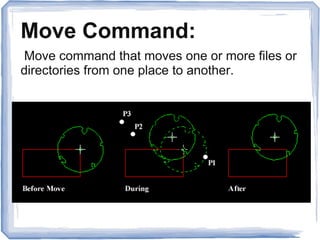
Move Command:
Move command that moves one or more files or
directories from one place to another.
What is Else ?
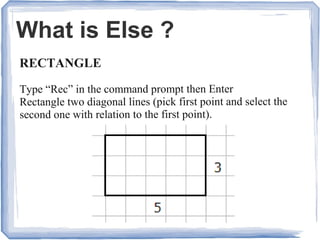
RECTANGLE
Type “Rec” in the command prompt then Enter
Rectangle two diagonal lines (pick first point and select the
second one with relation to the first point).
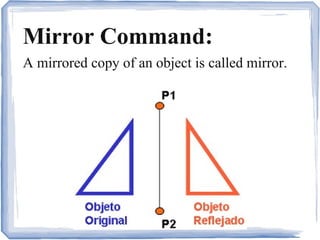
Mirror Command:
A mirrored copy of an object is called mirror.
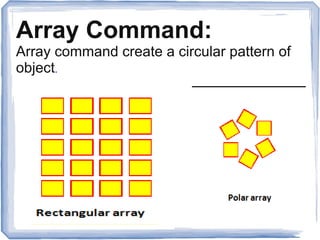
Array Command:
Array command create a circular pattern of
object.
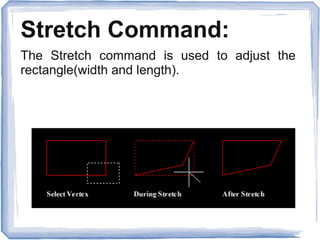
Stretch Command:
The Stretch command is used to adjust the
rectangle(width and length).
More Editing...
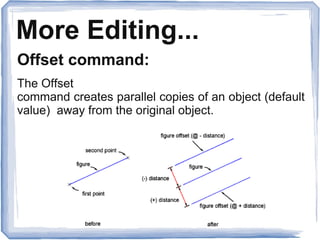
Offset command:
The Offset
command creates parallel copies of an object (default
value) away from the original object.
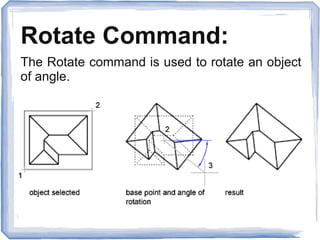
Rotate Command:
The Rotate command is used to rotate an object
of angle.
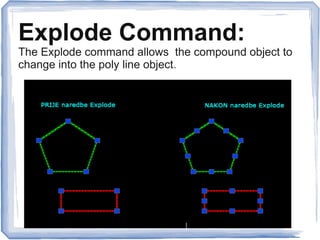
Explode Command:
The Explode command allows the compound object to
change into the poly line object.
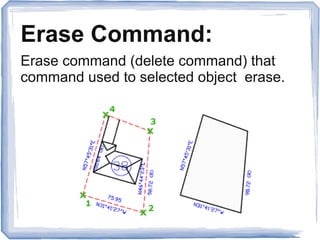
Erase Command:
Erase command (delete command) that
command used to selected object erase.
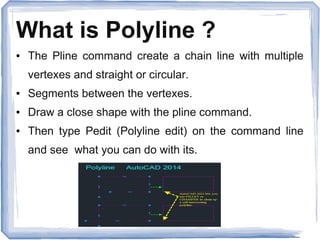
What is Polyline ?
● The Pline command create a chain line with multiple
vertexes and straight or circular.
● Segments between the vertexes.
● Draw a close shape with the pline command.
● Then type Pedit (Polyline edit) on the command line
and see what you can do with its.
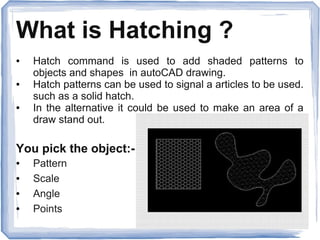
What is Hatching ?
● Hatch command is used to add shaded patterns to
objects and shapes in autoCAD drawing.
● Hatch patterns can be used to signal a articles to be used.
such as a solid hatch.
● In the alternative it could be used to make an area of a
draw stand out.
You pick the object:-
● Pattern
● Scale
● Angle
● Points
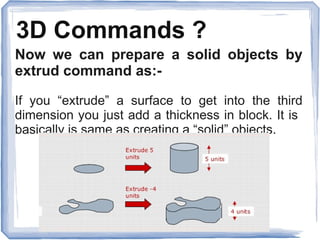
3D Commands ?
Now we can prepare a solid objects by
extrud command as:-
If you “extrude” a surface to get into the third
dimension you just add a thickness in block. It is
basically is same as creating a “solid” objects.
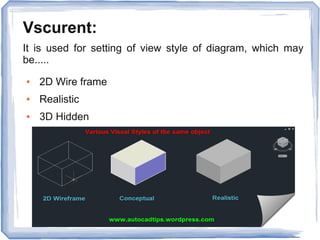
Vscurent:
It is used for setting of view style of diagram, which may
be.....
● 2D Wire frame
● Realistic
● 3D Hidden
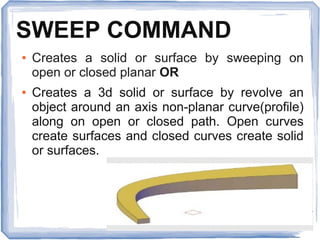
SWEEP COMMAND
● Creates a solid or surface by sweeping on
open or closed planar OR
● Creates a 3d solid or surface by revolve an
object around an axis non-planar curve(profile)
along on open or closed path. Open curves
create surfaces and closed curves create solid
or surfaces.
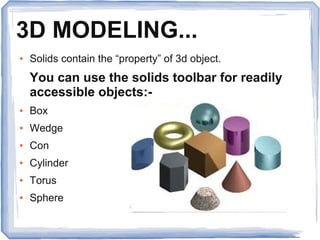
3D MODELING...
● Solids contain the “property” of 3d object.
You can use the solids toolbar for readily
accessible objects:-
● Box
● Wedge
● Con
● Cylinder
● Torus
● Sphere
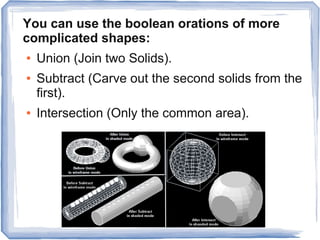
You can use the boolean orations of more
complicated shapes:
● Union (Join two Solids).
● Subtract (Carve out the second solids from the
first).
● Intersection (Only the common area).
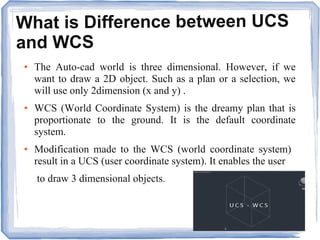
What is Difference between UCS
and WCS
● The Auto-cad world is three dimensional. However, if we
want to draw a 2D object. Such as a plan or a selection, we
will use only 2dimension (x and y) .
● WCS (World Coordinate System) is the dreamy plan that is
proportionate to the ground. It is the default coordinate
system.
● Modification made to the WCS (world coordinate system)
result in a UCS (user coordinate system). It enables the user
to draw 3 dimensional objects.
- Contact Us -
ADMEC MULTIMEDIA INSTITUTE
Leader in Animation & Digital Media Education
ISO 9001 : 2008 CERTIFIED
- Visit Our Websites -
www.admecindia.co.in
www.cadtraininginstitute.com
Phones: +91-9811-8181-22, +91-9911-7823-50
AutoCAD Architecture

AutoCAD Architecture

  • 1.
    AutoCAD Architecture ADMEC MultimediaInstitute C-7/114, 2nd Floor, Sector-7, Rohini, Delhi:110085 Mob.: +91-8377861642, 9999492155 Email ID: info@admecindia.co.in | website: www.admecindia.co.in Created by: Mukesh GuptaPresented By: ADMEC Multimedia Institute
  • 2.
    What is AutoCAD? ● AutoCAD (Automatic computer aided design) is a mercantile application for 2D plan and 3D modeling drawing available since 1982, as a desktop application and since 2010 available as a mobile web and cloud based apps. ● AutoCAD Developed by Auto-desk, CAD was first released in since December 1982, running on computers with internal graphics Comptroller. Former to the introduction of AutoCAD, most instdurial CAD programs ran on main computers or minicomputer, with each CAD manipulator working at a isolated graphic terminals. ● AutoCAD is a computer-aided drawing application used for creating blue-prints for buildings, Create a bridges and computer chips. CAD is mainly used by draftsman, although engineer, surveyors and architecture, may need to use the software application.
  • 3.
    Types of Drafters? Threetypes of drafters: Mechanical drafter: Mechanical engineers ,which create a plan of our project,and he is prepare a plan of his device.
  • 4.
    Architectural Drafters: Architectural draftersdraw a plan of our residence and industrial building. Civil engineer draw a plans for make bridge and road design and building of sewer method and other major projects.
  • 5.
    Electrical Drafters: Electrical engineerwork up electricity to prepare drawing of wiring electrical device demonstration.Electrical engineer also create a wiring plan for making, installing and repairing of electronic gadgets. Electrical engineer deep study and application for electricity.
  • 7.
    Who is AutoCADDesigner? CAD designer are professional who make a 2D plan and 3D modeling. Another designers as civil, machanical, architecture he make a building design.Sourly, CAD designers work an engineer, architect and interior designers to design a home design, electric or room designs. Most important, they help to create plans that can be used by an- other architecture professional.
  • 8.
    Where is AutoCADUsed? Auto-CAD is used athwart a broad range of industries, by as architectures, project managers, civil engineers, graphic designers, and other professionals and electrical engineer which make a good plan for our projects. ● Auto-CAD is engineer prepare a good plan and use it. ● Cad desingner prepare a building,bridge and roadways , flyover and another things .
  • 9.
    CO-ORDINATE SYSTEM ● Everything that be draw in autocad is exact All object drawn on screen is based on simple ● (x-y) co-ordinate system ● It is know as WCS(world co- ordinate system) in auto-CAD. ● Now we are draw a line,so we have take two points as:- A(- 10,-4) and B(9,6).
  • 10.
    Comparison between 2Dand 3D? 2D is a single view.but 3D is a six view and four isometric view. it is explain under of page. 2D is two dimensions "level", use the horizontal and vertical (X and Y) dimensions, but 3d is the three dimensions (X and Y and Z), ● It is show in 3d six view . Top view and Bottom view, Left view and Right view, Front view and Back view ● And 4 Isometric view:- South-East AND North-East AND North-West , South- West
  • 11.
    About Autocad Commands? ●Basics: Units. ● Viewing: Draw order, draw order annotation. ● Geometry: Circle,hatch,line,pline,rectangle. ● Precision: Distance,osnap. ● Layer: Layer. ● Properties: Match properties,line type.
  • 12.
    ● Modifying: Trim,Stretch, Rotate, Pedit, Offset, Move, Mirror, Fillet, Extend, Explode, Erase, Copy, Align, Champher. ● Block: Insert, Block. ● Layouts: Mview. ● Notes and labels: Style, Mtext, Multileader Style, Multileader. ● Dimensions: Dimaligned, Dimangular, Dimcontinue, Dimdiameter, Dimradius, Dimstyle.
  • 14.
    Be a AutoCadArchitecture - Contact Us - ADMEC MULTIMEDIA INSTITUTE Leader in Animation & Digital Media Education ISO 9001 : 2008 CERTIFIED - Visit Our Websites - www.admecindia.co.in www.cadtraininginstitute.com Phones: +91-9811-8181-22, +91-9911-7823-50
  • 15.
  • 16.
    Out Line... The presentationgives you a brief on the following topics and how to use them on auto-cad software. ● Way to provide command ● Drawing 3d shapes ● Object snap ● UCS(User coordinate system ● Editing ● Zooming and panning ● Drawing 2d shapes ● Assignment
  • 17.
    How do WeIssue a Command? ● Command Line ● Toolbars ● Drop down menus ● Ribbon
  • 18.
    What is Osnap? Osnap (object osnap) setting make it easier to select a 2D objects points:- ● End point ● Midpoint ● Perpendicular ● Centre ● scission ● Osnap will be active when autocad is expect you to pick a point on the operative area (F3) is on. ● Type (osnap) on your command window OR press F3 key.
  • 19.
    Zooming ? ● Youwant to zoom in side and out side you type z in autoCad window. ● This doesn’t change your ucs, only the route you see your ● Work space. This can be done in many way. ● Scroll bars ● Type ''Z'' or Zoom in your command prompt:- All Centre Dynamic Extents Previous Scale Window
  • 20.
    Let's Draw ALine ? Give the Command ● Short command (L+Enter) to open line ● Type ''L'' on the command prompt: ● Click on the line icon on the draw panel in the toolbar ● Select line on the Ribbon
  • 21.
    Specify the firstpoint : ● Click on a random point on your working area (block space) Specify the second point in relation to the first point: ● @ Distance – degrees ● @ 5<30
  • 22.
    CIRCLE COMMAND Type “C”in the command prompt then press Enter Circle is depend on two access: ● Centre (Diameter) ● Radius
  • 23.
    ELLIPSE COMMAND Ellipse isalso depend on two access ●Major ●Miner Type “EL” in command prompt then press Enter.
  • 24.
    POINT COMMAND Point isalso depend on two access:- ● Divide ● Measure
  • 25.
    What is Polygon? Specify the number of edge and length of a side:- ● First enter the number of sides number and second specify centre of polygon. Polygon is depend on two access: Inscribed (polygon is Inscribed in circle) Circumscribed (polygon is out of circle) ● You can use the explode command for the tool to split the object into its components or lines.
  • 26.
    What is Editing? Copy command: A copy object made to similar to an object.
  • 27.
    Move Command: Move commandthat moves one or more files or directories from one place to another.
  • 28.
    What is Else? RECTANGLE Type “Rec” in the command prompt then Enter Rectangle two diagonal lines (pick first point and select the second one with relation to the first point).
  • 29.
    Mirror Command: A mirroredcopy of an object is called mirror.
  • 30.
    Array Command: Array commandcreate a circular pattern of object.
  • 31.
    Stretch Command: The Stretchcommand is used to adjust the rectangle(width and length).
  • 32.
    More Editing... Offset command: TheOffset command creates parallel copies of an object (default value) away from the original object.
  • 33.
    Rotate Command: The Rotatecommand is used to rotate an object of angle.
  • 34.
    Explode Command: The Explodecommand allows the compound object to change into the poly line object.
  • 35.
    Erase Command: Erase command(delete command) that command used to selected object erase.
  • 36.
    What is Polyline? ● The Pline command create a chain line with multiple vertexes and straight or circular. ● Segments between the vertexes. ● Draw a close shape with the pline command. ● Then type Pedit (Polyline edit) on the command line and see what you can do with its.
  • 37.
    What is Hatching? ● Hatch command is used to add shaded patterns to objects and shapes in autoCAD drawing. ● Hatch patterns can be used to signal a articles to be used. such as a solid hatch. ● In the alternative it could be used to make an area of a draw stand out. You pick the object:- ● Pattern ● Scale ● Angle ● Points
  • 38.
    3D Commands ? Nowwe can prepare a solid objects by extrud command as:- If you “extrude” a surface to get into the third dimension you just add a thickness in block. It is basically is same as creating a “solid” objects.
  • 39.
    Vscurent: It is usedfor setting of view style of diagram, which may be..... ● 2D Wire frame ● Realistic ● 3D Hidden
  • 40.
    SWEEP COMMAND ● Createsa solid or surface by sweeping on open or closed planar OR ● Creates a 3d solid or surface by revolve an object around an axis non-planar curve(profile) along on open or closed path. Open curves create surfaces and closed curves create solid or surfaces.
  • 41.
    3D MODELING... ● Solidscontain the “property” of 3d object. You can use the solids toolbar for readily accessible objects:- ● Box ● Wedge ● Con ● Cylinder ● Torus ● Sphere
  • 42.
    You can usethe boolean orations of more complicated shapes: ● Union (Join two Solids). ● Subtract (Carve out the second solids from the first). ● Intersection (Only the common area).
  • 43.
    What is Differencebetween UCS and WCS ● The Auto-cad world is three dimensional. However, if we want to draw a 2D object. Such as a plan or a selection, we will use only 2dimension (x and y) . ● WCS (World Coordinate System) is the dreamy plan that is proportionate to the ground. It is the default coordinate system. ● Modification made to the WCS (world coordinate system) result in a UCS (user coordinate system). It enables the user to draw 3 dimensional objects.
  • 44.
    - Contact Us- ADMEC MULTIMEDIA INSTITUTE Leader in Animation & Digital Media Education ISO 9001 : 2008 CERTIFIED - Visit Our Websites - www.admecindia.co.in www.cadtraininginstitute.com Phones: +91-9811-8181-22, +91-9911-7823-50