INTRODUCTION
TO
COMPUTER AIDED DESIGN
By
DINBANDHU
Assistant Professor
Vidya Vihar Institute of Technology, Purnea
CAD/CAM definition
The Product Cycle and CAD/CAM
Introduction to Computer Technology
Computer Programming Languages
Fundamentals of CAD
The Design Process
The Application of Computers for design
Benefits of CAD
CAD Hardware
CAD Software
Contents
 CAD/CAM means computer-aided design and computer-aided manufacturing. It is the
technology concerned with the use of digital computers to perform certain functions in
design and manufacturing.
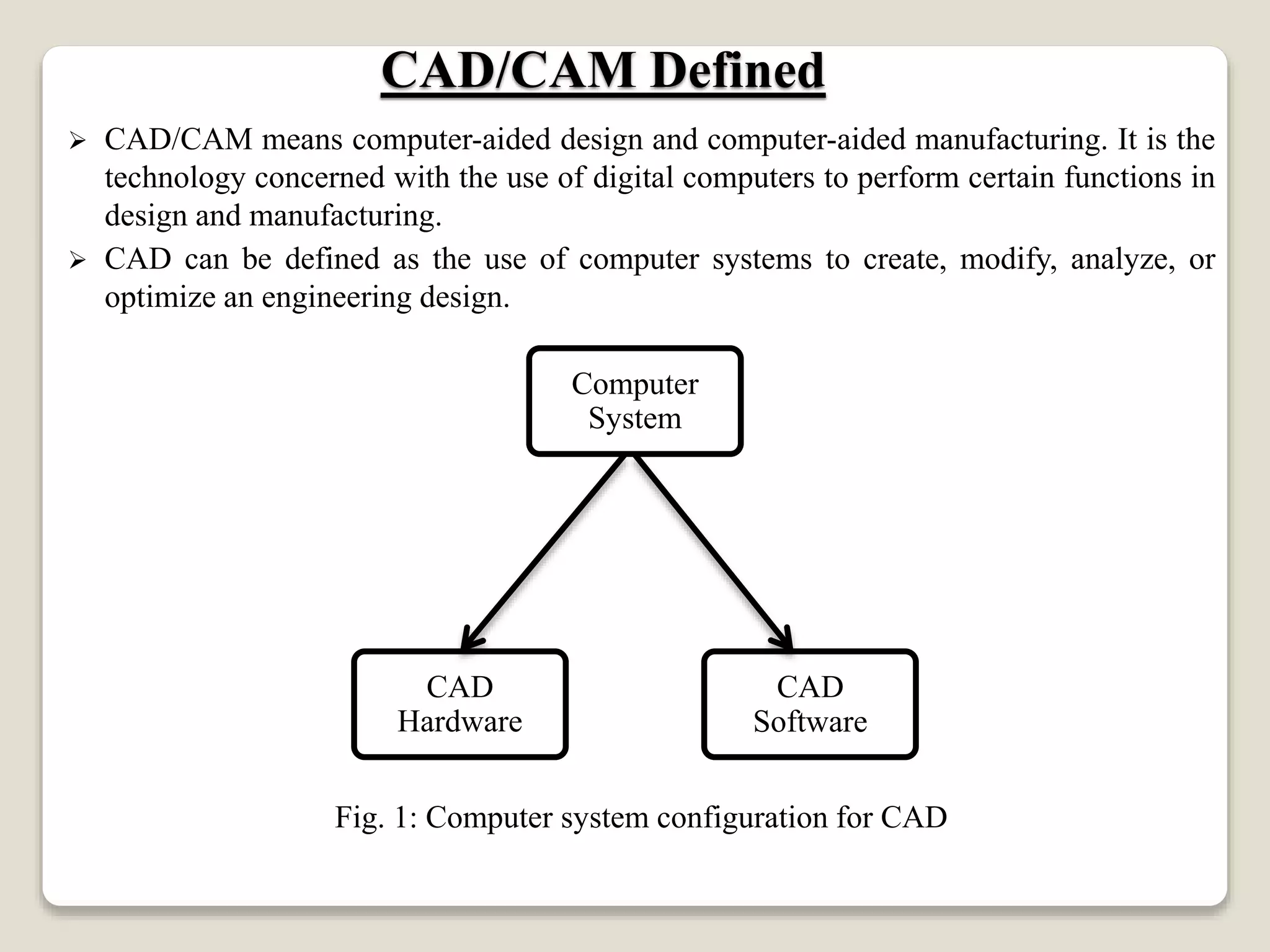
 CAD can be defined as the use of computer systems to create, modify, analyze, or
optimize an engineering design.
Fig. 1: Computer system configuration for CAD
CAD/CAM Defined
Computer
System
CAD
Software
CAD
Hardware
 CAM can be defined as the use of computer systems to plan, manage, and control the
operations of a manufacturing plant through either direct or indirect computer interface
with the plant’s production resources.
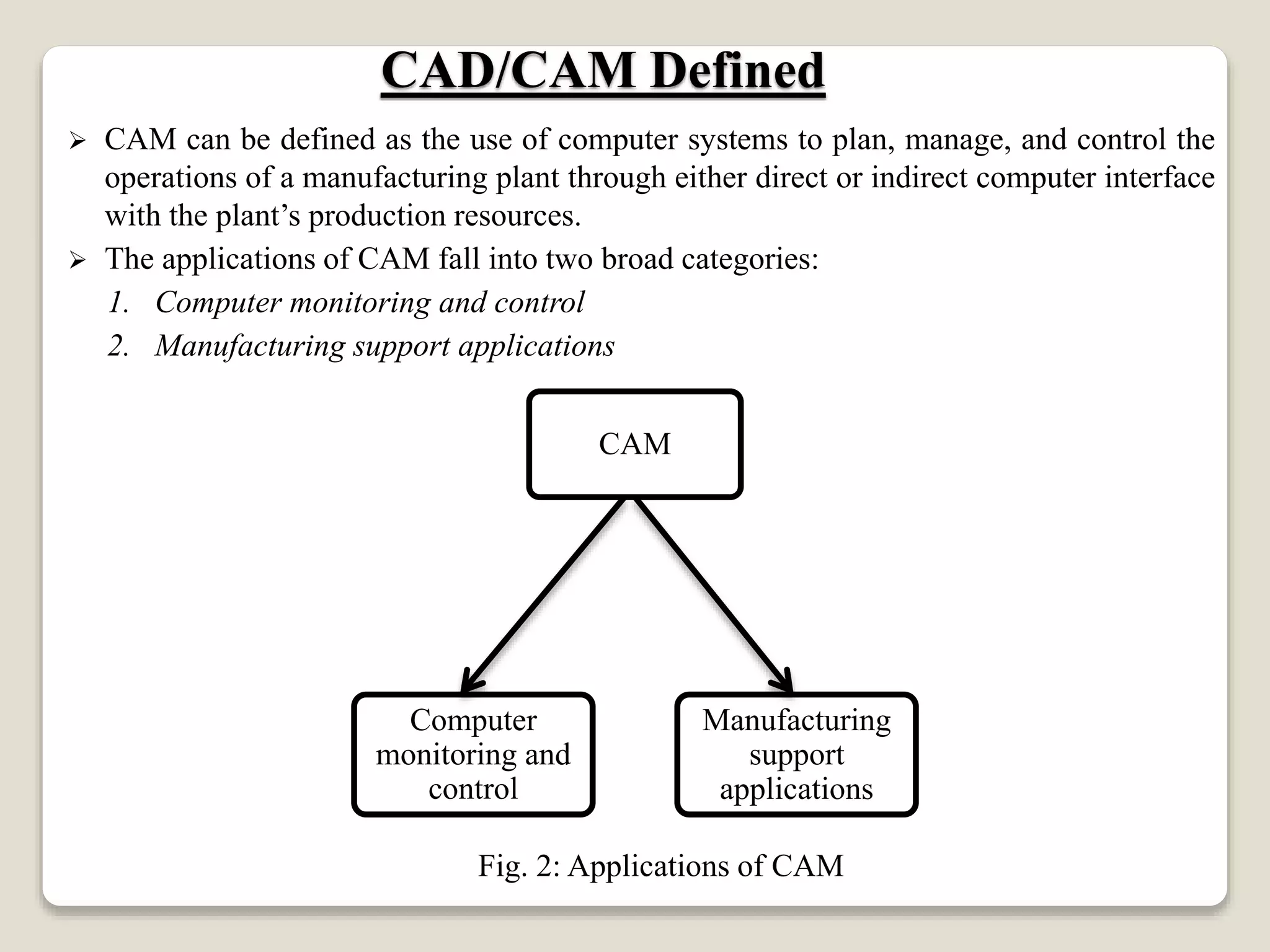
 The applications of CAM fall into two broad categories:
1. Computer monitoring and control
2. Manufacturing support applications
Fig. 2: Applications of CAM
CAD/CAM Defined
CAM
Manufacturing
support
applications
Computer
monitoring and
control
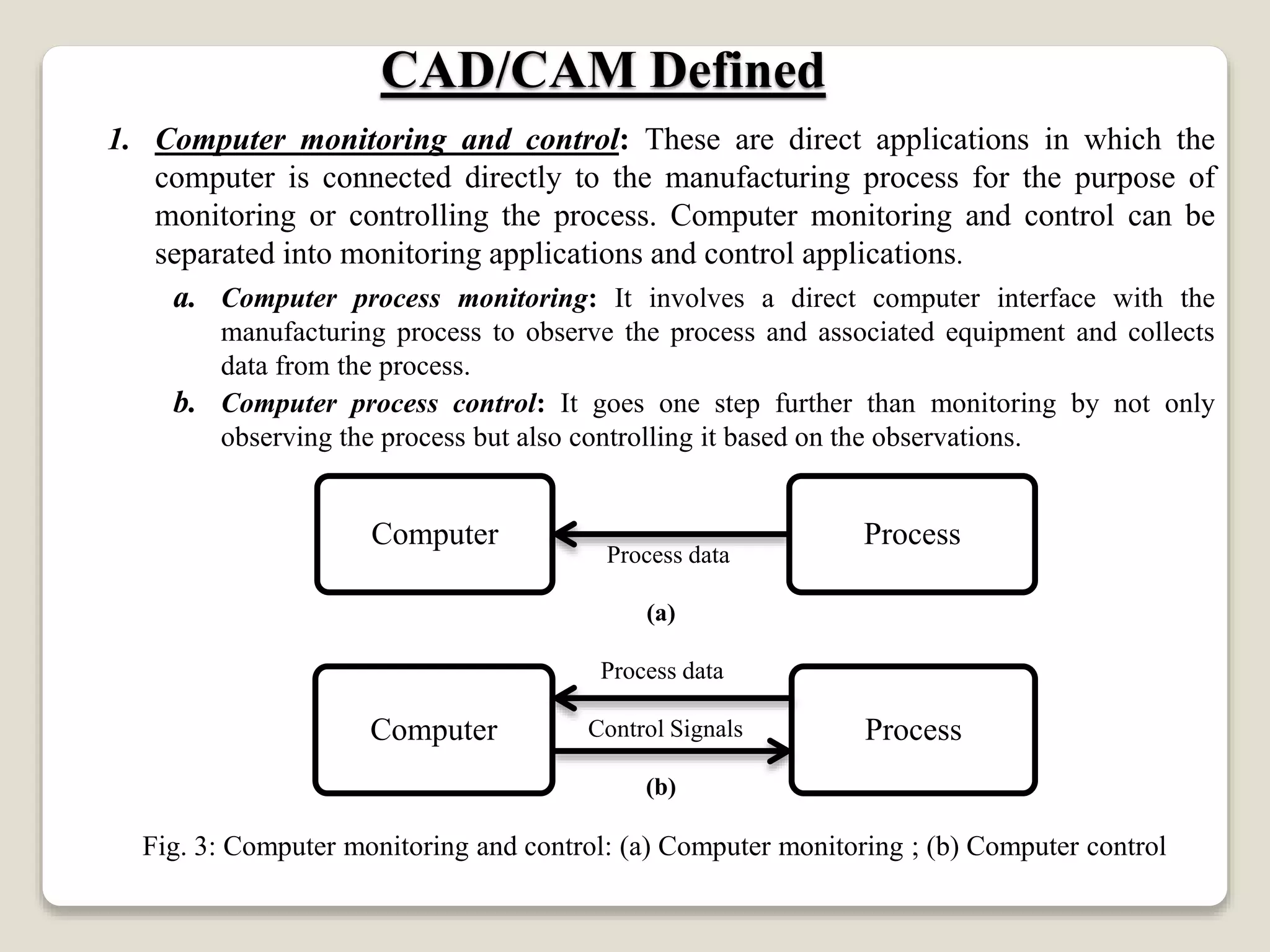
1. Computer monitoring and control: These are direct applications in which the
computer is connected directly to the manufacturing process for the purpose of
monitoring or controlling the process. Computer monitoring and control can be
separated into monitoring applications and control applications.
a. Computer process monitoring: It involves a direct computer interface with the
manufacturing process to observe the process and associated equipment and collects
data from the process.
b. Computer process control: It goes one step further than monitoring by not only
observing the process but also controlling it based on the observations.
Process data
(a)
Process data
Control Signals
(b)
Fig. 3: Computer monitoring and control: (a) Computer monitoring ; (b) Computer control
CAD/CAM Defined
ProcessComputer
ProcessComputer
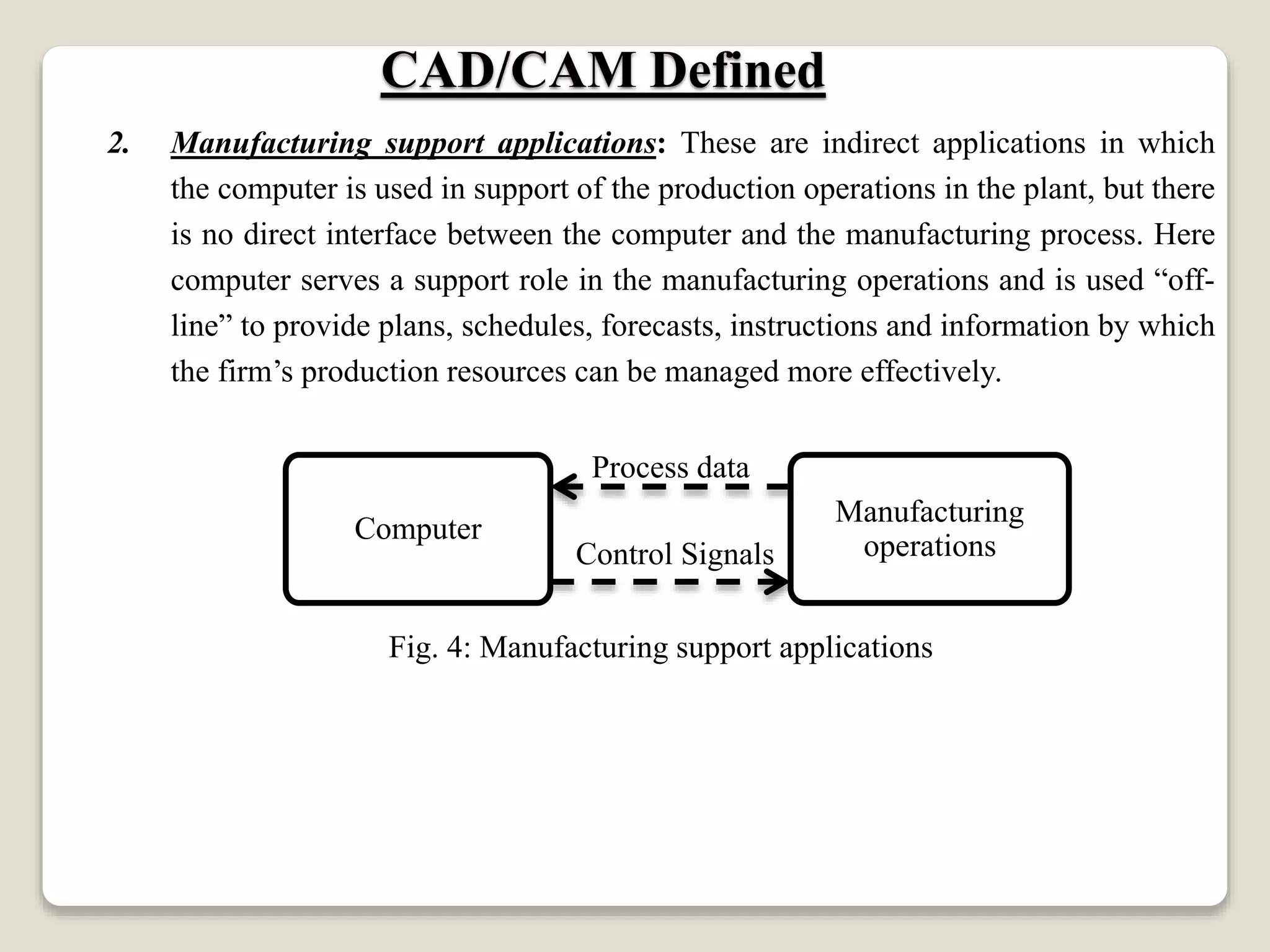
2. Manufacturing support applications: These are indirect applications in which
the computer is used in support of the production operations in the plant, but there
is no direct interface between the computer and the manufacturing process. Here
computer serves a support role in the manufacturing operations and is used “off-
line” to provide plans, schedules, forecasts, instructions and information by which
the firm’s production resources can be managed more effectively.
Process data
Control Signals
Fig. 4: Manufacturing support applications
CAD/CAM Defined
Manufacturing
operations
Computer
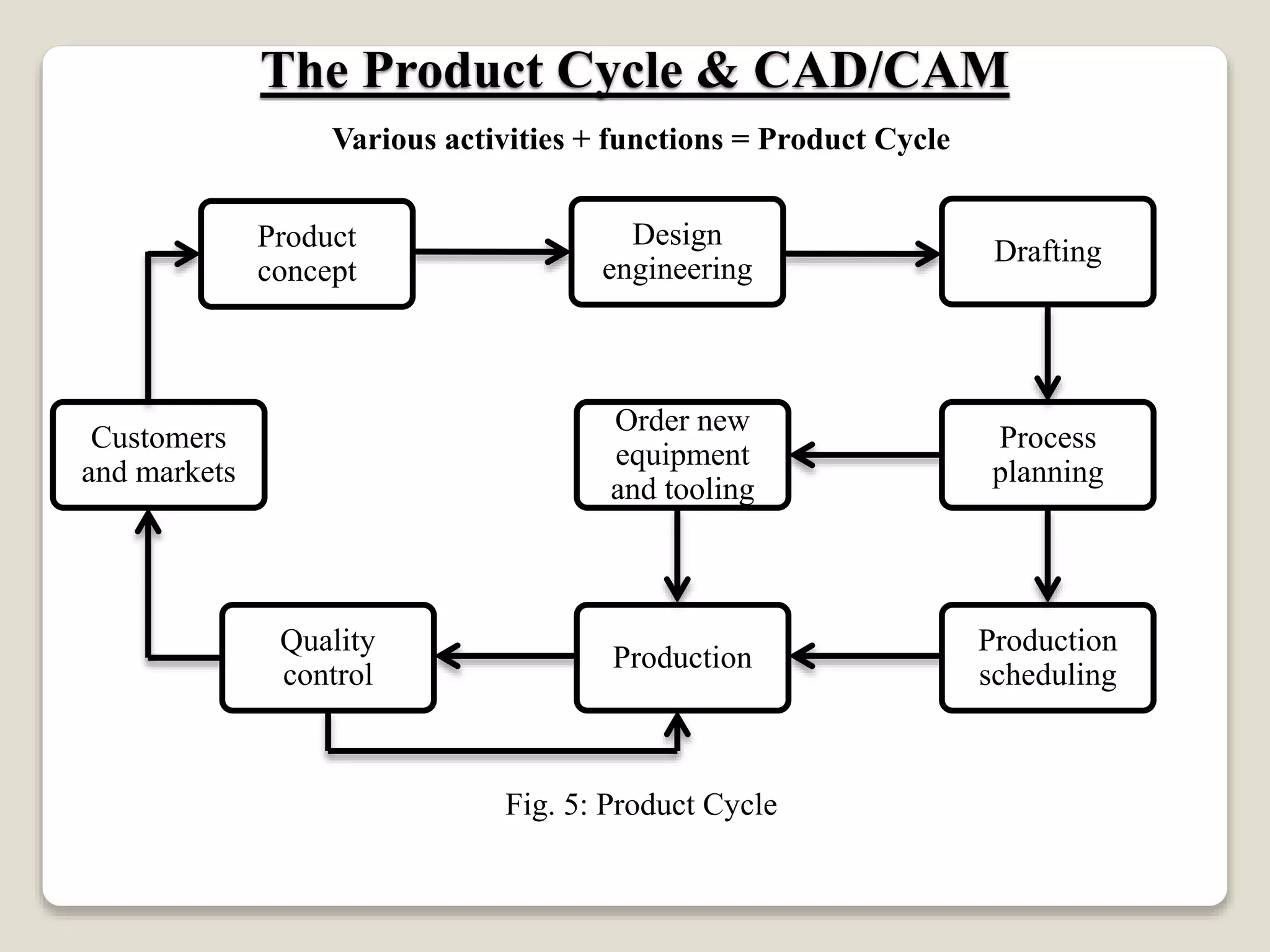
Various activities + functions = Product Cycle
Fig. 5: Product Cycle
The Product Cycle & CAD/CAM
Order new
equipment
and tooling
Process
planning
Drafting
Design
engineering
Product
concept
Customers
and markets
Quality
control
Production
Production
scheduling
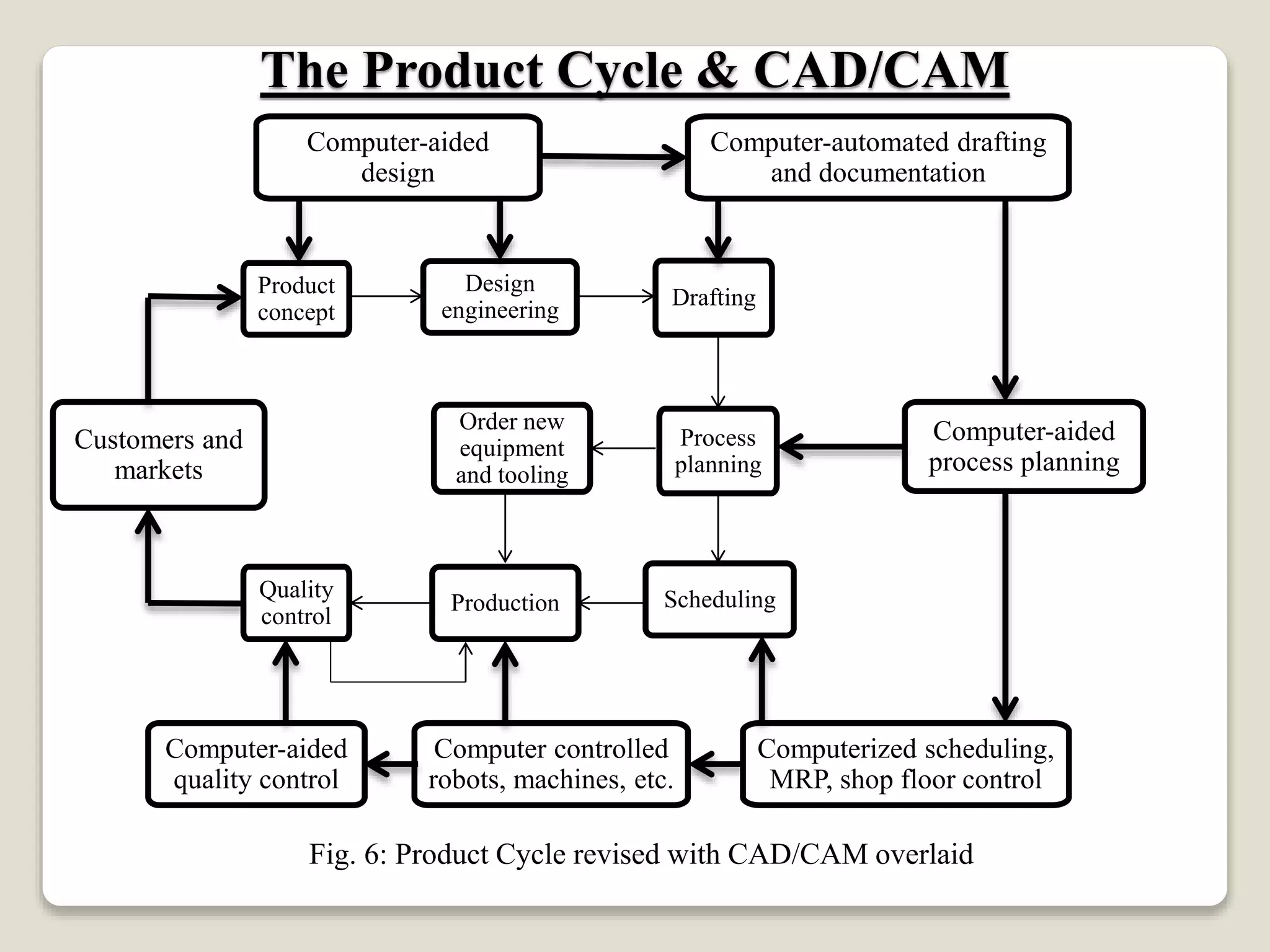
Fig. 6: Product Cycle revised with CAD/CAM overlaid
The Product Cycle & CAD/CAM
Order new
equipment
and tooling
Process
planning
Drafting
Design
engineering
Product
concept
Customers and
markets
Quality
control
Production Scheduling
Computer-aided
design
Computer-automated drafting
and documentation
Computer-aided
process planning
Computerized scheduling,
MRP, shop floor control
Computer controlled
robots, machines, etc.
Computer-aided
quality control
 The central and essential ingredient of CAD/CAM is the digital computer.
 The modern digital computer is an electronic machine that can perform mathematical
and logical calculations and data processing functions in accordance with a
predetermined program of instructions.
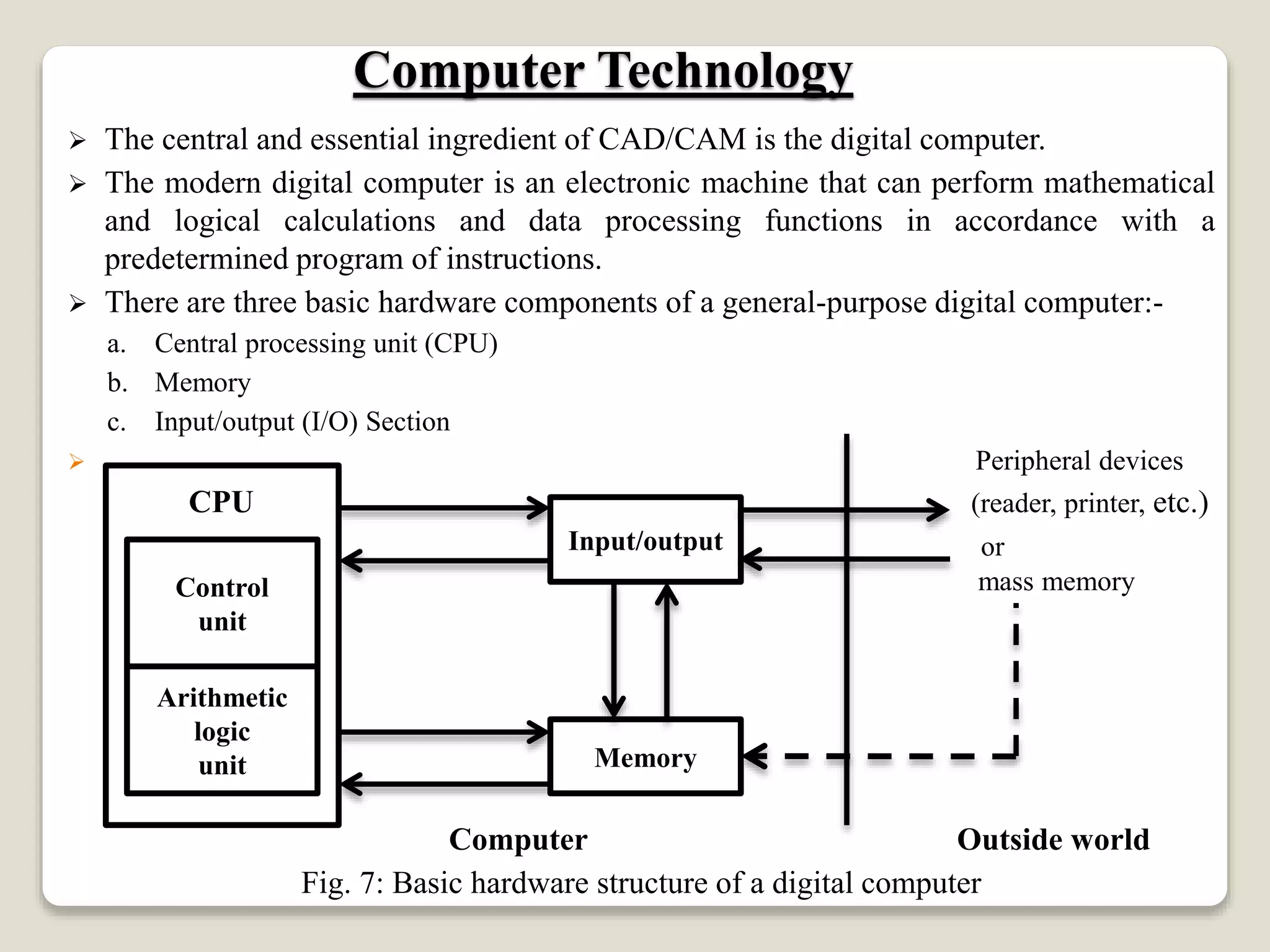
 There are three basic hardware components of a general-purpose digital computer:-
a. Central processing unit (CPU)
b. Memory
c. Input/output (I/O) Section
 Peripheral devices
CPU (reader, printer, etc.)
or
mass memory
Computer Outside world
Fig. 7: Basic hardware structure of a digital computer
Computer Technology
Control
unit
Arithmetic
logic
unit
Input/output
Memory
 Modern CAD systems are based on Interactive Computer Graphics (ICG).
 ICG is a system in which computer is used to create, transform, and display data in the
form of pictures or symbols.
 The ICG system and the human designer are the major components of a CAD system.
Interactive computer graphics is a tool used by the designer to solve a design problem.
In effect, the ICG system magnifies the powers of the designer. This has been referred
to as the synergistic effect.
 The designer performs the portion of the design process that is most suitable to human
intellectual skills (conceptualization, independent thinking) whereas the computer
performs the task best suited to its capabilities (speed of calculations, visual display,
storage of data), and the resulting system exceeds the sum of its components.
Fundamental reasons for implementing a CAD system
1. To increase the productivity of the designer.
2. To improve the quality of the design.
3. To improve communication.
4. To create a database for manufacturing.
Fundamentals of CAD
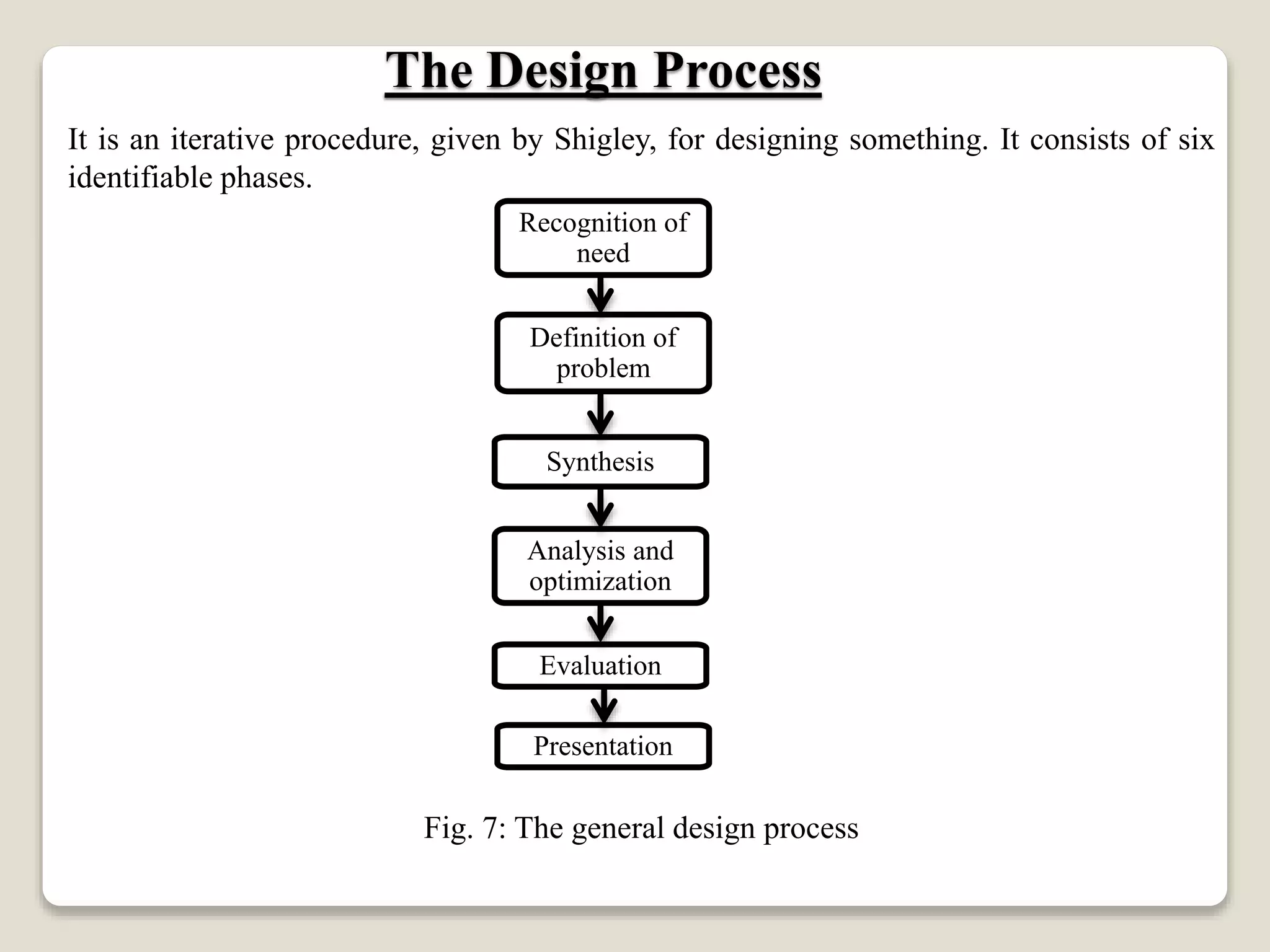
It is an iterative procedure, given by Shigley, for designing something. It consists of six
identifiable phases.
Fig. 7: The general design process
The Design Process
Recognition of
need
Evaluation
Synthesis
Analysis and
optimization
Presentation
Definition of
problem

Introduction to CAD/CAM

  • 1.
    INTRODUCTION TO COMPUTER AIDED DESIGN By DINBANDHU AssistantProfessor Vidya Vihar Institute of Technology, Purnea
  • 2.
    CAD/CAM definition The ProductCycle and CAD/CAM Introduction to Computer Technology Computer Programming Languages Fundamentals of CAD The Design Process The Application of Computers for design Benefits of CAD CAD Hardware CAD Software Contents
  • 3.
     CAD/CAM meanscomputer-aided design and computer-aided manufacturing. It is the technology concerned with the use of digital computers to perform certain functions in design and manufacturing.  CAD can be defined as the use of computer systems to create, modify, analyze, or optimize an engineering design. Fig. 1: Computer system configuration for CAD CAD/CAM Defined Computer System CAD Software CAD Hardware
  • 4.
     CAM canbe defined as the use of computer systems to plan, manage, and control the operations of a manufacturing plant through either direct or indirect computer interface with the plant’s production resources.  The applications of CAM fall into two broad categories: 1. Computer monitoring and control 2. Manufacturing support applications Fig. 2: Applications of CAM CAD/CAM Defined CAM Manufacturing support applications Computer monitoring and control
  • 5.
    1. Computer monitoringand control: These are direct applications in which the computer is connected directly to the manufacturing process for the purpose of monitoring or controlling the process. Computer monitoring and control can be separated into monitoring applications and control applications. a. Computer process monitoring: It involves a direct computer interface with the manufacturing process to observe the process and associated equipment and collects data from the process. b. Computer process control: It goes one step further than monitoring by not only observing the process but also controlling it based on the observations. Process data (a) Process data Control Signals (b) Fig. 3: Computer monitoring and control: (a) Computer monitoring ; (b) Computer control CAD/CAM Defined ProcessComputer ProcessComputer
  • 6.
    2. Manufacturing supportapplications: These are indirect applications in which the computer is used in support of the production operations in the plant, but there is no direct interface between the computer and the manufacturing process. Here computer serves a support role in the manufacturing operations and is used “off- line” to provide plans, schedules, forecasts, instructions and information by which the firm’s production resources can be managed more effectively. Process data Control Signals Fig. 4: Manufacturing support applications CAD/CAM Defined Manufacturing operations Computer
  • 7.
    Various activities +functions = Product Cycle Fig. 5: Product Cycle The Product Cycle & CAD/CAM Order new equipment and tooling Process planning Drafting Design engineering Product concept Customers and markets Quality control Production Production scheduling
  • 8.
    Fig. 6: ProductCycle revised with CAD/CAM overlaid The Product Cycle & CAD/CAM Order new equipment and tooling Process planning Drafting Design engineering Product concept Customers and markets Quality control Production Scheduling Computer-aided design Computer-automated drafting and documentation Computer-aided process planning Computerized scheduling, MRP, shop floor control Computer controlled robots, machines, etc. Computer-aided quality control
  • 9.
     The centraland essential ingredient of CAD/CAM is the digital computer.  The modern digital computer is an electronic machine that can perform mathematical and logical calculations and data processing functions in accordance with a predetermined program of instructions.  There are three basic hardware components of a general-purpose digital computer:- a. Central processing unit (CPU) b. Memory c. Input/output (I/O) Section  Peripheral devices CPU (reader, printer, etc.) or mass memory Computer Outside world Fig. 7: Basic hardware structure of a digital computer Computer Technology Control unit Arithmetic logic unit Input/output Memory
  • 10.
     Modern CADsystems are based on Interactive Computer Graphics (ICG).  ICG is a system in which computer is used to create, transform, and display data in the form of pictures or symbols.  The ICG system and the human designer are the major components of a CAD system. Interactive computer graphics is a tool used by the designer to solve a design problem. In effect, the ICG system magnifies the powers of the designer. This has been referred to as the synergistic effect.  The designer performs the portion of the design process that is most suitable to human intellectual skills (conceptualization, independent thinking) whereas the computer performs the task best suited to its capabilities (speed of calculations, visual display, storage of data), and the resulting system exceeds the sum of its components. Fundamental reasons for implementing a CAD system 1. To increase the productivity of the designer. 2. To improve the quality of the design. 3. To improve communication. 4. To create a database for manufacturing. Fundamentals of CAD
  • 11.
    It is aniterative procedure, given by Shigley, for designing something. It consists of six identifiable phases. Fig. 7: The general design process The Design Process Recognition of need Evaluation Synthesis Analysis and optimization Presentation Definition of problem