


LAYER COMMANDLAYER COMMAND
PRESENTATIONPRESENTATION
ADMEC MULTIMEDIA INSITITUTE
C-7/114, 2nd FLOOR, SECTOR- 7, ROHINI, NEW DELHI
PRESENTED BY:
ANKIT SINGH
LAYER COMMANDLAYER COMMAND
This command’s shortcut is LA (Enter).
In this command we can give the different
color for the different type of object and
different type of style also. We can edit the
object of the different type from the current
layer window. This command allows you to
create the different type of object. When we
using the layer command then open a layer
window. There are many types of sub tool to
modifying the object.
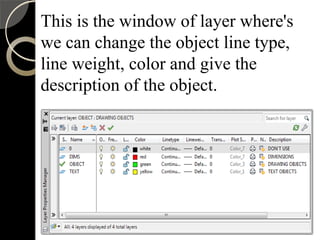
This is the window of layer where's
we can change the object line type,
line weight, color and give the
description of the object.
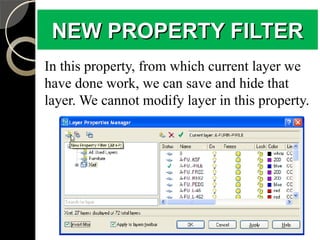
NEW PROPERTY FILTERNEW PROPERTY FILTER
In this property, from which current layer we
have done work, we can save and hide that
layer. We cannot modify layer in this property.
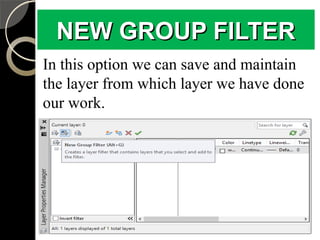
NEW GROUP FILTERNEW GROUP FILTER
In this option we can save and maintain
the layer from which layer we have done
our work.
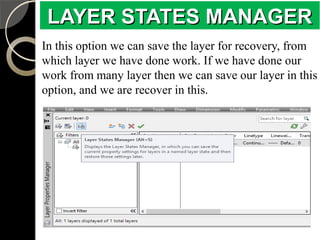
LAYER STATES MANAGERLAYER STATES MANAGER
In this option we can save the layer for recovery, from
which layer we have done work. If we have done our
work from many layer then we can save our layer in this
option, and we are recover in this.
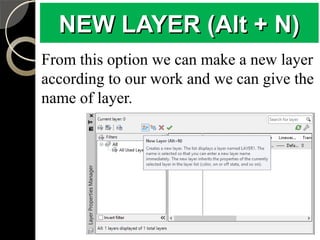
NEW LAYER (Alt + N)NEW LAYER (Alt + N)
From this option we can make a new layer
according to our work and we can give the
name of layer.
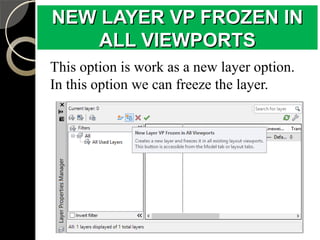
NEW LAYER VP FROZEN INNEW LAYER VP FROZEN IN
ALL VIEWPORTSALL VIEWPORTS
This option is work as a new layer option.
In this option we can freeze the layer.
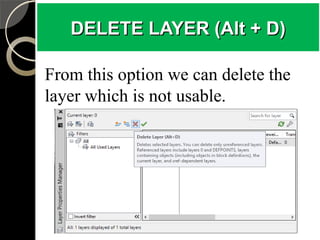
DELETE LAYER (Alt + D)DELETE LAYER (Alt + D)
From this option we can delete the
layer which is not usable.
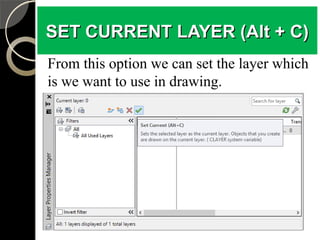
SET CURRENT LAYER (Alt + C)SET CURRENT LAYER (Alt + C)
From this option we can set the layer which
is we want to use in drawing.
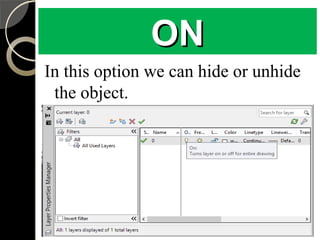
ONON
In this option we can hide or unhide
the object.
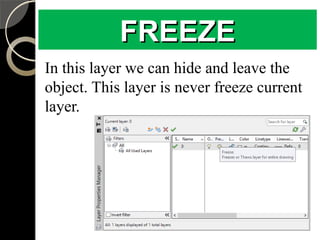
FREEZEFREEZE
In this layer we can hide and leave the
object. This layer is never freeze current
layer.
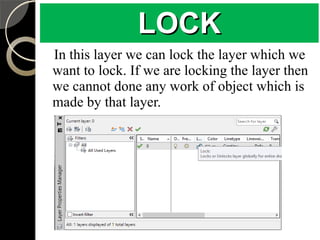
LOCKLOCK
In this layer we can lock the layer which we
want to lock. If we are locking the layer then
we cannot done any work of object which is
made by that layer.
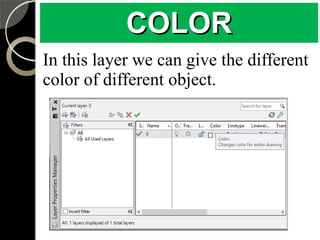
COLORCOLOR
In this layer we can give the different
color of different object.
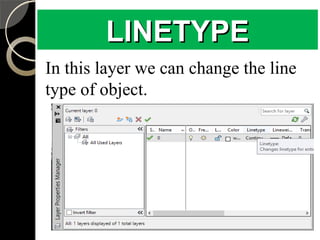
LINETYPELINETYPE
In this layer we can change the line
type of object.
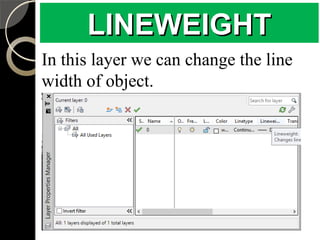
LINEWEIGHTLINEWEIGHT
In this layer we can change the line
width of object.

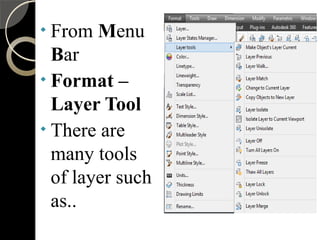
From Menu
Bar

Format –
Layer Tool

There are
many tools
of layer such
as..
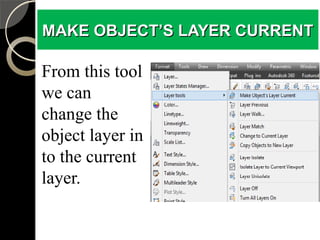
MAKE OBJECT’S LAYER CURRENTMAKE OBJECT’S LAYER CURRENT
From this tool
we can
change the
object layer in
to the current
layer.
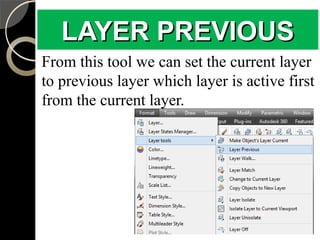
LAYER PREVIOUSLAYER PREVIOUS
From this tool we can set the current layer
to previous layer which layer is active first
from the current layer.
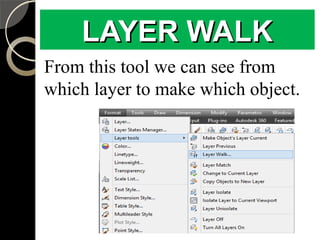
LAYER WALKLAYER WALK
From this tool we can see from
which layer to make which object.
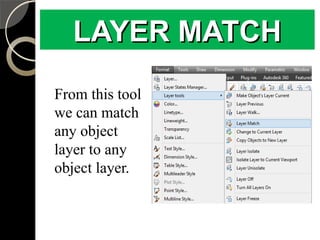
LAYER MATCHLAYER MATCH
From this tool
we can match
any object
layer to any
object layer.
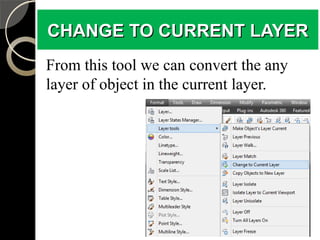
CHANGE TO CURRENT LAYERCHANGE TO CURRENT LAYER
From this tool we can convert the any
layer of object in the current layer.
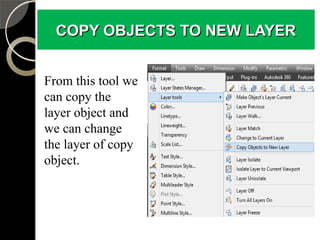
COPY OBJECTS TO NEW LAYERCOPY OBJECTS TO NEW LAYER
From this tool we
can copy the
layer object and
we can change
the layer of copy
object.
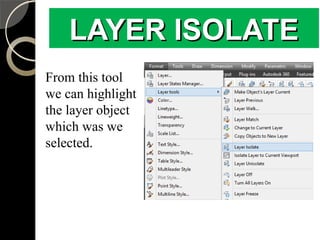
LAYER ISOLATELAYER ISOLATE
From this tool
we can highlight
the layer object
which was we
selected.
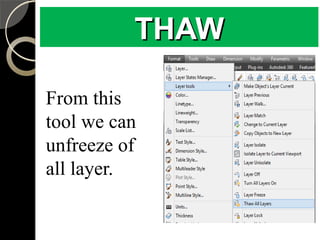
THAWTHAW
From this
tool we can
unfreeze of
all layer.
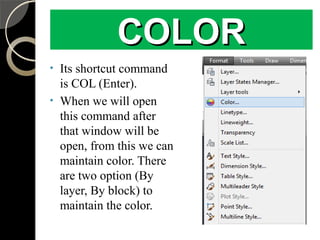
COLORCOLOR

Its shortcut command
is COL (Enter).

When we will open
this command after
that window will be
open, from this we can
maintain color. There
are two option (By
layer, By block) to
maintain the color.
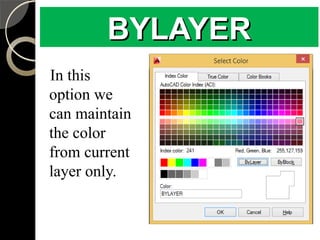
BYLAYER
In this
option we
can maintain
the color
from current
layer only.
BYLAYERBYLAYER
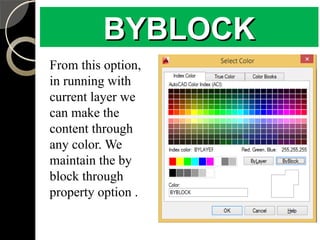
BYBLOCK
From this option,
in running with
current layer we
can make the
content through
any color. We
maintain the by
block through
property option .
BYBLOCKBYBLOCK
-- Contact Us -
ADMEC MULTIMEDIA INSTITUTE
Leader in Animation & Digital Media
Education
ISO 9001 : 2008 CERTIFIED
- Visit Our Websites -
www.admecindia.co.in
www.cadtraininginstitute.com
Phones: +91-9811-8181-22, +91-9911-7823-50
Thank
you

Layer command in AutoCAD

  • 1.
    LAYER COMMANDLAYER COMMAND PRESENTATIONPRESENTATION ADMECMULTIMEDIA INSITITUTE C-7/114, 2nd FLOOR, SECTOR- 7, ROHINI, NEW DELHI PRESENTED BY: ANKIT SINGH
  • 2.
    LAYER COMMANDLAYER COMMAND Thiscommand’s shortcut is LA (Enter). In this command we can give the different color for the different type of object and different type of style also. We can edit the object of the different type from the current layer window. This command allows you to create the different type of object. When we using the layer command then open a layer window. There are many types of sub tool to modifying the object.
  • 3.
    This is thewindow of layer where's we can change the object line type, line weight, color and give the description of the object.
  • 4.
    NEW PROPERTY FILTERNEWPROPERTY FILTER In this property, from which current layer we have done work, we can save and hide that layer. We cannot modify layer in this property.
  • 5.
    NEW GROUP FILTERNEWGROUP FILTER In this option we can save and maintain the layer from which layer we have done our work.
  • 6.
    LAYER STATES MANAGERLAYERSTATES MANAGER In this option we can save the layer for recovery, from which layer we have done work. If we have done our work from many layer then we can save our layer in this option, and we are recover in this.
  • 7.
    NEW LAYER (Alt+ N)NEW LAYER (Alt + N) From this option we can make a new layer according to our work and we can give the name of layer.
  • 8.
    NEW LAYER VPFROZEN INNEW LAYER VP FROZEN IN ALL VIEWPORTSALL VIEWPORTS This option is work as a new layer option. In this option we can freeze the layer.
  • 9.
    DELETE LAYER (Alt+ D)DELETE LAYER (Alt + D) From this option we can delete the layer which is not usable.
  • 10.
    SET CURRENT LAYER(Alt + C)SET CURRENT LAYER (Alt + C) From this option we can set the layer which is we want to use in drawing.
  • 11.
    ONON In this optionwe can hide or unhide the object.
  • 12.
    FREEZEFREEZE In this layerwe can hide and leave the object. This layer is never freeze current layer.
  • 13.
    LOCKLOCK In this layerwe can lock the layer which we want to lock. If we are locking the layer then we cannot done any work of object which is made by that layer.
  • 14.
    COLORCOLOR In this layerwe can give the different color of different object.
  • 15.
    LINETYPELINETYPE In this layerwe can change the line type of object.
  • 16.
    LINEWEIGHTLINEWEIGHT In this layerwe can change the line width of object.
  • 17.
     From Menu Bar  Format – LayerTool  There are many tools of layer such as..
  • 18.
    MAKE OBJECT’S LAYERCURRENTMAKE OBJECT’S LAYER CURRENT From this tool we can change the object layer in to the current layer.
  • 19.
    LAYER PREVIOUSLAYER PREVIOUS Fromthis tool we can set the current layer to previous layer which layer is active first from the current layer.
  • 20.
    LAYER WALKLAYER WALK Fromthis tool we can see from which layer to make which object.
  • 21.
    LAYER MATCHLAYER MATCH Fromthis tool we can match any object layer to any object layer.
  • 22.
    CHANGE TO CURRENTLAYERCHANGE TO CURRENT LAYER From this tool we can convert the any layer of object in the current layer.
  • 23.
    COPY OBJECTS TONEW LAYERCOPY OBJECTS TO NEW LAYER From this tool we can copy the layer object and we can change the layer of copy object.
  • 24.
    LAYER ISOLATELAYER ISOLATE Fromthis tool we can highlight the layer object which was we selected.
  • 25.
    THAWTHAW From this tool wecan unfreeze of all layer.
  • 26.
    COLORCOLOR  Its shortcut command isCOL (Enter).  When we will open this command after that window will be open, from this we can maintain color. There are two option (By layer, By block) to maintain the color.
  • 27.
    BYLAYER In this option we canmaintain the color from current layer only. BYLAYERBYLAYER
  • 28.
    BYBLOCK From this option, inrunning with current layer we can make the content through any color. We maintain the by block through property option . BYBLOCKBYBLOCK
  • 29.
    -- Contact Us- ADMEC MULTIMEDIA INSTITUTE Leader in Animation & Digital Media Education ISO 9001 : 2008 CERTIFIED - Visit Our Websites - www.admecindia.co.in www.cadtraininginstitute.com Phones: +91-9811-8181-22, +91-9911-7823-50
  • 30.