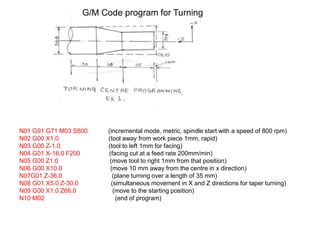
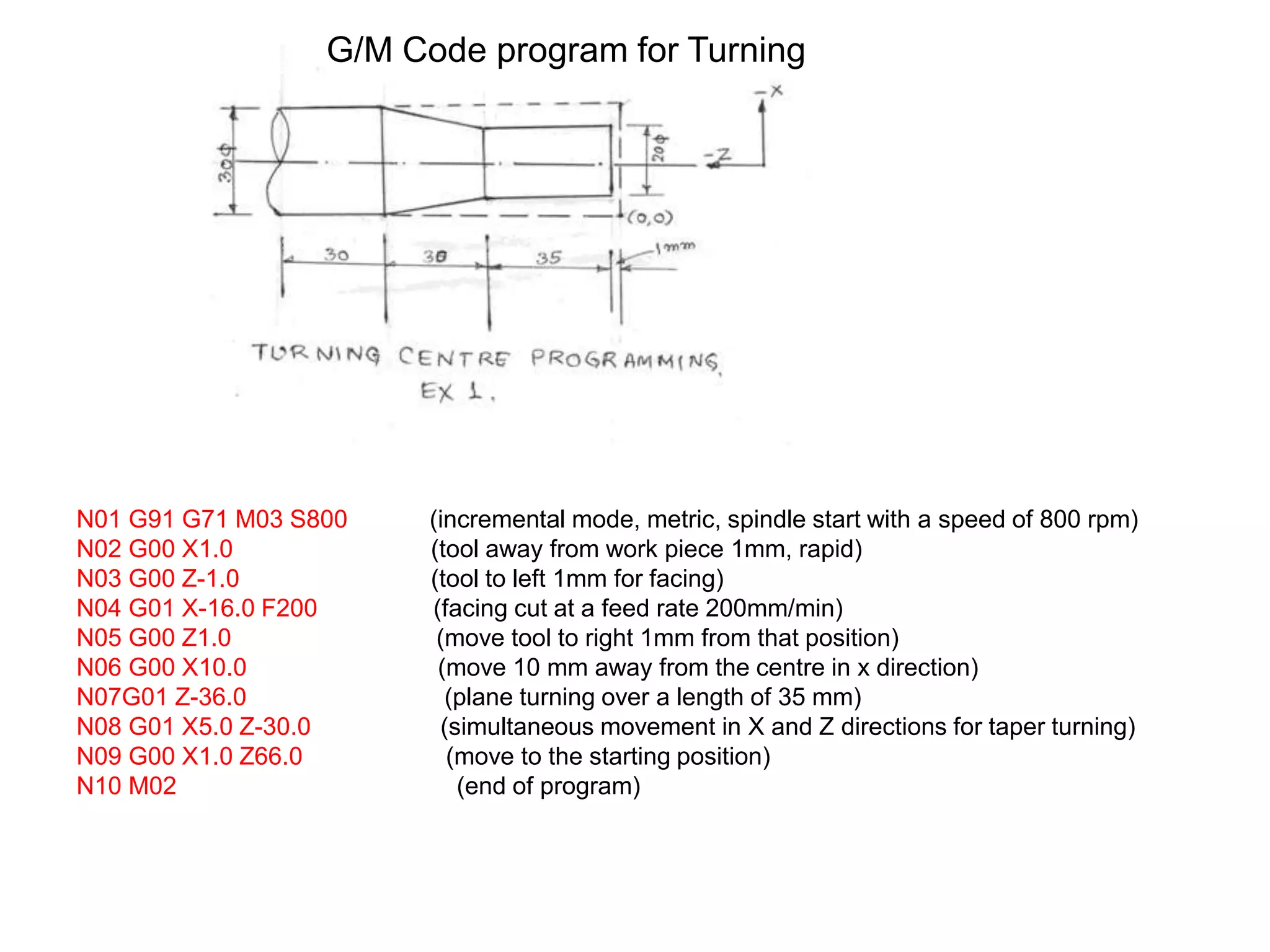
N01 G91 G71 M03 S800 (incremental mode, metric, spindle start with a speed of 800 rpm)
N02 G00 X1.0 (tool away from work piece 1mm, rapid)
N03 G00 Z-1.0 (tool to left 1mm for facing)
N04 G01 X-16.0 F200 (facing cut at a feed rate 200mm/min)
N05 G00 Z1.0 (move tool to right 1mm from that position)
N06 G00 X10.0 (move 10 mm away from the centre in x direction)
N07G01 Z-36.0 (plane turning over a length of 35 mm)
N08 G01 X5.0 Z-30.0 (simultaneous movement in X and Z directions for taper turning)
N09 G00 X1.0 Z66.0 (move to the starting position)
N10 M02 (end of program)
G/M Code program for Turning
APT (Automatically Programmed Tool)
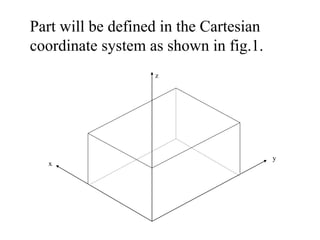
Part will be defined in the Cartesian
coordinate system as shown in fig.1.
y
z
x
11/19/2021
Part Programming
APT (Automatically Programmed Tool) is a
software compiler for simplifying numerical
control Programming.
Developed by MIT in 1959
APT is the most widely used processor
11/19/2021
APT
APT (Automatically Programmed Tool) is a
software compiler for simplifying numerical
control Programming.
Developed by MIT in 1959
APT is the most widely used processor
11/19/2021
APT Characteristics
•
Three-dimensional unbounded surfaces and points are
defined to represent the part to be made
•
Surfaces are defined in a X-Y-Z coordinate system
•
In Programming, the tool does all the moving; the part is
stationary.
•
Linear interpolation is used for curved tool paths
11/19/2021
APT Statement Types (5)
•
Identification
•
Geometry
•
Motion
•
Postprocessor (feed, speed, coolant, …
etc.)
•
Auxiliary (tool, tolerance, part, … etc.)
The general format for geometric statements is:
<Symbol> = Geometric Type/ Definitional
Modifiers
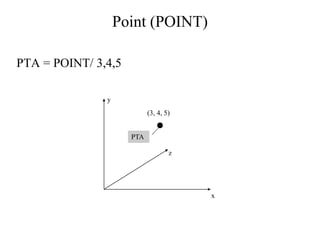
Point (POINT)
PTA
PTA = POINT/ 3,4,5
y
x
z
(3, 4, 5)
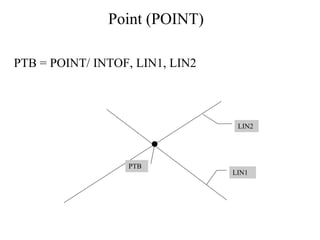
Point (POINT)
PTB = POINT/ INTOF, LIN1, LIN2
LIN2
LIN1
PTB
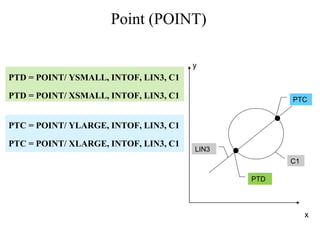
Point (POINT)
PTD = POINT/ YSMALL, INTOF, LIN3, C1
PTD = POINT/ XSMALL, INTOF, LIN3, C1
x
PTC
PTD
LIN3
C1
y
PTC = POINT/ YLARGE, INTOF, LIN3, C1
PTC = POINT/ XLARGE, INTOF, LIN3, C1
Point (POINT)
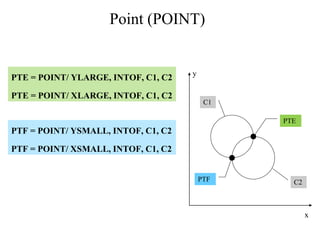
PTE = POINT/ YLARGE, INTOF, C1, C2
PTE = POINT/ XLARGE, INTOF, C1, C2
y
x
C1
C2
PTE
PTF
PTF = POINT/ YSMALL, INTOF, C1, C2
PTF = POINT/ XSMALL, INTOF, C1, C2
Point (POINT)
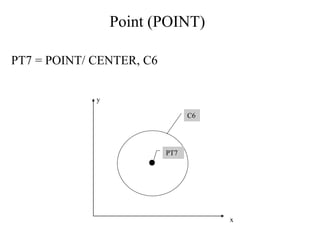
PT7 = POINT/ CENTER, C6
C6
PT7
y
x
Point (POINT)
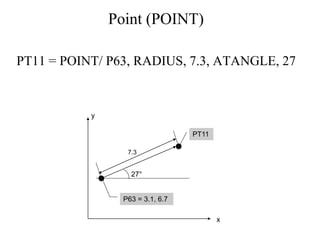
PT11 = POINT/ P63, RADIUS, 7.3, ATANGLE, 27
27°
P63 = 3.1, 6.7
PT11
y
x
7.3
Line (LINE)
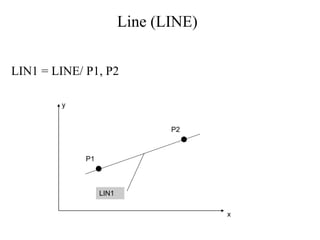
LIN1 = LINE/ P1, P2
LIN1
P1
P2
y
x
Line (LINE)
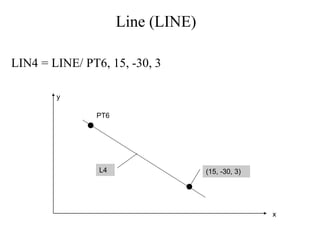
LIN4 = LINE/ PT6, 15, -30, 3
PT6
L4 (15, -30, 3)
y
x
Line (LINE)
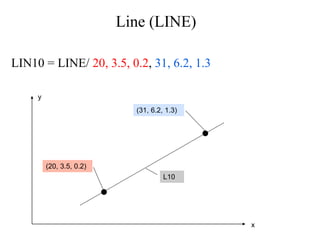
LIN10 = LINE/ 20, 3.5, 0.2, 31, 6.2, 1.3
(20, 3.5, 0.2)
L10
(31, 6.2, 1.3)
y
x
Line (LINE)
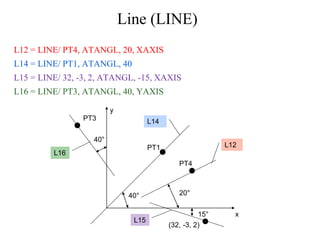
L12 = LINE/ PT4, ATANGL, 20, XAXIS
L14 = LINE/ PT1, ATANGL, 40
L15 = LINE/ 32, -3, 2, ATANGL, -15, XAXIS
L16 = LINE/ PT3, ATANGL, 40, YAXIS
y
x
L16
PT3
PT1
L14
L12
PT4
(32, -3, 2)
L15
40°
40° 20°
15°
Line (LINE)
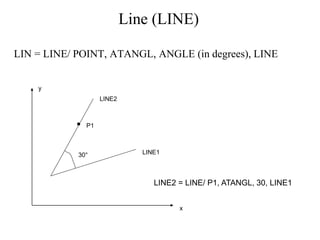
LIN = LINE/ POINT, ATANGL, ANGLE (in degrees), LINE
P1
LINE1
LINE2
x
y
LINE2 = LINE/ P1, ATANGL, 30, LINE1
30°
Line (LINE)
LIN = LINE/ SLOPE, SLOPE VALUE, INTERC, MODIFIER, d
where the slope value is y/x. The modifier options are [XAXIS,
YAXIS], and d is the corresponding intercept value on the selected
axis (i.e., modifier).
x
y
(6,0) Point of X-Intercept
LINE1
LINE1 = LINE/ SLOPE, 1, INTERC, XAXIS, 6
Line (LINE)
LIN = LINE/ ATANGL, DEGREES, INTERC, MODIFIER, d
The modifier options are [XAXIS, YAXIS], and d is the
corresponding intercept value on the selected axis (i.e., modifier).
x
y
d
LINE1
 = 30°
LINE1 = LINE/ ATANGL, 30, INTERC, XAXIS ,d
Line (LINE)
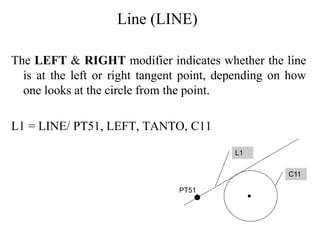
The LEFT & RIGHT modifier indicates whether the line
is at the left or right tangent point, depending on how
one looks at the circle from the point.
L1 = LINE/ PT51, LEFT, TANTO, C11
L1
C11
PT51
Line (LINE)
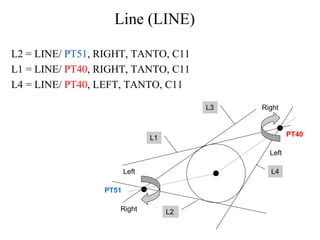
L2 = LINE/ PT51, RIGHT, TANTO, C11
L1 = LINE/ PT40, RIGHT, TANTO, C11
L4 = LINE/ PT40, LEFT, TANTO, C11
Left
Right
PT51
L1
L3
L4
L2
Right
Left
PT40
Line (LINE)
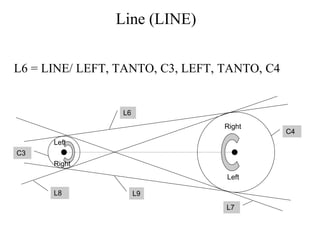
L6 = LINE/ LEFT, TANTO, C3, LEFT, TANTO, C4
C3
L6
L9
C4
L8
L7
Right
Left
Left
Right
Line (LINE)
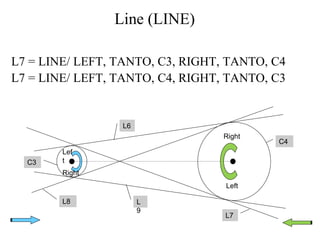
L7 = LINE/ LEFT, TANTO, C3, RIGHT, TANTO, C4
L7 = LINE/ LEFT, TANTO, C4, RIGHT, TANTO, C3
C3
L6
L
9
C4
L8
L7
Right
Left
Lef
t
Right
Line (LINE)
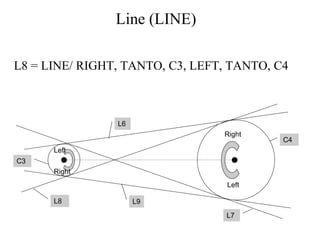
L8 = LINE/ RIGHT, TANTO, C3, LEFT, TANTO, C4
C3
L6
L9
C4
L8
L7
Right
Left
Left
Right
Line (LINE)
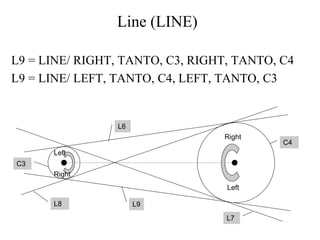
L9 = LINE/ RIGHT, TANTO, C3, RIGHT, TANTO, C4
L9 = LINE/ LEFT, TANTO, C4, LEFT, TANTO, C3
C3
L6
L9
C4
L8
L7
Right
Left
Left
Right
Line (LINE)
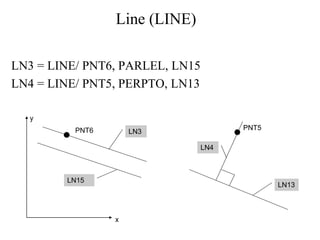
LN3 = LINE/ PNT6, PARLEL, LN15
LN4 = LINE/ PNT5, PERPTO, LN13
y
x
PNT6 LN3
LN15
LN13
PNT5
LN4
Plane (PLANE)
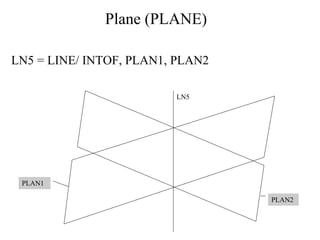
LN5 = LINE/ INTOF, PLAN1, PLAN2
PLAN2
PLAN1
LN5
Plane (PLANE)
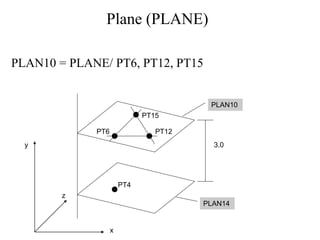
PLAN10 = PLANE/ PT6, PT12, PT15
PT15
PT12
PT6
PT4
y
x
z
PLAN10
PLAN14
3.0
Plane (PLANE)
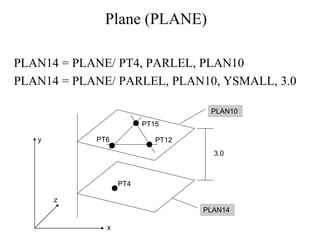
PLAN14 = PLANE/ PT4, PARLEL, PLAN10
PLAN14 = PLANE/ PARLEL, PLAN10, YSMALL, 3.0
PT15
PT12
PT6
PT4
y
x
z
PLAN10
PLAN14
3.0
Circle (CIRCLE)
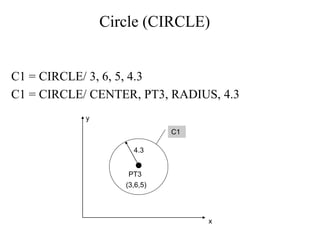
C1 = CIRCLE/ 3, 6, 5, 4.3
C1 = CIRCLE/ CENTER, PT3, RADIUS, 4.3
PT3
(3,6,5)
C1
y
x
4.3
Circle (CIRCLE)
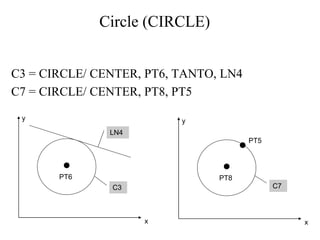
C3 = CIRCLE/ CENTER, PT6, TANTO, LN4
C7 = CIRCLE/ CENTER, PT8, PT5
C3
y
x
LN4
PT6
C7
y
x
PT8
PT5
Circle (CIRCLE)
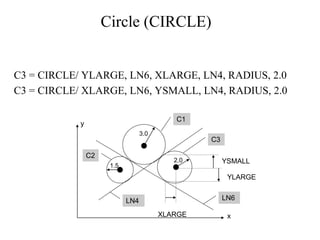
C3 = CIRCLE/ YLARGE, LN6, XLARGE, LN4, RADIUS, 2.0
C3 = CIRCLE/ XLARGE, LN6, YSMALL, LN4, RADIUS, 2.0
1.5
3.0
2.0
y
x
C1
C3
C2
LN4 LN6
YSMALL
YLARGE
XLARGE
Circle (CIRCLE)
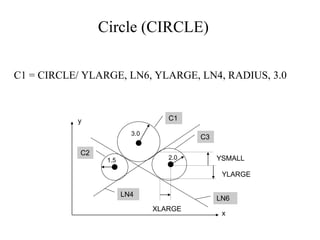
C1 = CIRCLE/ YLARGE, LN6, YLARGE, LN4, RADIUS, 3.0
1.5
3.0
2.0
y
x
C1
C3
C2
LN4
LN6
YSMALL
YLARGE
XLARGE
Circle (CIRCLE)
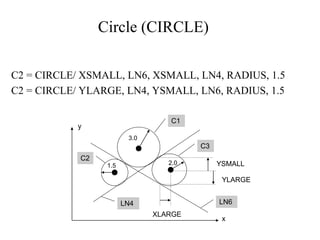
C2 = CIRCLE/ XSMALL, LN6, XSMALL, LN4, RADIUS, 1.5
C2 = CIRCLE/ YLARGE, LN4, YSMALL, LN6, RADIUS, 1.5
1.5
3.0
2.0
y
x
C1
C3
C2
LN4 LN6
YSMALL
YLARGE
XLARGE
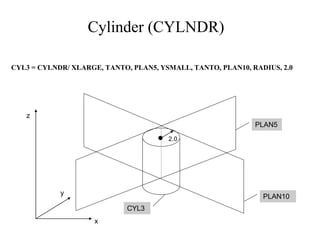
Cylinder (CYLNDR)
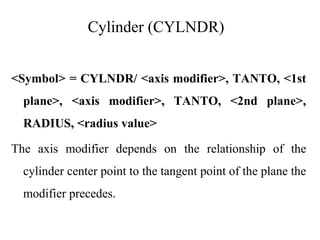
<Symbol> = CYLNDR/ <axis modifier>, TANTO, <1st
plane>, <axis modifier>, TANTO, <2nd plane>,
RADIUS, <radius value>
The axis modifier depends on the relationship of the
cylinder center point to the tangent point of the plane the
modifier precedes.
Cylinder (CYLNDR)
CYL3 = CYLNDR/ XLARGE, TANTO, PLAN5, YSMALL, TANTO, PLAN10, RADIUS, 2.0
2.0
CYL3
PLAN5
PLAN10
z
x
y
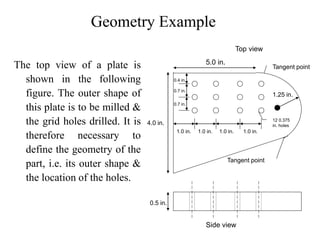
Geometry Example
The top view of a plate is
shown in the following
figure. The outer shape of
this plate is to be milled &
the grid holes drilled. It is
therefore necessary to
define the geometry of the
part, i.e. its outer shape &
the location of the holes.
5.0 in.
4.0 in.
Tangent point
Tangent point
1.25 in.
Side view
Top view
1.0 in. 1.0 in. 1.0 in. 1.0 in.
0.4 in.
0.7 in.
0.7 in.
12 0.375
in. holes
0.5 in.
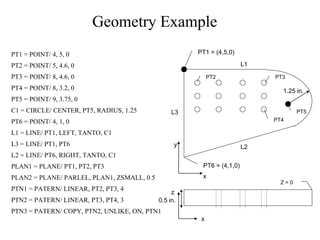
Geometry Example
PT1 = POINT/ 4, 5, 0
PT2 = POINT/ 5, 4.6, 0
PT3 = POINT/ 8, 4.6, 0
PT4 = POINT/ 8, 3.2, 0
PT5 = POINT/ 9, 3.75, 0
C1 = CIRCLE/ CENTER, PT5, RADIUS, 1.25
PT6 = POINT/ 4, 1, 0
L1 = LINE/ PT1, LEFT, TANTO, C1
L3 = LINE/ PT1, PT6
L2 = LINE/ PT6, RIGHT, TANTO, C1
PLAN1 = PLANE/ PT1, PT2, PT3
PLAN2 = PLANE/ PARLEL, PLAN1, ZSMALL, 0.5
PTN1 = PATERN/ LINEAR, PT2, PT3, 4
PTN2 = PATERN/ LINEAR, PT3, PT4, 3
PTN3 = PATERN/ COPY, PTN2, UNLIKE, ON, PTN1
PT1 = (4,5,0)
L3
PT6 = (4,1,0)
L2
L1
1.25 in.
PT2 PT3
PT4
Z = 0
y
x
z
x
PT5
0.5 in.
The Machining Plan
Point- to- point: refers to operations requiring fast
movement (straight- line motions) to a point followed by
a manufacturing operation at that point.
FROM/ <point location>: denotes that the point location is a starting
point for the tool, with the end of the tool at that point.
GOTO/ <point location>: refers to a rapid, straight- line move to the
point location indicated.
GODELTA/ <coordinate increments>: commands the tool to move
incremental distance from the current position.
The Machining Plan
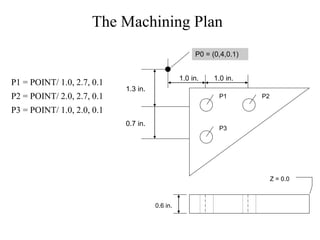
P1 = POINT/ 1.0, 2.7, 0.1
P2 = POINT/ 2.0, 2.7, 0.1
P3 = POINT/ 1.0, 2.0, 0.1
P0 = (0,4,0.1)
1.3 in.
0.7 in.
1.0 in. 1.0 in.
P1 P2
P3
Z = 0.0
0.6 in.
The Machining Plan
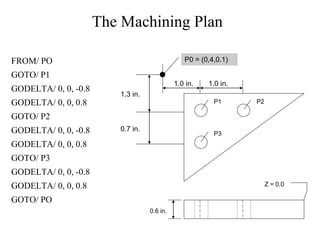
FROM/ PO
GOTO/ P1
GODELTA/ 0, 0, -0.8
GODELTA/ 0, 0, 0.8
GOTO/ P2
GODELTA/ 0, 0, -0.8
GODELTA/ 0, 0, 0.8
GOTO/ P3
GODELTA/ 0, 0, -0.8
GODELTA/ 0, 0, 0.8
GOTO/ PO
P0 = (0,4,0.1)
1.3 in.
0.7 in.
1.0 in. 1.0 in.
P1 P2
P3
Z = 0.0
0.6 in.
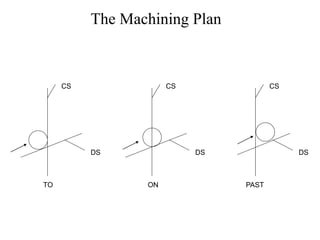
The Machining Plan:
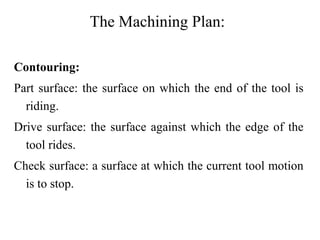
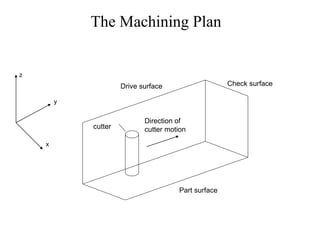
Contouring:
Part surface: the surface on which the end of the tool is
riding.
Drive surface: the surface against which the edge of the
tool rides.
Check surface: a surface at which the current tool motion
is to stop.
The Machining Plan
cutter
z
x
y
Direction of
cutter motion
Drive surface Check surface
Part surface
The Machining Plan
CS
DS
TO
CS
DS
ON
CS
DS
PAST
The Machining Plan
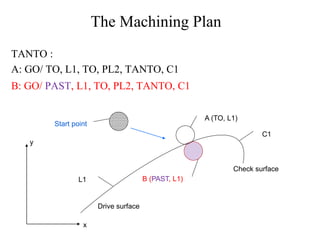
TANTO :
A: GO/ TO, L1, TO, PL2, TANTO, C1
Start point
L1
Drive surface
A (TO, L1)
B (PAST, L1)
C1
Check surface
y
x
B: GO/ PAST, L1, TO, PL2, TANTO, C1
The Machining Plan
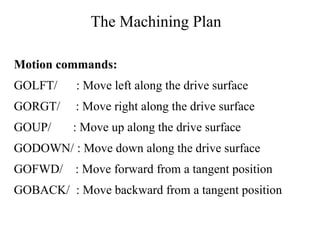
Motion commands:
GOLFT/ : Move left along the drive surface
GORGT/ : Move right along the drive surface
GOUP/ : Move up along the drive surface
GODOWN/ : Move down along the drive surface
GOFWD/ : Move forward from a tangent position
GOBACK/ : Move backward from a tangent position
The Machining Plan
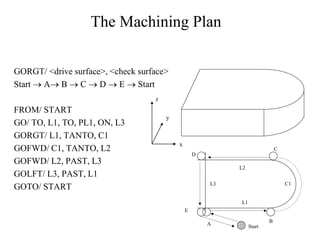
GORGT/ <drive surface>, <check surface>
Start  A B  C  D  E  Start
FROM/ START
GO/ TO, L1, TO, PL1, ON, L3
GORGT/ L1, TANTO, C1
GOFWD/ C1, TANTO, L2
GOFWD/ L2, PAST, L3
GOLFT/ L3, PAST, L1
GOTO/ START
z
y
x
C
B
C1
Start
A
E
D
L3
L1
L2
Machining Specifications
Postprocessor commands for a particular machine tool are:
MACHIN/ : used to specify the machine tool and call the
postprocessor for that tool:
MACHIN/ DRILL, 3
COOLNT/ : allows the coolant fluid to be turned on or off:
COOLNT/ MIST
COOLNT/ FLOOD
COOLNT/ OFF
Machining Specifications
FEDRAT/ : specifies the feed rate for moving the tool along the
part surface in inches per minute:
FEDRAT/ 4.5
SPINDL/ : gives the spindle rotation speed in revolutions per
minute:
SPINDL/ 850
TURRET/ : can be used to call a specific tool from an automatic
tool changer:
TURRET/ 11
Machining Specifications
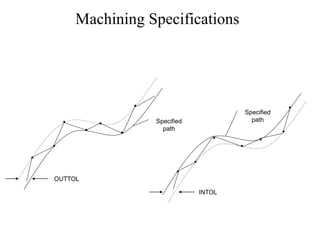
TOLERANCE SETTING: Nonlinear motion is accomplished in
straight-line segments, and INTOL/ and OUTTOL/ statements
dictate the number of straight-line segments to be generated.
INTOL/ 0.0015
OUTTOL/ 0.001
Machining Specifications
OUTTOL
Specified
path
Specified
path
INTOL
Machining Specifications
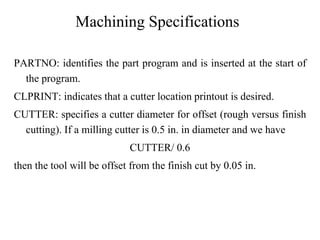
PARTNO: identifies the part program and is inserted at the start of
the program.
CLPRINT: indicates that a cutter location printout is desired.
CUTTER: specifies a cutter diameter for offset (rough versus finish
cutting). If a milling cutter is 0.5 in. in diameter and we have
CUTTER/ 0.6
then the tool will be offset from the finish cut by 0.05 in.
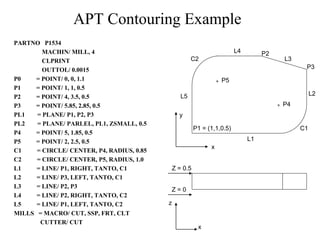
APT Contouring Example
PARTNO P1534
MACHIN/ MILL, 4
CLPRINT
OUTTOL/ 0.0015
P0 = POINT/ 0, 0, 1.1
P1 = POINT/ 1, 1, 0.5
P2 = POINT/ 4, 3.5, 0.5
P3 = POINT/ 5.85, 2.85, 0.5
PL1 = PLANE/ P1, P2, P3
PL2 = PLANE/ PARLEL, PL1, ZSMALL, 0.5
P4 = POINT/ 5, 1.85, 0.5
P5 = POINT/ 2, 2.5, 0.5
C1 = CIRCLE/ CENTER, P4, RADIUS, 0.85
C2 = CIRCLE/ CENTER, P5, RADIUS, 1.0
L1 = LINE/ P1, RIGHT, TANTO, C1
L2 = LINE/ P3, LEFT, TANTO, C1
L3 = LINE/ P2, P3
L4 = LINE/ P2, RIGHT, TANTO, C2
L5 = LINE/ P1, LEFT, TANTO, C2
MILLS = MACRO/ CUT, SSP, FRT, CLT
CUTTER/ CUT
L1
L4
C2
L5
C1
L3
L2
P1 = (1,1,0.5)
P2
P5
P4
x
y
Z = 0.5
Z = 0
z
x
P3
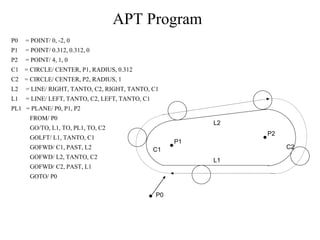
APT Program
P0 = POINT/ 0, -2, 0
P1 = POINT/ 0.312, 0.312, 0
P2 = POINT/ 4, 1, 0
C1 = CIRCLE/ CENTER, P1, RADIUS, 0.312
C2 = CIRCLE/ CENTER, P2, RADIUS, 1
L2 = LINE/ RIGHT, TANTO, C2, RIGHT, TANTO, C1
L1 = LINE/ LEFT, TANTO, C2, LEFT, TANTO, C1
PL1 = PLANE/ P0, P1, P2
FROM/ P0
GO/TO, L1, TO, PL1, TO, C2
GOLFT/ L1, TANTO, C1
GOFWD/ C1, PAST, L2
GOFWD/ L2, TANTO, C2
GOFWD/ C2, PAST, L1
GOTO/ P0
P1
P2
L2
L1
C1 C2
P0
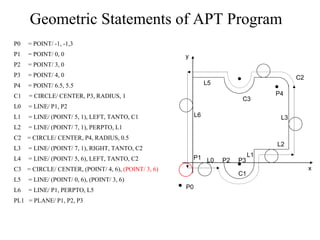
Geometric Statements of APT Program
P0 = POINT/ -1, -1,3
P1 = POINT/ 0, 0
P2 = POINT/ 3, 0
P3 = POINT/ 4, 0
P4 = POINT/ 6.5, 5.5
C1 = CIRCLE/ CENTER, P3, RADIUS, 1
L0 = LINE/ P1, P2
L1 = LINE/ (POINT/ 5, 1), LEFT, TANTO, C1
L2 = LINE/ (POINT/ 7, 1), PERPTO, L1
C2 = CIRCLE/ CENTER, P4, RADIUS, 0.5
L3 = LINE/ (POINT/ 7, 1), RIGHT, TANTO, C2
L4 = LINE/ (POINT/ 5, 6), LEFT, TANTO, C2
C3 = CIRCLE/ CENTER, (POINT/ 4, 6), (POINT/ 3, 6)
L5 = LINE/ (POINT/ 0, 6), (POINT/ 3, 6)
L6 = LINE/ P1, PERPTO, L5
PL1 = PLANE/ P1, P2, P3
x
y
P0
P1 P2 P3
P4
C1
L0
L1
L2
L3
C2
C3
L5
L6
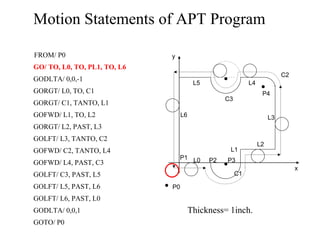
Motion Statements of APT Program
FROM/ P0
GO/ TO, L0, TO, PL1, TO, L6
GODLTA/ 0,0,-1
GORGT/ L0, TO, C1
GORGT/ C1, TANTO, L1
GOFWD/ L1, TO, L2
GORGT/ L2, PAST, L3
GOLFT/ L3, TANTO, C2
GOFWD/ C2, TANTO, L4
GOFWD/ L4, PAST, C3
GOLFT/ C3, PAST, L5
GOLFT/ L5, PAST, L6
GOLFT/ L6, PAST, L0
GODLTA/ 0,0,1
GOTO/ P0
x
y
P0
P1 P2 P3
P4
C1
L0
L1
L2
L3
C2
C3
L5
L6
L4
Thickness= 1inch.
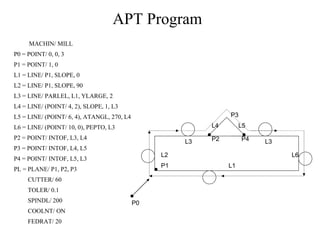
APT Program
MACHIN/ MILL
P0 = POINT/ 0, 0, 3
P1 = POINT/ 1, 0
L1 = LINE/ P1, SLOPE, 0
L2 = LINE/ P1, SLOPE, 90
L3 = LINE/ PARLEL, L1, YLARGE, 2
L4 = LINE/ (POINT/ 4, 2), SLOPE, 1, L3
L5 = LINE/ (POINT/ 6, 4), ATANGL, 270, L4
L6 = LINE/ (POINT/ 10, 0), PEPTO, L3
P2 = POINT/ INTOF, L3, L4
P3 = POINT/ INTOF, L4, L5
P4 = POINT/ INTOF, L5, L3
PL = PLANE/ P1, P2, P3
CUTTER/ 60
TOLER/ 0.1
SPINDL/ 200
COOLNT/ ON
FEDRAT/ 20
P1 L1
L3 L3
L2 L6
L5
L4
P2 P4
P3
P0
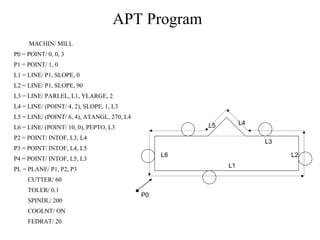
APT Program
MACHIN/ MILL
P0 = POINT/ 0, 0, 3
P1 = POINT/ 1, 0
L1 = LINE/ P1, SLOPE, 0
L2 = LINE/ P1, SLOPE, 90
L3 = LINE/ PARLEL, L1, YLARGE, 2
L4 = LINE/ (POINT/ 4, 2), SLOPE, 1, L3
L5 = LINE/ (POINT/ 6, 4), ATANGL, 270, L4
L6 = LINE/ (POINT/ 10, 0), PEPTO, L3
P2 = POINT/ INTOF, L3, L4
P3 = POINT/ INTOF, L4, L5
P4 = POINT/ INTOF, L5, L3
PL = PLANE/ P1, P2, P3
CUTTER/ 60
TOLER/ 0.1
SPINDL/ 200
COOLNT/ ON
FEDRAT/ 20
L1
L3
L6 L2
L4
L5
P0

APT part programming

  • 1.
    N01 G91 G71M03 S800 (incremental mode, metric, spindle start with a speed of 800 rpm) N02 G00 X1.0 (tool away from work piece 1mm, rapid) N03 G00 Z-1.0 (tool to left 1mm for facing) N04 G01 X-16.0 F200 (facing cut at a feed rate 200mm/min) N05 G00 Z1.0 (move tool to right 1mm from that position) N06 G00 X10.0 (move 10 mm away from the centre in x direction) N07G01 Z-36.0 (plane turning over a length of 35 mm) N08 G01 X5.0 Z-30.0 (simultaneous movement in X and Z directions for taper turning) N09 G00 X1.0 Z66.0 (move to the starting position) N10 M02 (end of program) G/M Code program for Turning
  • 2.
  • 3.
    Part will bedefined in the Cartesian coordinate system as shown in fig.1. y z x
  • 4.
    11/19/2021 Part Programming APT (AutomaticallyProgrammed Tool) is a software compiler for simplifying numerical control Programming. Developed by MIT in 1959 APT is the most widely used processor
  • 5.
    11/19/2021 APT APT (Automatically ProgrammedTool) is a software compiler for simplifying numerical control Programming. Developed by MIT in 1959 APT is the most widely used processor
  • 6.
    11/19/2021 APT Characteristics • Three-dimensional unboundedsurfaces and points are defined to represent the part to be made • Surfaces are defined in a X-Y-Z coordinate system • In Programming, the tool does all the moving; the part is stationary. • Linear interpolation is used for curved tool paths
  • 7.
    11/19/2021 APT Statement Types(5) • Identification • Geometry • Motion • Postprocessor (feed, speed, coolant, … etc.) • Auxiliary (tool, tolerance, part, … etc.)
  • 8.
    The general formatfor geometric statements is: <Symbol> = Geometric Type/ Definitional Modifiers
  • 9.
    Point (POINT) PTA PTA =POINT/ 3,4,5 y x z (3, 4, 5)
  • 10.
    Point (POINT) PTB =POINT/ INTOF, LIN1, LIN2 LIN2 LIN1 PTB
  • 11.
    Point (POINT) PTD =POINT/ YSMALL, INTOF, LIN3, C1 PTD = POINT/ XSMALL, INTOF, LIN3, C1 x PTC PTD LIN3 C1 y PTC = POINT/ YLARGE, INTOF, LIN3, C1 PTC = POINT/ XLARGE, INTOF, LIN3, C1
  • 12.
    Point (POINT) PTE =POINT/ YLARGE, INTOF, C1, C2 PTE = POINT/ XLARGE, INTOF, C1, C2 y x C1 C2 PTE PTF PTF = POINT/ YSMALL, INTOF, C1, C2 PTF = POINT/ XSMALL, INTOF, C1, C2
  • 13.
    Point (POINT) PT7 =POINT/ CENTER, C6 C6 PT7 y x
  • 14.
    Point (POINT) PT11 =POINT/ P63, RADIUS, 7.3, ATANGLE, 27 27° P63 = 3.1, 6.7 PT11 y x 7.3
  • 15.
    Line (LINE) LIN1 =LINE/ P1, P2 LIN1 P1 P2 y x
  • 16.
    Line (LINE) LIN4 =LINE/ PT6, 15, -30, 3 PT6 L4 (15, -30, 3) y x
  • 17.
    Line (LINE) LIN10 =LINE/ 20, 3.5, 0.2, 31, 6.2, 1.3 (20, 3.5, 0.2) L10 (31, 6.2, 1.3) y x
  • 18.
    Line (LINE) L12 =LINE/ PT4, ATANGL, 20, XAXIS L14 = LINE/ PT1, ATANGL, 40 L15 = LINE/ 32, -3, 2, ATANGL, -15, XAXIS L16 = LINE/ PT3, ATANGL, 40, YAXIS y x L16 PT3 PT1 L14 L12 PT4 (32, -3, 2) L15 40° 40° 20° 15°
  • 19.
    Line (LINE) LIN =LINE/ POINT, ATANGL, ANGLE (in degrees), LINE P1 LINE1 LINE2 x y LINE2 = LINE/ P1, ATANGL, 30, LINE1 30°
  • 20.
    Line (LINE) LIN =LINE/ SLOPE, SLOPE VALUE, INTERC, MODIFIER, d where the slope value is y/x. The modifier options are [XAXIS, YAXIS], and d is the corresponding intercept value on the selected axis (i.e., modifier). x y (6,0) Point of X-Intercept LINE1 LINE1 = LINE/ SLOPE, 1, INTERC, XAXIS, 6
  • 21.
    Line (LINE) LIN =LINE/ ATANGL, DEGREES, INTERC, MODIFIER, d The modifier options are [XAXIS, YAXIS], and d is the corresponding intercept value on the selected axis (i.e., modifier). x y d LINE1  = 30° LINE1 = LINE/ ATANGL, 30, INTERC, XAXIS ,d
  • 22.
    Line (LINE) The LEFT& RIGHT modifier indicates whether the line is at the left or right tangent point, depending on how one looks at the circle from the point. L1 = LINE/ PT51, LEFT, TANTO, C11 L1 C11 PT51
  • 23.
    Line (LINE) L2 =LINE/ PT51, RIGHT, TANTO, C11 L1 = LINE/ PT40, RIGHT, TANTO, C11 L4 = LINE/ PT40, LEFT, TANTO, C11 Left Right PT51 L1 L3 L4 L2 Right Left PT40
  • 24.
    Line (LINE) L6 =LINE/ LEFT, TANTO, C3, LEFT, TANTO, C4 C3 L6 L9 C4 L8 L7 Right Left Left Right
  • 25.
    Line (LINE) L7 =LINE/ LEFT, TANTO, C3, RIGHT, TANTO, C4 L7 = LINE/ LEFT, TANTO, C4, RIGHT, TANTO, C3 C3 L6 L 9 C4 L8 L7 Right Left Lef t Right
  • 26.
    Line (LINE) L8 =LINE/ RIGHT, TANTO, C3, LEFT, TANTO, C4 C3 L6 L9 C4 L8 L7 Right Left Left Right
  • 27.
    Line (LINE) L9 =LINE/ RIGHT, TANTO, C3, RIGHT, TANTO, C4 L9 = LINE/ LEFT, TANTO, C4, LEFT, TANTO, C3 C3 L6 L9 C4 L8 L7 Right Left Left Right
  • 28.
    Line (LINE) LN3 =LINE/ PNT6, PARLEL, LN15 LN4 = LINE/ PNT5, PERPTO, LN13 y x PNT6 LN3 LN15 LN13 PNT5 LN4
  • 29.
    Plane (PLANE) LN5 =LINE/ INTOF, PLAN1, PLAN2 PLAN2 PLAN1 LN5
  • 30.
    Plane (PLANE) PLAN10 =PLANE/ PT6, PT12, PT15 PT15 PT12 PT6 PT4 y x z PLAN10 PLAN14 3.0
  • 31.
    Plane (PLANE) PLAN14 =PLANE/ PT4, PARLEL, PLAN10 PLAN14 = PLANE/ PARLEL, PLAN10, YSMALL, 3.0 PT15 PT12 PT6 PT4 y x z PLAN10 PLAN14 3.0
  • 32.
    Circle (CIRCLE) C1 =CIRCLE/ 3, 6, 5, 4.3 C1 = CIRCLE/ CENTER, PT3, RADIUS, 4.3 PT3 (3,6,5) C1 y x 4.3
  • 33.
    Circle (CIRCLE) C3 =CIRCLE/ CENTER, PT6, TANTO, LN4 C7 = CIRCLE/ CENTER, PT8, PT5 C3 y x LN4 PT6 C7 y x PT8 PT5
  • 34.
    Circle (CIRCLE) C3 =CIRCLE/ YLARGE, LN6, XLARGE, LN4, RADIUS, 2.0 C3 = CIRCLE/ XLARGE, LN6, YSMALL, LN4, RADIUS, 2.0 1.5 3.0 2.0 y x C1 C3 C2 LN4 LN6 YSMALL YLARGE XLARGE
  • 35.
    Circle (CIRCLE) C1 =CIRCLE/ YLARGE, LN6, YLARGE, LN4, RADIUS, 3.0 1.5 3.0 2.0 y x C1 C3 C2 LN4 LN6 YSMALL YLARGE XLARGE
  • 36.
    Circle (CIRCLE) C2 =CIRCLE/ XSMALL, LN6, XSMALL, LN4, RADIUS, 1.5 C2 = CIRCLE/ YLARGE, LN4, YSMALL, LN6, RADIUS, 1.5 1.5 3.0 2.0 y x C1 C3 C2 LN4 LN6 YSMALL YLARGE XLARGE
  • 37.
    Cylinder (CYLNDR) <Symbol> =CYLNDR/ <axis modifier>, TANTO, <1st plane>, <axis modifier>, TANTO, <2nd plane>, RADIUS, <radius value> The axis modifier depends on the relationship of the cylinder center point to the tangent point of the plane the modifier precedes.
  • 38.
    Cylinder (CYLNDR) CYL3 =CYLNDR/ XLARGE, TANTO, PLAN5, YSMALL, TANTO, PLAN10, RADIUS, 2.0 2.0 CYL3 PLAN5 PLAN10 z x y
  • 39.
    Geometry Example The topview of a plate is shown in the following figure. The outer shape of this plate is to be milled & the grid holes drilled. It is therefore necessary to define the geometry of the part, i.e. its outer shape & the location of the holes. 5.0 in. 4.0 in. Tangent point Tangent point 1.25 in. Side view Top view 1.0 in. 1.0 in. 1.0 in. 1.0 in. 0.4 in. 0.7 in. 0.7 in. 12 0.375 in. holes 0.5 in.
  • 40.
    Geometry Example PT1 =POINT/ 4, 5, 0 PT2 = POINT/ 5, 4.6, 0 PT3 = POINT/ 8, 4.6, 0 PT4 = POINT/ 8, 3.2, 0 PT5 = POINT/ 9, 3.75, 0 C1 = CIRCLE/ CENTER, PT5, RADIUS, 1.25 PT6 = POINT/ 4, 1, 0 L1 = LINE/ PT1, LEFT, TANTO, C1 L3 = LINE/ PT1, PT6 L2 = LINE/ PT6, RIGHT, TANTO, C1 PLAN1 = PLANE/ PT1, PT2, PT3 PLAN2 = PLANE/ PARLEL, PLAN1, ZSMALL, 0.5 PTN1 = PATERN/ LINEAR, PT2, PT3, 4 PTN2 = PATERN/ LINEAR, PT3, PT4, 3 PTN3 = PATERN/ COPY, PTN2, UNLIKE, ON, PTN1 PT1 = (4,5,0) L3 PT6 = (4,1,0) L2 L1 1.25 in. PT2 PT3 PT4 Z = 0 y x z x PT5 0.5 in.
  • 41.
    The Machining Plan Point-to- point: refers to operations requiring fast movement (straight- line motions) to a point followed by a manufacturing operation at that point. FROM/ <point location>: denotes that the point location is a starting point for the tool, with the end of the tool at that point. GOTO/ <point location>: refers to a rapid, straight- line move to the point location indicated. GODELTA/ <coordinate increments>: commands the tool to move incremental distance from the current position.
  • 42.
    The Machining Plan P1= POINT/ 1.0, 2.7, 0.1 P2 = POINT/ 2.0, 2.7, 0.1 P3 = POINT/ 1.0, 2.0, 0.1 P0 = (0,4,0.1) 1.3 in. 0.7 in. 1.0 in. 1.0 in. P1 P2 P3 Z = 0.0 0.6 in.
  • 43.
    The Machining Plan FROM/PO GOTO/ P1 GODELTA/ 0, 0, -0.8 GODELTA/ 0, 0, 0.8 GOTO/ P2 GODELTA/ 0, 0, -0.8 GODELTA/ 0, 0, 0.8 GOTO/ P3 GODELTA/ 0, 0, -0.8 GODELTA/ 0, 0, 0.8 GOTO/ PO P0 = (0,4,0.1) 1.3 in. 0.7 in. 1.0 in. 1.0 in. P1 P2 P3 Z = 0.0 0.6 in.
  • 44.
    The Machining Plan: Contouring: Partsurface: the surface on which the end of the tool is riding. Drive surface: the surface against which the edge of the tool rides. Check surface: a surface at which the current tool motion is to stop.
  • 45.
    The Machining Plan cutter z x y Directionof cutter motion Drive surface Check surface Part surface
  • 46.
  • 47.
    The Machining Plan TANTO: A: GO/ TO, L1, TO, PL2, TANTO, C1 Start point L1 Drive surface A (TO, L1) B (PAST, L1) C1 Check surface y x B: GO/ PAST, L1, TO, PL2, TANTO, C1
  • 48.
    The Machining Plan Motioncommands: GOLFT/ : Move left along the drive surface GORGT/ : Move right along the drive surface GOUP/ : Move up along the drive surface GODOWN/ : Move down along the drive surface GOFWD/ : Move forward from a tangent position GOBACK/ : Move backward from a tangent position
  • 49.
    The Machining Plan GORGT/<drive surface>, <check surface> Start  A B  C  D  E  Start FROM/ START GO/ TO, L1, TO, PL1, ON, L3 GORGT/ L1, TANTO, C1 GOFWD/ C1, TANTO, L2 GOFWD/ L2, PAST, L3 GOLFT/ L3, PAST, L1 GOTO/ START z y x C B C1 Start A E D L3 L1 L2
  • 50.
    Machining Specifications Postprocessor commandsfor a particular machine tool are: MACHIN/ : used to specify the machine tool and call the postprocessor for that tool: MACHIN/ DRILL, 3 COOLNT/ : allows the coolant fluid to be turned on or off: COOLNT/ MIST COOLNT/ FLOOD COOLNT/ OFF
  • 51.
    Machining Specifications FEDRAT/ :specifies the feed rate for moving the tool along the part surface in inches per minute: FEDRAT/ 4.5 SPINDL/ : gives the spindle rotation speed in revolutions per minute: SPINDL/ 850 TURRET/ : can be used to call a specific tool from an automatic tool changer: TURRET/ 11
  • 52.
    Machining Specifications TOLERANCE SETTING:Nonlinear motion is accomplished in straight-line segments, and INTOL/ and OUTTOL/ statements dictate the number of straight-line segments to be generated. INTOL/ 0.0015 OUTTOL/ 0.001
  • 53.
  • 54.
    Machining Specifications PARTNO: identifiesthe part program and is inserted at the start of the program. CLPRINT: indicates that a cutter location printout is desired. CUTTER: specifies a cutter diameter for offset (rough versus finish cutting). If a milling cutter is 0.5 in. in diameter and we have CUTTER/ 0.6 then the tool will be offset from the finish cut by 0.05 in.
  • 55.
    APT Contouring Example PARTNOP1534 MACHIN/ MILL, 4 CLPRINT OUTTOL/ 0.0015 P0 = POINT/ 0, 0, 1.1 P1 = POINT/ 1, 1, 0.5 P2 = POINT/ 4, 3.5, 0.5 P3 = POINT/ 5.85, 2.85, 0.5 PL1 = PLANE/ P1, P2, P3 PL2 = PLANE/ PARLEL, PL1, ZSMALL, 0.5 P4 = POINT/ 5, 1.85, 0.5 P5 = POINT/ 2, 2.5, 0.5 C1 = CIRCLE/ CENTER, P4, RADIUS, 0.85 C2 = CIRCLE/ CENTER, P5, RADIUS, 1.0 L1 = LINE/ P1, RIGHT, TANTO, C1 L2 = LINE/ P3, LEFT, TANTO, C1 L3 = LINE/ P2, P3 L4 = LINE/ P2, RIGHT, TANTO, C2 L5 = LINE/ P1, LEFT, TANTO, C2 MILLS = MACRO/ CUT, SSP, FRT, CLT CUTTER/ CUT L1 L4 C2 L5 C1 L3 L2 P1 = (1,1,0.5) P2 P5 P4 x y Z = 0.5 Z = 0 z x P3
  • 56.
    APT Program P0 =POINT/ 0, -2, 0 P1 = POINT/ 0.312, 0.312, 0 P2 = POINT/ 4, 1, 0 C1 = CIRCLE/ CENTER, P1, RADIUS, 0.312 C2 = CIRCLE/ CENTER, P2, RADIUS, 1 L2 = LINE/ RIGHT, TANTO, C2, RIGHT, TANTO, C1 L1 = LINE/ LEFT, TANTO, C2, LEFT, TANTO, C1 PL1 = PLANE/ P0, P1, P2 FROM/ P0 GO/TO, L1, TO, PL1, TO, C2 GOLFT/ L1, TANTO, C1 GOFWD/ C1, PAST, L2 GOFWD/ L2, TANTO, C2 GOFWD/ C2, PAST, L1 GOTO/ P0 P1 P2 L2 L1 C1 C2 P0
  • 57.
    Geometric Statements ofAPT Program P0 = POINT/ -1, -1,3 P1 = POINT/ 0, 0 P2 = POINT/ 3, 0 P3 = POINT/ 4, 0 P4 = POINT/ 6.5, 5.5 C1 = CIRCLE/ CENTER, P3, RADIUS, 1 L0 = LINE/ P1, P2 L1 = LINE/ (POINT/ 5, 1), LEFT, TANTO, C1 L2 = LINE/ (POINT/ 7, 1), PERPTO, L1 C2 = CIRCLE/ CENTER, P4, RADIUS, 0.5 L3 = LINE/ (POINT/ 7, 1), RIGHT, TANTO, C2 L4 = LINE/ (POINT/ 5, 6), LEFT, TANTO, C2 C3 = CIRCLE/ CENTER, (POINT/ 4, 6), (POINT/ 3, 6) L5 = LINE/ (POINT/ 0, 6), (POINT/ 3, 6) L6 = LINE/ P1, PERPTO, L5 PL1 = PLANE/ P1, P2, P3 x y P0 P1 P2 P3 P4 C1 L0 L1 L2 L3 C2 C3 L5 L6
  • 58.
    Motion Statements ofAPT Program FROM/ P0 GO/ TO, L0, TO, PL1, TO, L6 GODLTA/ 0,0,-1 GORGT/ L0, TO, C1 GORGT/ C1, TANTO, L1 GOFWD/ L1, TO, L2 GORGT/ L2, PAST, L3 GOLFT/ L3, TANTO, C2 GOFWD/ C2, TANTO, L4 GOFWD/ L4, PAST, C3 GOLFT/ C3, PAST, L5 GOLFT/ L5, PAST, L6 GOLFT/ L6, PAST, L0 GODLTA/ 0,0,1 GOTO/ P0 x y P0 P1 P2 P3 P4 C1 L0 L1 L2 L3 C2 C3 L5 L6 L4 Thickness= 1inch.
  • 59.
    APT Program MACHIN/ MILL P0= POINT/ 0, 0, 3 P1 = POINT/ 1, 0 L1 = LINE/ P1, SLOPE, 0 L2 = LINE/ P1, SLOPE, 90 L3 = LINE/ PARLEL, L1, YLARGE, 2 L4 = LINE/ (POINT/ 4, 2), SLOPE, 1, L3 L5 = LINE/ (POINT/ 6, 4), ATANGL, 270, L4 L6 = LINE/ (POINT/ 10, 0), PEPTO, L3 P2 = POINT/ INTOF, L3, L4 P3 = POINT/ INTOF, L4, L5 P4 = POINT/ INTOF, L5, L3 PL = PLANE/ P1, P2, P3 CUTTER/ 60 TOLER/ 0.1 SPINDL/ 200 COOLNT/ ON FEDRAT/ 20 P1 L1 L3 L3 L2 L6 L5 L4 P2 P4 P3 P0
  • 60.
    APT Program MACHIN/ MILL P0= POINT/ 0, 0, 3 P1 = POINT/ 1, 0 L1 = LINE/ P1, SLOPE, 0 L2 = LINE/ P1, SLOPE, 90 L3 = LINE/ PARLEL, L1, YLARGE, 2 L4 = LINE/ (POINT/ 4, 2), SLOPE, 1, L3 L5 = LINE/ (POINT/ 6, 4), ATANGL, 270, L4 L6 = LINE/ (POINT/ 10, 0), PEPTO, L3 P2 = POINT/ INTOF, L3, L4 P3 = POINT/ INTOF, L4, L5 P4 = POINT/ INTOF, L5, L3 PL = PLANE/ P1, P2, P3 CUTTER/ 60 TOLER/ 0.1 SPINDL/ 200 COOLNT/ ON FEDRAT/ 20 L1 L3 L6 L2 L4 L5 P0