3.CNC PART
PROGRAMMING
Co:-Develop part program for CNC Turning, Milling and verify on
simulation software.
Visit for more Learning Resources
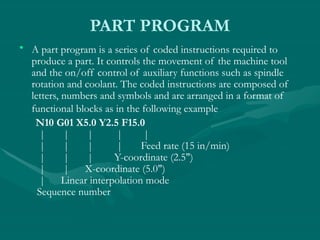
PART PROGRAM
• A part program is a series of coded instructions required to
produce a part. It controls the movement of the machine tool
and the on/off control of auxiliary functions such as spindle
rotation and coolant. The coded instructions are composed of
letters, numbers and symbols and are arranged in a format of
functional blocks as in the following example
N10 G01 X5.0 Y2.5 F15.0
| | | | |
| | | | Feed rate (15 in/min)
| | | Y-coordinate (2.5")
| | X-coordinate (5.0")
| Linear interpolation mode
Sequence number
PROGRAM INPUT DEVICE
• The program input device is the mechanism for
part programs to be entered into the CNC
control. The most commonly used program
input devices are keyboards, punched tape
reader, diskette drivers, throgh RS 232 serial
ports and networks.
MACHINE CONTROL UNIT
The machine control unit (MCU) is the heart of a CNC system. It
is used to perform the following functions:
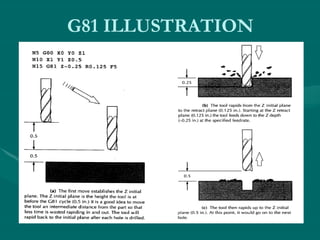
• Read coded instructions
• Decode coded instructions
• Implement interpolations (linear, circular, and helical) to generate
axis motion commands
• Feed axis motion commands to the amplifier circuits for driving
the axis mechanisms
• Receive the feedback signals of position and speed for each drive
axis
• Implement auxiliary control functions such as coolant or spindle
on/off, and tool change
CNC PROGRAMMING
• Offline programming linked to CAD
programs.
• Conversational programming by the operator.
• MDI ~ Manual Data Input.
• Manual Control using jog buttons or
`electronic handwheel'.
• Word-Address Coding using standard G-codes
and M-codes.
The position of the tool is described
by using a Cartesian coordinate
system. If (0,0,0) position can be
described by the operator, then it is
called floating zero.
In defining the motion of the tool
from one point to another,
either absolute positioning mode or
incremental positioning mode
can be used.
1. Absolute positioning. In this mode, the
desired target position of the tool for a
particular move is given relative to the origin
point of the program.
2. Incremental positioning. In this mode, the
next target position for the tool is given
relative to the current tool position.
Structure of an NC Part
Program:
Commands are input into the controller in
units called blocks or statements.
Block Format:
1. Fixed sequential format
2. Tab sequential format
3. Word address format
EXAMPLE:
Assume that a drilling operation is to be
programmed as:
1. The tool is positioned at (25.4,12.5,0) by a
rapid movement.
2. The tool is then advanced -10 mm in the z
direction at a feed rate of 500 mm/min., with the
flood coolant on.
3.The is then retracted back 10 mm at the rapid
feed rate, and the coolant is turned off.
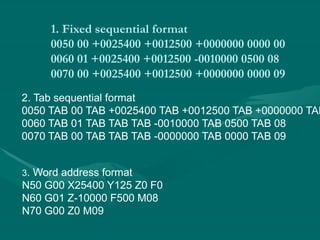
1. Fixed sequential format
0050 00 +0025400 +0012500 +0000000 0000 00
0060 01 +0025400 +0012500 -0010000 0500 08
0070 00 +0025400 +0012500 +0000000 0000 09
2. Tab sequential format
0050 TAB 00 TAB +0025400 TAB +0012500 TAB +0000000 TAB
0060 TAB 01 TAB TAB TAB -0010000 TAB 0500 TAB 08
0070 TAB 00 TAB TAB TAB -0000000 TAB 0000 TAB 09
3. Word address format
N50 G00 X25400 Y125 Z0 F0
N60 G01 Z-10000 F500 M08
N70 G00 Z0 M09
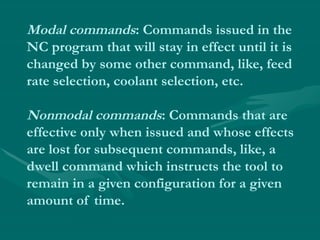
Modal commands: Commands issued in the
NC program that will stay in effect until it is
changed by some other command, like, feed
rate selection, coolant selection, etc.
Nonmodal commands: Commands that are
effective only when issued and whose effects
are lost for subsequent commands, like, a
dwell command which instructs the tool to
remain in a given configuration for a given
amount of time.
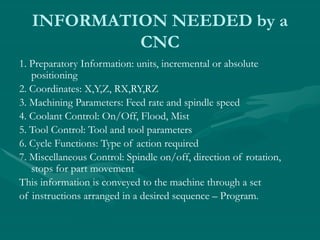
INFORMATION NEEDED by a
CNC
1. Preparatory Information: units, incremental or absolute
positioning
2. Coordinates: X,Y,Z, RX,RY,RZ
3. Machining Parameters: Feed rate and spindle speed
4. Coolant Control: On/Off, Flood, Mist
5. Tool Control: Tool and tool parameters
6. Cycle Functions: Type of action required
7. Miscellaneous Control: Spindle on/off, direction of rotation,
stops for part movement
This information is conveyed to the machine through a set
of instructions arranged in a desired sequence – Program.
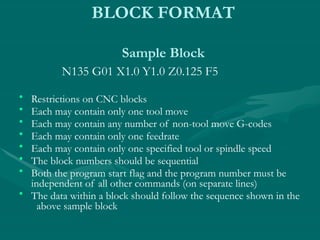
BLOCK FORMAT
Sample Block
N135 G01 X1.0 Y1.0 Z0.125 F5
• Restrictions on CNC blocks
• Each may contain only one tool move
• Each may contain any number of non-tool move G-codes
• Each may contain only one feedrate
• Each may contain only one specified tool or spindle speed
• The block numbers should be sequential
• Both the program start flag and the program number must be
independent of all other commands (on separate lines)
• The data within a block should follow the sequence shown in the
above sample block
WORD-ADDRESS CODING
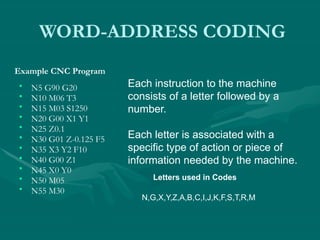
• N5 G90 G20
• N10 M06 T3
• N15 M03 S1250
• N20 G00 X1 Y1
• N25 Z0.1
• N30 G01 Z-0.125 F5
• N35 X3 Y2 F10
• N40 G00 Z1
• N45 X0 Y0
• N50 M05
• N55 M30
Example CNC Program
Each instruction to the machine
consists of a letter followed by a
number.
Each letter is associated with a
specific type of action or piece of
information needed by the machine.
Letters used in Codes
N,G,X,Y,Z,A,B,C,I,J,K,F,S,T,R,M
G Codes
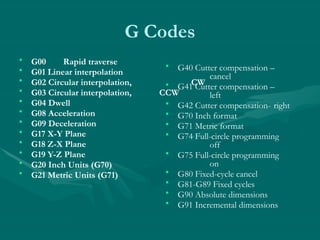
• G00 Rapid traverse
• G01 Linear interpolation
• G02 Circular interpolation, CW
• G03 Circular interpolation, CCW
• G04 Dwell
• G08 Acceleration
• G09 Deceleration
• G17 X-Y Plane
• G18 Z-X Plane
• G19 Y-Z Plane
• G20 Inch Units (G70)
• G21 Metric Units (G71)
• G40 Cutter compensation –
cancel
• G41 Cutter compensation –
left
• G42 Cutter compensation- right
• G70 Inch format
• G71 Metric format
• G74 Full-circle programming
off
• G75 Full-circle programming
on
• G80 Fixed-cycle cancel
• G81-G89 Fixed cycles
• G90 Absolute dimensions
• G91 Incremental dimensions
M Codes
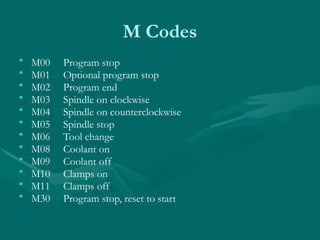
• M00 Program stop
• M01 Optional program stop
• M02 Program end
• M03 Spindle on clockwise
• M04 Spindle on counterclockwise
• M05 Spindle stop
• M06 Tool change
• M08 Coolant on
• M09 Coolant off
• M10 Clamps on
• M11 Clamps off
• M30 Program stop, reset to start
N Codes
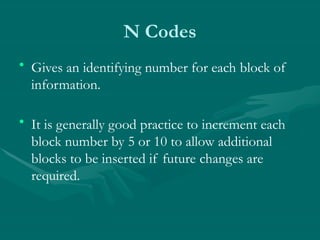
• Gives an identifying number for each block of
information.
• It is generally good practice to increment each
block number by 5 or 10 to allow additional
blocks to be inserted if future changes are
required.
X,Y, and Z Codes
• X, Y, and Z codes are used to specify the
coordinate axis.
• Number following the code defines the
coordinate at the end of the move relative to an
incremental or absolute reference point.
I,J, and K Codes
• I, J, and K codes are used to specify the
coordinate axis when defining the center of a
circle.
• Number following the code defines the
respective coordinate for the center of the circle.
F,S, and T Codes
• F-code: used to specify the feed rate
• S-code: used to specify the spindle speed
• T-code: used to specify the tool identification
number associated with the tool to be used in
subsequent operations.
Application of Some Codes
G01 Linear Interpolation
Format: N_ G01 X_ Y_ Z_ F_
• Linear Interpolation results in a straight line feed
move.
• Unless tool compensation is used, the
coordinates are associated with the centerline of
the tool.
Application of Some Codes
G01 Linear Interpolation
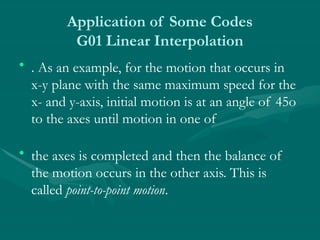
• . As an example, for the motion that occurs in
x-y plane with the same maximum speed for the
x- and y-axis, initial motion is at an angle of 45o
to the axes until motion in one of
• the axes is completed and then the balance of
the motion occurs in the other axis. This is
called point-to-point motion.
Application of Some Codes
G01 Linear Interpolation
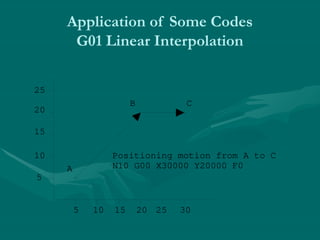
5
10
15
20
25
5 10 15 20 25 30
A
B C
Positioning motion from A to C
N10 G00 X30000 Y20000 F0
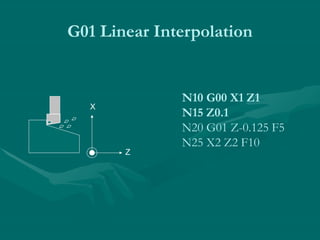
N10 G00 X1 Z1
N15 Z0.1
N20 G01 Z-0.125 F5
N25 X2 Z2 F10
G01 Linear Interpolation
X
Z
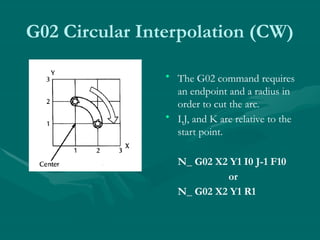
G02 Circular Interpolation
• G02 is also a preparatory function to specify
that the tool should be moved to a specified
location along a circular path in a clockwise
direction. In order to specify the path to the
MCU, the end point of the arc and the location
of the center of the arc should be specified.
Within the block in which the G02 code is
programmed, the center of the arc is given by
specifying its location relative to the start of the
arc.
G02 Circular Interpolation (CW)
• The G02 command requires
an endpoint and a radius in
order to cut the arc.
• I,J, and K are relative to the
start point.
N_ G02 X2 Y1 I0 J-1 F10
or
N_ G02 X2 Y1 R1
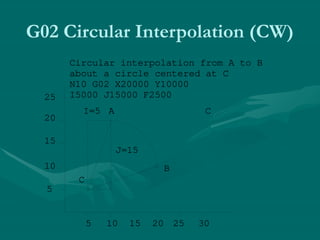
G02 Circular Interpolation (CW)
5
10
15
20
25
5 10 15 20 25 30
C
C
Circular interpolation from A to B
about a circle centered at C
N10 G02 X20000 Y10000
I5000 J15000 F2500
A
B
I=5
J=15
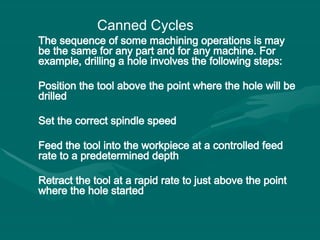
The sequence of some machining operations is may
be the same for any part and for any machine. For
example, drilling a hole involves the following steps:
Position the tool above the point where the hole will be
drilled
Set the correct spindle speed
Feed the tool into the workpiece at a controlled feed
rate to a predetermined depth
Retract the tool at a rapid rate to just above the point
where the hole started
Canned Cycles
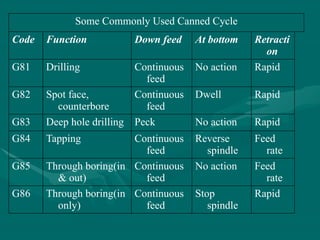
Some Commonly Used Canned Cycle
Code Function Down feed At bottom Retracti
on
G81 Drilling Continuous
feed
No action Rapid
G82 Spot face,
counterbore
Continuous
feed
Dwell Rapid
G83 Deep hole drilling Peck No action Rapid
G84 Tapping Continuous
feed
Reverse
spindle
Feed
rate
G85 Through boring(in
& out)
Continuous
feed
No action Feed
rate
G86 Through boring(in
only)
Continuous
feed
Stop
spindle
Rapid
G81 ILLUSTRATION
Three Main parts of a CNC program
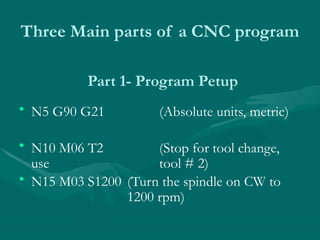
• N5 G90 G21 (Absolute units, metric)
• N10 M06 T2 (Stop for tool change,
use tool # 2)
• N15 M03 S1200 (Turn the spindle on CW to
1200 rpm)
Part 1- Program Petup
Three Main parts of a CNC program
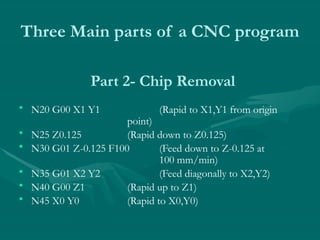
• N20 G00 X1 Y1 (Rapid to X1,Y1 from origin
point)
• N25 Z0.125 (Rapid down to Z0.125)
• N30 G01 Z-0.125 F100 (Feed down to Z-0.125 at
100 mm/min)
• N35 G01 X2 Y2 (Feed diagonally to X2,Y2)
• N40 G00 Z1 (Rapid up to Z1)
• N45 X0 Y0 (Rapid to X0,Y0)
Part 2- Chip Removal
Three Main parts of a CNC program
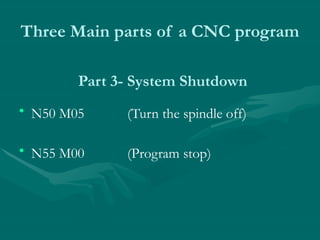
• N50 M05 (Turn the spindle off)
• N55 M00 (Program stop)
Part 3- System Shutdown
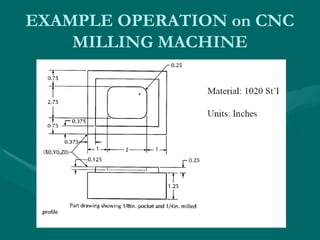
EXAMPLE OPERATION on CNC
MILLING MACHINE
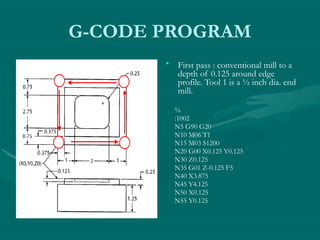
G-CODE PROGRAM
• First pass : conventional mill to a
depth of 0.125 around edge
profile. Tool 1 is a ½ inch dia. end
mill.
%
:1002
N5 G90 G20
N10 M06 T1
N15 M03 S1200
N20 G00 X0.125 Y0.125
N30 Z0.125
N35 G01 Z-0.125 F5
N40 X3.875
N45 Y4.125
N50 X0.125
N55 Y0.125
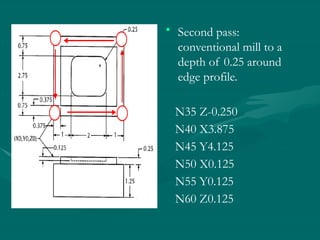
• Second pass:
conventional mill to a
depth of 0.25 around
edge profile.
N35 Z-0.250
N40 X3.875
N45 Y4.125
N50 X0.125
N55 Y0.125
N60 Z0.125
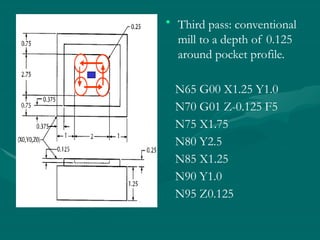
• Third pass: conventional
mill to a depth of 0.125
around pocket profile.
N65 G00 X1.25 Y1.0
N70 G01 Z-0.125 F5
N75 X1.75
N80 Y2.5
N85 X1.25
N90 Y1.0
N95 Z0.125
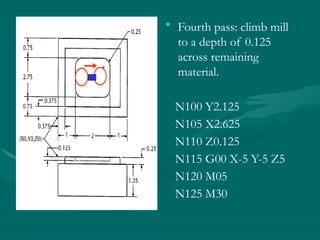
• Fourth pass: climb mill
to a depth of 0.125
across remaining
material.
N100 Y2.125
N105 X2.625
N110 Z0.125
N115 G00 X-5 Y-5 Z5
N120 M05
N125 M30
Advanced features:
• Execution of the part of the program in a rotated
or mirrored position.
• Ability to scale the program and produce larger or
smaller programs.
• Three dimensional circular interpolation which
produces a helical shape.
• Parabolic and cubic interpolation.
• NC program preparation may be tedious and difficult
if the part to be machined has a complex geometry.
The main difficulty is to find out the cutter locations
during the machining. Computers may be used to
assist the programmers in preparing the NC codes.
Computer Aided Part Programming:
Advantages of applying computer-aided part
programming include the following:
• 1. It reduces the manual calculations involves in
determining the geometric characteristics of the part.
• It provides the cutter path simulation.
• It provides tool collision checking.
• It shortens the program preparation time.
• It makes the program preparation easier.
• The Aerospace Industries Association sponsored the
work that led to the first part programming language,
developed in MIT in 1955.
• This was called: Automatically Programmed Tools (APT).
• APT is an English like simple programming language
which basically produce the Cutter Location (CL) data.
• Using the cutter location data, the program can
generate the actual NC codes by using a
postprocessor .
• The output of any CAD package include the
geometric data of the part to be machined. Therefore,
many CAD/CAM package can produce cutter
location (CL) data to be used for NC code generation.
• There is still to be a process planning module for a
workable NC code generation.
• Some of the CAD/CAM packages that have the NC
code generation capabilities are Computervision,
CATIA, CADAM, ProEngineer, MechanicalDesktop
(Auto Desk).
CAD/CAM Based Part Programming:
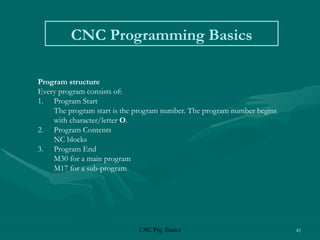
CNC Prg. Basics 45
CNC Programming Basics
Program structure
Every program consists of:
1. Program Start
The program start is the program number. The program number begins
with character/letter O.
2. Program Contents
NC blocks
3. Program End
M30 for a main program
M17 for a sub-program
CNC Prg. Basics 46
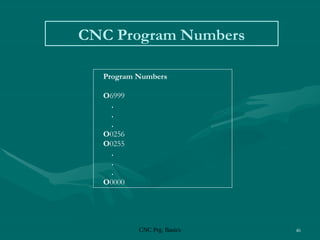
CNC Program Numbers
Program Numbers
O6999
.
.
.
O0256
O0255
.
.
.
O0000
CNC Prg. Basics 47
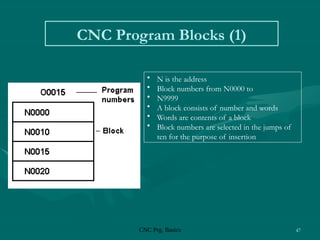
CNC Program Blocks (1)
• N is the address
• Block numbers from N0000 to
• N9999
• A block consists of number and words
• Words are contents of a block
• Block numbers are selected in the jumps of
ten for the purpose of insertion
CNC Prg. Basics 48
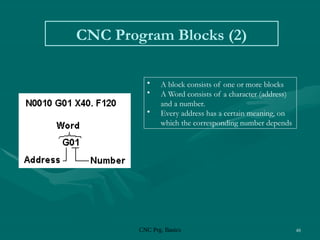
CNC Program Blocks (2)
• A block consists of one or more blocks
• A Word consists of a character (address)
and a number.
• Every address has a certain meaning, on
which the corresponding number depends
CNC Prg. Basics 49
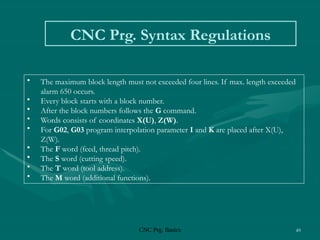
CNC Prg. Syntax Regulations
• The maximum block length must not exceeded four lines. If max. length exceeded
alarm 650 occurs.
• Every block starts with a block number.
• After the block numbers follows the G command.
• Words consists of coordinates X(U), Z(W).
• For G02, G03 program interpolation parameter I and K are placed after X(U),
Z(W).
• The F word (feed, thread pitch).
• The S word (cutting speed).
• The T word (tool address).
• The M word (additional functions).
CNC Prg. Basics 50
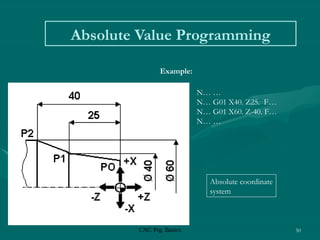
Absolute Value Programming
 P0 N… …
P0  P1 N… G01 X40. Z25. F…
P1  P2 N… G01 X60. Z-40. F…
P2  N… …
Absolute coordinate
system
Example:
CNC Prg. Basics 51
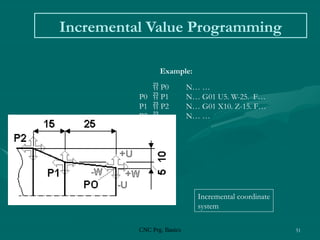
Incremental Value Programming
Incremental coordinate
system
Example:
 P0 N… …
P0  P1 N… G01 U5. W-25. F…
P1  P2 N… G01 X10. Z-15. F…
P2  N… …
CNC Prg. Basics 52
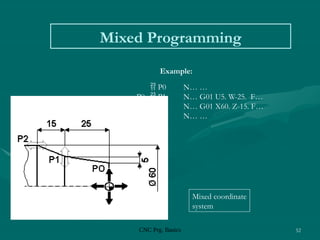
Mixed Programming
Mixed coordinate
system
Example:
 P0 N… …
P0  P1 N… G01 U5. W-25. F…
P1  P2 N… G01 X60. Z-15. F…
P2  N… …
CNC Prg. Basics 53
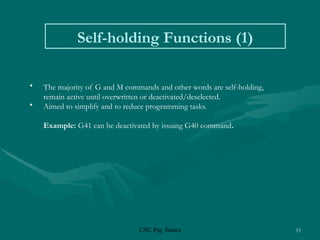
Self-holding Functions (1)
• The majority of G and M commands and other words are self-holding,
remain active until overwritten or deactivated/deselected.
• Aimed to simplify and to reduce programming tasks.
Example: G41 can be deactivated by issuing G40 command.
CNC Prg. Basics 54
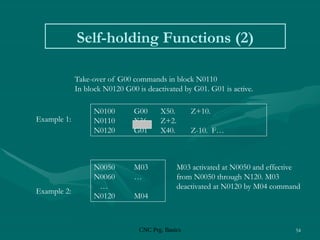
Self-holding Functions (2)
Take-over of G00 commands in block N0110
In block N0120 G00 is deactivated by G01. G01 is active.
N0100 G00 X50. Z+10.
N0110 X36. Z+2.
N0120 G01 X40. Z-10. F…
N0050 M03
N0060 …
…
N0120 M04
Example 1:
Example 2:
M03 activated at N0050 and effective
from N0050 through N120. M03
deactivated at N0120 by M04 command
CNC Prg. Basics 55
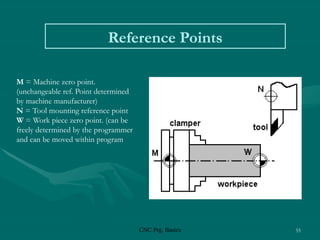
Reference Points
M = Machine zero point.
(unchangeable ref. Point determined
by machine manufacturer)
N = Tool mounting reference point
W = Work piece zero point. (can be
freely determined by the programmer
and can be moved within program
CNC Prg. Basics 56
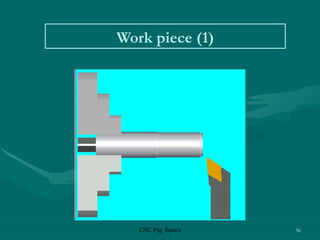
Work piece (1)
CNC Prg. Basics 57
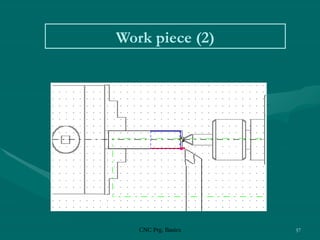
Work piece (2)
CNC Prg. Basics 58
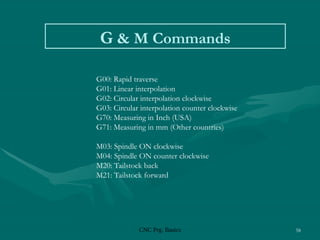
G & M Commands
G00: Rapid traverse
G01: Linear interpolation
G02: Circular interpolation clockwise
G03: Circular interpolation counter clockwise
G70: Measuring in Inch (USA)
G71: Measuring in mm (Other countries)
M03: Spindle ON clockwise
M04: Spindle ON counter clockwise
M20: Tailstock back
M21: Tailstock forward
CNC Prg. Basics 59
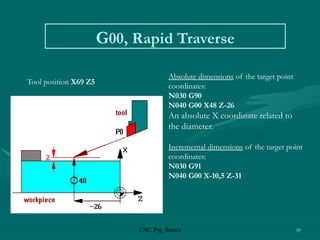
G00, Rapid Traverse
Absolute dimensions of the target point
coordinates:
N030 G90
N040 G00 X48 Z-26
An absolute X coordinate related to
the diameter.
Incremental dimensions of the target point
coordinates:
N030 G91
N040 G00 X-10,5 Z-31
Tool position X69 Z5
CNC Prg. Basics 60
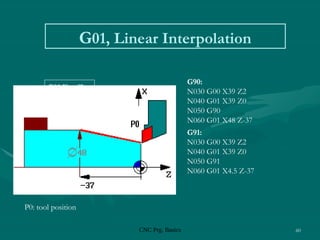
G01, Linear Interpolation
P0: tool position
G90:
N030 G00 X39 Z2
N040 G01 X39 Z0
N050 G90
N060 G01 X48 Z-37
G91:
N030 G00 X39 Z2
N040 G01 X39 Z0
N050 G91
N060 G01 X4.5 Z-37
G01 X… Z…
CNC Prg. Basics 61
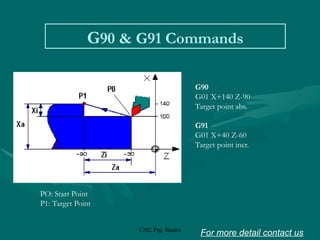
G90 & G91 Commands
G90
G01 X+140 Z-90
Target point abs.
G91
G01 X+40 Z-60
Target point incr.
PO: Start Point
P1: Target Point
For more detail contact us
CHAPTER 3.CNC PART PROGRAMMING .....pptx

  • 1.
    3.CNC PART PROGRAMMING Co:-Develop partprogram for CNC Turning, Milling and verify on simulation software. Visit for more Learning Resources
  • 2.
    PART PROGRAM • Apart program is a series of coded instructions required to produce a part. It controls the movement of the machine tool and the on/off control of auxiliary functions such as spindle rotation and coolant. The coded instructions are composed of letters, numbers and symbols and are arranged in a format of functional blocks as in the following example N10 G01 X5.0 Y2.5 F15.0 | | | | | | | | | Feed rate (15 in/min) | | | Y-coordinate (2.5") | | X-coordinate (5.0") | Linear interpolation mode Sequence number
  • 3.
    PROGRAM INPUT DEVICE •The program input device is the mechanism for part programs to be entered into the CNC control. The most commonly used program input devices are keyboards, punched tape reader, diskette drivers, throgh RS 232 serial ports and networks.
  • 4.
    MACHINE CONTROL UNIT Themachine control unit (MCU) is the heart of a CNC system. It is used to perform the following functions: • Read coded instructions • Decode coded instructions • Implement interpolations (linear, circular, and helical) to generate axis motion commands • Feed axis motion commands to the amplifier circuits for driving the axis mechanisms • Receive the feedback signals of position and speed for each drive axis • Implement auxiliary control functions such as coolant or spindle on/off, and tool change
  • 5.
    CNC PROGRAMMING • Offlineprogramming linked to CAD programs. • Conversational programming by the operator. • MDI ~ Manual Data Input. • Manual Control using jog buttons or `electronic handwheel'. • Word-Address Coding using standard G-codes and M-codes.
  • 6.
    The position ofthe tool is described by using a Cartesian coordinate system. If (0,0,0) position can be described by the operator, then it is called floating zero.
  • 7.
    In defining themotion of the tool from one point to another, either absolute positioning mode or incremental positioning mode can be used.
  • 8.
    1. Absolute positioning.In this mode, the desired target position of the tool for a particular move is given relative to the origin point of the program. 2. Incremental positioning. In this mode, the next target position for the tool is given relative to the current tool position.
  • 9.
    Structure of anNC Part Program: Commands are input into the controller in units called blocks or statements. Block Format: 1. Fixed sequential format 2. Tab sequential format 3. Word address format
  • 10.
    EXAMPLE: Assume that adrilling operation is to be programmed as: 1. The tool is positioned at (25.4,12.5,0) by a rapid movement. 2. The tool is then advanced -10 mm in the z direction at a feed rate of 500 mm/min., with the flood coolant on. 3.The is then retracted back 10 mm at the rapid feed rate, and the coolant is turned off.
  • 11.
    1. Fixed sequentialformat 0050 00 +0025400 +0012500 +0000000 0000 00 0060 01 +0025400 +0012500 -0010000 0500 08 0070 00 +0025400 +0012500 +0000000 0000 09 2. Tab sequential format 0050 TAB 00 TAB +0025400 TAB +0012500 TAB +0000000 TAB 0060 TAB 01 TAB TAB TAB -0010000 TAB 0500 TAB 08 0070 TAB 00 TAB TAB TAB -0000000 TAB 0000 TAB 09 3. Word address format N50 G00 X25400 Y125 Z0 F0 N60 G01 Z-10000 F500 M08 N70 G00 Z0 M09
  • 12.
    Modal commands: Commandsissued in the NC program that will stay in effect until it is changed by some other command, like, feed rate selection, coolant selection, etc. Nonmodal commands: Commands that are effective only when issued and whose effects are lost for subsequent commands, like, a dwell command which instructs the tool to remain in a given configuration for a given amount of time.
  • 13.
    INFORMATION NEEDED bya CNC 1. Preparatory Information: units, incremental or absolute positioning 2. Coordinates: X,Y,Z, RX,RY,RZ 3. Machining Parameters: Feed rate and spindle speed 4. Coolant Control: On/Off, Flood, Mist 5. Tool Control: Tool and tool parameters 6. Cycle Functions: Type of action required 7. Miscellaneous Control: Spindle on/off, direction of rotation, stops for part movement This information is conveyed to the machine through a set of instructions arranged in a desired sequence – Program.
  • 14.
    BLOCK FORMAT Sample Block N135G01 X1.0 Y1.0 Z0.125 F5 • Restrictions on CNC blocks • Each may contain only one tool move • Each may contain any number of non-tool move G-codes • Each may contain only one feedrate • Each may contain only one specified tool or spindle speed • The block numbers should be sequential • Both the program start flag and the program number must be independent of all other commands (on separate lines) • The data within a block should follow the sequence shown in the above sample block
  • 15.
    WORD-ADDRESS CODING • N5G90 G20 • N10 M06 T3 • N15 M03 S1250 • N20 G00 X1 Y1 • N25 Z0.1 • N30 G01 Z-0.125 F5 • N35 X3 Y2 F10 • N40 G00 Z1 • N45 X0 Y0 • N50 M05 • N55 M30 Example CNC Program Each instruction to the machine consists of a letter followed by a number. Each letter is associated with a specific type of action or piece of information needed by the machine. Letters used in Codes N,G,X,Y,Z,A,B,C,I,J,K,F,S,T,R,M
  • 16.
    G Codes • G00Rapid traverse • G01 Linear interpolation • G02 Circular interpolation, CW • G03 Circular interpolation, CCW • G04 Dwell • G08 Acceleration • G09 Deceleration • G17 X-Y Plane • G18 Z-X Plane • G19 Y-Z Plane • G20 Inch Units (G70) • G21 Metric Units (G71) • G40 Cutter compensation – cancel • G41 Cutter compensation – left • G42 Cutter compensation- right • G70 Inch format • G71 Metric format • G74 Full-circle programming off • G75 Full-circle programming on • G80 Fixed-cycle cancel • G81-G89 Fixed cycles • G90 Absolute dimensions • G91 Incremental dimensions
  • 17.
    M Codes • M00Program stop • M01 Optional program stop • M02 Program end • M03 Spindle on clockwise • M04 Spindle on counterclockwise • M05 Spindle stop • M06 Tool change • M08 Coolant on • M09 Coolant off • M10 Clamps on • M11 Clamps off • M30 Program stop, reset to start
  • 18.
    N Codes • Givesan identifying number for each block of information. • It is generally good practice to increment each block number by 5 or 10 to allow additional blocks to be inserted if future changes are required.
  • 19.
    X,Y, and ZCodes • X, Y, and Z codes are used to specify the coordinate axis. • Number following the code defines the coordinate at the end of the move relative to an incremental or absolute reference point.
  • 20.
    I,J, and KCodes • I, J, and K codes are used to specify the coordinate axis when defining the center of a circle. • Number following the code defines the respective coordinate for the center of the circle.
  • 21.
    F,S, and TCodes • F-code: used to specify the feed rate • S-code: used to specify the spindle speed • T-code: used to specify the tool identification number associated with the tool to be used in subsequent operations.
  • 22.
    Application of SomeCodes G01 Linear Interpolation Format: N_ G01 X_ Y_ Z_ F_ • Linear Interpolation results in a straight line feed move. • Unless tool compensation is used, the coordinates are associated with the centerline of the tool.
  • 23.
    Application of SomeCodes G01 Linear Interpolation • . As an example, for the motion that occurs in x-y plane with the same maximum speed for the x- and y-axis, initial motion is at an angle of 45o to the axes until motion in one of • the axes is completed and then the balance of the motion occurs in the other axis. This is called point-to-point motion.
  • 24.
    Application of SomeCodes G01 Linear Interpolation 5 10 15 20 25 5 10 15 20 25 30 A B C Positioning motion from A to C N10 G00 X30000 Y20000 F0
  • 25.
    N10 G00 X1Z1 N15 Z0.1 N20 G01 Z-0.125 F5 N25 X2 Z2 F10 G01 Linear Interpolation X Z
  • 26.
    G02 Circular Interpolation •G02 is also a preparatory function to specify that the tool should be moved to a specified location along a circular path in a clockwise direction. In order to specify the path to the MCU, the end point of the arc and the location of the center of the arc should be specified. Within the block in which the G02 code is programmed, the center of the arc is given by specifying its location relative to the start of the arc.
  • 27.
    G02 Circular Interpolation(CW) • The G02 command requires an endpoint and a radius in order to cut the arc. • I,J, and K are relative to the start point. N_ G02 X2 Y1 I0 J-1 F10 or N_ G02 X2 Y1 R1
  • 28.
    G02 Circular Interpolation(CW) 5 10 15 20 25 5 10 15 20 25 30 C C Circular interpolation from A to B about a circle centered at C N10 G02 X20000 Y10000 I5000 J15000 F2500 A B I=5 J=15
  • 29.
    The sequence ofsome machining operations is may be the same for any part and for any machine. For example, drilling a hole involves the following steps: Position the tool above the point where the hole will be drilled Set the correct spindle speed Feed the tool into the workpiece at a controlled feed rate to a predetermined depth Retract the tool at a rapid rate to just above the point where the hole started Canned Cycles
  • 30.
    Some Commonly UsedCanned Cycle Code Function Down feed At bottom Retracti on G81 Drilling Continuous feed No action Rapid G82 Spot face, counterbore Continuous feed Dwell Rapid G83 Deep hole drilling Peck No action Rapid G84 Tapping Continuous feed Reverse spindle Feed rate G85 Through boring(in & out) Continuous feed No action Feed rate G86 Through boring(in only) Continuous feed Stop spindle Rapid
  • 31.
  • 32.
    Three Main partsof a CNC program • N5 G90 G21 (Absolute units, metric) • N10 M06 T2 (Stop for tool change, use tool # 2) • N15 M03 S1200 (Turn the spindle on CW to 1200 rpm) Part 1- Program Petup
  • 33.
    Three Main partsof a CNC program • N20 G00 X1 Y1 (Rapid to X1,Y1 from origin point) • N25 Z0.125 (Rapid down to Z0.125) • N30 G01 Z-0.125 F100 (Feed down to Z-0.125 at 100 mm/min) • N35 G01 X2 Y2 (Feed diagonally to X2,Y2) • N40 G00 Z1 (Rapid up to Z1) • N45 X0 Y0 (Rapid to X0,Y0) Part 2- Chip Removal
  • 34.
    Three Main partsof a CNC program • N50 M05 (Turn the spindle off) • N55 M00 (Program stop) Part 3- System Shutdown
  • 35.
    EXAMPLE OPERATION onCNC MILLING MACHINE
  • 36.
    G-CODE PROGRAM • Firstpass : conventional mill to a depth of 0.125 around edge profile. Tool 1 is a ½ inch dia. end mill. % :1002 N5 G90 G20 N10 M06 T1 N15 M03 S1200 N20 G00 X0.125 Y0.125 N30 Z0.125 N35 G01 Z-0.125 F5 N40 X3.875 N45 Y4.125 N50 X0.125 N55 Y0.125
  • 37.
    • Second pass: conventionalmill to a depth of 0.25 around edge profile. N35 Z-0.250 N40 X3.875 N45 Y4.125 N50 X0.125 N55 Y0.125 N60 Z0.125
  • 38.
    • Third pass:conventional mill to a depth of 0.125 around pocket profile. N65 G00 X1.25 Y1.0 N70 G01 Z-0.125 F5 N75 X1.75 N80 Y2.5 N85 X1.25 N90 Y1.0 N95 Z0.125
  • 39.
    • Fourth pass:climb mill to a depth of 0.125 across remaining material. N100 Y2.125 N105 X2.625 N110 Z0.125 N115 G00 X-5 Y-5 Z5 N120 M05 N125 M30
  • 40.
    Advanced features: • Executionof the part of the program in a rotated or mirrored position. • Ability to scale the program and produce larger or smaller programs. • Three dimensional circular interpolation which produces a helical shape. • Parabolic and cubic interpolation.
  • 41.
    • NC programpreparation may be tedious and difficult if the part to be machined has a complex geometry. The main difficulty is to find out the cutter locations during the machining. Computers may be used to assist the programmers in preparing the NC codes. Computer Aided Part Programming:
  • 42.
    Advantages of applyingcomputer-aided part programming include the following: • 1. It reduces the manual calculations involves in determining the geometric characteristics of the part. • It provides the cutter path simulation. • It provides tool collision checking. • It shortens the program preparation time. • It makes the program preparation easier.
  • 43.
    • The AerospaceIndustries Association sponsored the work that led to the first part programming language, developed in MIT in 1955. • This was called: Automatically Programmed Tools (APT). • APT is an English like simple programming language which basically produce the Cutter Location (CL) data. • Using the cutter location data, the program can generate the actual NC codes by using a postprocessor .
  • 44.
    • The outputof any CAD package include the geometric data of the part to be machined. Therefore, many CAD/CAM package can produce cutter location (CL) data to be used for NC code generation. • There is still to be a process planning module for a workable NC code generation. • Some of the CAD/CAM packages that have the NC code generation capabilities are Computervision, CATIA, CADAM, ProEngineer, MechanicalDesktop (Auto Desk). CAD/CAM Based Part Programming:
  • 45.
    CNC Prg. Basics45 CNC Programming Basics Program structure Every program consists of: 1. Program Start The program start is the program number. The program number begins with character/letter O. 2. Program Contents NC blocks 3. Program End M30 for a main program M17 for a sub-program
  • 46.
    CNC Prg. Basics46 CNC Program Numbers Program Numbers O6999 . . . O0256 O0255 . . . O0000
  • 47.
    CNC Prg. Basics47 CNC Program Blocks (1) • N is the address • Block numbers from N0000 to • N9999 • A block consists of number and words • Words are contents of a block • Block numbers are selected in the jumps of ten for the purpose of insertion
  • 48.
    CNC Prg. Basics48 CNC Program Blocks (2) • A block consists of one or more blocks • A Word consists of a character (address) and a number. • Every address has a certain meaning, on which the corresponding number depends
  • 49.
    CNC Prg. Basics49 CNC Prg. Syntax Regulations • The maximum block length must not exceeded four lines. If max. length exceeded alarm 650 occurs. • Every block starts with a block number. • After the block numbers follows the G command. • Words consists of coordinates X(U), Z(W). • For G02, G03 program interpolation parameter I and K are placed after X(U), Z(W). • The F word (feed, thread pitch). • The S word (cutting speed). • The T word (tool address). • The M word (additional functions).
  • 50.
    CNC Prg. Basics50 Absolute Value Programming  P0 N… … P0  P1 N… G01 X40. Z25. F… P1  P2 N… G01 X60. Z-40. F… P2  N… … Absolute coordinate system Example:
  • 51.
    CNC Prg. Basics51 Incremental Value Programming Incremental coordinate system Example:  P0 N… … P0  P1 N… G01 U5. W-25. F… P1  P2 N… G01 X10. Z-15. F… P2  N… …
  • 52.
    CNC Prg. Basics52 Mixed Programming Mixed coordinate system Example:  P0 N… … P0  P1 N… G01 U5. W-25. F… P1  P2 N… G01 X60. Z-15. F… P2  N… …
  • 53.
    CNC Prg. Basics53 Self-holding Functions (1) • The majority of G and M commands and other words are self-holding, remain active until overwritten or deactivated/deselected. • Aimed to simplify and to reduce programming tasks. Example: G41 can be deactivated by issuing G40 command.
  • 54.
    CNC Prg. Basics54 Self-holding Functions (2) Take-over of G00 commands in block N0110 In block N0120 G00 is deactivated by G01. G01 is active. N0100 G00 X50. Z+10. N0110 X36. Z+2. N0120 G01 X40. Z-10. F… N0050 M03 N0060 … … N0120 M04 Example 1: Example 2: M03 activated at N0050 and effective from N0050 through N120. M03 deactivated at N0120 by M04 command
  • 55.
    CNC Prg. Basics55 Reference Points M = Machine zero point. (unchangeable ref. Point determined by machine manufacturer) N = Tool mounting reference point W = Work piece zero point. (can be freely determined by the programmer and can be moved within program
  • 56.
    CNC Prg. Basics56 Work piece (1)
  • 57.
    CNC Prg. Basics57 Work piece (2)
  • 58.
    CNC Prg. Basics58 G & M Commands G00: Rapid traverse G01: Linear interpolation G02: Circular interpolation clockwise G03: Circular interpolation counter clockwise G70: Measuring in Inch (USA) G71: Measuring in mm (Other countries) M03: Spindle ON clockwise M04: Spindle ON counter clockwise M20: Tailstock back M21: Tailstock forward
  • 59.
    CNC Prg. Basics59 G00, Rapid Traverse Absolute dimensions of the target point coordinates: N030 G90 N040 G00 X48 Z-26 An absolute X coordinate related to the diameter. Incremental dimensions of the target point coordinates: N030 G91 N040 G00 X-10,5 Z-31 Tool position X69 Z5
  • 60.
    CNC Prg. Basics60 G01, Linear Interpolation P0: tool position G90: N030 G00 X39 Z2 N040 G01 X39 Z0 N050 G90 N060 G01 X48 Z-37 G91: N030 G00 X39 Z2 N040 G01 X39 Z0 N050 G91 N060 G01 X4.5 Z-37 G01 X… Z…
  • 61.
    CNC Prg. Basics61 G90 & G91 Commands G90 G01 X+140 Z-90 Target point abs. G91 G01 X+40 Z-60 Target point incr. PO: Start Point P1: Target Point For more detail contact us
Editor's Notes
  • #45 Computer Numeric Control @ UPH By Jonny Latuny, M.Eng © August 2002
  • #46 Computer Numeric Control @ UPH By Jonny Latuny, M.Eng © August 2002
  • #47 Computer Numeric Control @ UPH By Jonny Latuny, M.Eng © August 2002
  • #48 Computer Numeric Control @ UPH By Jonny Latuny, M.Eng © August 2002
  • #49 Computer Numeric Control @ UPH By Jonny Latuny, M.Eng © August 2002
  • #50 Computer Numeric Control @ UPH By Jonny Latuny, M.Eng © August 2002
  • #51 Computer Numeric Control @ UPH By Jonny Latuny, M.Eng © August 2002
  • #52 Computer Numeric Control @ UPH By Jonny Latuny, M.Eng © August 2002
  • #53 Computer Numeric Control @ UPH By Jonny Latuny, M.Eng © August 2002
  • #54 Computer Numeric Control @ UPH By Jonny Latuny, M.Eng © August 2002
  • #55 Computer Numeric Control @ UPH By Jonny Latuny, M.Eng © August 2002
  • #56 Computer Numeric Control @ UPH By Jonny Latuny, M.Eng © August 2002
  • #57 Computer Numeric Control @ UPH By Jonny Latuny, M.Eng © August 2002
  • #58 Computer Numeric Control @ UPH By Jonny Latuny, M.Eng © August 2002
  • #59 Computer Numeric Control @ UPH By Jonny Latuny, M.Eng © August 2002
  • #60 Computer Numeric Control @ UPH By Jonny Latuny, M.Eng © August 2002
  • #61 Computer Numeric Control @ UPH By Jonny Latuny, M.Eng © August 2002