Alternative Methods
Of Input
This lesson includes the following sections:
 Devices for the Hand
 Optical Input Devices
 Audio-Visual (Multimedia) Input Devices
Alternative Input Devices –
Devices for the Hand
• Pens
• Touch Screens
• Game Controllers
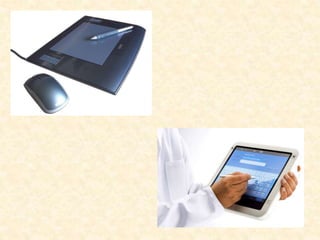
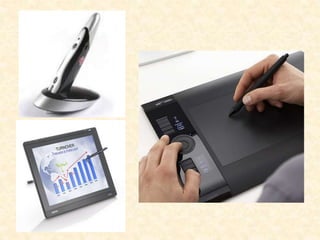
Devices for the Hand - Pens
• With a pen-based system, you use an electronic pen
to write on the screen and choose commands.
• Pens are common input devices for handheld
computers, like “personal digital assistants (PDAs).”
• Pens are handy for making notes or selecting
commands, not for inputting a lot of text.
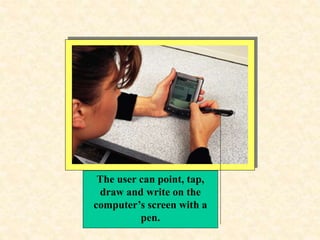
The user can point, tap,
draw and write on the
computer’s screen with a
pen.
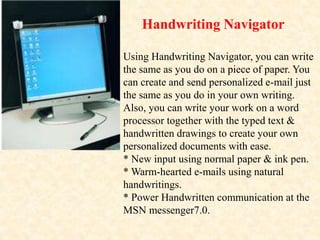
Using Handwriting Navigator, you can write
the same as you do on a piece of paper. You
can create and send personalized e-mail just
the same as you do in your own writing.
Also, you can write your work on a word
processor together with the typed text &
handwritten drawings to create your own
personalized documents with ease.
* New input using normal paper & ink pen.
* Warm-hearted e-mails using natural
handwritings.
* Power Handwritten communication at the
MSN messenger7.0.
Handwriting Navigator
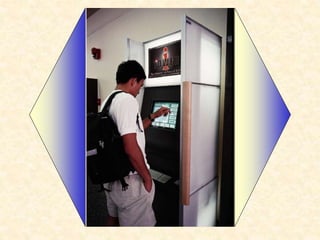
Devices for the Hand - Touch Screens
• Touch-screen systems accept input directly through
the monitor.
• Touch screens use sensors to detect the touch of a
finger. They are useful where environmental
conditions prohibit the use of a keyboard or mouse.
• Touch-screen systems are useful for selecting options
from menus.
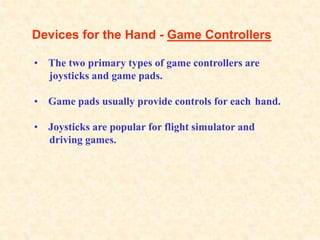
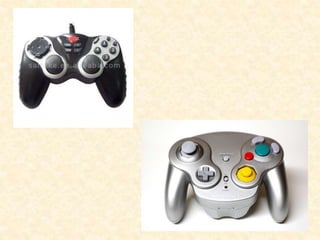
Devices for the Hand - Game Controllers
• The two primary types of game controllers are
joysticks and game pads.
• Game pads usually provide controls for each hand.
• Joysticks are popular for flight simulator and
driving games.
Alternative Input Devices –
Optical Input Devices
• Bar Code Readers
• Image Scanners and OCR
Optical Input Devices - Bar Code Readers
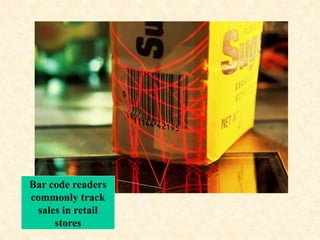
• Bar code readers can read bar codes—patterns of
printed bars.
• The reader emits light, which reflects off the bar code
and into a detector in the reader. The detector
translates the code into numbers.
• Flatbed bar code readers are commonly found in
supermarkets. Courier services often use handheld
readers.
Bar code readers
commonly track
sales in retail
stores
Optical Input Devices –
Image Scanners and OCR
• Image scanners digitize printed images for storage and
manipulation in a computer.
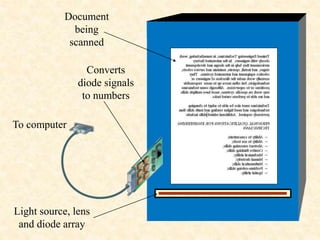
• A scanner shines light onto the image and interprets
the reflection.
• Optical character recognition (OCR) software
translates scanned text into editable electronic
documents.
Light source, lens
and diode array
Document
being
scanned
Converts
diode signals
to numbers
To computer
Alternative Input Devices –
Audio-Visual (Multimedia) Input Devices
• Microphones and Speech Recognition
• Video Input
Audio-Visual (Multimedia) Input Devices -
Microphones and Speech Recognition
• Microphones can accept auditory input. A
microphone requires a sound card in the PC.
• A sound card can digitize analog sound signals, and
convert digital sound signals to analog form.
• With speech recognition software, you can use your
microphone to dictate text, navigate programs, and
choose commands.
Digital Audio Output
[electrical signals]
(ex. 11100011) to
computer
Analog Sound Signals
Analog Signals are Digitized
Audio-Visual (Multimedia) Input Devices –
Video Input
• PC video cameras digitize full-motion images.
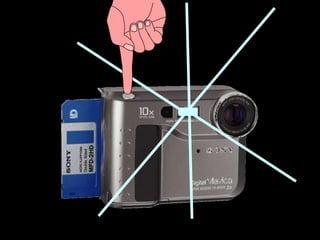
• Digital cameras capture still images.
• These cameras break images into pixels and store
data about each pixel.
• Video images may be compressed to use less memory
and storage space.
lesson Review
• List two reasons why some computer users prefer
alternative methods of input over a standard keyboard
or mouse.
• List three categories of alternative input devices.
• List two type of optical input devices and describe
their uses.
• Describe the uses for speech-recognition systems.
• Identify two types of video input devices and their
uses.

Alternate methods of input

  • 1.
  • 2.
    This lesson includesthe following sections:  Devices for the Hand  Optical Input Devices  Audio-Visual (Multimedia) Input Devices
  • 3.
    Alternative Input Devices– Devices for the Hand • Pens • Touch Screens • Game Controllers
  • 4.
    Devices for theHand - Pens • With a pen-based system, you use an electronic pen to write on the screen and choose commands. • Pens are common input devices for handheld computers, like “personal digital assistants (PDAs).” • Pens are handy for making notes or selecting commands, not for inputting a lot of text.
  • 5.
    The user canpoint, tap, draw and write on the computer’s screen with a pen.
  • 6.
    Using Handwriting Navigator,you can write the same as you do on a piece of paper. You can create and send personalized e-mail just the same as you do in your own writing. Also, you can write your work on a word processor together with the typed text & handwritten drawings to create your own personalized documents with ease. * New input using normal paper & ink pen. * Warm-hearted e-mails using natural handwritings. * Power Handwritten communication at the MSN messenger7.0. Handwriting Navigator
  • 9.
    Devices for theHand - Touch Screens • Touch-screen systems accept input directly through the monitor. • Touch screens use sensors to detect the touch of a finger. They are useful where environmental conditions prohibit the use of a keyboard or mouse. • Touch-screen systems are useful for selecting options from menus.
  • 11.
    Devices for theHand - Game Controllers • The two primary types of game controllers are joysticks and game pads. • Game pads usually provide controls for each hand. • Joysticks are popular for flight simulator and driving games.
  • 13.
    Alternative Input Devices– Optical Input Devices • Bar Code Readers • Image Scanners and OCR
  • 14.
    Optical Input Devices- Bar Code Readers • Bar code readers can read bar codes—patterns of printed bars. • The reader emits light, which reflects off the bar code and into a detector in the reader. The detector translates the code into numbers. • Flatbed bar code readers are commonly found in supermarkets. Courier services often use handheld readers.
  • 15.
    Bar code readers commonlytrack sales in retail stores
  • 16.
    Optical Input Devices– Image Scanners and OCR • Image scanners digitize printed images for storage and manipulation in a computer. • A scanner shines light onto the image and interprets the reflection. • Optical character recognition (OCR) software translates scanned text into editable electronic documents.
  • 17.
    Light source, lens anddiode array Document being scanned Converts diode signals to numbers To computer
  • 18.
    Alternative Input Devices– Audio-Visual (Multimedia) Input Devices • Microphones and Speech Recognition • Video Input
  • 19.
    Audio-Visual (Multimedia) InputDevices - Microphones and Speech Recognition • Microphones can accept auditory input. A microphone requires a sound card in the PC. • A sound card can digitize analog sound signals, and convert digital sound signals to analog form. • With speech recognition software, you can use your microphone to dictate text, navigate programs, and choose commands.
  • 20.
    Digital Audio Output [electricalsignals] (ex. 11100011) to computer Analog Sound Signals Analog Signals are Digitized
  • 21.
    Audio-Visual (Multimedia) InputDevices – Video Input • PC video cameras digitize full-motion images. • Digital cameras capture still images. • These cameras break images into pixels and store data about each pixel. • Video images may be compressed to use less memory and storage space.
  • 23.
    lesson Review • Listtwo reasons why some computer users prefer alternative methods of input over a standard keyboard or mouse. • List three categories of alternative input devices. • List two type of optical input devices and describe their uses. • Describe the uses for speech-recognition systems. • Identify two types of video input devices and their uses.