Input Devices
Table of Contents
 Input devices
o Keyboard
o Mouse
o Joy Stick
o Light pen
o Track Ball
o Scanner
o Graphic Tablet
o Microphone
o Magnetic Ink Card Reader(MICR)
o Optical Character Reader(OCR)
o Bar Code Reader
o Optical Mark Reader(OMR)
Input Devices
 Input devices are hardware devices which take information
from the user of the computer system, convert it into
electrical signals and transmit it to the processor.
 The primary function of input devices is to allow humans to
interact with the computer system.
 There are dozens of other devices that can also be used to
input data into the computer.
 List of computer input devices that can be utilized with a
computer or a computing device is as follows:
o Keyboard
o Mouse
o Joy Stick
o Light pen
o Track Ball
o Scanner
o Graphic Tablet
o Microphone
o Magnetic Ink Card Reader(MICR)
o Optical Character Reader(OCR)
o Bar Code Reader
o Optical Mark Reader(OMR)
Keyboard
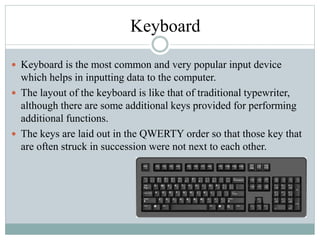
 Keyboard is the most common and very popular input device
which helps in inputting data to the computer.
 The layout of the keyboard is like that of traditional typewriter,
although there are some additional keys provided for performing
additional functions.
 The keys are laid out in the QWERTY order so that those key that
are often struck in succession were not next to each other.
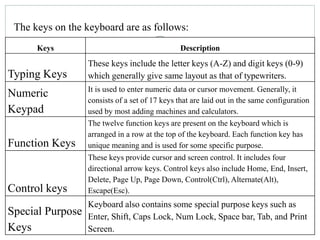
The keys on the keyboard are as follows:
Keys Description
Typing Keys
These keys include the letter keys (A-Z) and digit keys (0-9)
which generally give same layout as that of typewriters.
Numeric
Keypad
It is used to enter numeric data or cursor movement. Generally, it
consists of a set of 17 keys that are laid out in the same configuration
used by most adding machines and calculators.
Function Keys
The twelve function keys are present on the keyboard which is
arranged in a row at the top of the keyboard. Each function key has
unique meaning and is used for some specific purpose.
Control keys
These keys provide cursor and screen control. It includes four
directional arrow keys. Control keys also include Home, End, Insert,
Delete, Page Up, Page Down, Control(Ctrl), Alternate(Alt),
Escape(Esc).
Special Purpose
Keys
Keyboard also contains some special purpose keys such as
Enter, Shift, Caps Lock, Num Lock, Space bar, Tab, and Print
Screen.
Mouse
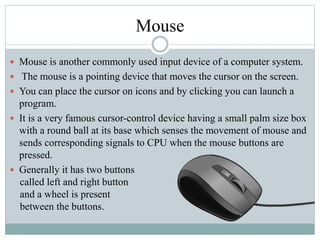
 Mouse is another commonly used input device of a computer system.
 The mouse is a pointing device that moves the cursor on the screen.
 You can place the cursor on icons and by clicking you can launch a
program.
 It is a very famous cursor-control device having a small palm size box
with a round ball at its base which senses the movement of mouse and
sends corresponding signals to CPU when the mouse buttons are
pressed.
 Generally it has two buttons
called left and right button
and a wheel is present
between the buttons.
Joystick
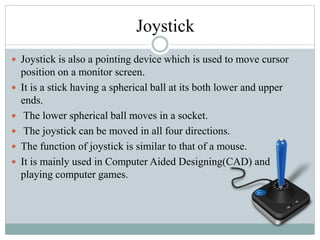
 Joystick is also a pointing device which is used to move cursor
position on a monitor screen.
 It is a stick having a spherical ball at its both lower and upper
ends.
 The lower spherical ball moves in a socket.
 The joystick can be moved in all four directions.
 The function of joystick is similar to that of a mouse.
 It is mainly used in Computer Aided Designing(CAD) and
playing computer games.
Light Pen
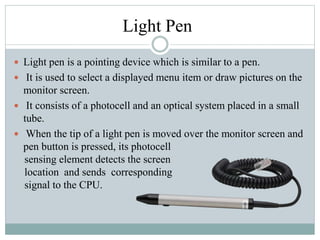
 Light pen is a pointing device which is similar to a pen.
 It is used to select a displayed menu item or draw pictures on the
monitor screen.
 It consists of a photocell and an optical system placed in a small
tube.
 When the tip of a light pen is moved over the monitor screen and
pen button is pressed, its photocell
sensing element detects the screen
location and sends corresponding
signal to the CPU.
Track Ball
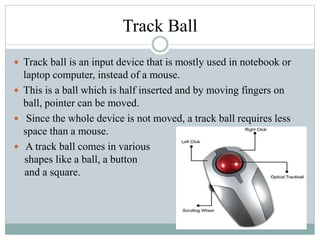
 Track ball is an input device that is mostly used in notebook or
laptop computer, instead of a mouse.
 This is a ball which is half inserted and by moving fingers on
ball, pointer can be moved.
 Since the whole device is not moved, a track ball requires less
space than a mouse.
 A track ball comes in various
shapes like a ball, a button
and a square.
Scanner
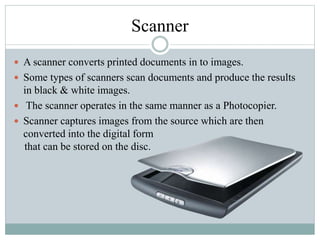
 A scanner converts printed documents in to images.
 Some types of scanners scan documents and produce the results
in black & white images.
 The scanner operates in the same manner as a Photocopier.
 Scanner captures images from the source which are then
converted into the digital form
that can be stored on the disc.
Graphic Tablet
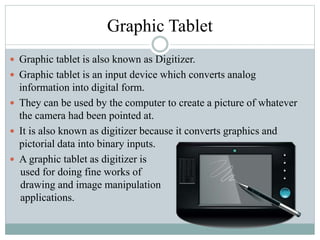
 Graphic tablet is also known as Digitizer.
 Graphic tablet is an input device which converts analog
information into digital form.
 They can be used by the computer to create a picture of whatever
the camera had been pointed at.
 It is also known as digitizer because it converts graphics and
pictorial data into binary inputs.
 A graphic tablet as digitizer is
used for doing fine works of
drawing and image manipulation
applications.
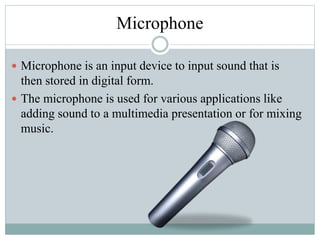
Microphone
 Microphone is an input device to input sound that is
then stored in digital form.
 The microphone is used for various applications like
adding sound to a multimedia presentation or for mixing
music.
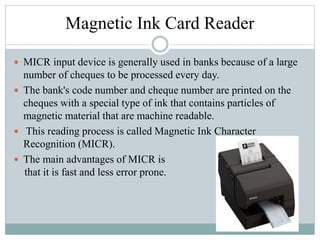
Magnetic Ink Card Reader
 MICR input device is generally used in banks because of a large
number of cheques to be processed every day.
 The bank's code number and cheque number are printed on the
cheques with a special type of ink that contains particles of
magnetic material that are machine readable.
 This reading process is called Magnetic Ink Character
Recognition (MICR).
 The main advantages of MICR is
that it is fast and less error prone.
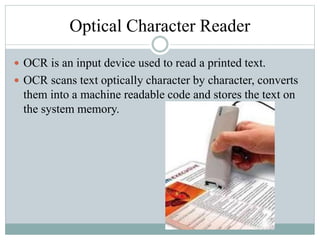
Optical Character Reader
 OCR is an input device used to read a printed text.
 OCR scans text optically character by character, converts
them into a machine readable code and stores the text on
the system memory.
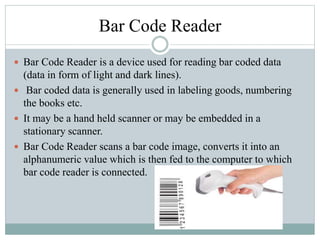
Bar Code Reader
 Bar Code Reader is a device used for reading bar coded data
(data in form of light and dark lines).
 Bar coded data is generally used in labeling goods, numbering
the books etc.
 It may be a hand held scanner or may be embedded in a
stationary scanner.
 Bar Code Reader scans a bar code image, converts it into an
alphanumeric value which is then fed to the computer to which
bar code reader is connected.
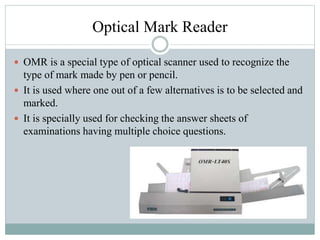
Optical Mark Reader
 OMR is a special type of optical scanner used to recognize the
type of mark made by pen or pencil.
 It is used where one out of a few alternatives is to be selected and
marked.
 It is specially used for checking the answer sheets of
examinations having multiple choice questions.
References
 https://en.wikibooks.org/wiki/A-
level_Computing/CIE/Computer_systems,_communications_and_software/Co
mponents_of_a_computer_system_and_modes_of_use/Types_of_hardware
 http://www.computerhope.com/jargon/i/inputdev.htm
 http://www.tutorialspoint.com/computer_fundamentals/computer_input_device
s.htm

Input devices

  • 1.
  • 2.
    Table of Contents Input devices o Keyboard o Mouse o Joy Stick o Light pen o Track Ball o Scanner o Graphic Tablet o Microphone o Magnetic Ink Card Reader(MICR) o Optical Character Reader(OCR) o Bar Code Reader o Optical Mark Reader(OMR)
  • 3.
    Input Devices  Inputdevices are hardware devices which take information from the user of the computer system, convert it into electrical signals and transmit it to the processor.  The primary function of input devices is to allow humans to interact with the computer system.  There are dozens of other devices that can also be used to input data into the computer.
  • 4.
     List ofcomputer input devices that can be utilized with a computer or a computing device is as follows: o Keyboard o Mouse o Joy Stick o Light pen o Track Ball o Scanner o Graphic Tablet o Microphone o Magnetic Ink Card Reader(MICR) o Optical Character Reader(OCR) o Bar Code Reader o Optical Mark Reader(OMR)
  • 5.
    Keyboard  Keyboard isthe most common and very popular input device which helps in inputting data to the computer.  The layout of the keyboard is like that of traditional typewriter, although there are some additional keys provided for performing additional functions.  The keys are laid out in the QWERTY order so that those key that are often struck in succession were not next to each other.
  • 6.
    The keys onthe keyboard are as follows: Keys Description Typing Keys These keys include the letter keys (A-Z) and digit keys (0-9) which generally give same layout as that of typewriters. Numeric Keypad It is used to enter numeric data or cursor movement. Generally, it consists of a set of 17 keys that are laid out in the same configuration used by most adding machines and calculators. Function Keys The twelve function keys are present on the keyboard which is arranged in a row at the top of the keyboard. Each function key has unique meaning and is used for some specific purpose. Control keys These keys provide cursor and screen control. It includes four directional arrow keys. Control keys also include Home, End, Insert, Delete, Page Up, Page Down, Control(Ctrl), Alternate(Alt), Escape(Esc). Special Purpose Keys Keyboard also contains some special purpose keys such as Enter, Shift, Caps Lock, Num Lock, Space bar, Tab, and Print Screen.
  • 7.
    Mouse  Mouse isanother commonly used input device of a computer system.  The mouse is a pointing device that moves the cursor on the screen.  You can place the cursor on icons and by clicking you can launch a program.  It is a very famous cursor-control device having a small palm size box with a round ball at its base which senses the movement of mouse and sends corresponding signals to CPU when the mouse buttons are pressed.  Generally it has two buttons called left and right button and a wheel is present between the buttons.
  • 8.
    Joystick  Joystick isalso a pointing device which is used to move cursor position on a monitor screen.  It is a stick having a spherical ball at its both lower and upper ends.  The lower spherical ball moves in a socket.  The joystick can be moved in all four directions.  The function of joystick is similar to that of a mouse.  It is mainly used in Computer Aided Designing(CAD) and playing computer games.
  • 9.
    Light Pen  Lightpen is a pointing device which is similar to a pen.  It is used to select a displayed menu item or draw pictures on the monitor screen.  It consists of a photocell and an optical system placed in a small tube.  When the tip of a light pen is moved over the monitor screen and pen button is pressed, its photocell sensing element detects the screen location and sends corresponding signal to the CPU.
  • 10.
    Track Ball  Trackball is an input device that is mostly used in notebook or laptop computer, instead of a mouse.  This is a ball which is half inserted and by moving fingers on ball, pointer can be moved.  Since the whole device is not moved, a track ball requires less space than a mouse.  A track ball comes in various shapes like a ball, a button and a square.
  • 11.
    Scanner  A scannerconverts printed documents in to images.  Some types of scanners scan documents and produce the results in black & white images.  The scanner operates in the same manner as a Photocopier.  Scanner captures images from the source which are then converted into the digital form that can be stored on the disc.
  • 12.
    Graphic Tablet  Graphictablet is also known as Digitizer.  Graphic tablet is an input device which converts analog information into digital form.  They can be used by the computer to create a picture of whatever the camera had been pointed at.  It is also known as digitizer because it converts graphics and pictorial data into binary inputs.  A graphic tablet as digitizer is used for doing fine works of drawing and image manipulation applications.
  • 13.
    Microphone  Microphone isan input device to input sound that is then stored in digital form.  The microphone is used for various applications like adding sound to a multimedia presentation or for mixing music.
  • 14.
    Magnetic Ink CardReader  MICR input device is generally used in banks because of a large number of cheques to be processed every day.  The bank's code number and cheque number are printed on the cheques with a special type of ink that contains particles of magnetic material that are machine readable.  This reading process is called Magnetic Ink Character Recognition (MICR).  The main advantages of MICR is that it is fast and less error prone.
  • 15.
    Optical Character Reader OCR is an input device used to read a printed text.  OCR scans text optically character by character, converts them into a machine readable code and stores the text on the system memory.
  • 16.
    Bar Code Reader Bar Code Reader is a device used for reading bar coded data (data in form of light and dark lines).  Bar coded data is generally used in labeling goods, numbering the books etc.  It may be a hand held scanner or may be embedded in a stationary scanner.  Bar Code Reader scans a bar code image, converts it into an alphanumeric value which is then fed to the computer to which bar code reader is connected.
  • 17.
    Optical Mark Reader OMR is a special type of optical scanner used to recognize the type of mark made by pen or pencil.  It is used where one out of a few alternatives is to be selected and marked.  It is specially used for checking the answer sheets of examinations having multiple choice questions.
  • 18.