NURIZAH RAMLI
10D0124
DTE
Any data or instruction entered into the computer is
known as INPUT.
An input device helps you to communicate with the
computer.
To enter information and issue commands, you use input
devices.
Examples of input devices:
Keyboard
Mouse
Scanner
Microphone
Digital Camera and Web Camera
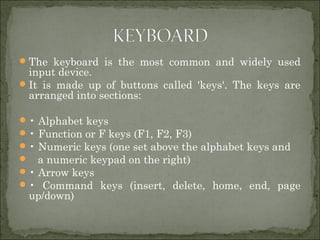
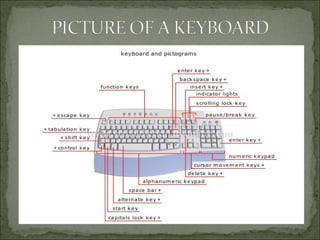
The keyboard is the most common and widely used
input device.
It is made up of buttons called 'keys'. The keys are
arranged into sections:
• Alphabet keys
• Function or F keys (F1, F2, F3)
• Numeric keys (one set above the alphabet keys and
 a numeric keypad on the right)
• Arrow keys
• Command keys (insert, delete, home, end, page
up/down)
A mouse is an input devices that fits comfortably
under the palm of your hand.
A mouse is a pointing device.
We use mouse to control the movement of the mouse
pointer on the screen and to make selections from
the screen.
The bottom of a mouse is flat and contains a
mechanism that detects the movement of a mouse.
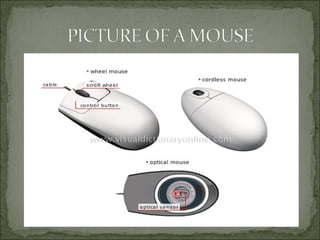
 optical mouse
 Mouse in which the ball is replaced by an optical system (light-
emitting diode and sensor); it has no movable parts.
 wheel mouse
 Mechanical or optical mouse that contains a scroll wheel.
 cordless mouse
 Mechanical or optical mouse connected to the computer by
infrared or radio signals.
A scanner is a light-sensing input device that reads
printed text and graphics and then translates the
results into a form the computer can use.
The image or text can be saved or changed on the
computer.
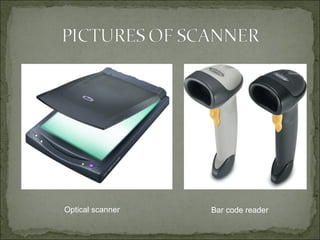
bar code reader
Device that uses an optical scanning process to decode
information contained in bar codes.
optical scanner
Equipment that converts a document’s graphics or texts
into digital data.
Optical scanner Bar code reader
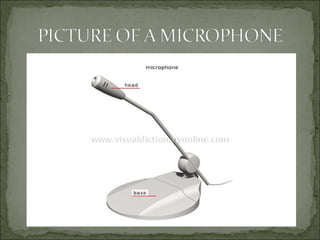
microphone
Device that converts electric pulses into broadcast or
recorded sounds.
A microphone allows you to record your voice to the
computer.
It also lets you speak to other people using computers
or even on the telephone.
A microphone is also called a mic.
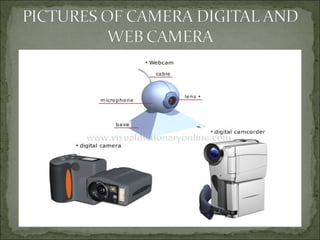
Web camera
Miniature digital camera used to transmit video images
in real time or for videoconferencing over the Internet.
digital camcorder
Portable video camera in which the recording tape is
replaced by a processor, which records and stores
sounds and images in digital format.
digital camera
Camera that contains a sensor and a microprocessor
rather than film; it records and stores images in digital
form, which can then be viewed on a screen.
Ict 123  input devices

Ict 123 input devices

  • 1.
  • 2.
    Any data orinstruction entered into the computer is known as INPUT. An input device helps you to communicate with the computer. To enter information and issue commands, you use input devices. Examples of input devices: Keyboard Mouse Scanner Microphone Digital Camera and Web Camera
  • 3.
    The keyboard isthe most common and widely used input device. It is made up of buttons called 'keys'. The keys are arranged into sections: • Alphabet keys • Function or F keys (F1, F2, F3) • Numeric keys (one set above the alphabet keys and  a numeric keypad on the right) • Arrow keys • Command keys (insert, delete, home, end, page up/down)
  • 5.
    A mouse isan input devices that fits comfortably under the palm of your hand. A mouse is a pointing device. We use mouse to control the movement of the mouse pointer on the screen and to make selections from the screen. The bottom of a mouse is flat and contains a mechanism that detects the movement of a mouse.
  • 6.
     optical mouse Mouse in which the ball is replaced by an optical system (light- emitting diode and sensor); it has no movable parts.  wheel mouse  Mechanical or optical mouse that contains a scroll wheel.  cordless mouse  Mechanical or optical mouse connected to the computer by infrared or radio signals.
  • 8.
    A scanner isa light-sensing input device that reads printed text and graphics and then translates the results into a form the computer can use. The image or text can be saved or changed on the computer.
  • 9.
    bar code reader Devicethat uses an optical scanning process to decode information contained in bar codes. optical scanner Equipment that converts a document’s graphics or texts into digital data.
  • 10.
  • 11.
    microphone Device that convertselectric pulses into broadcast or recorded sounds. A microphone allows you to record your voice to the computer. It also lets you speak to other people using computers or even on the telephone. A microphone is also called a mic.
  • 13.
    Web camera Miniature digitalcamera used to transmit video images in real time or for videoconferencing over the Internet. digital camcorder Portable video camera in which the recording tape is replaced by a processor, which records and stores sounds and images in digital format. digital camera Camera that contains a sensor and a microprocessor rather than film; it records and stores images in digital form, which can then be viewed on a screen.