Introduction to Databases
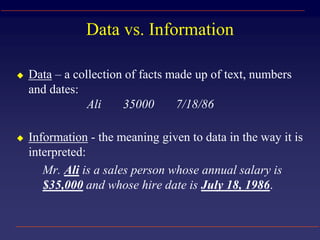
Data vs. Information
 Data – a collection of facts made up of text, numbers
and dates:
Ali 35000 7/18/86
 Information - the meaning given to data in the way it is
interpreted:
Mr. Ali is a sales person whose annual salary is
$35,000 and whose hire date is July 18, 1986.
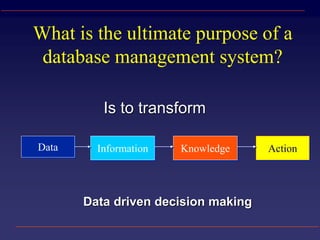
What is the ultimate purpose of a
database management system?
Data Information Knowledge Action
Is to transform
Data driven decision making
What is a Database?
 A structured collection of related data
 An filing cabinet, an address book, a
telephone directory, a timetable, etc.
 Google and your email is a database
 School Student Information System
Basic Database Concepts
 Table
– A set of related records
Name: Harris
College: Medicine
Tel: 392-5555
Name: Harris
College: Medicine
Tel: 392-5555
Name: Harris
 Field
 Record
–A collection of data
about an individual item
–A single item of data
common to all records
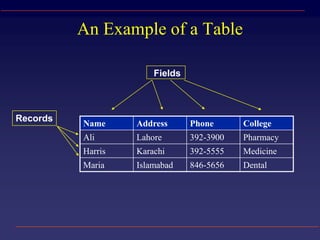
An Example of a Table
Records
Fields
Name Address Phone College
Ali Lahore 392-3900 Pharmacy
Harris Karachi 392-5555 Medicine
Maria Islamabad 846-5656 Dental
Different parts of a database
Fields – different types of data (number or text)
Records
Queries
Reports
Primary Keys & Foreign Keys
Name User Phone College
Ali a.ali 392-3900 Pharmacy
Harris h.harris 392-5555 Medicine
Maria m.maria 846-5656 Dental
To ensure that each record is unique in each table, we
can set one field to be a Primary Key field.
A Primary Key is a field that will contain no duplicates
and no blank values.
Foreign Keys link to data in other tables
What is a Relational Database
Management System (RDMS)?
A relational database is a collection of tables from
which data can be accessed in many different ways
without having to reorganize the database tables.
DON’T DUPLICATE DATA
– That is, once relationships are created, tables can “talk” to
each other. We can link (relate) the tables to find:
 Which schools are in a system?
 Which students are in which class?
 Which classes are filling up?
Relationships
Database Options
Consumer
 Flat Files
 Microsoft Excel
- Limit of 65,536 Rows
 Microsoft Access
 FileMaker Pro
 MySQL (Open Source)
 Postgres (Open Source)
Enterprise RDMS
 Oracle
 IBM/DB2
 MS SQL-server
 Sybase
 Informix
 Lotus Notes
 MySQL (Open Source)
 Postgres (Open Source)
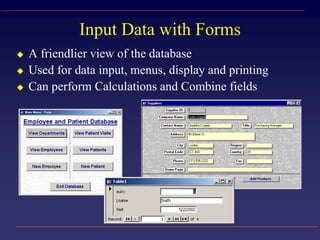
Input Data with Forms
 A friendlier view of the database
 Used for data input, menus, display and printing
 Can perform Calculations and Combine fields
Databases and the Web
Accessing databases through web forms
– Java programming interface (JDBC)
– Embedding into HTML pages (JSP or ASP)
– Access through http protocol (Web Services)
Using Web document formats for data
definition and manipulation
– XML, XML databases and messaging systems
Queries
 A means of asking questions (querying) of your data
 Can look across a number of Tables and other Queries
 Can perform Calculations and Combine fields
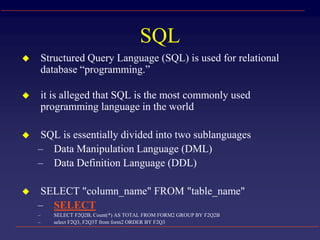
SQL
 Structured Query Language (SQL) is used for relational
database “programming.”
 it is alleged that SQL is the most commonly used
programming language in the world
 SQL is essentially divided into two sublanguages
– Data Manipulation Language (DML)
– Data Definition Language (DDL)
 SELECT "column_name" FROM "table_name"
– SELECT
– SELECT F2Q2B, Count(*) AS TOTAL FROM FORM2 GROUP BY F2Q2B
– select F2Q3, F2Q3T from form2 ORDER BY F2Q3
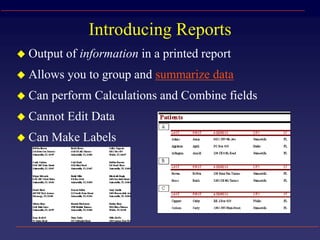
Introducing Reports
 Output of information in a printed report
 Allows you to group and summarize data
 Can perform Calculations and Combine fields
 Cannot Edit Data
 Can Make Labels
XML: Extensible Markup Language
 Defined by the WWW Consortium (W3C)
 The ability to specify new tags, and to create
nested tag structures made XML a great way to
exchange data, not just documents
 XML has become the basis for all new
generation data interchange formats.
 A wide variety of tools is available for parsing,
browsing and querying XML documents/data
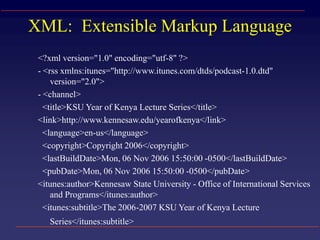
XML: Extensible Markup Language
<?xml version="1.0" encoding="utf-8" ?>
- <rss xmlns:itunes="http://www.itunes.com/dtds/podcast-1.0.dtd"
version="2.0">
- <channel>
<title>KSU Year of Kenya Lecture Series</title>
<link>http://www.kennesaw.edu/yearofkenya</link>
<language>en-us</language>
<copyright>Copyright 2006</copyright>
<lastBuildDate>Mon, 06 Nov 2006 15:50:00 -0500</lastBuildDate>
<pubDate>Mon, 06 Nov 2006 15:50:00 -0500</pubDate>
<itunes:author>Kennesaw State University - Office of International Services
and Programs</itunes:author>
<itunes:subtitle>The 2006-2007 KSU Year of Kenya Lecture
Series</itunes:subtitle>
Data Mining
Searching for novel patterns, rules or
relationships in data, e.g.:
– correlations
– classification
– clustering
– Visualization

Intro databases (Table, Record, Field)

  • 1.
  • 2.
    Data vs. Information Data – a collection of facts made up of text, numbers and dates: Ali 35000 7/18/86  Information - the meaning given to data in the way it is interpreted: Mr. Ali is a sales person whose annual salary is $35,000 and whose hire date is July 18, 1986.
  • 3.
    What is theultimate purpose of a database management system? Data Information Knowledge Action Is to transform Data driven decision making
  • 4.
    What is aDatabase?  A structured collection of related data  An filing cabinet, an address book, a telephone directory, a timetable, etc.  Google and your email is a database  School Student Information System
  • 5.
    Basic Database Concepts Table – A set of related records Name: Harris College: Medicine Tel: 392-5555 Name: Harris College: Medicine Tel: 392-5555 Name: Harris  Field  Record –A collection of data about an individual item –A single item of data common to all records
  • 6.
    An Example ofa Table Records Fields Name Address Phone College Ali Lahore 392-3900 Pharmacy Harris Karachi 392-5555 Medicine Maria Islamabad 846-5656 Dental
  • 7.
    Different parts ofa database Fields – different types of data (number or text) Records Queries Reports
  • 8.
    Primary Keys &Foreign Keys Name User Phone College Ali a.ali 392-3900 Pharmacy Harris h.harris 392-5555 Medicine Maria m.maria 846-5656 Dental To ensure that each record is unique in each table, we can set one field to be a Primary Key field. A Primary Key is a field that will contain no duplicates and no blank values. Foreign Keys link to data in other tables
  • 9.
    What is aRelational Database Management System (RDMS)? A relational database is a collection of tables from which data can be accessed in many different ways without having to reorganize the database tables. DON’T DUPLICATE DATA – That is, once relationships are created, tables can “talk” to each other. We can link (relate) the tables to find:  Which schools are in a system?  Which students are in which class?  Which classes are filling up?
  • 10.
  • 11.
    Database Options Consumer  FlatFiles  Microsoft Excel - Limit of 65,536 Rows  Microsoft Access  FileMaker Pro  MySQL (Open Source)  Postgres (Open Source) Enterprise RDMS  Oracle  IBM/DB2  MS SQL-server  Sybase  Informix  Lotus Notes  MySQL (Open Source)  Postgres (Open Source)
  • 12.
    Input Data withForms  A friendlier view of the database  Used for data input, menus, display and printing  Can perform Calculations and Combine fields
  • 13.
    Databases and theWeb Accessing databases through web forms – Java programming interface (JDBC) – Embedding into HTML pages (JSP or ASP) – Access through http protocol (Web Services) Using Web document formats for data definition and manipulation – XML, XML databases and messaging systems
  • 14.
    Queries  A meansof asking questions (querying) of your data  Can look across a number of Tables and other Queries  Can perform Calculations and Combine fields
  • 15.
    SQL  Structured QueryLanguage (SQL) is used for relational database “programming.”  it is alleged that SQL is the most commonly used programming language in the world  SQL is essentially divided into two sublanguages – Data Manipulation Language (DML) – Data Definition Language (DDL)  SELECT "column_name" FROM "table_name" – SELECT – SELECT F2Q2B, Count(*) AS TOTAL FROM FORM2 GROUP BY F2Q2B – select F2Q3, F2Q3T from form2 ORDER BY F2Q3
  • 16.
    Introducing Reports  Outputof information in a printed report  Allows you to group and summarize data  Can perform Calculations and Combine fields  Cannot Edit Data  Can Make Labels
  • 17.
    XML: Extensible MarkupLanguage  Defined by the WWW Consortium (W3C)  The ability to specify new tags, and to create nested tag structures made XML a great way to exchange data, not just documents  XML has become the basis for all new generation data interchange formats.  A wide variety of tools is available for parsing, browsing and querying XML documents/data
  • 18.
    XML: Extensible MarkupLanguage <?xml version="1.0" encoding="utf-8" ?> - <rss xmlns:itunes="http://www.itunes.com/dtds/podcast-1.0.dtd" version="2.0"> - <channel> <title>KSU Year of Kenya Lecture Series</title> <link>http://www.kennesaw.edu/yearofkenya</link> <language>en-us</language> <copyright>Copyright 2006</copyright> <lastBuildDate>Mon, 06 Nov 2006 15:50:00 -0500</lastBuildDate> <pubDate>Mon, 06 Nov 2006 15:50:00 -0500</pubDate> <itunes:author>Kennesaw State University - Office of International Services and Programs</itunes:author> <itunes:subtitle>The 2006-2007 KSU Year of Kenya Lecture Series</itunes:subtitle>
  • 19.
    Data Mining Searching fornovel patterns, rules or relationships in data, e.g.: – correlations – classification – clustering – Visualization

Editor's Notes

  • #8 We know that a database stores pieces of information or facts in an organised way. Understanding how to use and get the most out of databases requires us to understand that method of organisation.