SubmittedTo :
Dr. Akhilesh Singh
Faculty of Agriculture
PRSU Prayagraj
Submitted By:
Amit Kumar
M.Sc. (Ag.) Agronomy 3rd
Sem
Roll No. : 02
CourseTitle: Computer Fundamentals and Programming
(MCA-501)
Topic: Input Devices, its function and uses?
Input Devices
Input Devices
 The devices that are used to enter data and
instructions or commands into the computer.
 Eyes and ears of computer.
 Commonly used input devices are:
◦ Keyboard
◦ Mouse
◦ Joystick
◦ Light Pen
◦ Digital Scanner
 Floppy drives, hard disks and CD drives are used
for both input and output devices
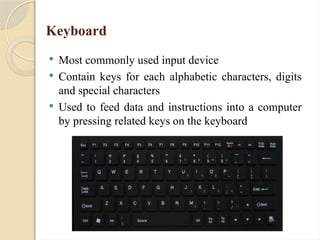
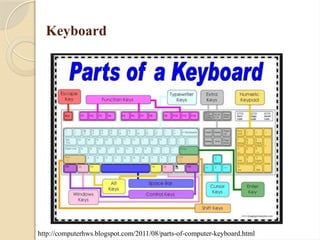
Keyboard
 Most commonly used input device
 Contain keys for each alphabetic characters, digits
and special characters
 Used to feed data and instructions into a computer
by pressing related keys on the keyboard
Keyboard
http://computerhws.blogspot.com/2011/08/parts-of-computer-keyboard.html
Types of Keyboard
 QWERTY
 Enhanced Keyboard
 Cordless Keyboard
 Portable keyboard
 Ergonomic keyboard
 Gaming keyboard
 Virtual keyboard
Pointing Devices
 A pointer represents a small symbol on the screen
 Appears on the screen in Graphical User Interface
◦ For example, an arrow appears on the screen in Windows
environment.
 A pointing device is an input device that is used to
control a pointer on the screen.
 Used to select item on the screen, to select
commands from the command menu, to draw
graphs etc.
 Mouse, Joystick, Trackball etc are examples of
pointing devices.
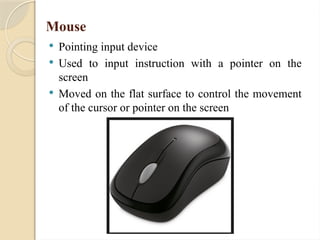
Mouse
 Pointing input device
 Used to input instruction with a pointer on the
screen
 Moved on the flat surface to control the movement
of the cursor or pointer on the screen
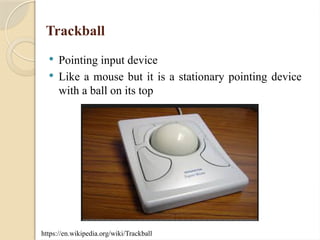
Trackball
 Pointing input device
 Like a mouse but it is a stationary pointing device
with a ball on its top
https://en.wikipedia.org/wiki/Trackball
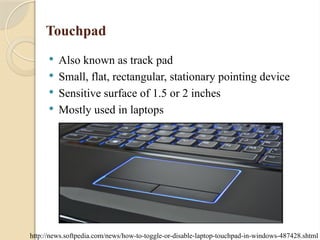
Touchpad
 Also known as track pad
 Small, flat, rectangular, stationary pointing device
 Sensitive surface of 1.5 or 2 inches
 Mostly used in laptops
http://news.softpedia.com/news/how-to-toggle-or-disable-laptop-touchpad-in-windows-487428.shtml
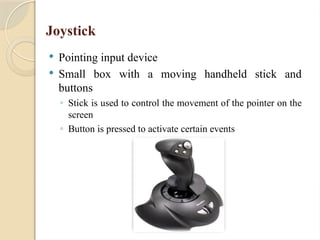
Joystick
 Pointing input device
 Small box with a moving handheld stick and
buttons
◦ Stick is used to control the movement of the pointer on the
screen
◦ Button is pressed to activate certain events
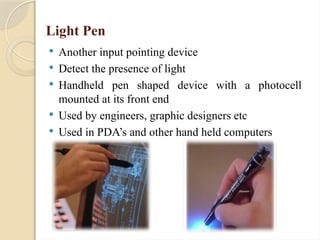
Light Pen
 Another input pointing device
 Detect the presence of light
 Handheld pen shaped device with a photocell
mounted at its front end
 Used by engineers, graphic designers etc
 Used in PDA’s and other hand held computers
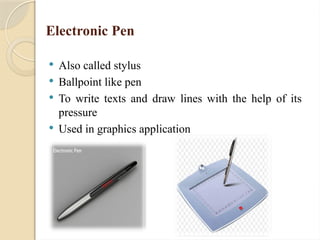
Electronic Pen
 Also called stylus
 Ballpoint like pen
 To write texts and draw lines with the help of its
pressure
 Used in graphics application
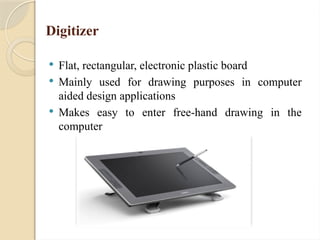
Digitizer
 Flat, rectangular, electronic plastic board
 Mainly used for drawing purposes in computer
aided design applications
 Makes easy to enter free-hand drawing in the
computer
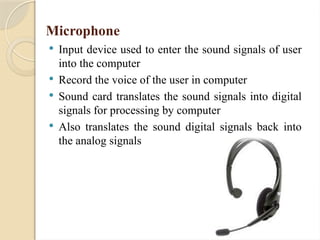
Microphone
 Input device used to enter the sound signals of user
into the computer
 Record the voice of the user in computer
 Sound card translates the sound signals into digital
signals for processing by computer
 Also translates the sound digital signals back into
the analog signals
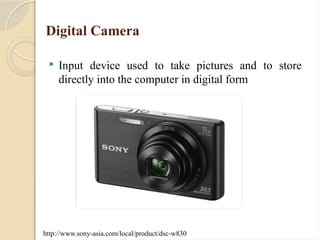
Digital Camera
 Input device used to take pictures and to store
directly into the computer in digital form
http://www.sony-asia.com/local/product/dsc-w830
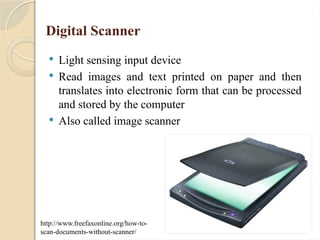
Digital Scanner
 Light sensing input device
 Read images and text printed on paper and then
translates into electronic form that can be processed
and stored by the computer
 Also called image scanner
http://www.freefaxonline.org/how-to-
scan-documents-without-scanner/
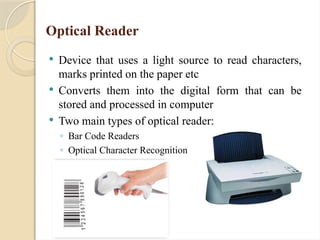
Optical Reader
 Device that uses a light source to read characters,
marks printed on the paper etc
 Converts them into the digital form that can be
stored and processed in computer
 Two main types of optical reader:
◦ Bar Code Readers
◦ Optical Character Recognition
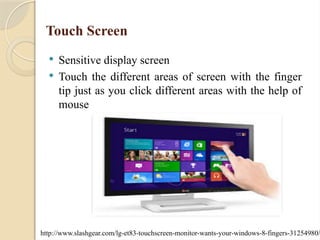
Touch Screen
 Sensitive display screen
 Touch the different areas of screen with the finger
tip just as you click different areas with the help of
mouse
http://www.slashgear.com/lg-et83-touchscreen-monitor-wants-your-windows-8-fingers-31254980/
Any
Questions?
Thankyou

computer input device ak computers s.pptx

  • 1.
    SubmittedTo : Dr. AkhileshSingh Faculty of Agriculture PRSU Prayagraj Submitted By: Amit Kumar M.Sc. (Ag.) Agronomy 3rd Sem Roll No. : 02 CourseTitle: Computer Fundamentals and Programming (MCA-501) Topic: Input Devices, its function and uses?
  • 2.
  • 3.
    Input Devices  Thedevices that are used to enter data and instructions or commands into the computer.  Eyes and ears of computer.  Commonly used input devices are: ◦ Keyboard ◦ Mouse ◦ Joystick ◦ Light Pen ◦ Digital Scanner  Floppy drives, hard disks and CD drives are used for both input and output devices
  • 4.
    Keyboard  Most commonlyused input device  Contain keys for each alphabetic characters, digits and special characters  Used to feed data and instructions into a computer by pressing related keys on the keyboard
  • 5.
  • 6.
    Types of Keyboard QWERTY  Enhanced Keyboard  Cordless Keyboard  Portable keyboard  Ergonomic keyboard  Gaming keyboard  Virtual keyboard
  • 7.
    Pointing Devices  Apointer represents a small symbol on the screen  Appears on the screen in Graphical User Interface ◦ For example, an arrow appears on the screen in Windows environment.  A pointing device is an input device that is used to control a pointer on the screen.  Used to select item on the screen, to select commands from the command menu, to draw graphs etc.  Mouse, Joystick, Trackball etc are examples of pointing devices.
  • 8.
    Mouse  Pointing inputdevice  Used to input instruction with a pointer on the screen  Moved on the flat surface to control the movement of the cursor or pointer on the screen
  • 9.
    Trackball  Pointing inputdevice  Like a mouse but it is a stationary pointing device with a ball on its top https://en.wikipedia.org/wiki/Trackball
  • 10.
    Touchpad  Also knownas track pad  Small, flat, rectangular, stationary pointing device  Sensitive surface of 1.5 or 2 inches  Mostly used in laptops http://news.softpedia.com/news/how-to-toggle-or-disable-laptop-touchpad-in-windows-487428.shtml
  • 11.
    Joystick  Pointing inputdevice  Small box with a moving handheld stick and buttons ◦ Stick is used to control the movement of the pointer on the screen ◦ Button is pressed to activate certain events
  • 12.
    Light Pen  Anotherinput pointing device  Detect the presence of light  Handheld pen shaped device with a photocell mounted at its front end  Used by engineers, graphic designers etc  Used in PDA’s and other hand held computers
  • 13.
    Electronic Pen  Alsocalled stylus  Ballpoint like pen  To write texts and draw lines with the help of its pressure  Used in graphics application
  • 14.
    Digitizer  Flat, rectangular,electronic plastic board  Mainly used for drawing purposes in computer aided design applications  Makes easy to enter free-hand drawing in the computer
  • 15.
    Microphone  Input deviceused to enter the sound signals of user into the computer  Record the voice of the user in computer  Sound card translates the sound signals into digital signals for processing by computer  Also translates the sound digital signals back into the analog signals
  • 16.
    Digital Camera  Inputdevice used to take pictures and to store directly into the computer in digital form http://www.sony-asia.com/local/product/dsc-w830
  • 17.
    Digital Scanner  Lightsensing input device  Read images and text printed on paper and then translates into electronic form that can be processed and stored by the computer  Also called image scanner http://www.freefaxonline.org/how-to- scan-documents-without-scanner/
  • 18.
    Optical Reader  Devicethat uses a light source to read characters, marks printed on the paper etc  Converts them into the digital form that can be stored and processed in computer  Two main types of optical reader: ◦ Bar Code Readers ◦ Optical Character Recognition
  • 19.
    Touch Screen  Sensitivedisplay screen  Touch the different areas of screen with the finger tip just as you click different areas with the help of mouse http://www.slashgear.com/lg-et83-touchscreen-monitor-wants-your-windows-8-fingers-31254980/
  • 20.
  • 21.