Input Output Devices
Input – Output Devices

• Also known as Peripheral Devices.
• These surround a computer’s CPU and
  memory.
Input Devices

• An Input Device is an electromechanical
  device that accepts data from outside
  world and translates them into a form a
  computer can interpret.
• It a hardware device that sends data to a
  computer.
Categories

• Keyboard
• Pointing Devices (mouse, joystick)
• Imaging and video input devices (digital
  camera, webcam, barcode
  reader, fingerprint scanner, image
  scanner)
• Audio Input Devices (Microphone, MIDI
  keyboard)
• Composite Devices (Game Controller)
Keyboard
• A 'keyboard' is a human interface device
  which is represented as a layout of
  buttons.
• Keyboards allow a computer user to input
  letters, numbers, and other symbols into a
  computer.
• Keyboards are also used for computer
  gaming.
• Most keyboards have QWERTY layout.
• A keyboard has:
  Alphanumeric keys (A-Z, 0-9)
  Function keys (F1 – F12)
  Control keys
   (Home, End, Insert, Delete, Page-up, Page-
   Down)
  Special-purpose keys (Enter, Shift, (Caps-
   lock, Space, Tab, Print-Screen)
Pointing Devices

                  JoyStick
• Mouse
TRACKBALL
BALL
• A trackball is a pointing device consisting
  of a ball held by a socket.
• The socket contains sensors to detect a
  rotation of the ball about two axes.
• The user rolls the ball to direct the cursor
  to the desired place on the screen and can
  click one of two buttons near the trackball
  to select objects on the screen.
TOUCH SCREEN
• A display device that allows a user to
  interact with a computer by touching areas
  on the screen.
• These are used in
  ATM, Tablets, Smartphones, and other
  devices.
LIGHT PEN
LIGHT PEN
• A light pen is a pen-shaped input device.
• A light pen utilizes a light sensitive
  detector, requiring you to hold a pen and
  point it at the screen.
• The device contains a light sensor
  which, when pointed at a cathode ray tube
  screen, generates a signal each time the
  electron beam raster passes by the spot
  the pen is pointing at.
• Light enters the lens of a light pen, where
  it encounters a photoelectric cell, which
  converts the energy to a signal that is sent
  to the computer. The light is obtained from
  the refresh of the CRT, and at the instant
  the light is generated, the computer knows
  what location on the screen is being
  refreshed; this information is coordinated
  with the signal from the light pen, and is
  subsequently used by the graphics
  software to make a decision.
CONTROL
BUTTON


 LENS
DIGITIZER
DIGITIZER
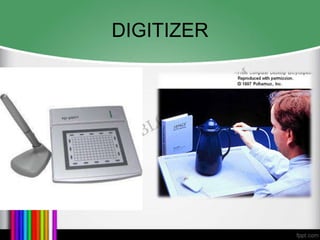
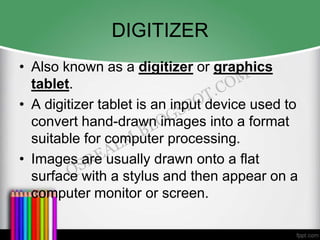
• Also known as a digitizer or graphics
  tablet.
• A digitizer tablet is an input device used to
  convert hand-drawn images into a format
  suitable for computer processing.
• Images are usually drawn onto a flat
  surface with a stylus and then appear on a
  computer monitor or screen.
• The device consists of a flat surface upon
  which the user may "draw" or trace an
  image using an attached stylus.
• The image is displayed on the computer
  monitor.
• Used for technical drawing, CAD, graphics
  editing program, etc.
Imaging And Video Input Devices
•   Digital Camera
•   Webcam
•   Fingerprint Scanner
•   Image Scanner
•   Optical Recognition Devices --
    OMR, OBR, OCR
SCANNER
• A scanner is an input device used to
  capture information, such as, photographs
  and documents on paper and translate the
  information into a computer image.
• It is a device that optically scans
  images, printed text, handwriting, or an
  object, and converts it to a digital image.
• Most scanners have a flat scanning surface.
Scanners include:
  – Fingerprint Scanner
  – Image Scanner
  – Optical Recognition Devices --
    OMR, OBR, OCR
• OMR: OMR which stands for Optical Mark Recognition
  is the process of gathering data with an optical scanner
  by measuring the reflectively of light at predetermined
  positions on a surface.
  OCR: OCR stands for Optical Character Recognition.
  OCR is the recognition of printed or written text
  characters by a computer. It is the application software
  that allows a computer to recognize printed or written
  characters, e.g. letters, numbers, punctuation
  marks, and pictograms using an optical scanner for
  input. OCR is being used by libraries to digitize and
  preserve their holdings.
  OBR: It stands for Optical Bar Code Reader which is
  used for reading bar-coded data. It scans a set of vertical
  bars of different width for specific data and is used to
  read tags. Bar code reading is done by a light pen or
  scanner connected to a computer.
BAR CODE READER
• Bar code readers are used very
  extensively in supermarkets. Look closely
  at a packet of biscuits. Do you see a set of
  narrow ad broad lines printed on the
  wrapper? This is a bar code. Bar codes
  contain all the information about an
  item, such as price and weight. When this
  bar code reader is shown over a bar code
  reader, the information about the item is
  automatically sent to the computer. Then
WEBCAM and
DIGITAL CAMERA
IO Devices

IO Devices

  • 1.
  • 2.
    Input – OutputDevices • Also known as Peripheral Devices. • These surround a computer’s CPU and memory.
  • 3.
    Input Devices • AnInput Device is an electromechanical device that accepts data from outside world and translates them into a form a computer can interpret. • It a hardware device that sends data to a computer.
  • 4.
    Categories • Keyboard • PointingDevices (mouse, joystick) • Imaging and video input devices (digital camera, webcam, barcode reader, fingerprint scanner, image scanner) • Audio Input Devices (Microphone, MIDI keyboard) • Composite Devices (Game Controller)
  • 5.
  • 6.
    • A 'keyboard'is a human interface device which is represented as a layout of buttons. • Keyboards allow a computer user to input letters, numbers, and other symbols into a computer. • Keyboards are also used for computer gaming.
  • 7.
    • Most keyboardshave QWERTY layout. • A keyboard has: Alphanumeric keys (A-Z, 0-9) Function keys (F1 – F12) Control keys (Home, End, Insert, Delete, Page-up, Page- Down) Special-purpose keys (Enter, Shift, (Caps- lock, Space, Tab, Print-Screen)
  • 9.
    Pointing Devices JoyStick • Mouse
  • 10.
  • 11.
    • A trackballis a pointing device consisting of a ball held by a socket. • The socket contains sensors to detect a rotation of the ball about two axes. • The user rolls the ball to direct the cursor to the desired place on the screen and can click one of two buttons near the trackball to select objects on the screen.
  • 12.
    TOUCH SCREEN • Adisplay device that allows a user to interact with a computer by touching areas on the screen.
  • 13.
    • These areused in ATM, Tablets, Smartphones, and other devices.
  • 14.
  • 15.
    LIGHT PEN • Alight pen is a pen-shaped input device. • A light pen utilizes a light sensitive detector, requiring you to hold a pen and point it at the screen. • The device contains a light sensor which, when pointed at a cathode ray tube screen, generates a signal each time the electron beam raster passes by the spot the pen is pointing at.
  • 16.
    • Light entersthe lens of a light pen, where it encounters a photoelectric cell, which converts the energy to a signal that is sent to the computer. The light is obtained from the refresh of the CRT, and at the instant the light is generated, the computer knows what location on the screen is being refreshed; this information is coordinated with the signal from the light pen, and is subsequently used by the graphics software to make a decision.
  • 17.
  • 18.
  • 19.
    DIGITIZER • Also knownas a digitizer or graphics tablet. • A digitizer tablet is an input device used to convert hand-drawn images into a format suitable for computer processing. • Images are usually drawn onto a flat surface with a stylus and then appear on a computer monitor or screen.
  • 20.
    • The deviceconsists of a flat surface upon which the user may "draw" or trace an image using an attached stylus. • The image is displayed on the computer monitor. • Used for technical drawing, CAD, graphics editing program, etc.
  • 21.
    Imaging And VideoInput Devices • Digital Camera • Webcam • Fingerprint Scanner • Image Scanner • Optical Recognition Devices -- OMR, OBR, OCR
  • 22.
    SCANNER • A scanneris an input device used to capture information, such as, photographs and documents on paper and translate the information into a computer image. • It is a device that optically scans images, printed text, handwriting, or an object, and converts it to a digital image. • Most scanners have a flat scanning surface.
  • 23.
    Scanners include: – Fingerprint Scanner – Image Scanner – Optical Recognition Devices -- OMR, OBR, OCR
  • 24.
    • OMR: OMRwhich stands for Optical Mark Recognition is the process of gathering data with an optical scanner by measuring the reflectively of light at predetermined positions on a surface. OCR: OCR stands for Optical Character Recognition. OCR is the recognition of printed or written text characters by a computer. It is the application software that allows a computer to recognize printed or written characters, e.g. letters, numbers, punctuation marks, and pictograms using an optical scanner for input. OCR is being used by libraries to digitize and preserve their holdings. OBR: It stands for Optical Bar Code Reader which is used for reading bar-coded data. It scans a set of vertical bars of different width for specific data and is used to read tags. Bar code reading is done by a light pen or scanner connected to a computer.
  • 25.
    BAR CODE READER •Bar code readers are used very extensively in supermarkets. Look closely at a packet of biscuits. Do you see a set of narrow ad broad lines printed on the wrapper? This is a bar code. Bar codes contain all the information about an item, such as price and weight. When this bar code reader is shown over a bar code reader, the information about the item is automatically sent to the computer. Then
  • 27.