WHAT IS INPUT?
The data or
instructions
given to the
computer is
called Input.
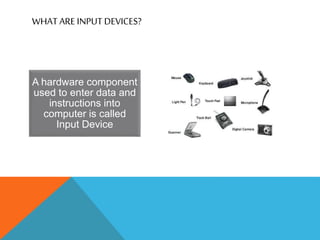
A hardware component
used to enter data and
instructions into
computer is called
Input Device
WHAT ARE INPUT DEVICES?
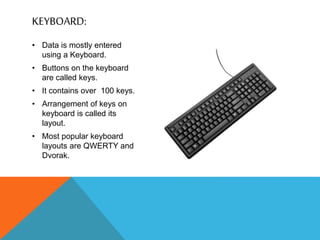
• Data is mostly entered
using a Keyboard.
• Buttons on the keyboard
are called keys.
• It contains over 100 keys.
• Arrangement of keys on
keyboard is called its
layout.
• Most popular keyboard
layouts are QWERTY and
Dvorak.
KEYBOARD:
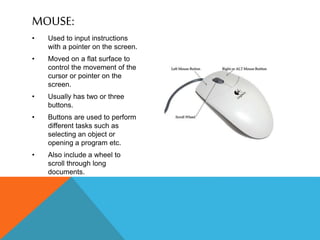
MOUSE:
• Used to input instructions
with a pointer on the screen.
• Moved on a flat surface to
control the movement of the
cursor or pointer on the
screen.
• Usually has two or three
buttons.
• Buttons are used to perform
different tasks such as
selecting an object or
opening a program etc.
• Also include a wheel to
scroll through long
documents.
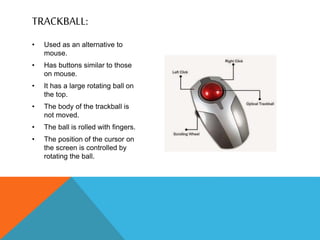
• Used as an alternative to
mouse.
• Has buttons similar to those
on mouse.
• It has a large rotating ball on
the top.
• The body of the trackball is
not moved.
• The ball is rolled with fingers.
• The position of the cursor on
the screen is controlled by
rotating the ball.
TRACKBALL:
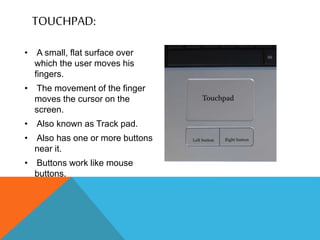
TOUCHPAD:
• A small, flat surface over
which the user moves his
fingers.
• The movement of the finger
moves the cursor on the
screen.
• Also known as Track pad.
• Also has one or more buttons
near it.
• Buttons work like mouse
buttons.
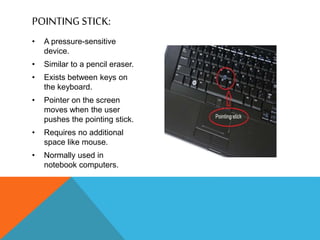
• A pressure-sensitive
device.
• Similar to a pencil eraser.
• Exists between keys on
the keyboard.
• Pointer on the screen
moves when the user
pushes the pointing stick.
• Requires no additional
space like mouse.
• Normally used in
notebook computers.
POINTING STICK:
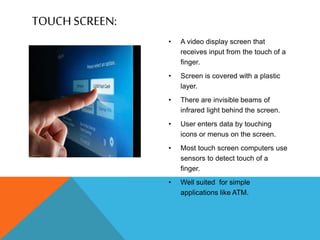
• A video display screen that
receives input from the touch of a
finger.
• Screen is covered with a plastic
layer.
• There are invisible beams of
infrared light behind the screen.
• User enters data by touching
icons or menus on the screen.
• Most touch screen computers use
sensors to detect touch of a
finger.
• Well suited for simple
applications like ATM.
TOUCH SCREEN:
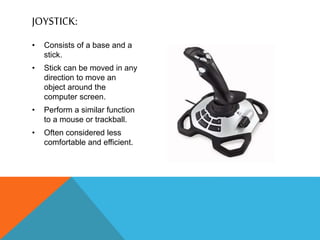
• Consists of a base and a
stick.
• Stick can be moved in any
direction to move an
object around the
computer screen.
• Perform a similar function
to a mouse or trackball.
• Often considered less
comfortable and efficient.
JOYSTICK:
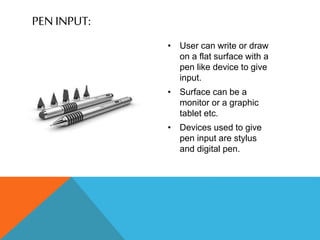
• User can write or draw
on a flat surface with a
pen like device to give
input.
• Surface can be a
monitor or a graphic
tablet etc.
• Devices used to give
pen input are stylus
and digital pen.
PEN INPUT:
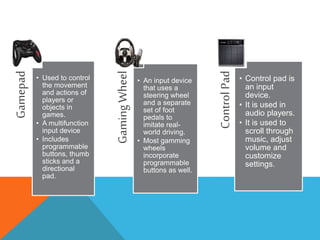
Gamepad
• Used to control
the movement
and actions of
players or
objects in
games.
• A multifunction
input device
• Includes
programmable
buttons, thumb
sticks and a
directional
pad.
Gaming
Wheel
• An input device
that uses a
steering wheel
and a separate
set of foot
pedals to
imitate real-
world driving.
• Most gamming
wheels
incorporate
programmable
buttons as well.
Control
Pad
• Control pad is
an input
device.
• It is used in
audio players.
• It is used to
scroll through
music, adjust
volume and
customize
settings.
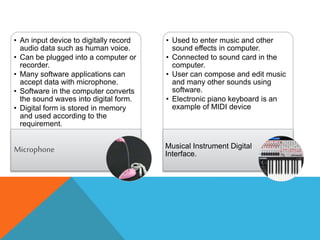
• An input device to digitally record
audio data such as human voice.
• Can be plugged into a computer or
recorder.
• Many software applications can
accept data with microphone.
• Software in the computer converts
the sound waves into digital form.
• Digital form is stored in memory
and used according to the
requirement.
Microphone
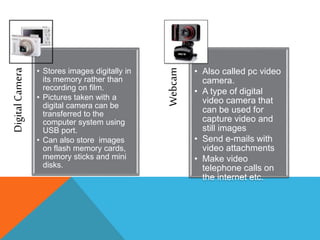
• Used to enter music and other
sound effects in computer.
• Connected to sound card in the
computer.
• User can compose and edit music
and many other sounds using
software.
• Electronic piano keyboard is an
example of MIDI device
Musical Instrument Digital
Interface.
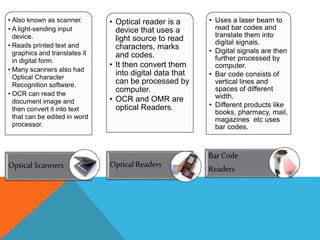
Digital
Camera
• Stores images digitally in
its memory rather than
recording on film.
• Pictures taken with a
digital camera can be
transferred to the
computer system using
USB port.
• Can also store images
on flash memory cards,
memory sticks and mini
disks.
Webcam
• Also called pc video
camera.
• A type of digital
video camera that
can be used for
capture video and
still images
• Send e-mails with
video attachments
• Make video
telephone calls on
the internet etc.
• Also known as scanner.
• A light-sending input
device.
• Reads printed text and
graphics and translates it
in digital form.
• Many scanners also had
Optical Character
Recognition software.
• OCR can read the
document image and
then convert it into text
that can be edited in word
processor.
Optical Scanners
• Optical reader is a
device that uses a
light source to read
characters, marks
and codes.
• It then convert them
into digital data that
can be processed by
computer.
• OCR and OMR are
optical Readers.
Optical Readers
• Uses a laser beam to
read bar codes and
translate them into
digital signals.
• Digital signals are then
further processed by
computer.
• Bar code consists of
vertical lines and
spaces of different
width.
• Different products like
books, pharmacy, mail,
magazines etc uses
bar codes.
Bar Code
Readers
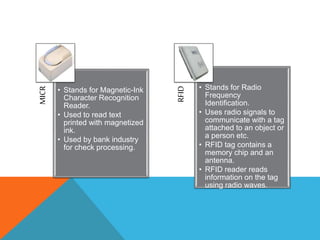
MICR
• Stands for Magnetic-Ink
Character Recognition
Reader.
• Used to read text
printed with magnetized
ink.
• Used by bank industry
for check processing.
RFID
• Stands for Radio
Frequency
Identification.
• Uses radio signals to
communicate with a tag
attached to an object or
a person etc.
• RFID tag contains a
memory chip and an
antenna.
• RFID reader reads
information on the tag
using radio waves.
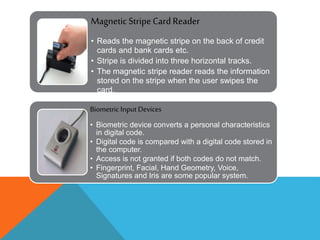
Magnetic Stripe CardReader
• Reads the magnetic stripe on the back of credit
cards and bank cards etc.
• Stripe is divided into three horizontal tracks.
• The magnetic stripe reader reads the information
stored on the stripe when the user swipes the
card.
Biometric Input Devices
• Biometric device converts a personal characteristics
in digital code.
• Digital code is compared with a digital code stored in
the computer.
• Access is not granted if both codes do not match.
• Fingerprint, Facial, Hand Geometry, Voice,
Signatures and Iris are some popular system.

Input Devices

  • 2.
    WHAT IS INPUT? Thedata or instructions given to the computer is called Input.
  • 3.
    A hardware component usedto enter data and instructions into computer is called Input Device WHAT ARE INPUT DEVICES?
  • 4.
    • Data ismostly entered using a Keyboard. • Buttons on the keyboard are called keys. • It contains over 100 keys. • Arrangement of keys on keyboard is called its layout. • Most popular keyboard layouts are QWERTY and Dvorak. KEYBOARD:
  • 5.
    MOUSE: • Used toinput instructions with a pointer on the screen. • Moved on a flat surface to control the movement of the cursor or pointer on the screen. • Usually has two or three buttons. • Buttons are used to perform different tasks such as selecting an object or opening a program etc. • Also include a wheel to scroll through long documents.
  • 6.
    • Used asan alternative to mouse. • Has buttons similar to those on mouse. • It has a large rotating ball on the top. • The body of the trackball is not moved. • The ball is rolled with fingers. • The position of the cursor on the screen is controlled by rotating the ball. TRACKBALL:
  • 7.
    TOUCHPAD: • A small,flat surface over which the user moves his fingers. • The movement of the finger moves the cursor on the screen. • Also known as Track pad. • Also has one or more buttons near it. • Buttons work like mouse buttons.
  • 8.
    • A pressure-sensitive device. •Similar to a pencil eraser. • Exists between keys on the keyboard. • Pointer on the screen moves when the user pushes the pointing stick. • Requires no additional space like mouse. • Normally used in notebook computers. POINTING STICK:
  • 9.
    • A videodisplay screen that receives input from the touch of a finger. • Screen is covered with a plastic layer. • There are invisible beams of infrared light behind the screen. • User enters data by touching icons or menus on the screen. • Most touch screen computers use sensors to detect touch of a finger. • Well suited for simple applications like ATM. TOUCH SCREEN:
  • 10.
    • Consists ofa base and a stick. • Stick can be moved in any direction to move an object around the computer screen. • Perform a similar function to a mouse or trackball. • Often considered less comfortable and efficient. JOYSTICK:
  • 11.
    • User canwrite or draw on a flat surface with a pen like device to give input. • Surface can be a monitor or a graphic tablet etc. • Devices used to give pen input are stylus and digital pen. PEN INPUT:
  • 12.
    Gamepad • Used tocontrol the movement and actions of players or objects in games. • A multifunction input device • Includes programmable buttons, thumb sticks and a directional pad. Gaming Wheel • An input device that uses a steering wheel and a separate set of foot pedals to imitate real- world driving. • Most gamming wheels incorporate programmable buttons as well. Control Pad • Control pad is an input device. • It is used in audio players. • It is used to scroll through music, adjust volume and customize settings.
  • 13.
    • An inputdevice to digitally record audio data such as human voice. • Can be plugged into a computer or recorder. • Many software applications can accept data with microphone. • Software in the computer converts the sound waves into digital form. • Digital form is stored in memory and used according to the requirement. Microphone • Used to enter music and other sound effects in computer. • Connected to sound card in the computer. • User can compose and edit music and many other sounds using software. • Electronic piano keyboard is an example of MIDI device Musical Instrument Digital Interface.
  • 14.
    Digital Camera • Stores imagesdigitally in its memory rather than recording on film. • Pictures taken with a digital camera can be transferred to the computer system using USB port. • Can also store images on flash memory cards, memory sticks and mini disks. Webcam • Also called pc video camera. • A type of digital video camera that can be used for capture video and still images • Send e-mails with video attachments • Make video telephone calls on the internet etc.
  • 15.
    • Also knownas scanner. • A light-sending input device. • Reads printed text and graphics and translates it in digital form. • Many scanners also had Optical Character Recognition software. • OCR can read the document image and then convert it into text that can be edited in word processor. Optical Scanners • Optical reader is a device that uses a light source to read characters, marks and codes. • It then convert them into digital data that can be processed by computer. • OCR and OMR are optical Readers. Optical Readers • Uses a laser beam to read bar codes and translate them into digital signals. • Digital signals are then further processed by computer. • Bar code consists of vertical lines and spaces of different width. • Different products like books, pharmacy, mail, magazines etc uses bar codes. Bar Code Readers
  • 16.
    MICR • Stands forMagnetic-Ink Character Recognition Reader. • Used to read text printed with magnetized ink. • Used by bank industry for check processing. RFID • Stands for Radio Frequency Identification. • Uses radio signals to communicate with a tag attached to an object or a person etc. • RFID tag contains a memory chip and an antenna. • RFID reader reads information on the tag using radio waves.
  • 17.
    Magnetic Stripe CardReader •Reads the magnetic stripe on the back of credit cards and bank cards etc. • Stripe is divided into three horizontal tracks. • The magnetic stripe reader reads the information stored on the stripe when the user swipes the card. Biometric Input Devices • Biometric device converts a personal characteristics in digital code. • Digital code is compared with a digital code stored in the computer. • Access is not granted if both codes do not match. • Fingerprint, Facial, Hand Geometry, Voice, Signatures and Iris are some popular system.