AIRCRAFT DRAWINGS
BY
MANI RATHINAM RAJAMANI
DRAWINGS
• Drawing :
– A method of conveying ideas concerning the construction / assembly of
objects.
– Link b/w Designer and Assembler
– Described by lines, notes, abbreviations, symbols ,..ETC.
• Modern Drawings:
– Computer Aided Design Drafting (CADD)
– Computer Aided Design (CAD) : Product Design.
– Computer Aided Manufacturing (CAM) : Product Manufacturing.
– Computer Aided Engineering (CAE) : Product Engineering / Analysis /
Simulation & PLC.
Do’s & Dont’s
• Care and Use of Drawings :
– Drawings are both expensive and valuable.
– Handle with Care.
– Do smooth out the fold lines instead of bending back.
– lay them on a flat surface.
– Hands free of oil, grease, etc. that soil / smudge prints.

– Never make notes or marks on a print to avoid confusions.
– Authorized personnel changes Only permitted with sign and date any
changes they make.
DRAWING TYPES
• Information as size and shape of the object and all of its parts,
• Specifications for material to be used,
• how the material is to be finished,
• how the parts are to be assembled,
• Types of Drawings:
– (1) Detail,
– (2) Assembly,
– (3) Installation.
DRAWING TYPES
• DETAIL DRAWING:
– A description of a single part,
– described by lines, notes, and symbols the
specifications for size, shape, material, and
methods of manufacture.
– several detail drawings may be shown on the
same sheet or print.
• ASSEMBLY DRAWING:
– A description of an object made up of two or
more parts.
– to show the relationship of the various parts
assembled.
– An assembly drawing is usually more complex
than detail drawing and accompanied by detail
drawings.
DRAWING TYPES
• INSTALLATION DRAWING :
– all necessary info for a part or an
assembly in the final installed
position in the aircraft.
– shows dimensions necessary for
location of parts with relation to
the other parts
– reference dimensions that are
helpful in later work in the shop.
SECTIONAL VIEW DRAWINGS
• Section / Sectional view is obtained by cutting away part of an object to
show the shape and construction at the cutting plane.
• Parts cut away are shown by use of section (crosshatching) lines.
• Types of sections are.
– Full Section
– Half Section
– Revolved Section
– Removed Section
SECTIONAL VIEW TYPES
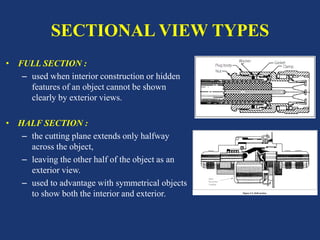
• FULL SECTION :
– used when interior construction or hidden
features of an object cannot be shown
clearly by exterior views.
• HALF SECTION :
– the cutting plane extends only halfway
across the object,
– leaving the other half of the object as an
exterior view.
– used to advantage with symmetrical objects
to show both the interior and exterior.
SECTIONAL VIEW TYPES
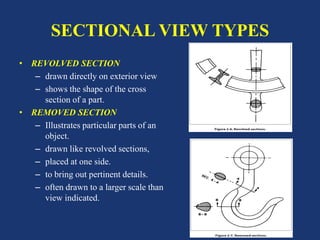
• REVOLVED SECTION
– drawn directly on exterior view
– shows the shape of the cross
section of a part.
• REMOVED SECTION
– Illustrates particular parts of an
object.
– drawn like revolved sections,
– placed at one side.
– to bring out pertinent details.
– often drawn to a larger scale than
view indicated.
TITLE BLOCK
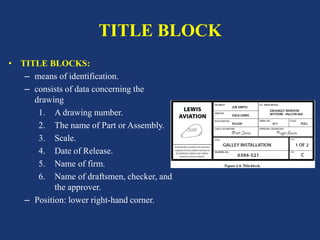
• TITLE BLOCKS:
– means of identification.
– consists of data concerning the
drawing
1. A drawing number.
2. The name of Part or Assembly.
3. Scale.
4. Date of Release.
5. Name of firm.
6. Name of draftsmen, checker, and
the approver.
– Position: lower right-hand corner.
DRAWING NUMBER
• Drawing or Print Numbers:
• All prints are identified by a number
• appears in a number block in lower right-hand corner of title block.
• may be also shown in other places
– near the top border line,
– in the upper right-hand corner,
– on the reverse side of the print at both ends.
• Purpose : quick identification of a print.
• sheet number and number of sheets in series.
REFERENCE AND DASH NUMBERS
• Ref No’s appear in title blocks
• refers to numbers of other prints.
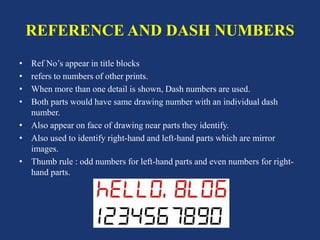
• When more than one detail is shown, Dash numbers are used.
• Both parts would have same drawing number with an individual dash
number.
• Also appear on face of drawing near parts they identify.
• Also used to identify right-hand and left-hand parts which are mirror
images.
• Thumb rule : odd numbers for left-hand parts and even numbers for right-
hand parts.
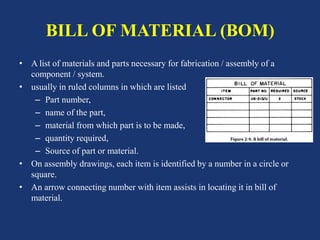
BILL OF MATERIAL (BOM)
• A list of materials and parts necessary for fabrication / assembly of a
component / system.
• usually in ruled columns in which are listed
– Part number,
– name of the part,
– material from which part is to be made,
– quantity required,
– Source of part or material.
• On assembly drawings, each item is identified by a number in a circle or
square.
• An arrow connecting number with item assists in locating it in bill of
material.
OTHER DRAWING DATA
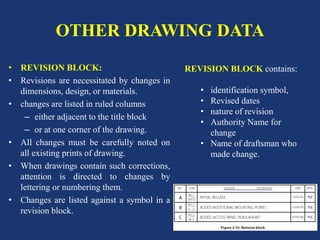
• REVISION BLOCK:
• Revisions are necessitated by changes in
dimensions, design, or materials.
• changes are listed in ruled columns
– either adjacent to the title block
– or at one corner of the drawing.
• All changes must be carefully noted on
all existing prints of drawing.
• When drawings contain such corrections,
attention is directed to changes by
lettering or numbering them.
• Changes are listed against a symbol in a
revision block.
REVISION BLOCK contains:
• identification symbol,
• Revised dates
• nature of revision
• Authority Name for
change
• Name of draftsman who
made change.
OTHER DRAWING DATA
• NOTES:
• refer to methods / alternate applicable methods of attachment or
construction.
• used only when information cannot be conveyed in conventional manner
• Used to avoid crowding the drawing.
• When the note refers to a specific part, a light line with an arrowhead leads
from the note to the part.
• If it applies to more than one part, note is worded to eliminate ambiguity as
to the parts to which it pertains.
• If there are several notes, they are generally grouped together and
numbered consecutively.
OTHER DRAWING DATA
• ZONE NUMBERS:
– are similar to numbers and letters printed on borders of a map.
– Help to locate a particular point.
– To find a point, mentally draw horizontal and vertical lines from the
letters and numerals specified;
– point where these lines intersect is the area sought.
– Used to locate parts, sections, and views on large drawings, particularly
assembly drawings.
– Parts numbered can be located on drawings by finding numbers in
squares along the lower border.
– Zone numbers read from right to left.
OTHER DRAWING DATA
• Finish Marks :
– used to indicate surface finish required
– better appearance and allow a closer fit with adjoining parts.
– Standard limits and tolerances must be observed.
– Do not confuse machined finishes with paint, enamel, chromium
plating.
• Scale :
• exactly same size as drawn part; a scale of 1:1.
• Application:
• When shown near title block, application may refer to aircraft, assembly,
sub-assembly or next installation on which part would be used.
LOCATION IDENTIFICATION
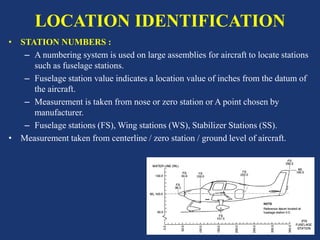
• STATION NUMBERS :
– A numbering system is used on large assemblies for aircraft to locate stations
such as fuselage stations.
– Fuselage station value indicates a location value of inches from the datum of
the aircraft.
– Measurement is taken from nose or zero station or A point chosen by
manufacturer.
– Fuselage stations (FS), Wing stations (WS), Stabilizer Stations (SS).
• Measurement taken from centerline / zero station / ground level of aircraft.
LOCATION IDENTIFICATION
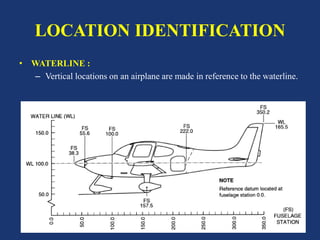
• WATERLINE :
– Vertical locations on an airplane are made in reference to the waterline.
LOCATION IDENTIFICATION
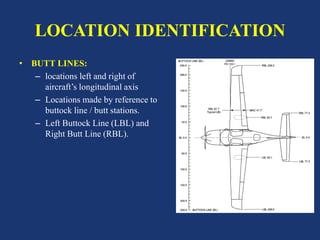
• BUTT LINES:
– locations left and right of
aircraft’s longitudinal axis
– Locations made by reference to
buttock line / butt stations.
– Left Buttock Line (LBL) and
Right Butt Line (RBL).
TOLERANCES & ALLOWANCES
• TOLERANCE:
– a given dimension with an allowable variation,
– plus (+) indicates maximum, and minus (−) minimum allowable variation.
– sum of plus and minus allowance figures is called tolerance.
– If the plus and minus allowances are the same, presented as value ± tolerance.
• ALLOWANCE:
– indicated in either fractional or decimal form.
– Used for very accurate dimensions,
– decimal allowances are used.
– Fractional allowances are sufficient when precise tolerances are not required.
– Standard tolerances may be given in title block to apply throughout drawing.
METHODS OF ILLUSTRATION
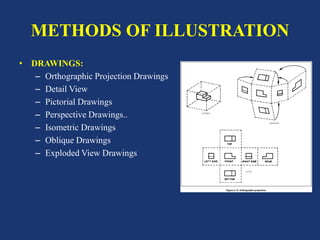
• DRAWINGS:
– Orthographic Projection Drawings
– Detail View
– Pictorial Drawings
– Perspective Drawings..
– Isometric Drawings
– Oblique Drawings
– Exploded View Drawings
ORTHOGRAPHIC PROJECTION
DRAWINGS
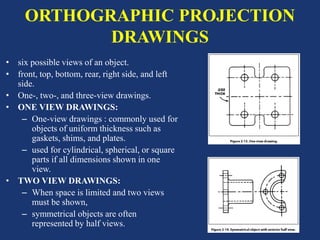
• six possible views of an object.
• front, top, bottom, rear, right side, and left
side.
• One-, two-, and three-view drawings.
• ONE VIEW DRAWINGS:
– One-view drawings : commonly used for
objects of uniform thickness such as
gaskets, shims, and plates.
– used for cylindrical, spherical, or square
parts if all dimensions shown in one
view.
• TWO VIEW DRAWINGS:
– When space is limited and two views
must be shown,
– symmetrical objects are often
represented by half views.
DETAIL VIEW
• shows only a part of object but in greater
detail.
• shows to a larger scale than the principal
view.
• parts shown in detail on drawing is
encircled by a heavy line on principal view.
PICTORIAL DRAWINGS
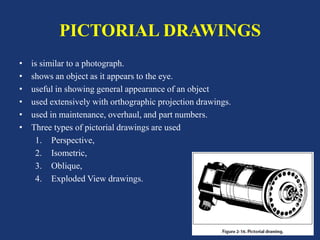
• is similar to a photograph.
• shows an object as it appears to the eye.
• useful in showing general appearance of an object
• used extensively with orthographic projection drawings.
• used in maintenance, overhaul, and part numbers.
• Three types of pictorial drawings are used
1. Perspective,
2. Isometric,
3. Oblique,
4. Exploded View drawings.
PICTORIAL DRAWINGS
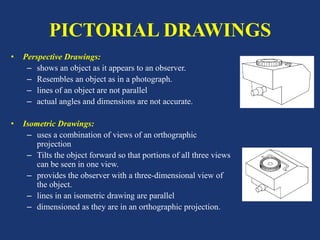
• Perspective Drawings:
– shows an object as it appears to an observer.
– Resembles an object as in a photograph.
– lines of an object are not parallel
– actual angles and dimensions are not accurate.
• Isometric Drawings:
– uses a combination of views of an orthographic
projection
– Tilts the object forward so that portions of all three views
can be seen in one view.
– provides the observer with a three-dimensional view of
the object.
– lines in an isometric drawing are parallel
– dimensioned as they are in an orthographic projection.
PICTORIAL DRAWINGS
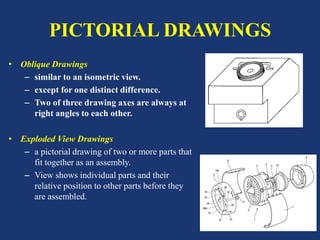
• Oblique Drawings
– similar to an isometric view.
– except for one distinct difference.
– Two of three drawing axes are always at
right angles to each other.
• Exploded View Drawings
– a pictorial drawing of two or more parts that
fit together as an assembly.
– View shows individual parts and their
relative position to other parts before they
are assembled.
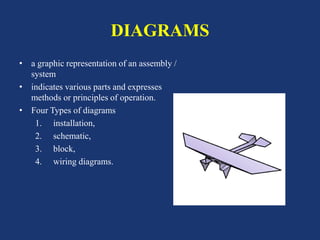
DIAGRAMS
• a graphic representation of an assembly /
system
• indicates various parts and expresses
methods or principles of operation.
• Four Types of diagrams
1. installation,
2. schematic,
3. block,
4. wiring diagrams.
INSTALLATION DRAWINGS
• a diagram of installation of the flight
components of an aircraft.
• Identifies each of the components in the
systems and shows their location in the
aircraft.
• used extensively in aircraft maintenance
and repair manuals,
• Are invaluable in identifying and locating
components and understanding the
operation of various systems.
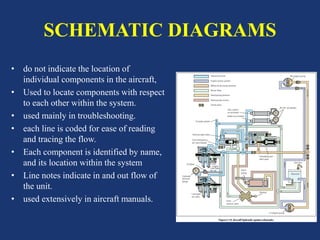
SCHEMATIC DIAGRAMS
• do not indicate the location of
individual components in the aircraft,
• Used to locate components with respect
to each other within the system.
• used mainly in troubleshooting.
• each line is coded for ease of reading
and tracing the flow.
• Each component is identified by name,
and its location within the system
• Line notes indicate in and out flow of
the unit.
• used extensively in aircraft manuals.
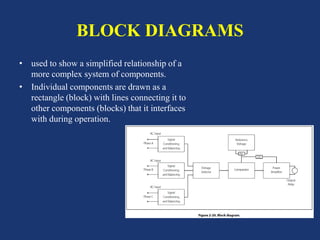
BLOCK DIAGRAMS
• used to show a simplified relationship of a
more complex system of components.
• Individual components are drawn as a
rectangle (block) with lines connecting it to
other components (blocks) that it interfaces
with during operation.
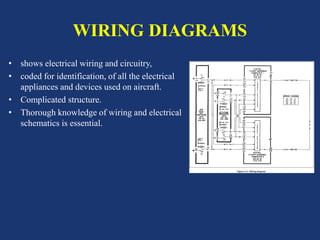
WIRING DIAGRAMS
• shows electrical wiring and circuitry,
• coded for identification, of all the electrical
appliances and devices used on aircraft.
• Complicated structure.
• Thorough knowledge of wiring and electrical
schematics is essential.
FLOWCHARTS
• used to illustrate a particular sequence, or flow of events.
• Types are
– Troubleshooting Flowchart:
• used for detection of faulty components.
• consist of a series of yes or no questions.
• If yes, one course of action is followed.
• If no, a different course of action is followed.
• a logical solution to a particular problem may be achieved.
– Logic Flowchart
• analysis of digitally controlled components and systems.
• uses standardized symbols to indicate specific types of logic gates
• relationship to other digital devices in a system.
• consist of individual components that take an input
• and provide an output.
• By analyzing inputs, it is possible to determine digital output.
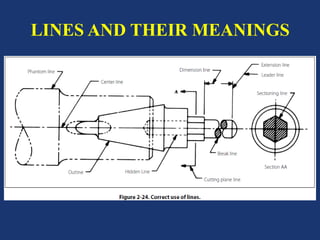
LINES AND THEIR MEANINGS
• Lines mark boundaries, edges, and
intersection of surfaces.
• used to show dimensions and hidden
surfaces and to indicate centers.
• Types:
– Centerlines
– Dimension Line.
– Extension Lines.
– Sectioning Lines.
– Phantom Lines.
– Break Lines.
– Leader Lines.
– Hidden Lines.
– Outline / Visible Lines
– Stitch Lines.
– Cutting Plane and Viewing
Plane Lines.
LINES AND THEIR MEANINGS
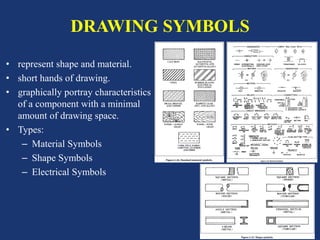
DRAWING SYMBOLS
• represent shape and material.
• short hands of drawing.
• graphically portray characteristics
of a component with a minimal
amount of drawing space.
• Types:
– Material Symbols
– Shape Symbols
– Electrical Symbols
INTERPRETING DRAWINGS
• read drawing number and description.
• check model affected, latest change
letter, the next assembly listed.
• read illustrations.
• For multi-view drawing,
• get a general idea of shape of object
• select one view for a more careful
study.
• referring back and forth to adjacent
view.
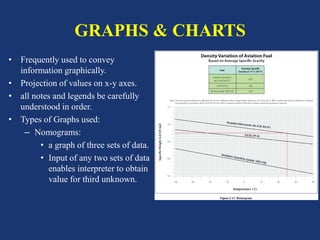
GRAPHS & CHARTS
• Frequently used to convey
information graphically.
• Projection of values on x-y axes.
• all notes and legends be carefully
understood in order.
• Types of Graphs used:
– Nomograms:
• a graph of three sets of data.
• Input of any two sets of data
enables interpreter to obtain
value for third unknown.
QUESTIONS>?
THANK YOU

Aircraft drawingsbasics

  • 1.
  • 2.
    DRAWINGS • Drawing : –A method of conveying ideas concerning the construction / assembly of objects. – Link b/w Designer and Assembler – Described by lines, notes, abbreviations, symbols ,..ETC. • Modern Drawings: – Computer Aided Design Drafting (CADD) – Computer Aided Design (CAD) : Product Design. – Computer Aided Manufacturing (CAM) : Product Manufacturing. – Computer Aided Engineering (CAE) : Product Engineering / Analysis / Simulation & PLC.
  • 3.
    Do’s & Dont’s •Care and Use of Drawings : – Drawings are both expensive and valuable. – Handle with Care. – Do smooth out the fold lines instead of bending back. – lay them on a flat surface. – Hands free of oil, grease, etc. that soil / smudge prints. – Never make notes or marks on a print to avoid confusions. – Authorized personnel changes Only permitted with sign and date any changes they make.
  • 4.
    DRAWING TYPES • Informationas size and shape of the object and all of its parts, • Specifications for material to be used, • how the material is to be finished, • how the parts are to be assembled, • Types of Drawings: – (1) Detail, – (2) Assembly, – (3) Installation.
  • 5.
    DRAWING TYPES • DETAILDRAWING: – A description of a single part, – described by lines, notes, and symbols the specifications for size, shape, material, and methods of manufacture. – several detail drawings may be shown on the same sheet or print. • ASSEMBLY DRAWING: – A description of an object made up of two or more parts. – to show the relationship of the various parts assembled. – An assembly drawing is usually more complex than detail drawing and accompanied by detail drawings.
  • 6.
    DRAWING TYPES • INSTALLATIONDRAWING : – all necessary info for a part or an assembly in the final installed position in the aircraft. – shows dimensions necessary for location of parts with relation to the other parts – reference dimensions that are helpful in later work in the shop.
  • 7.
    SECTIONAL VIEW DRAWINGS •Section / Sectional view is obtained by cutting away part of an object to show the shape and construction at the cutting plane. • Parts cut away are shown by use of section (crosshatching) lines. • Types of sections are. – Full Section – Half Section – Revolved Section – Removed Section
  • 8.
    SECTIONAL VIEW TYPES •FULL SECTION : – used when interior construction or hidden features of an object cannot be shown clearly by exterior views. • HALF SECTION : – the cutting plane extends only halfway across the object, – leaving the other half of the object as an exterior view. – used to advantage with symmetrical objects to show both the interior and exterior.
  • 9.
    SECTIONAL VIEW TYPES •REVOLVED SECTION – drawn directly on exterior view – shows the shape of the cross section of a part. • REMOVED SECTION – Illustrates particular parts of an object. – drawn like revolved sections, – placed at one side. – to bring out pertinent details. – often drawn to a larger scale than view indicated.
  • 10.
    TITLE BLOCK • TITLEBLOCKS: – means of identification. – consists of data concerning the drawing 1. A drawing number. 2. The name of Part or Assembly. 3. Scale. 4. Date of Release. 5. Name of firm. 6. Name of draftsmen, checker, and the approver. – Position: lower right-hand corner.
  • 11.
    DRAWING NUMBER • Drawingor Print Numbers: • All prints are identified by a number • appears in a number block in lower right-hand corner of title block. • may be also shown in other places – near the top border line, – in the upper right-hand corner, – on the reverse side of the print at both ends. • Purpose : quick identification of a print. • sheet number and number of sheets in series.
  • 12.
    REFERENCE AND DASHNUMBERS • Ref No’s appear in title blocks • refers to numbers of other prints. • When more than one detail is shown, Dash numbers are used. • Both parts would have same drawing number with an individual dash number. • Also appear on face of drawing near parts they identify. • Also used to identify right-hand and left-hand parts which are mirror images. • Thumb rule : odd numbers for left-hand parts and even numbers for right- hand parts.
  • 13.
    BILL OF MATERIAL(BOM) • A list of materials and parts necessary for fabrication / assembly of a component / system. • usually in ruled columns in which are listed – Part number, – name of the part, – material from which part is to be made, – quantity required, – Source of part or material. • On assembly drawings, each item is identified by a number in a circle or square. • An arrow connecting number with item assists in locating it in bill of material.
  • 14.
    OTHER DRAWING DATA •REVISION BLOCK: • Revisions are necessitated by changes in dimensions, design, or materials. • changes are listed in ruled columns – either adjacent to the title block – or at one corner of the drawing. • All changes must be carefully noted on all existing prints of drawing. • When drawings contain such corrections, attention is directed to changes by lettering or numbering them. • Changes are listed against a symbol in a revision block. REVISION BLOCK contains: • identification symbol, • Revised dates • nature of revision • Authority Name for change • Name of draftsman who made change.
  • 15.
    OTHER DRAWING DATA •NOTES: • refer to methods / alternate applicable methods of attachment or construction. • used only when information cannot be conveyed in conventional manner • Used to avoid crowding the drawing. • When the note refers to a specific part, a light line with an arrowhead leads from the note to the part. • If it applies to more than one part, note is worded to eliminate ambiguity as to the parts to which it pertains. • If there are several notes, they are generally grouped together and numbered consecutively.
  • 16.
    OTHER DRAWING DATA •ZONE NUMBERS: – are similar to numbers and letters printed on borders of a map. – Help to locate a particular point. – To find a point, mentally draw horizontal and vertical lines from the letters and numerals specified; – point where these lines intersect is the area sought. – Used to locate parts, sections, and views on large drawings, particularly assembly drawings. – Parts numbered can be located on drawings by finding numbers in squares along the lower border. – Zone numbers read from right to left.
  • 17.
    OTHER DRAWING DATA •Finish Marks : – used to indicate surface finish required – better appearance and allow a closer fit with adjoining parts. – Standard limits and tolerances must be observed. – Do not confuse machined finishes with paint, enamel, chromium plating. • Scale : • exactly same size as drawn part; a scale of 1:1. • Application: • When shown near title block, application may refer to aircraft, assembly, sub-assembly or next installation on which part would be used.
  • 18.
    LOCATION IDENTIFICATION • STATIONNUMBERS : – A numbering system is used on large assemblies for aircraft to locate stations such as fuselage stations. – Fuselage station value indicates a location value of inches from the datum of the aircraft. – Measurement is taken from nose or zero station or A point chosen by manufacturer. – Fuselage stations (FS), Wing stations (WS), Stabilizer Stations (SS). • Measurement taken from centerline / zero station / ground level of aircraft.
  • 19.
    LOCATION IDENTIFICATION • WATERLINE: – Vertical locations on an airplane are made in reference to the waterline.
  • 20.
    LOCATION IDENTIFICATION • BUTTLINES: – locations left and right of aircraft’s longitudinal axis – Locations made by reference to buttock line / butt stations. – Left Buttock Line (LBL) and Right Butt Line (RBL).
  • 21.
    TOLERANCES & ALLOWANCES •TOLERANCE: – a given dimension with an allowable variation, – plus (+) indicates maximum, and minus (−) minimum allowable variation. – sum of plus and minus allowance figures is called tolerance. – If the plus and minus allowances are the same, presented as value ± tolerance. • ALLOWANCE: – indicated in either fractional or decimal form. – Used for very accurate dimensions, – decimal allowances are used. – Fractional allowances are sufficient when precise tolerances are not required. – Standard tolerances may be given in title block to apply throughout drawing.
  • 22.
    METHODS OF ILLUSTRATION •DRAWINGS: – Orthographic Projection Drawings – Detail View – Pictorial Drawings – Perspective Drawings.. – Isometric Drawings – Oblique Drawings – Exploded View Drawings
  • 23.
    ORTHOGRAPHIC PROJECTION DRAWINGS • sixpossible views of an object. • front, top, bottom, rear, right side, and left side. • One-, two-, and three-view drawings. • ONE VIEW DRAWINGS: – One-view drawings : commonly used for objects of uniform thickness such as gaskets, shims, and plates. – used for cylindrical, spherical, or square parts if all dimensions shown in one view. • TWO VIEW DRAWINGS: – When space is limited and two views must be shown, – symmetrical objects are often represented by half views.
  • 24.
    DETAIL VIEW • showsonly a part of object but in greater detail. • shows to a larger scale than the principal view. • parts shown in detail on drawing is encircled by a heavy line on principal view.
  • 25.
    PICTORIAL DRAWINGS • issimilar to a photograph. • shows an object as it appears to the eye. • useful in showing general appearance of an object • used extensively with orthographic projection drawings. • used in maintenance, overhaul, and part numbers. • Three types of pictorial drawings are used 1. Perspective, 2. Isometric, 3. Oblique, 4. Exploded View drawings.
  • 26.
    PICTORIAL DRAWINGS • PerspectiveDrawings: – shows an object as it appears to an observer. – Resembles an object as in a photograph. – lines of an object are not parallel – actual angles and dimensions are not accurate. • Isometric Drawings: – uses a combination of views of an orthographic projection – Tilts the object forward so that portions of all three views can be seen in one view. – provides the observer with a three-dimensional view of the object. – lines in an isometric drawing are parallel – dimensioned as they are in an orthographic projection.
  • 27.
    PICTORIAL DRAWINGS • ObliqueDrawings – similar to an isometric view. – except for one distinct difference. – Two of three drawing axes are always at right angles to each other. • Exploded View Drawings – a pictorial drawing of two or more parts that fit together as an assembly. – View shows individual parts and their relative position to other parts before they are assembled.
  • 28.
    DIAGRAMS • a graphicrepresentation of an assembly / system • indicates various parts and expresses methods or principles of operation. • Four Types of diagrams 1. installation, 2. schematic, 3. block, 4. wiring diagrams.
  • 29.
    INSTALLATION DRAWINGS • adiagram of installation of the flight components of an aircraft. • Identifies each of the components in the systems and shows their location in the aircraft. • used extensively in aircraft maintenance and repair manuals, • Are invaluable in identifying and locating components and understanding the operation of various systems.
  • 30.
    SCHEMATIC DIAGRAMS • donot indicate the location of individual components in the aircraft, • Used to locate components with respect to each other within the system. • used mainly in troubleshooting. • each line is coded for ease of reading and tracing the flow. • Each component is identified by name, and its location within the system • Line notes indicate in and out flow of the unit. • used extensively in aircraft manuals.
  • 31.
    BLOCK DIAGRAMS • usedto show a simplified relationship of a more complex system of components. • Individual components are drawn as a rectangle (block) with lines connecting it to other components (blocks) that it interfaces with during operation.
  • 32.
    WIRING DIAGRAMS • showselectrical wiring and circuitry, • coded for identification, of all the electrical appliances and devices used on aircraft. • Complicated structure. • Thorough knowledge of wiring and electrical schematics is essential.
  • 33.
    FLOWCHARTS • used toillustrate a particular sequence, or flow of events. • Types are – Troubleshooting Flowchart: • used for detection of faulty components. • consist of a series of yes or no questions. • If yes, one course of action is followed. • If no, a different course of action is followed. • a logical solution to a particular problem may be achieved. – Logic Flowchart • analysis of digitally controlled components and systems. • uses standardized symbols to indicate specific types of logic gates • relationship to other digital devices in a system. • consist of individual components that take an input • and provide an output. • By analyzing inputs, it is possible to determine digital output.
  • 34.
    LINES AND THEIRMEANINGS • Lines mark boundaries, edges, and intersection of surfaces. • used to show dimensions and hidden surfaces and to indicate centers. • Types: – Centerlines – Dimension Line. – Extension Lines. – Sectioning Lines. – Phantom Lines. – Break Lines. – Leader Lines. – Hidden Lines. – Outline / Visible Lines – Stitch Lines. – Cutting Plane and Viewing Plane Lines.
  • 35.
  • 36.
    DRAWING SYMBOLS • representshape and material. • short hands of drawing. • graphically portray characteristics of a component with a minimal amount of drawing space. • Types: – Material Symbols – Shape Symbols – Electrical Symbols
  • 37.
    INTERPRETING DRAWINGS • readdrawing number and description. • check model affected, latest change letter, the next assembly listed. • read illustrations. • For multi-view drawing, • get a general idea of shape of object • select one view for a more careful study. • referring back and forth to adjacent view.
  • 38.
    GRAPHS & CHARTS •Frequently used to convey information graphically. • Projection of values on x-y axes. • all notes and legends be carefully understood in order. • Types of Graphs used: – Nomograms: • a graph of three sets of data. • Input of any two sets of data enables interpreter to obtain value for third unknown.
  • 39.
  • 40.