Pre-Production
Adele Rolf
Style sheet
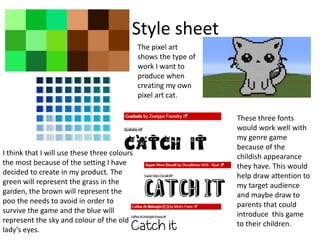
I think that I will use these three colours
the most because of the setting I have
decided to create in my product. The
green will represent the grass in the
garden, the brown will represent the
poo the needs to avoid in order to
survive the game and the blue will
represent the sky and colour of the old
lady's eyes.
The pixel art
shows the type of
work I want to
produce when
creating my own
pixel art cat.
These three fonts
would work well with
my genre game
because of the
childish appearance
they have. This would
help draw attention to
my target audience
and maybe draw to
parents that could
introduce this game
to their children.
Layout 1
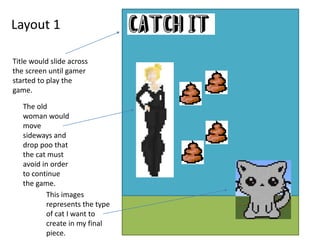
Title would slide across
the screen until gamer
started to play the
game.
The old
woman would
move
sideways and
drop poo that
the cat must
avoid in order
to continue
the game.
This images
represents the type
of cat I want to
create in my final
piece.
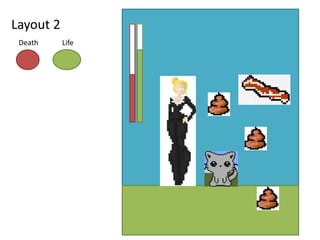
Layout 2
Death Life
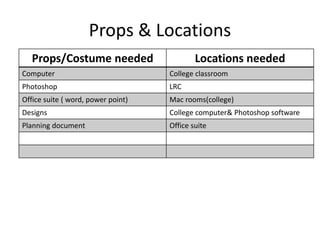
Props & Locations
Props/Costume needed Locations needed
Computer College classroom
Photoshop LRC
Office suite ( word, power point) Mac rooms(college)
Designs College computer& Photoshop software
Planning document Office suite
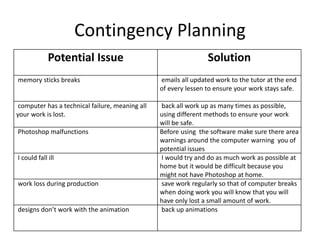
Contingency Planning
Potential Issue Solution
memory sticks breaks emails all updated work to the tutor at the end
of every lessen to ensure your work stays safe.
computer has a technical failure, meaning all
your work is lost.
back all work up as many times as possible,
using different methods to ensure your work
will be safe.
Photoshop malfunctions Before using the software make sure there area
warnings around the computer warning you of
potential issues
I could fall ill I would try and do as much work as possible at
home but it would be difficult because you
might not have Photoshop at home.
work loss during production save work regularly so that of computer breaks
when doing work you will know that you will
have only lost a small amount of work.
designs don’t work with the animation back up animations
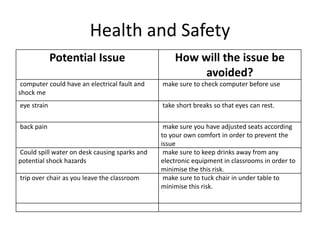
Health and Safety
Potential Issue How will the issue be
avoided?
computer could have an electrical fault and
shock me
make sure to check computer before use
eye strain take short breaks so that eyes can rest.
back pain make sure you have adjusted seats according
to your own comfort in order to prevent the
issue
Could spill water on desk causing sparks and
potential shock hazards
make sure to keep drinks away from any
electronic equipment in classrooms in order to
minimise the this risk.
trip over chair as you leave the classroom make sure to tuck chair in under table to
minimise this risk.
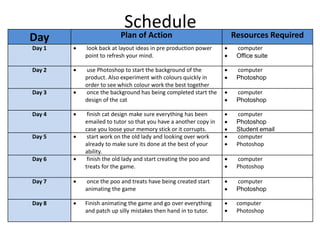
Schedule
Day Plan of Action Resources Required
Day 1  look back at layout ideas in pre production power
point to refresh your mind.
 computer
 Office suite
Day 2  use Photoshop to start the background of the
product. Also experiment with colours quickly in
order to see which colour work the best together
 computer
 Photoshop
Day 3  once the background has being completed start the
design of the cat
 computer
 Photoshop
Day 4  finish cat design make sure everything has been
emailed to tutor so that you have a another copy in
case you loose your memory stick or it corrupts.
 computer
 Photoshop
 Student email
Day 5  start work on the old lady and looking over work
already to make sure its done at the best of your
ability.
 computer
 Photoshop
Day 6  finish the old lady and start creating the poo and
treats for the game.
 computer
 Photoshop
Day 7  once the poo and treats have being created start
animating the game
 computer
 Photoshop
Day 8  Finish animating the game and go over everything
and patch up silly mistakes then hand in to tutor.
 computer
 Photoshop

5.pre production

  • 1.
  • 2.
    Style sheet I thinkthat I will use these three colours the most because of the setting I have decided to create in my product. The green will represent the grass in the garden, the brown will represent the poo the needs to avoid in order to survive the game and the blue will represent the sky and colour of the old lady's eyes. The pixel art shows the type of work I want to produce when creating my own pixel art cat. These three fonts would work well with my genre game because of the childish appearance they have. This would help draw attention to my target audience and maybe draw to parents that could introduce this game to their children.
  • 3.
    Layout 1 Title wouldslide across the screen until gamer started to play the game. The old woman would move sideways and drop poo that the cat must avoid in order to continue the game. This images represents the type of cat I want to create in my final piece.
  • 4.
  • 5.
    Props & Locations Props/Costumeneeded Locations needed Computer College classroom Photoshop LRC Office suite ( word, power point) Mac rooms(college) Designs College computer& Photoshop software Planning document Office suite
  • 6.
    Contingency Planning Potential IssueSolution memory sticks breaks emails all updated work to the tutor at the end of every lessen to ensure your work stays safe. computer has a technical failure, meaning all your work is lost. back all work up as many times as possible, using different methods to ensure your work will be safe. Photoshop malfunctions Before using the software make sure there area warnings around the computer warning you of potential issues I could fall ill I would try and do as much work as possible at home but it would be difficult because you might not have Photoshop at home. work loss during production save work regularly so that of computer breaks when doing work you will know that you will have only lost a small amount of work. designs don’t work with the animation back up animations
  • 7.
    Health and Safety PotentialIssue How will the issue be avoided? computer could have an electrical fault and shock me make sure to check computer before use eye strain take short breaks so that eyes can rest. back pain make sure you have adjusted seats according to your own comfort in order to prevent the issue Could spill water on desk causing sparks and potential shock hazards make sure to keep drinks away from any electronic equipment in classrooms in order to minimise the this risk. trip over chair as you leave the classroom make sure to tuck chair in under table to minimise this risk.
  • 8.
    Schedule Day Plan ofAction Resources Required Day 1  look back at layout ideas in pre production power point to refresh your mind.  computer  Office suite Day 2  use Photoshop to start the background of the product. Also experiment with colours quickly in order to see which colour work the best together  computer  Photoshop Day 3  once the background has being completed start the design of the cat  computer  Photoshop Day 4  finish cat design make sure everything has been emailed to tutor so that you have a another copy in case you loose your memory stick or it corrupts.  computer  Photoshop  Student email Day 5  start work on the old lady and looking over work already to make sure its done at the best of your ability.  computer  Photoshop Day 6  finish the old lady and start creating the poo and treats for the game.  computer  Photoshop Day 7  once the poo and treats have being created start animating the game  computer  Photoshop Day 8  Finish animating the game and go over everything and patch up silly mistakes then hand in to tutor.  computer  Photoshop

Editor's Notes

  • #3 Explore colours, fonts and image styles similar to what you want to produce. Discuss all three elements in relation to why you chose them and where you may use them in your project. Go over as many pages as you need to
  • #4 Mock up of a potential design using the colours and fonts established in your style sheet and sourced images
  • #5 Mock up of a potential design using the colours and fonts established in your style sheet and sourced images