Microsoft® Small BasicVariablesEstimated time to complete this lesson: 1 hour
VariablesIn this lesson, you will learn how to:Define and name a variable.Use variables to store text or numbers.Use arrays to store multiple values.
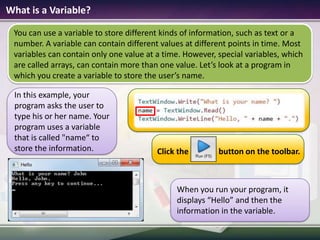
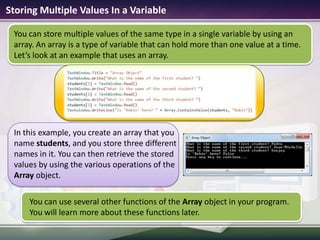
What is a Variable?You can use a variable to store different kinds of information, such as text or a number. A variable can contain different values at different points in time. Most variables can contain only one value at a time. However, special variables, which are called arrays, can contain more than one value. Let’s look at a program in which you create a variable to store the user’s name. In this example, your program asks the user to type his or her name. Your program uses a variable that is called "name“ to store the information.When you run your program, it displays “Hello” and then the information in the variable.Click the               button on the toolbar.
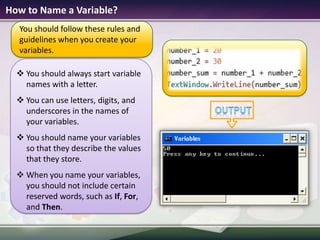
 How to Name a Variable? You should always start variable names with a letter.
You can use letters, digits, and underscores in the names of your variables.
You should name your variables so that they describe the values that they store.
When you name your variables, you should not include certain reserved words, such as If, For, and Then.You should follow these rules and guidelines when you create your variables.output
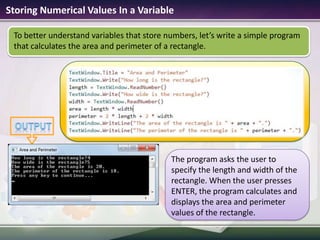
Storing Numerical Values In a VariableTo better understand variables that store numbers, let’s write a simple program that calculates the area and perimeter of a rectangle.The program asks the user to specify the length and width of the rectangle. When the user presses ENTER, the program calculates and displays the area and perimeter values of the rectangle.output

1.3 variables

  • 1.
    Microsoft® Small BasicVariablesEstimatedtime to complete this lesson: 1 hour
  • 2.
    VariablesIn this lesson,you will learn how to:Define and name a variable.Use variables to store text or numbers.Use arrays to store multiple values.
  • 3.
    What is aVariable?You can use a variable to store different kinds of information, such as text or a number. A variable can contain different values at different points in time. Most variables can contain only one value at a time. However, special variables, which are called arrays, can contain more than one value. Let’s look at a program in which you create a variable to store the user’s name. In this example, your program asks the user to type his or her name. Your program uses a variable that is called "name“ to store the information.When you run your program, it displays “Hello” and then the information in the variable.Click the button on the toolbar.
  • 4.
    How toName a Variable? You should always start variable names with a letter.
  • 5.
    You can useletters, digits, and underscores in the names of your variables.
  • 6.
    You should nameyour variables so that they describe the values that they store.
  • 7.
    When you nameyour variables, you should not include certain reserved words, such as If, For, and Then.You should follow these rules and guidelines when you create your variables.output
  • 8.
    Storing Numerical ValuesIn a VariableTo better understand variables that store numbers, let’s write a simple program that calculates the area and perimeter of a rectangle.The program asks the user to specify the length and width of the rectangle. When the user presses ENTER, the program calculates and displays the area and perimeter values of the rectangle.output

Editor's Notes

  • #5 You can identify your variables more easily if you give them suitable names. Code:number_1 = 20number_2 = 30number_sum = number_1 + number_2TextWindow.WriteLine(number_sum)
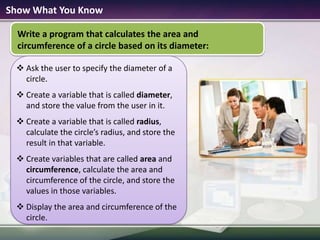
  • #9 You can use the following formulas for calculation:radius = diameter / 2area = (3.14) * radius * radiuscircumference = (3.14) * 2 * radiusSolution:TextWindow.Write(“What is the diameter of the circle? ")diameter = TextWindow.ReadNumber()radius = diameter / 2area = (3.14) * radius * radiuscircumference = (3.14) * 2 * radiusTextWindow.WriteLine("The area of the circle is " + area + ".")TextWindow.WriteLine("The circumference of the circle is " + circumference + ".")