Constant
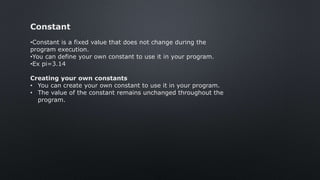
•Constant is a fixed value that does not change during the
program execution.
•You can define your own constant to use it in your program.
•Ex pi=3.14
Creating your own constants
• You can create your own constant to use it in your program.
• The value of the constant remains unchanged throughout the
program.
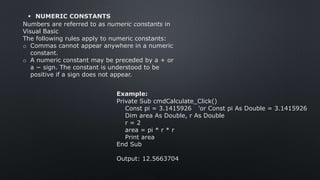
Example:
Private Sub cmdCalculate_Click()
Const pi = 3.1415926 'or Const pi As Double = 3.1415926
Dim area As Double, r As Double
r = 2
area = pi * r * r
Print area
End Sub
Output: 12.5663704
 NUMERIC CONSTANTS
Numbers are referred to as numeric constants in
Visual Basic
The following rules apply to numeric constants:
o Commas cannot appear anywhere in a numeric
constant.
o A numeric constant may be preceded by a + or
a − sign. The constant is understood to be
positive if a sign does not appear.
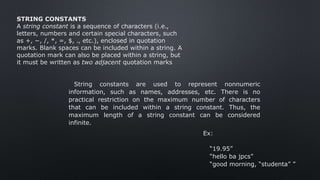
STRING CONSTANTS
A string constant is a sequence of characters (i.e.,
letters, numbers and certain special characters, such
as +, −, /, *, =, $, ., etc.), enclosed in quotation
marks. Blank spaces can be included within a string. A
quotation mark can also be placed within a string, but
it must be written as two adjacent quotation marks
String constants are used to represent nonnumeric
information, such as names, addresses, etc. There is no
practical restriction on the maximum number of characters
that can be included within a string constant. Thus, the
maximum length of a string constant can be considered
infinite.
Ex:
“19.95”
“hello ba jpcs”
“good morning, “studenta” ”
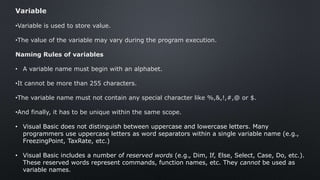
Variable
•Variable is used to store value.
•The value of the variable may vary during the program execution.
Naming Rules of variables
• A variable name must begin with an alphabet.
•It cannot be more than 255 characters.
•The variable name must not contain any special character like %,&,!,#,@ or $.
•And finally, it has to be unique within the same scope.
• Visual Basic does not distinguish between uppercase and lowercase letters. Many
programmers use uppercase letters as word separators within a single variable name (e.g.,
FreezingPoint, TaxRate, etc.)
• Visual Basic includes a number of reserved words (e.g., Dim, If, Else, Select, Case, Do, etc.).
These reserved words represent commands, function names, etc. They cannot be used as
variable names.
You can declare a variable with the 'dim' keyword.
Syntax:
Dim variable As [Type]
Example:
Private Sub cmdSum_Click()
Dim m As Integer
Dim n As Integer
Dim sum As Integer
m = 10 'm is a variable, 10 is a constant
n = 30
sum = m + n
Print "The sum is " & sum
End Sub
Output: The sum is 40
Variable Declaration
• Depending on where the variables are declared and how they are declared, there are many
ways to declare a variable in visual basic.
•When you declare a variable, memory space for the variable is reserved.
•This is called memory allocation.
•Different amount of memory space is reserved for different data types.
Variants
Visual Basic allows variables to be undeclared if the
programmer so chooses. In such cases, the data type of the
variable is determined implicitly by the value that is
assigned to the variable. Such variables are referred to as
Variant-type variables, or simply as variants.
Data Types
• Visual Basic is rich in its data types.
• Data types are used to declare the variables.
• At the time of declaration, memory is allocated for the variables.
• Different data types are used to store different types of values.
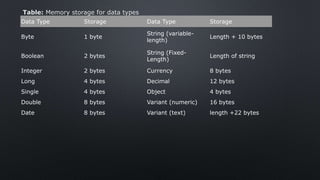
Data Type Storage Data Type Storage
Byte 1 byte
String (variable-
length)
Length + 10 bytes
Boolean 2 bytes
String (Fixed-
Length)
Length of string
Integer 2 bytes Currency 8 bytes
Long 4 bytes Decimal 12 bytes
Single 4 bytes Object 4 bytes
Double 8 bytes Variant (numeric) 16 bytes
Date 8 bytes Variant (text) length +22 bytes
Table: Memory storage for data types
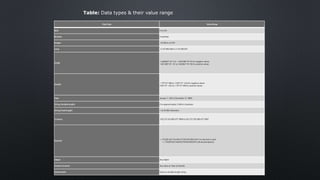
Data Type Value Range
Byte 0 to 255
Boolean True/False
Integer -32,768 to 32,767
Long -2,147,483,648 to 2,147,483,647
Single
-3.402823*10^3 to -1.401298*10^45 for negative values
1.401298*10^-45 to 3.402823*10^38 for positive values
Double
-1.79*10^308 to -4.94*10^-324 for negative values
4.94*10^-324 to 1.79*10^308 for positive values
Date January 1, 100 to December 31, 9999
String (Variable length) 0 to approximately 2 billion characters
String (Fixed length) 1 to 65,400 characters
Currency -922,337,203,685,477.5808 to 922,337,203,685,477.5807
Decimal
+,-79,228,162,514,264,337,593,543,950,335 if no decimal is used
+,-7.9228162514264337593543950335 (28 decimal places)
Object Any object
Variant (numeric) Any value as 16px as Double
Variant (text) Same as variable length string
Table: Data types & their value range
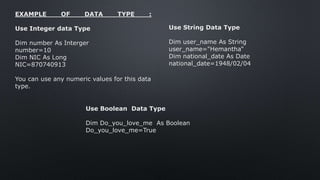
EXAMPLE OF DATA TYPE :
Use Integer data Type
Dim number As Interger
number=10
Dim NIC As Long
NIC=870740913
You can use any numeric values for this data
type.
Use String Data Type
Dim user_name As String
user_name="Hemantha“
Dim national_date As Date
national_date=1948/02/04
Use Boolean Data Type
Dim Do_you_love_me As Boolean
Do_you_love_me=True
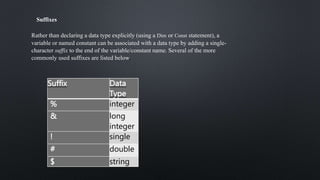
Suffixes
Rather than declaring a data type explicitly (using a Dim or Const statement), a
variable or named constant can be associated with a data type by adding a single-
character suffix to the end of the variable/constant name. Several of the more
commonly used suffixes are listed below.
Suffix Data
Type
% integer
& long
integer
! single
# double
$ string
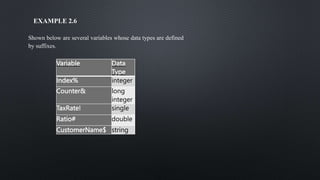
EXAMPLE 2.6
Shown below are several variables whose data types are defined
by suffixes.
Variable Data
Type
Index% integer
Counter& long
integer
TaxRate! single
Ratio# double
CustomerName$ string
Visual Basic Fundamentals

Visual Basic Fundamentals

  • 2.
    Constant •Constant is afixed value that does not change during the program execution. •You can define your own constant to use it in your program. •Ex pi=3.14 Creating your own constants • You can create your own constant to use it in your program. • The value of the constant remains unchanged throughout the program.
  • 3.
    Example: Private Sub cmdCalculate_Click() Constpi = 3.1415926 'or Const pi As Double = 3.1415926 Dim area As Double, r As Double r = 2 area = pi * r * r Print area End Sub Output: 12.5663704  NUMERIC CONSTANTS Numbers are referred to as numeric constants in Visual Basic The following rules apply to numeric constants: o Commas cannot appear anywhere in a numeric constant. o A numeric constant may be preceded by a + or a − sign. The constant is understood to be positive if a sign does not appear.
  • 4.
    STRING CONSTANTS A stringconstant is a sequence of characters (i.e., letters, numbers and certain special characters, such as +, −, /, *, =, $, ., etc.), enclosed in quotation marks. Blank spaces can be included within a string. A quotation mark can also be placed within a string, but it must be written as two adjacent quotation marks String constants are used to represent nonnumeric information, such as names, addresses, etc. There is no practical restriction on the maximum number of characters that can be included within a string constant. Thus, the maximum length of a string constant can be considered infinite. Ex: “19.95” “hello ba jpcs” “good morning, “studenta” ”
  • 5.
    Variable •Variable is usedto store value. •The value of the variable may vary during the program execution. Naming Rules of variables • A variable name must begin with an alphabet. •It cannot be more than 255 characters. •The variable name must not contain any special character like %,&,!,#,@ or $. •And finally, it has to be unique within the same scope. • Visual Basic does not distinguish between uppercase and lowercase letters. Many programmers use uppercase letters as word separators within a single variable name (e.g., FreezingPoint, TaxRate, etc.) • Visual Basic includes a number of reserved words (e.g., Dim, If, Else, Select, Case, Do, etc.). These reserved words represent commands, function names, etc. They cannot be used as variable names.
  • 6.
    You can declarea variable with the 'dim' keyword. Syntax: Dim variable As [Type] Example: Private Sub cmdSum_Click() Dim m As Integer Dim n As Integer Dim sum As Integer m = 10 'm is a variable, 10 is a constant n = 30 sum = m + n Print "The sum is " & sum End Sub Output: The sum is 40 Variable Declaration • Depending on where the variables are declared and how they are declared, there are many ways to declare a variable in visual basic. •When you declare a variable, memory space for the variable is reserved. •This is called memory allocation. •Different amount of memory space is reserved for different data types.
  • 7.
    Variants Visual Basic allowsvariables to be undeclared if the programmer so chooses. In such cases, the data type of the variable is determined implicitly by the value that is assigned to the variable. Such variables are referred to as Variant-type variables, or simply as variants. Data Types • Visual Basic is rich in its data types. • Data types are used to declare the variables. • At the time of declaration, memory is allocated for the variables. • Different data types are used to store different types of values.
  • 8.
    Data Type StorageData Type Storage Byte 1 byte String (variable- length) Length + 10 bytes Boolean 2 bytes String (Fixed- Length) Length of string Integer 2 bytes Currency 8 bytes Long 4 bytes Decimal 12 bytes Single 4 bytes Object 4 bytes Double 8 bytes Variant (numeric) 16 bytes Date 8 bytes Variant (text) length +22 bytes Table: Memory storage for data types
  • 9.
    Data Type ValueRange Byte 0 to 255 Boolean True/False Integer -32,768 to 32,767 Long -2,147,483,648 to 2,147,483,647 Single -3.402823*10^3 to -1.401298*10^45 for negative values 1.401298*10^-45 to 3.402823*10^38 for positive values Double -1.79*10^308 to -4.94*10^-324 for negative values 4.94*10^-324 to 1.79*10^308 for positive values Date January 1, 100 to December 31, 9999 String (Variable length) 0 to approximately 2 billion characters String (Fixed length) 1 to 65,400 characters Currency -922,337,203,685,477.5808 to 922,337,203,685,477.5807 Decimal +,-79,228,162,514,264,337,593,543,950,335 if no decimal is used +,-7.9228162514264337593543950335 (28 decimal places) Object Any object Variant (numeric) Any value as 16px as Double Variant (text) Same as variable length string Table: Data types & their value range
  • 10.
    EXAMPLE OF DATATYPE : Use Integer data Type Dim number As Interger number=10 Dim NIC As Long NIC=870740913 You can use any numeric values for this data type. Use String Data Type Dim user_name As String user_name="Hemantha“ Dim national_date As Date national_date=1948/02/04 Use Boolean Data Type Dim Do_you_love_me As Boolean Do_you_love_me=True
  • 11.
    Suffixes Rather than declaringa data type explicitly (using a Dim or Const statement), a variable or named constant can be associated with a data type by adding a single- character suffix to the end of the variable/constant name. Several of the more commonly used suffixes are listed below. Suffix Data Type % integer & long integer ! single # double $ string
  • 12.
    EXAMPLE 2.6 Shown beloware several variables whose data types are defined by suffixes. Variable Data Type Index% integer Counter& long integer TaxRate! single Ratio# double CustomerName$ string