Powerful Ideas
Constructivist Educational
Techniques in Computer
Programming Using MSWLogo©
Copyright 2002, Tony Gauvin, UMFK
Introduction
 Tony Gauvin, Assistant Professor of E-
Commerce, UMFK
 Developed an Interest in MSWLogo as a tool
for exploration of advanced Computer
Science Topics while a Graduate Student at
UM
 Based on Draft copy of Discrete Logo written
by Dr. George Markowsky, Chair, Computer
Science Department, UM
What Is Logo?
 Logo is both an educational Philosophy and a
programming language based on
Constructivism
 Constructivism views knowledge as being
created by learners in their own minds
through interaction with other people and the
world around them.
 This theory is most closely associated with
Jean Piaget, the Swiss psychologist, who
spent decades studying and documenting the
learning processes of young children.
A Brief History of Logo
 Seymour Papert and Marvin Minsky
co-founded MIT’s Artificial
Intelligence Lab in mid ’60s
 Papert and others developed the
Logo programming language in 1967
 In 1980 Papert published
Mindstorms
Logo Basics
 Turtle(s) moving in a world controlled by
the user
 Turtle(s) act on and react to the World
controlled by the User
 The only data structure is a list (LISP
heritage)
 Commands are simple and intuitive
 “low threshold and NO ceiling”
LOGO Today
 STARLogo
 Massively Parallel
 Developed by Mitchel Resnick at MIT
 Turtles, Termites, and Traffic Jams:
Explorations in Massively Parallel Microworlds
 UCBLogo
 Unix, msDos, Mac
 Brian Harvey at UC at Berkeley
 Computer Science Logo Style
LOGO Today
 MSWLogo
 Windows (GUI) version of UCBLogo
 George Mills at Softronics, INC
 Has all the power of any windows
programming Language
 Great tool for exploring Advanced
Computer Topics
Today’s Topic
 Teaching programming concepts using
MSWLogo
 Two goals
 Use Iteration in Geometric Constructions
 Use Recursion In Geometric Constructions

Fractals
 Methods of Instruction
 The student experience is Totally Hands On
 By using Constructivism Educational Philosophy
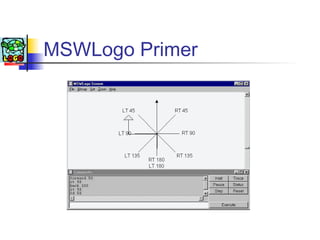
MSWLogo Primer
Turtle commands
 To move
 Forward (# of steps) FD
 Back (# of steps) BK
 Home (back to the Middle)
 To Turn
 Right (# of Degrees) RT
 Left (# of Degrees) LT
 Pen Commands
 PenUp PU
 PenDown PD
 SetPenColor [Red, Green, Blue] O-255
MSWLogo Commands
 Edit <procedure>

Creates a procedure (program)
 Edall

Edit all procedures in memory
 ClearScreen CS
 Repeat # [stuff to do]
 :<Identifier>

Variable (place to store stuff .. Memory)
 Mathematics

*, +, -, /

(4 +3)/12*3-6
Draw a square
 Lets make the turtle draw a square
 First think how you would draw a square.
 Then tell the turtle to do it
 FD 100 RT 90
 FD 100 RT 90
 FD 100 RT 90
 FD 100 RT 90
 Repeat 4 [FD 100 RT 90]
Create a program for Drawing
a square
 Invoke the editor by typing “edall”
 Every procedure
To <name> <maybe some stuff>
<stuff to do>
End
 Remember variables can be used (:X)
The square program
To square : size
Repeat 4 [fd :size rt 90]
END
Type run square #
Something Cool
 What if the turtle took a step and turned
slightly and drew another Square?
 And then did this a bunch of times??
 To cool :size
Repeat 100 [square :size fd 1 rt 10]
END
Something Cool
Drawing a fern
 A fern is a Fractal
 Structure is repeated
 Every leaf is a fern
 Structure is recursive
MSWLogo Fern
 A Fern is
 A stem
 A fern to the left
 A fern to the right
 A fern to the front
Program for Drawing a Fern
 Teaching a turtle Botany
 Fern program
 Go forward
 Draw a fern to the left
 Go back
 Draw a fern to the right
 Go Back
 Draw a fern to the front
 Go Back
 Till it gets too small to draw
The program
to fern :size
if :size < 4 [stop]
fd :size / 25
lt 90 fern :size * .3
rt 90
rt 90 fern :size * .3
lt 90 fern :size * .85
bk :size / 25
end
A Cool Fractal Fern
What we learned
 Programming using Iteration
 Turtle drawing Square
 Programming using recursion
 Turtle drawing Fractals
 Programming is fun AND creative
Logo Resources
 MSWLogo
 http://www.softronix.com/logo.html
 Logo Foundation
 http://el.www.media.mit.edu/groups/logo-
foundation/
 Logo Art Gallery
 http://www.geocities.com/CollegePark/Lab/2276/
 Beginnings of My Logo workshop
 http://littleblack.umfk.maine.edu
Questions??

Logo

  • 1.
    Powerful Ideas Constructivist Educational Techniquesin Computer Programming Using MSWLogo© Copyright 2002, Tony Gauvin, UMFK
  • 2.
    Introduction  Tony Gauvin,Assistant Professor of E- Commerce, UMFK  Developed an Interest in MSWLogo as a tool for exploration of advanced Computer Science Topics while a Graduate Student at UM  Based on Draft copy of Discrete Logo written by Dr. George Markowsky, Chair, Computer Science Department, UM
  • 3.
    What Is Logo? Logo is both an educational Philosophy and a programming language based on Constructivism  Constructivism views knowledge as being created by learners in their own minds through interaction with other people and the world around them.  This theory is most closely associated with Jean Piaget, the Swiss psychologist, who spent decades studying and documenting the learning processes of young children.
  • 4.
    A Brief Historyof Logo  Seymour Papert and Marvin Minsky co-founded MIT’s Artificial Intelligence Lab in mid ’60s  Papert and others developed the Logo programming language in 1967  In 1980 Papert published Mindstorms
  • 5.
    Logo Basics  Turtle(s)moving in a world controlled by the user  Turtle(s) act on and react to the World controlled by the User  The only data structure is a list (LISP heritage)  Commands are simple and intuitive  “low threshold and NO ceiling”
  • 6.
    LOGO Today  STARLogo Massively Parallel  Developed by Mitchel Resnick at MIT  Turtles, Termites, and Traffic Jams: Explorations in Massively Parallel Microworlds  UCBLogo  Unix, msDos, Mac  Brian Harvey at UC at Berkeley  Computer Science Logo Style
  • 7.
    LOGO Today  MSWLogo Windows (GUI) version of UCBLogo  George Mills at Softronics, INC  Has all the power of any windows programming Language  Great tool for exploring Advanced Computer Topics
  • 8.
    Today’s Topic  Teachingprogramming concepts using MSWLogo  Two goals  Use Iteration in Geometric Constructions  Use Recursion In Geometric Constructions  Fractals  Methods of Instruction  The student experience is Totally Hands On  By using Constructivism Educational Philosophy
  • 9.
  • 10.
    Turtle commands  Tomove  Forward (# of steps) FD  Back (# of steps) BK  Home (back to the Middle)  To Turn  Right (# of Degrees) RT  Left (# of Degrees) LT  Pen Commands  PenUp PU  PenDown PD  SetPenColor [Red, Green, Blue] O-255
  • 11.
    MSWLogo Commands  Edit<procedure>  Creates a procedure (program)  Edall  Edit all procedures in memory  ClearScreen CS  Repeat # [stuff to do]  :<Identifier>  Variable (place to store stuff .. Memory)  Mathematics  *, +, -, /  (4 +3)/12*3-6
  • 12.
    Draw a square Lets make the turtle draw a square  First think how you would draw a square.  Then tell the turtle to do it  FD 100 RT 90  FD 100 RT 90  FD 100 RT 90  FD 100 RT 90  Repeat 4 [FD 100 RT 90]
  • 13.
    Create a programfor Drawing a square  Invoke the editor by typing “edall”  Every procedure To <name> <maybe some stuff> <stuff to do> End  Remember variables can be used (:X)
  • 14.
    The square program Tosquare : size Repeat 4 [fd :size rt 90] END Type run square #
  • 15.
    Something Cool  Whatif the turtle took a step and turned slightly and drew another Square?  And then did this a bunch of times??  To cool :size Repeat 100 [square :size fd 1 rt 10] END
  • 16.
  • 17.
    Drawing a fern A fern is a Fractal  Structure is repeated  Every leaf is a fern  Structure is recursive
  • 18.
    MSWLogo Fern  AFern is  A stem  A fern to the left  A fern to the right  A fern to the front
  • 19.
    Program for Drawinga Fern  Teaching a turtle Botany  Fern program  Go forward  Draw a fern to the left  Go back  Draw a fern to the right  Go Back  Draw a fern to the front  Go Back  Till it gets too small to draw
  • 20.
    The program to fern:size if :size < 4 [stop] fd :size / 25 lt 90 fern :size * .3 rt 90 rt 90 fern :size * .3 lt 90 fern :size * .85 bk :size / 25 end
  • 21.
  • 22.
    What we learned Programming using Iteration  Turtle drawing Square  Programming using recursion  Turtle drawing Fractals  Programming is fun AND creative
  • 23.
    Logo Resources  MSWLogo http://www.softronix.com/logo.html  Logo Foundation  http://el.www.media.mit.edu/groups/logo- foundation/  Logo Art Gallery  http://www.geocities.com/CollegePark/Lab/2276/  Beginnings of My Logo workshop  http://littleblack.umfk.maine.edu
  • 24.