Overview 
 Network Topologies 
 Transmission Media (Cable Types) 
Infromation Technology Unit - AFHQ 2
Network Topologies 
 Token Ring 
 Linear Bus 
 Star 
 Tree (Expanded Star) 
 Considerations When Choosing a Topology 
Infromation Technology Unit - AFHQ 3
Token Ring 
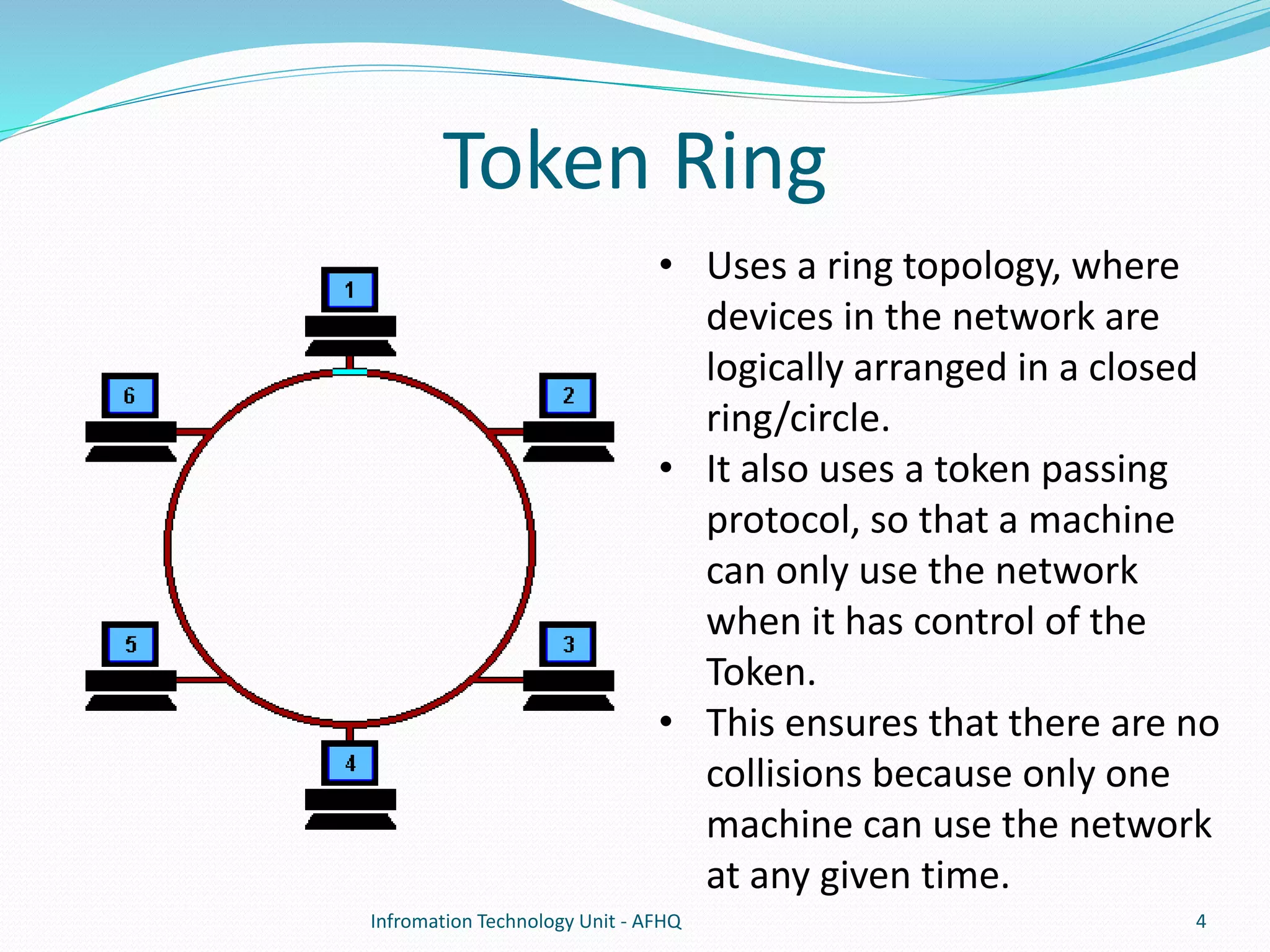
• Uses a ring topology, where 
devices in the network are 
logically arranged in a closed 
ring/circle. 
• It also uses a token passing 
protocol, so that a machine 
can only use the network 
when it has control of the 
Token. 
• This ensures that there are no 
collisions because only one 
machine can use the network 
at any given time. 
Infromation Technology Unit - AFHQ 4
 It is considered to be an active topology, as computers 
in the ring re-transmit the packet they receive to the 
next computer in the ring. 
 The token is a special packet of data, if a computer 
wants to send data onto the network, it has to wait 
until it has possession of the token, else it passes it on 
to the next computer. 
Infromation Technology Unit - AFHQ 5
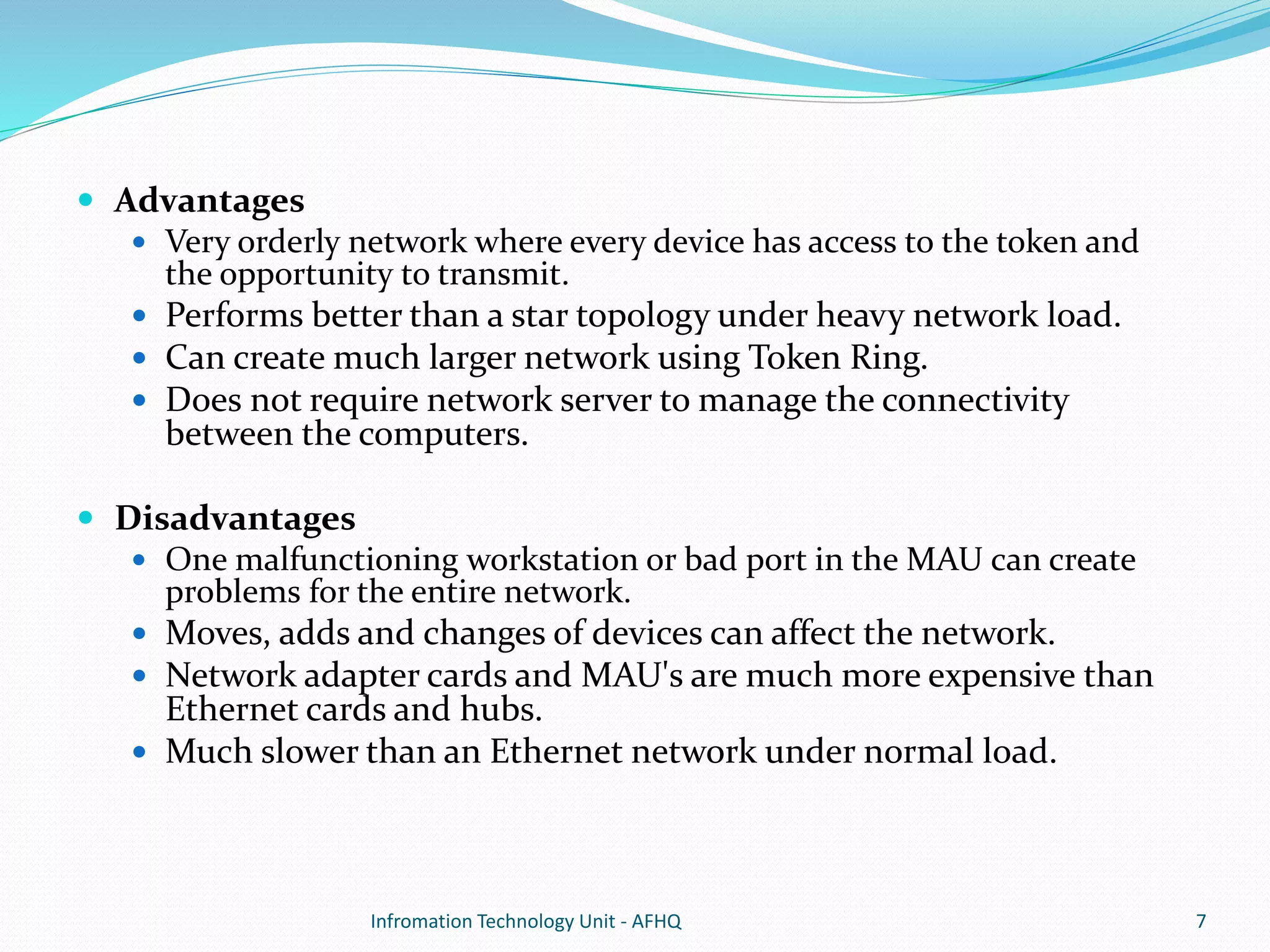
 Upon start up, the machine with the highest MAC address 
is chosen as the 'Active Monitor‘, and all other machines 
become 'Standby Monitors'. 
 Active Monitors are in charge of monitoring the network 
and performing “Ring Polling”, by which other computers 
find their “Nearest Active Upstream Neighbor (NAUN)”. 
Infromation Technology Unit - AFHQ 6
 Advantages 
 Very orderly network where every device has access to the token and 
the opportunity to transmit. 
 Performs better than a star topology under heavy network load. 
 Can create much larger network using Token Ring. 
 Does not require network server to manage the connectivity 
between the computers. 
 Disadvantages 
 One malfunctioning workstation or bad port in the MAU can create 
problems for the entire network. 
 Moves, adds and changes of devices can affect the network. 
 Network adapter cards and MAU's are much more expensive than 
Ethernet cards and hubs. 
 Much slower than an Ethernet network under normal load. 
Infromation Technology Unit - AFHQ 7
Linear Bus 
Infromation Technology Unit - AFHQ 8
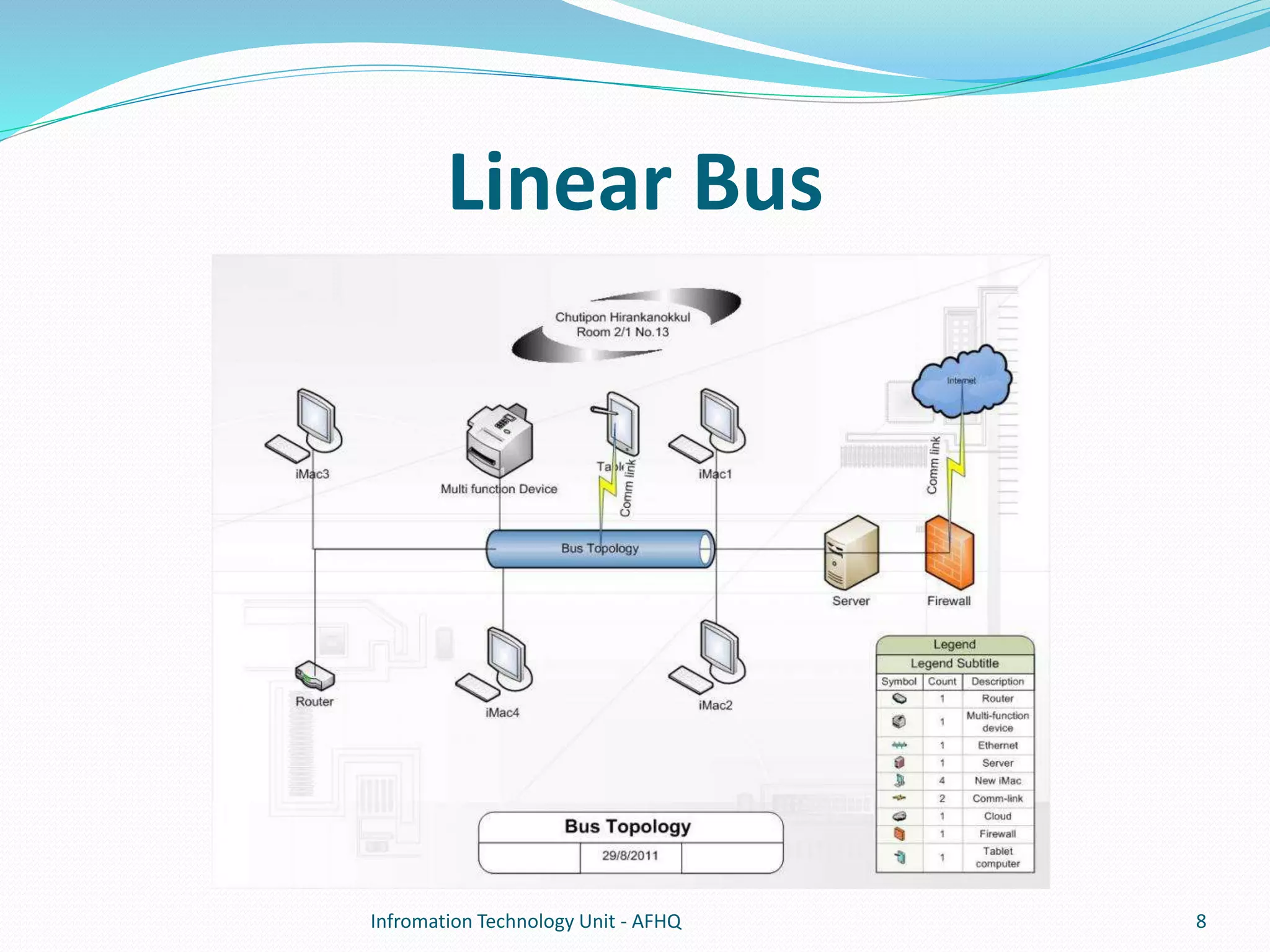
 A linear bus topology consists of a main run of cable with a 
terminator at each end. All nodes (file server, workstations, 
and peripherals) are connected to the linear cable. 
 A signal from the source travels in both directions to all 
machines connected on the bus cable until it finds the 
intended recipient. If the machine address does not match 
the intended address for the data, the machine ignores the 
data. 
 Uses CSMA/CD, or CSMA/CA to manage and minimize 
collisions. 
Infromation Technology Unit - AFHQ 9
 Linear bus 
 The type of network topology in which all of the nodes of the network 
are connected to a common transmission medium which has exactly 
two endpoints (also commonly referred to as the backbone, or trunk) – 
all data transmitted between nodes in the network is sent over the 
backbone and can be received by all nodes in the network 
simultaneously. 
 Distributed bus 
 The type of network topology in which all of the nodes of the network 
are connected to a common transmission medium which has more 
than two endpoints (that are created by adding branches to the main 
section of the transmission medium). 
 Notes: 
 The linear bus topology is sometimes considered to be a special case of the 
distributed bus topology – i.e., a distributed bus with no branching segments. 
 The physical distributed bus topology is sometimes incorrectly referred to as a 
physical tree topology. 
Infromation Technology Unit - AFHQ 10
 Advantages of a Linear Bus Topology 
 Easy to connect a computer or peripheral to a linear bus. 
 Requires less cable length than a star topology. 
 Disadvantages of a Linear Bus Topology 
 Entire network shuts down if there is a break in the main 
cable. 
 Terminators are required at both ends of the backbone cable. 
 Difficult to identify the problem if the entire network shuts 
down. 
 Not meant to be used as a stand-alone solution in a large 
building. 
Infromation Technology Unit - AFHQ 11
Star Topology 
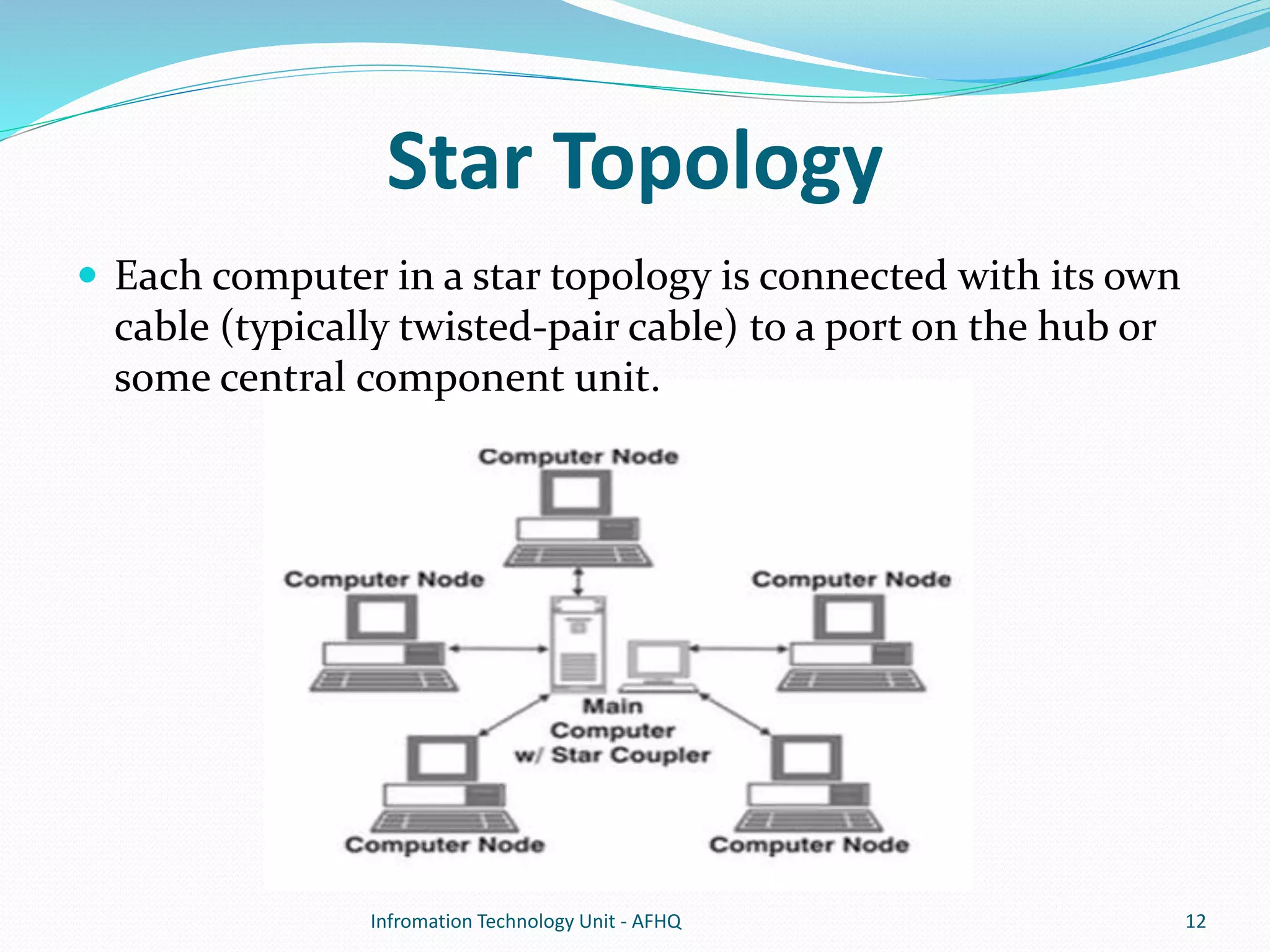
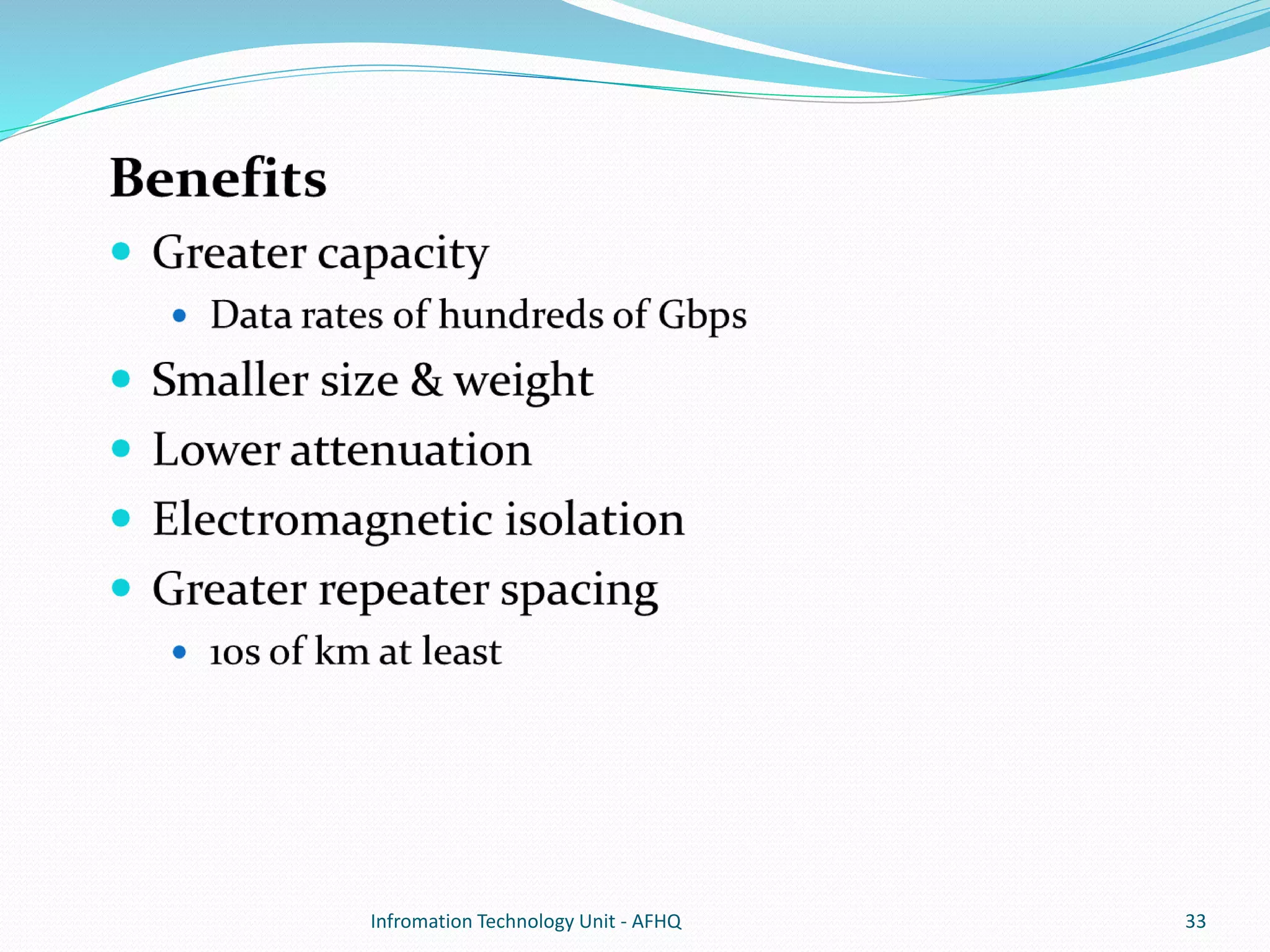
 Each computer in a star topology is connected with its own 
cable (typically twisted-pair cable) to a port on the hub or 
some central component unit. 
Infromation Technology Unit - AFHQ 12
 Star LANs also use the same type of wait-and-listen 
strategy to access data or send data as characterized by the 
bus topology. 
 Advantages 
 Better performance. 
 Passing of Data Packet through unnecessary nodes is prevented by 
this topology. This topology induces a huge overhead on the central 
hub, however if the central hub has adequate capacity, then very 
high network utilization by one device in the network does not affect 
the other devices in the network. 
 Isolation of devices. 
 Each device is inherently isolated by the link that connects it to the 
hub. This makes the isolation of the individual devices fairly 
straightforward. This isolated nature also prevents any non-centralized 
failure to affect the network. 
Infromation Technology Unit - AFHQ 13
 Benefits from centralization. 
 Easy to increase the capacity of the central hub, add 
additional devices to the star (can scale the network very 
easily). The central nature also allows the inspection traffic 
through the network. 
 Simplicity. 
 The topology is easy to understand, establish, and navigate. 
 Unobtrusive. 
 Minimal effect on users. 
Infromation Technology Unit - AFHQ 14
 Disadvantages. 
 High dependence of the system on the functioning of 
the central hub. 
 Performance and scalability of the network also depend 
on the capabilities of the hub. 
 Number of connections in the star also depends on the 
how many connections the hub can support. 
Infromation Technology Unit - AFHQ 15
Tree Topology (Expanded Star) 
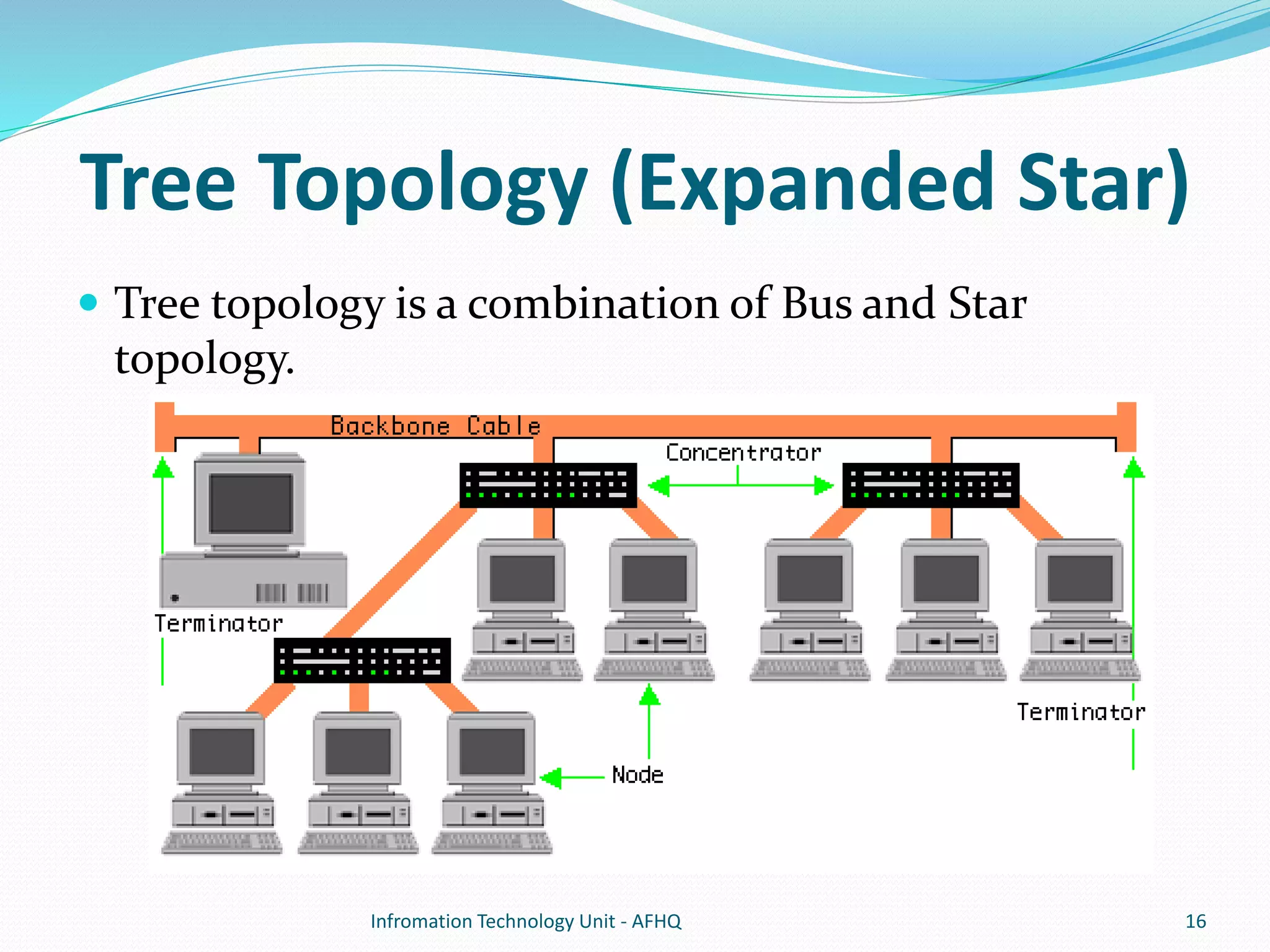
 Tree topology is a combination of Bus and Star 
topology. 
Infromation Technology Unit - AFHQ 16
 It consists of groups of star-configured workstations connected to a 
linear bus backbone cable. 
 5-4-3 Rule 
 Between any two nodes on the network there can only be a maximum 
of 5 segments, connected through 4 repeaters/concentrators. In 
addition, only 3 of the segments may be populated (trunk) segments if 
they are made of coaxial cable. 
 Advantages 
 Point-to-point wiring for individual segments. 
 Supported by several hardware and software venders. 
 Disadvantages 
 Overall length of each segment is limited by the type of cabling used. 
 If the backbone line breaks, the entire segment goes down. 
 More difficult to configure and wire than other topologies. 
Infromation Technology Unit - AFHQ 17
Considerations When Choosing a 
Topology 
 Money. 
 A linear bus network may be the least expensive way to install a 
network; you do not have to purchase concentrators. 
 Cable Length. 
 The linear bus network uses shorter lengths of cable. 
 Future growth. 
 With a star topology, expanding a network is easily done by adding 
another concentrator. 
 Cable type. 
 The most common cable in schools is unshielded twisted pair, which is 
most often used with star topologies. 
Infromation Technology Unit - AFHQ 18
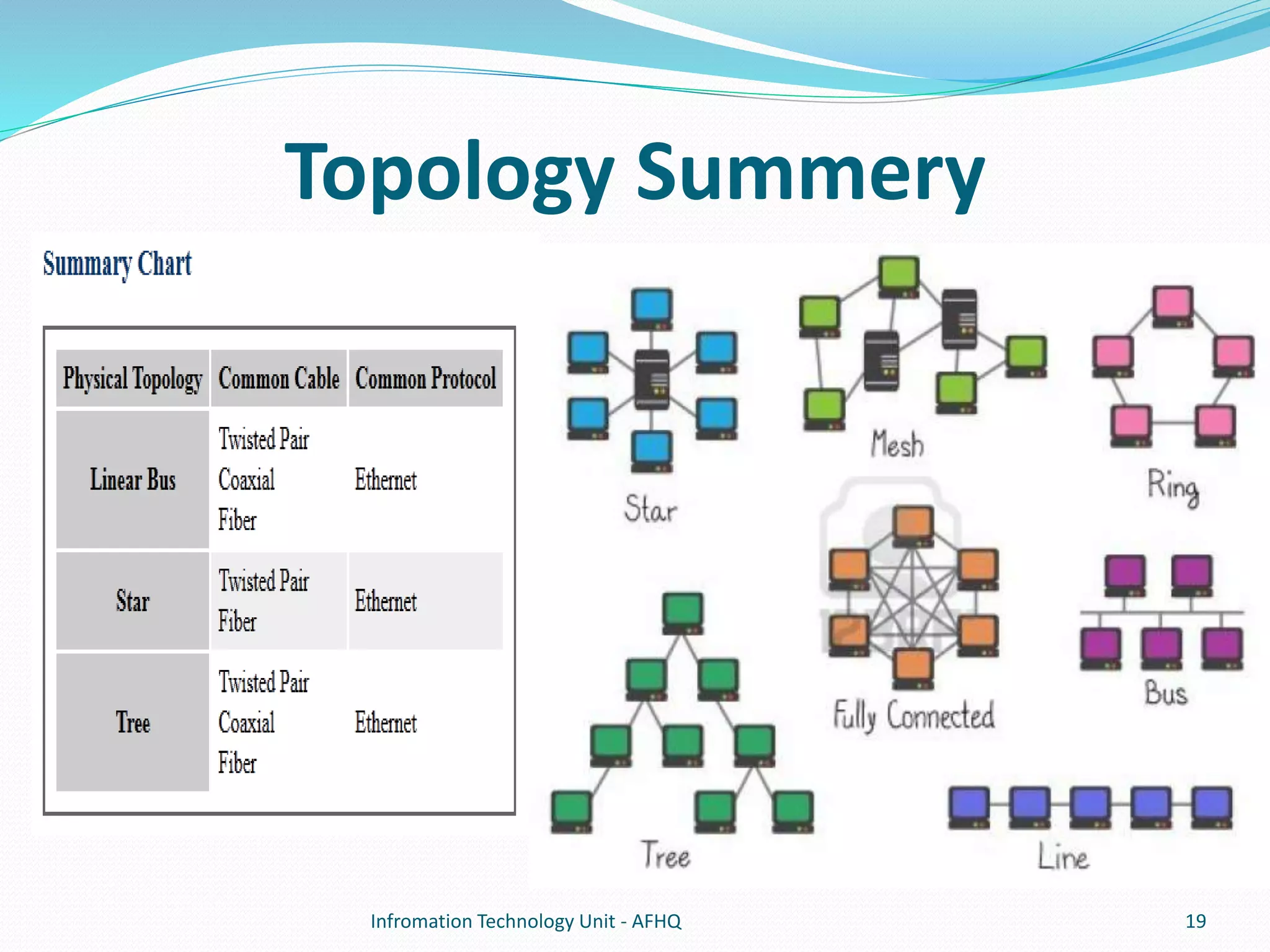
Topology Summery 
Infromation Technology Unit - AFHQ 19
Transmission Media 
 Twisted Pair 
 Coaxial Cable 
 Optical fiber 
Infromation Technology Unit - AFHQ 20
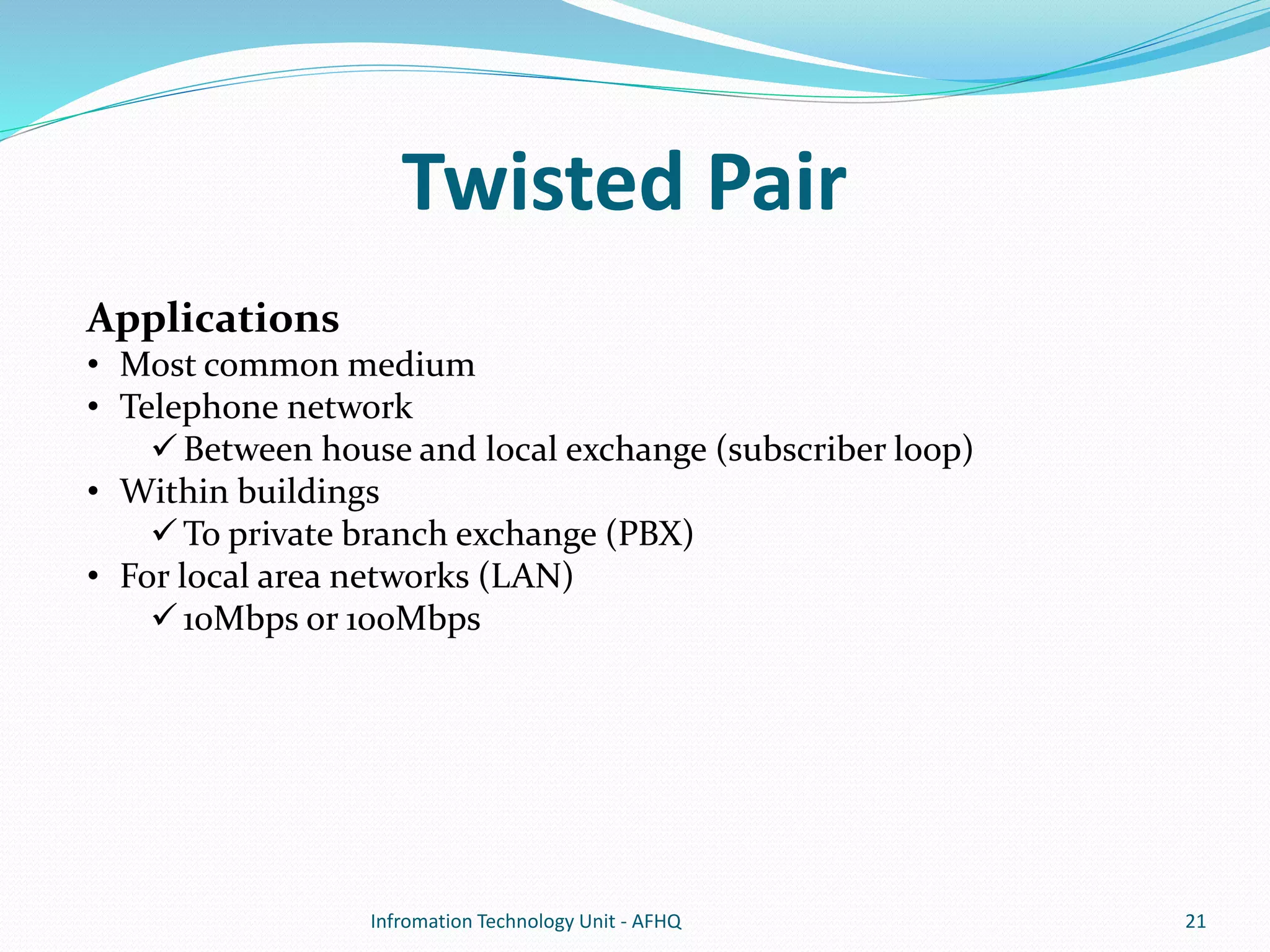
Twisted Pair 
Applications 
• Most common medium 
• Telephone network 
 Between house and local exchange (subscriber loop) 
• Within buildings 
To private branch exchange (PBX) 
• For local area networks (LAN) 
10Mbps or 100Mbps 
Infromation Technology Unit - AFHQ 21
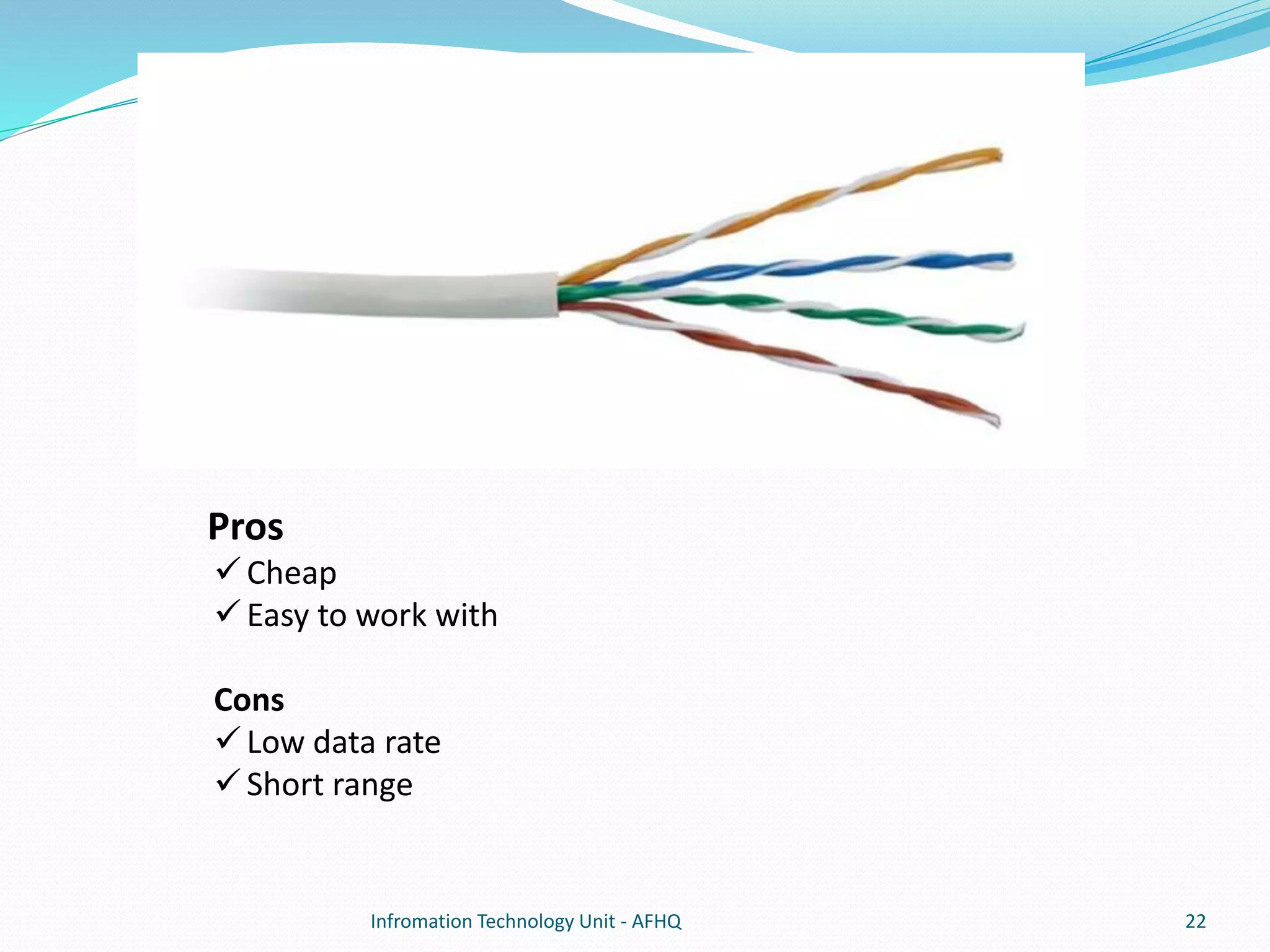
Pros 
 Cheap 
 Easy to work with 
Cons 
 Low data rate 
 Short range 
Infromation Technology Unit - AFHQ 22
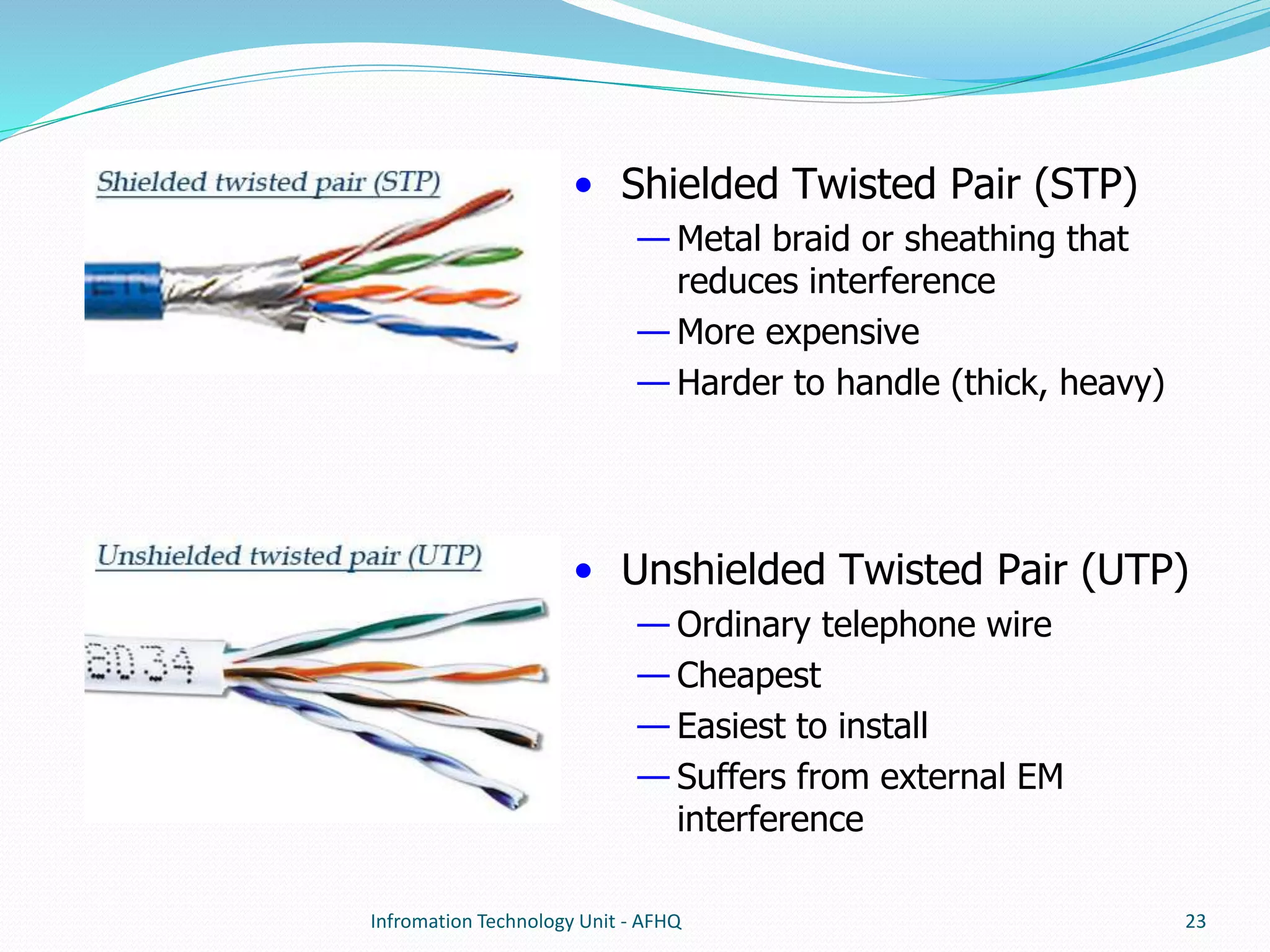
• Shielded Twisted Pair (STP) 
— Metal braid or sheathing that 
reduces interference 
— More expensive 
— Harder to handle (thick, heavy) 
• Unshielded Twisted Pair (UTP) 
— Ordinary telephone wire 
— Cheapest 
— Easiest to install 
— Suffers from external EM 
interference 
Infromation Technology Unit - AFHQ 23
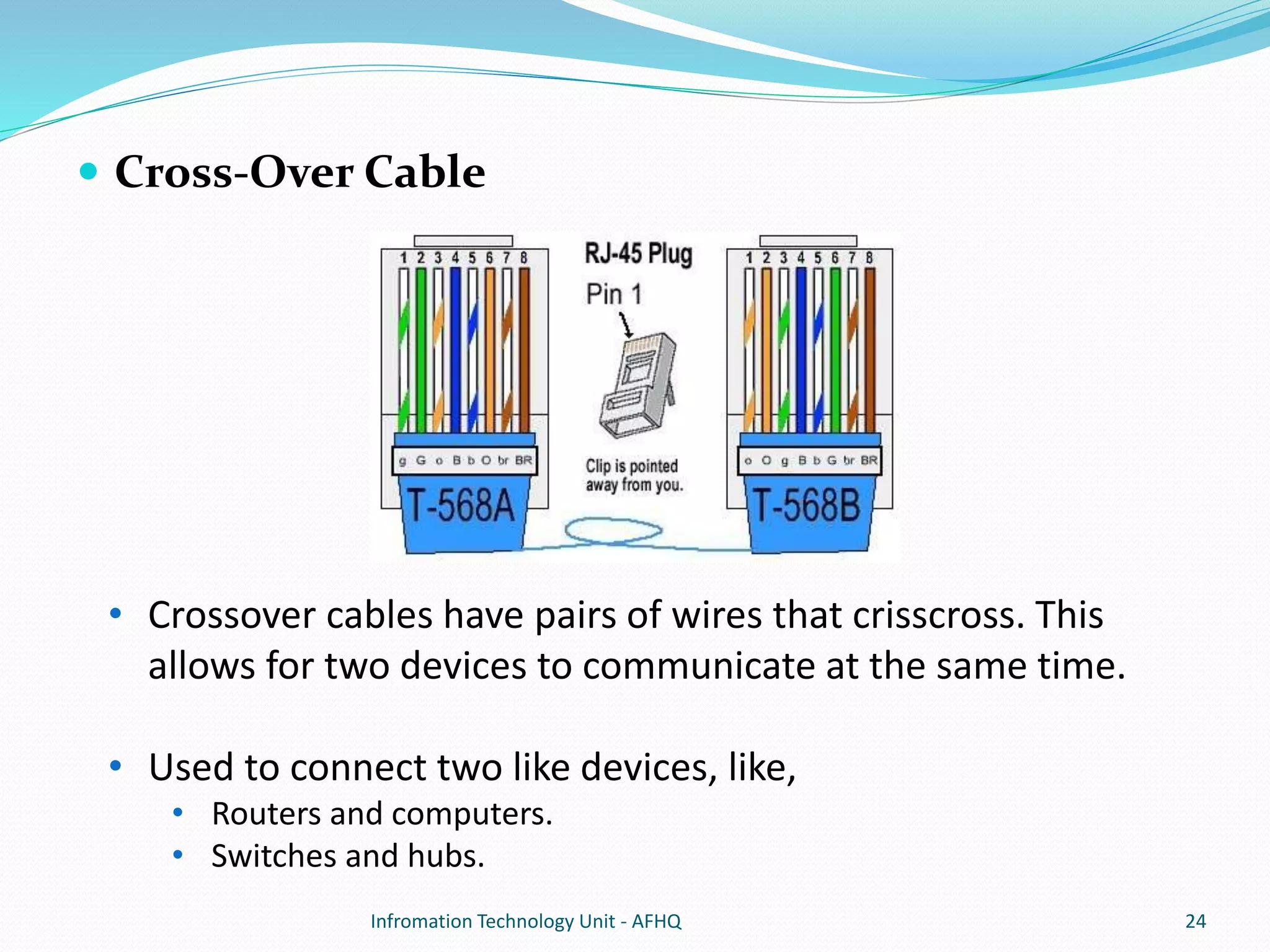
 Cross-Over Cable 
• Crossover cables have pairs of wires that crisscross. This 
allows for two devices to communicate at the same time. 
• Used to connect two like devices, like, 
• Routers and computers. 
• Switches and hubs. 
Infromation Technology Unit - AFHQ 24
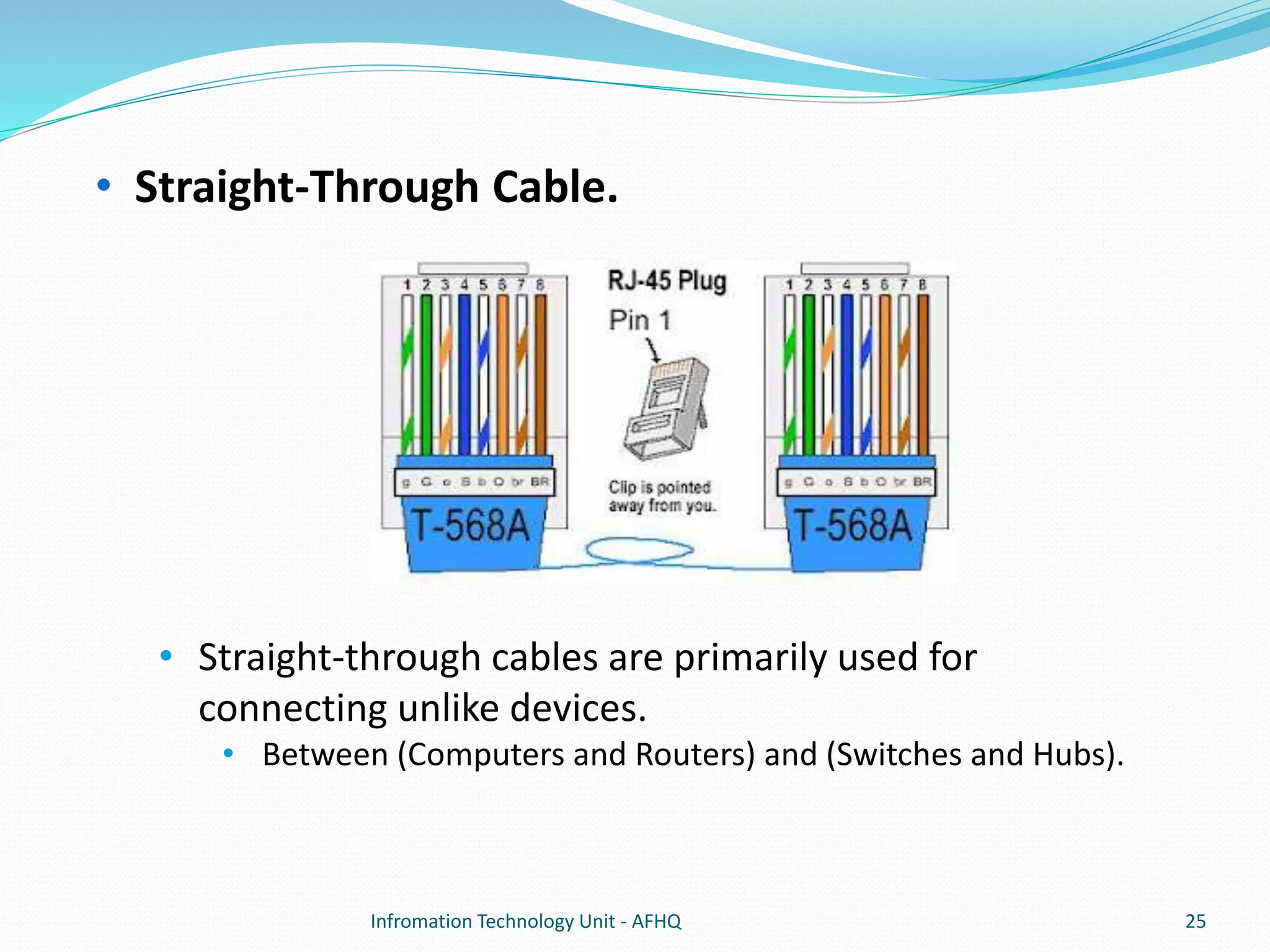
• Straight-Through Cable. 
• Straight-through cables are primarily used for 
connecting unlike devices. 
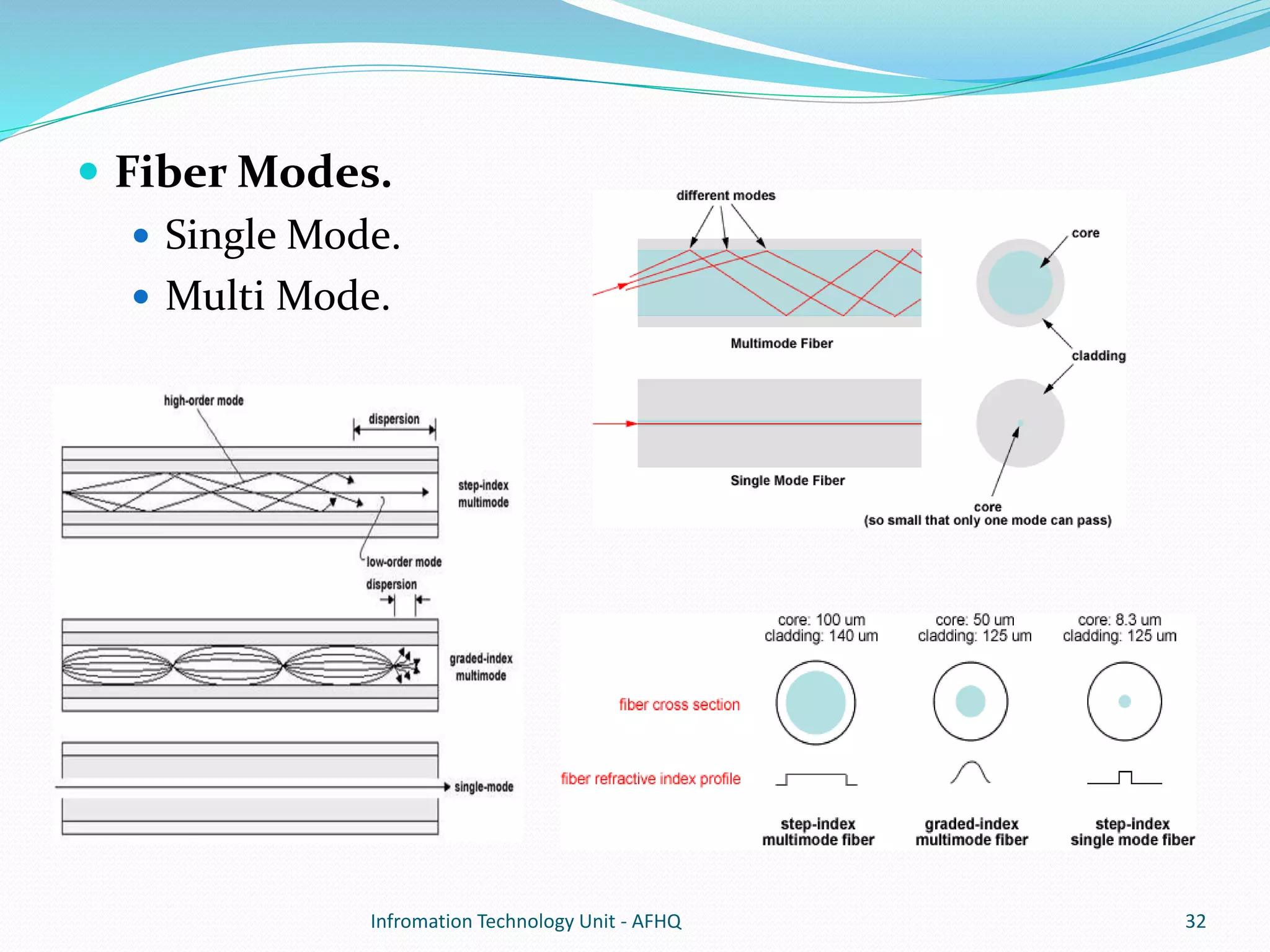
• Between (Computers and Routers) and (Switches and Hubs). 
Infromation Technology Unit - AFHQ 25
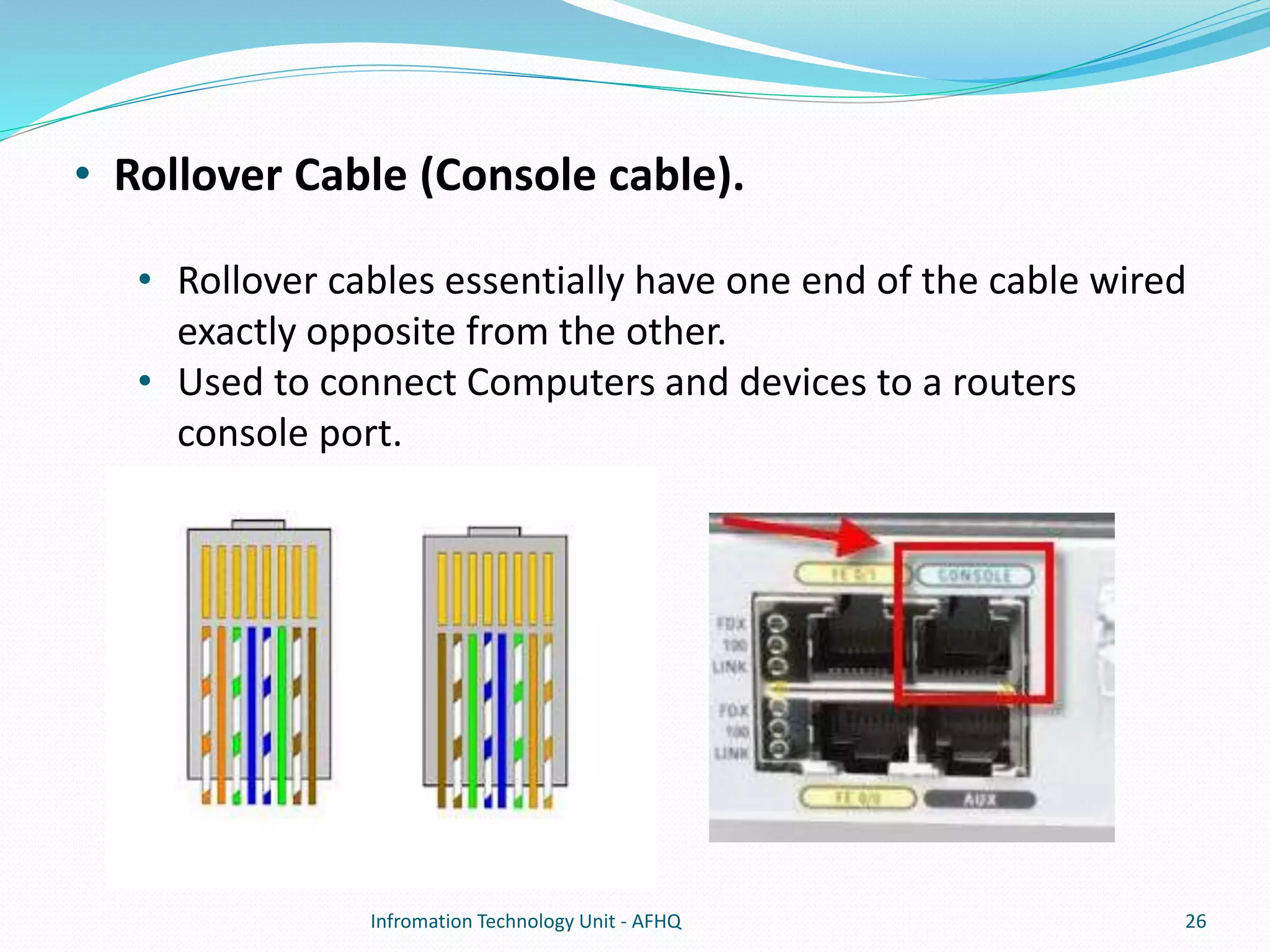
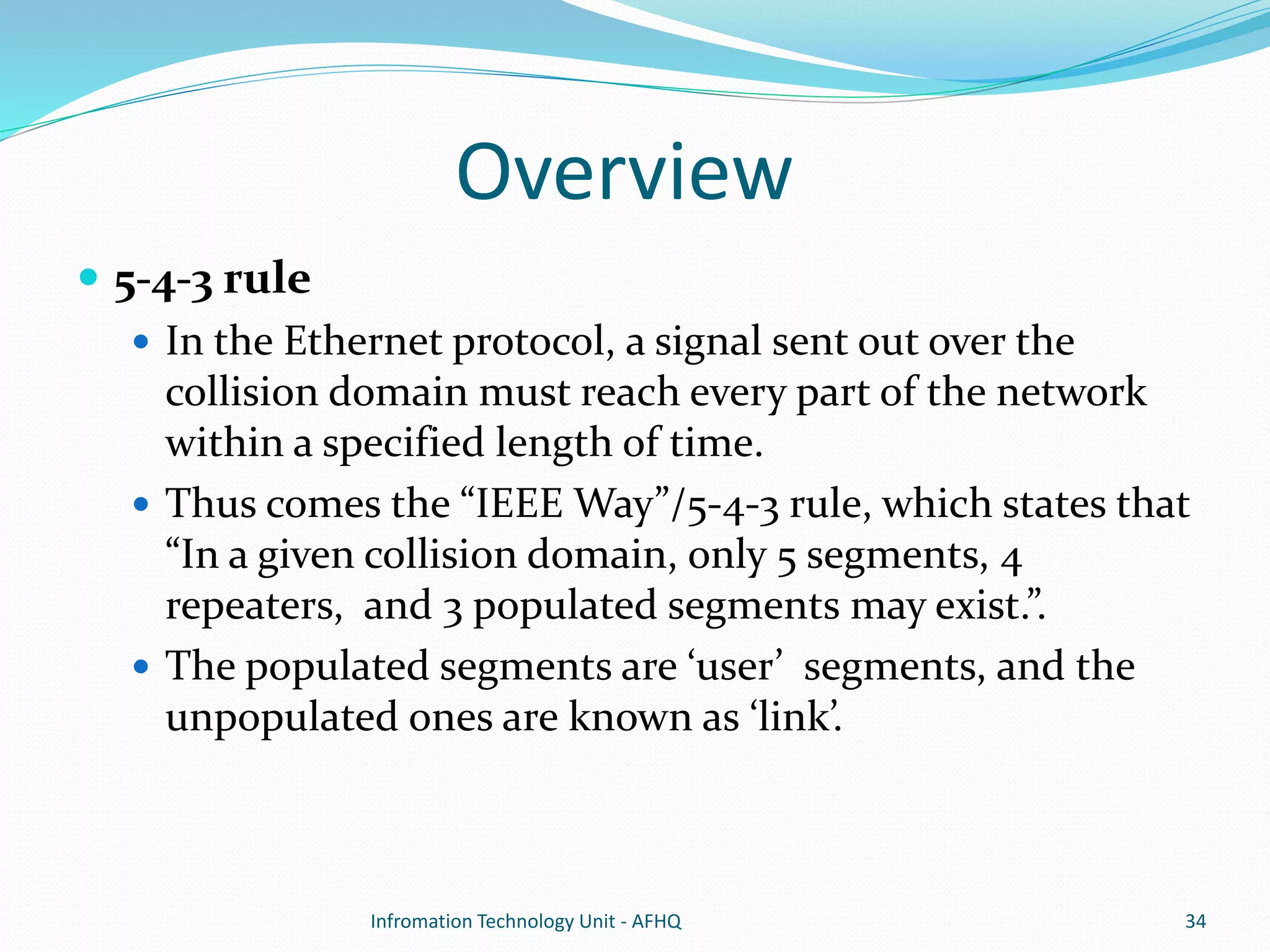
• Rollover Cable (Console cable). 
• Rollover cables essentially have one end of the cable wired 
exactly opposite from the other. 
• Used to connect Computers and devices to a routers 
console port. 
Infromation Technology Unit - AFHQ 26
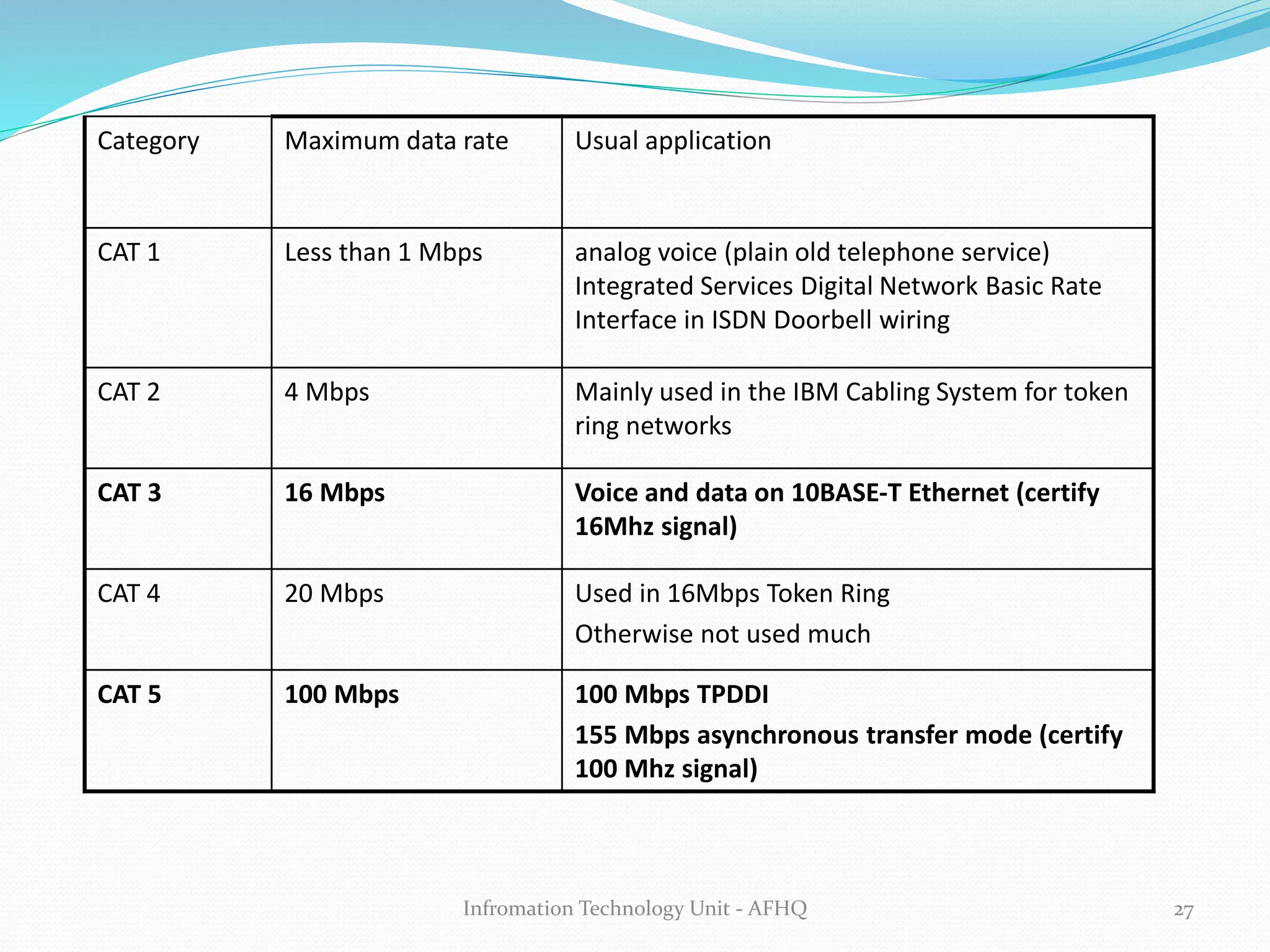
Category Maximum data rate Usual application 
CAT 1 Less than 1 Mbps analog voice (plain old telephone service) 
Integrated Services Digital Network Basic Rate 
Interface in ISDN Doorbell wiring 
CAT 2 4 Mbps Mainly used in the IBM Cabling System for token 
ring networks 
CAT 3 16 Mbps Voice and data on 10BASE-T Ethernet (certify 
16Mhz signal) 
CAT 4 20 Mbps Used in 16Mbps Token Ring 
Otherwise not used much 
CAT 5 100 Mbps 100 Mbps TPDDI 
155 Mbps asynchronous transfer mode (certify 
100 Mhz signal) 
Infromation Technology Unit - AFHQ 27
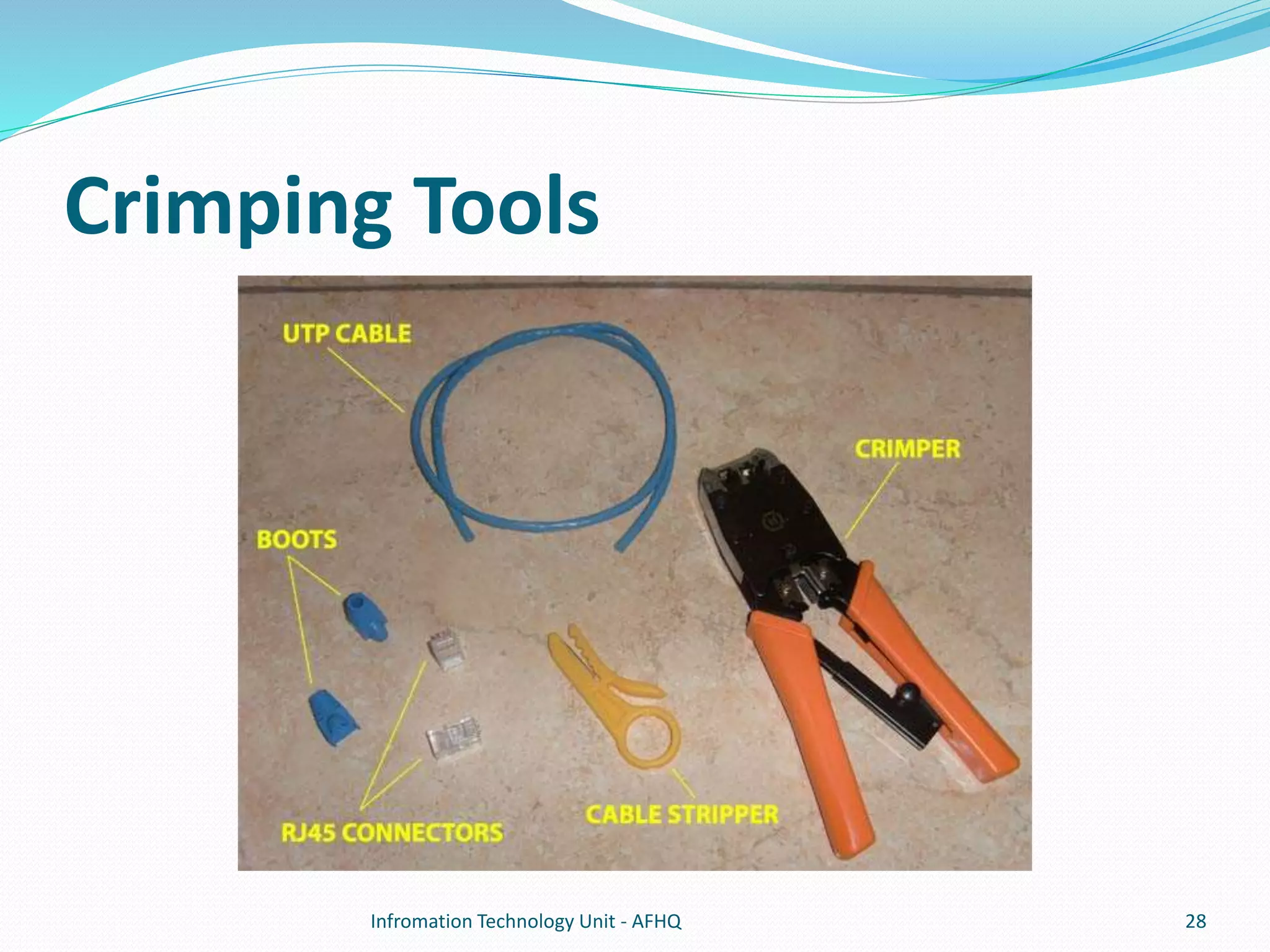
Crimping Tools 
Infromation Technology Unit - AFHQ 28
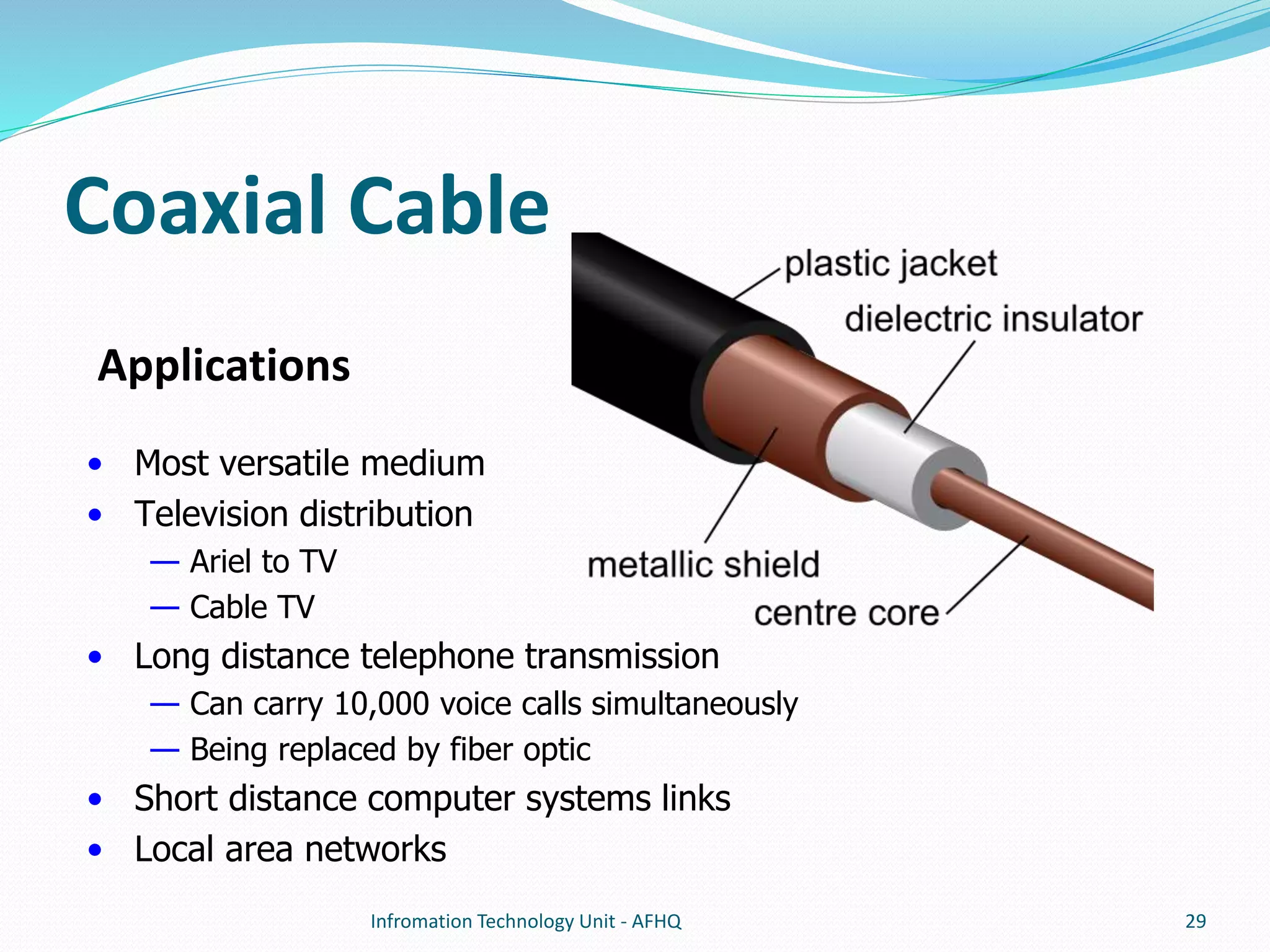
Coaxial Cable 
Infromation Technology Unit - AFHQ 29 
Applications 
• Most versatile medium 
• Television distribution 
— Ariel to TV 
— Cable TV 
• Long distance telephone transmission 
— Can carry 10,000 voice calls simultaneously 
— Being replaced by fiber optic 
• Short distance computer systems links 
• Local area networks
 Two types of coaxial cable are used for networking 
computers: 
 Thicknet 
 A heavy-gauge coaxial cable that is fairly inflexible and requires 
special equipment (over and above a simple network card) to 
connect the computer to the network backbone. 
 Thinnet. 
 Thinnet (RG-58 coaxial cable) was the cable of choice at one time because of 
its relative ease of installation and its low cost. 
 Thinnet LANs employ a bus topology, where a T-connector is attached to 
each computer’s network card. The computers are then chained together 
using appropriate lengths of cable. Thinnet installations require that each 
end of the network be terminated, and terminators are placed on the 
downside T-connector of the computers that reside on either end of the 
network. 
Infromation Technology Unit - AFHQ 30
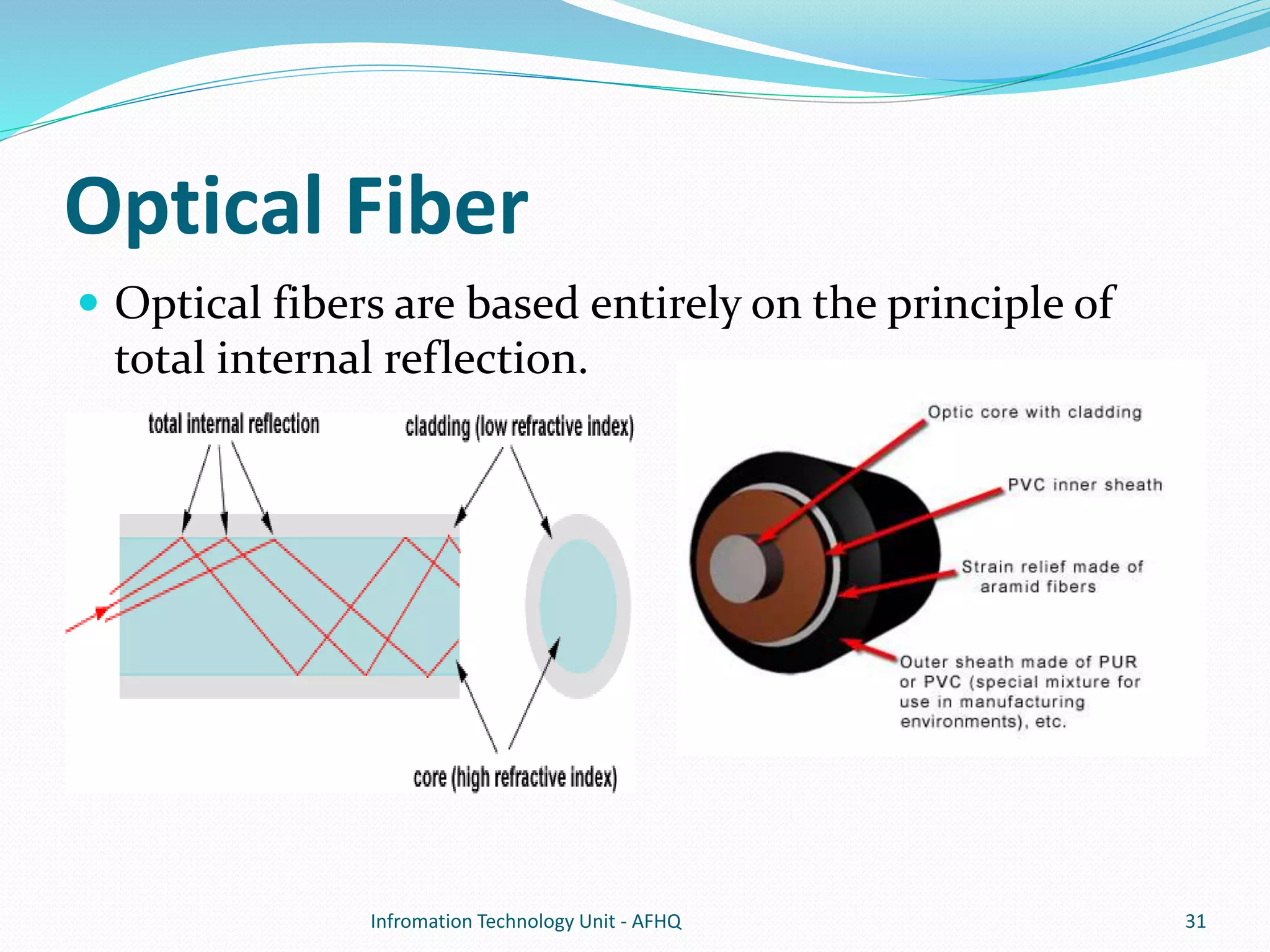
Optical Fiber 
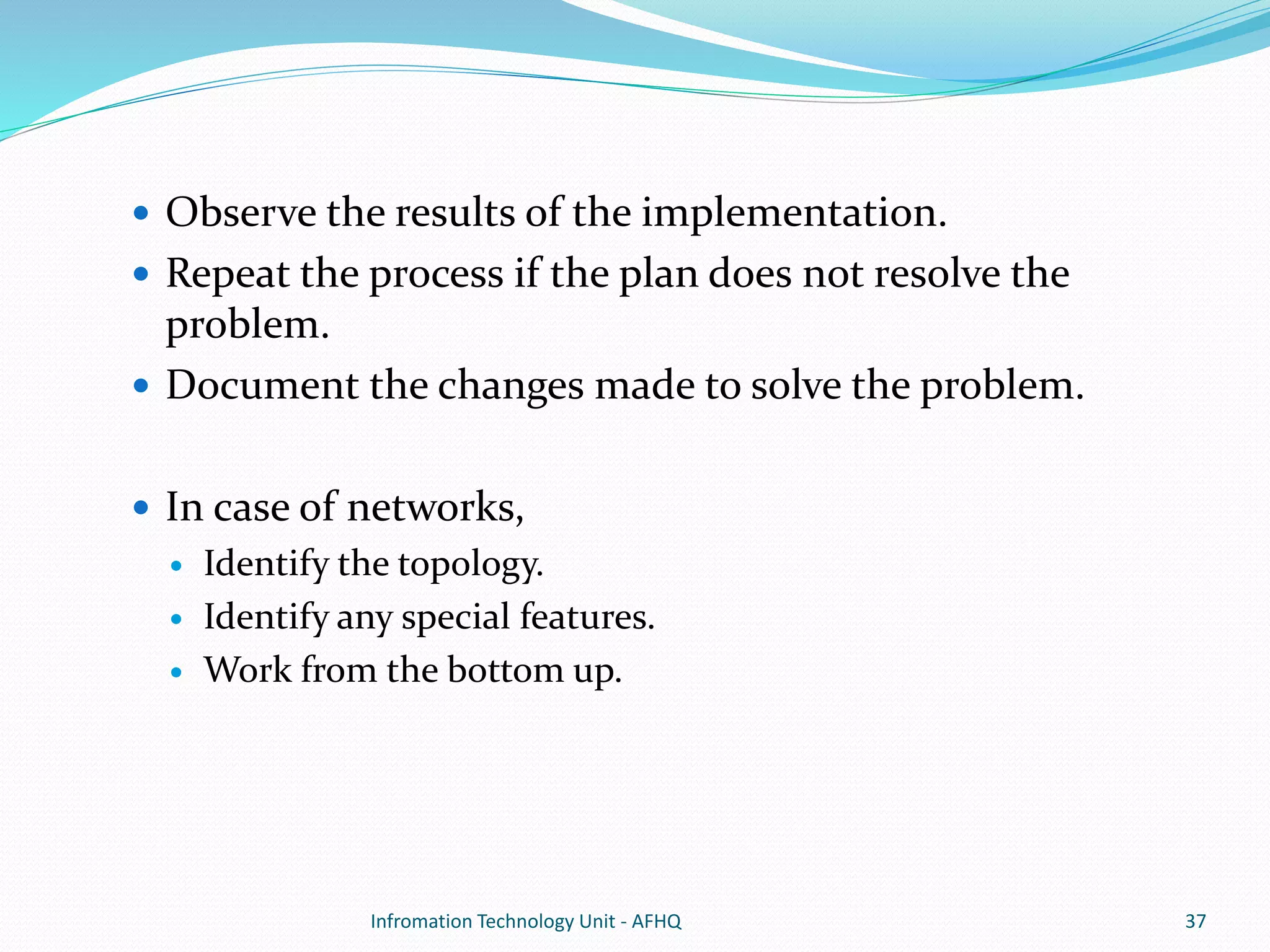
 Optical fibers are based entirely on the principle of 
total internal reflection. 
Infromation Technology Unit - AFHQ 31
 Fiber Modes. 
 Single Mode. 
 Multi Mode. 
Infromation Technology Unit - AFHQ 32
Infromation Technology Unit - AFHQ 33
Overview 
 5-4-3 rule 
 In the Ethernet protocol, a signal sent out over the 
collision domain must reach every part of the network 
within a specified length of time. 
 Thus comes the “IEEE Way”/5-4-3 rule, which states that 
“In a given collision domain, only 5 segments, 4 
repeaters, and 3 populated segments may exist.”. 
 The populated segments are ‘user’ segments, and the 
unpopulated ones are known as ‘link’. 
Infromation Technology Unit - AFHQ 34
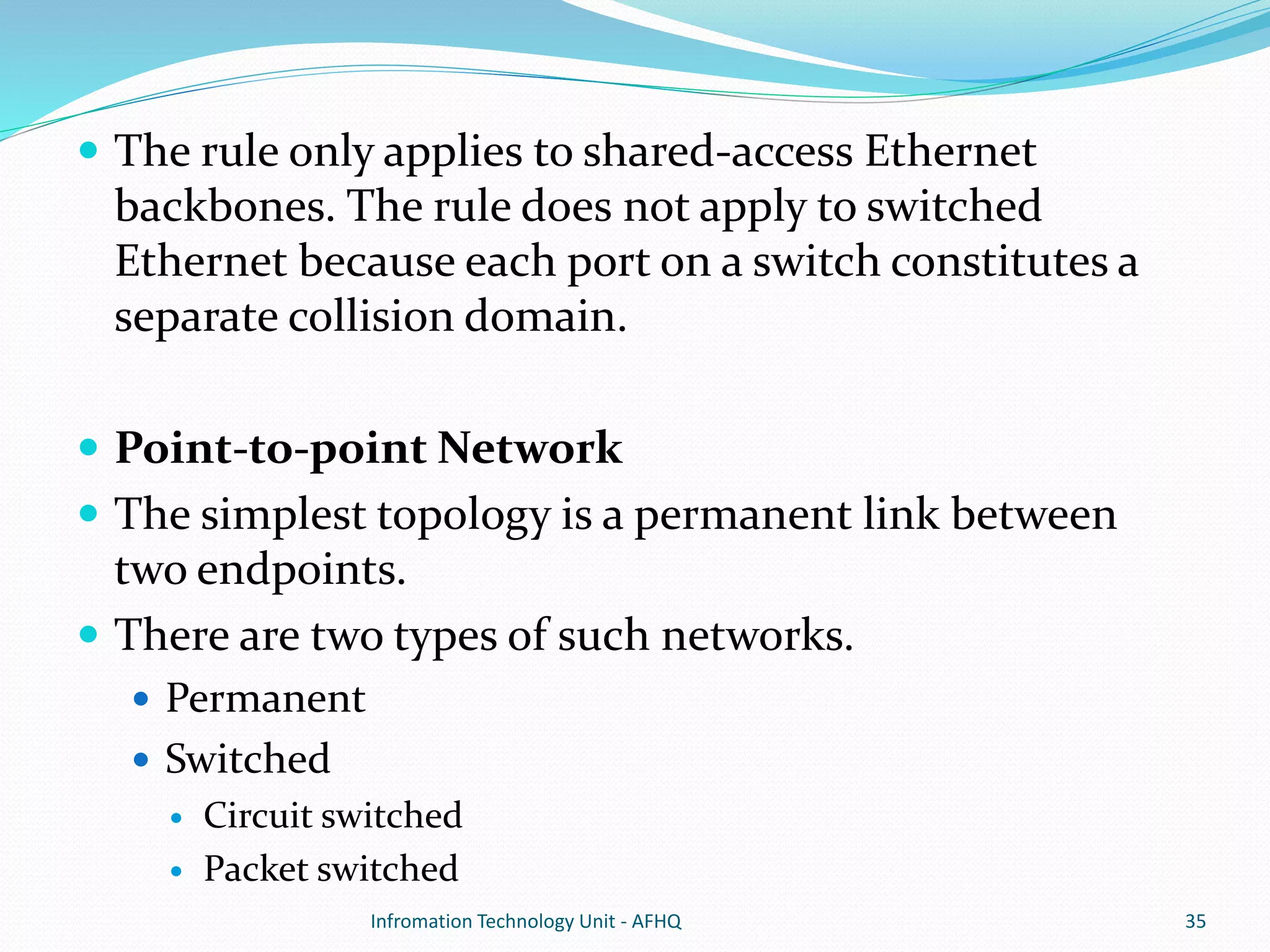
 The rule only applies to shared-access Ethernet 
backbones. The rule does not apply to switched 
Ethernet because each port on a switch constitutes a 
separate collision domain. 
 Point-to-point Network 
 The simplest topology is a permanent link between 
two endpoints. 
 There are two types of such networks. 
 Permanent 
 Switched 
 Circuit switched 
 Packet switched 
Infromation Technology Unit - AFHQ 35
The eight steps 
 The most important part of troubleshooting any 
problem is to divide the tasks of problem resolution 
into a systematic process of elimination. Cisco has 
broken this process into eight steps: 
Define the problem. 
 Gather detailed information. 
 Consider probable cause for the failure. 
 Devise a plan to solve the problem. 
 Implement the plan. 
Infromation Technology Unit - AFHQ 36
 Observe the results of the implementation. 
 Repeat the process if the plan does not resolve the 
problem. 
 Document the changes made to solve the problem. 
 In case of networks, 
 Identify the topology. 
 Identify any special features. 
 Work from the bottom up. 
Infromation Technology Unit - AFHQ 37
QUESTIONS 
Infromation Technology Unit - AFHQ 38

01. network topologies & cable

  • 2.
    Overview  NetworkTopologies  Transmission Media (Cable Types) Infromation Technology Unit - AFHQ 2
  • 3.
    Network Topologies Token Ring  Linear Bus  Star  Tree (Expanded Star)  Considerations When Choosing a Topology Infromation Technology Unit - AFHQ 3
  • 4.
    Token Ring •Uses a ring topology, where devices in the network are logically arranged in a closed ring/circle. • It also uses a token passing protocol, so that a machine can only use the network when it has control of the Token. • This ensures that there are no collisions because only one machine can use the network at any given time. Infromation Technology Unit - AFHQ 4
  • 5.
     It isconsidered to be an active topology, as computers in the ring re-transmit the packet they receive to the next computer in the ring.  The token is a special packet of data, if a computer wants to send data onto the network, it has to wait until it has possession of the token, else it passes it on to the next computer. Infromation Technology Unit - AFHQ 5
  • 6.
     Upon startup, the machine with the highest MAC address is chosen as the 'Active Monitor‘, and all other machines become 'Standby Monitors'.  Active Monitors are in charge of monitoring the network and performing “Ring Polling”, by which other computers find their “Nearest Active Upstream Neighbor (NAUN)”. Infromation Technology Unit - AFHQ 6
  • 7.
     Advantages Very orderly network where every device has access to the token and the opportunity to transmit.  Performs better than a star topology under heavy network load.  Can create much larger network using Token Ring.  Does not require network server to manage the connectivity between the computers.  Disadvantages  One malfunctioning workstation or bad port in the MAU can create problems for the entire network.  Moves, adds and changes of devices can affect the network.  Network adapter cards and MAU's are much more expensive than Ethernet cards and hubs.  Much slower than an Ethernet network under normal load. Infromation Technology Unit - AFHQ 7
  • 8.
    Linear Bus InfromationTechnology Unit - AFHQ 8
  • 9.
     A linearbus topology consists of a main run of cable with a terminator at each end. All nodes (file server, workstations, and peripherals) are connected to the linear cable.  A signal from the source travels in both directions to all machines connected on the bus cable until it finds the intended recipient. If the machine address does not match the intended address for the data, the machine ignores the data.  Uses CSMA/CD, or CSMA/CA to manage and minimize collisions. Infromation Technology Unit - AFHQ 9
  • 10.
     Linear bus  The type of network topology in which all of the nodes of the network are connected to a common transmission medium which has exactly two endpoints (also commonly referred to as the backbone, or trunk) – all data transmitted between nodes in the network is sent over the backbone and can be received by all nodes in the network simultaneously.  Distributed bus  The type of network topology in which all of the nodes of the network are connected to a common transmission medium which has more than two endpoints (that are created by adding branches to the main section of the transmission medium).  Notes:  The linear bus topology is sometimes considered to be a special case of the distributed bus topology – i.e., a distributed bus with no branching segments.  The physical distributed bus topology is sometimes incorrectly referred to as a physical tree topology. Infromation Technology Unit - AFHQ 10
  • 11.
     Advantages ofa Linear Bus Topology  Easy to connect a computer or peripheral to a linear bus.  Requires less cable length than a star topology.  Disadvantages of a Linear Bus Topology  Entire network shuts down if there is a break in the main cable.  Terminators are required at both ends of the backbone cable.  Difficult to identify the problem if the entire network shuts down.  Not meant to be used as a stand-alone solution in a large building. Infromation Technology Unit - AFHQ 11
  • 12.
    Star Topology Each computer in a star topology is connected with its own cable (typically twisted-pair cable) to a port on the hub or some central component unit. Infromation Technology Unit - AFHQ 12
  • 13.
     Star LANsalso use the same type of wait-and-listen strategy to access data or send data as characterized by the bus topology.  Advantages  Better performance.  Passing of Data Packet through unnecessary nodes is prevented by this topology. This topology induces a huge overhead on the central hub, however if the central hub has adequate capacity, then very high network utilization by one device in the network does not affect the other devices in the network.  Isolation of devices.  Each device is inherently isolated by the link that connects it to the hub. This makes the isolation of the individual devices fairly straightforward. This isolated nature also prevents any non-centralized failure to affect the network. Infromation Technology Unit - AFHQ 13
  • 14.
     Benefits fromcentralization.  Easy to increase the capacity of the central hub, add additional devices to the star (can scale the network very easily). The central nature also allows the inspection traffic through the network.  Simplicity.  The topology is easy to understand, establish, and navigate.  Unobtrusive.  Minimal effect on users. Infromation Technology Unit - AFHQ 14
  • 15.
     Disadvantages. High dependence of the system on the functioning of the central hub.  Performance and scalability of the network also depend on the capabilities of the hub.  Number of connections in the star also depends on the how many connections the hub can support. Infromation Technology Unit - AFHQ 15
  • 16.
    Tree Topology (ExpandedStar)  Tree topology is a combination of Bus and Star topology. Infromation Technology Unit - AFHQ 16
  • 17.
     It consistsof groups of star-configured workstations connected to a linear bus backbone cable.  5-4-3 Rule  Between any two nodes on the network there can only be a maximum of 5 segments, connected through 4 repeaters/concentrators. In addition, only 3 of the segments may be populated (trunk) segments if they are made of coaxial cable.  Advantages  Point-to-point wiring for individual segments.  Supported by several hardware and software venders.  Disadvantages  Overall length of each segment is limited by the type of cabling used.  If the backbone line breaks, the entire segment goes down.  More difficult to configure and wire than other topologies. Infromation Technology Unit - AFHQ 17
  • 18.
    Considerations When Choosinga Topology  Money.  A linear bus network may be the least expensive way to install a network; you do not have to purchase concentrators.  Cable Length.  The linear bus network uses shorter lengths of cable.  Future growth.  With a star topology, expanding a network is easily done by adding another concentrator.  Cable type.  The most common cable in schools is unshielded twisted pair, which is most often used with star topologies. Infromation Technology Unit - AFHQ 18
  • 19.
    Topology Summery InfromationTechnology Unit - AFHQ 19
  • 20.
    Transmission Media Twisted Pair  Coaxial Cable  Optical fiber Infromation Technology Unit - AFHQ 20
  • 21.
    Twisted Pair Applications • Most common medium • Telephone network  Between house and local exchange (subscriber loop) • Within buildings To private branch exchange (PBX) • For local area networks (LAN) 10Mbps or 100Mbps Infromation Technology Unit - AFHQ 21
  • 22.
    Pros  Cheap  Easy to work with Cons  Low data rate  Short range Infromation Technology Unit - AFHQ 22
  • 23.
    • Shielded TwistedPair (STP) — Metal braid or sheathing that reduces interference — More expensive — Harder to handle (thick, heavy) • Unshielded Twisted Pair (UTP) — Ordinary telephone wire — Cheapest — Easiest to install — Suffers from external EM interference Infromation Technology Unit - AFHQ 23
  • 24.
     Cross-Over Cable • Crossover cables have pairs of wires that crisscross. This allows for two devices to communicate at the same time. • Used to connect two like devices, like, • Routers and computers. • Switches and hubs. Infromation Technology Unit - AFHQ 24
  • 25.
    • Straight-Through Cable. • Straight-through cables are primarily used for connecting unlike devices. • Between (Computers and Routers) and (Switches and Hubs). Infromation Technology Unit - AFHQ 25
  • 26.
    • Rollover Cable(Console cable). • Rollover cables essentially have one end of the cable wired exactly opposite from the other. • Used to connect Computers and devices to a routers console port. Infromation Technology Unit - AFHQ 26
  • 27.
    Category Maximum datarate Usual application CAT 1 Less than 1 Mbps analog voice (plain old telephone service) Integrated Services Digital Network Basic Rate Interface in ISDN Doorbell wiring CAT 2 4 Mbps Mainly used in the IBM Cabling System for token ring networks CAT 3 16 Mbps Voice and data on 10BASE-T Ethernet (certify 16Mhz signal) CAT 4 20 Mbps Used in 16Mbps Token Ring Otherwise not used much CAT 5 100 Mbps 100 Mbps TPDDI 155 Mbps asynchronous transfer mode (certify 100 Mhz signal) Infromation Technology Unit - AFHQ 27
  • 28.
    Crimping Tools InfromationTechnology Unit - AFHQ 28
  • 29.
    Coaxial Cable InfromationTechnology Unit - AFHQ 29 Applications • Most versatile medium • Television distribution — Ariel to TV — Cable TV • Long distance telephone transmission — Can carry 10,000 voice calls simultaneously — Being replaced by fiber optic • Short distance computer systems links • Local area networks
  • 30.
     Two typesof coaxial cable are used for networking computers:  Thicknet  A heavy-gauge coaxial cable that is fairly inflexible and requires special equipment (over and above a simple network card) to connect the computer to the network backbone.  Thinnet.  Thinnet (RG-58 coaxial cable) was the cable of choice at one time because of its relative ease of installation and its low cost.  Thinnet LANs employ a bus topology, where a T-connector is attached to each computer’s network card. The computers are then chained together using appropriate lengths of cable. Thinnet installations require that each end of the network be terminated, and terminators are placed on the downside T-connector of the computers that reside on either end of the network. Infromation Technology Unit - AFHQ 30
  • 31.
    Optical Fiber Optical fibers are based entirely on the principle of total internal reflection. Infromation Technology Unit - AFHQ 31
  • 32.
     Fiber Modes.  Single Mode.  Multi Mode. Infromation Technology Unit - AFHQ 32
  • 33.
  • 34.
    Overview  5-4-3rule  In the Ethernet protocol, a signal sent out over the collision domain must reach every part of the network within a specified length of time.  Thus comes the “IEEE Way”/5-4-3 rule, which states that “In a given collision domain, only 5 segments, 4 repeaters, and 3 populated segments may exist.”.  The populated segments are ‘user’ segments, and the unpopulated ones are known as ‘link’. Infromation Technology Unit - AFHQ 34
  • 35.
     The ruleonly applies to shared-access Ethernet backbones. The rule does not apply to switched Ethernet because each port on a switch constitutes a separate collision domain.  Point-to-point Network  The simplest topology is a permanent link between two endpoints.  There are two types of such networks.  Permanent  Switched  Circuit switched  Packet switched Infromation Technology Unit - AFHQ 35
  • 36.
    The eight steps  The most important part of troubleshooting any problem is to divide the tasks of problem resolution into a systematic process of elimination. Cisco has broken this process into eight steps: Define the problem.  Gather detailed information.  Consider probable cause for the failure.  Devise a plan to solve the problem.  Implement the plan. Infromation Technology Unit - AFHQ 36
  • 37.
     Observe theresults of the implementation.  Repeat the process if the plan does not resolve the problem.  Document the changes made to solve the problem.  In case of networks,  Identify the topology.  Identify any special features.  Work from the bottom up. Infromation Technology Unit - AFHQ 37
  • 38.