Network Cabling
Making connections with Cat5
Key Points :
What cable types are
available?
How do cables work?
How are cables used in
networking?
How are connections made?
Learning Objectives :
 List common cable types used in networking
 Describe how UTP cables are made
 Explain how UTP cables are used in Ethernet networks
 Demonstrate the ability to make a working patch cable
 Name the two wiring standards used for wired Ethernet
networks and their uses
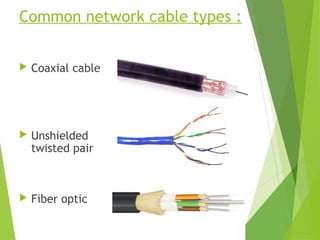
Common network cable types :
 Coaxial cable
 Unshielded
twisted pair
 Fiber optic
UTP characteristics :
 Unshielded
 Twisted (why?) pairs of insulated
conductors
 Covered by
insulating sheath
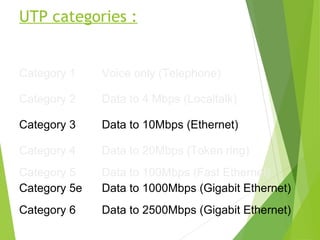
UTP categories :
Category 1 Voice only (Telephone)
Category 2 Data to 4 Mbps (Localtalk)
Category 3 Data to 10Mbps (Ethernet)
Category 4 Data to 20Mbps (Token ring)
Category 5
Category 5e
Data to 100Mbps (Fast Ethernet)
Data to 1000Mbps (Gigabit Ethernet)
Category 6 Data to 2500Mbps (Gigabit Ethernet)
Cat5e cable :
 1000Mbps data capacity
 For runs of up to 90 meters
 Solid core cable ideal for structural installations (PVC or
Plenum)
 Stranded cable ideal for patch cables
 Terminated with RJ-45 connectors
RJ45 connector :
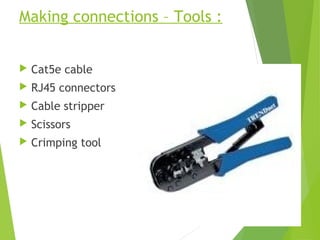
Making connections – Tools :
 Cat5e cable
 RJ45 connectors
 Cable stripper
 Scissors
 Crimping tool
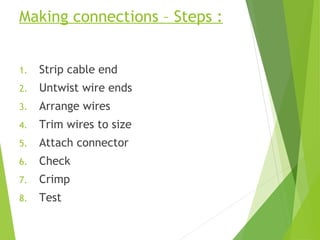
Making connections – Steps :
1. Strip cable end
2. Untwist wire ends
3. Arrange wires
4. Trim wires to size
5. Attach connector
6. Check
7. Crimp
8. Test
Step 1 – Strip cable end :
 Strip 1 – 1½” of insulating sheath
 Avoid cutting into conductor insulation
Step 2 – Untwist wire ends :
 Sort wires by insulation colors
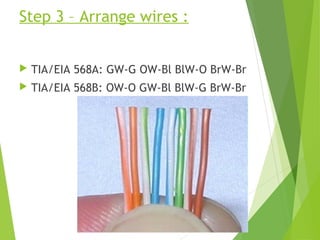
Step 3 – Arrange wires :
 TIA/EIA 568A: GW-G OW-Bl BlW-O BrW-Br
 TIA/EIA 568B: OW-O GW-Bl BlW-G BrW-Br
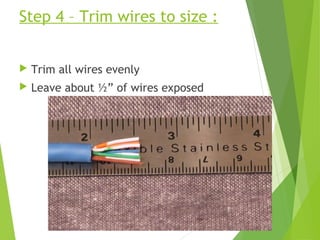
Step 4 – Trim wires to size :
 Trim all wires evenly
 Leave about ½” of wires exposed
Step 5 – Attach connector :
 Maintain wire order,
left-to-right, with RJ45
tab facing downward
Step 6 – Check :
 Do all wires extend to end?
 Is sheath well inside connector?
Step 7 – Crimp :
 Squeeze firmly to crimp connecter
onto cable end (8P)
Step 8 – Test :
 Does the cable work?
Let’s go to work :!

Network Cabling

  • 1.
  • 2.
    Key Points : Whatcable types are available? How do cables work? How are cables used in networking? How are connections made?
  • 3.
    Learning Objectives : List common cable types used in networking  Describe how UTP cables are made  Explain how UTP cables are used in Ethernet networks  Demonstrate the ability to make a working patch cable  Name the two wiring standards used for wired Ethernet networks and their uses
  • 4.
    Common network cabletypes :  Coaxial cable  Unshielded twisted pair  Fiber optic
  • 5.
    UTP characteristics : Unshielded  Twisted (why?) pairs of insulated conductors  Covered by insulating sheath
  • 6.
    UTP categories : Category1 Voice only (Telephone) Category 2 Data to 4 Mbps (Localtalk) Category 3 Data to 10Mbps (Ethernet) Category 4 Data to 20Mbps (Token ring) Category 5 Category 5e Data to 100Mbps (Fast Ethernet) Data to 1000Mbps (Gigabit Ethernet) Category 6 Data to 2500Mbps (Gigabit Ethernet)
  • 7.
    Cat5e cable : 1000Mbps data capacity  For runs of up to 90 meters  Solid core cable ideal for structural installations (PVC or Plenum)  Stranded cable ideal for patch cables  Terminated with RJ-45 connectors
  • 8.
  • 9.
    Making connections –Tools :  Cat5e cable  RJ45 connectors  Cable stripper  Scissors  Crimping tool
  • 10.
    Making connections –Steps : 1. Strip cable end 2. Untwist wire ends 3. Arrange wires 4. Trim wires to size 5. Attach connector 6. Check 7. Crimp 8. Test
  • 11.
    Step 1 –Strip cable end :  Strip 1 – 1½” of insulating sheath  Avoid cutting into conductor insulation
  • 12.
    Step 2 –Untwist wire ends :  Sort wires by insulation colors
  • 13.
    Step 3 –Arrange wires :  TIA/EIA 568A: GW-G OW-Bl BlW-O BrW-Br  TIA/EIA 568B: OW-O GW-Bl BlW-G BrW-Br
  • 14.
    Step 4 –Trim wires to size :  Trim all wires evenly  Leave about ½” of wires exposed
  • 15.
    Step 5 –Attach connector :  Maintain wire order, left-to-right, with RJ45 tab facing downward
  • 16.
    Step 6 –Check :  Do all wires extend to end?  Is sheath well inside connector?
  • 17.
    Step 7 –Crimp :  Squeeze firmly to crimp connecter onto cable end (8P)
  • 18.
    Step 8 –Test :  Does the cable work?
  • 19.