NETWORK TOPOLOGIESNETWORK TOPOLOGIES
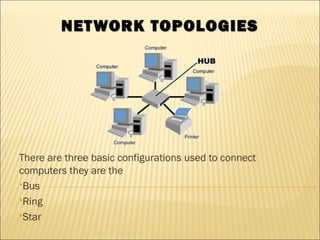
There are three basic configurations used to connect
computers they are the
Bus
Ring
Star
 This type of network was widely used in the 1980’s
 In this configuration every computer (node) shares
the networks total bus capacities.
 In this configuration adding more computers will
reduce the access speed on the network.
 Each computer communicates to other computers on
the network independently this is referred to as
PEER-TO-PEER networking
HOW A BUS PEER TO PEERHOW A BUS PEER TO PEER
NETWORK WORKSNETWORK WORKS
 All computers on a network have a distinct
address just like your house does
 a message would be send from one computer
with the address of another computer attached
to the message
 The message is broadcasted to all the
computers on the network until the addressed
PC accepts the message
HOW IT WORKEDHOW IT WORKED
 The type of wires used for Bus Networks in the 80’s
were called Thicknet and Thinnet
 A Thicknet cable (very large about 1 inch in diameter
usually yellow was hung around a room)
 Thinnet cables were connected to the PC’s NIC and a
Transceiver. The Transceiver was tapped into the
Thicknet cable
 To stop the message from bouncing back and forward
down the wire (known as signal bounce) both ends of
the network are terminated with 50Ω resistors
PROBLEMSPROBLEMS
 One of the main problems with this type of
network is that it is not very fault tolerant, a
break or defect in the bus would affect the
whole network
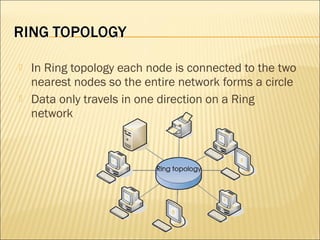
 In Ring topology each node is connected to the two
nearest nodes so the entire network forms a circle
 Data only travels in one direction on a Ring
network
 a node has information to send to another computer
on the network so it sends the information out on the
network to the PC it is connected to, if the information
is for this PC (the recipients NIC address is attached to
the message, which is like putting an address on an
envelope) then the PC accepts the data
 otherwise it passes the information on to the next PC
by repeating the data back out on the line
 This method of repeating the data helps keep the
integrity of the data readable by other computers
HOW IT WORKSHOW IT WORKS
 As it is better to have computers take turns
using the connecting Data cable, Ring
topologies incorporated a system called Token
passing
 In this topology, to transmit on the wire your
computer must have control of the token or
wait for the token to be free
 Larger Token Ring networks use multiple
tokens
PROBLEMS AND SOLUTIONSPROBLEMS AND SOLUTIONS
 The drawback to this type of topology is that a single
malfunctioning workstation can disable the whole network
 To make sure all the information is sent the receiving PC sends
the token back to the sending PC after it has received all the
data
 If the sending PC is finished sending it passes the token to the
next PC
 This type of network was also widely used in the 1980’s
 This type of network used Thinnet cable joining nodes.
 In the mid 1980’s Thinnet cable was replaced by
Category 3 Ethernet cable capable of handling up to 10Mbps
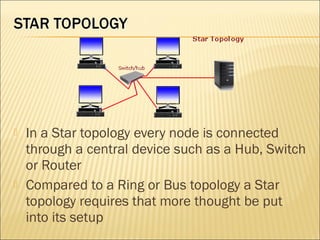
 In a Star topology every node is connected
through a central device such as a Hub, Switch
or Router
 Compared to a Ring or Bus topology a Star
topology requires that more thought be put
into its setup
THE GOOD AND BAD OF ATHE GOOD AND BAD OF A
STAR NETWORKSTAR NETWORK
 The upside of a star network is that if any one
cable fails then only the node connected on
that cable would be affected
 Another positive point to this type of network is
that it is very simple to join two star networks
together by connecting their central devices to
each other
THE GOOD AND BAD OF ATHE GOOD AND BAD OF A
STAR NETWORKSTAR NETWORK
 As each computer is connected to a central
device (Hub) the location of the Hub must be
made as central as possible, so as to reduce
cable lengths
 The drawback to this type of topology is if a
central device was to fail then all computers
connected to that device would not be able to
see the network
WHAT IS A HUB?WHAT IS A HUB?
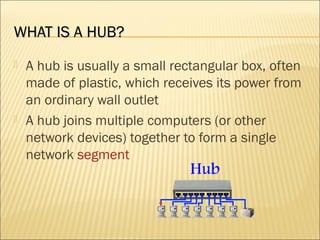
 A hub is usually a small rectangular box, often
made of plastic, which receives its power from
an ordinary wall outlet
 A hub joins multiple computers (or other
network devices) together to form a single
network segment
WHAT IS A NETWORK SWITCH?WHAT IS A NETWORK SWITCH?
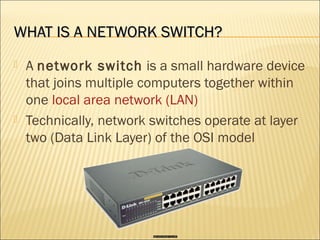
 A network switch is a small hardware device
that joins multiple computers together within
one local area network (LAN)
 Technically, network switches operate at layer
two (Data Link Layer) of the OSI model
WHAT IS A ROUTER?WHAT IS A ROUTER?
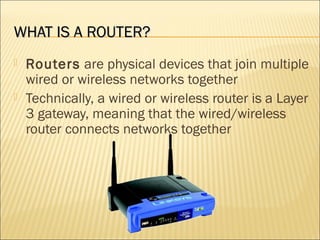
 Routers are physical devices that join multiple
wired or wireless networks together
 Technically, a wired or wireless router is a Layer
3 gateway, meaning that the wired/wireless
router connects networks together

Network topologies

  • 1.
    NETWORK TOPOLOGIESNETWORK TOPOLOGIES Thereare three basic configurations used to connect computers they are the Bus Ring Star
  • 2.
     This typeof network was widely used in the 1980’s  In this configuration every computer (node) shares the networks total bus capacities.  In this configuration adding more computers will reduce the access speed on the network.  Each computer communicates to other computers on the network independently this is referred to as PEER-TO-PEER networking
  • 3.
    HOW A BUSPEER TO PEERHOW A BUS PEER TO PEER NETWORK WORKSNETWORK WORKS  All computers on a network have a distinct address just like your house does  a message would be send from one computer with the address of another computer attached to the message  The message is broadcasted to all the computers on the network until the addressed PC accepts the message
  • 4.
    HOW IT WORKEDHOWIT WORKED  The type of wires used for Bus Networks in the 80’s were called Thicknet and Thinnet  A Thicknet cable (very large about 1 inch in diameter usually yellow was hung around a room)  Thinnet cables were connected to the PC’s NIC and a Transceiver. The Transceiver was tapped into the Thicknet cable  To stop the message from bouncing back and forward down the wire (known as signal bounce) both ends of the network are terminated with 50Ω resistors
  • 5.
    PROBLEMSPROBLEMS  One ofthe main problems with this type of network is that it is not very fault tolerant, a break or defect in the bus would affect the whole network
  • 6.
     In Ringtopology each node is connected to the two nearest nodes so the entire network forms a circle  Data only travels in one direction on a Ring network
  • 7.
     a nodehas information to send to another computer on the network so it sends the information out on the network to the PC it is connected to, if the information is for this PC (the recipients NIC address is attached to the message, which is like putting an address on an envelope) then the PC accepts the data  otherwise it passes the information on to the next PC by repeating the data back out on the line  This method of repeating the data helps keep the integrity of the data readable by other computers
  • 8.
    HOW IT WORKSHOWIT WORKS  As it is better to have computers take turns using the connecting Data cable, Ring topologies incorporated a system called Token passing  In this topology, to transmit on the wire your computer must have control of the token or wait for the token to be free  Larger Token Ring networks use multiple tokens
  • 9.
    PROBLEMS AND SOLUTIONSPROBLEMSAND SOLUTIONS  The drawback to this type of topology is that a single malfunctioning workstation can disable the whole network  To make sure all the information is sent the receiving PC sends the token back to the sending PC after it has received all the data  If the sending PC is finished sending it passes the token to the next PC  This type of network was also widely used in the 1980’s  This type of network used Thinnet cable joining nodes.  In the mid 1980’s Thinnet cable was replaced by Category 3 Ethernet cable capable of handling up to 10Mbps
  • 10.
     In aStar topology every node is connected through a central device such as a Hub, Switch or Router  Compared to a Ring or Bus topology a Star topology requires that more thought be put into its setup
  • 11.
    THE GOOD ANDBAD OF ATHE GOOD AND BAD OF A STAR NETWORKSTAR NETWORK  The upside of a star network is that if any one cable fails then only the node connected on that cable would be affected  Another positive point to this type of network is that it is very simple to join two star networks together by connecting their central devices to each other
  • 12.
    THE GOOD ANDBAD OF ATHE GOOD AND BAD OF A STAR NETWORKSTAR NETWORK  As each computer is connected to a central device (Hub) the location of the Hub must be made as central as possible, so as to reduce cable lengths  The drawback to this type of topology is if a central device was to fail then all computers connected to that device would not be able to see the network
  • 13.
    WHAT IS AHUB?WHAT IS A HUB?  A hub is usually a small rectangular box, often made of plastic, which receives its power from an ordinary wall outlet  A hub joins multiple computers (or other network devices) together to form a single network segment
  • 14.
    WHAT IS ANETWORK SWITCH?WHAT IS A NETWORK SWITCH?  A network switch is a small hardware device that joins multiple computers together within one local area network (LAN)  Technically, network switches operate at layer two (Data Link Layer) of the OSI model
  • 15.
    WHAT IS AROUTER?WHAT IS A ROUTER?  Routers are physical devices that join multiple wired or wireless networks together  Technically, a wired or wireless router is a Layer 3 gateway, meaning that the wired/wireless router connects networks together