

An Introduction To Structured Cabling
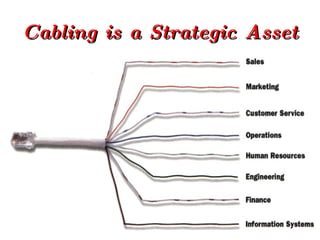
Cabling is a Strategic Asset Information technology is at the heart of today's successful business operations. Efficient integration of all key areas, from research and development through customer service, is critically important. The many and varied business functions, each with their own unique requirements, are dependant on a common technology foundation: CABLING
Cabling is a Strategic Asset
What does ‘Structured Cabling’ mean? Cabling system that allows constant moves  and changes to be performed by on site  personnel. Growth and flexibility built in to the cabling  scheme. Can be proprietary (closed) or non-proprietary  (open).
Cabling Life Cycle
Network Investment A cabling system supports and outlives most network components, yet represents only 5% of the total network investment
Facilitates Moving Employees Within A Building Moves, adds and changes are inevitable: 40% of employees move within their building every year. These activities can cause serious work-flow disruptions with an unstructured cabling system. A structured cabling system allows moves, adds and changes to occur quickly and cost effectively.
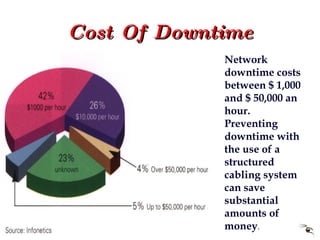
Cost Of Downtime Network downtime costs between $ 1,000 and $ 50,000 an hour. Preventing downtime with the use of a structured cabling system can save substantial amounts of money .
Cabling System-Related Problems The average  network crashes 20 times per year, 70% of the time due to inferior cabling
Structured Versus Conventional Cabling Costs
Closed or Open Closed systems are proprietary to a  particular vendor and / or system. Open systems give greater flexibility by  being applications and vendor  independent.
Open System Architecture Why Open ? Facility o run any voice, data or video service over the same cables. On site personnel can perform their own shifts and changes, thus reducing the cost of ownership. Protection of investment.
The Technicalities
Megabits versus Megahertz 1 Hz 100 MHz CAT 5 (100 MHz) Voice  CAT 3 (16 MHz) CAT 4 (20 MHz) 100 Base T TP-PMD ATM (31.25 MHz)
Applicable Standards ANSI/TIA/EIA-568A Commercial Building Wiring standard which specifies the requirements for category 3, 4 and 5 cabling. ANSI/TIA/EIA-569 The standard covering pathways and spaces for commercial building wiring. ANSI/TIA/EIA-606 The standard covering administration and labelling of commercial building wiring. ISO/IEC/IS-11801 International standard covering all of the above
Definitions Backbone  a link (fibre or cable) between telecommunications closets, and equipment rooms within or between buildings. Horizontal Cabling  the wiring between the telecommunications outlet and the horizontal cross connect. Horizontal Cross Connect  a connection point between the backbone cabling and the horizontal cabling. Intermediate Cross Connect (IC)  a connection point between 1st and 2nd level backbone cabling. Main Cross Connect (MC)  a connection point between 1st level backbone and entrance equipment cables. Outlet Connector (TO)  the socket into which you plug your telephone Telecommunications Closet (TC)  an enclosed space for housing telecommunications equipment and cables. Work Area  any occupied building space requiring telecommunications equipment.
Backbone & Horizontal Cabling Telecoms Closet Main Cross Connect Telecoms Closet Telecoms Closet Horizontal Cable Horizontal Cable Horizontal Cable Backbone Cable
Backbone Cable A properly designed cabling system will have no more than two levels of backbone. MC TC TC IC “ A” 1st Level Backbone “ C” 2nd Level Backbone “ B” 1st Level Backbone
Backbone UTP Cable
Recognised Media & Maximum Distances
Horizontal Cable ANSI/TIA/EIA-568A Wiring Standard Guidelines Horizontal  Cross Connect Backbone From  MC or IC Telecommunications Closet 6m Patchcord Telecom Outlet Work Station 3m Patchcord Max 90 m
ANSI/TIA/EIA-568A MC IC TC TC TC IMO IMO Horizontal Cable First Level Backbone Second Level Backbone
TIA/EIA-568A
TIA/EIA-568B
ISO/IEC/IS-11801 Campus Distributor Building Distributor Floor Distributor Floor Distributor Floor Distributor TO TO Horizontal Cable First Level Backbone Second Level Backbone Transition Point
USOC
EIA/TIA 356A
DEC
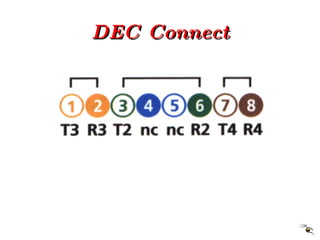
DEC Connect
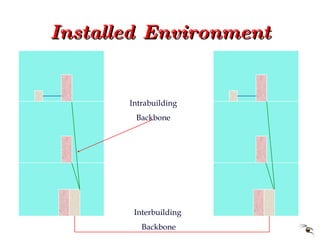
Installed Environment Interbuilding  Backbone Intrabuilding Backbone
Outlet Provision Each work area should have a MINIMUM of 2  outlets. A work area should be assumed to be  approximately 10 square metres.
Cabling Solutions
ATM
Fibre to the Desk Top
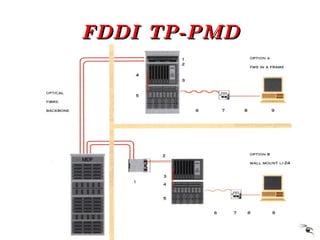
FDDI TP-PMD
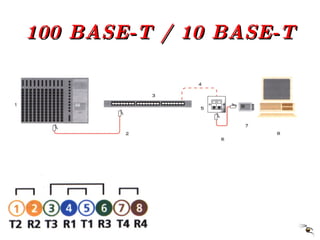
100 BASE-T / 10 BASE-T
10 BASE-T
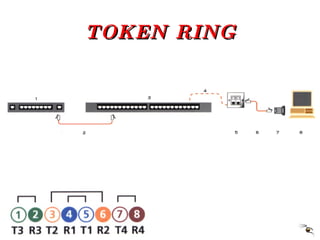
TOKEN RING
IBM 3X/AS400
IBM 3270
RS 232
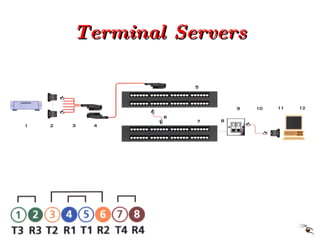
Terminal Servers
Basic Rate ISDN
Installing the ‘MAX’
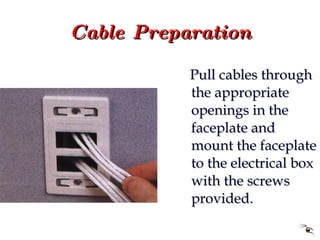
Cable Preparation Pull cables through the appropriate openings in the faceplate and mount the faceplate to the electrical box with the screws provided.
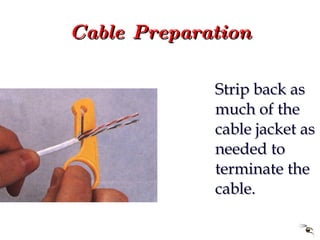
Cable Preparation Strip back as much of the cable jacket as needed to terminate the cable.
Cable Preparation Fan out the pairs according to the colour code label on the clear termination cap.
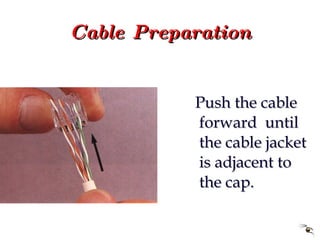
Cable Preparation Push the cable forward  until the cable jacket is adjacent to the cap.
Cable Preparation Lace the individual wires into the proper locations according to the colour code label. For CAT 5, tip wires (white) should be to the left side of each pair.
Cable Preparation Cable pairs MUST be laced into the termination cap as shown above for proper termination and transmission performance.
Cable Preparation Trim the excess wires as shown.
Cable Preparation Align the key and alignment ribs on the termination cap with the corresponding slots in the MAX module.
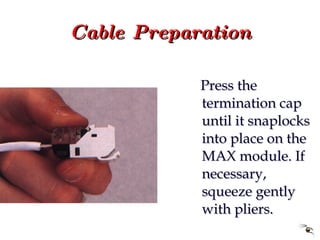
Cable Preparation Press the termination cap until it snaplocks into place on the MAX module. If necessary, squeeze gently with pliers.
Cable Preparation If re-termination is required, unlatch the termination cap at the screwdriver slots. Pull the cap straight off to remove the wires from the terminations.
Module Installation Slide the MAX module into the proper location of the face plate.
Module Installation Align the top of the module into the faceplate. Angle the module downward. Snap into place.
Module Installation Insert the colour icons provided by sliding them into place from the side.
Module Installation To install the protective rubber doors, slide the bottom of the door into the slot below the outlet opening.
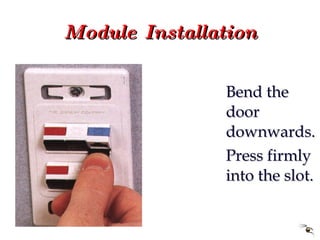
Module Installation Bend the door downwards. Press firmly into the slot.
Module Installation Press the door into the jack opening. The door will close easily when pressed.
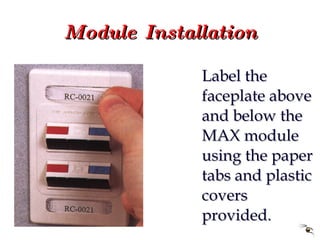
Module Installation Label the faceplate above and below the MAX module using the paper tabs and plastic covers provided.
Module Removal First remove the protective rubber door by opening the door and then pulling the door outward
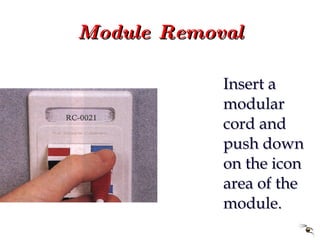
Module Removal Insert a modular cord and push down on the icon area of the module.
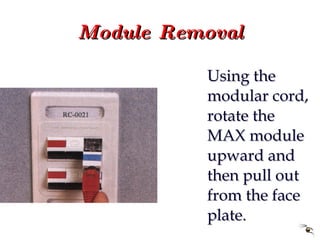
Module Removal Using the modular cord, rotate the MAX module upward and then pull out from the face plate.
What the Customer Sees
Planning
The Patch Panel
The Telecomm Closet
The Patch Leads
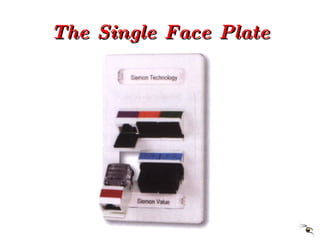
The Single Face Plate
The Double Face Plate
The Balun

Structured cabling

  • 1.
    An Introduction ToStructured Cabling
  • 2.
    Cabling is aStrategic Asset Information technology is at the heart of today's successful business operations. Efficient integration of all key areas, from research and development through customer service, is critically important. The many and varied business functions, each with their own unique requirements, are dependant on a common technology foundation: CABLING
  • 3.
    Cabling is aStrategic Asset
  • 4.
    What does ‘StructuredCabling’ mean? Cabling system that allows constant moves and changes to be performed by on site personnel. Growth and flexibility built in to the cabling scheme. Can be proprietary (closed) or non-proprietary (open).
  • 5.
  • 6.
    Network Investment Acabling system supports and outlives most network components, yet represents only 5% of the total network investment
  • 7.
    Facilitates Moving EmployeesWithin A Building Moves, adds and changes are inevitable: 40% of employees move within their building every year. These activities can cause serious work-flow disruptions with an unstructured cabling system. A structured cabling system allows moves, adds and changes to occur quickly and cost effectively.
  • 8.
    Cost Of DowntimeNetwork downtime costs between $ 1,000 and $ 50,000 an hour. Preventing downtime with the use of a structured cabling system can save substantial amounts of money .
  • 9.
    Cabling System-Related ProblemsThe average network crashes 20 times per year, 70% of the time due to inferior cabling
  • 10.
  • 11.
    Closed or OpenClosed systems are proprietary to a particular vendor and / or system. Open systems give greater flexibility by being applications and vendor independent.
  • 12.
    Open System ArchitectureWhy Open ? Facility o run any voice, data or video service over the same cables. On site personnel can perform their own shifts and changes, thus reducing the cost of ownership. Protection of investment.
  • 13.
  • 14.
    Megabits versus Megahertz1 Hz 100 MHz CAT 5 (100 MHz) Voice CAT 3 (16 MHz) CAT 4 (20 MHz) 100 Base T TP-PMD ATM (31.25 MHz)
  • 15.
    Applicable Standards ANSI/TIA/EIA-568ACommercial Building Wiring standard which specifies the requirements for category 3, 4 and 5 cabling. ANSI/TIA/EIA-569 The standard covering pathways and spaces for commercial building wiring. ANSI/TIA/EIA-606 The standard covering administration and labelling of commercial building wiring. ISO/IEC/IS-11801 International standard covering all of the above
  • 16.
    Definitions Backbone a link (fibre or cable) between telecommunications closets, and equipment rooms within or between buildings. Horizontal Cabling the wiring between the telecommunications outlet and the horizontal cross connect. Horizontal Cross Connect a connection point between the backbone cabling and the horizontal cabling. Intermediate Cross Connect (IC) a connection point between 1st and 2nd level backbone cabling. Main Cross Connect (MC) a connection point between 1st level backbone and entrance equipment cables. Outlet Connector (TO) the socket into which you plug your telephone Telecommunications Closet (TC) an enclosed space for housing telecommunications equipment and cables. Work Area any occupied building space requiring telecommunications equipment.
  • 17.
    Backbone & HorizontalCabling Telecoms Closet Main Cross Connect Telecoms Closet Telecoms Closet Horizontal Cable Horizontal Cable Horizontal Cable Backbone Cable
  • 18.
    Backbone Cable Aproperly designed cabling system will have no more than two levels of backbone. MC TC TC IC “ A” 1st Level Backbone “ C” 2nd Level Backbone “ B” 1st Level Backbone
  • 19.
  • 20.
    Recognised Media &Maximum Distances
  • 21.
    Horizontal Cable ANSI/TIA/EIA-568AWiring Standard Guidelines Horizontal Cross Connect Backbone From MC or IC Telecommunications Closet 6m Patchcord Telecom Outlet Work Station 3m Patchcord Max 90 m
  • 22.
    ANSI/TIA/EIA-568A MC ICTC TC TC IMO IMO Horizontal Cable First Level Backbone Second Level Backbone
  • 23.
  • 24.
  • 25.
    ISO/IEC/IS-11801 Campus DistributorBuilding Distributor Floor Distributor Floor Distributor Floor Distributor TO TO Horizontal Cable First Level Backbone Second Level Backbone Transition Point
  • 26.
  • 27.
  • 28.
  • 29.
  • 30.
    Installed Environment Interbuilding Backbone Intrabuilding Backbone
  • 31.
    Outlet Provision Eachwork area should have a MINIMUM of 2 outlets. A work area should be assumed to be approximately 10 square metres.
  • 32.
  • 33.
  • 34.
    Fibre to theDesk Top
  • 35.
  • 36.
    100 BASE-T /10 BASE-T
  • 37.
  • 38.
  • 39.
  • 40.
  • 41.
  • 42.
  • 43.
  • 44.
  • 45.
    Cable Preparation Pullcables through the appropriate openings in the faceplate and mount the faceplate to the electrical box with the screws provided.
  • 46.
    Cable Preparation Stripback as much of the cable jacket as needed to terminate the cable.
  • 47.
    Cable Preparation Fanout the pairs according to the colour code label on the clear termination cap.
  • 48.
    Cable Preparation Pushthe cable forward until the cable jacket is adjacent to the cap.
  • 49.
    Cable Preparation Lacethe individual wires into the proper locations according to the colour code label. For CAT 5, tip wires (white) should be to the left side of each pair.
  • 50.
    Cable Preparation Cablepairs MUST be laced into the termination cap as shown above for proper termination and transmission performance.
  • 51.
    Cable Preparation Trimthe excess wires as shown.
  • 52.
    Cable Preparation Alignthe key and alignment ribs on the termination cap with the corresponding slots in the MAX module.
  • 53.
    Cable Preparation Pressthe termination cap until it snaplocks into place on the MAX module. If necessary, squeeze gently with pliers.
  • 54.
    Cable Preparation Ifre-termination is required, unlatch the termination cap at the screwdriver slots. Pull the cap straight off to remove the wires from the terminations.
  • 55.
    Module Installation Slidethe MAX module into the proper location of the face plate.
  • 56.
    Module Installation Alignthe top of the module into the faceplate. Angle the module downward. Snap into place.
  • 57.
    Module Installation Insertthe colour icons provided by sliding them into place from the side.
  • 58.
    Module Installation Toinstall the protective rubber doors, slide the bottom of the door into the slot below the outlet opening.
  • 59.
    Module Installation Bendthe door downwards. Press firmly into the slot.
  • 60.
    Module Installation Pressthe door into the jack opening. The door will close easily when pressed.
  • 61.
    Module Installation Labelthe faceplate above and below the MAX module using the paper tabs and plastic covers provided.
  • 62.
    Module Removal Firstremove the protective rubber door by opening the door and then pulling the door outward
  • 63.
    Module Removal Inserta modular cord and push down on the icon area of the module.
  • 64.
    Module Removal Usingthe modular cord, rotate the MAX module upward and then pull out from the face plate.
  • 65.
  • 66.
  • 67.
  • 68.
  • 69.
  • 70.
  • 71.
  • 72.

Editor's Notes

  • #24 Two wiring schemes have been adopted. They are nearly identical except that pairs two and three are reversed. T568A is the preferred scheme because it is compatible with 1 or 2 pair USOC systems. Either configuration can be used for Integrated Services Digital Network (ISDN) and high speed data applications. Transmission Categories 3, 4, and 5 are only applicable to this type of pair grouping.
  • #25 Two wiring schemes have been adopted. They are nearly identical except that pairs two and three are reversed. T568A is the preferred scheme because it is compatible with 1 or 2 pair USOC systems. Either configuration can be used for Integrated Services Digital Network (ISDN) and high speed data applications. Transmission Categories 3, 4, and 5 are only applicable to this type of pair grouping.
  • #27 USOC wiring is available in 1, 2, 3 or 4 pair schemes. Pair 1 occupies the centre conductors, pair 2 occupies the next two contacts out, etc. One advantage to this scheme is that a 6 position plug configured with 1, 2 or 3 pairs can be inserted into an 8 position jack and maintain pair continuity. A disadvantage is the poor transmission performance associated with this type of pair sequence. NONE of these pair schemes are cabling standard compliant.
  • #29 The MMJ is a unique wiring scheme for DEC equipment
  • #30 A unique wiring scheme for DEC equipment
  • #34 Asynchronous Transfer Mode (ATM) is an evolving wide and local area network standard for total information transport. ATM is a cell-based packet switching protocol (ISO Layer 2) that is capable of supporting multimedia traffic at very high (gigabit) speeds in the same transmission. ATM runs on fibre-optic or twisted pair media. It offers universal, service independent switching and multiplexing capabilities. 1/. Patch panel 2/. Fibre management system 3/. Optical fibre patch cords 4/. Intelligent hub with ATM Module (customer supplied) 5/. UTP, STP or fibre patch cords 6/. UTP, STP or fibre patching 7/. UTP, STP or fibre cable 8/. Wall plate with modules 9/. UTP, STP or Optical fibre patch cord 10/. Multimedia Workstation
  • #35 Optical fibre the universal media for high speed / multimedia applications. A variety of protocols are supported namely, FDDI, ATM, Fibre channel and SONET. LOCAL HUB 1/. Fibre management system 2/. Optical fibre patch cord 3/. High speed local LAN hub (customer supplied) 4/. FDDI 62.5 riser rated 6/. Wall outlets 9/. Duplex 62.5 jumper 10/. Workstation (customer supplied) CENTRALISED HUB 1/. Wall mounted splice cabinet 3/. FDDI 62.5 riser rated 4/. Wall outlets 7/. Duplex 62.5 FDDI 8/. Workstation (customer supplied)
  • #36 Fibre Distributed Data Interface Twisted Pair-Physical Layer Medium Dependant (FDDI-TP-PMD) is a standard developed by ANSI. This protocol, designed to be effective at 155 Mbps over twisted pair, is also known as Copper Distributed Data Interface (CDDI) or Twisted Pair Distributed Data Interface (TPDDI). FMS 1/. Patch Panel 2/. Fibre management system 3/. High speed LAN hub (customer supplied) 4/. UTP, STP CAT 5 patch cord 5/. UTP, STP CAT 5 patch panel 6/. UPT, STP CAT 5 cable 7/. Wall outlets 8/. UTP, STP CAT 5 patch cord 9/. Workstation (customer supplied) Ll-24 1/. Ll-24 Distribution frame 2/. Optical fibre patch cord 3/. High speed LAN hub (customer supplied) 4/. UTP, STP CAT 5 patch cord 5/. UTP, STP CAT 5 patch panel 6/. UPT, STP CAT 5 cable 7/. Wall outlets 8/. UTP, STP CAT 5 patch cord 9/. Workstation (customer supplied)
  • #37 The IEEE 802.3 100Base-T specification is the standard for Ethernet communications over 100 ohm unshielded twisted pair (UTP) cabling. The IEEE 802.3 10Base-T specification is the standard for Ethernet communications over unshielded twisted pair (UTP) cabling. The EIA 568B wiring sequence is the recommended solution for operation of both 100Base-T and 10Base-T LANs. 100 Base-T / 10 Base-T Modular Interface Hub Cabling 1/. Hub (customer supplied) 2/. UTP, STP CAT 5 patch cord 3/. UTP, STP CAT 5 patch panel 4/. UTP, STP CAT 5 cable 5/. Wall plate 6/. UTP, STP CAT 5 patch cord 7/. Transceiver / Network Interface Card (customer supplied) 8/. Terminal
  • #38 While category 3 cabling and components will support 10Base-T it is recommended that the use of CAT 5 compliant cable and components will remove the need for future upgrades. 50 Pin Interface Hub Cabling 1/. Hub (customer supplied) 2/. Feeder cable 3/. UTP, STP 10Base-T Patch panel 4/. UTP, STP CAT 5 patch cord 5/. UTP, STP CAT 5 patch panel 6/. UTP, STP CAT 5 cable 7/. Wall outlet 8/. UTP, STP CAT 5 patch cord 9/. Transceiver / Network Interface Card (customer supplied) 10/. Terminal (customer supplied)
  • #39 The IEEE 802.5 Token Ring is a token passing, base band system where messages are transmitted at a rate of either 4 or 16 Mbps. The data rate of a given ring is determined by the data rates if the workfloor Network Interface Cards (NIC’s). All NIC’s on a given Token Ring MUST operate at the same speed (4 or 16 Mbps). A Multi-floor Access Unit (MAU) or cabling concentrator is used to create a star wired ring topology. EIA 568A Token Ring Cabling 1/. Token Ring MAU 2/. UTP, STP CAT 5 patch cord 3/. UTP, STP CAT 5 patch panel 4/. UTP, STP CAT 5 cable 5/. Wall outlet 6/. UTP, STP CAT 5 patch cord 7/. Token ring media filter (4 or 16 Mbps) 8/. Terminal
  • #40 This solution converts an IBM twin-axial interface for operation over a single unshielded twisted pair cable using a balun. In addition, the bus wiring architecture of the IBM system is utilised. An IBM representative should be consulted to determine the maximum number of 5291 devices that can be supported by each controller. 1/. AS400 Controller 2/. Twinax balun 3/. UTP, STP CAT 5 patch cord 4/. Passive hub 5/. UTP, STP CAT 5 patch cord 6/. UTP, STP CAT 5 patch panel 7/. UTP, STP CAT 5 cable 8/. Wall plate 9/. UTP, STP CAT 5 patch cord 10/. Twinax balun 11/. Terminal
  • #41 IBM 3270 type A devices were designed with RG62A/U coaxial cable interfaces communicating at the rate of 2.35 Mbps. A 3270 balun will impedance match the interface and convert the signal for operation over unshielded twisted pair cable, a lower cost and easier to install media. 1/. 3270 Controller 2/. 3270 balun 3/. 16 channel, 2 wire UTP, STP Octopus 4/. UTP, STP feeder cable 5/. UTP, STP patch panel 6/. UTP, STP CAT 5 patch cord 7/. UTP, STP CAT 5 patch panel 8/. UTP, STP CAT 5 cable 9/. Wall outlet 10/. UTP, STP CAT 5 patch cord 11/. 3270 balun 12/. Terminal
  • #42 The EIA RS232 standard was developed to allow the attachment of data communications equipment (DCE - modem, mux, data switch) to data terminal equipment (DTE - computer, terminal or printer) over a 25 wire cable wired straight through or point to point. The interface connector is a 25 pin D type connector. 1/. Controller 2/. UTP, STP 25 pin adapter 3/. 6 channel, 8 wire UTP, STP Octopus 4/. UTP, STP feeder cable 5/. UTP, STP patch panel 6/. UTP, STP patch lead 7/. UTP, STP CAT 5 patch panel 8/. UTP, STP CAT 5 cable 9/. Wall outlet 10/. UTP, STP patch cord 11/. UTP, STP 25 pin adapter 12/. Terminal
  • #43 Terminal servers provide a cost effective, flexible way to connect terminals to a host in an 802.3 Ethernet LAN. They provide high density service and significant savings in cabling and installation. Terminal servers handle asynchronous communications at speeds up to 38.4 Kbps. 1/. Terminal Server 2/. UTP, STP 25 pin adapter 3/. 8 channel, 6 wire UTP, STP Octopus 4/. UTP, STP feeder cable 5/. UTP, STP patch panel 6/. UTP, STP patch lead 7/. UTP, STP CAT 5 patch panel 8/. UTP, STP CAT 5 cable 9/. Wall outlet 10/. UTP, STP patch cord 11/. UTP, STP 25 pin adapter 12/. Terminal
  • #44 BUS APPLICATION - ISDN OVER STRUCTURED CABLING 1/. ISDN Network terminating devise (customer supplied) 2/. UTP, STP CAT 5 patch cord 3/. ISDN BUS patch panel 4/. UTP, STP CAT 5 patch cord 5/. UTP, STP CAT 5 patch panel 6/. UTP, STP CAT 5 cable 7/. Wall outlet 8/. UTP, STP patch cord 9/. ISDN Device (customer supplied)