LOCAL AREA N/W
LAN
 LAN is communication network that inter connect a variety of data
communications devices with in a small geographic area and broadcast data at
high data transfer rates.
 Data communication devices- pc, computer workstation , main frames
computers and disk drives, printers and modems etc.
 Small geographic area- Lan can be as small as one room, or extend over
multiple rooms, over multiple floors within a building, or even multiple building
within single campus area.
 High data transfer rate – early Lan transmitted data at only 10 million bits per
second , newest lan networks 10 Billion per second
Primary function of LAN
 First appeared in the 1970’s
 It use become widespread in commercial and academic
environment .
 Lan provide access to h/w and s/w resources that will allow
them to perform one or more of the following activites in an
office, academic or manufacturing environment:- file serving,
database and application serving , print serving.
 1.Share hardware and s/w.
 LAN perform file serving when connection to a workstation
with a large storage disk.
 By keeping all of the application on the s server or part of it
on server and part of it on client workstation.
 Two or more users wish to share a data set. In this case the data set ,
like application s/w would be stored on file server. Then network
provide access to those users who has the permissions
 -2. provide access to one or more high quality printers.
 Lan software called print server provide workstations with
authorization to access a particular printer, accepts and
queues print jobs , and allow users access to job queue for
routine administrative function .
 3. Provide service of sending and receiving e-mail.
within LAN-
 between LAN and other network.
 4. LAN can interface with other LAN and WAN.
 5. provide the capabilities of transferring video images and video
streams , also teleconferencing between 2 or more users.
 6. In manufacturing and industrial environments, local area often
used to monitor manufacturing events and report and control their
occurrence .
The lan provide process control and monitoring.
 7. In addition to common activates , LAN can be an effective tool in
many application areas
 - word processing, spreadsheet operations, d/b functions, internet
access, electronic appointment scheduling , graphic image creation
capabilities.
Adv
 1.Ability to share resources in an economical and efficient
manner .
 h/w resources- high quality printer, tape back-up sytem,
mass storage systems, and other h/w devices.
 s/w end- allow the sharing of commercial applications, in-
house application and data set with one or all user
workstations .
 Allow users to send emails, web pages send print jobs and
retrieve d/b records.
Dis adv
 1. LAN hardware , OS and s/w that runs on the network can
be expensive.
 - also require funding for network server, network OS,
network cabling system including hubs, switches , network
security, support and maintenance etc.
 2. The management and control of LAN require many hours
of dedication and service.
 - a manager or network administrator of a LAN network
should be properly trained .
 3. finally Lan is only strong as its weakest link.
Basic LAN Topologies
 Network topology is the arrangement of the various
elements (links, nodes, etc.) of a computer network.
 The topological structure of a network and may be in
 physically
 logically
Physical topology is the placement of the various components
of a network, including device location and cable installation.
logical topology illustrates how data flows within a network,
regardless of its physical design.
 Distances between nodes, physical interconnections,
transmission rates, or signal types may differ between two
networks, yet their topologies may be identical.
 1. Bus /Tree topology
 2. star-wired topology
 3. star-wired ring topology
 4. wireless LAN.
Bus/Tree topology
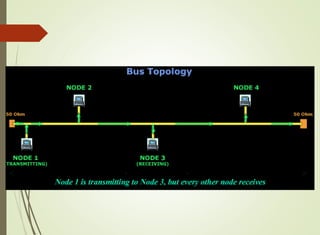
 Simply called bus topology
 It became commercially available in the 1970’s
 It consist of a simple cable or bus to which all device attach.
 When a device transmits on the bus , all other attached
devices receive the transmission.
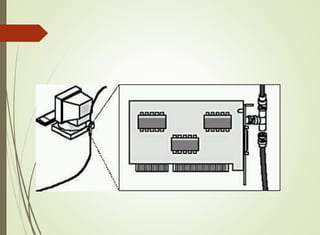
 Connecting to the cable require a simple device tap.
 On the workstation end of the cable is a network interface
card (NIC).
 NIC :-It is an electronic device , typically in the form of
computer circuit board, that perform the necessary signal
conversion and protocol operation that allow the workstation
to send and receive data on the network.
 Two different signaling technology of LAN
 baseband signaling
 broadband signaling
Baseband signaling
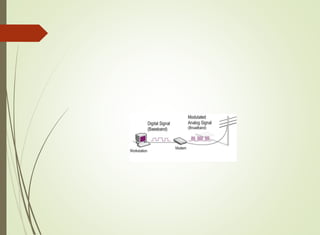
 Baseband transmissions typically use digital signaling over a single wire;
the transmissions themselves take the form of either electrical pulses or
light.
 The digital signal used in baseband transmission occupies the entire
bandwidth of the network media to transmit a single data signal.
 Baseband communication is bidirectional, allowing computers to both
send and receive data using a single cable. But , the sending and receiving
cannot occur on the same wire at the same time.
Broadband signaling
 broadband uses analog signals in the form of optical or
electromagnetic waves over multiple transmission
frequencies.
 For signals to be both send and received, the transmission
media must be split into two channels.
 Alternatively, two cables can be used: one to send and one to
receive transmissions.
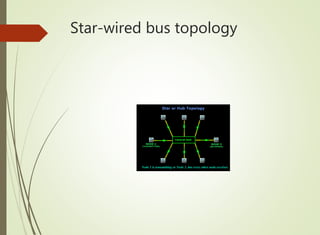
Star-wired topology
 Star networks are one of the most common computer network topology.
 In star topology, every node (computer workstation or any other
peripheral) is connected to a central node called a hub or switch. The
switch is the server and the peripherals are the clients
 Hub is a non intelligent device that simply receive the data from
workstations and retransmit it to other devices connected to hub..
 All workstation hear the transmitted data, because there is only a single
transmission channel, and all workstations are using this one channel to
send and receive .
 Sending the data to all workstations and devices generate a lot of traffic
but keeps the operation very simple.
 With regard to its logical design the star-wired bus is acting as a bus, when
a workstation transmits , all workstations (or devices) immediately receive
the data.
 Physical design , is a star because all device are connected to the hub and
radiate outward in a star like pattern.
 Hub at center comes in a variety of design .
 one of more common is the 24- port hub , which will
connect 24 workstations or device.
 If more than 24 workstation connection is needed , use 2 or
more hubs.
 Many hub support multiple type of media-
 twisted pair
 coaxial cable
 fiber-optic cable
Adv
 Simple installation and maintenance
 Low cost component (such as hub and twisted pair wiring)
 High volume of compatible product due to major market
share.
Dis adv
 About the amount of traffic the hubs must handle.
 When 2 or more hub are interconnected and a workstation
transmit data , all the workstations connected to all the hubs
receive the data.
 Hub is relatively non intelligent device , it does nor filter out
any data framed and does not perform any routing..
 Hub can be replaced with a more advanced device called
switch.
Star-wired bus topology
Star-wired ring topology
 The star wired ring topology is a circular connection of workstations.
 Star wired ring topologies support baseband signals, capable of
supporting only one channel of information.
 This channel of information flows in one direction around the ring, moving
from workstation to workstation .
 The star wired ring is a closed loop of wire, it is important for some device
to remove a circling piece of data from the ring.
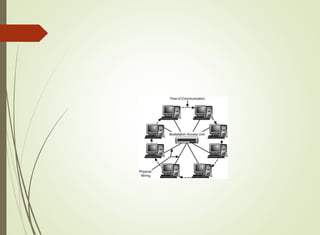
 The logical organization of the workstation in a star-wired
ring topology is circular but the physical organization in a
star wired ring is not circular.
 It look like a star wired bus design , with all its workstation
connected to a central device.
 This central device is not a hub, but it is Multistation Access
Unit(MAU).
 MAU accepts the data from workstation and transmits the
data to the next workstation in the ring.
 MAU is different from hub that it does not send a copy of incoming data
immediately out to every connection.
 if a workstation is not connected to a particular port on MAU, , that port
closes itself so that a continuous ring is maintained.
 Adv:- advantage same as that of star-wired topology.
 Star wired ring also based on twisted pair wiring, which make installing
new workstation easy.
 Easy to maintain topology.
 Disadv :- slower transmission speed , higher cost, more complex s/w.
Wireless LANs
 A lan that is not based primarily on physical wiring but uses
wireless transmissions between workstation is a wireless LAN.
 Basic Components of WLAN:-
 First component is a user device such as laptop, workstation or
PDA with a special NIC that receive and transmits the wireless
signals.
 Second component is wired LAN. This is the conventional
network component that supports standard workstation, servers
and medium access control protocols. A vast majority of wireless
network are connected to wired LAN.
 The third component is the control module or access
point(AP), which is the component that communicate with
wireless user device.
 AP is essentially the interface device between the wireless user
device and wired LAN. Also act as a bridge and support a
medium access control protocol.
Basic configurations of WLAN
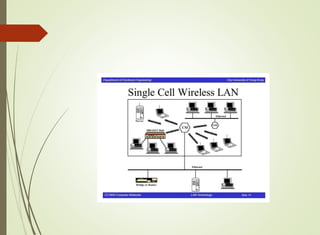
 1. The single cell wireless LAN. At the center of the cell is the
access point, which is connected to the WLAN.
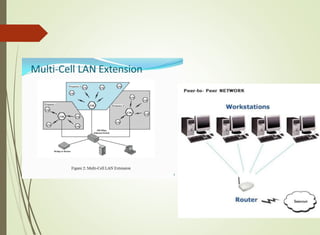
 2. multicell layout . In this multicell support by multi Access
point . User device communicate with the nearest access
point and may move from one cell to another .
 3. peer to peer – there is no access point at the center of the
cell . Each user device communicates directly with the other
user device.
Local Area network system
 Ethernet ,
 IBM token Ring.
 Fiber Distributed data interface
 Wireless Ethernet .
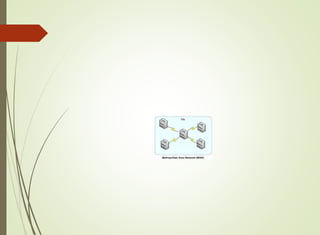
MAN
 A network that expands into a metropolitan area and exhibits
high data rates, high reliability and low data loss is called a
metropolitan area network..
 MAN are almost exclusively fiber optic network and capable
of supporting data rates in to 10 to 100 of millions of bits
per second.
 So it is considered as network with very low error rates and
extremely high throughput.
Characteristic of MAN
 1 Man cover much greater distance than LAN.
 2. Man recover very quickly from a link or switch/router
failure.
 MAN are designed to have highly redundant circuit so
that in the time of a failure , network can quickly reroute
traffic away from failed component.
 3. Some MAN topology are based on ring, logically and
physically.
 Ability of the user to dynamically allocate more bandwidth
on demand.
WAN
 Is a collection of computers and computer related equipment
interconnected to perform a given functions using local and
long distance telecommunications systems.
 Type of computers used in WAN range from microcomputers
to mainframe.
 Telecommunication lines can be as simple as standard
telephone line or as advance as satellite systems.
 WAN used to transfer bulk data b/w two endpoints and
provide users with email services, access to db, and access to
internet.
 Used mesh topology and requires routing to transfer data
across network.
 To transmitted across a mesh network . The data has to be
passed along a route from workstation to workstation.
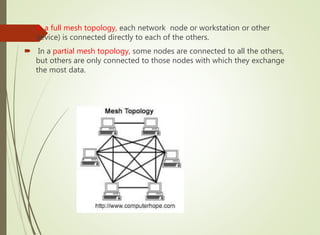
 In a full mesh topology, each network node or workstation or other
device) is connected directly to each of the others.
 In a partial mesh topology, some nodes are connected to all the others,
but others are only connected to those nodes with which they exchange
the most data.
 All WAN are collection of at least 2 basic type of equipment :-
a station and a node
 A station :- is a device that a user interacts with to access a
network and it contain the s/w application that allow to use
network for particular purpose.
 A node is a device that allows one or more stations to access
the physical network and is a transfer point for passing
information through network.
 When the information arrives on the proper destination , the
destination node delivers it to the destination station.
 The node is usually very fast and power full router with
multiple ports.
 A router is a networking device that forwards data packets
between computer networks. Routers perform the traffic
directing functions on the Internet.
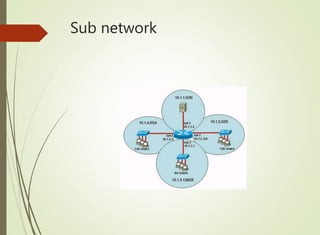
Sub network
Types of sub networks
 The structure of WAN is the sub network. A sub network is a
collection of nodes and interconnecting telecommunication
links.
 The no. of interconnections between the nodes and the way
network data is passed from node to node are the
responsibility of the sub network.
 Three basic form of sub network
 1. circuit switched
2. packet switched
3. broadcast
Circuit switched
 Circuit-switched communication system involves three
phases:
 1. Circuit establishment (setting up dedicated links between
the source and destination).
 2. Data transfer (transmitting the data between the source
and destination).
 3. Circuit disconnect (removing the dedicated links).
 Examples of circuit-switched technologies include:
1• Dial-up 2• ISDN
Packet switched
 Packet switching is a method for sending data whereby the
data is divided in packets.
 Each packet is given a header containing information of the
destination.
 Each packet is forwarded through the network to the
destination using this information.
 At the destination the data has to be reassembled from the
received packages.
 There are two common packet switching methods in use:
 Datagram Packet Switching:
Each packet is forwarded independently based on the destination address.
 Routing decisions are made dynamically, so each packet may follow a
different route and thus the packages may arrive out of order.
 Virtual Circuit Packet Switching:
A route is set up prior to packets being sent. The packets will all follow this
route.
 This makes the routing through the network very easy and the packages
will be received in the correct order.
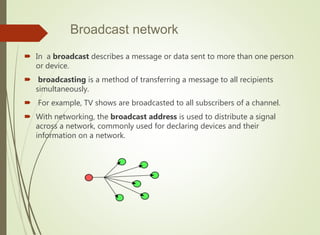
Broadcast network
 In a broadcast describes a message or data sent to more than one person
or device.
 broadcasting is a method of transferring a message to all recipients
simultaneously.
 For example, TV shows are broadcasted to all subscribers of a channel.
 With networking, the broadcast address is used to distribute a signal
across a network, commonly used for declaring devices and their
information on a network.
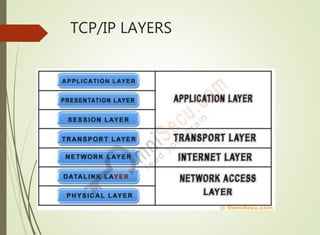
TCP/IP LAYERS
 Protocol, in computer science, a set of rules or procedures
for transmitting data between electronic devices, such as
computer
 Eg:
 TCP/IP, SMTP, HTTp,UDP
 In order for computers to exchange information, there must
be a preexisting agreement as to how the information will be
structured and how each side will send and receive it.
 TCP/IP is the first set of protocol used in internet.
 Allows computers to communicate/ share resources across
n/w
 Work on tcp/ip started in the 1970
 founded by US military
 Advanced Research Project Ajency
 The protocol that resides at the network layer in the TCP/IP
protocol is called internet protocol.
 IP’s primary function is to perform routing necessary to move
data packet across the internet.
 IP is connection less protocol .
 It doesn’t concern itself with the keeping track of lost,
duplicated or delayed packets of data.
 The sender and the receiver of these packet may not be
informed these problems have occurred.
 IP is referred to as an unreliable service.
 So the application requires a reliable service, it include a
reliable transport service.
 The reliable transport service provided by software is called
transmission control protocol.(TCP)
 It turns the unreliable n/w into reliable, free from lost and
duplicate packets.
 This combined n/w is known as TCP/IP.
Internet Protocol (IP)
 What does an IP do?
 IP transport datagram(packets) from the source to the
destination node.
 Responsible for routing the packets
 Breaks a packet into smaller pieces known as fragments
 Unreliable service
 packet may lost
 packet may arrive out of order.
Internet Protocol (IP)
 Internet protocol provide connectionless data transfer service over network
by passing and routing IP datagrams.
 All IP datagram(data packets) with IP header are passed from transport
layer to network layer.
 IP header contains information necessary to transfer packets from one n/w
to another.
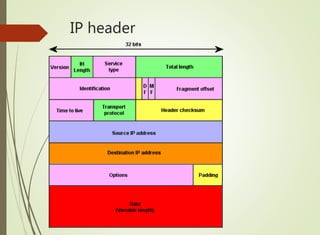
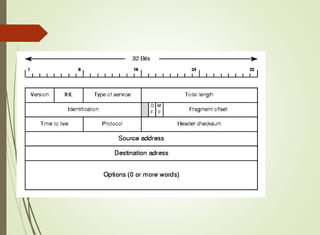
An IP datagram consists of a header part and text
part
 Even though the all 14 fields are important , only consider the
fields that affect 3 of the primary functions of IP.
 1. Fragmentation 2.datagram discard 3. addressing.
IP header
 Version
 Which version of the protocol the datagram belongs to.
 The current version number is 4.
 Next version: 6
 Identification
 Uniquely identifies the datagram.
 Usually incremented by 1 each time a datagram is sent.
 All fragments of a datagram contain the same identification
value.
 This allows the destination host to determine which fragment
belongs to which datagram.
 Flags and Fragmentation Offset
 Used for fragmentation
 DF means do not fragment. It is a request to routers not to
fragment the datagram since the destination is incapable of
putting the pieces back together.
 MF means more fragments to follow. All fragments except the
last one have this bit set. It is needed to know if all fragments of
a datagram have arrived.
 Fragment offset
 number of fragments
 Time to Live
 Enable n/w to discard a particular datagram that has travelling
the internet for a long time.
 When a packet is first created , this field set to 255
 Decremented 1 by each router that processes the datagram.
 router discards the datagram when TTL reaches 0.
 Source IP address
 The sender
 Destination IP address
 the final destination
Transmission Control
Protocol(TCP)
 TCP provide a connection –oriented reliable service for
sending messages.
 Split a message into packets.
 Reassemble packets at destination
 resend the packets that were lost in transmit.
 Interface with IP
 Each packet forwarded to IP for delivery.
 Error control is done by TCP
TCP/IP
 The primary functions of Transmission control Protocol is to
turn an unreliable network into reliable network, that is free
from lost and duplicate packets.
 Functions of TCP :
 1. Create a connection:- The TCP header include a port
address that indicates a particular application on a machine.
 When TCP create a connection between sender and receiver ,
two ends of the connection use a port number to identify a
particular application’s connection.
 Port address and IP address identify a particular application of
a particular machine.
 2. Release connection:- The TCP dissolve a connection after all the
data has been sent and received.
 3. Implement the flow control:- To make sure the sending station
does not overcome the receiving station with too much data.
 TCP header include a field called window value , that allow the
receiver to tell the sender slow down.
 4. Establishing multiplexing:- Because the TCP header include a
port number instead of an IP address , it is possible to multiplex
multiple connections over a single IP connections.
 This multiplexing can be done by creating a different connection
that has a port number different from a previous connection
 5. Perform error recovery:- TCP numbers each packets for
transmission with sequence number.
 As the packets arriving at the destination site, the receiving TCP s/w
checks these sequence number for continuity . If there is a loss, the
receiving TCP s/w uses an acknowledge number to inform sending
TCP s/w of a possible error condition.
 6. Establishing priority :-
 if the sender has to transmit data of a higher priority, such as an error
condition, TCP can set a value in the field (urgent pointer) that
indicate the enclosed data is important.
 To perform these functions , TCP places a header at the front of
every data packets.
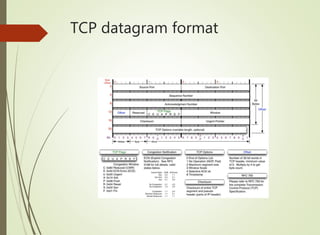
TCP datagram format
 An IP address identifies a particular computer on the
Internet. The port number identifies a particular program
running on that computer.
 21- FTP
 55-DNS
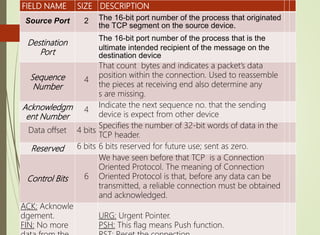
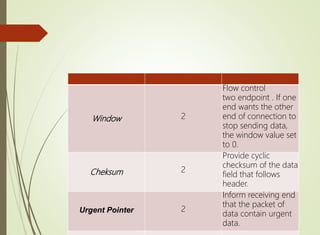
FIELD NAME SIZE DESCRIPTION
Source Port 2 The 16-bit port number of the process that originated
the TCP segment on the source device.
Destination
Port
The 16-bit port number of the process that is the
ultimate intended recipient of the message on the
destination device
Sequence
Number
4
That count bytes and indicates a packet’s data
position within the connection. Used to reassemble
the pieces at receiving end also determine any
s are missing.
Acknowledgm
ent Number
4
Indicate the next sequence no. that the sending
device is expect from other device
Data offset 4 bits
Specifies the number of 32-bit words of data in the
TCP header.
Reserved 6 bits 6 bits reserved for future use; sent as zero.
Control Bits 6
We have seen before that TCP is a Connection
Oriented Protocol. The meaning of Connection
Oriented Protocol is that, before any data can be
transmitted, a reliable connection must be obtained
and acknowledged.
ACK: Acknowle
dgement.
FIN: No more
URG: Urgent Pointer.
PSH: This flag means Push function.
Window 2
Flow control
two endpoint . If one
end wants the other
end of connection to
stop sending data,
the window value set
to 0.
Cheksum 2
Provide cyclic
checksum of the data
field that follows
header.
Urgent Pointer 2
Inform receiving end
that the packet of
data contain urgent
data.
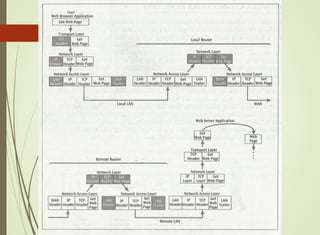
 Progression of one data packet from one network to to
another:
 draw the diagram and explain the flow in detail.
Local area network.

Local area network.

  • 1.
  • 2.
    LAN  LAN iscommunication network that inter connect a variety of data communications devices with in a small geographic area and broadcast data at high data transfer rates.  Data communication devices- pc, computer workstation , main frames computers and disk drives, printers and modems etc.  Small geographic area- Lan can be as small as one room, or extend over multiple rooms, over multiple floors within a building, or even multiple building within single campus area.  High data transfer rate – early Lan transmitted data at only 10 million bits per second , newest lan networks 10 Billion per second
  • 3.
    Primary function ofLAN  First appeared in the 1970’s  It use become widespread in commercial and academic environment .  Lan provide access to h/w and s/w resources that will allow them to perform one or more of the following activites in an office, academic or manufacturing environment:- file serving, database and application serving , print serving.
  • 4.
     1.Share hardwareand s/w.  LAN perform file serving when connection to a workstation with a large storage disk.  By keeping all of the application on the s server or part of it on server and part of it on client workstation.  Two or more users wish to share a data set. In this case the data set , like application s/w would be stored on file server. Then network provide access to those users who has the permissions
  • 5.
     -2. provideaccess to one or more high quality printers.  Lan software called print server provide workstations with authorization to access a particular printer, accepts and queues print jobs , and allow users access to job queue for routine administrative function .  3. Provide service of sending and receiving e-mail. within LAN-  between LAN and other network.
  • 6.
     4. LANcan interface with other LAN and WAN.  5. provide the capabilities of transferring video images and video streams , also teleconferencing between 2 or more users.  6. In manufacturing and industrial environments, local area often used to monitor manufacturing events and report and control their occurrence . The lan provide process control and monitoring.  7. In addition to common activates , LAN can be an effective tool in many application areas  - word processing, spreadsheet operations, d/b functions, internet access, electronic appointment scheduling , graphic image creation capabilities.
  • 7.
    Adv  1.Ability toshare resources in an economical and efficient manner .  h/w resources- high quality printer, tape back-up sytem, mass storage systems, and other h/w devices.  s/w end- allow the sharing of commercial applications, in- house application and data set with one or all user workstations .  Allow users to send emails, web pages send print jobs and retrieve d/b records.
  • 8.
    Dis adv  1.LAN hardware , OS and s/w that runs on the network can be expensive.  - also require funding for network server, network OS, network cabling system including hubs, switches , network security, support and maintenance etc.  2. The management and control of LAN require many hours of dedication and service.  - a manager or network administrator of a LAN network should be properly trained .  3. finally Lan is only strong as its weakest link.
  • 9.
    Basic LAN Topologies Network topology is the arrangement of the various elements (links, nodes, etc.) of a computer network.  The topological structure of a network and may be in  physically  logically Physical topology is the placement of the various components of a network, including device location and cable installation. logical topology illustrates how data flows within a network, regardless of its physical design.
  • 10.
     Distances betweennodes, physical interconnections, transmission rates, or signal types may differ between two networks, yet their topologies may be identical.  1. Bus /Tree topology  2. star-wired topology  3. star-wired ring topology  4. wireless LAN.
  • 11.
    Bus/Tree topology  Simplycalled bus topology  It became commercially available in the 1970’s  It consist of a simple cable or bus to which all device attach.  When a device transmits on the bus , all other attached devices receive the transmission.  Connecting to the cable require a simple device tap.  On the workstation end of the cable is a network interface card (NIC).
  • 13.
     NIC :-Itis an electronic device , typically in the form of computer circuit board, that perform the necessary signal conversion and protocol operation that allow the workstation to send and receive data on the network.  Two different signaling technology of LAN  baseband signaling  broadband signaling
  • 14.
    Baseband signaling  Basebandtransmissions typically use digital signaling over a single wire; the transmissions themselves take the form of either electrical pulses or light.  The digital signal used in baseband transmission occupies the entire bandwidth of the network media to transmit a single data signal.  Baseband communication is bidirectional, allowing computers to both send and receive data using a single cable. But , the sending and receiving cannot occur on the same wire at the same time.
  • 16.
    Broadband signaling  broadbanduses analog signals in the form of optical or electromagnetic waves over multiple transmission frequencies.  For signals to be both send and received, the transmission media must be split into two channels.  Alternatively, two cables can be used: one to send and one to receive transmissions.
  • 19.
    Star-wired topology  Starnetworks are one of the most common computer network topology.  In star topology, every node (computer workstation or any other peripheral) is connected to a central node called a hub or switch. The switch is the server and the peripherals are the clients  Hub is a non intelligent device that simply receive the data from workstations and retransmit it to other devices connected to hub..
  • 20.
     All workstationhear the transmitted data, because there is only a single transmission channel, and all workstations are using this one channel to send and receive .  Sending the data to all workstations and devices generate a lot of traffic but keeps the operation very simple.  With regard to its logical design the star-wired bus is acting as a bus, when a workstation transmits , all workstations (or devices) immediately receive the data.  Physical design , is a star because all device are connected to the hub and radiate outward in a star like pattern.
  • 21.
     Hub atcenter comes in a variety of design .  one of more common is the 24- port hub , which will connect 24 workstations or device.  If more than 24 workstation connection is needed , use 2 or more hubs.  Many hub support multiple type of media-  twisted pair  coaxial cable  fiber-optic cable
  • 22.
    Adv  Simple installationand maintenance  Low cost component (such as hub and twisted pair wiring)  High volume of compatible product due to major market share.
  • 23.
    Dis adv  Aboutthe amount of traffic the hubs must handle.  When 2 or more hub are interconnected and a workstation transmit data , all the workstations connected to all the hubs receive the data.  Hub is relatively non intelligent device , it does nor filter out any data framed and does not perform any routing..  Hub can be replaced with a more advanced device called switch.
  • 24.
  • 25.
    Star-wired ring topology The star wired ring topology is a circular connection of workstations.  Star wired ring topologies support baseband signals, capable of supporting only one channel of information.  This channel of information flows in one direction around the ring, moving from workstation to workstation .  The star wired ring is a closed loop of wire, it is important for some device to remove a circling piece of data from the ring.
  • 26.
     The logicalorganization of the workstation in a star-wired ring topology is circular but the physical organization in a star wired ring is not circular.  It look like a star wired bus design , with all its workstation connected to a central device.  This central device is not a hub, but it is Multistation Access Unit(MAU).  MAU accepts the data from workstation and transmits the data to the next workstation in the ring.
  • 27.
     MAU isdifferent from hub that it does not send a copy of incoming data immediately out to every connection.  if a workstation is not connected to a particular port on MAU, , that port closes itself so that a continuous ring is maintained.  Adv:- advantage same as that of star-wired topology.  Star wired ring also based on twisted pair wiring, which make installing new workstation easy.  Easy to maintain topology.  Disadv :- slower transmission speed , higher cost, more complex s/w.
  • 29.
    Wireless LANs  Alan that is not based primarily on physical wiring but uses wireless transmissions between workstation is a wireless LAN.  Basic Components of WLAN:-  First component is a user device such as laptop, workstation or PDA with a special NIC that receive and transmits the wireless signals.  Second component is wired LAN. This is the conventional network component that supports standard workstation, servers and medium access control protocols. A vast majority of wireless network are connected to wired LAN.
  • 30.
     The thirdcomponent is the control module or access point(AP), which is the component that communicate with wireless user device.  AP is essentially the interface device between the wireless user device and wired LAN. Also act as a bridge and support a medium access control protocol.
  • 31.
    Basic configurations ofWLAN  1. The single cell wireless LAN. At the center of the cell is the access point, which is connected to the WLAN.  2. multicell layout . In this multicell support by multi Access point . User device communicate with the nearest access point and may move from one cell to another .  3. peer to peer – there is no access point at the center of the cell . Each user device communicates directly with the other user device.
  • 34.
    Local Area networksystem  Ethernet ,  IBM token Ring.  Fiber Distributed data interface  Wireless Ethernet .
  • 35.
    MAN  A networkthat expands into a metropolitan area and exhibits high data rates, high reliability and low data loss is called a metropolitan area network..  MAN are almost exclusively fiber optic network and capable of supporting data rates in to 10 to 100 of millions of bits per second.  So it is considered as network with very low error rates and extremely high throughput.
  • 36.
    Characteristic of MAN 1 Man cover much greater distance than LAN.  2. Man recover very quickly from a link or switch/router failure.  MAN are designed to have highly redundant circuit so that in the time of a failure , network can quickly reroute traffic away from failed component.  3. Some MAN topology are based on ring, logically and physically.  Ability of the user to dynamically allocate more bandwidth on demand.
  • 38.
    WAN  Is acollection of computers and computer related equipment interconnected to perform a given functions using local and long distance telecommunications systems.  Type of computers used in WAN range from microcomputers to mainframe.  Telecommunication lines can be as simple as standard telephone line or as advance as satellite systems.  WAN used to transfer bulk data b/w two endpoints and provide users with email services, access to db, and access to internet.
  • 39.
     Used meshtopology and requires routing to transfer data across network.  To transmitted across a mesh network . The data has to be passed along a route from workstation to workstation.
  • 40.
     In afull mesh topology, each network node or workstation or other device) is connected directly to each of the others.  In a partial mesh topology, some nodes are connected to all the others, but others are only connected to those nodes with which they exchange the most data.
  • 41.
     All WANare collection of at least 2 basic type of equipment :- a station and a node  A station :- is a device that a user interacts with to access a network and it contain the s/w application that allow to use network for particular purpose.
  • 42.
     A nodeis a device that allows one or more stations to access the physical network and is a transfer point for passing information through network.  When the information arrives on the proper destination , the destination node delivers it to the destination station.  The node is usually very fast and power full router with multiple ports.  A router is a networking device that forwards data packets between computer networks. Routers perform the traffic directing functions on the Internet.
  • 43.
  • 44.
    Types of subnetworks  The structure of WAN is the sub network. A sub network is a collection of nodes and interconnecting telecommunication links.  The no. of interconnections between the nodes and the way network data is passed from node to node are the responsibility of the sub network.  Three basic form of sub network  1. circuit switched 2. packet switched 3. broadcast
  • 45.
    Circuit switched  Circuit-switchedcommunication system involves three phases:  1. Circuit establishment (setting up dedicated links between the source and destination).  2. Data transfer (transmitting the data between the source and destination).  3. Circuit disconnect (removing the dedicated links).  Examples of circuit-switched technologies include: 1• Dial-up 2• ISDN
  • 46.
    Packet switched  Packetswitching is a method for sending data whereby the data is divided in packets.  Each packet is given a header containing information of the destination.  Each packet is forwarded through the network to the destination using this information.  At the destination the data has to be reassembled from the received packages.
  • 47.
     There aretwo common packet switching methods in use:  Datagram Packet Switching: Each packet is forwarded independently based on the destination address.  Routing decisions are made dynamically, so each packet may follow a different route and thus the packages may arrive out of order.  Virtual Circuit Packet Switching: A route is set up prior to packets being sent. The packets will all follow this route.  This makes the routing through the network very easy and the packages will be received in the correct order.
  • 48.
    Broadcast network  Ina broadcast describes a message or data sent to more than one person or device.  broadcasting is a method of transferring a message to all recipients simultaneously.  For example, TV shows are broadcasted to all subscribers of a channel.  With networking, the broadcast address is used to distribute a signal across a network, commonly used for declaring devices and their information on a network.
  • 49.
  • 50.
     Protocol, incomputer science, a set of rules or procedures for transmitting data between electronic devices, such as computer  Eg:  TCP/IP, SMTP, HTTp,UDP  In order for computers to exchange information, there must be a preexisting agreement as to how the information will be structured and how each side will send and receive it.
  • 51.
     TCP/IP isthe first set of protocol used in internet.  Allows computers to communicate/ share resources across n/w  Work on tcp/ip started in the 1970  founded by US military  Advanced Research Project Ajency
  • 52.
     The protocolthat resides at the network layer in the TCP/IP protocol is called internet protocol.  IP’s primary function is to perform routing necessary to move data packet across the internet.  IP is connection less protocol .  It doesn’t concern itself with the keeping track of lost, duplicated or delayed packets of data.  The sender and the receiver of these packet may not be informed these problems have occurred.
  • 53.
     IP isreferred to as an unreliable service.  So the application requires a reliable service, it include a reliable transport service.  The reliable transport service provided by software is called transmission control protocol.(TCP)  It turns the unreliable n/w into reliable, free from lost and duplicate packets.  This combined n/w is known as TCP/IP.
  • 54.
    Internet Protocol (IP) What does an IP do?  IP transport datagram(packets) from the source to the destination node.  Responsible for routing the packets  Breaks a packet into smaller pieces known as fragments  Unreliable service  packet may lost  packet may arrive out of order.
  • 55.
    Internet Protocol (IP) Internet protocol provide connectionless data transfer service over network by passing and routing IP datagrams.  All IP datagram(data packets) with IP header are passed from transport layer to network layer.  IP header contains information necessary to transfer packets from one n/w to another. An IP datagram consists of a header part and text part
  • 56.
     Even thoughthe all 14 fields are important , only consider the fields that affect 3 of the primary functions of IP.  1. Fragmentation 2.datagram discard 3. addressing.
  • 57.
  • 59.
     Version  Whichversion of the protocol the datagram belongs to.  The current version number is 4.  Next version: 6  Identification  Uniquely identifies the datagram.  Usually incremented by 1 each time a datagram is sent.  All fragments of a datagram contain the same identification value.  This allows the destination host to determine which fragment belongs to which datagram.
  • 60.
     Flags andFragmentation Offset  Used for fragmentation  DF means do not fragment. It is a request to routers not to fragment the datagram since the destination is incapable of putting the pieces back together.  MF means more fragments to follow. All fragments except the last one have this bit set. It is needed to know if all fragments of a datagram have arrived.  Fragment offset  number of fragments
  • 61.
     Time toLive  Enable n/w to discard a particular datagram that has travelling the internet for a long time.  When a packet is first created , this field set to 255  Decremented 1 by each router that processes the datagram.  router discards the datagram when TTL reaches 0.  Source IP address  The sender  Destination IP address  the final destination
  • 62.
    Transmission Control Protocol(TCP)  TCPprovide a connection –oriented reliable service for sending messages.  Split a message into packets.  Reassemble packets at destination  resend the packets that were lost in transmit.  Interface with IP  Each packet forwarded to IP for delivery.  Error control is done by TCP
  • 63.
    TCP/IP  The primaryfunctions of Transmission control Protocol is to turn an unreliable network into reliable network, that is free from lost and duplicate packets.  Functions of TCP :  1. Create a connection:- The TCP header include a port address that indicates a particular application on a machine.  When TCP create a connection between sender and receiver , two ends of the connection use a port number to identify a particular application’s connection.  Port address and IP address identify a particular application of a particular machine.
  • 64.
     2. Releaseconnection:- The TCP dissolve a connection after all the data has been sent and received.  3. Implement the flow control:- To make sure the sending station does not overcome the receiving station with too much data.  TCP header include a field called window value , that allow the receiver to tell the sender slow down.  4. Establishing multiplexing:- Because the TCP header include a port number instead of an IP address , it is possible to multiplex multiple connections over a single IP connections.  This multiplexing can be done by creating a different connection that has a port number different from a previous connection
  • 65.
     5. Performerror recovery:- TCP numbers each packets for transmission with sequence number.  As the packets arriving at the destination site, the receiving TCP s/w checks these sequence number for continuity . If there is a loss, the receiving TCP s/w uses an acknowledge number to inform sending TCP s/w of a possible error condition.  6. Establishing priority :-  if the sender has to transmit data of a higher priority, such as an error condition, TCP can set a value in the field (urgent pointer) that indicate the enclosed data is important.  To perform these functions , TCP places a header at the front of every data packets.
  • 66.
  • 67.
     An IPaddress identifies a particular computer on the Internet. The port number identifies a particular program running on that computer.  21- FTP  55-DNS
  • 68.
    FIELD NAME SIZEDESCRIPTION Source Port 2 The 16-bit port number of the process that originated the TCP segment on the source device. Destination Port The 16-bit port number of the process that is the ultimate intended recipient of the message on the destination device Sequence Number 4 That count bytes and indicates a packet’s data position within the connection. Used to reassemble the pieces at receiving end also determine any s are missing. Acknowledgm ent Number 4 Indicate the next sequence no. that the sending device is expect from other device Data offset 4 bits Specifies the number of 32-bit words of data in the TCP header. Reserved 6 bits 6 bits reserved for future use; sent as zero. Control Bits 6 We have seen before that TCP is a Connection Oriented Protocol. The meaning of Connection Oriented Protocol is that, before any data can be transmitted, a reliable connection must be obtained and acknowledged. ACK: Acknowle dgement. FIN: No more URG: Urgent Pointer. PSH: This flag means Push function.
  • 69.
    Window 2 Flow control twoendpoint . If one end wants the other end of connection to stop sending data, the window value set to 0. Cheksum 2 Provide cyclic checksum of the data field that follows header. Urgent Pointer 2 Inform receiving end that the packet of data contain urgent data.
  • 70.
     Progression ofone data packet from one network to to another:  draw the diagram and explain the flow in detail.