G. V. Vidya Lakshmi
Department of CSE
SRM University-AP
Computer Networks
Physical Layer
Topics covered
• Some basic terminologies
• Transmission medium
• Network topologies
• Transmission mode
2
Time domain concepts
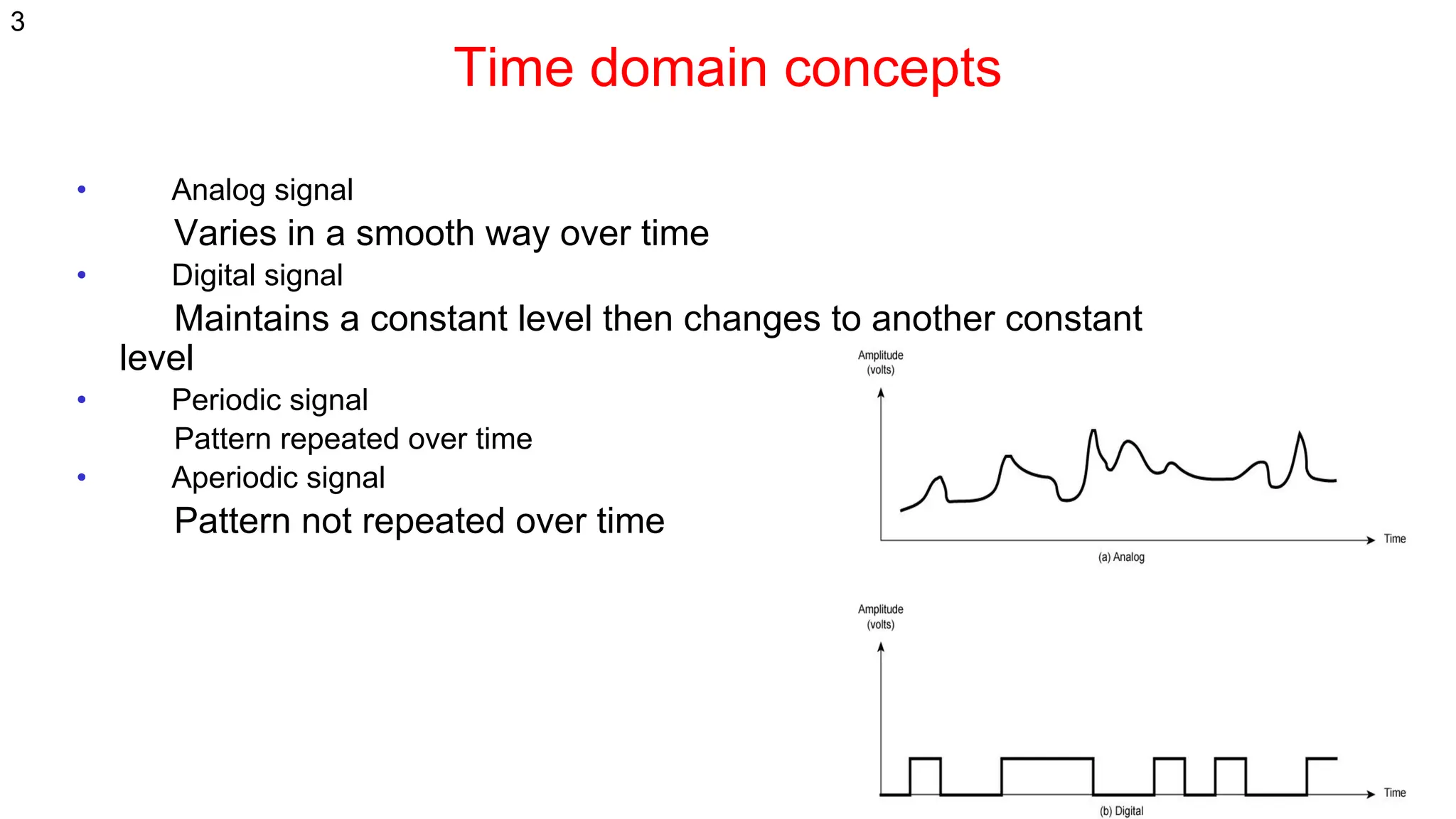
• Analog signal
Varies in a smooth way over time
• Digital signal
Maintains a constant level then changes to another constant
level
• Periodic signal
Pattern repeated over time
• Aperiodic signal
Pattern not repeated over time
3
4
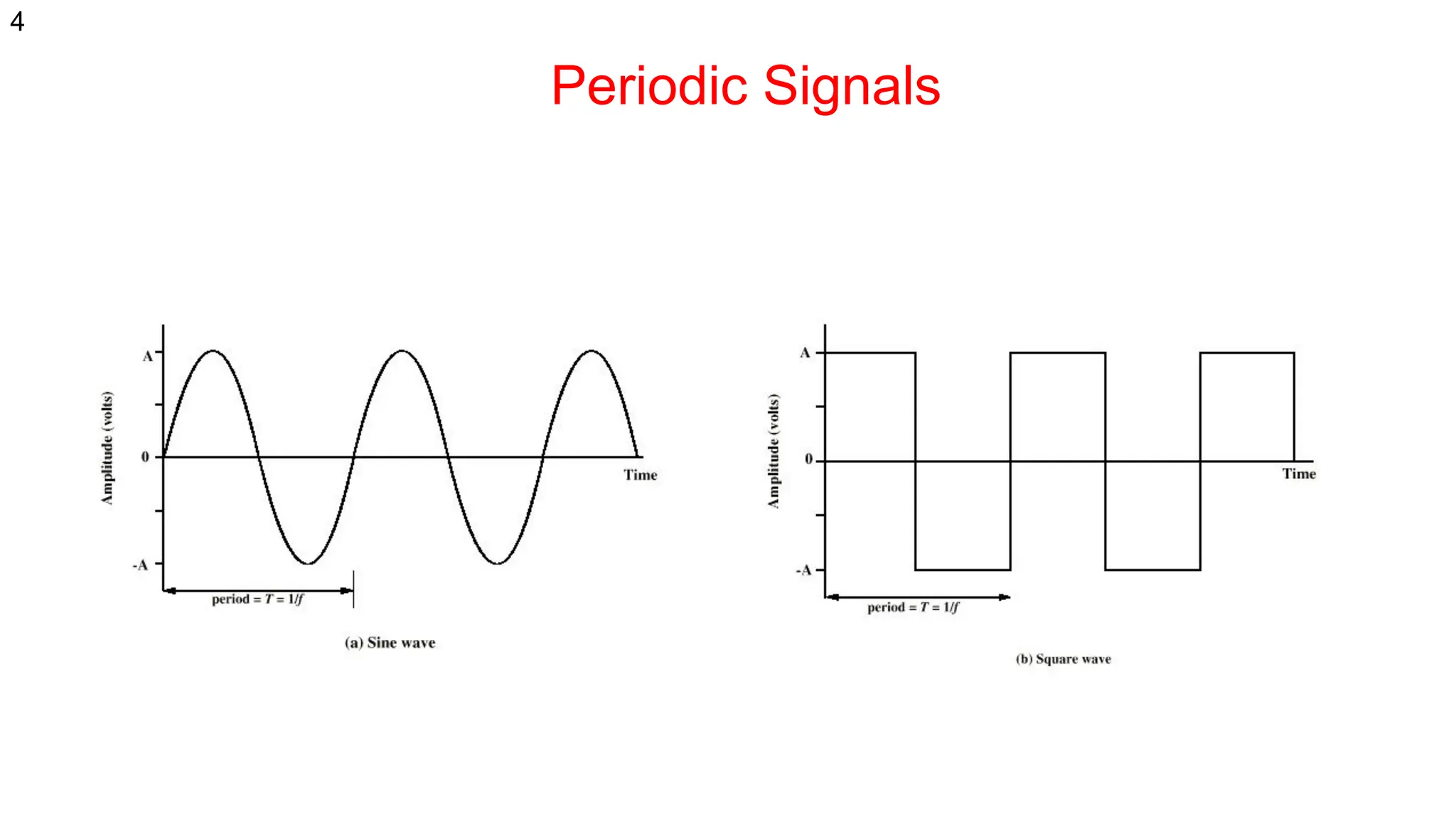
Periodic Signals
Wavelength, Period and Frequency
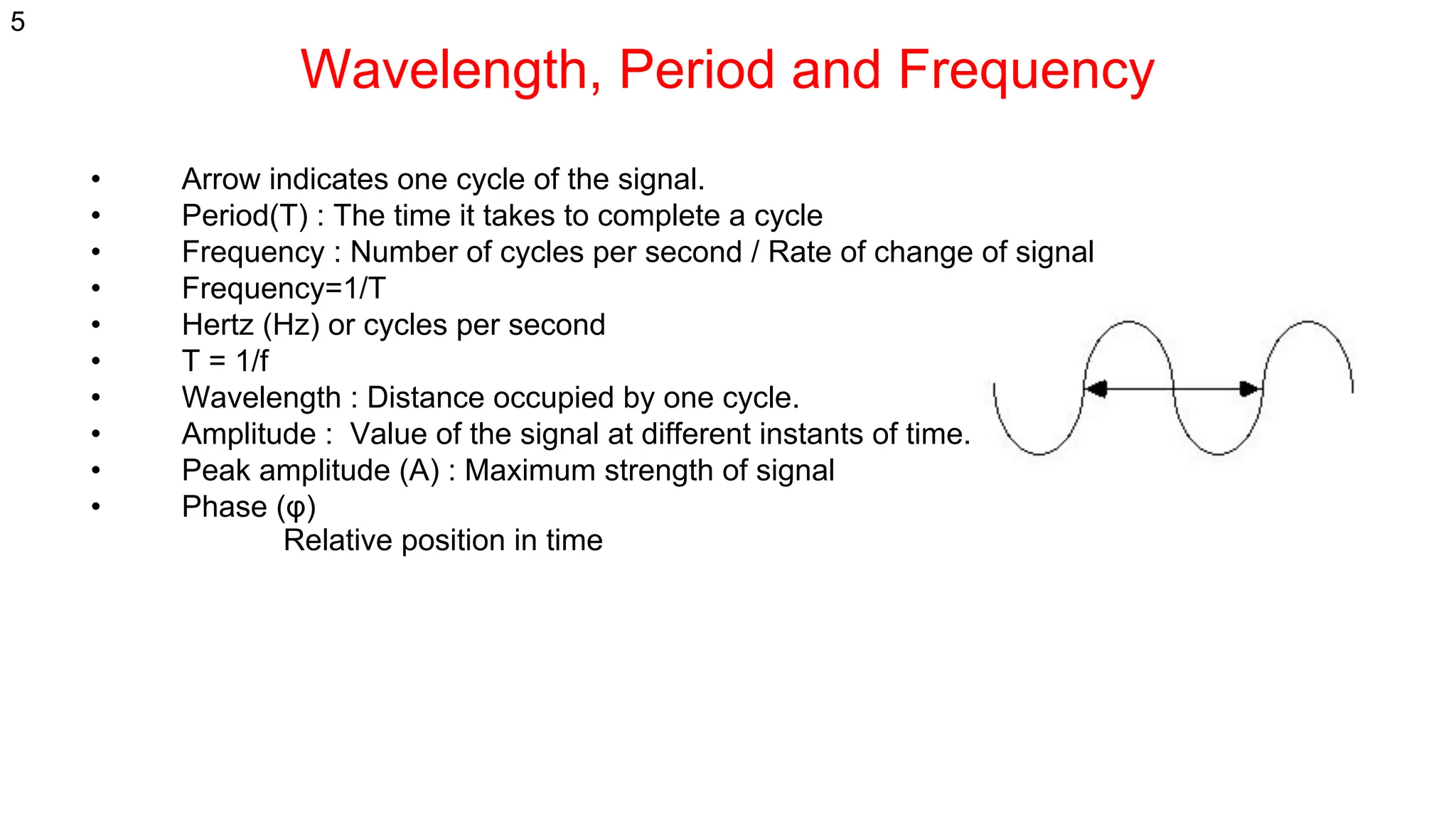
• Arrow indicates one cycle of the signal.
• Period(T) : The time it takes to complete a cycle
• Frequency : Number of cycles per second / Rate of change of signal
• Frequency=1/T
• Hertz (Hz) or cycles per second
• T = 1/f
• Wavelength : Distance occupied by one cycle.
• Amplitude : Value of the signal at different instants of time.
• Peak amplitude (A) : Maximum strength of signal
• Phase (φ)
Relative position in time
5
Frequency Domain Concepts
Signals are made up of many frequencies
Components are sine waves
Fourier analysis can show that any signal is made up of
component sine waves
Can plot frequency domain functions
6
Digital Data
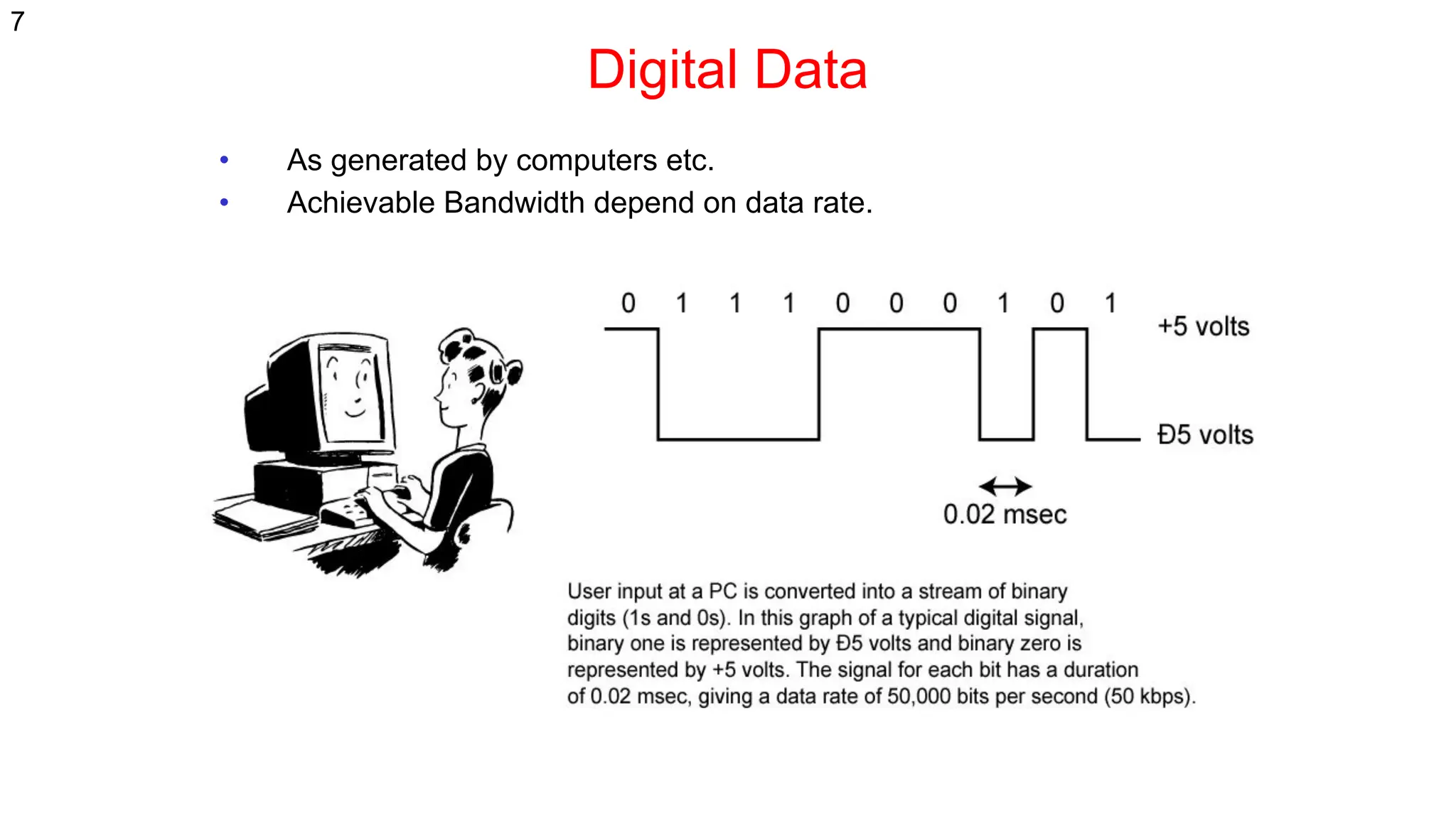
• As generated by computers etc.
• Achievable Bandwidth depend on data rate.
7
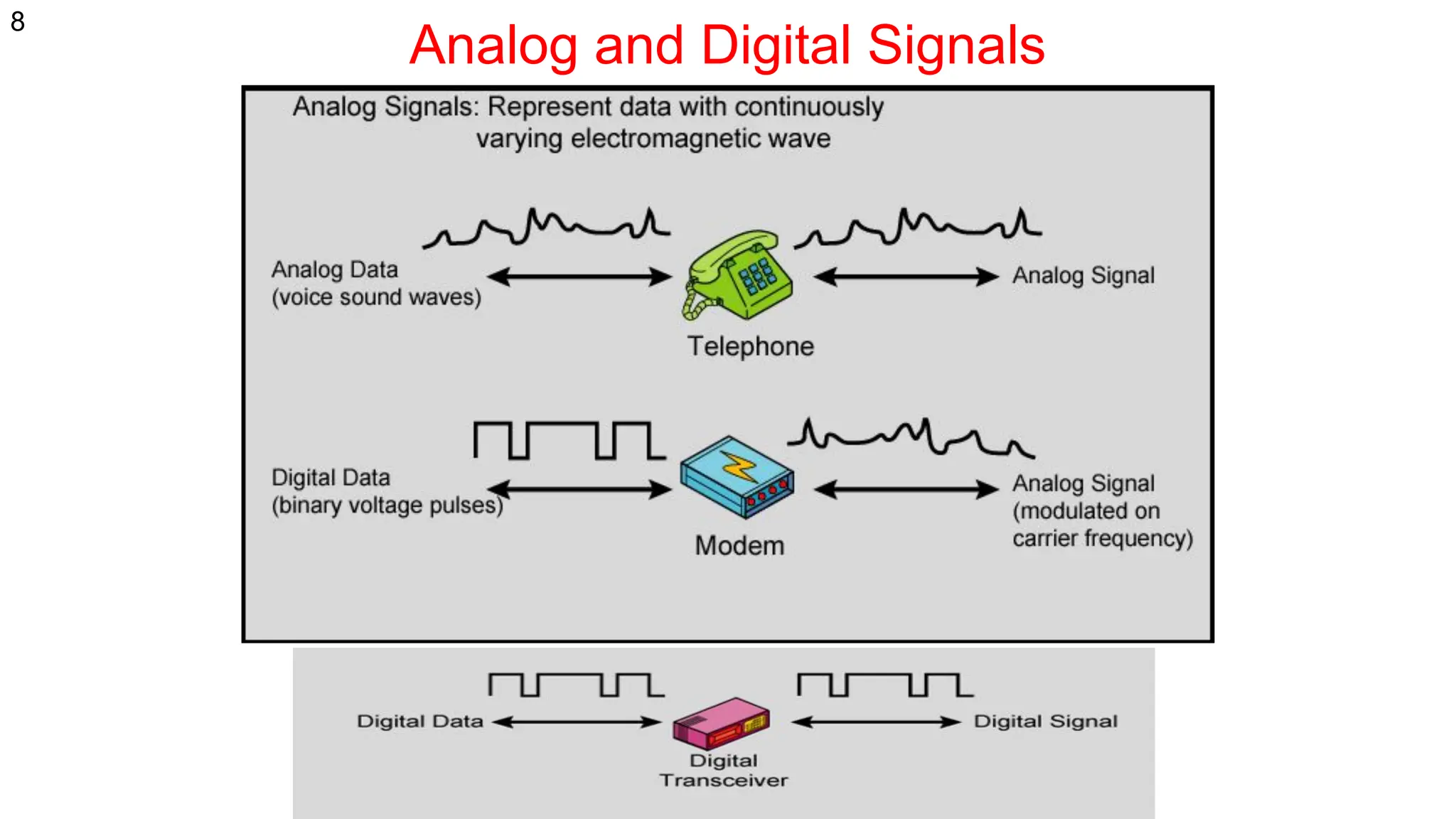
Analog and Digital Signals
8
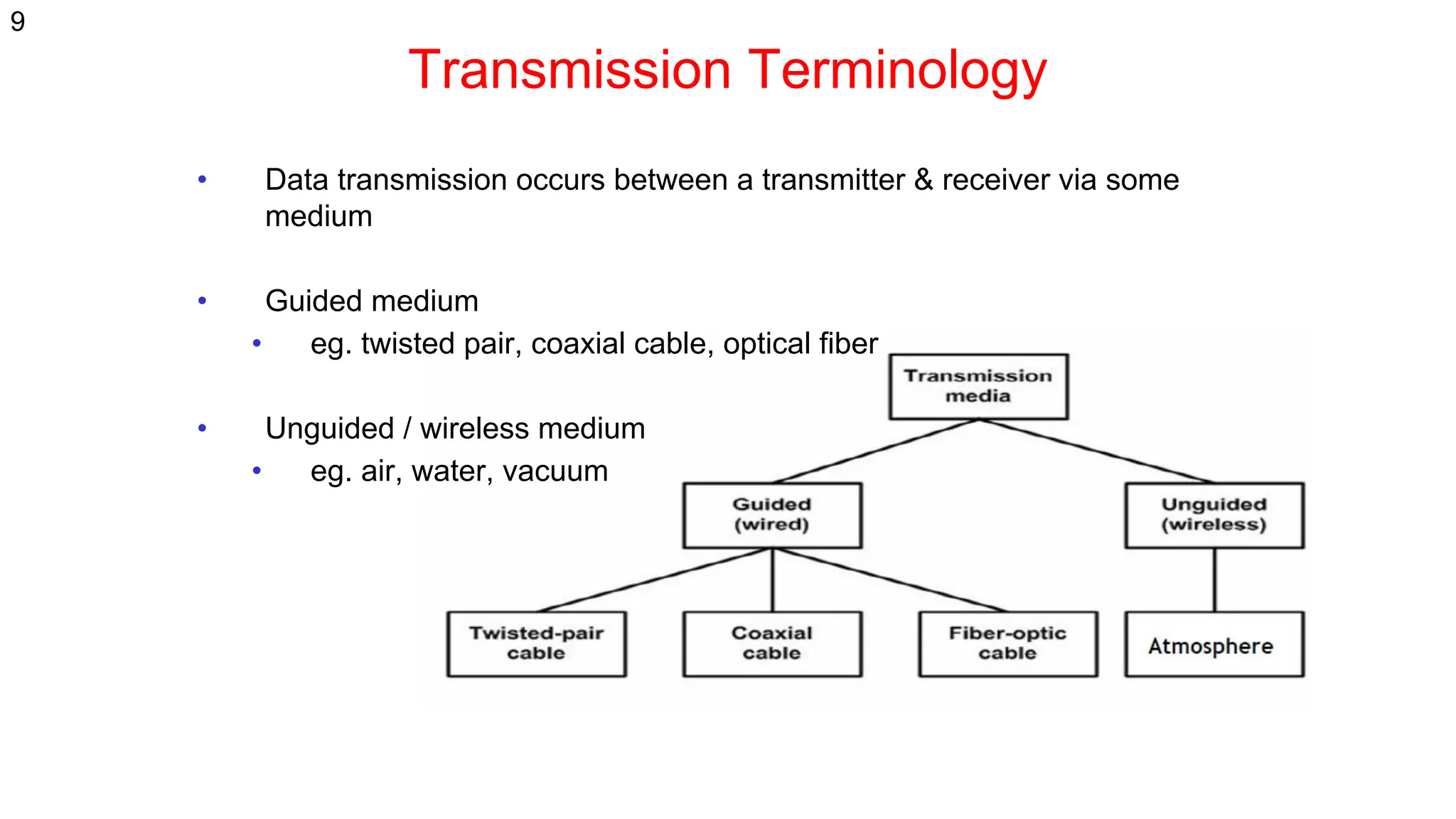
Transmission Terminology
• Data transmission occurs between a transmitter & receiver via some
medium
• Guided medium
• eg. twisted pair, coaxial cable, optical fiber
• Unguided / wireless medium
• eg. air, water, vacuum
9
Transmission Terminology
• Direct link
• no intermediate devices
• Point-to-point
• direct link
• only 2 devices share link (Telephone Communication, Backbone optical
Networks)
• Multi-point
• more than two devices share the link (Ethernet)
10
Transmission media (2)
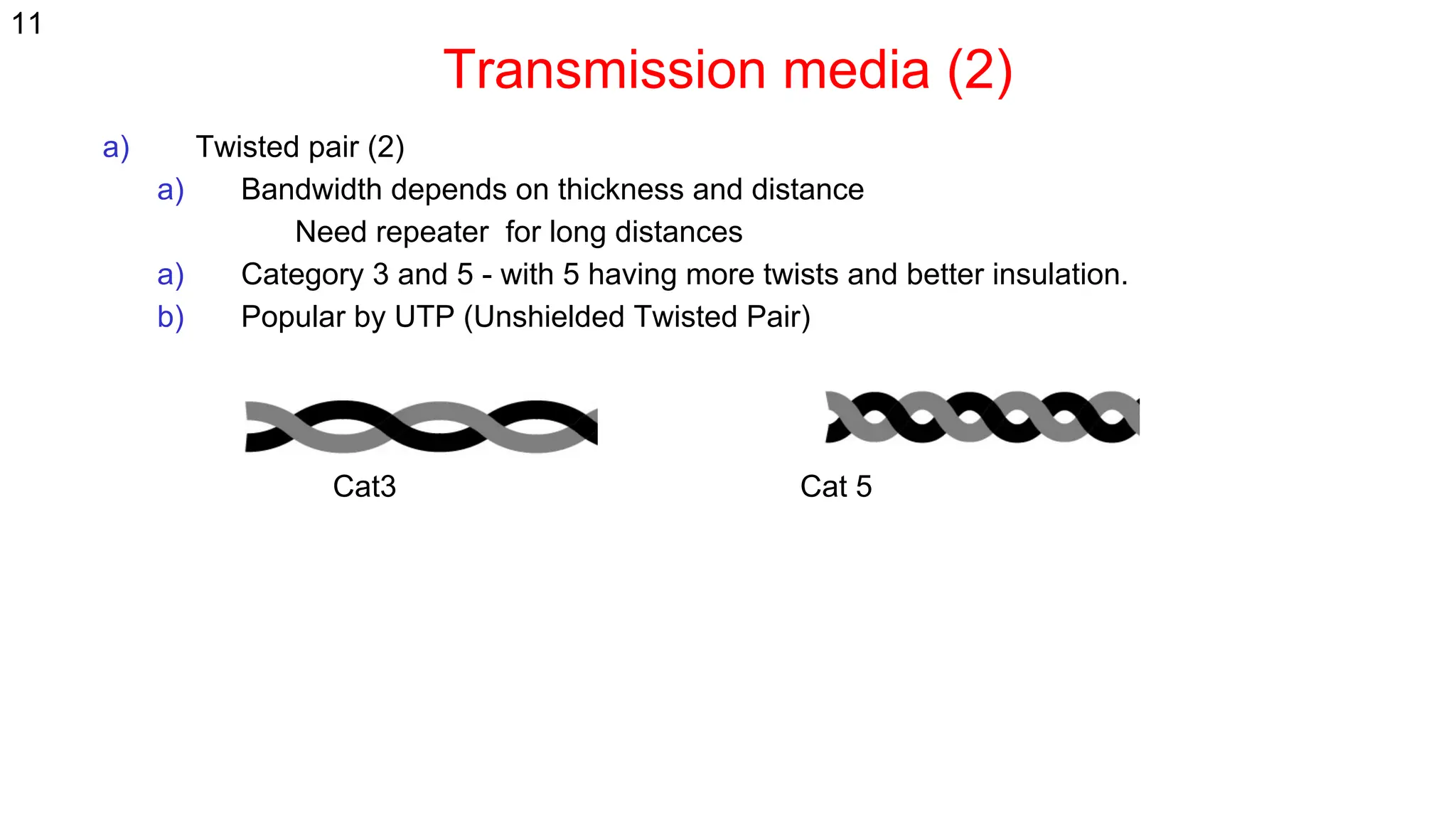
a) Twisted pair (2)
a) Bandwidth depends on thickness and distance
Need repeater for long distances
a) Category 3 and 5 - with 5 having more twists and better insulation.
b) Popular by UTP (Unshielded Twisted Pair)
Cat3 Cat 5
11
Transmission media (2)
• UTP = Unshielded Twisted Pair
- Cat 3: Home telephone lines
- Cat 5: Fast Ethernet (100 Mbps)
- Cat 5e: Gigabit Ethernet (1 Gbps)
- Cat 6: 10-Gigabit Ethernet (10 Gps) up to 100 m
- Cat 6A: Better quality Cat 6
- Cat 7: Includes shielding (not in common use)
12
Transmission media
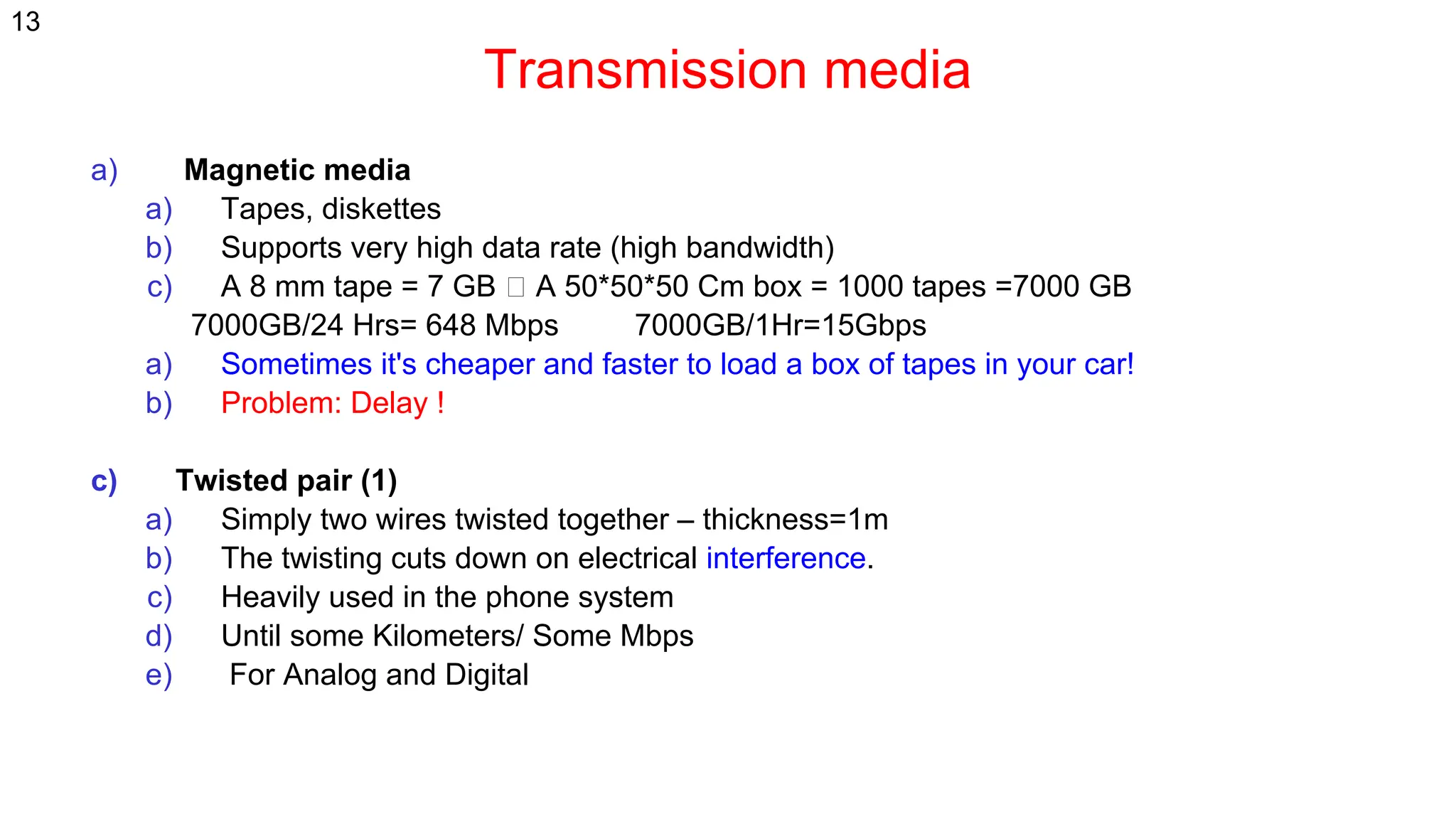
a) Magnetic media
a) Tapes, diskettes
b) Supports very high data rate (high bandwidth)
c) A 8 mm tape = 7 GB A 50*50*50 Cm box = 1000 tapes =7000 GB
7000GB/24 Hrs= 648 Mbps 7000GB/1Hr=15Gbps
a) Sometimes it's cheaper and faster to load a box of tapes in your car!
b) Problem: Delay !
c) Twisted pair (1)
a) Simply two wires twisted together – thickness=1m
b) The twisting cuts down on electrical interference.
c) Heavily used in the phone system
d) Until some Kilometers/ Some Mbps
e) For Analog and Digital
13
Transmission Media (3)
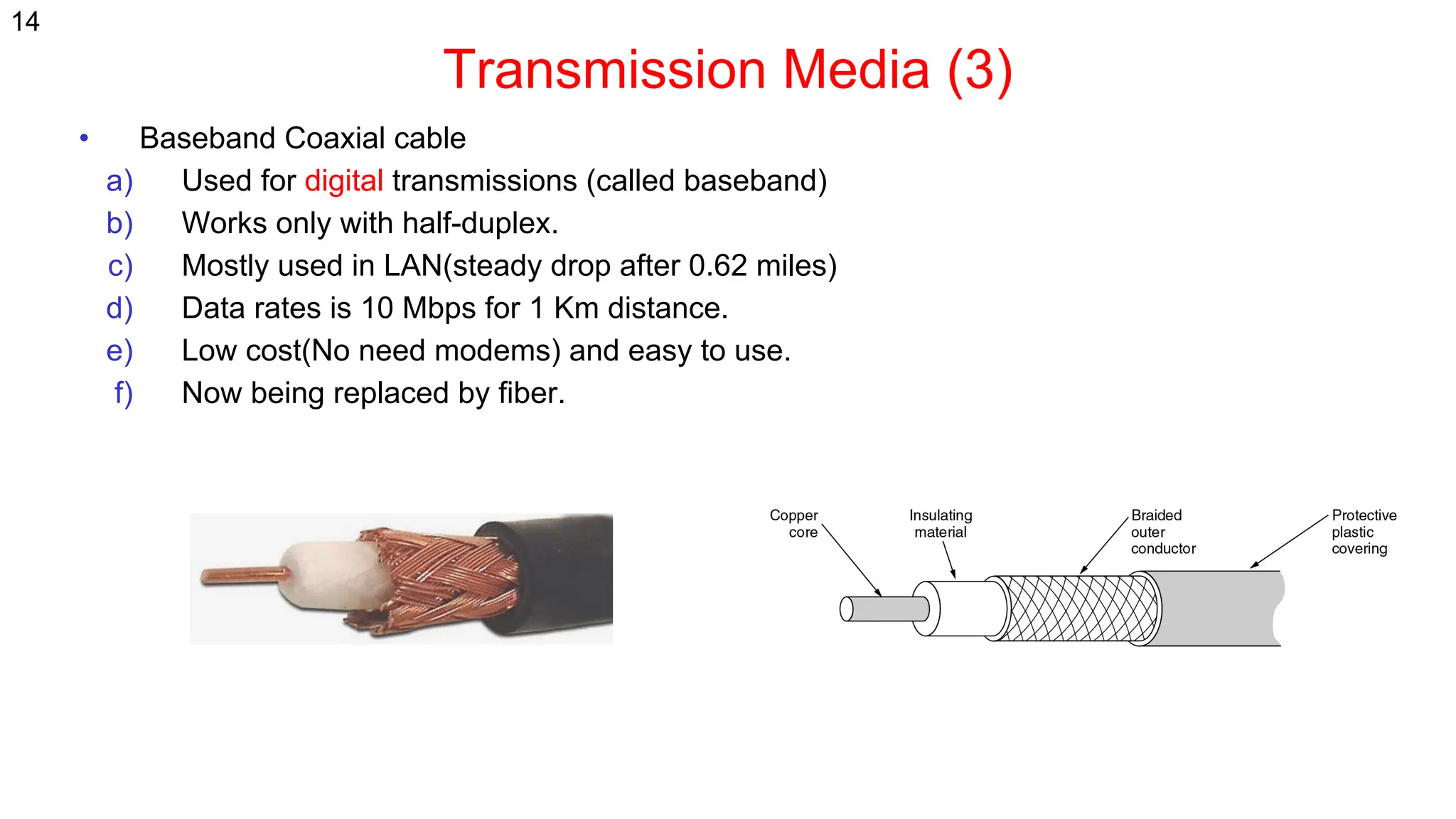
• Baseband Coaxial cable
a) Used for digital transmissions (called baseband)
b) Works only with half-duplex.
c) Mostly used in LAN(steady drop after 0.62 miles)
d) Data rates is 10 Mbps for 1 Km distance.
e) Low cost(No need modems) and easy to use.
f) Now being replaced by fiber.
14
Transmission Media (3)
15
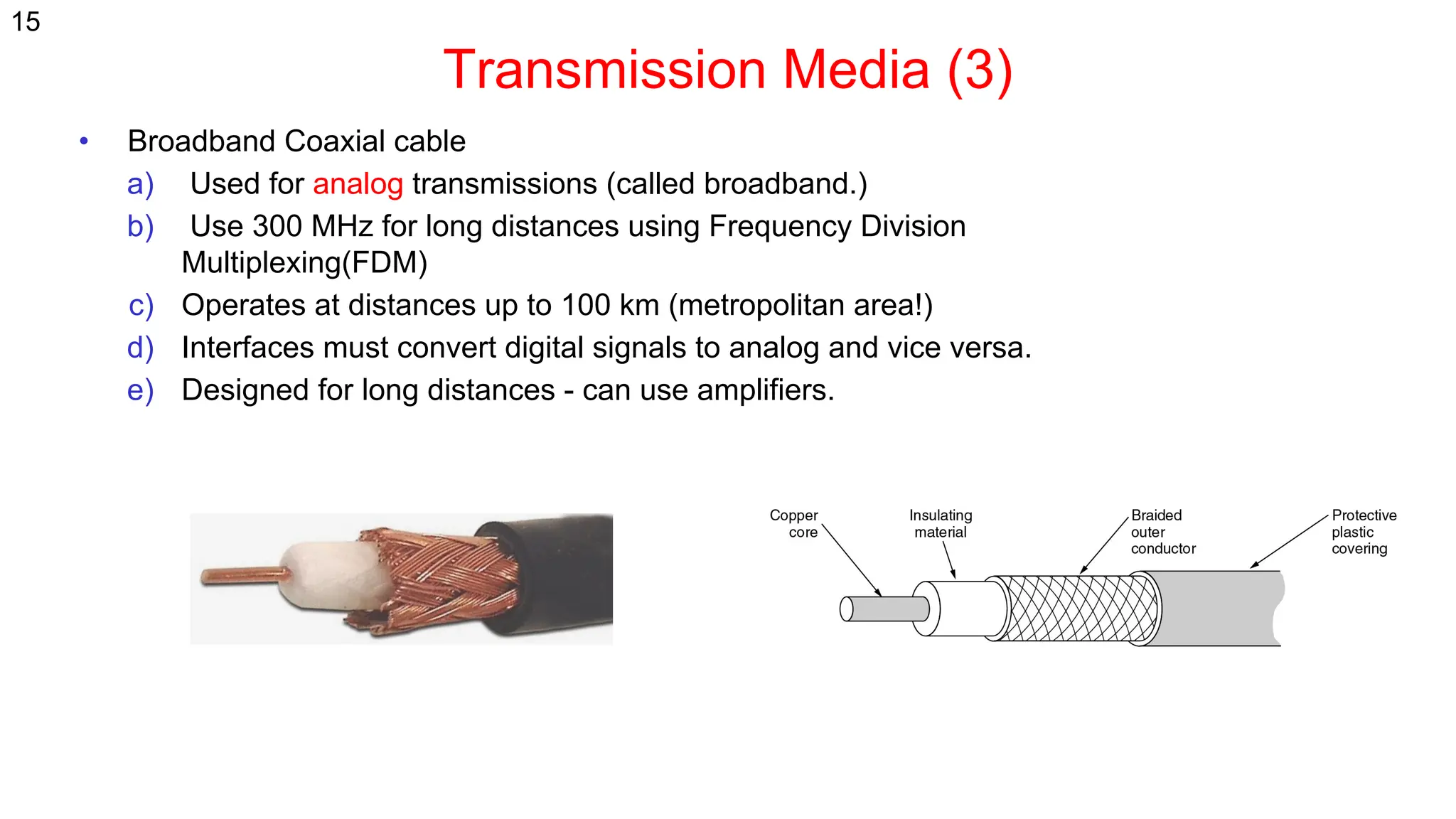
• Broadband Coaxial cable
a) Used for analog transmissions (called broadband.)
b) Use 300 MHz for long distances using Frequency Division
Multiplexing(FDM)
c) Operates at distances up to 100 km (metropolitan area!)
d) Interfaces must convert digital signals to analog and vice versa.
e) Designed for long distances - can use amplifiers.
Transmission Media (4)
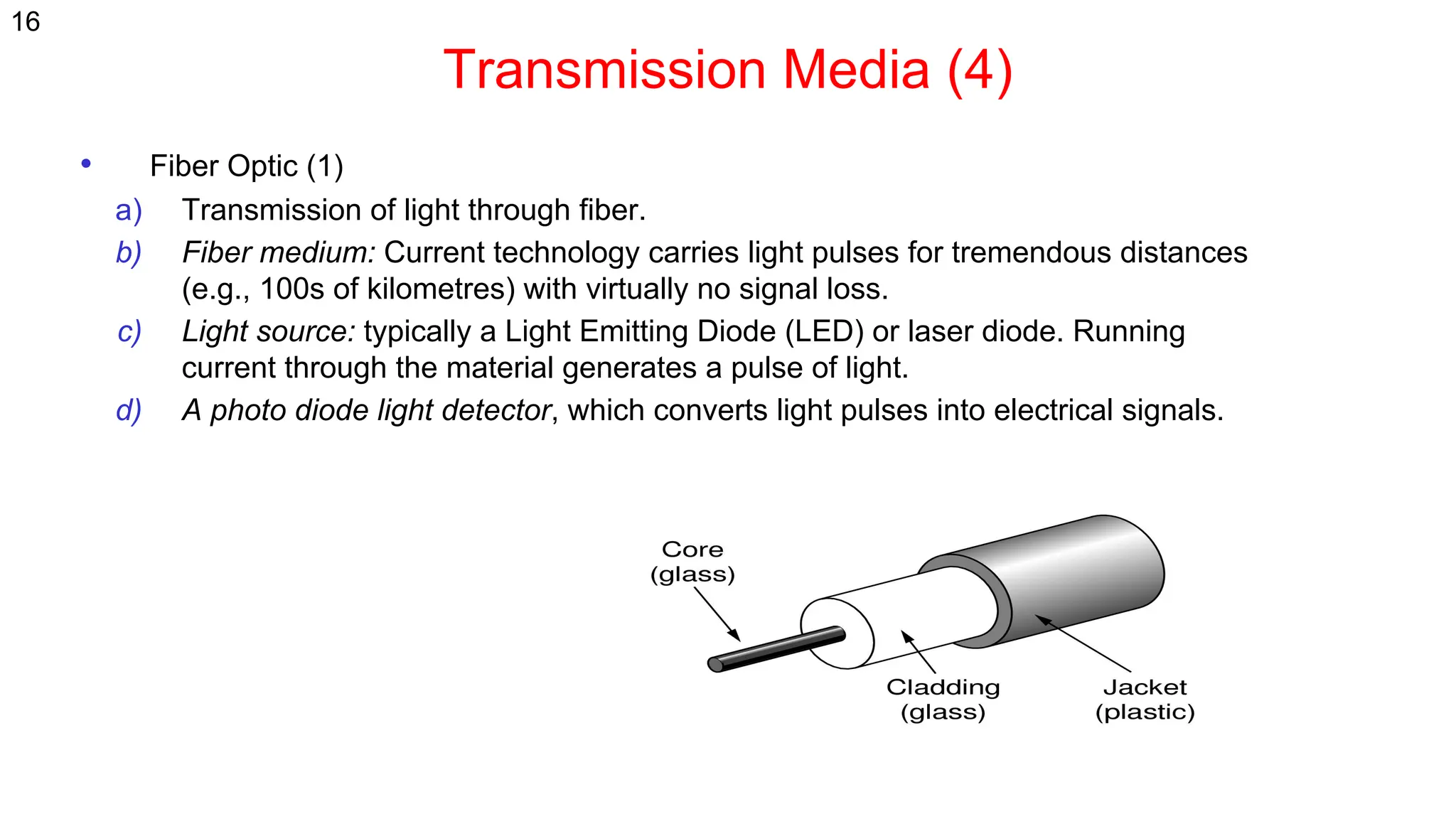
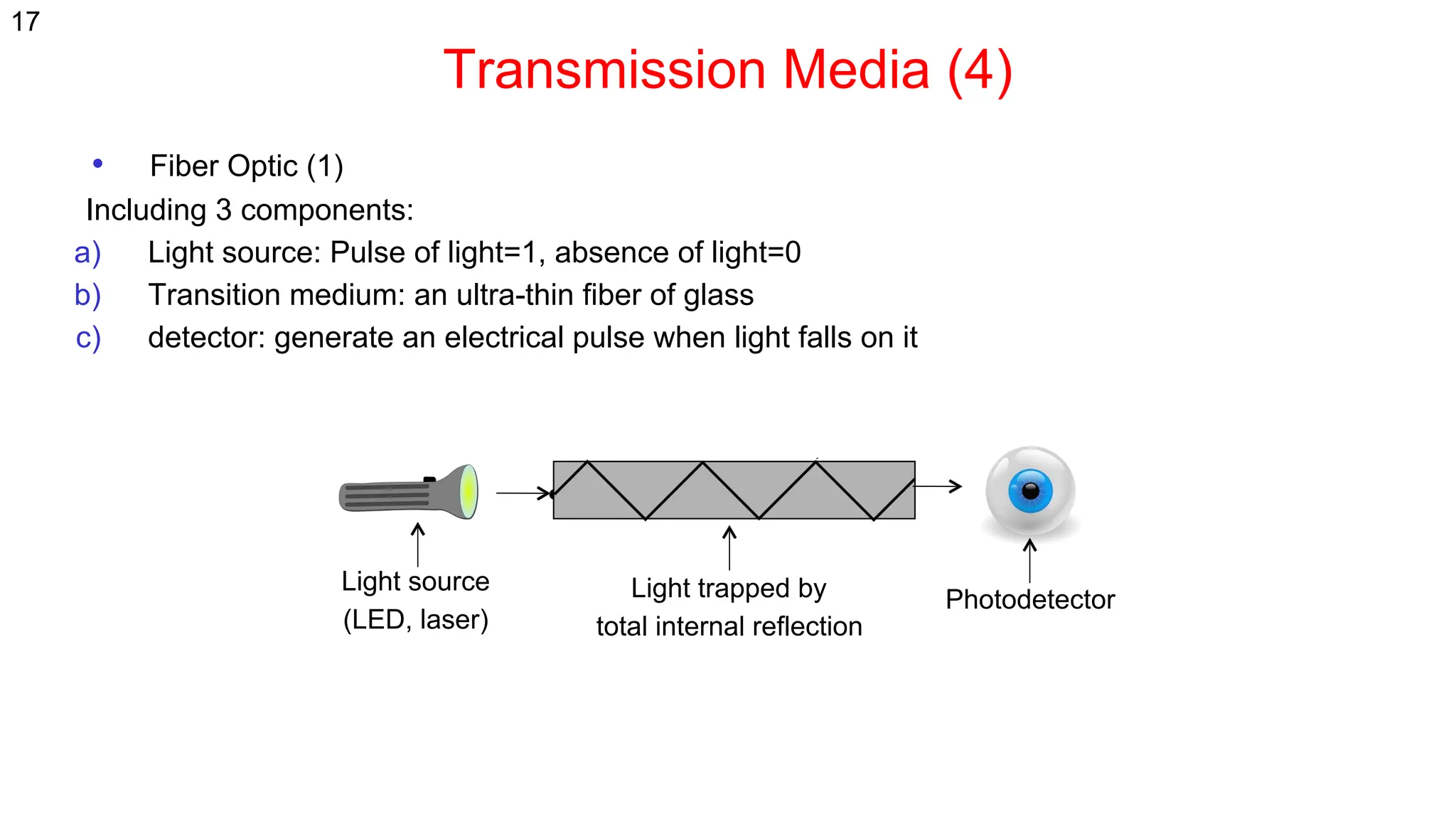
• Fiber Optic (1)
a) Transmission of light through fiber.
b) Fiber medium: Current technology carries light pulses for tremendous distances
(e.g., 100s of kilometres) with virtually no signal loss.
c) Light source: typically a Light Emitting Diode (LED) or laser diode. Running
current through the material generates a pulse of light.
d) A photo diode light detector, which converts light pulses into electrical signals.
16
Transmission Media (4)
• Fiber Optic (1)
Including 3 components:
a) Light source: Pulse of light=1, absence of light=0
b) Transition medium: an ultra-thin fiber of glass
c) detector: generate an electrical pulse when light falls on it
Light source
(LED, laser)
Photodetector
Light trapped by
total internal reflection
17
Transmission Media (4)
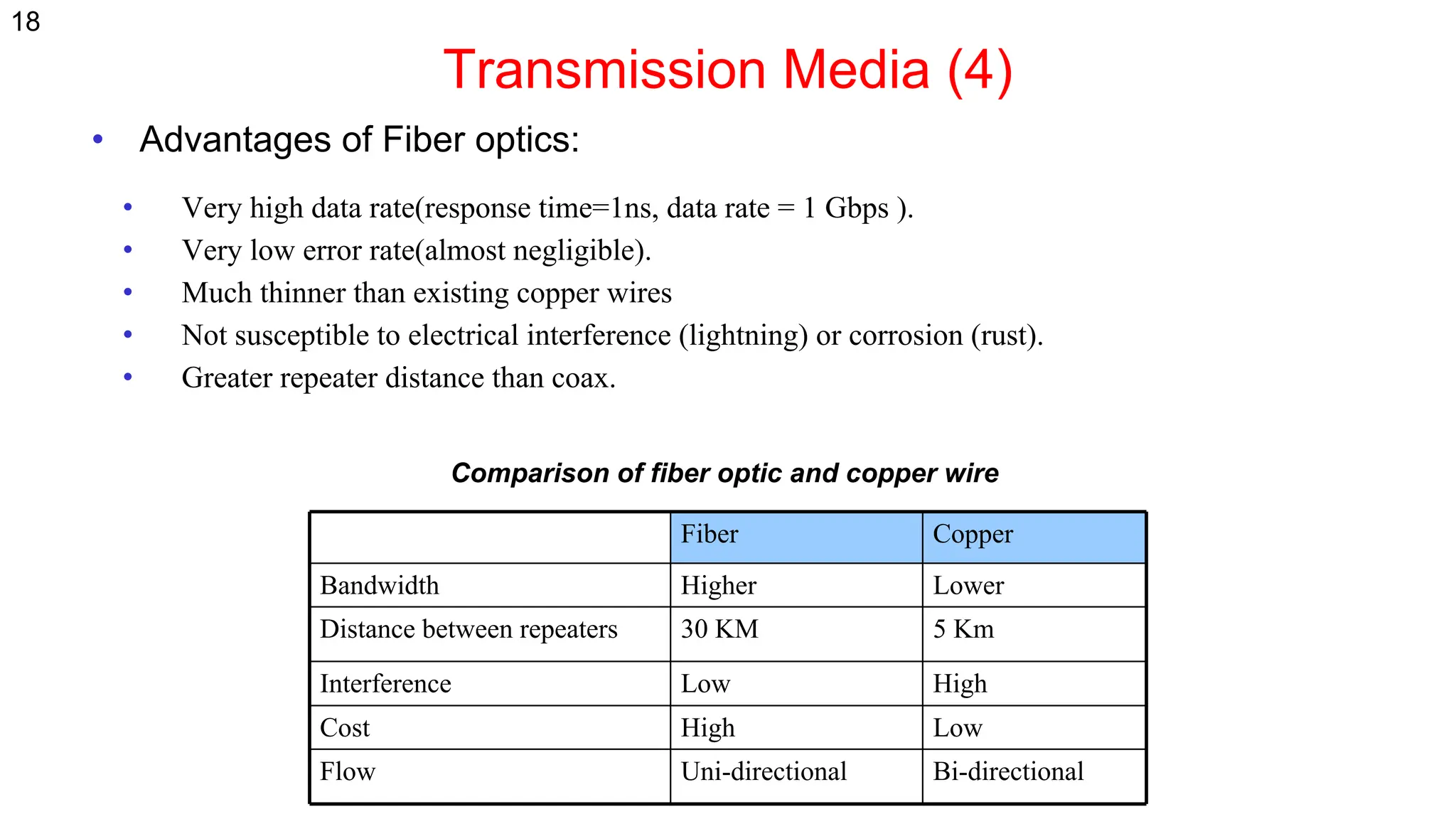
• Advantages of Fiber optics:
• Very high data rate(response time=1ns, data rate = 1 Gbps ).
• Very low error rate(almost negligible).
• Much thinner than existing copper wires
• Not susceptible to electrical interference (lightning) or corrosion (rust).
• Greater repeater distance than coax.
Copper
Fiber
Lower
Higher
Bandwidth
5 Km
30 KM
Distance between repeaters
High
Low
Interference
Low
High
Cost
Bi-directional
Uni-directional
Flow
Comparison of fiber optic and copper wire
18
Wireless transmission
• Radio transmission
• Microwave Transmission
• Lightwave Transmission
• Satellites
19
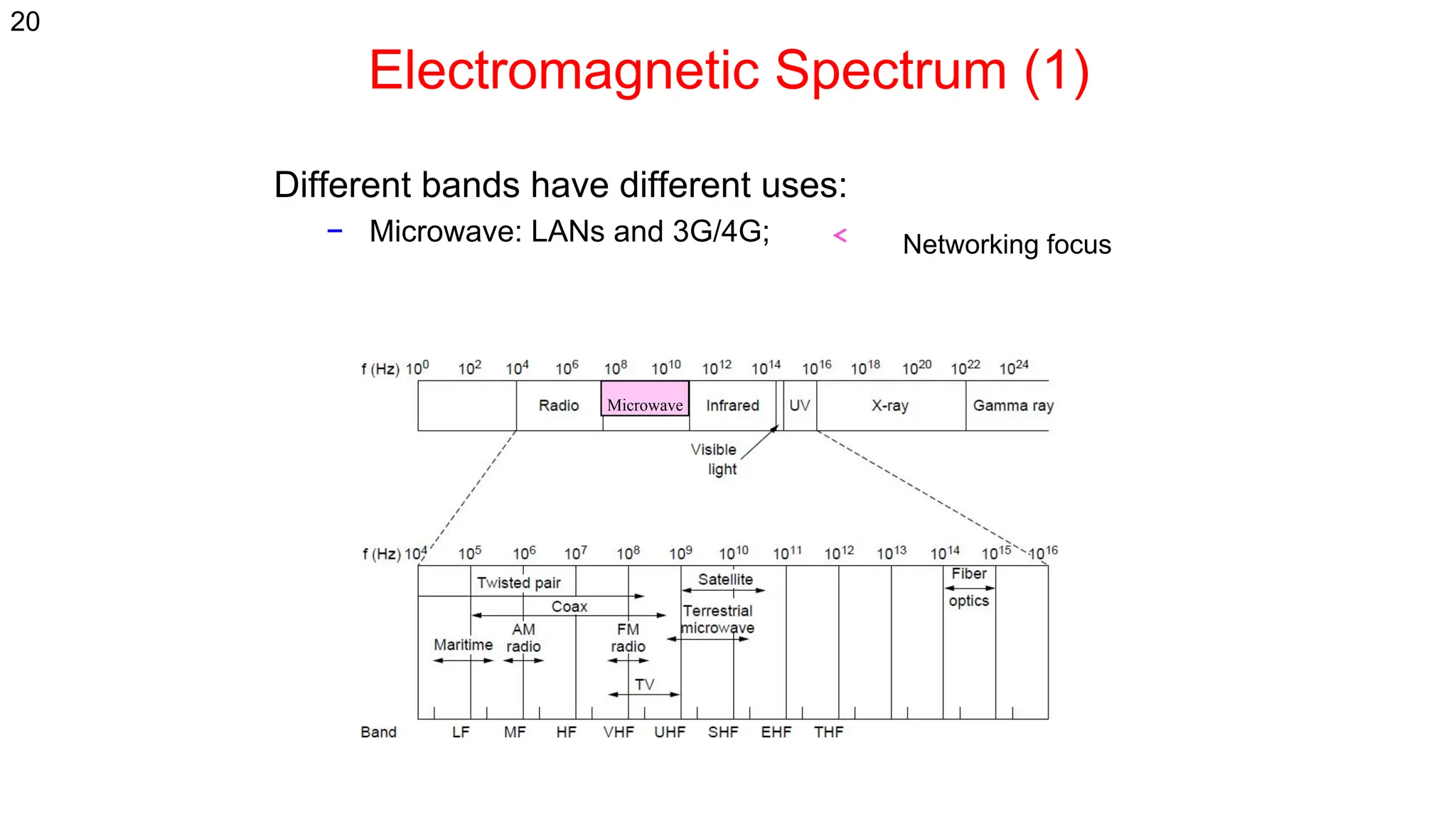
Electromagnetic Spectrum (1)
Different bands have different uses:
− Microwave: LANs and 3G/4G;
Microwave
Networking focus
20
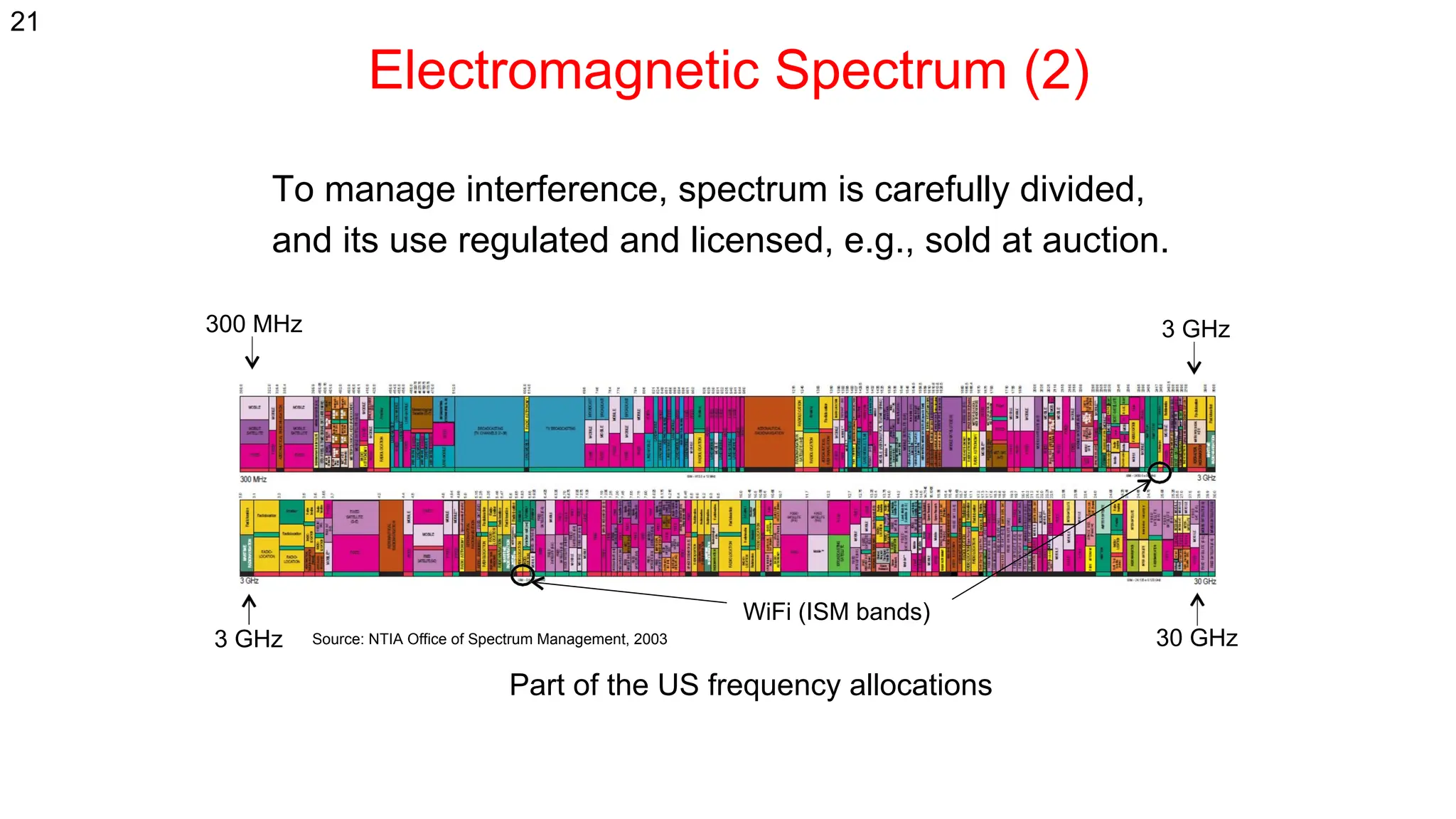
Electromagnetic Spectrum (2)
To manage interference, spectrum is carefully divided,
and its use regulated and licensed, e.g., sold at auction.
Source: NTIA Office of Spectrum Management, 2003
3 GHz 30 GHz
3 GHz
300 MHz
WiFi (ISM bands)
Part of the US frequency allocations
21
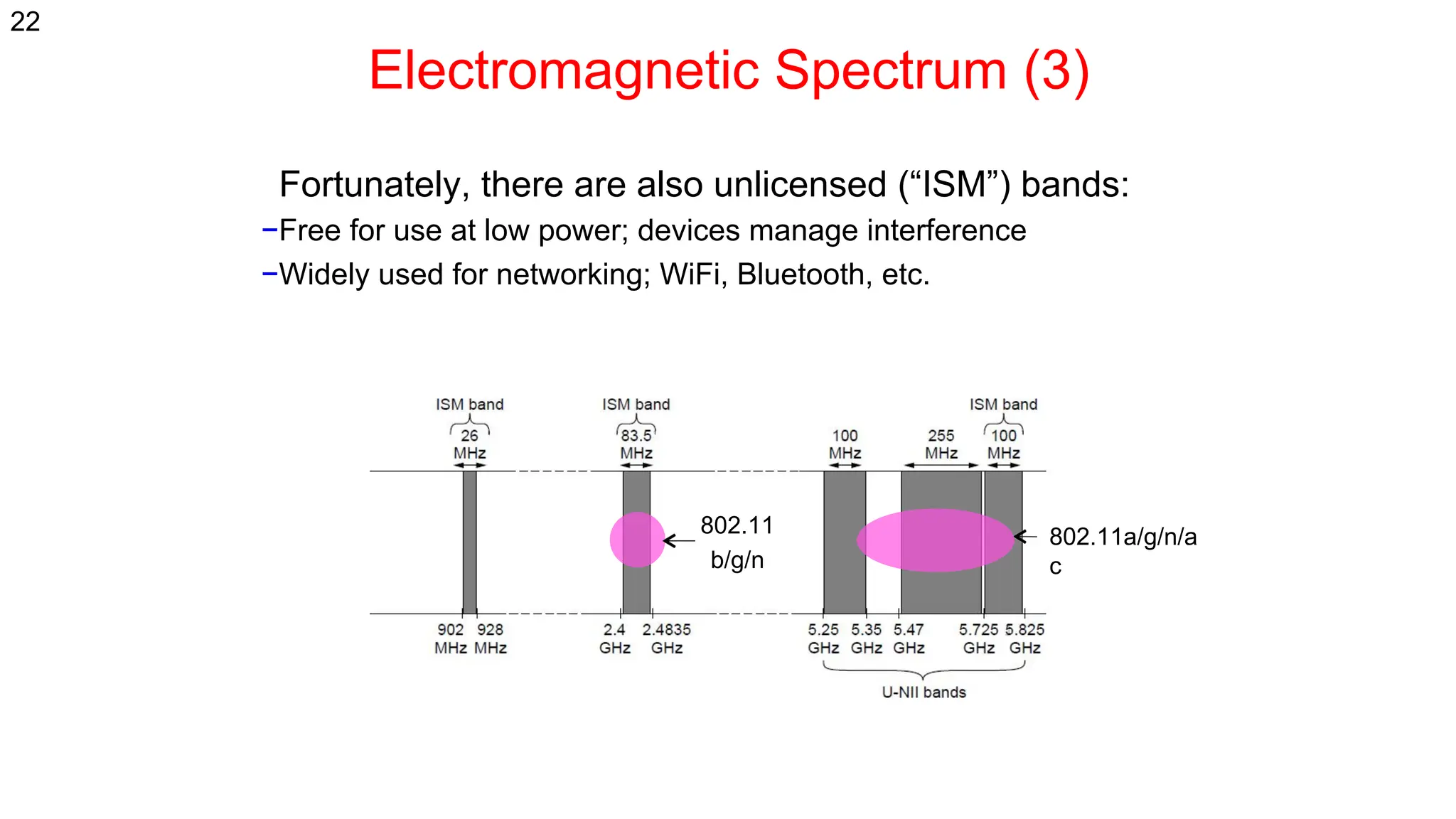
Electromagnetic Spectrum (3)
Fortunately, there are also unlicensed (“ISM”) bands:
−Free for use at low power; devices manage interference
−Widely used for networking; WiFi, Bluetooth, etc.
802.11
b/g/n
802.11a/g/n/a
c
22
Simple Physical Topologies
a) Physical topology: physical layout of nodes on a network
b) Four fundamental shapes:
a) Bus
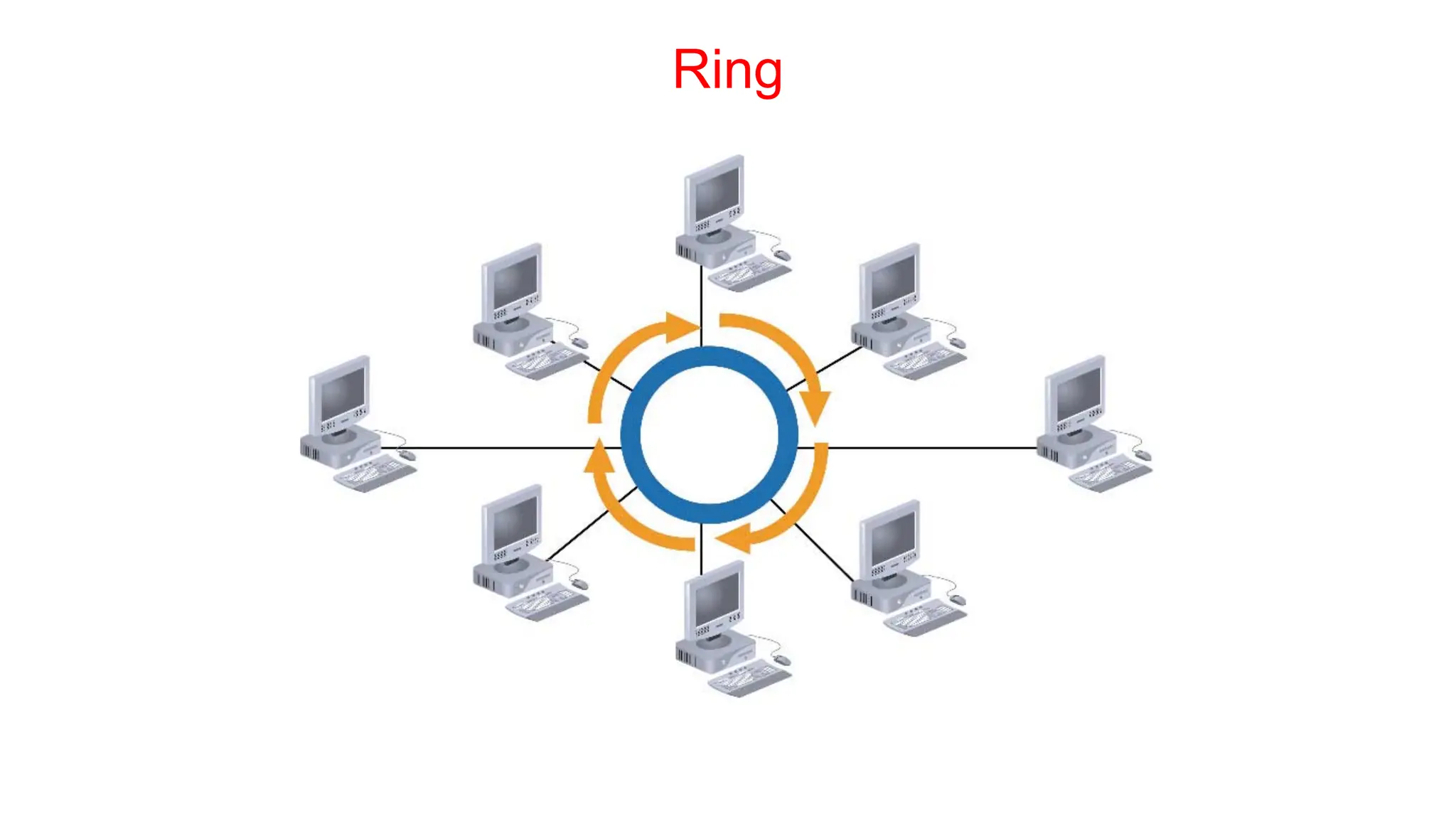
b) Ring
c) Star
d) Mesh
c) May create hybrid topologies
d) Topology integral to type of network, cabling infrastructure, and transmission media used.
Why we need a topology
Choosing one topology over another can impact :
a) type of equipment the network needs
b) capabilities of the equipment
c) network’s growth
d) way a network is managed
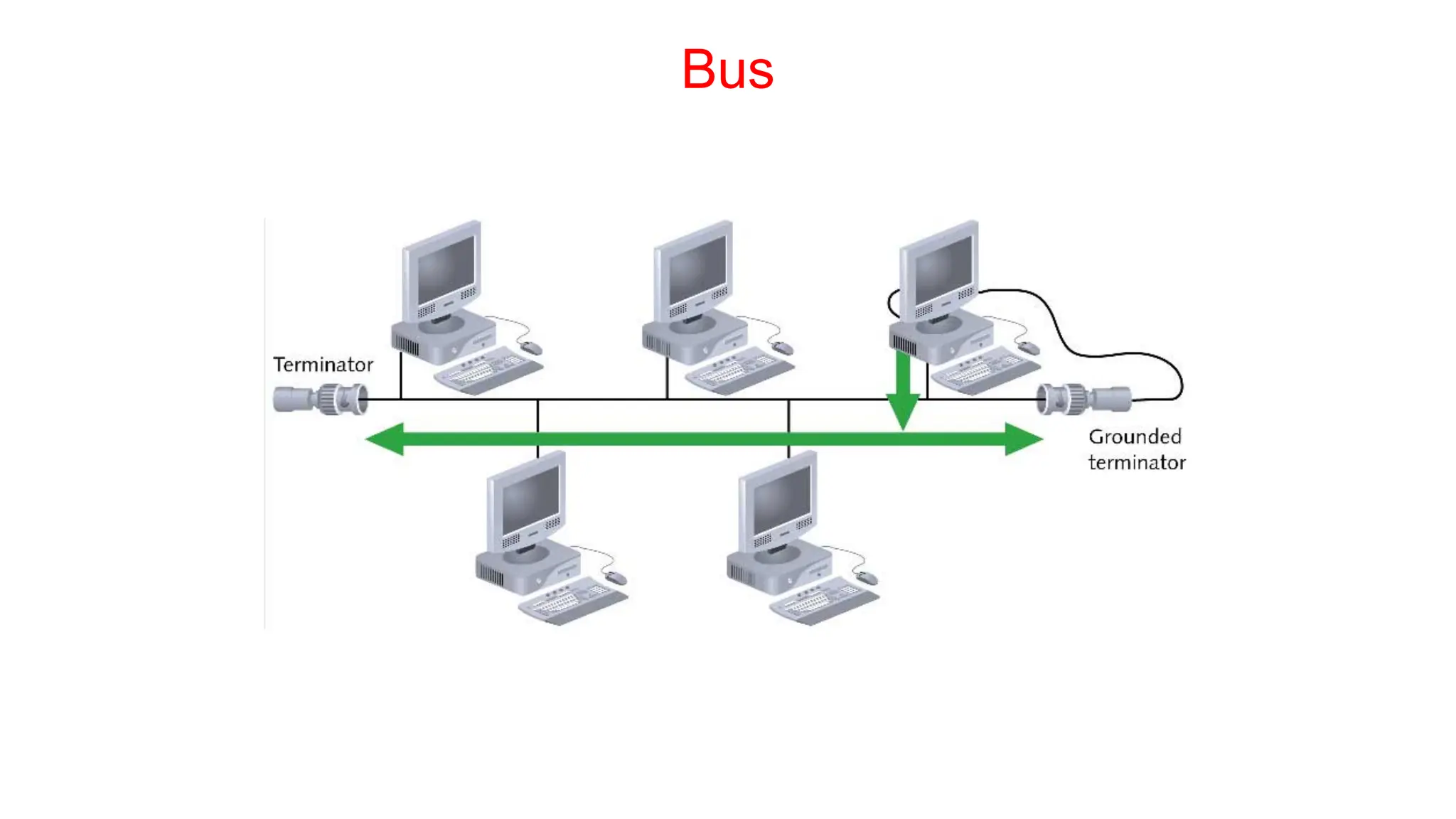
Bus
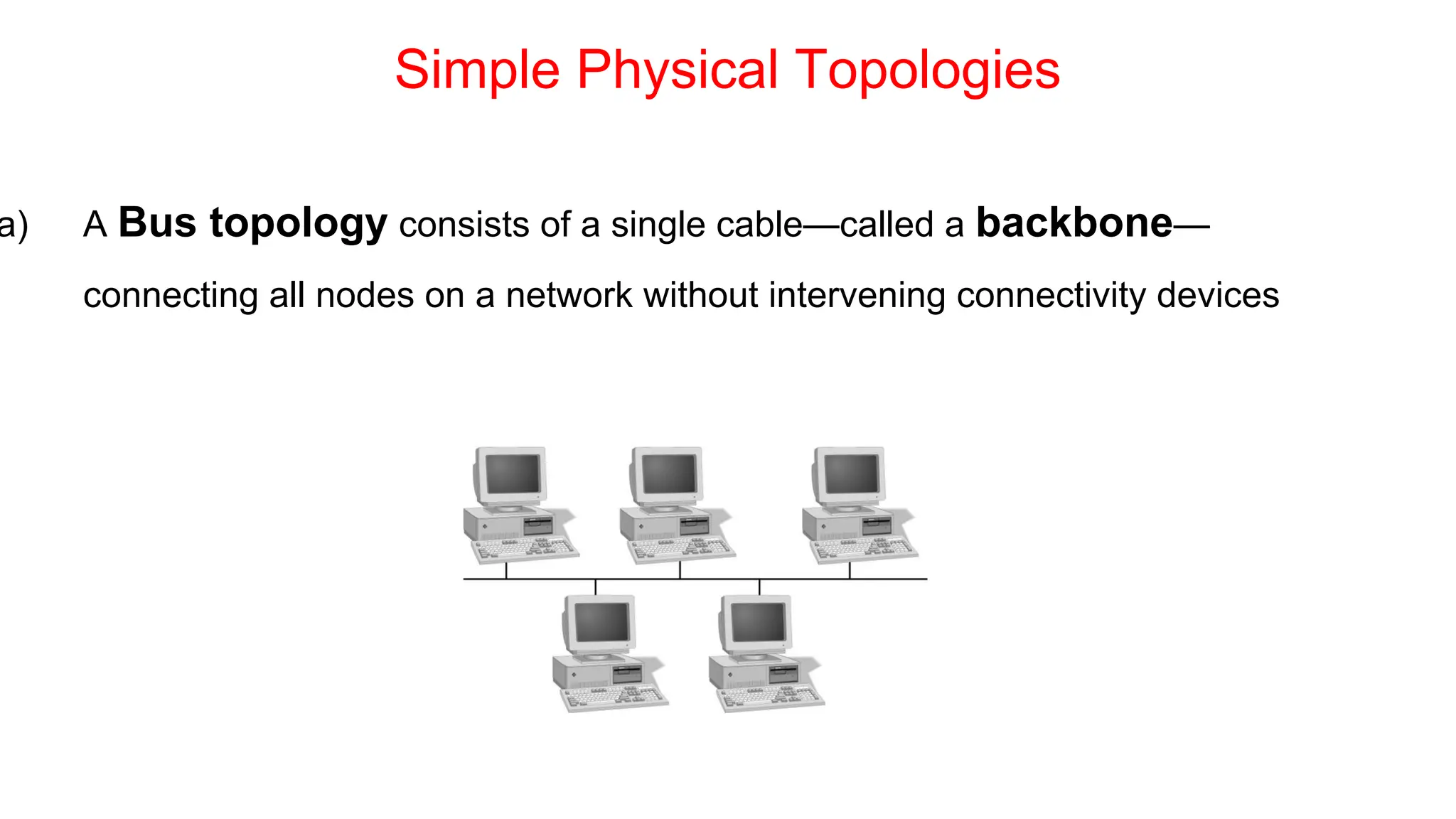
Simple Physical Topologies
a) A Bus topology consists of a single cable—called a backbone—
connecting all nodes on a network without intervening connectivity devices
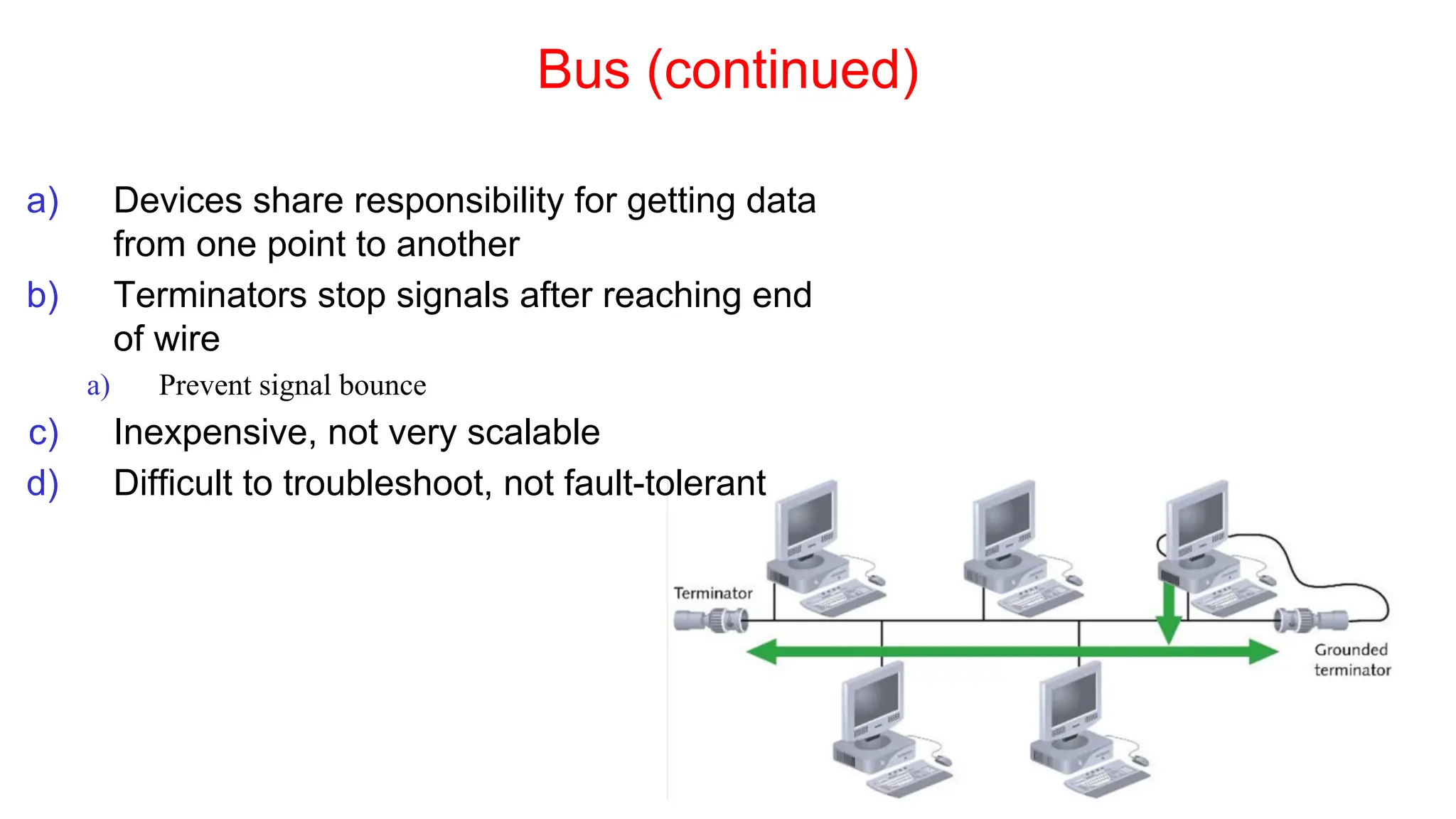
Bus (continued)
a) Devices share responsibility for getting data
from one point to another
b) Terminators stop signals after reaching end
of wire
a) Prevent signal bounce
c) Inexpensive, not very scalable
d) Difficult to troubleshoot, not fault-tolerant
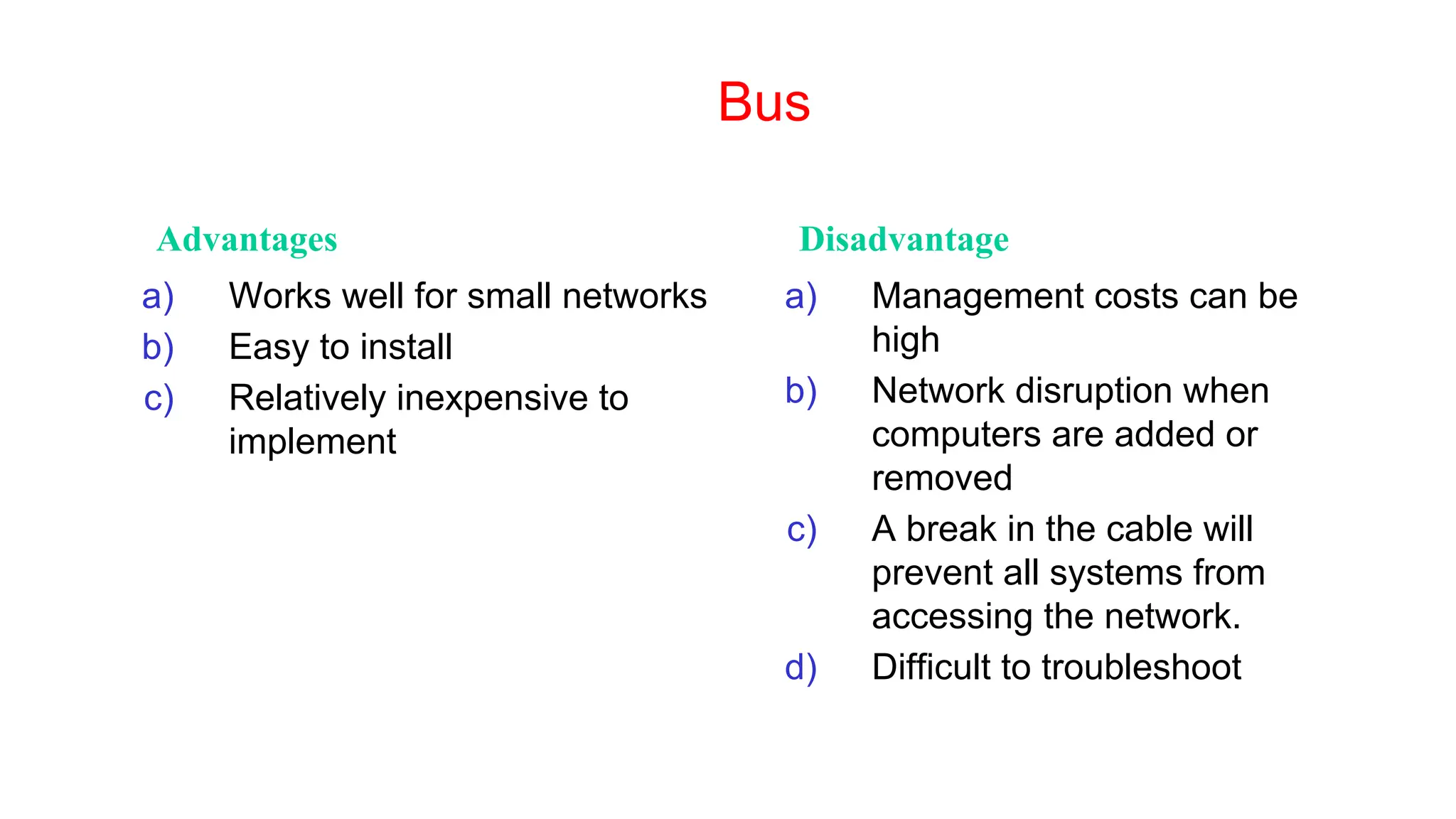
Bus
Advantages Disadvantage
a) Works well for small networks
b) Easy to install
c) Relatively inexpensive to
implement
a) Management costs can be
high
b) Network disruption when
computers are added or
removed
c) A break in the cable will
prevent all systems from
accessing the network.
d) Difficult to troubleshoot
Ring
Simple Physical Topologies
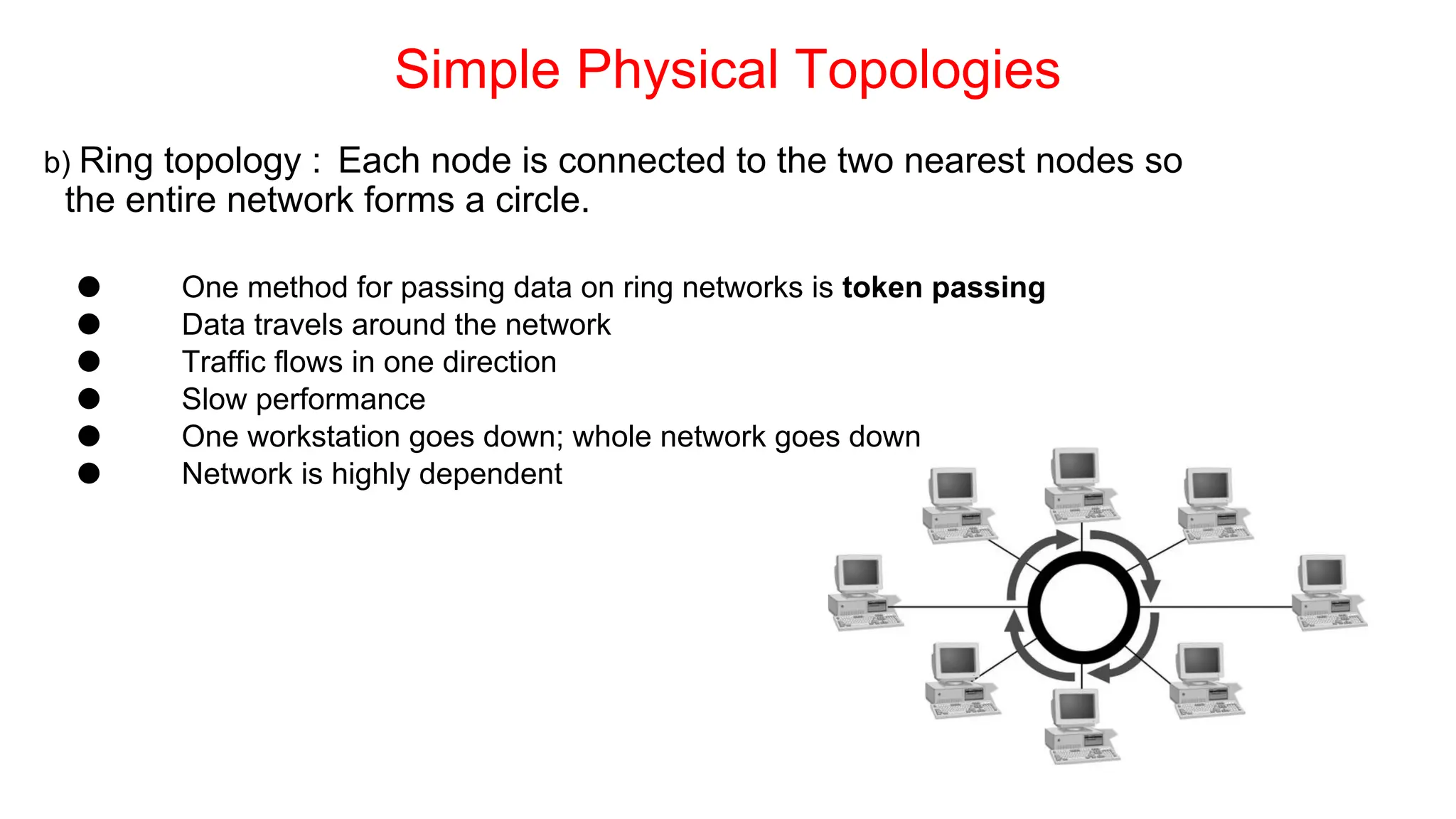
b) Ring topology : Each node is connected to the two nearest nodes so
the entire network forms a circle.
⚫ One method for passing data on ring networks is token passing
⚫ Data travels around the network
⚫ Traffic flows in one direction
⚫ Slow performance
⚫ One workstation goes down; whole network goes down
⚫ Network is highly dependent
Ring Topology
Advantages Disadvantage
a) Cable faults are easily located,
making troubleshooting easier
b) Ring networks are moderately
easy to install
⚫ Expensive
⚫ Requires more cable and
network equipment at the start
⚫ Expansion to the network can
cause network disruption
⚫ A single break in the cable can
disrupt the entire network
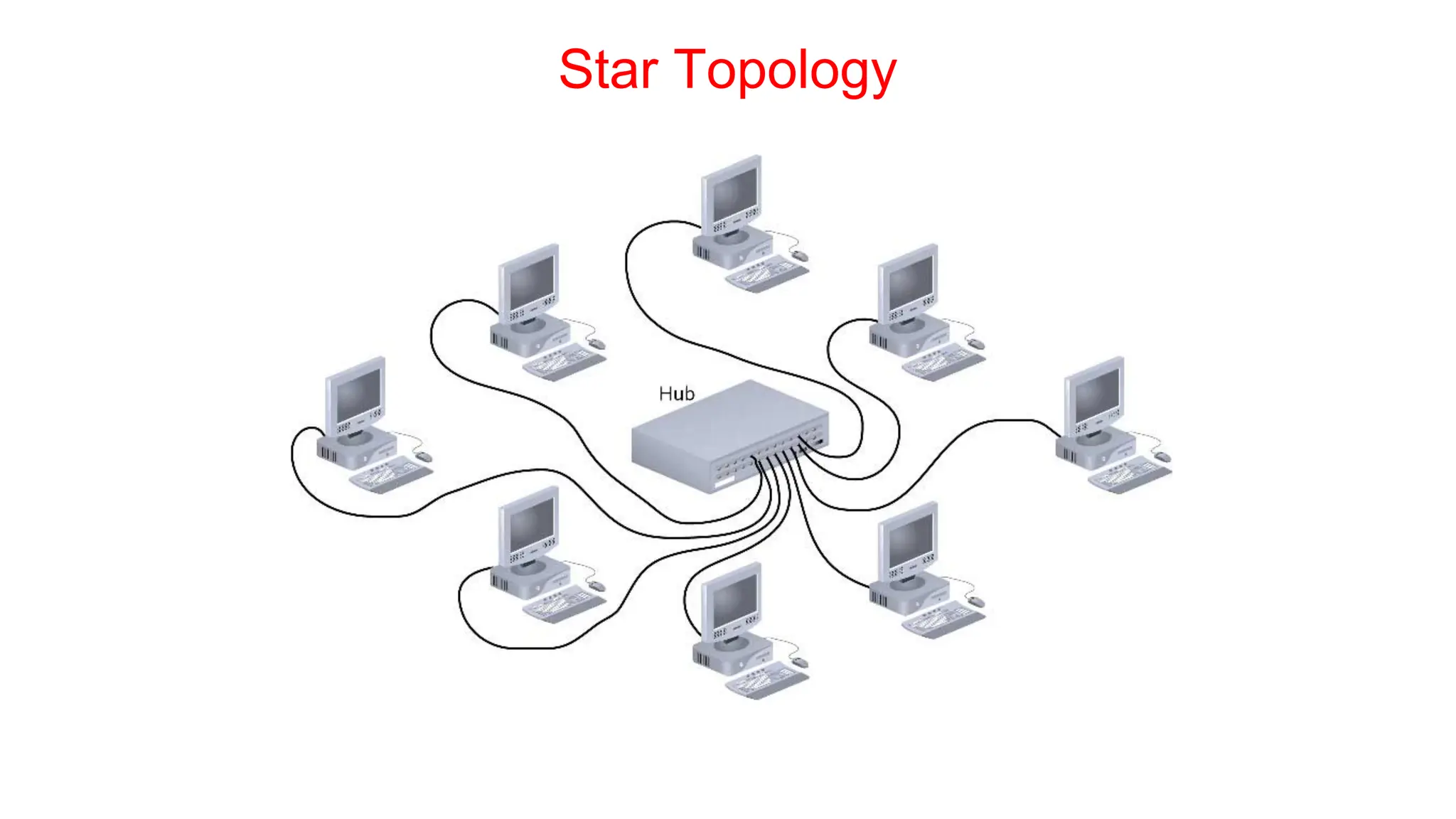
Star Topology
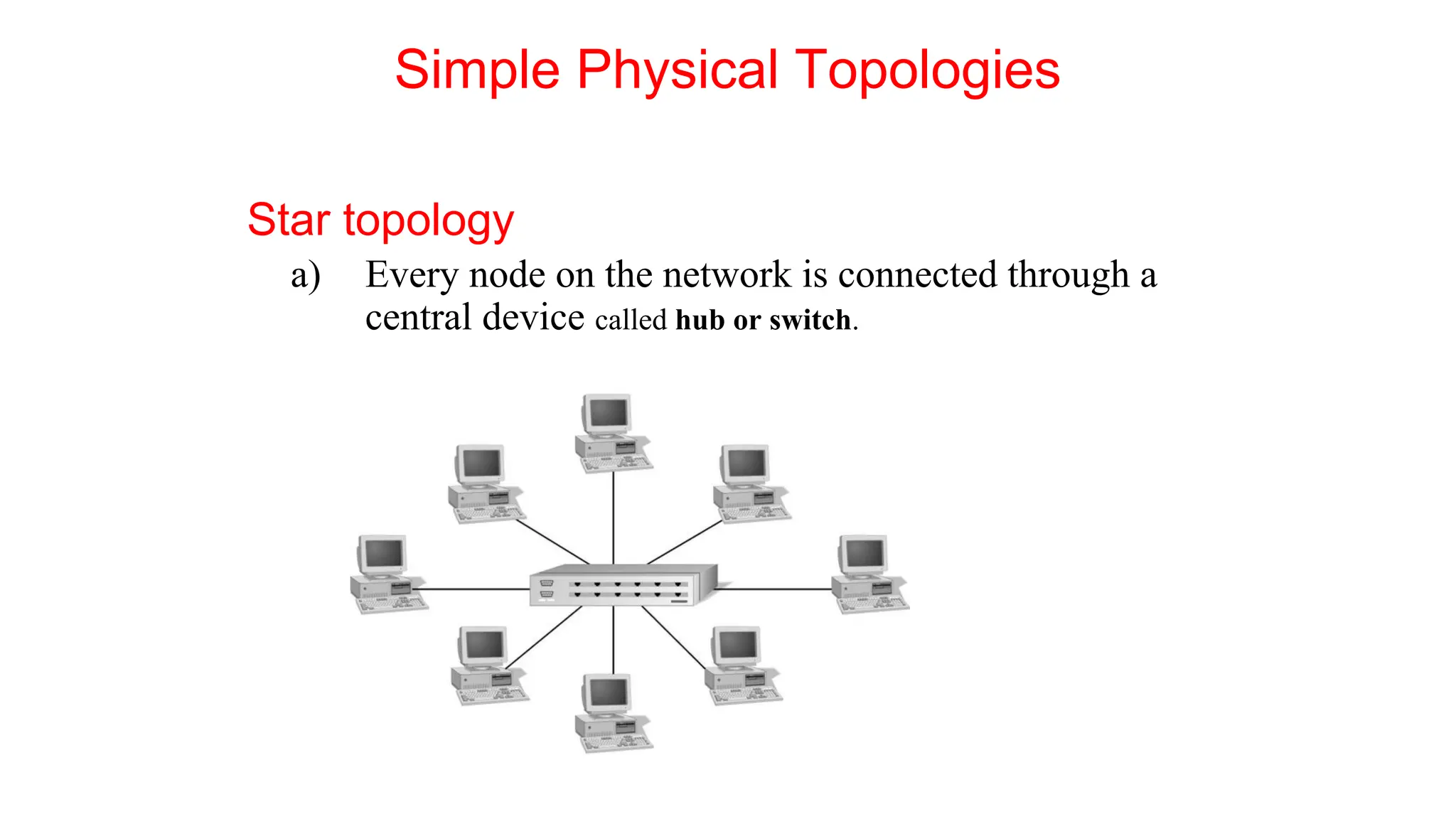
Star topology
a) Every node on the network is connected through a
central device called hub or switch.
Simple Physical Topologies
Star Topology (continued)
a) Any single cable connects only two devices
a) Cabling problems affect two nodes at most
b) Requires more cabling than ring or bus networks
a) More fault-tolerant
c) Easily moved, isolated, or interconnected with other networks
a) Scalable
d) Supports max of 1024 addressable nodes on logical network
Star Topology
Advantages Disadvantage
⚫ Good option for modern networks
⚫ Low startup costs
⚫ Easy to manage
⚫ Offers opportunities for
expansion
⚫ Most popular topology in use;
wide variety of equipment
available
a) Hub is a single point of failure
b) Requires more cable than the
bus
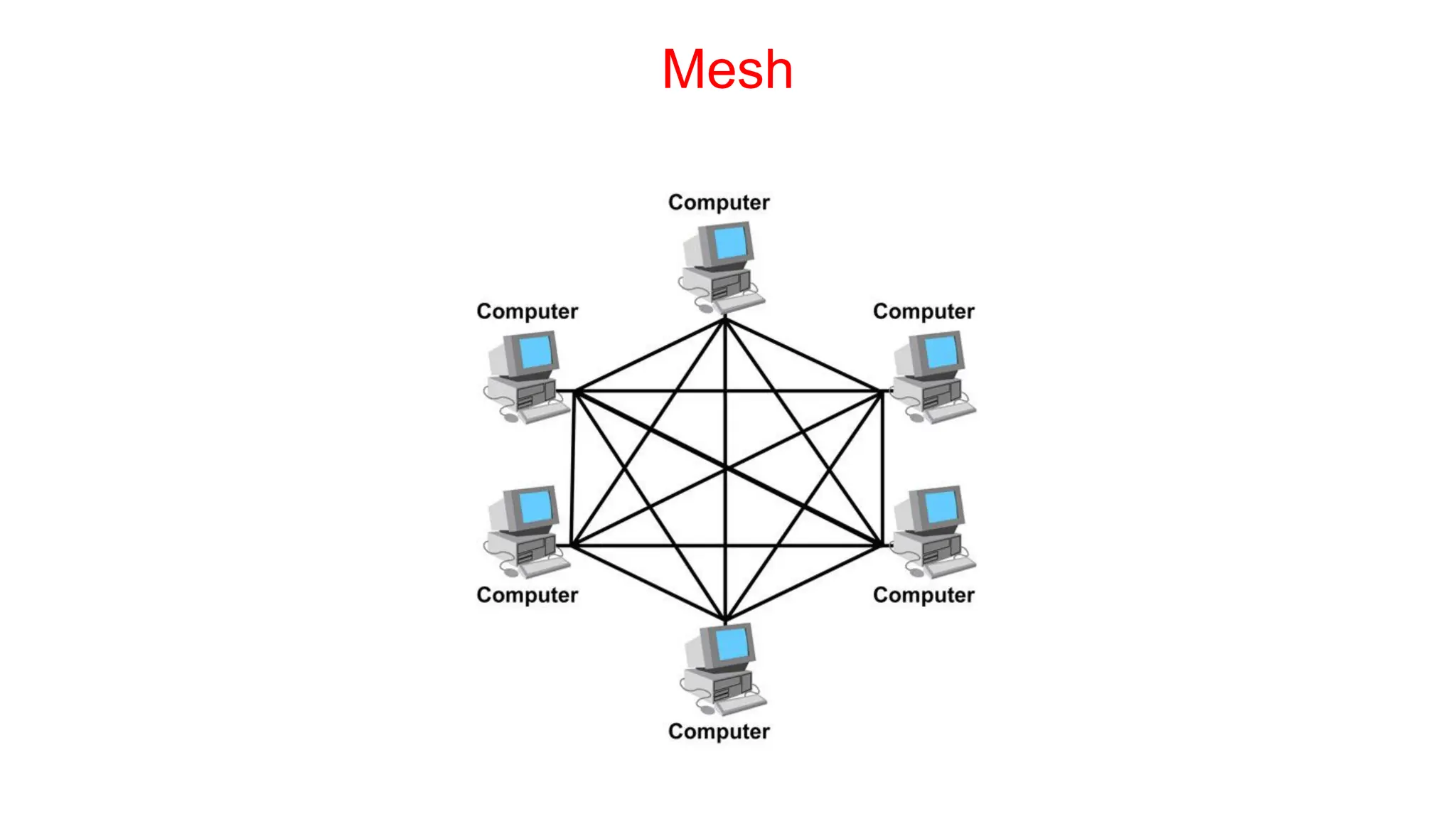
Mesh
Simple Physical Topologies
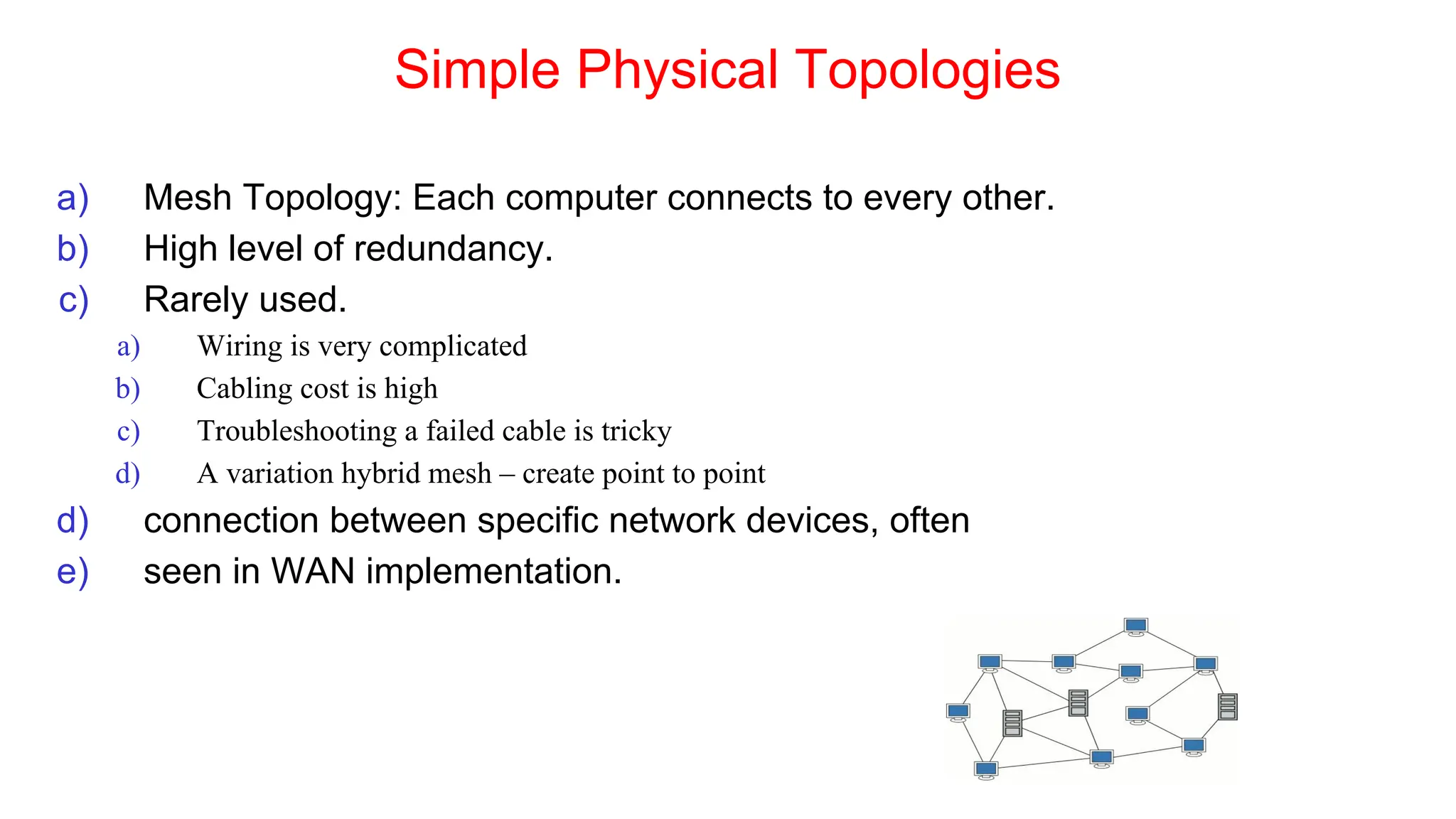
a) Mesh Topology: Each computer connects to every other.
b) High level of redundancy.
c) Rarely used.
a) Wiring is very complicated
b) Cabling cost is high
c) Troubleshooting a failed cable is tricky
d) A variation hybrid mesh – create point to point
d) connection between specific network devices, often
e) seen in WAN implementation.
Mesh Topology
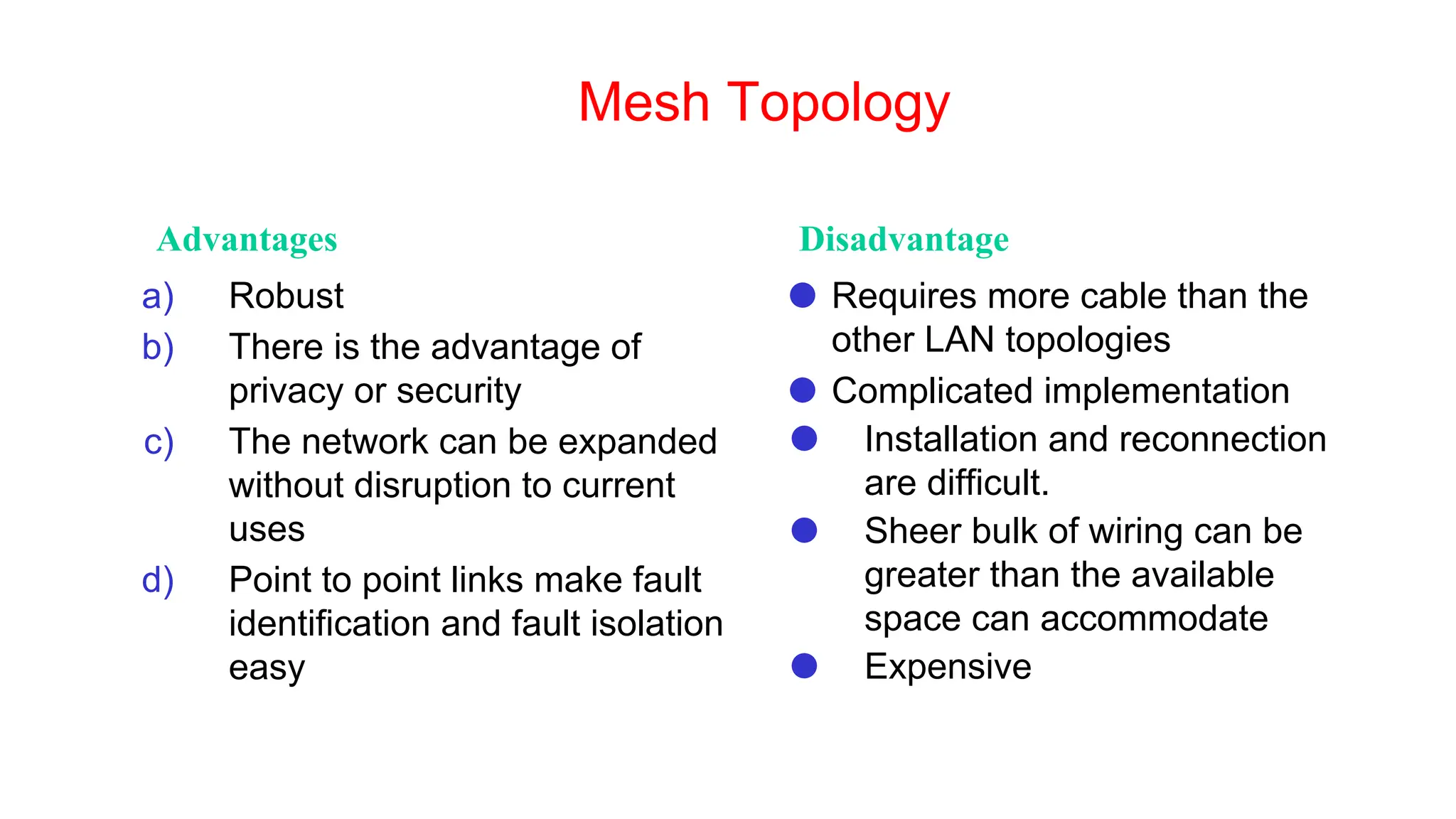
Advantages Disadvantage
a) Robust
b) There is the advantage of
privacy or security
c) The network can be expanded
without disruption to current
uses
d) Point to point links make fault
identification and fault isolation
easy
⚫ Requires more cable than the
other LAN topologies
⚫ Complicated implementation
⚫ Installation and reconnection
are difficult.
⚫ Sheer bulk of wiring can be
greater than the available
space can accommodate
⚫ Expensive
Hybrid Physical Topologies
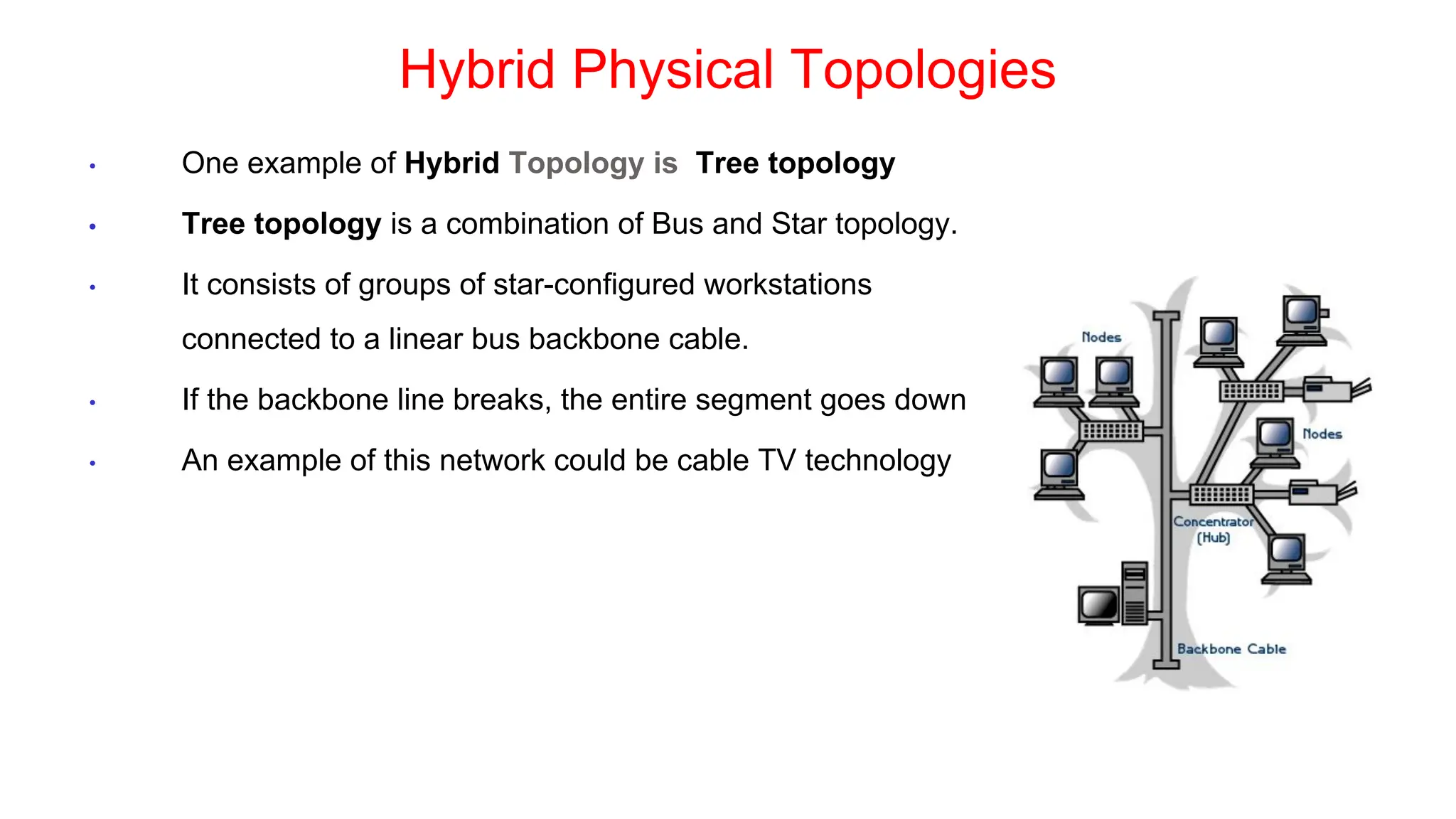
• One example of Hybrid Topology is Tree topology
• Tree topology is a combination of Bus and Star topology.
• It consists of groups of star-configured workstations
connected to a linear bus backbone cable.
• If the backbone line breaks, the entire segment goes down
• An example of this network could be cable TV technology
Choosing a Topology
a) BUS
a) network is small
b) network will not be frequently reconfigured
c) least expensive solution is required
d) network is not expected to grow much
b) STAR
a) it must be easy to add/remove PCs
b) it must be easy to troubleshoot
c) network is large
d) network is expected to grow in the future
c) RING
a) network must operate reasonably under heavy load
b) higher speed network is required
c) network will not be frequently reconfigured
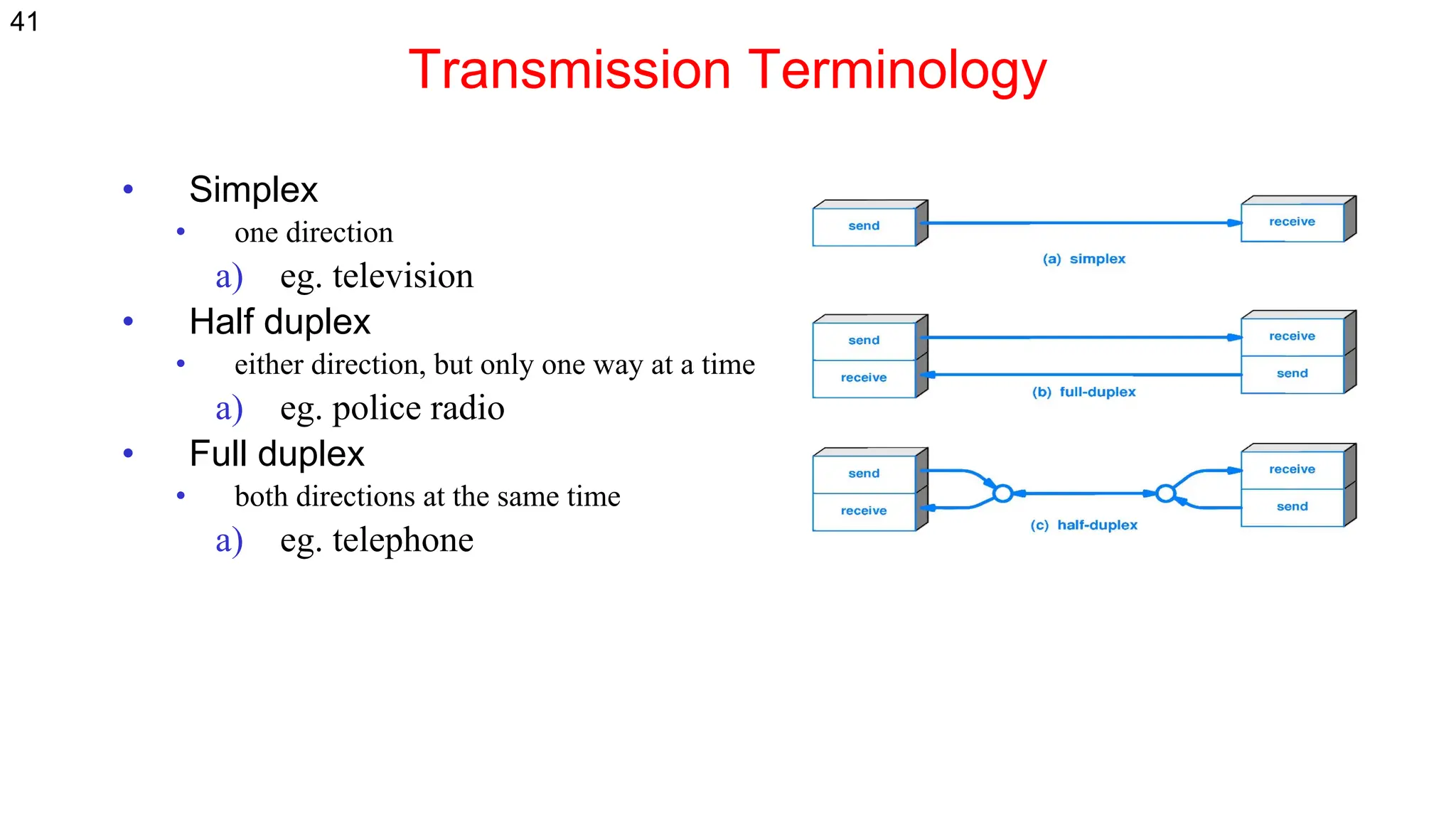
Transmission Terminology
• Simplex
• one direction
a) eg. television
• Half duplex
• either direction, but only one way at a time
a) eg. police radio
• Full duplex
• both directions at the same time
a) eg. telephone
41

Compueter Network Compueter Network physical layer

  • 1.
    G. V. VidyaLakshmi Department of CSE SRM University-AP Computer Networks Physical Layer
  • 2.
    Topics covered • Somebasic terminologies • Transmission medium • Network topologies • Transmission mode 2
  • 3.
    Time domain concepts •Analog signal Varies in a smooth way over time • Digital signal Maintains a constant level then changes to another constant level • Periodic signal Pattern repeated over time • Aperiodic signal Pattern not repeated over time 3
  • 4.
  • 5.
    Wavelength, Period andFrequency • Arrow indicates one cycle of the signal. • Period(T) : The time it takes to complete a cycle • Frequency : Number of cycles per second / Rate of change of signal • Frequency=1/T • Hertz (Hz) or cycles per second • T = 1/f • Wavelength : Distance occupied by one cycle. • Amplitude : Value of the signal at different instants of time. • Peak amplitude (A) : Maximum strength of signal • Phase (φ) Relative position in time 5
  • 6.
    Frequency Domain Concepts Signalsare made up of many frequencies Components are sine waves Fourier analysis can show that any signal is made up of component sine waves Can plot frequency domain functions 6
  • 7.
    Digital Data • Asgenerated by computers etc. • Achievable Bandwidth depend on data rate. 7
  • 8.
  • 9.
    Transmission Terminology • Datatransmission occurs between a transmitter & receiver via some medium • Guided medium • eg. twisted pair, coaxial cable, optical fiber • Unguided / wireless medium • eg. air, water, vacuum 9
  • 10.
    Transmission Terminology • Directlink • no intermediate devices • Point-to-point • direct link • only 2 devices share link (Telephone Communication, Backbone optical Networks) • Multi-point • more than two devices share the link (Ethernet) 10
  • 11.
    Transmission media (2) a)Twisted pair (2) a) Bandwidth depends on thickness and distance Need repeater for long distances a) Category 3 and 5 - with 5 having more twists and better insulation. b) Popular by UTP (Unshielded Twisted Pair) Cat3 Cat 5 11
  • 12.
    Transmission media (2) •UTP = Unshielded Twisted Pair - Cat 3: Home telephone lines - Cat 5: Fast Ethernet (100 Mbps) - Cat 5e: Gigabit Ethernet (1 Gbps) - Cat 6: 10-Gigabit Ethernet (10 Gps) up to 100 m - Cat 6A: Better quality Cat 6 - Cat 7: Includes shielding (not in common use) 12
  • 13.
    Transmission media a) Magneticmedia a) Tapes, diskettes b) Supports very high data rate (high bandwidth) c) A 8 mm tape = 7 GB A 50*50*50 Cm box = 1000 tapes =7000 GB 7000GB/24 Hrs= 648 Mbps 7000GB/1Hr=15Gbps a) Sometimes it's cheaper and faster to load a box of tapes in your car! b) Problem: Delay ! c) Twisted pair (1) a) Simply two wires twisted together – thickness=1m b) The twisting cuts down on electrical interference. c) Heavily used in the phone system d) Until some Kilometers/ Some Mbps e) For Analog and Digital 13
  • 14.
    Transmission Media (3) •Baseband Coaxial cable a) Used for digital transmissions (called baseband) b) Works only with half-duplex. c) Mostly used in LAN(steady drop after 0.62 miles) d) Data rates is 10 Mbps for 1 Km distance. e) Low cost(No need modems) and easy to use. f) Now being replaced by fiber. 14
  • 15.
    Transmission Media (3) 15 •Broadband Coaxial cable a) Used for analog transmissions (called broadband.) b) Use 300 MHz for long distances using Frequency Division Multiplexing(FDM) c) Operates at distances up to 100 km (metropolitan area!) d) Interfaces must convert digital signals to analog and vice versa. e) Designed for long distances - can use amplifiers.
  • 16.
    Transmission Media (4) •Fiber Optic (1) a) Transmission of light through fiber. b) Fiber medium: Current technology carries light pulses for tremendous distances (e.g., 100s of kilometres) with virtually no signal loss. c) Light source: typically a Light Emitting Diode (LED) or laser diode. Running current through the material generates a pulse of light. d) A photo diode light detector, which converts light pulses into electrical signals. 16
  • 17.
    Transmission Media (4) •Fiber Optic (1) Including 3 components: a) Light source: Pulse of light=1, absence of light=0 b) Transition medium: an ultra-thin fiber of glass c) detector: generate an electrical pulse when light falls on it Light source (LED, laser) Photodetector Light trapped by total internal reflection 17
  • 18.
    Transmission Media (4) •Advantages of Fiber optics: • Very high data rate(response time=1ns, data rate = 1 Gbps ). • Very low error rate(almost negligible). • Much thinner than existing copper wires • Not susceptible to electrical interference (lightning) or corrosion (rust). • Greater repeater distance than coax. Copper Fiber Lower Higher Bandwidth 5 Km 30 KM Distance between repeaters High Low Interference Low High Cost Bi-directional Uni-directional Flow Comparison of fiber optic and copper wire 18
  • 19.
    Wireless transmission • Radiotransmission • Microwave Transmission • Lightwave Transmission • Satellites 19
  • 20.
    Electromagnetic Spectrum (1) Differentbands have different uses: − Microwave: LANs and 3G/4G; Microwave Networking focus 20
  • 21.
    Electromagnetic Spectrum (2) Tomanage interference, spectrum is carefully divided, and its use regulated and licensed, e.g., sold at auction. Source: NTIA Office of Spectrum Management, 2003 3 GHz 30 GHz 3 GHz 300 MHz WiFi (ISM bands) Part of the US frequency allocations 21
  • 22.
    Electromagnetic Spectrum (3) Fortunately,there are also unlicensed (“ISM”) bands: −Free for use at low power; devices manage interference −Widely used for networking; WiFi, Bluetooth, etc. 802.11 b/g/n 802.11a/g/n/a c 22
  • 23.
    Simple Physical Topologies a)Physical topology: physical layout of nodes on a network b) Four fundamental shapes: a) Bus b) Ring c) Star d) Mesh c) May create hybrid topologies d) Topology integral to type of network, cabling infrastructure, and transmission media used.
  • 24.
    Why we needa topology Choosing one topology over another can impact : a) type of equipment the network needs b) capabilities of the equipment c) network’s growth d) way a network is managed
  • 25.
  • 26.
    Simple Physical Topologies a)A Bus topology consists of a single cable—called a backbone— connecting all nodes on a network without intervening connectivity devices
  • 27.
    Bus (continued) a) Devicesshare responsibility for getting data from one point to another b) Terminators stop signals after reaching end of wire a) Prevent signal bounce c) Inexpensive, not very scalable d) Difficult to troubleshoot, not fault-tolerant
  • 28.
    Bus Advantages Disadvantage a) Workswell for small networks b) Easy to install c) Relatively inexpensive to implement a) Management costs can be high b) Network disruption when computers are added or removed c) A break in the cable will prevent all systems from accessing the network. d) Difficult to troubleshoot
  • 29.
  • 30.
    Simple Physical Topologies b)Ring topology : Each node is connected to the two nearest nodes so the entire network forms a circle. ⚫ One method for passing data on ring networks is token passing ⚫ Data travels around the network ⚫ Traffic flows in one direction ⚫ Slow performance ⚫ One workstation goes down; whole network goes down ⚫ Network is highly dependent
  • 31.
    Ring Topology Advantages Disadvantage a)Cable faults are easily located, making troubleshooting easier b) Ring networks are moderately easy to install ⚫ Expensive ⚫ Requires more cable and network equipment at the start ⚫ Expansion to the network can cause network disruption ⚫ A single break in the cable can disrupt the entire network
  • 32.
  • 33.
    Star topology a) Everynode on the network is connected through a central device called hub or switch. Simple Physical Topologies
  • 34.
    Star Topology (continued) a)Any single cable connects only two devices a) Cabling problems affect two nodes at most b) Requires more cabling than ring or bus networks a) More fault-tolerant c) Easily moved, isolated, or interconnected with other networks a) Scalable d) Supports max of 1024 addressable nodes on logical network
  • 35.
    Star Topology Advantages Disadvantage ⚫Good option for modern networks ⚫ Low startup costs ⚫ Easy to manage ⚫ Offers opportunities for expansion ⚫ Most popular topology in use; wide variety of equipment available a) Hub is a single point of failure b) Requires more cable than the bus
  • 36.
  • 37.
    Simple Physical Topologies a)Mesh Topology: Each computer connects to every other. b) High level of redundancy. c) Rarely used. a) Wiring is very complicated b) Cabling cost is high c) Troubleshooting a failed cable is tricky d) A variation hybrid mesh – create point to point d) connection between specific network devices, often e) seen in WAN implementation.
  • 38.
    Mesh Topology Advantages Disadvantage a)Robust b) There is the advantage of privacy or security c) The network can be expanded without disruption to current uses d) Point to point links make fault identification and fault isolation easy ⚫ Requires more cable than the other LAN topologies ⚫ Complicated implementation ⚫ Installation and reconnection are difficult. ⚫ Sheer bulk of wiring can be greater than the available space can accommodate ⚫ Expensive
  • 39.
    Hybrid Physical Topologies •One example of Hybrid Topology is Tree topology • Tree topology is a combination of Bus and Star topology. • It consists of groups of star-configured workstations connected to a linear bus backbone cable. • If the backbone line breaks, the entire segment goes down • An example of this network could be cable TV technology
  • 40.
    Choosing a Topology a)BUS a) network is small b) network will not be frequently reconfigured c) least expensive solution is required d) network is not expected to grow much b) STAR a) it must be easy to add/remove PCs b) it must be easy to troubleshoot c) network is large d) network is expected to grow in the future c) RING a) network must operate reasonably under heavy load b) higher speed network is required c) network will not be frequently reconfigured
  • 41.
    Transmission Terminology • Simplex •one direction a) eg. television • Half duplex • either direction, but only one way at a time a) eg. police radio • Full duplex • both directions at the same time a) eg. telephone 41