PHYSICAL LAYER
Data Flow
• Data communications are the exchange of data between two devices via some form
of transmission medium such as a wire cable.
MODES OF COMMUNICATION
• Communication between two devices can be
•Simplex
•half-duplex
•full-duplex
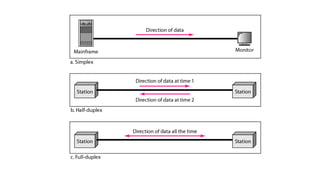
 Simplex
•In simplex mode, the communication is unidirectional, as on a one-way street.
•Only one of the two devices on a link can transmit; the other can only receive
•Keyboards and traditional monitors are examples of simplex devices.
• The simplex mode can use the entire capacity of the channel to send data in one
direction.
Half-Duplex
• In half-duplex mode, each station can both transmit and receive, but not at the
same time.
• When one device is sending, the other can only receive, and vice versa
• The half-duplex mode is like a one-lane road with traffic allowed in both
directions.
• Walkie-talkies and CB (citizens band) radios are both half-duplex systems.
• The half-duplex mode is used in cases where there is no need for communication
in both directions at the same time; the entire capacity of the channel can be
utilized for each direction.
Full-Duplex
• In full-duplex mode (also called duplex), both stations can transmit and receive
simultaneously
• In full-duplex mode, signals going in one direction share the capacity of the link:
with signals going in the other direction.
• This sharing can occur in two ways:
Either the link must contain two physically separate transmission paths, one
for sending and the other for receiving;
 The capacity of the channel is divided between signals traveling in both
directions.
• One common example of full-duplex communication is the telephone network
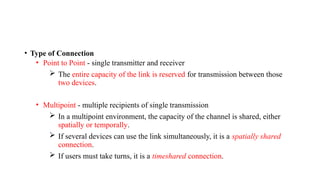
• Type of Connection
• Point to Point - single transmitter and receiver
 The entire capacity of the link is reserved for transmission between those
two devices.
• Multipoint - multiple recipients of single transmission
 In a multipoint environment, the capacity of the channel is shared, either
spatially or temporally.
 If several devices can use the link simultaneously, it is a spatially shared
connection.
 If users must take turns, it is a timeshared connection.
Figure - Types of connections: point-to-point and multipoint
Physical Topology
•Connection of devices
• The term physical topology refers to the way in which a network is laid out
physically.
•Two or more devices connect to a link; two or more links form a topology.
• The topology of a network is the geometric representation of the relationship of
all the links and linking devices (usually called nodes) to one another.
•Type of transmission - unicast, mulitcast, broadcast
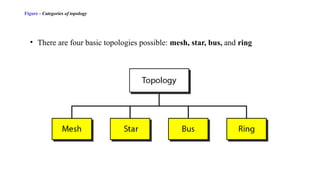
Figure - Categories of topology
• There are four basic topologies possible: mesh, star, bus, and ring
Mesh Topology
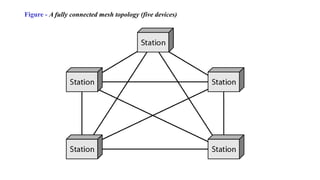
• In a mesh topology, every device has a dedicated point-to-point link to every other device.
• The term dedicated means that the link carries traffic only between the two devices it connects.
• To find the number of physical links in a fully connected mesh network with n nodes, we first
consider that each node must be connected to every other node.
• Node 1 must be connected to n - I nodes, node 2 must be connected to n – 1 nodes, and finally
node n must be connected to n - 1 nodes.
• We need n(n - 1) physical links.
• However, if each physical link allows communication in both directions (duplex mode), we can
divide the number of links by 2.
• In other words, we can say that in a mesh topology, we need n(n -1) /2 duplex-mode links.
Figure - A fully connected mesh topology (five devices)
• Advantages
The use of dedicated links guarantees that each connection can carry its own
data load, thus eliminating the traffic problems that can occur when links must
be shared by multiple devices.
Mesh topology is robust. If one link becomes unusable, it does not incapacitate
the entire system.
Privacy or security-When every message travels along a dedicated line, only
the intended recipient sees it.
Point-to-point links make fault identification and fault isolation easy.
• Disadvantages
First, because every device must be connected to every other device,
installation and reconnection are difficult.
 Second, the sheer bulk of the wiring can be greater than the available
space (in walls, ceilings, or floors) can accommodate.
Finally, the hardware required to connect each link (I/O ports and cable) can
be prohibitively expensive.
• Example
•Connection of telephone regional offices in which each regional office needs to
be connected to every other regional office
Star Topology
In a star topology, each device has a dedicated point-to-point link only to a
central controller, usually called a hub.
The devices are not directly linked to one another.
Unlike a mesh topology, a star topology does not allow direct traffic between
devices.
The controller acts as an exchange: If one device wants to send data to another, it
sends the data to the controller, which then relays the data to the other connected
device
Figure - A star topology connecting four stations
Advantages
A star topology is less expensive than a mesh topology.
 In a star, each device needs only one link and one I/O port to connect it to any
number of others.
This factor also makes it easy to install and reconfigure. Far less cabling needs
to be housed, and additions, moves, and deletions involve only one connection:
between that device and the hub.
Other advantages include robustness. If one link fails, only that link is affected.
All other links remain active.
This factor also lends itself to easy fault identification and fault isolation. As
long as the hub is working, it can be used to monitor link problems and bypass
defective links.
Disadvantages
• One big disadvantage of a star topology is the dependency of the whole topology
on one single point, the hub. If the hub goes down, the whole system is dead.
• Although a star requires far less cable than a mesh, each node must be linked to a
central hub. For this reason, often more cabling is required in a star than in some
other topologies (such as ring or bus).
Example
• The star topology is used in local-area networks (LANs)
• High-speed LANs often use a star topology with a central hub.
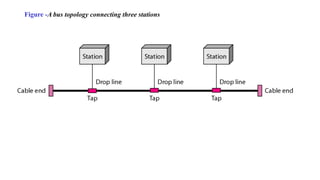
Bus Topology
• A bus topology, is multipoint.
• One long cable acts as a backbone to link all the devices in a network
• Nodes are connected to the bus cable by drop lines and taps.
• A drop line is a connection running between the device and the main cable.
• A tap is a connector that either splices into the main cable or punctures the
sheathing of a cable to create a contact with the metallic core.
• As a signal travels along the backbone, some of its energy is transformed into
heat.
• Therefore, it becomes weaker and weaker as it travels farther and farther.
• For this reason there is a limit on the number of taps a bus can support and on
the distance between those taps.
Figure -A bus topology connecting three stations
Advantages
• Advantages of a bus topology include ease of installation.
• Backbone cable can be laid along the most efficient path, then connected to the nodes
by drop lines of various lengths. In this way, a bus uses less cabling than mesh or
star topologies.
• In a star, for example, four network devices in the same room require four lengths of
cable reaching all the way to the hub. In a bus, this redundancy is eliminated. Only
the backbone cable stretches through the entire facility.
• Each drop line has to reach only as far as the nearest point on the backbone.
Disadvantages
• Disadvantages include difficult reconnection and fault isolation.
• A bus is usually designed to be optimally efficient at installation. It can therefore
be difficult to add new devices.
• Signal reflection at the taps can cause degradation in quality. This degradation
can be controlled by limiting the number and spacing of devices connected to a
given length of cable.
• Adding new devices may therefore require modification or replacement of the
backbone.
• In addition, a fault or break in the bus cable stops all transmission, even
between devices on the same side of the problem. The damaged area reflects
signals back in the direction of origin, creating noise in both directions.
Example
• Bus topology was the one of the first topologies used in the design of early local
area networks. Ethernet LANs can use a bus topology, but they are less popular
now
Ring Topology
• In a ring topology, each device has a dedicated point-to-point connection with
only the two devices on either side of it.
• A signal is passed along the ring in one direction, from device to device, until it
reaches its destination.
• Each device in the ring incorporates a repeater.
• When a device receives a signal intended for another device, its repeater
regenerates the bits and passes them along.
Figure -A ring topology connecting six stations
Advantages
• A ring is relatively easy to install and reconfigure. Each device is linked to only
its immediate neighbors (either physically or logically).
• To add or delete a device requires changing only two connections. The only
constraints are media and traffic considerations (maximum ring length and
number of devices).
• In addition, fault isolation is simplified.
• Generally in a ring, a signal is circulating at all times. If one device does not
receive a signal within a specified period, it can issue an alarm. The alarm alerts
the network operator to the problem and its location
Disadvantage
• Unidirectional traffic can be a disadvantage.
• In a simple ring, a break in the ring (such as a disabled station) can disable
the entire network. This weakness can be solved by using a dual ring or a
switch capable of closing off the break.
Example
• Ring topology was prevalent when IBM introduced its local-area network Token
Ring. Today, the need for higher-speed LANs has made this topology less popular.
Hybrid Topology
• A network can be hybrid.
• Hybrid topology is an integration of two or more different topologies to form a
resultant topology which has many advantages (as well as disadvantages) of all
the constituent basic topologies rather than having characteristics of one specific
topology.
Figure - A hybrid topology: a star backbone with three bus networks
Repeaters
• A repeater is a device that operates only in the physical layer.
• Signals that carry information within a network can travel a fixed distance before
attenuation endangers the integrity of the data.
• A repeater receives a signal and, before it becomes too weak or corrupted,
regenerates the original bit pattern.
• The repeater then sends the refreshed signal.
• A repeater can extend the physical length of a LAN
• A repeater does not actually connect two LANs; it connects two segments of the
same LAN. The segments connected are still part of one single LAN.
• A repeater is not a device that can connect two LANs of different protocols.
• It is tempting to compare a repeater to an amplifier, but the comparison is
inaccurate.
• An amplifier cannot discriminate between the intended signal and noise; it
amplifies equally everything fed into it.
• A repeater does not amplify the signal; it regenerates the signal. When it receives
a weakened or corrupted signal, it creates a copy, bit for bit, at the original
strength.
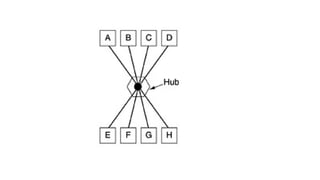
Hub
• Hubs are networking devices operating at a physical layer of the OSI model that are used
to connect multiple devices in a network.
• A network hub is a node that broadcasts data to every computer or Ethernet-based
device connected to it.
• A hub is less sophisticated than a switch, the latter of which can isolate data transmissions
to specific devices.
• A hub has a number of input lines that it joins electrically.
• Frames arriving on any of the lines are sent out on all the others.
• If two frames arrive at the same time, they will collide, just as on a coaxial cable.
• In other words, the entire hub forms a single collision domain.
• All the lines coming into a hub must operate at the same speed.
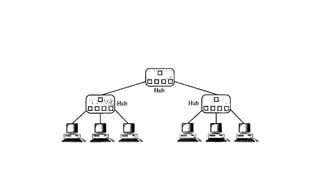
Active Hubs
• An active hub is actually a multipart repeater.
• It is normally used to create connections between stations in a physical star
topology.
• Ethernet implementations (lOBase-T, for example).
• Hubs can also be used to create multiple levels of hierarchy
Performance
• One important issue in networking is the performance of the network—how good
is it?
 Bandwidth - capacity of the system
 Throughput - no. of bits that can be pushed through
 Latency (Delay) - delay incurred by a bit from start to finish
 Bandwidth-Delay Product
Bandwidth
• Network bandwidth is a measurement indicating the maximum
capacity of a wired or wireless communications link to transmit data
over a network connection in a given amount of time.
• The term can be used in two different contexts with two different
measuring values: bandwidth in hertz and bandwidth in bits per
second.
Bandwidth in Hertz
• Bandwidth in hertz is the range of frequencies contained in a
composite signal or the range of frequencies a channel can pass.
• For example, we can say the bandwidth of a subscriber telephone line
is 4 kHz.
Bandwidth in Bits per Seconds
• The term bandwidth can also refer to the number of bits per second
that a channel, a link, or even a network can transmit.
• For example, one can say the bandwidth of a Fast Ethernet network (or
the links in this network) is a maximum of 100 Mbps. This means that
this network can send 100 Mbps.
Throughput
• The throughput is a measure of how fast we can actually send data through a network.
• Although, at first glance, bandwidth in bits per second and throughput seem the same,
they are different.
• A link may have a bandwidth of B bps, but we can only send T bps through this link
with T always less than B.
• In other words, the bandwidth is a potential measurement of a link; the throughput is
an actual measurement of how fast we can send data.
• For example, we may have a link with a bandwidth of 1 Mbps, but the devices
connected to the end of the link may handle only 200 kbps. This means that we cannot
send more than 200 kbps through this link.
3.40
A network with bandwidth of 10 Mbps can pass only an average of 12,000
frames per minute with each frame carrying an average of 10,000 bits.
What is the throughput of this network?
Solution
We can calculate the throughput as
Example
The throughput is almost one-fifth of the bandwidth in this case.
Latency (Delay)
• The latency or delay defines how long it takes for an entire message to
completely arrive at the destination from the time the first bit is sent out from
the source.
• We can say that latency is made of four components: propagation time,
transmission time, queuing time and processing delay.
Latency =propagation time +transmission time +queuing time + processing delay
Propagation Time
• Propagation time measures the time required for a bit to travel from the source to the
destination. The propagation time is calculated by dividing the distance by the propagation
speed.
• Propagation time = Distance
Propagation speed
• Propagation speed - speed at which a bit travels through the medium from source to
destination.
Transmission Time
• The time required for transmission of a message depends on the size of the message and
the bandwidth of the channel.
• Transmission time = Message size
Bandwidth
• Transmission speed - the speed at which all the bits in a message arrive at the destination.
(difference in arrival time of first and last bit)
3.43
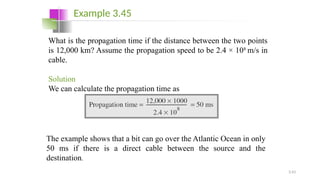
What is the propagation time if the distance between the two points
is 12,000 km? Assume the propagation speed to be 2.4 × 10⁸
m/s in
cable.
Solution
We can calculate the propagation time as
Example 3.45
The example shows that a bit can go over the Atlantic Ocean in only
50 ms if there is a direct cable between the source and the
destination.
Queuing Time
• The third component in latency is the queuing time, the time needed for each
intermediate or end device to hold the message before it can be processed.
• The queuing time is not a fixed factor; it changes with the load imposed on the
network.
• When there is heavy traffic on the network, the queuing time increases.
• An intermediate device, such as a router, queues the arrived messages and
processes them one by one. If there are many messages, each message will have to
wait.
3.45
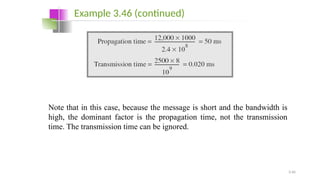
What are the propagation time and the transmission time for a 2.5-
kbyte message (an e-mail) if the bandwidth of the network is 1
Gbps? Assume that the distance between the sender and the receiver
is 12,000 km and that light travels at 2.4 × 10⁸
m/s.
Solution
We can calculate the propagation and transmission time as shown
on the next slide:
Example 3.46
3.46
Note that in this case, because the message is short and the bandwidth is
high, the dominant factor is the propagation time, not the transmission
time. The transmission time can be ignored.
Example 3.46 (continued)
3.47
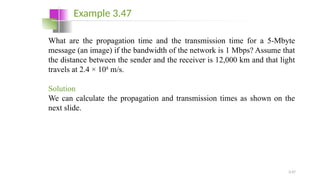
What are the propagation time and the transmission time for a 5-Mbyte
message (an image) if the bandwidth of the network is 1 Mbps? Assume that
the distance between the sender and the receiver is 12,000 km and that light
travels at 2.4 × 10⁸
m/s.
Solution
We can calculate the propagation and transmission times as shown on the
next slide.
Example 3.47
3.48
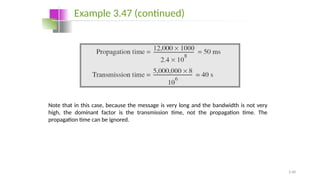
Note that in this case, because the message is very long and the bandwidth is not very
high, the dominant factor is the transmission time, not the propagation time. The
propagation time can be ignored.
Example 3.47 (continued)
Bandwidth-Delay Product
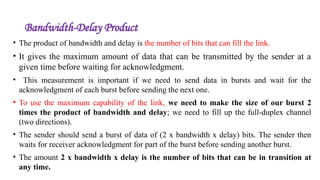
• The product of bandwidth and delay is the number of bits that can fill the link.
• It gives the maximum amount of data that can be transmitted by the sender at a
given time before waiting for acknowledgment.
• This measurement is important if we need to send data in bursts and wait for the
acknowledgment of each burst before sending the next one.
• To use the maximum capability of the link, we need to make the size of our burst 2
times the product of bandwidth and delay; we need to fill up the full-duplex channel
(two directions).
• The sender should send a burst of data of (2 x bandwidth x delay) bits. The sender then
waits for receiver acknowledgment for part of the burst before sending another burst.
• The amount 2 x bandwidth x delay is the number of bits that can be in transition at
any time.
3.50
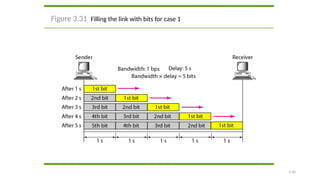
Figure 3.31 Filling the link with bits for case 1
3.52
The bandwidth-delay product defines the
number of bits that can fill the link.
Note
3.53
We can think about the link between two points as a pipe. The cross
section of the pipe represents the bandwidth, and the length of the
pipe represents the delay. We can say the volume of the pipe
defines the bandwidth-delay product, as shown in Figure 3.33.
Example 3.48
3.54
Figure 3.33 Concept of bandwidth-delay product
SIGNAL ENCODING
Digital Transmission
Data can be represented either in analog or digital form. The computers
used the digital form to store the information. Therefore, the data
needs to be converted in digital form so that it can be used by a
computer.
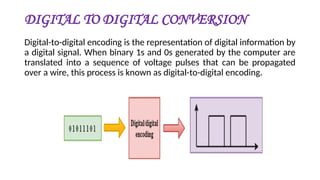
DIGITAL TO DIGITAL CONVERSION
Digital-to-digital encoding is the representation of digital information by
a digital signal. When binary 1s and 0s generated by the computer are
translated into a sequence of voltage pulses that can be propagated
over a wire, this process is known as digital-to-digital encoding.
DIGITAL TO DIGITAL CONVERSION
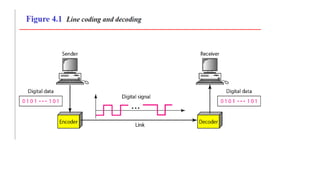
Line Coding
• Line coding is the process of converting digital data to digital signals.
• Data, in the form of text, numbers, graphical images, audio, or video, are stored in
computer memory as sequences of bits .
• Line coding converts a sequence of bits to a digital signal.
• At the sender, digital data are encoded into a digital signal; at the receiver, the digital
data are recreated by decoding the digital signal.
Line Coding Schemes
Unipolar Scheme
• In a unipolar scheme, all the signal levels are on one side of the time axis, either
above or below.
• NRZ (Non-Return-to-Zero) -Traditionally, a unipolar scheme was designed as a
non-return-to-zero (NRZ) scheme in which the positive voltage defines bit I and
the zero voltage defines bit O.
• It is called NRZ because the signal does not return to zero at the middle of the bit.
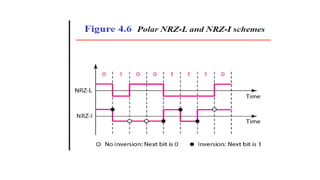
Polar Schemes
• In polar schemes, the voltages are on the both sides of the time axis. For
example, the voltage level for 0 can be positive and the voltage level for I can be
negative.
• In polar NRZ encoding, we use two levels of voltage amplitude.
• We can have two versions of polar NRZ: NRZ-Land NRZ-I
• In the first variation, NRZ-L (NRZ-Level), the level of the voltage determines
the value of the bit.
• In the second variation, NRZ-I (NRZ-Invert), the change or lack of change in
the level of the voltage determines the value of the bit. If there is no change, the
bit is 0; if there is a change, the bit is 1.
Return to Zero (RZ)
• The main problem with NRZ encoding occurs when the sender and receiver
clocks are not synchronized.
• The receiver does not know when one bit has ended and the next bit is starting.
• One solution is the return-to-zero (RZ) scheme, which uses three values: positive,
negative, and zero.
• In RZ, the signal changes not between bits but during the bit.
• The signal goes to 0 in the middle of each bit. It remains there until the beginning
of the next bit.
• The main disadvantage of RZ encoding is that it requires two signal changes to
encode a bit and therefore occupies greater bandwidth.
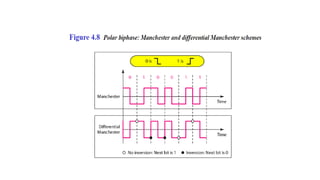
Biphase: Manchester and Differential Manchester
Manchester Encoding Scheme
• The idea of RZ (transition at the middle of the bit) and the idea of NRZ-L are
combined into the Manchester scheme.
• In Manchester encoding, the duration of the bit is divided into two halves.
• The voltage remains at one level during the first half and moves to the other level
in the second half.
• The transition at the middle of the bit provides synchronization.
Differential Manchester Encoding Scheme
• It combines the ideas of RZ and NRZ-I.
• There is always a transition at the middle of the bit, but the bit values are
determined at the beginning of the bit.
• If the next bit is 0, there is a transition; if the next bit is 1, there is none.
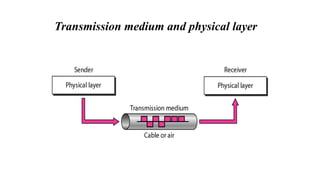
Transmission medium and physical layer
Classes of transmission media
GUIDED MEDIA
Guided media, which are those that provide a conduit
from one device to another, include twisted-pair cable,
coaxial cable, and fiber-optic cable. Twisted pair and
coaxial cable use metallic conductors that accept and
transport signals in the form of electric current.
Optical fiber is a cable that accepts and transports
signals in the form of light
Twisted-pair cable
A twisted pair consists of two conductors each with its
own plastic insulation, twisted together
UTP and STP cables
The most common twisted pair cable used in communications is
referred to as Unshielded Twisted Pair(UTP).
Shielded Twisted Pair (STP) cable has a metal foil or mesh covering that
encases each pair of insulated conductors. This improves the quality
of cable by preventing the penetration of noise or crosstalk
UTP and STP cables
UTP connector
The most common UTP connector is RJ45 (Registered Jack)
UTP Applications
-Used in telephone lines to provide voice and data
-Used DSL lines (High speed data connection)
-Local area networks
Coaxial cable
Coaxial cable carries signals of higher frequency ranges
than those in twisted pair cable.
Coaxial cable Standards
Coaxial cables are categorized by Radio Government
(RG) ratings
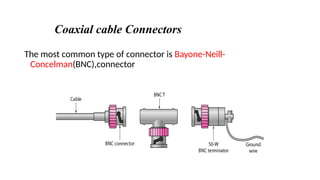
Coaxial cable Connectors
The most common type of connector is Bayone-Neill-
Concelman(BNC),connector
Coaxial cable Applications
-Digital telephone network
-Cable TV
-Ethernet LAN
Optical fiber
A fiber optic cable is made of glass or plastic and transmits signals in
the form of light.
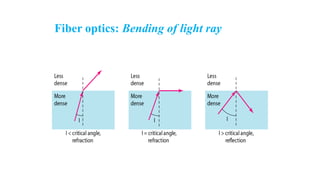
If the angle of incidence I is less than the critical angle, the ray refracts
and move closer to the surface. If the angle of incidence is equal to
the critical angle, the light bends along the surface. If the angle is
greater than the critical angle, the ray reflects and travels again in the
denser substance.
Fiber optics: Bending of light ray
Optical fiber
Propagation modes
Fiber types
Optical fiber are defined by the ratio of the diameter of
their core to the diameter of their cladding, both
expressed in micrometers
Fiber construction
Fiber-optic cable connectors
The subscriber channel(SC) connector is used for cable
TV. The straight tip(ST) connector is used for
connecting cable to networking devices.MT-RJ is a
connector that is the same size as RJ45
Advantages and Disadvantages of Optical fiber
Advantages
-Higher bandwidth
-less signal attenuation
-Immunity to electromagnetic interference
-Light weight
Disadvantages
-Installation and maintenance
-Unidirectional light propagation
-Cost

Data CommunicationModule1-PHYSICAL LAYER-Part2.pptx

  • 1.
  • 2.
    Data Flow • Datacommunications are the exchange of data between two devices via some form of transmission medium such as a wire cable. MODES OF COMMUNICATION • Communication between two devices can be •Simplex •half-duplex •full-duplex  Simplex •In simplex mode, the communication is unidirectional, as on a one-way street. •Only one of the two devices on a link can transmit; the other can only receive •Keyboards and traditional monitors are examples of simplex devices. • The simplex mode can use the entire capacity of the channel to send data in one direction.
  • 3.
    Half-Duplex • In half-duplexmode, each station can both transmit and receive, but not at the same time. • When one device is sending, the other can only receive, and vice versa • The half-duplex mode is like a one-lane road with traffic allowed in both directions. • Walkie-talkies and CB (citizens band) radios are both half-duplex systems. • The half-duplex mode is used in cases where there is no need for communication in both directions at the same time; the entire capacity of the channel can be utilized for each direction.
  • 4.
    Full-Duplex • In full-duplexmode (also called duplex), both stations can transmit and receive simultaneously • In full-duplex mode, signals going in one direction share the capacity of the link: with signals going in the other direction. • This sharing can occur in two ways: Either the link must contain two physically separate transmission paths, one for sending and the other for receiving;  The capacity of the channel is divided between signals traveling in both directions. • One common example of full-duplex communication is the telephone network
  • 6.
    • Type ofConnection • Point to Point - single transmitter and receiver  The entire capacity of the link is reserved for transmission between those two devices. • Multipoint - multiple recipients of single transmission  In a multipoint environment, the capacity of the channel is shared, either spatially or temporally.  If several devices can use the link simultaneously, it is a spatially shared connection.  If users must take turns, it is a timeshared connection.
  • 7.
    Figure - Typesof connections: point-to-point and multipoint
  • 8.
    Physical Topology •Connection ofdevices • The term physical topology refers to the way in which a network is laid out physically. •Two or more devices connect to a link; two or more links form a topology. • The topology of a network is the geometric representation of the relationship of all the links and linking devices (usually called nodes) to one another. •Type of transmission - unicast, mulitcast, broadcast
  • 9.
    Figure - Categoriesof topology • There are four basic topologies possible: mesh, star, bus, and ring
  • 10.
    Mesh Topology • Ina mesh topology, every device has a dedicated point-to-point link to every other device. • The term dedicated means that the link carries traffic only between the two devices it connects. • To find the number of physical links in a fully connected mesh network with n nodes, we first consider that each node must be connected to every other node. • Node 1 must be connected to n - I nodes, node 2 must be connected to n – 1 nodes, and finally node n must be connected to n - 1 nodes. • We need n(n - 1) physical links. • However, if each physical link allows communication in both directions (duplex mode), we can divide the number of links by 2. • In other words, we can say that in a mesh topology, we need n(n -1) /2 duplex-mode links.
  • 11.
    Figure - Afully connected mesh topology (five devices)
  • 12.
    • Advantages The useof dedicated links guarantees that each connection can carry its own data load, thus eliminating the traffic problems that can occur when links must be shared by multiple devices. Mesh topology is robust. If one link becomes unusable, it does not incapacitate the entire system. Privacy or security-When every message travels along a dedicated line, only the intended recipient sees it. Point-to-point links make fault identification and fault isolation easy.
  • 13.
    • Disadvantages First, becauseevery device must be connected to every other device, installation and reconnection are difficult.  Second, the sheer bulk of the wiring can be greater than the available space (in walls, ceilings, or floors) can accommodate. Finally, the hardware required to connect each link (I/O ports and cable) can be prohibitively expensive. • Example •Connection of telephone regional offices in which each regional office needs to be connected to every other regional office
  • 14.
    Star Topology In astar topology, each device has a dedicated point-to-point link only to a central controller, usually called a hub. The devices are not directly linked to one another. Unlike a mesh topology, a star topology does not allow direct traffic between devices. The controller acts as an exchange: If one device wants to send data to another, it sends the data to the controller, which then relays the data to the other connected device
  • 15.
    Figure - Astar topology connecting four stations
  • 16.
    Advantages A star topologyis less expensive than a mesh topology.  In a star, each device needs only one link and one I/O port to connect it to any number of others. This factor also makes it easy to install and reconfigure. Far less cabling needs to be housed, and additions, moves, and deletions involve only one connection: between that device and the hub. Other advantages include robustness. If one link fails, only that link is affected. All other links remain active. This factor also lends itself to easy fault identification and fault isolation. As long as the hub is working, it can be used to monitor link problems and bypass defective links.
  • 17.
    Disadvantages • One bigdisadvantage of a star topology is the dependency of the whole topology on one single point, the hub. If the hub goes down, the whole system is dead. • Although a star requires far less cable than a mesh, each node must be linked to a central hub. For this reason, often more cabling is required in a star than in some other topologies (such as ring or bus). Example • The star topology is used in local-area networks (LANs) • High-speed LANs often use a star topology with a central hub.
  • 18.
    Bus Topology • Abus topology, is multipoint. • One long cable acts as a backbone to link all the devices in a network • Nodes are connected to the bus cable by drop lines and taps. • A drop line is a connection running between the device and the main cable. • A tap is a connector that either splices into the main cable or punctures the sheathing of a cable to create a contact with the metallic core. • As a signal travels along the backbone, some of its energy is transformed into heat. • Therefore, it becomes weaker and weaker as it travels farther and farther. • For this reason there is a limit on the number of taps a bus can support and on the distance between those taps.
  • 19.
    Figure -A bustopology connecting three stations
  • 20.
    Advantages • Advantages ofa bus topology include ease of installation. • Backbone cable can be laid along the most efficient path, then connected to the nodes by drop lines of various lengths. In this way, a bus uses less cabling than mesh or star topologies. • In a star, for example, four network devices in the same room require four lengths of cable reaching all the way to the hub. In a bus, this redundancy is eliminated. Only the backbone cable stretches through the entire facility. • Each drop line has to reach only as far as the nearest point on the backbone.
  • 21.
    Disadvantages • Disadvantages includedifficult reconnection and fault isolation. • A bus is usually designed to be optimally efficient at installation. It can therefore be difficult to add new devices. • Signal reflection at the taps can cause degradation in quality. This degradation can be controlled by limiting the number and spacing of devices connected to a given length of cable. • Adding new devices may therefore require modification or replacement of the backbone. • In addition, a fault or break in the bus cable stops all transmission, even between devices on the same side of the problem. The damaged area reflects signals back in the direction of origin, creating noise in both directions. Example • Bus topology was the one of the first topologies used in the design of early local area networks. Ethernet LANs can use a bus topology, but they are less popular now
  • 22.
    Ring Topology • Ina ring topology, each device has a dedicated point-to-point connection with only the two devices on either side of it. • A signal is passed along the ring in one direction, from device to device, until it reaches its destination. • Each device in the ring incorporates a repeater. • When a device receives a signal intended for another device, its repeater regenerates the bits and passes them along.
  • 23.
    Figure -A ringtopology connecting six stations
  • 24.
    Advantages • A ringis relatively easy to install and reconfigure. Each device is linked to only its immediate neighbors (either physically or logically). • To add or delete a device requires changing only two connections. The only constraints are media and traffic considerations (maximum ring length and number of devices). • In addition, fault isolation is simplified. • Generally in a ring, a signal is circulating at all times. If one device does not receive a signal within a specified period, it can issue an alarm. The alarm alerts the network operator to the problem and its location
  • 25.
    Disadvantage • Unidirectional trafficcan be a disadvantage. • In a simple ring, a break in the ring (such as a disabled station) can disable the entire network. This weakness can be solved by using a dual ring or a switch capable of closing off the break. Example • Ring topology was prevalent when IBM introduced its local-area network Token Ring. Today, the need for higher-speed LANs has made this topology less popular.
  • 26.
    Hybrid Topology • Anetwork can be hybrid. • Hybrid topology is an integration of two or more different topologies to form a resultant topology which has many advantages (as well as disadvantages) of all the constituent basic topologies rather than having characteristics of one specific topology.
  • 27.
    Figure - Ahybrid topology: a star backbone with three bus networks
  • 28.
    Repeaters • A repeateris a device that operates only in the physical layer. • Signals that carry information within a network can travel a fixed distance before attenuation endangers the integrity of the data. • A repeater receives a signal and, before it becomes too weak or corrupted, regenerates the original bit pattern. • The repeater then sends the refreshed signal. • A repeater can extend the physical length of a LAN • A repeater does not actually connect two LANs; it connects two segments of the same LAN. The segments connected are still part of one single LAN. • A repeater is not a device that can connect two LANs of different protocols.
  • 30.
    • It istempting to compare a repeater to an amplifier, but the comparison is inaccurate. • An amplifier cannot discriminate between the intended signal and noise; it amplifies equally everything fed into it. • A repeater does not amplify the signal; it regenerates the signal. When it receives a weakened or corrupted signal, it creates a copy, bit for bit, at the original strength.
  • 31.
    Hub • Hubs arenetworking devices operating at a physical layer of the OSI model that are used to connect multiple devices in a network. • A network hub is a node that broadcasts data to every computer or Ethernet-based device connected to it. • A hub is less sophisticated than a switch, the latter of which can isolate data transmissions to specific devices. • A hub has a number of input lines that it joins electrically. • Frames arriving on any of the lines are sent out on all the others. • If two frames arrive at the same time, they will collide, just as on a coaxial cable. • In other words, the entire hub forms a single collision domain. • All the lines coming into a hub must operate at the same speed.
  • 33.
    Active Hubs • Anactive hub is actually a multipart repeater. • It is normally used to create connections between stations in a physical star topology. • Ethernet implementations (lOBase-T, for example). • Hubs can also be used to create multiple levels of hierarchy
  • 35.
    Performance • One importantissue in networking is the performance of the network—how good is it?  Bandwidth - capacity of the system  Throughput - no. of bits that can be pushed through  Latency (Delay) - delay incurred by a bit from start to finish  Bandwidth-Delay Product
  • 36.
    Bandwidth • Network bandwidthis a measurement indicating the maximum capacity of a wired or wireless communications link to transmit data over a network connection in a given amount of time. • The term can be used in two different contexts with two different measuring values: bandwidth in hertz and bandwidth in bits per second.
  • 37.
    Bandwidth in Hertz •Bandwidth in hertz is the range of frequencies contained in a composite signal or the range of frequencies a channel can pass. • For example, we can say the bandwidth of a subscriber telephone line is 4 kHz. Bandwidth in Bits per Seconds • The term bandwidth can also refer to the number of bits per second that a channel, a link, or even a network can transmit. • For example, one can say the bandwidth of a Fast Ethernet network (or the links in this network) is a maximum of 100 Mbps. This means that this network can send 100 Mbps.
  • 38.
    Throughput • The throughputis a measure of how fast we can actually send data through a network. • Although, at first glance, bandwidth in bits per second and throughput seem the same, they are different. • A link may have a bandwidth of B bps, but we can only send T bps through this link with T always less than B. • In other words, the bandwidth is a potential measurement of a link; the throughput is an actual measurement of how fast we can send data. • For example, we may have a link with a bandwidth of 1 Mbps, but the devices connected to the end of the link may handle only 200 kbps. This means that we cannot send more than 200 kbps through this link.
  • 39.
    3.40 A network withbandwidth of 10 Mbps can pass only an average of 12,000 frames per minute with each frame carrying an average of 10,000 bits. What is the throughput of this network? Solution We can calculate the throughput as Example The throughput is almost one-fifth of the bandwidth in this case.
  • 40.
    Latency (Delay) • Thelatency or delay defines how long it takes for an entire message to completely arrive at the destination from the time the first bit is sent out from the source. • We can say that latency is made of four components: propagation time, transmission time, queuing time and processing delay. Latency =propagation time +transmission time +queuing time + processing delay
  • 41.
    Propagation Time • Propagationtime measures the time required for a bit to travel from the source to the destination. The propagation time is calculated by dividing the distance by the propagation speed. • Propagation time = Distance Propagation speed • Propagation speed - speed at which a bit travels through the medium from source to destination. Transmission Time • The time required for transmission of a message depends on the size of the message and the bandwidth of the channel. • Transmission time = Message size Bandwidth • Transmission speed - the speed at which all the bits in a message arrive at the destination. (difference in arrival time of first and last bit)
  • 42.
    3.43 What is thepropagation time if the distance between the two points is 12,000 km? Assume the propagation speed to be 2.4 × 10⁸ m/s in cable. Solution We can calculate the propagation time as Example 3.45 The example shows that a bit can go over the Atlantic Ocean in only 50 ms if there is a direct cable between the source and the destination.
  • 43.
    Queuing Time • Thethird component in latency is the queuing time, the time needed for each intermediate or end device to hold the message before it can be processed. • The queuing time is not a fixed factor; it changes with the load imposed on the network. • When there is heavy traffic on the network, the queuing time increases. • An intermediate device, such as a router, queues the arrived messages and processes them one by one. If there are many messages, each message will have to wait.
  • 44.
    3.45 What are thepropagation time and the transmission time for a 2.5- kbyte message (an e-mail) if the bandwidth of the network is 1 Gbps? Assume that the distance between the sender and the receiver is 12,000 km and that light travels at 2.4 × 10⁸ m/s. Solution We can calculate the propagation and transmission time as shown on the next slide: Example 3.46
  • 45.
    3.46 Note that inthis case, because the message is short and the bandwidth is high, the dominant factor is the propagation time, not the transmission time. The transmission time can be ignored. Example 3.46 (continued)
  • 46.
    3.47 What are thepropagation time and the transmission time for a 5-Mbyte message (an image) if the bandwidth of the network is 1 Mbps? Assume that the distance between the sender and the receiver is 12,000 km and that light travels at 2.4 × 10⁸ m/s. Solution We can calculate the propagation and transmission times as shown on the next slide. Example 3.47
  • 47.
    3.48 Note that inthis case, because the message is very long and the bandwidth is not very high, the dominant factor is the transmission time, not the propagation time. The propagation time can be ignored. Example 3.47 (continued)
  • 48.
    Bandwidth-Delay Product • Theproduct of bandwidth and delay is the number of bits that can fill the link. • It gives the maximum amount of data that can be transmitted by the sender at a given time before waiting for acknowledgment. • This measurement is important if we need to send data in bursts and wait for the acknowledgment of each burst before sending the next one. • To use the maximum capability of the link, we need to make the size of our burst 2 times the product of bandwidth and delay; we need to fill up the full-duplex channel (two directions). • The sender should send a burst of data of (2 x bandwidth x delay) bits. The sender then waits for receiver acknowledgment for part of the burst before sending another burst. • The amount 2 x bandwidth x delay is the number of bits that can be in transition at any time.
  • 49.
    3.50 Figure 3.31 Fillingthe link with bits for case 1
  • 50.
    3.52 The bandwidth-delay productdefines the number of bits that can fill the link. Note
  • 51.
    3.53 We can thinkabout the link between two points as a pipe. The cross section of the pipe represents the bandwidth, and the length of the pipe represents the delay. We can say the volume of the pipe defines the bandwidth-delay product, as shown in Figure 3.33. Example 3.48
  • 52.
    3.54 Figure 3.33 Conceptof bandwidth-delay product
  • 53.
    SIGNAL ENCODING Digital Transmission Datacan be represented either in analog or digital form. The computers used the digital form to store the information. Therefore, the data needs to be converted in digital form so that it can be used by a computer.
  • 54.
    DIGITAL TO DIGITALCONVERSION Digital-to-digital encoding is the representation of digital information by a digital signal. When binary 1s and 0s generated by the computer are translated into a sequence of voltage pulses that can be propagated over a wire, this process is known as digital-to-digital encoding.
  • 55.
    DIGITAL TO DIGITALCONVERSION Line Coding • Line coding is the process of converting digital data to digital signals. • Data, in the form of text, numbers, graphical images, audio, or video, are stored in computer memory as sequences of bits . • Line coding converts a sequence of bits to a digital signal. • At the sender, digital data are encoded into a digital signal; at the receiver, the digital data are recreated by decoding the digital signal.
  • 57.
  • 58.
    Unipolar Scheme • Ina unipolar scheme, all the signal levels are on one side of the time axis, either above or below. • NRZ (Non-Return-to-Zero) -Traditionally, a unipolar scheme was designed as a non-return-to-zero (NRZ) scheme in which the positive voltage defines bit I and the zero voltage defines bit O. • It is called NRZ because the signal does not return to zero at the middle of the bit.
  • 59.
    Polar Schemes • Inpolar schemes, the voltages are on the both sides of the time axis. For example, the voltage level for 0 can be positive and the voltage level for I can be negative. • In polar NRZ encoding, we use two levels of voltage amplitude. • We can have two versions of polar NRZ: NRZ-Land NRZ-I • In the first variation, NRZ-L (NRZ-Level), the level of the voltage determines the value of the bit. • In the second variation, NRZ-I (NRZ-Invert), the change or lack of change in the level of the voltage determines the value of the bit. If there is no change, the bit is 0; if there is a change, the bit is 1.
  • 61.
    Return to Zero(RZ) • The main problem with NRZ encoding occurs when the sender and receiver clocks are not synchronized. • The receiver does not know when one bit has ended and the next bit is starting. • One solution is the return-to-zero (RZ) scheme, which uses three values: positive, negative, and zero. • In RZ, the signal changes not between bits but during the bit. • The signal goes to 0 in the middle of each bit. It remains there until the beginning of the next bit. • The main disadvantage of RZ encoding is that it requires two signal changes to encode a bit and therefore occupies greater bandwidth.
  • 63.
    Biphase: Manchester andDifferential Manchester Manchester Encoding Scheme • The idea of RZ (transition at the middle of the bit) and the idea of NRZ-L are combined into the Manchester scheme. • In Manchester encoding, the duration of the bit is divided into two halves. • The voltage remains at one level during the first half and moves to the other level in the second half. • The transition at the middle of the bit provides synchronization. Differential Manchester Encoding Scheme • It combines the ideas of RZ and NRZ-I. • There is always a transition at the middle of the bit, but the bit values are determined at the beginning of the bit. • If the next bit is 0, there is a transition; if the next bit is 1, there is none.
  • 65.
  • 66.
  • 67.
    GUIDED MEDIA Guided media,which are those that provide a conduit from one device to another, include twisted-pair cable, coaxial cable, and fiber-optic cable. Twisted pair and coaxial cable use metallic conductors that accept and transport signals in the form of electric current. Optical fiber is a cable that accepts and transports signals in the form of light
  • 68.
    Twisted-pair cable A twistedpair consists of two conductors each with its own plastic insulation, twisted together
  • 69.
    UTP and STPcables The most common twisted pair cable used in communications is referred to as Unshielded Twisted Pair(UTP). Shielded Twisted Pair (STP) cable has a metal foil or mesh covering that encases each pair of insulated conductors. This improves the quality of cable by preventing the penetration of noise or crosstalk
  • 70.
  • 71.
    UTP connector The mostcommon UTP connector is RJ45 (Registered Jack)
  • 72.
    UTP Applications -Used intelephone lines to provide voice and data -Used DSL lines (High speed data connection) -Local area networks
  • 73.
    Coaxial cable Coaxial cablecarries signals of higher frequency ranges than those in twisted pair cable.
  • 74.
    Coaxial cable Standards Coaxialcables are categorized by Radio Government (RG) ratings
  • 75.
    Coaxial cable Connectors Themost common type of connector is Bayone-Neill- Concelman(BNC),connector
  • 76.
    Coaxial cable Applications -Digitaltelephone network -Cable TV -Ethernet LAN
  • 77.
    Optical fiber A fiberoptic cable is made of glass or plastic and transmits signals in the form of light. If the angle of incidence I is less than the critical angle, the ray refracts and move closer to the surface. If the angle of incidence is equal to the critical angle, the light bends along the surface. If the angle is greater than the critical angle, the ray reflects and travels again in the denser substance.
  • 78.
  • 79.
  • 80.
  • 81.
    Fiber types Optical fiberare defined by the ratio of the diameter of their core to the diameter of their cladding, both expressed in micrometers
  • 82.
  • 83.
    Fiber-optic cable connectors Thesubscriber channel(SC) connector is used for cable TV. The straight tip(ST) connector is used for connecting cable to networking devices.MT-RJ is a connector that is the same size as RJ45
  • 84.
    Advantages and Disadvantagesof Optical fiber Advantages -Higher bandwidth -less signal attenuation -Immunity to electromagnetic interference -Light weight Disadvantages -Installation and maintenance -Unidirectional light propagation -Cost