Camera Shots
Learning Objective:
To understand key terms to describe camera shots
To be able to describe shots using key terms
To be able to evaluate how different shots affect the
audience.
Camera Variables
There are three key things you
can alter about cinematography:
• Focal length (how far the
camera is from the subject)
• Camera angles
• Camera movement
Focal length
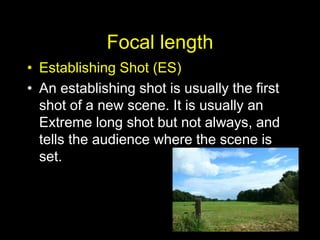
• Establishing Shot (ES)
• An establishing shot is usually the first
shot of a new scene. It is usually an
Extreme long shot but not always, and
tells the audience where the scene is
set.
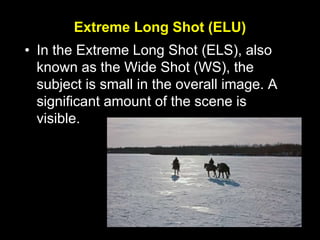
Extreme Long Shot (ELU)
• In the Extreme Long Shot (ELS), also
known as the Wide Shot (WS), the
subject is small in the overall image. A
significant amount of the scene is
visible.
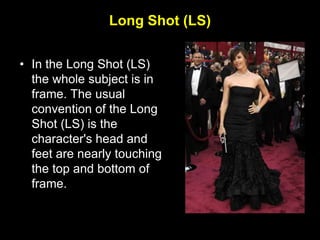
Long Shot (LS)
• In the Long Shot (LS)
the whole subject is in
frame. The usual
convention of the Long
Shot (LS) is the
character's head and
feet are nearly touching
the top and bottom of
frame.
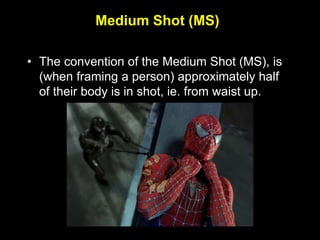
Medium Shot (MS)
• The convention of the Medium Shot (MS), is
(when framing a person) approximately half
of their body is in shot, ie. from waist up.
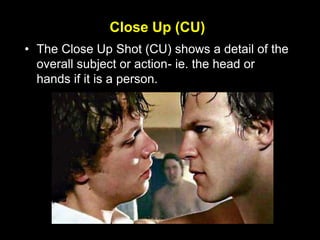
Close Up (CU)
• The Close Up Shot (CU) shows a detail of the
overall subject or action- ie. the head or
hands if it is a person.
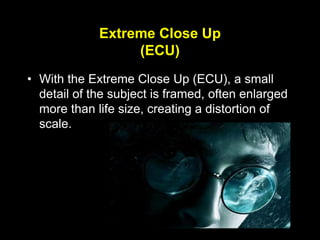
Extreme Close Up
(ECU)
• With the Extreme Close Up (ECU), a small
detail of the subject is framed, often enlarged
more than life size, creating a distortion of
scale.
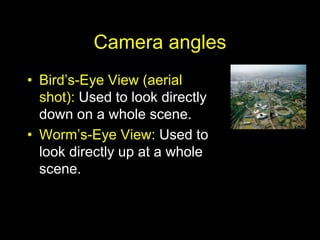
Camera angles
• Bird’s-Eye View (aerial
shot): Used to look directly
down on a whole scene.
• Worm’s-Eye View: Used to
look directly up at a whole
scene.
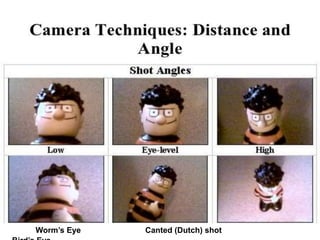
Camera angles
Worm’s Eye Canted (Dutch) shot
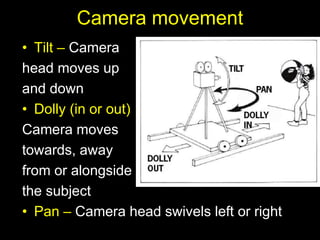
Camera movement
• Tilt – Camera
head moves up
and down
• Dolly (in or out)
Camera moves
towards, away
from or alongside
the subject
• Pan – Camera head swivels left or right
Task
Watch the opening sequence from a film.
See if you can identify the shot types
used.
During the second screening, explain why
a director may chose to use certain shot
types.
Task
Fill in the blank squares on your task
sheet illustrating examples of the
different shot types you have learnt
today.

Cinematography techniques

  • 1.
    Camera Shots Learning Objective: Tounderstand key terms to describe camera shots To be able to describe shots using key terms To be able to evaluate how different shots affect the audience.
  • 2.
    Camera Variables There arethree key things you can alter about cinematography: • Focal length (how far the camera is from the subject) • Camera angles • Camera movement
  • 3.
    Focal length • EstablishingShot (ES) • An establishing shot is usually the first shot of a new scene. It is usually an Extreme long shot but not always, and tells the audience where the scene is set.
  • 4.
    Extreme Long Shot(ELU) • In the Extreme Long Shot (ELS), also known as the Wide Shot (WS), the subject is small in the overall image. A significant amount of the scene is visible.
  • 5.
    Long Shot (LS) •In the Long Shot (LS) the whole subject is in frame. The usual convention of the Long Shot (LS) is the character's head and feet are nearly touching the top and bottom of frame.
  • 6.
    Medium Shot (MS) •The convention of the Medium Shot (MS), is (when framing a person) approximately half of their body is in shot, ie. from waist up.
  • 7.
    Close Up (CU) •The Close Up Shot (CU) shows a detail of the overall subject or action- ie. the head or hands if it is a person.
  • 8.
    Extreme Close Up (ECU) •With the Extreme Close Up (ECU), a small detail of the subject is framed, often enlarged more than life size, creating a distortion of scale.
  • 9.
    Camera angles • Bird’s-EyeView (aerial shot): Used to look directly down on a whole scene. • Worm’s-Eye View: Used to look directly up at a whole scene.
  • 10.
    Camera angles Worm’s EyeCanted (Dutch) shot
  • 11.
    Camera movement • Tilt– Camera head moves up and down • Dolly (in or out) Camera moves towards, away from or alongside the subject • Pan – Camera head swivels left or right
  • 12.
    Task Watch the openingsequence from a film. See if you can identify the shot types used. During the second screening, explain why a director may chose to use certain shot types.
  • 13.
    Task Fill in theblank squares on your task sheet illustrating examples of the different shot types you have learnt today.