Camera Modes and Functions
www.creativepraveen.com
Automatic Modes
Auto Mode
Portrait Mode
Landscape
Macro
Sports
Night Portrait
No Flash
Auto Mode
The camera decides on the Shutter Speed, ISO , Aperture and Flash
It will do so based on the external light conditions
No Control on Camera Settings
Good for people who have recently purchased one
Gives good results in daylight and evenly lit situations
AVOID SHOOTING AUTO !! if you want to grow as a Photographer
Portrait Mode
Used for Portraits i.e. Shooting People
Camera Automatically selects Wide aperture or
smaller F-stop number
Small F-Stop number means Shallow/Narrow Depth of Field
Shallow Depth of Field ensures that the Background
is Out of Focus
The Subjects Stands out in the frame
Pleasing effect for Portraits.
Shallow DoF in Portrait Mode
Shallow DoF Large DoF
Landscape Mode
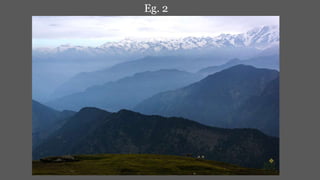
Used for shooting Landscapes
Almost opposite of Portrait Mode
Camera Automatically selects Smaller aperture or
Large F-stop number
Large F-Stop number means higher Depth of Field
Higher depth of field ensures that everything in the frame
is in focus.
Good for shooting Wide landscapes.
Large DoF in Landscape Mode Eg. 1
Eg. 2
Macro Mode
Good for Close ups
Lets you get very close to the subject
Good for Shooting Insects, Flowers and small objects.
Camera automatically selects a very small F-number or a
wide Aperture
Wide Aperture means Shallow/Narrow Depth of Field
One has to be very steady when using this mode.
Using a Tripod/Camera Stand can be handy here.
Examples of Macro Mode
Sports Mode
Used for shooting fast moving objects or people
Can be used for Shooting Sports, Pets, Cars and Wildlife
Anything that moves Fast or Erratically
Camera will try to freeze the subject
Uses the fastest Shutter speed available at the time.
Works best in Good lighting conditions.
Fast Shutter Speed Eg.1
1/500 Sec
Eg. 2
Eg. 2
1/2000 Sec
Night Portrait/Night
Mode
Used for Shooting in Nights in low light condition
E.g. Parties, Homes, Weddings etc.
Camera will use a slower shutter speed, wide aperture
and high ISO
Images can be a bit blurry if camera is not held properly.
Camera may also use flash if light is very poor
No Flash
Normally used in Evenings or Night.
Camera will not use Flash in this mode
Used in Museums or while shooting landscapes at night.
Also used to capture sporting events in low light
E.g. Indoor sports like Badminton, Martial Arts,
sports played at night.
Camera uses a wide aperture and depending on light condition
a corresponding Shutter Speed and ISO
Examples of No Flash
Shutter Speed: 13 Seconds
Some Other Modes
Panorama Mode- Used for making Panoramas
or really wide angle scenes.
Snow mode- Used when shooting in areas with Snow.
Fireworks Mode- Very hand when shooting fireworks
especially Rockets bursting in Sky.
Beach Mode: Used for scenes with very bright and harsh light
Kids/Pets Mode: Essentially almost same as Sports mode
Semi Automatic Modes
Aperture Priority Mode (A or Av)
Shutter Priority Mode (S or Tv)
Aperture Priority Mode (Av or A)
We select the desired F-Stop or Aperture
value
Camera will control the Shutter Speed
We control ISO , White Balance and flash
with this mode
Normally used when Depth of Field (DoF)
is the main area of Interest.
Requires Practice to get it right.
Can be used very creatively while composing
Images
Small F- Number for Shallower DoF
Larger F-Number or higher DoF
Shutter Priority Mode (S or Tv)
We select the desired Shutter Speed
Camera will select the Corresponding F-Stop
We control ISO , White Balance and flash
Creative Part of Image Making
Requires Practice to get it right.
Normally used when one requires a higher shutter speed
for shooting fast moving objects.(e.g. Sports)
Also used when the requirement in
slower shutter speeds (e.g. Shooting Waterfalls)
Slower Shutter Speed
Shutter Speed: 1/8 Sec
Creative use of Shutter speed to Show Motion: See Wings
Shutter Speed:1/250 Sec
M Mode or the Fully Manual Mode
The user has full control on the camera settings
Shutter Speed, Aperture, ISO and white balance
is selected by the user
Creative part of Image making
Requires good practice and understanding of light to use
and Master.
Examples of Manual Mode
Shutter Speed :3 Minutes
Torch light used to paint foreground
Eg. 2
Eg. 2
Shutter Speed: 2Mins 50 Seconds
QUESTIONS????
www.creativepraveen.com
https://www.facebook.com/creativepraveens
Contact No:08419927006

Camera Modes explained

  • 1.
    Camera Modes andFunctions www.creativepraveen.com
  • 3.
    Automatic Modes Auto Mode PortraitMode Landscape Macro Sports Night Portrait No Flash
  • 4.
    Auto Mode The cameradecides on the Shutter Speed, ISO , Aperture and Flash It will do so based on the external light conditions No Control on Camera Settings Good for people who have recently purchased one Gives good results in daylight and evenly lit situations AVOID SHOOTING AUTO !! if you want to grow as a Photographer
  • 5.
    Portrait Mode Used forPortraits i.e. Shooting People Camera Automatically selects Wide aperture or smaller F-stop number Small F-Stop number means Shallow/Narrow Depth of Field Shallow Depth of Field ensures that the Background is Out of Focus The Subjects Stands out in the frame Pleasing effect for Portraits.
  • 6.
    Shallow DoF inPortrait Mode Shallow DoF Large DoF
  • 7.
    Landscape Mode Used forshooting Landscapes Almost opposite of Portrait Mode Camera Automatically selects Smaller aperture or Large F-stop number Large F-Stop number means higher Depth of Field Higher depth of field ensures that everything in the frame is in focus. Good for shooting Wide landscapes.
  • 8.
    Large DoF inLandscape Mode Eg. 1
  • 9.
  • 10.
    Macro Mode Good forClose ups Lets you get very close to the subject Good for Shooting Insects, Flowers and small objects. Camera automatically selects a very small F-number or a wide Aperture Wide Aperture means Shallow/Narrow Depth of Field One has to be very steady when using this mode. Using a Tripod/Camera Stand can be handy here.
  • 11.
  • 13.
    Sports Mode Used forshooting fast moving objects or people Can be used for Shooting Sports, Pets, Cars and Wildlife Anything that moves Fast or Erratically Camera will try to freeze the subject Uses the fastest Shutter speed available at the time. Works best in Good lighting conditions.
  • 14.
  • 15.
    Fast Shutter SpeedEg.1 1/500 Sec
  • 16.
  • 17.
  • 18.
    Night Portrait/Night Mode Used forShooting in Nights in low light condition E.g. Parties, Homes, Weddings etc. Camera will use a slower shutter speed, wide aperture and high ISO Images can be a bit blurry if camera is not held properly. Camera may also use flash if light is very poor
  • 19.
    No Flash Normally usedin Evenings or Night. Camera will not use Flash in this mode Used in Museums or while shooting landscapes at night. Also used to capture sporting events in low light E.g. Indoor sports like Badminton, Martial Arts, sports played at night. Camera uses a wide aperture and depending on light condition a corresponding Shutter Speed and ISO
  • 20.
  • 21.
    Examples of NoFlash Shutter Speed: 13 Seconds
  • 22.
    Some Other Modes PanoramaMode- Used for making Panoramas or really wide angle scenes. Snow mode- Used when shooting in areas with Snow. Fireworks Mode- Very hand when shooting fireworks especially Rockets bursting in Sky. Beach Mode: Used for scenes with very bright and harsh light Kids/Pets Mode: Essentially almost same as Sports mode
  • 23.
    Semi Automatic Modes AperturePriority Mode (A or Av) Shutter Priority Mode (S or Tv)
  • 24.
    Aperture Priority Mode(Av or A) We select the desired F-Stop or Aperture value Camera will control the Shutter Speed We control ISO , White Balance and flash with this mode Normally used when Depth of Field (DoF) is the main area of Interest. Requires Practice to get it right. Can be used very creatively while composing Images
  • 25.
    Small F- Numberfor Shallower DoF
  • 26.
  • 27.
    Shutter Priority Mode(S or Tv) We select the desired Shutter Speed Camera will select the Corresponding F-Stop We control ISO , White Balance and flash Creative Part of Image Making Requires Practice to get it right. Normally used when one requires a higher shutter speed for shooting fast moving objects.(e.g. Sports) Also used when the requirement in slower shutter speeds (e.g. Shooting Waterfalls)
  • 28.
  • 29.
  • 30.
    Creative use ofShutter speed to Show Motion: See Wings
  • 31.
    Creative use ofShutter speed to Show Motion: See Wings Shutter Speed:1/250 Sec
  • 32.
    M Mode orthe Fully Manual Mode The user has full control on the camera settings Shutter Speed, Aperture, ISO and white balance is selected by the user Creative part of Image making Requires good practice and understanding of light to use and Master.
  • 33.
  • 34.
    Examples of ManualMode Shutter Speed :3 Minutes Torch light used to paint foreground
  • 35.
  • 36.
    Eg. 2 Shutter Speed:2Mins 50 Seconds
  • 37.
  • 38.