Basic Shots and Camera Angles
Warda Maryam
warda.choudry@outlook.com
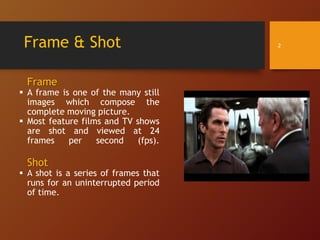
Frame & Shot
Frame
 A frame is one of the many still
images which compose the
complete moving picture.
 Most feature films and TV shows
are shot and viewed at 24
frames per second (fps).
Shot
 A shot is a series of frames that
runs for an uninterrupted period
of time.
2
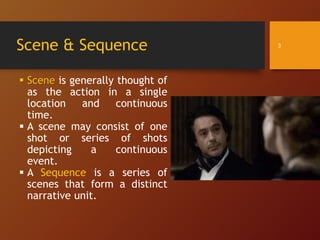
Scene & Sequence
 Scene is generally thought of
as the action in a single
location and continuous
time.
 A scene may consist of one
shot or series of shots
depicting a continuous
event.
 A Sequence is a series of
scenes that form a distinct
narrative unit.
3
Categories of Shots
Two major Categories of Shots:
1) Static Shot
The camera does not move or change its aim within the shot,
although the camera may move from the shot to the next shot.
2) Dynamic Shot
The camera moves or changes its aim within the shot.
4
Categories of Shots
1) Static Shot
 There are many types of static shots and can be
categorized in multiple ways.
 Static shots are identified by:
a) scale or shot size
b) angle
c) the point of view shots
d) two shot and over the shoulder shots.
5
Categories of Shots
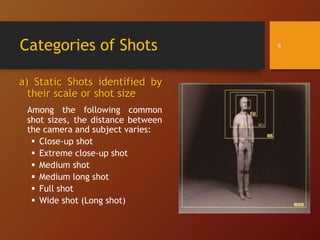
a) Static Shots identified by
their scale or shot size
Among the following common
shot sizes, the distance between
the camera and subject varies:
 Close-up shot
 Extreme close-up shot
 Medium shot
 Medium long shot
 Full shot
 Wide shot (Long shot)
6
Static Shots
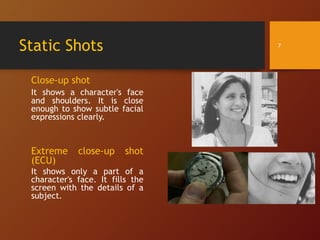
Close-up shot
It shows a character's face
and shoulders. It is close
enough to show subtle facial
expressions clearly.
Extreme close-up shot
(ECU)
It shows only a part of a
character's face. It fills the
screen with the details of a
subject.
7
Static Shots
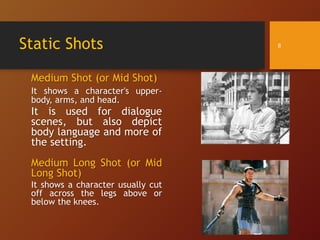
Medium Shot (or Mid Shot)
It shows a character's upper-
body, arms, and head.
It is used for dialogue
scenes, but also depict
body language and more of
the setting.
Medium Long Shot (or Mid
Long Shot)
It shows a character usually cut
off across the legs above or
below the knees.
8
Static Shots
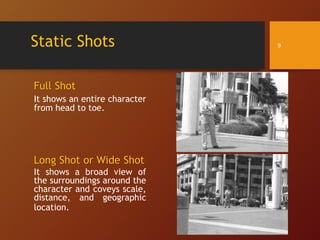
Full Shot
It shows an entire character
from head to toe.
Long Shot or Wide Shot
It shows a broad view of
the surroundings around the
character and coveys scale,
distance, and geographic
location.
9
Categories of Shots
b) Static Shots identified by Angles
Another set of shots are identified by their camera angles.
Changing the camera angle changes the appearance and function
of your shot.
Two Types of Camera Angles:
 Horizontal Camera Angles
 Vertical Camera Angles
10
Camera Angles
Horizontal Camera Angles
Moving the camera around the
subject horizontally.
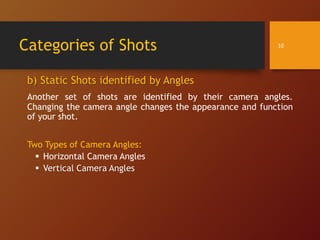
a)Frontal,
b)3/4 Front (or Three-quarter front),
c)Profile (Left or Right),
d)3/4 Rear (or back)
e)Rear (Full back Camera Angle)
 Note:
The three-quarter front angle is
more often used than the frontal
angle or profile because it shows
more depth and volumes.
11
Camera Angles
Vertical Camera Angles
Moving the camera around the subject
vertically
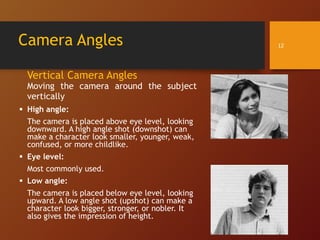
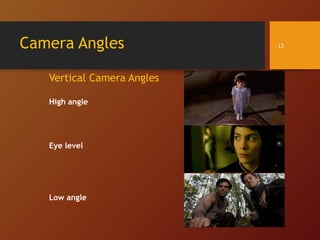
 High angle:
The camera is placed above eye level, looking
downward. A high angle shot (downshot) can
make a character look smaller, younger, weak,
confused, or more childlike.
 Eye level:
Most commonly used.
 Low angle:
The camera is placed below eye level, looking
upward. A low angle shot (upshot) can make a
character look bigger, stronger, or nobler. It
also gives the impression of height.
12
Camera Angles
Vertical Camera Angles
High angle
Eye level
Low angle
13
Static Shots
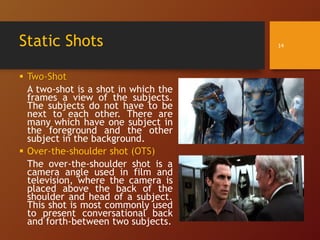
 Two-Shot
A two-shot is a shot in which the
frames a view of the subjects.
The subjects do not have to be
next to each other. There are
many which have one subject in
the foreground and the other
subject in the background.
 Over-the-shoulder shot (OTS)
The over-the-shoulder shot is a
camera angle used in film and
television, where the camera is
placed above the back of the
shoulder and head of a subject.
This shot is most commonly used
to present conversational back
and forth-between two subjects.
14
Static Shots
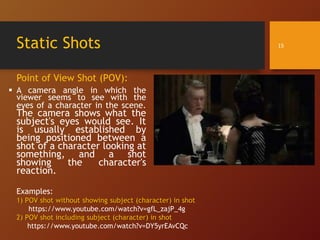
Point of View Shot (POV):
 A camera angle in which the
viewer seems to see with the
eyes of a character in the scene.
The camera shows what the
subject's eyes would see. It
is usually established by
being positioned between a
shot of a character looking at
something, and a shot
showing the character's
reaction.
15
Examples:
1) POV shot without showing subject (character) in shot
https://www.youtube.com/watch?v=gfL_zajP_4g
2) POV shot including subject (character) in shot
https://www.youtube.com/watch?v=DY5yrEAvCQc
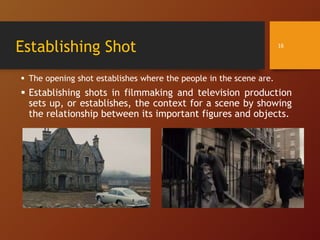
Establishing Shot
 The opening shot establishes where the people in the scene are.
 Establishing shots in filmmaking and television production
sets up, or establishes, the context for a scene by showing
the relationship between its important figures and objects.
16
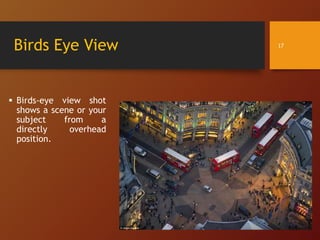
Birds Eye View
 Birds-eye view shot
shows a scene or your
subject from a
directly overhead
position.
17
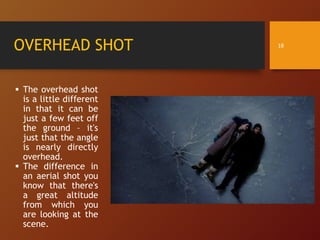
OVERHEAD SHOT
 The overhead shot
is a little different
in that it can be
just a few feet off
the ground – it's
just that the angle
is nearly directly
overhead.
 The difference in
an aerial shot you
know that there's
a great altitude
from which you
are looking at the
scene.
18
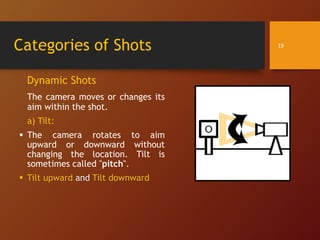
Categories of Shots
Dynamic Shots
The camera moves or changes its
aim within the shot.
a) Tilt:
 The camera rotates to aim
upward or downward without
changing the location. Tilt is
sometimes called "pitch".
 Tilt upward and Tilt downward
19
Categories of Shots
Dynamic Shots
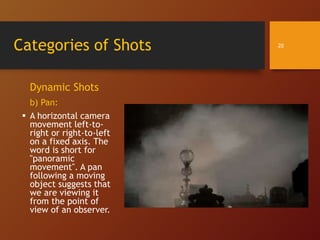
b) Pan:
 A horizontal camera
movement left-to-
right or right-to-left
on a fixed axis. The
word is short for
"panoramic
movement". A pan
following a moving
object suggests that
we are viewing it
from the point of
view of an observer.
20
Categories of Shots
Dynamic Shots
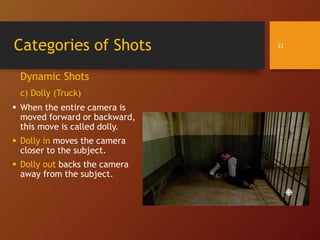
c) Dolly (Truck)
 When the entire camera is
moved forward or backward,
this move is called dolly.
 Dolly in moves the camera
closer to the subject.
 Dolly out backs the camera
away from the subject.
21
Categories of Shots
Zoom (Zoom in / Zoom out)
 The camera's lens is adjusted to increase or decrease the camera's
field of view, magnifying a portion of the scene without moving the
camera.
 Zoom is often confused with truck (dolly in/dolly out). Zoom is not a
camera move.
 Dolly vs. Zoom
 When you dolly, you are moving the camera in space, while zoom
refers to changing the camera's focal length.
 When you move the camera, the perspective changes. That is what
you see through your human eyes as you walk around, your perspective
changes.
 In old dramas & films, Zoom in / Zoom out was quite common but now
directors use dolly in / dolly out.
 https://www.youtube.com/watch?v=14p8B0XpKFU
22

Basic Camera Composition - Shots and Angles in Filmmaking by Warda Maryam

  • 1.
    Basic Shots andCamera Angles Warda Maryam warda.choudry@outlook.com
  • 2.
    Frame & Shot Frame A frame is one of the many still images which compose the complete moving picture.  Most feature films and TV shows are shot and viewed at 24 frames per second (fps). Shot  A shot is a series of frames that runs for an uninterrupted period of time. 2
  • 3.
    Scene & Sequence Scene is generally thought of as the action in a single location and continuous time.  A scene may consist of one shot or series of shots depicting a continuous event.  A Sequence is a series of scenes that form a distinct narrative unit. 3
  • 4.
    Categories of Shots Twomajor Categories of Shots: 1) Static Shot The camera does not move or change its aim within the shot, although the camera may move from the shot to the next shot. 2) Dynamic Shot The camera moves or changes its aim within the shot. 4
  • 5.
    Categories of Shots 1)Static Shot  There are many types of static shots and can be categorized in multiple ways.  Static shots are identified by: a) scale or shot size b) angle c) the point of view shots d) two shot and over the shoulder shots. 5
  • 6.
    Categories of Shots a)Static Shots identified by their scale or shot size Among the following common shot sizes, the distance between the camera and subject varies:  Close-up shot  Extreme close-up shot  Medium shot  Medium long shot  Full shot  Wide shot (Long shot) 6
  • 7.
    Static Shots Close-up shot Itshows a character's face and shoulders. It is close enough to show subtle facial expressions clearly. Extreme close-up shot (ECU) It shows only a part of a character's face. It fills the screen with the details of a subject. 7
  • 8.
    Static Shots Medium Shot(or Mid Shot) It shows a character's upper- body, arms, and head. It is used for dialogue scenes, but also depict body language and more of the setting. Medium Long Shot (or Mid Long Shot) It shows a character usually cut off across the legs above or below the knees. 8
  • 9.
    Static Shots Full Shot Itshows an entire character from head to toe. Long Shot or Wide Shot It shows a broad view of the surroundings around the character and coveys scale, distance, and geographic location. 9
  • 10.
    Categories of Shots b)Static Shots identified by Angles Another set of shots are identified by their camera angles. Changing the camera angle changes the appearance and function of your shot. Two Types of Camera Angles:  Horizontal Camera Angles  Vertical Camera Angles 10
  • 11.
    Camera Angles Horizontal CameraAngles Moving the camera around the subject horizontally. a)Frontal, b)3/4 Front (or Three-quarter front), c)Profile (Left or Right), d)3/4 Rear (or back) e)Rear (Full back Camera Angle)  Note: The three-quarter front angle is more often used than the frontal angle or profile because it shows more depth and volumes. 11
  • 12.
    Camera Angles Vertical CameraAngles Moving the camera around the subject vertically  High angle: The camera is placed above eye level, looking downward. A high angle shot (downshot) can make a character look smaller, younger, weak, confused, or more childlike.  Eye level: Most commonly used.  Low angle: The camera is placed below eye level, looking upward. A low angle shot (upshot) can make a character look bigger, stronger, or nobler. It also gives the impression of height. 12
  • 13.
    Camera Angles Vertical CameraAngles High angle Eye level Low angle 13
  • 14.
    Static Shots  Two-Shot Atwo-shot is a shot in which the frames a view of the subjects. The subjects do not have to be next to each other. There are many which have one subject in the foreground and the other subject in the background.  Over-the-shoulder shot (OTS) The over-the-shoulder shot is a camera angle used in film and television, where the camera is placed above the back of the shoulder and head of a subject. This shot is most commonly used to present conversational back and forth-between two subjects. 14
  • 15.
    Static Shots Point ofView Shot (POV):  A camera angle in which the viewer seems to see with the eyes of a character in the scene. The camera shows what the subject's eyes would see. It is usually established by being positioned between a shot of a character looking at something, and a shot showing the character's reaction. 15 Examples: 1) POV shot without showing subject (character) in shot https://www.youtube.com/watch?v=gfL_zajP_4g 2) POV shot including subject (character) in shot https://www.youtube.com/watch?v=DY5yrEAvCQc
  • 16.
    Establishing Shot  Theopening shot establishes where the people in the scene are.  Establishing shots in filmmaking and television production sets up, or establishes, the context for a scene by showing the relationship between its important figures and objects. 16
  • 17.
    Birds Eye View Birds-eye view shot shows a scene or your subject from a directly overhead position. 17
  • 18.
    OVERHEAD SHOT  Theoverhead shot is a little different in that it can be just a few feet off the ground – it's just that the angle is nearly directly overhead.  The difference in an aerial shot you know that there's a great altitude from which you are looking at the scene. 18
  • 19.
    Categories of Shots DynamicShots The camera moves or changes its aim within the shot. a) Tilt:  The camera rotates to aim upward or downward without changing the location. Tilt is sometimes called "pitch".  Tilt upward and Tilt downward 19
  • 20.
    Categories of Shots DynamicShots b) Pan:  A horizontal camera movement left-to- right or right-to-left on a fixed axis. The word is short for "panoramic movement". A pan following a moving object suggests that we are viewing it from the point of view of an observer. 20
  • 21.
    Categories of Shots DynamicShots c) Dolly (Truck)  When the entire camera is moved forward or backward, this move is called dolly.  Dolly in moves the camera closer to the subject.  Dolly out backs the camera away from the subject. 21
  • 22.
    Categories of Shots Zoom(Zoom in / Zoom out)  The camera's lens is adjusted to increase or decrease the camera's field of view, magnifying a portion of the scene without moving the camera.  Zoom is often confused with truck (dolly in/dolly out). Zoom is not a camera move.  Dolly vs. Zoom  When you dolly, you are moving the camera in space, while zoom refers to changing the camera's focal length.  When you move the camera, the perspective changes. That is what you see through your human eyes as you walk around, your perspective changes.  In old dramas & films, Zoom in / Zoom out was quite common but now directors use dolly in / dolly out.  https://www.youtube.com/watch?v=14p8B0XpKFU 22