INFORMATION
ARCHITECTURE.
CARD SORTING TECHNIQUE
Grau en Enginyeria Informàtica
User Centred Desig
Index
• Introduction: the value of organized knowledge
• Information design: Card Sorting
• The technique
• Advantages and disadvantages
• Tools
Information Architecture. Card Sorting - User Centred Design 2 / 42
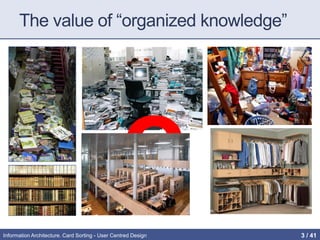
The value of “organized knowledge”
Information Architecture. Card Sorting - User Centred Design 3 / 42
Why Navigation Design Is So Crucial to
the User Experience?
• The most common problem users come across is –
unable to find the desired content or features in the
website or application.
• Poorly designed navigation systems leads to more
than 75% of usability problems.
• The most common user problems
• I am not able to find what I am looking for
• I am not able to get back to previous page
• Where to go next now?
• The link clicked earlier is disappeared
• While visiting any website or application the users should be able to
answer these questions?
• Where am I?
• Where can I go?
• How do I get there?
• How do I get back?
Good navigation is easy to
find, the navigation menu
should always stand out.
Information Architecture. Card Sorting - User Centred Design 4 / 42
Information overload
(infobesity or infoxication)
• Difficulty for a person to have understanding and making
decisions caused by the presence of too much
information
• During last years a hug amount of information overloads
people.
• In general, this is beneficial,
• BUT, such amount of overload of information can have negative
effects.
• We cannot solve the amount of information, we can help users
facilitating the finding of this information.
Information Architecture. Card Sorting - User Centred Design 5 / 42
Possible Causes
• Information
• Multiplicity: electronic news, email, databases, Web pages, stored
documents, social networks, ...
• Incompatible formats
• Unawareness, ignorance of new tools
• Altavista study: 80% couldn’t/wouldn’t build a working Boolean
search
• Altavista study: 87% used less than 3 words
• POOR Schemes and Information Architectures
• Users do not understand how information is structured
• That information is available does not mean it is "achievable"
• “Out of sight, out of mind” [D. Norman]
Information Architecture. Card Sorting - User Centred Design 6 / 42
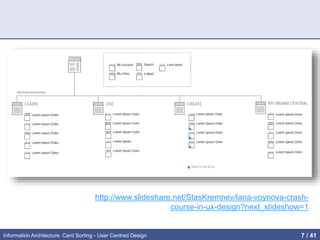
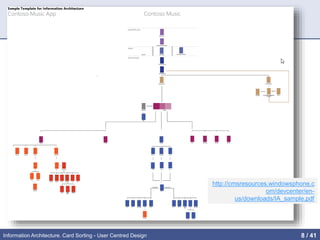
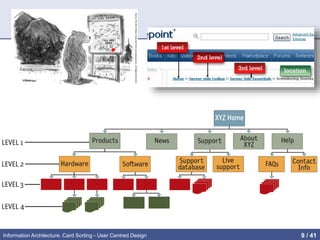
Information Architecture (IA)
• IA is about helping people understand their surroundings
and find what they're looking for —in the real world as well
as online.
• Definition
• The art and science of organizing and labeling web sites, intranets,
online communities and software to support usability and findability
http://www.iainstitute.org
http://www.iainstitute.org/documents/learn/What_is_IA.pdf
Information Architecture. Card Sorting - User Centred Design 7 / 42
http://www.slideshare.net/StasKremnev/lana-voynova-crash-
course-in-ux-design?next_slideshow=1
Information Architecture. Card Sorting - User Centred Design 8 / 41
http://cmsresources.windowsphone.c
om/devcenter/en-
us/downloads/IA_sample.pdf
Information Architecture. Card Sorting - User Centred Design 9 / 41
Information Architecture. Card Sorting - User Centred Design 10 / 41
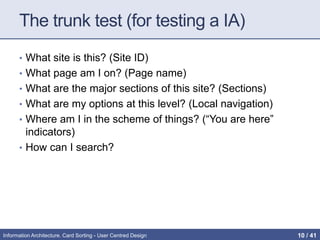
The trunk test (for testing a IA)
• What site is this? (Site ID)
• What page am I on? (Page name)
• What are the major sections of this site? (Sections)
• What are my options at this level? (Local navigation)
• Where am I in the scheme of things? (“You are here”
indicators)
• How can I search?
Information Architecture. Card Sorting - User Centred Design 11 / 42
Top 3 IA Questions about Navigation
Menus
1. How Many Categories Should We Have?
• fundamental principle: the number of categories should be
determined by what makes it easiest for people to discover and
access information — not by some preordained decision that “we
should only have 4 categories”
2. Should Categories Be Listed in Alphabetical Order?
• 3 key factors to consider:
• Is there another organizing principle that would be more meaningful?
• Will visitors already know the exact category names?
• How many categories are there?
3. Should Hover-Activated Menus Be Eliminated Since
Touch Devices Don’t Allow Hovering?
by K. WHITENTON on January 4, 2015
http://goo.gl/dm4LFC
Information Architecture. Card Sorting - User Centred Design 12 / 42
Some good references on IA
(also in the virtual campus)
• http://semanticstudios.com/publications/semantics/00001
0.php
• http://prezi.com/aafmvya6bk7t/understanding-information-
architecture/
• http://www.slideshare.net/petervandijck/everything-i-know-
about-information-architecture-mostly-categorization-in-
90-minutes
• http://www.uxabilidad.com/experiencia-de-
usuario/arquitectura-de-la-informacion.html
• http://www.nngroup.com/articles/intranet-information-
architecture-ia
• http://uxmatters.com/mt/archives/2014/02/adopting-a-
professional-compass-for-information-architecture.php
Information Architecture. Card Sorting - User Centred Design 13 / 42
CARD SORTING
Traditionally, User-Centered Design techniques are
used to develop the Information Architecture of
websites. The typical one is Card Sorting, where users
are given a set of cards labelled with the main topics of
the site and they group these cards following their
own criteria
Information Architecture. Card Sorting - User Centred Design 14 / 42
What is Card Sorting?
• Technical knowledge acquisition based on a
constructivist approach that serves to:
• Understanding how users envision the organization of
information
• Explore how the concepts are grouped by people
• Understanding users' mental model
• provides concrete data that can be instantiated
• Moreover, is:
• Cheep, quick, involves users, democratic, …
Information Architecture. Card Sorting - User Centred Design 15 / 42
Benefits
• Why sort?
• To better understand a problem and users’ view of it
• Source of concepts, terminology and organisation
• How is it done?
• Participants given objects, photos, cards or similar and are asked to
group them
• What are the results?
• Qualitative: concepts, terminology, understanding
• Quantitative: how frequently items are grouped together; how
groupings compare with a reference set
• What methods can be used?
• Face-to-face: ‘in-depth’ individuals sessions, pair sorting, with
observer, larger sessions with emphasis feedback
• Online: much larger sample sizes possible, using images or words
(little qualitative information though)
Information Architecture. Card Sorting - User Centred Design 16 / 42
Card Sorting in UCD
• CS has wide application in UCD answering questions
such as:
• How do users think about this problem?
• What words do they use?
• Are menu items or form fields grouped the way users expect?
• Is there anything we’ve forgotten?
• Paper-based sorting in particular can be very helpful
• No technological barriers
• Participants can write comments on cards, change terms, create
new items or groups (good qualitative results)
• Cards can appear in more than one group
Information Architecture. Card Sorting - User Centred Design 17 / 42
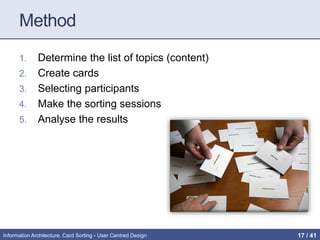
Method
1. Determine the list of topics (content)
2. Create cards
3. Selecting participants
4. Make the sorting sessions
5. Analyse the results
Information Architecture. Card Sorting - User Centred Design 18 / 42
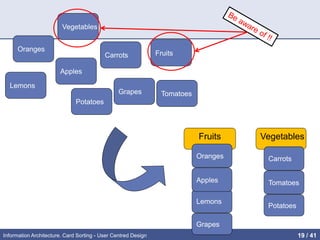
1. Determine the list of topics
• Each topic should be neither too generic or too
specific. It must represent a piece of content or
functionality that needs to be organized.
• The sample card to order should be "manageable"
• Avoid
• giving "clues" that lead users to organize topics in a (pre) defined.
• topics that include "grouping terms" (File, Edit, FAQs, ...)
• And, (perhaps) the most important
• The topics should be meaningful to the participants
Information Architecture. Card Sorting - User Centred Design 19 / 42
Fruits
Grapes
Lemons
Apples
Vegetables
Oranges
Potatoes
Carrots
Tomatoes
Grapes
Fruits Vegetables
Lemons
Apples
Oranges
Potatoes
Tomatoes
Carrots
Information Architecture. Card Sorting - User Centred Design 20 / 42
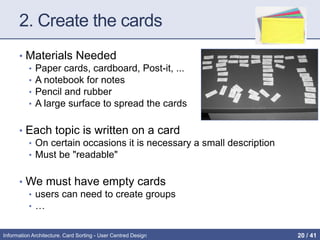
2. Create the cards
• Materials Needed
• Paper cards, cardboard, Post-it, ...
• A notebook for notes
• Pencil and rubber
• A large surface to spread the cards
• Each topic is written on a card
• On certain occasions it is necessary a small description
• Must be "readable"
• We must have empty cards
• users can need to create groups
• …
Information Architecture. Card Sorting - User Centred Design 21 / 42
3. Select participants
• Aim to have participants representing all possible
potential users
• NOT your fellow designers, friends, relatives, …
• be sure that the participants are familiar with the vocabulary
of the cards
• 15 to 20 participants should be successful
• Perform separate card sorting sessions for different
groups
Information Architecture. Card Sorting - User Centred Design 22 / 42
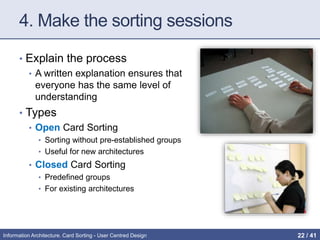
4. Make the sorting sessions
• Explain the process
• A written explanation ensures that
everyone has the same level of
understanding
• Types
• Open Card Sorting
• Sorting without pre-established groups
• Useful for new architectures
• Closed Card Sorting
• Predefined groups
• For existing architectures
Information Architecture. Card Sorting - User Centred Design 23 / 42
4. Make the sorting sessions
• Practical recommendations for participants
• READ ALL labels before sorting
• Awareness of the range of items to sort
• Arrange the cards using a common approach and according
to its own principles
• Allow a “I’m not sure" group
• Explain only when needed (not at the beginning)
• In an open card sorting session participants should label the
groups in their own way
Information Architecture. Card Sorting - User Centred Design 24 / 42
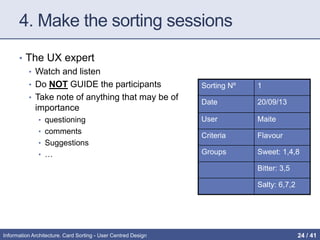
4. Make the sorting sessions
• The UX expert
• Watch and listen
• Do NOT GUIDE the participants
• Take note of anything that may be of
importance
• questioning
• comments
• Suggestions
• …
Sorting Nº 1
Date 20/09/13
User Maite
Criteria Flavour
Groups Sweet: 1,4,8
Bitter: 3,5
Salty: 6,7,2
Information Architecture. Card Sorting - User Centred Design 25 / 42
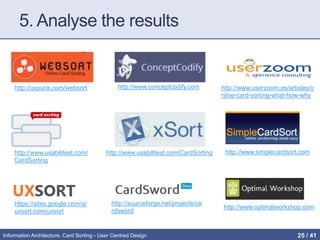
5. Analyse the results
http://uxpunk.com/websort http://www.conceptcodify.com http://www.userzoom.es/articles/o
nline-card-sorting-what-how-why
http://www.usabilitest.com/
CardSorting
http://www.usabilitest.com/CardSorting http://www.simplecardsort.com
https://sites.google.com/a/
uxsort.com/uxsort
http://sourceforge.net/projects/ca
rdsword
http://www.optimalworkshop.com
Information Architecture. Card Sorting - User Centred Design 26 / 41
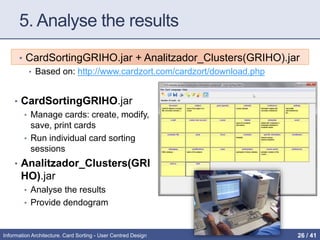
5. Analyse the results
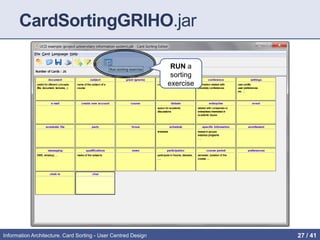
• CardSortingGRIHO.jar + Analitzador_Clusters(GRIHO).jar
• Based on: http://www.cardzort.com/cardzort/download.php
• CardSortingGRIHO.jar
• Manage cards: create, modify,
save, print cards
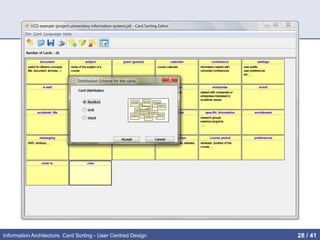
• Run individual card sorting
sessions
• Analitzador_Clusters(GRI
HO).jar
• Analyse the results
• Provide dendogram
Information Architecture. Card Sorting - User Centred Design 27 / 42
RUN a
sorting
exercise
CardSortingGRIHO.jar
Information Architecture. Card Sorting - User Centred Design 28 / 41
Information Architecture. Card Sorting - User Centred Design 29 / 41
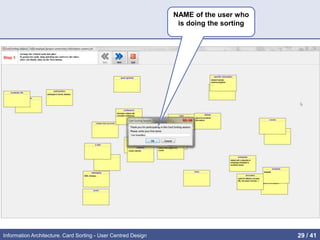
NAME of the user who
is doing the sorting
Information Architecture. Card Sorting - User Centred Design 30 / 41
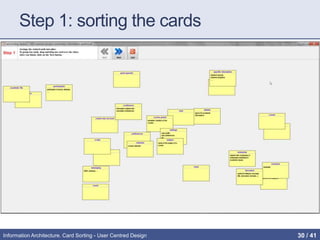
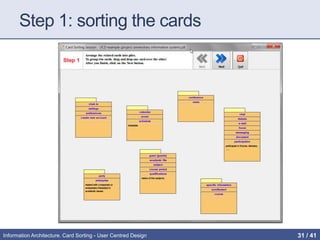
Step 1: sorting the cards
Information Architecture. Card Sorting - User Centred Design 31 / 41
Step 1: sorting the cards
Information Architecture. Card Sorting - User Centred Design 32 / 41
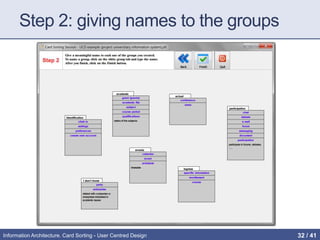
Step 2: giving names to the groups
Information Architecture. Card Sorting - User Centred Design 33 / 41
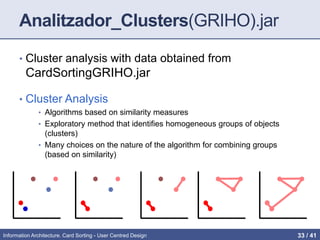
Analitzador_Clusters(GRIHO).jar
• Cluster analysis with data obtained from
CardSortingGRIHO.jar
• Cluster Analysis
• Algorithms based on similarity measures
• Exploratory method that identifies homogeneous groups of objects
(clusters)
• Many choices on the nature of the algorithm for combining groups
(based on similarity)
Information Architecture. Card Sorting - User Centred Design 34 / 42
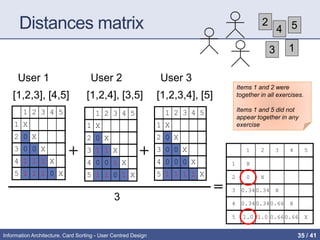
How we measure the similarity between
two cards?
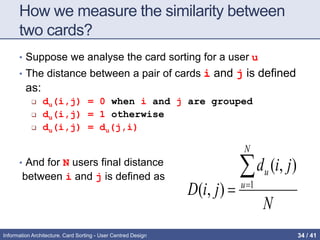
• Suppose we analyse the card sorting for a user u
• The distance between a pair of cards i and j is defined
as:
 du(i,j) = 0 when i and j are grouped
 du(i,j) = 1 otherwise
 du(i,j) = du(j,i)
• And for N users final distance
between i and j is defined as
N
jid
jiD
N
u
u
 1
),(
),(
Information Architecture. Card Sorting - User Centred Design 35 / 42
Distances matrix
1 2 3 4 5
1 X
2 0 X
3 0 0 X
4 1 1 1 X
5 1 1 1 0 X
1 2 3 4 5
1 X
2 0 X
3 1 1 X
4 0 0 1 X
5 1 1 0 1 X
1 2 3 4 5
1 X
2 0 X
3 0 0 X
4 0 0 0 X
5 1 1 1 1 X
1 2 3 4 5
1 X
2 0 X
3 0.340.34 X
4 0.340.340.66 X
5 1.0 1.0 0.660.66 X
+
=
3
User 1 User 2 User 3
+
[1,2,3], [4,5] [1,2,4], [3,5] [1,2,3,4], [5]
2
4
3
5
1
Items 1 and 2 were
together in all exercises.
Items 1 and 5 did not
appear together in any
exercise
Information Architecture. Card Sorting - User Centred Design 36 / 41
Obtaining the Clusters
1: One of the pairs with
minor distance is the
cluster
1 2 3 4 5
1 X
2 0 X
3 0.34 0.34 X
4 0.34 0.34 0.66 X
5 1.0 1.0 0.66 0.66 X
2: The cluster becomes a
single entity
(1,2) 3 4 5
(1,2) X
3 ? X
4 ? 0.66 X
5 ? 0.66 0.66 X
3: repeat this process: D[(1,2),3] = AVG{d(1,3), d(2,3)}
Information Architecture. Card Sorting - User Centred Design 37 / 42
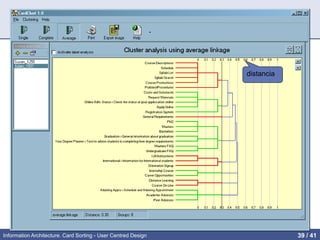
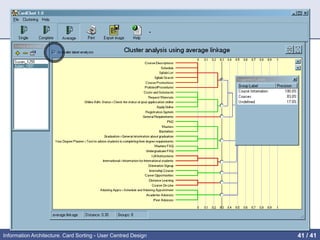
Analitzador_Clusters(GRIHO).jar
• Perform cluster analysis on data obtained with
CardSortingGRIHO.jar
• Visualization of the user preferences for labelling clusters
• The distance reflects the number of matches between
people who have done the exercise
• How many users have put a couple of cards together?
• A greater number of people who have joined a pair of cards shorter
the distance between them.
Information Architecture. Card Sorting - User Centred Design 38 / 42
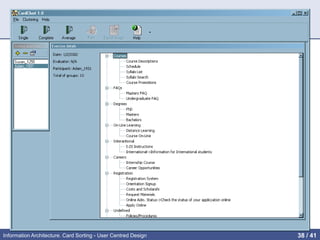
Managing card
sorting
exercises from
users
Card sorting
exercise
corresponding
to selected
participant
Information Architecture. Card Sorting - User Centred Design 39 / 41
distance
Suggested
groups &
their labels
participants
Information Architecture. Card Sorting - User Centred Design 40 / 41
Analitzador_Clusters(GRIHO).jarNombr
es de los grupos
• With the resutls the UX professional can:
• Decide the most appropriate Information Architecture
• Naming the groups
• … from users’ point of view (mental
model)!!
Information Architecture. Card Sorting - User Centred Design 41 / 42
References
• Jakob Nelsen’s Web: http://www.nngroup.com/articles/card-
sorting-how-many-users-to-test
• The Encyclopedia of Human-Computer Interaction:
http://www.interaction-
design.org/encyclopedia/card_sorting.html
• Usability.gov:
http://www.usability.gov/methods/design_site/cardsort.html
• Blog “No Solo Usabilidad”:
http://www.nosolousabilidad.com/articulos/cardsorting.htm
• Kelly, G.A. (1955). The Psychology of Personal Constructs.
New York: W.W. Norton.
• Lamantia, J. (2003). Analyzing Card Sort Results with a
Spreadsheet Template. Boxes and Arrows.
• Maurer, D. (2003). Card-Based Classification Evaluation.
Boxes and Arrows.
Information Architecture. Card Sorting - User Centred Design 42 / 42

Information Architecture. Card Sorting

  • 1.
    INFORMATION ARCHITECTURE. CARD SORTING TECHNIQUE Grauen Enginyeria Informàtica User Centred Desig
  • 2.
    Index • Introduction: thevalue of organized knowledge • Information design: Card Sorting • The technique • Advantages and disadvantages • Tools Information Architecture. Card Sorting - User Centred Design 2 / 42
  • 3.
    The value of“organized knowledge” Information Architecture. Card Sorting - User Centred Design 3 / 42
  • 4.
    Why Navigation DesignIs So Crucial to the User Experience? • The most common problem users come across is – unable to find the desired content or features in the website or application. • Poorly designed navigation systems leads to more than 75% of usability problems. • The most common user problems • I am not able to find what I am looking for • I am not able to get back to previous page • Where to go next now? • The link clicked earlier is disappeared • While visiting any website or application the users should be able to answer these questions? • Where am I? • Where can I go? • How do I get there? • How do I get back? Good navigation is easy to find, the navigation menu should always stand out. Information Architecture. Card Sorting - User Centred Design 4 / 42
  • 5.
    Information overload (infobesity orinfoxication) • Difficulty for a person to have understanding and making decisions caused by the presence of too much information • During last years a hug amount of information overloads people. • In general, this is beneficial, • BUT, such amount of overload of information can have negative effects. • We cannot solve the amount of information, we can help users facilitating the finding of this information. Information Architecture. Card Sorting - User Centred Design 5 / 42
  • 6.
    Possible Causes • Information •Multiplicity: electronic news, email, databases, Web pages, stored documents, social networks, ... • Incompatible formats • Unawareness, ignorance of new tools • Altavista study: 80% couldn’t/wouldn’t build a working Boolean search • Altavista study: 87% used less than 3 words • POOR Schemes and Information Architectures • Users do not understand how information is structured • That information is available does not mean it is "achievable" • “Out of sight, out of mind” [D. Norman] Information Architecture. Card Sorting - User Centred Design 6 / 42
  • 7.
    Information Architecture (IA) •IA is about helping people understand their surroundings and find what they're looking for —in the real world as well as online. • Definition • The art and science of organizing and labeling web sites, intranets, online communities and software to support usability and findability http://www.iainstitute.org http://www.iainstitute.org/documents/learn/What_is_IA.pdf Information Architecture. Card Sorting - User Centred Design 7 / 42
  • 8.
  • 9.
  • 10.
    Information Architecture. CardSorting - User Centred Design 10 / 41
  • 11.
    The trunk test(for testing a IA) • What site is this? (Site ID) • What page am I on? (Page name) • What are the major sections of this site? (Sections) • What are my options at this level? (Local navigation) • Where am I in the scheme of things? (“You are here” indicators) • How can I search? Information Architecture. Card Sorting - User Centred Design 11 / 42
  • 12.
    Top 3 IAQuestions about Navigation Menus 1. How Many Categories Should We Have? • fundamental principle: the number of categories should be determined by what makes it easiest for people to discover and access information — not by some preordained decision that “we should only have 4 categories” 2. Should Categories Be Listed in Alphabetical Order? • 3 key factors to consider: • Is there another organizing principle that would be more meaningful? • Will visitors already know the exact category names? • How many categories are there? 3. Should Hover-Activated Menus Be Eliminated Since Touch Devices Don’t Allow Hovering? by K. WHITENTON on January 4, 2015 http://goo.gl/dm4LFC Information Architecture. Card Sorting - User Centred Design 12 / 42
  • 13.
    Some good referenceson IA (also in the virtual campus) • http://semanticstudios.com/publications/semantics/00001 0.php • http://prezi.com/aafmvya6bk7t/understanding-information- architecture/ • http://www.slideshare.net/petervandijck/everything-i-know- about-information-architecture-mostly-categorization-in- 90-minutes • http://www.uxabilidad.com/experiencia-de- usuario/arquitectura-de-la-informacion.html • http://www.nngroup.com/articles/intranet-information- architecture-ia • http://uxmatters.com/mt/archives/2014/02/adopting-a- professional-compass-for-information-architecture.php Information Architecture. Card Sorting - User Centred Design 13 / 42
  • 14.
    CARD SORTING Traditionally, User-CenteredDesign techniques are used to develop the Information Architecture of websites. The typical one is Card Sorting, where users are given a set of cards labelled with the main topics of the site and they group these cards following their own criteria Information Architecture. Card Sorting - User Centred Design 14 / 42
  • 15.
    What is CardSorting? • Technical knowledge acquisition based on a constructivist approach that serves to: • Understanding how users envision the organization of information • Explore how the concepts are grouped by people • Understanding users' mental model • provides concrete data that can be instantiated • Moreover, is: • Cheep, quick, involves users, democratic, … Information Architecture. Card Sorting - User Centred Design 15 / 42
  • 16.
    Benefits • Why sort? •To better understand a problem and users’ view of it • Source of concepts, terminology and organisation • How is it done? • Participants given objects, photos, cards or similar and are asked to group them • What are the results? • Qualitative: concepts, terminology, understanding • Quantitative: how frequently items are grouped together; how groupings compare with a reference set • What methods can be used? • Face-to-face: ‘in-depth’ individuals sessions, pair sorting, with observer, larger sessions with emphasis feedback • Online: much larger sample sizes possible, using images or words (little qualitative information though) Information Architecture. Card Sorting - User Centred Design 16 / 42
  • 17.
    Card Sorting inUCD • CS has wide application in UCD answering questions such as: • How do users think about this problem? • What words do they use? • Are menu items or form fields grouped the way users expect? • Is there anything we’ve forgotten? • Paper-based sorting in particular can be very helpful • No technological barriers • Participants can write comments on cards, change terms, create new items or groups (good qualitative results) • Cards can appear in more than one group Information Architecture. Card Sorting - User Centred Design 17 / 42
  • 18.
    Method 1. Determine thelist of topics (content) 2. Create cards 3. Selecting participants 4. Make the sorting sessions 5. Analyse the results Information Architecture. Card Sorting - User Centred Design 18 / 42
  • 19.
    1. Determine thelist of topics • Each topic should be neither too generic or too specific. It must represent a piece of content or functionality that needs to be organized. • The sample card to order should be "manageable" • Avoid • giving "clues" that lead users to organize topics in a (pre) defined. • topics that include "grouping terms" (File, Edit, FAQs, ...) • And, (perhaps) the most important • The topics should be meaningful to the participants Information Architecture. Card Sorting - User Centred Design 19 / 42
  • 20.
  • 21.
    2. Create thecards • Materials Needed • Paper cards, cardboard, Post-it, ... • A notebook for notes • Pencil and rubber • A large surface to spread the cards • Each topic is written on a card • On certain occasions it is necessary a small description • Must be "readable" • We must have empty cards • users can need to create groups • … Information Architecture. Card Sorting - User Centred Design 21 / 42
  • 22.
    3. Select participants •Aim to have participants representing all possible potential users • NOT your fellow designers, friends, relatives, … • be sure that the participants are familiar with the vocabulary of the cards • 15 to 20 participants should be successful • Perform separate card sorting sessions for different groups Information Architecture. Card Sorting - User Centred Design 22 / 42
  • 23.
    4. Make thesorting sessions • Explain the process • A written explanation ensures that everyone has the same level of understanding • Types • Open Card Sorting • Sorting without pre-established groups • Useful for new architectures • Closed Card Sorting • Predefined groups • For existing architectures Information Architecture. Card Sorting - User Centred Design 23 / 42
  • 24.
    4. Make thesorting sessions • Practical recommendations for participants • READ ALL labels before sorting • Awareness of the range of items to sort • Arrange the cards using a common approach and according to its own principles • Allow a “I’m not sure" group • Explain only when needed (not at the beginning) • In an open card sorting session participants should label the groups in their own way Information Architecture. Card Sorting - User Centred Design 24 / 42
  • 25.
    4. Make thesorting sessions • The UX expert • Watch and listen • Do NOT GUIDE the participants • Take note of anything that may be of importance • questioning • comments • Suggestions • … Sorting Nº 1 Date 20/09/13 User Maite Criteria Flavour Groups Sweet: 1,4,8 Bitter: 3,5 Salty: 6,7,2 Information Architecture. Card Sorting - User Centred Design 25 / 42
  • 26.
    5. Analyse theresults http://uxpunk.com/websort http://www.conceptcodify.com http://www.userzoom.es/articles/o nline-card-sorting-what-how-why http://www.usabilitest.com/ CardSorting http://www.usabilitest.com/CardSorting http://www.simplecardsort.com https://sites.google.com/a/ uxsort.com/uxsort http://sourceforge.net/projects/ca rdsword http://www.optimalworkshop.com Information Architecture. Card Sorting - User Centred Design 26 / 41
  • 27.
    5. Analyse theresults • CardSortingGRIHO.jar + Analitzador_Clusters(GRIHO).jar • Based on: http://www.cardzort.com/cardzort/download.php • CardSortingGRIHO.jar • Manage cards: create, modify, save, print cards • Run individual card sorting sessions • Analitzador_Clusters(GRI HO).jar • Analyse the results • Provide dendogram Information Architecture. Card Sorting - User Centred Design 27 / 42
  • 28.
  • 29.
    Information Architecture. CardSorting - User Centred Design 29 / 41
  • 30.
    NAME of theuser who is doing the sorting Information Architecture. Card Sorting - User Centred Design 30 / 41
  • 31.
    Step 1: sortingthe cards Information Architecture. Card Sorting - User Centred Design 31 / 41
  • 32.
    Step 1: sortingthe cards Information Architecture. Card Sorting - User Centred Design 32 / 41
  • 33.
    Step 2: givingnames to the groups Information Architecture. Card Sorting - User Centred Design 33 / 41
  • 34.
    Analitzador_Clusters(GRIHO).jar • Cluster analysiswith data obtained from CardSortingGRIHO.jar • Cluster Analysis • Algorithms based on similarity measures • Exploratory method that identifies homogeneous groups of objects (clusters) • Many choices on the nature of the algorithm for combining groups (based on similarity) Information Architecture. Card Sorting - User Centred Design 34 / 42
  • 35.
    How we measurethe similarity between two cards? • Suppose we analyse the card sorting for a user u • The distance between a pair of cards i and j is defined as:  du(i,j) = 0 when i and j are grouped  du(i,j) = 1 otherwise  du(i,j) = du(j,i) • And for N users final distance between i and j is defined as N jid jiD N u u  1 ),( ),( Information Architecture. Card Sorting - User Centred Design 35 / 42
  • 36.
    Distances matrix 1 23 4 5 1 X 2 0 X 3 0 0 X 4 1 1 1 X 5 1 1 1 0 X 1 2 3 4 5 1 X 2 0 X 3 1 1 X 4 0 0 1 X 5 1 1 0 1 X 1 2 3 4 5 1 X 2 0 X 3 0 0 X 4 0 0 0 X 5 1 1 1 1 X 1 2 3 4 5 1 X 2 0 X 3 0.340.34 X 4 0.340.340.66 X 5 1.0 1.0 0.660.66 X + = 3 User 1 User 2 User 3 + [1,2,3], [4,5] [1,2,4], [3,5] [1,2,3,4], [5] 2 4 3 5 1 Items 1 and 2 were together in all exercises. Items 1 and 5 did not appear together in any exercise Information Architecture. Card Sorting - User Centred Design 36 / 41
  • 37.
    Obtaining the Clusters 1:One of the pairs with minor distance is the cluster 1 2 3 4 5 1 X 2 0 X 3 0.34 0.34 X 4 0.34 0.34 0.66 X 5 1.0 1.0 0.66 0.66 X 2: The cluster becomes a single entity (1,2) 3 4 5 (1,2) X 3 ? X 4 ? 0.66 X 5 ? 0.66 0.66 X 3: repeat this process: D[(1,2),3] = AVG{d(1,3), d(2,3)} Information Architecture. Card Sorting - User Centred Design 37 / 42
  • 38.
    Analitzador_Clusters(GRIHO).jar • Perform clusteranalysis on data obtained with CardSortingGRIHO.jar • Visualization of the user preferences for labelling clusters • The distance reflects the number of matches between people who have done the exercise • How many users have put a couple of cards together? • A greater number of people who have joined a pair of cards shorter the distance between them. Information Architecture. Card Sorting - User Centred Design 38 / 42
  • 39.
    Managing card sorting exercises from users Cardsorting exercise corresponding to selected participant Information Architecture. Card Sorting - User Centred Design 39 / 41
  • 40.
    distance Suggested groups & their labels participants InformationArchitecture. Card Sorting - User Centred Design 40 / 41
  • 41.
    Analitzador_Clusters(GRIHO).jarNombr es de losgrupos • With the resutls the UX professional can: • Decide the most appropriate Information Architecture • Naming the groups • … from users’ point of view (mental model)!! Information Architecture. Card Sorting - User Centred Design 41 / 42
  • 42.
    References • Jakob Nelsen’sWeb: http://www.nngroup.com/articles/card- sorting-how-many-users-to-test • The Encyclopedia of Human-Computer Interaction: http://www.interaction- design.org/encyclopedia/card_sorting.html • Usability.gov: http://www.usability.gov/methods/design_site/cardsort.html • Blog “No Solo Usabilidad”: http://www.nosolousabilidad.com/articulos/cardsorting.htm • Kelly, G.A. (1955). The Psychology of Personal Constructs. New York: W.W. Norton. • Lamantia, J. (2003). Analyzing Card Sort Results with a Spreadsheet Template. Boxes and Arrows. • Maurer, D. (2003). Card-Based Classification Evaluation. Boxes and Arrows. Information Architecture. Card Sorting - User Centred Design 42 / 42